
NVIDIA Quadro P1000 Professional 4GB
4.5Editor score
Compact low profile form factor
4GB GDDR5 memory buffer
ISV certified for stability
This guide compares the top 10 graphics cards for Dell Optiplex workstations, focusing on performance, compact fit, and professional reliability for upgrades.
Finding the right GPU for Optiplex systems requires balancing power with physical constraints. These small form factor PCs need low profile or compact cards to fit inside their chassis while delivering reliable performance for daily tasks or light creative workloads.
We evaluated ten top-rated graphics cards based on architecture, memory capacity, and compatibility with Dell Optiplex models. Our comparison focuses on real-world performance, power efficiency, and physical dimensions to help you choose the best upgrade for your specific workstation needs.
Each pick below highlights key strengths and limitations so you can make an informed decision quickly. Remember that availability and pricing fluctuate frequently, so check current listings before purchasing to ensure the best value and stock for your upgrade today.
4.5Editor score

4.7Editor score

4.7Editor score
The following table provides a side-by-side comparison of all ten graphics cards evaluated in this guide. We highlight key specifications such as memory type, core counts, and physical dimensions to help you quickly identify the best fit for your Optiplex system.

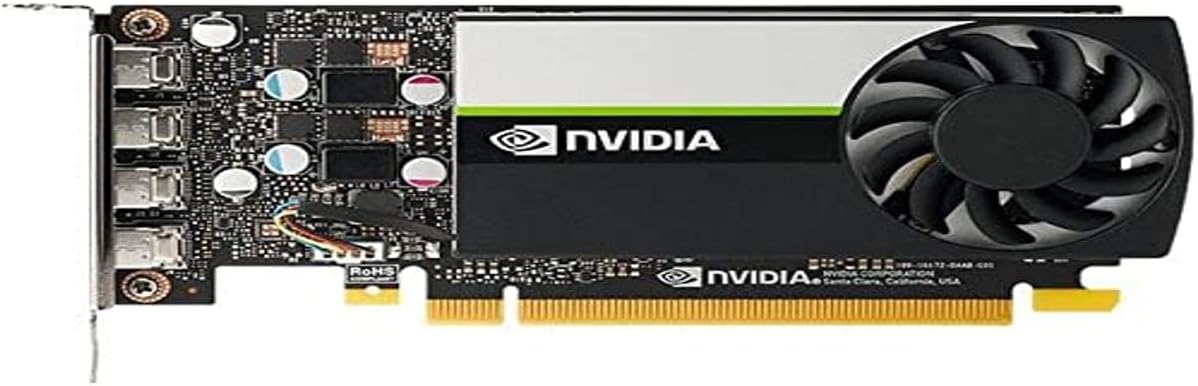


The PNY Nvidia RTX A400 stands out as the top choice for upgrading Dell Optiplex workstations with professional needs. Its single slot low profile design ensures it fits perfectly into compact chassis without requiring additional power connectors or airflow modifications. With a rating of 4.7 stars, users praise its reliability and efficiency in business environments.
We may earn a commission when you buy through this link, at no additional cost to you.
Powered by the Nvidia Ampere architecture, this card delivers exceptional compute power for AI ray tracing and modeling tasks. The 4GB GDDR6 memory ensures high speed data transfer and seamless multitasking across demanding applications like video production and 3D rendering. Its support for PCI Express 4.0 provides enhanced bandwidth for next-gen connectivity in modern workstations and business systems.
While it excels in professional workflows, the A400 has trade-offs for general users. The four Mini DisplayPort outputs may require adapters for standard HDMI monitors, and its gaming performance is secondary to its rendering capabilities. However, these limitations are acceptable for workstations prioritizing stability and visualization quality over high frame rates.
Business users and content creators should buy this card for its ISV certification and energy efficient operation. It offers a reliable and performance driven solution for extended professional use in small form factor systems. This makes it the definitive choice for upgrading Optiplex PCs focused on productivity and design work.
The A400 is optimized for compact business systems and professional environments ensuring smooth operation in tight spaces.
Connecting multiple high resolution displays is ideal for professional video editing and visualization workflows.
We may earn a commission when you buy through this link, at no additional cost to you.
The NVIDIA Quadro P1000 is an excellent budget friendly option for users seeking professional graphics capabilities in their Optiplex systems. Combining the latest GPU architecture and display technologies of its time, it delivers up to 60 percent better performance than the previous generation. Its low profile design makes it suitable for small form factor workstations requiring reliable output.
We may earn a commission when you buy through this link, at no additional cost to you.
Powered by NVIDIA Quadro Pascal GPU technology, this card is one of the most powerful low profile professional graphics solutions available. It provides professional users with significant memory and best performance in a compact workstation graphics card. The extensive ISV certification ensures compatibility with demanding professional applications used in engineering and design.
While it is a cost effective choice, the P1000 relies on older Pascal architecture which limits its performance in modern rendering tasks compared to newer Ampere cards. It lacks dedicated ray tracing cores found in newer generations. However, for standard CAD and visualization work, its stability and certification justify these trade-offs for many professionals.
Professionals needing a reliable upgrade without a high price tag should choose this card. It supports up to four 4K displays allowing professionals to view their designs, scenes or projects in stunning detail. This makes it a solid recommendation for those prioritizing stability and certification over cutting edge features.
An expansive visual workspace of up to four 4K displays lets professionals view designs in stunning detail.
Extensive ISV certification provides the most powerful low profile graphics solution for demanding apps.
We may earn a commission when you buy through this link, at no additional cost to you.
The ASUS Dual GeForce RTX 3050 6GB GDDR6 OC Edition brings premium gaming performance to small form factor PCs like Optiplex. Its compact design ensures compatibility with limited chassis space while delivering advanced features like ray tracing and AI acceleration. With a 4.7 star rating, it is highly regarded for balancing performance and size effectively.
We may earn a commission when you buy through this link, at no additional cost to you.
Powered by NVIDIA Ampere Streaming Multiprocessors, this card offers 2X the FP32 throughput and improved power efficiency. The 2nd Generation RT Cores deliver a whole new level of ray tracing performance alongside 3rd Generation Tensor Cores for DLSS. Its Axial-tech fan design features a smaller fan hub that facilitates longer blades and a barrier ring for increased air pressure.
Premium features like IP5X Dust Resistance protect from particle ingress for better durability in dusty office environments. The stainless steel bracket is harder and more resistant to corrosion ensuring long term physical integrity. However, the higher cost compared to non gaming cards and potential power requirements may be a consideration for budget buyers.
Gamers and power users should choose this card for its superior performance in a compact chassis. It maximizes compatibility and cooling efficiency for superior performance in small chassis while maintaining robust build quality. This makes it the ideal choice for those needing a balance of professional reliability and gaming capability.
2nd Generation RT Cores offer 2X throughput and concurrent RT and shading for new levels of performance.
Axial tech fan design and IP5X dust resistance ensure better durability and airflow in compact cases.
We may earn a commission when you buy through this link, at no additional cost to you.
The maxsun GeForce RTX 3050 is built with the powerful graphics performance of the NV Ampere architecture. It is specifically designed as a Mini Small Form Factor SSF Slim Low Profile Design card perfect for fitting into tight Optiplex cases. Its slim dimensions and modern connectivity options make it a strong contender for compact builds.
We may earn a commission when you buy through this link, at no additional cost to you.
With integrated 6GB GDDR6 memory and a 96-bit memory interface, it offers solid bandwidth for its class. The card features 1042MHz gpu core clock and 1470MHz boost clock speeds to help meet the needs of demanding games. It also supports 8K resolution output and multi monitors to enjoy wider audio and video entertainment.
While it offers excellent connectivity including HDMI 2.1 and DisplayPort 1.4a, it may lack the thermal headroom of larger cards. The compact design ensures easy installation in Mini Small Form Factor SFF computer pc cases. However, users should ensure adequate airflow as smaller cards can run hotter in sealed office systems.
Gamers with tight space constraints should choose this card for its precise fit and modern specs. It enables building a powerful small ITX AI PC without compromising on key gaming features. This makes it a practical choice for users prioritizing physical dimensions alongside performance.
Slim Low profile desgin perfect in Mini Small Form Factor SFF computer pc cases & easy to build.
Supports 8K resolution output and multi monitors to enjoy wider audio and video entertainment.
We may earn a commission when you buy through this link, at no additional cost to you.
Powered by NVIDIA Turing GPU architecture, NVIDIA T600 delivers more than double the performance of the previous generation for some 3D graphics workloads. It allows you to work with larger models, scenes, and assemblies, with higher levels of interactivity during design and visualization. This makes it highly suitable for professionals needing enhanced graphics without excessive bulk.
We may earn a commission when you buy through this link, at no additional cost to you.
The card ensures hardware compatibility and stability through NVIDIA support of the latest OpenGL, DirectX, Vulkan, and NVIDIA CUDA standards. It enables creation and playback of H.264 and HEVC video, with dedicated decode and encode engines that are independent of the 3D graphics and compute pipeline. This ensures smooth video workflows alongside 3D tasks.
With support for DisplayPort 1.4, NVIDIA T600 can drive display resolutions for up to four 5K displays or two 8K displays per card. While this offers immense visual workspace capability, it may require adapters for standard HDMI connections. The ability to combine up to four NVIDIA T600s in a single system allows for immersive environments.
Design professionals should buy this card for its multi display capabilities and robust software support. It provides the necessary interactivity for complex projects while maintaining the stability required in production environments. This makes it a reliable choice for visual workflows needing multiple high resolution screens.
Drive display resolutions for up to four 5K displays or two 8K displays per card.
Enables creation and playback of H.264 and HEVC video with dedicated encode engines.
We may earn a commission when you buy through this link, at no additional cost to you.
The GIGABYTE GeForce RTX 3050 WINDFORCE OC V2 6G provides a robust solution for Optiplex systems needing better thermal performance. It features NVIDIA Ampere Streaming Multiprocessors and 2nd Generation RT Cores for modern rendering capabilities. The dual fan design helps maintain lower temperatures during extended workloads which is critical for compact office PCs.
We may earn a commission when you buy through this link, at no additional cost to you.
With 3rd Generation Tensor Cores and 6GB GDDR6 memory, it delivers a massive boost in game performance and all-new AI capabilities. The 96-bit memory interface ensures efficient data transfer for high-speed tasks. While it is compact, the dual fan system requires sufficient clearance which may be a factor in some mini-ITX or slim cases.
This card balances gaming potential with professional utility effectively. The cooling system ensures stability in environments where airflow is limited. However, users must verify their chassis clearance before installation to ensure the fans fit properly without obstruction.
Users needing reliable cooling in a compact chassis should choose this card for its thermal efficiency. It ensures consistent performance without overheating during demanding tasks. This makes it a smart choice for Optiplex upgrades prioritizing thermal reliability.
The dual fan design helps maintain lower temperatures during extended workloads.
Delivers a massive boost in game performance and all-new AI capabilities via Tensor Cores.
We may earn a commission when you buy through this link, at no additional cost to you.
The msi Gaming RTX 3050 LP 6G OC Graphics Card is optimized for low profile gaming in Optiplex chassis. Powered by Ampere Architecture, it delivers strong performance in a space-saving package. The card features a 96-bit memory interface and 6GB GDDR6 memory to handle demanding modern titles effectively.
We may earn a commission when you buy through this link, at no additional cost to you.
With a boost clock of 1492 MHz and memory speeds of 14 Gbps, it offers solid throughput for its size. The outputs include DisplayPort 1.4a and HDMI 2.1a x 2, providing modern connectivity options for high-resolution displays. Its low profile design ensures it fits into most slim business cases.
While the cooling is basic compared to larger gaming cards, it is sufficient for the low-power RTX 3050 chip. The compact design ensures compatibility with small form factor systems. However, users should monitor temperatures during extended sessions to ensure stability.
Gamers with space constraints should buy this card for its reliable performance and modern connectivity. It balances gaming capability with the physical limits of office PCs. This makes it a practical solution for users wanting more power in a tiny case.
Optimized for low profile gaming in Optiplex chassis with solid 3D performance.
Outputs include DisplayPort 1.4a and HDMI 2.1a providing modern connectivity options.
We may earn a commission when you buy through this link, at no additional cost to you.
The msi Gaming GeForce GT 1030 4GB DDR4 is an entry-level upgrade for basic Optiplex systems. It features the NVIDIA GeForce GT 1030 chipset with a 64-bit memory interface and DisplayPort 1.4a output. Its single fan design ensures quiet operation and compatibility with compact cases.
We may earn a commission when you buy through this link, at no additional cost to you.
With a boost clock of 1430 MHz, it handles light gaming and multimedia tasks efficiently. The card supports DirectX 12 and HDCP, making it suitable for streaming and media playback. However, DDR4 memory limits its performance compared to GDDR6 alternatives, restricting it to basic workloads.
This card is ideal for users needing basic GPU acceleration without changing power supplies or case configurations. It ensures compatibility with legacy ports and modern digital displays. Its affordability makes it a safe choice for minimal upgrades.
Users needing a simple graphics fix should buy this card for its reliability and low power consumption. It improves graphical performance without complex modifications. This makes it a practical solution for entry-level Optiplex upgrades.
Handles light gaming and multimedia tasks efficiently with low power usage.
Supports DirectX 12 and HDCP, making it suitable for streaming and media playback.
We may earn a commission when you buy through this link, at no additional cost to you.
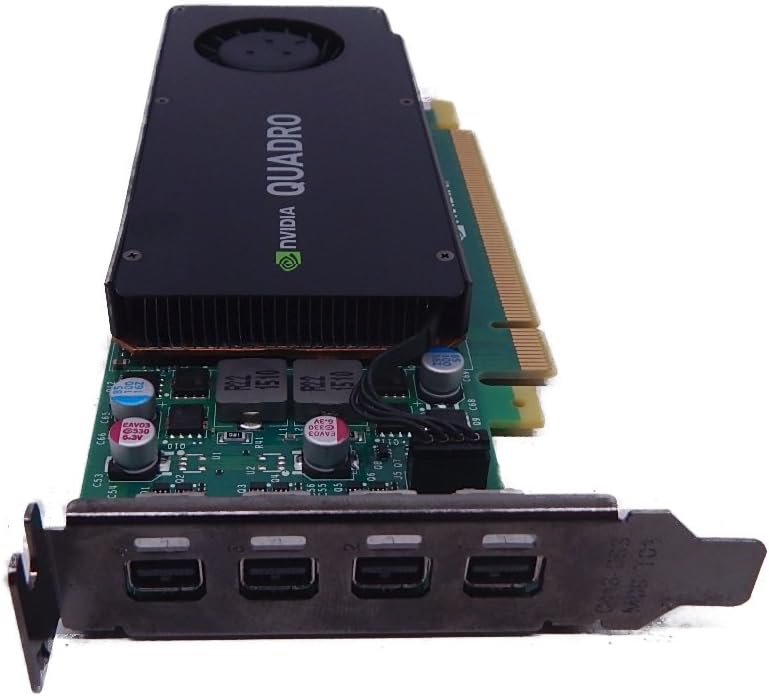
The PNY NVidia Quadro K1200 (Low Profile) offers incredible 3D application performance in a compact footprint. It supports Four Mini DisplayPort 1.2 Connectors for multi-monitor setups in older systems. This card is designed for reliability and stability in professional environments with legacy infrastructure.
We may earn a commission when you buy through this link, at no additional cost to you.
Powered by older Quadro technology, it maintains compatibility with older Optiplex models that may only support PCIe 2.0. The 3-Year Warranty ensures long-term support for critical business workstations. However, its performance is limited compared to newer generations which may restrict complex rendering tasks.
While it is less powerful, its stability and legacy support make it valuable for specific industrial or design setups. The compact low profile design ensures it fits into older chassis easily. It remains a solid choice for environments prioritizing longevity over speed.
Users with older Optiplex systems should buy this card for its reliable legacy support. It ensures stable 3D output without requiring new hardware. This makes it a smart choice for extending workstation life.
Designed for reliable and stable compatibility with older Optiplex models supporting PCIe 2.0.
Compact low profile design ensures it fits into older chassis easily.
We may earn a commission when you buy through this link, at no additional cost to you.
The NVIDIA Graphics Card VCQK1200DVI-PB features the Quadro K1200 engine and 4GB GDDR5 memory for legacy systems. It includes a DVI connector which is essential for older monitors lacking HDMI or DisplayPort inputs. This card ensures professional stability through ISV certification even with older hardware.
We may earn a commission when you buy through this link, at no additional cost to you.
Powered by PCIe 2.0 x16 bus, it maintains compatibility with older Optiplex models designed for early 3D workflows. The low profile design allows installation in compact chassis without modification. However, the outdated display technology limits its use in modern digital setups.
While it is not suitable for modern high-resolution displays, it remains valuable for maintaining legacy equipment. Its professional stability ensures reliable output for critical tasks. It is a niche choice for specific industrial setups requiring DVI connectivity.
Users with older DVI monitors should buy this card for its direct connectivity support. It ensures reliable 3D output for legacy systems. This makes it a practical solution for maintaining existing hardware investments.
Includes a DVI connector which is essential for older monitors lacking HDMI or DisplayPort inputs.
Ensures professional stability through ISV certification even with older hardware.
We may earn a commission when you buy through this link, at no additional cost to you.
Selecting the right GPU for Optiplex systems requires careful consideration of physical dimensions, power requirements, and compatibility. This guide outlines key factors to help you choose a card that fits your specific Optiplex model and performance needs.
Optiplex systems often have slim chassis requiring low profile or slim cards. Check the internal height and length limits of your specific model to ensure a physical fit without obstruction.
Always measure your case interior and compare it against the card dimensions before purchasing.
Most Optiplex systems rely on integrated PSUs that lack extra power connectors. Look for cards that run solely on PCIe slot power (75W max) unless your model supports an external power adapter.
Confirm your PSU wattage and connector availability to avoid compatibility issues.
GDDR6 memory offers significantly better bandwidth than DDR4. For professional tasks like video editing or 3D rendering, prioritize cards with at least 4GB to 6GB of GDDR6 memory for smooth performance.
Higher memory capacity ensures smoother multitasking and better support for high-resolution displays.
Verify your monitor connectors and required resolution. Modern cards offer HDMI 2.1 or DisplayPort 1.4a for high resolution support. Ensure the card has enough ports for your multi-monitor setup.
Check if your monitors use HDMI or DisplayPort to avoid needing unnecessary adapters.
For professional engineering or design work, ISV certified cards like Quadro or RTX A-series ensure stability with specialized software. This certification reduces the risk of crashes during critical workflows.
Prioritize ISV certified cards if you rely on certified CAD or video editing applications.
Newer architectures like Ampere provide better efficiency and features like ray tracing. Older Pascal or Turing cards offer solid stability but may lack modern gaming capabilities.
Choose a modern architecture if you need better performance per watt and future-proofing.
Slim chassis may restrict airflow so consider passive or low noise cooling solutions. Cards with active fans need sufficient clearance and airflow to prevent overheating.
Ensure your case has adequate ventilation to support active cooling fans.
NVIDIA provides regular updates for GeForce and Quadro lines. Ensure the card you choose has active driver support to maintain compatibility with new software and operating systems.
Check the manufacturer's support page to confirm long-term driver availability before buying.
Before installation, shut down your Optiplex and unplug the power cable. Remove the side panel and carefully insert the new GPU into the PCIe slot until it clicks into place. Secure the card using the bracket screws and close the panel.
Once the card is physically installed, restart your system and install the latest NVIDIA drivers from their official website. Use the GeForce Experience utility for automatic updates and optimized game settings for better performance.
Regularly clean dust from the GPU fans and vents using compressed air. Check temperatures during peak usage to ensure the cooling system is functioning effectively. Keep the Optiplex case open occasionally to improve airflow if the chassis is restrictive.
Not all GPUs fit every Optiplex model. Most slim Optiplex systems require low profile cards that run on PCIe slot power. Check your PSU wattage and case dimensions before buying to ensure compatibility.
Many Optiplex systems do not have extra power connectors. Look for GPUs that require only PCIe slot power (up to 75W) unless your model includes an optional external power adapter.
Low profile GPUs are smaller cards with a shorter bracket height designed for slim cases. They are essential for fitting into compact Optiplex towers without modifying the chassis.
Yes, GDDR6 offers significantly faster memory speeds and better bandwidth. This improves performance in modern applications and gaming compared to older DDR4 options.
Quadro cards can run games but are optimized for professional stability and rendering. They may not match the frame rates of GeForce cards but offer better reliability for business workflows.
After installing the GPU, restart your system and download the latest drivers from NVIDIA's official website. Install the driver package and restart again for the best performance.
Yes, most modern GPUs support multiple monitors via HDMI or DisplayPort. Check the card's output ports to ensure you can connect all your required displays.
Regular driver updates ensure your GPU works smoothly with new software and operating systems. Older drivers may lead to crashes or compatibility issues with modern apps.
Choosing the right GPU for Optiplex involves balancing size, power, and performance needs. The PNY Nvidia RTX A400 offers the best professional fit with its slim profile and certified stability.
For users seeking reliable professional performance on a budget, the NVIDIA Quadro P1000 provides solid capabilities with legacy support. Gaming enthusiasts may prefer the ASUS Dual GeForce RTX 3050 for its cooling and features.
Always verify physical dimensions and power limits before purchase to ensure a smooth upgrade. Remember that availability and pricing can change quickly, so check current listings to secure the best value for your Optiplex system today.