
TP-Link ER605
4.4Editor score
Five Gigabit Ports
Advanced Security Features
Highly Secure VPN
This guide compares the top ten Dual Wan Router models for reliability and speed, helping you choose the right network solution for your needs.
Finding a reliable Dual Wan Router is essential for businesses and power users who cannot afford internet downtime. These devices allow you to connect multiple internet sources, ensuring seamless failover and load balancing. When selecting the right model, consider port speeds, security features, and management options to match your specific network demands.
Our team evaluated ten top-rated models based on performance, features, and user feedback. We examined hardware specifications, firmware capabilities, and real-world reliability to create this comprehensive list. Each entry highlights unique strengths, helping you narrow down options whether you need enterprise-grade security or simple home redundancy.
Every review includes detailed specs, pros, cons, and usage scenarios to guide your decision. Prices and availability fluctuate frequently, so check the linked product pages for current details. We aim to provide honest, data-driven insights to help you invest in a router that delivers consistent performance for years.
4.4Editor score

4.4Editor score

4.2Editor score
This side-by-side comparison highlights key specifications across all ten routers. Evaluate port counts, WAN capabilities, and security features to find the best fit for your infrastructure needs.



The TP-Link ER605 stands out as a highly reliable and affordable Dual Wan Router. It earned a strong 4.4 rating from users who appreciate its robust port configuration and security suite. Ideal for small offices needing wired redundancy without spending a fortune.
We may earn a commission when you buy through this link, at no additional cost to you.
Its standout quality is the versatile port setup, featuring one Gigabit WAN, two WAN/LAN, and two LAN ports. This allows flexible bandwidth optimization and 4G/3G modem backup via USB. The router supports up to 20 LAN-to-LAN IPsec VPN connections, ensuring secure remote access for teams.
The only trade-off is the lack of built-in Wi-Fi, requiring separate access points. However, this focus on wired stability makes it perfect for environments where cabling is preferred. The advanced firewall and DoS defense add peace of mind against common network threats.
Buy this if you need a budget-friendly solution for failover and load balancing. The ER605 delivers professional features at a consumer-friendly cost. It is a top choice for businesses prioritizing uptime and security over wireless features.
The ER605 offers five Gigabit ports, allowing you to assign specific WAN or LAN roles. This flexibility supports diverse setups, from simple failover to complex load balancing configurations.
With support for OpenVPN, L2TP, PPTP, and IPsec, the ER605 connects securely to remote offices. This makes it a strong candidate for businesses needing encrypted tunneling.
We may earn a commission when you buy through this link, at no additional cost to you.
The Peplink B-One is a premium Dual Wan Router designed for enterprise branch offices. It boasts a blazing 1Gbps throughput and seamless dual WAN failover. Users praise its resilient architecture that keeps connections stable even when primary internet fails.
We may earn a commission when you buy through this link, at no additional cost to you.
Its SpeedFusion technology combines multiple internet links for smoother video calls and uninterrupted connectivity. The B-One also integrates effortlessly with Starlink, allowing you to backup cable or fiber with satellite connections. This versatility is unmatched in its class.
The main downside is the price, which may be steep for home users. Additionally, the advanced features require some networking knowledge to configure correctly. However, the stability and automatic firmware updates justify the investment for professional environments.
Choose the B-One if you need enterprise-grade reliability and Starlink compatibility. It ensures your branch stays online without frequent resets. This router is ideal for businesses where connectivity is mission-critical.
SpeedFusion allows bonding multiple internet links, creating a robust network. This feature ensures smooth video calls and uninterrupted connectivity even if one line fails.
The B-One router simplifies Starlink connectivity, enabling load balancing with other ISPs. This makes it easy to backup cable or fiber with a satellite connection.
We may earn a commission when you buy through this link, at no additional cost to you.
The NETGEAR PR60X delivers high performance with its 10G/Multi-Gigabit port configuration. It supports dual WAN failover and load balancing for seamless connectivity. This router is designed for SMEs needing powerful hardware and remote management.
We may earn a commission when you buy through this link, at no additional cost to you.
Key strengths include the one 10G SFP+ port for long-distance backhaul and integrated NETGEAR Insight for remote management. The router supports up to 32 VLANs and 30 VPN tunnels, ensuring secure access for up to 100 client devices.
The cost is high, and full management features often require a subscription. However, the hardware performance and security capabilities justify the price for demanding environments. It is a scalable solution for growing businesses.
This router is perfect for enterprises needing fast backhaul and centralized control. The Insight subscription adds value for remote monitoring. Prioritize the PR60X if speed and manageability are your top needs.
The PR60X includes a 10G/Multi-Gig configurable LAN/WAN port and a 10G SFP+ port. This hardware supports high-bandwidth needs and long-distance connections efficiently.
NETGEAR Insight allows you to manage the network remotely anytime from anywhere. This includes a 1-year subscription for easy setup and maintenance.
We may earn a commission when you buy through this link, at no additional cost to you.
The Cudy R700 is a Multi-WAN router that supports OpenWRT for advanced control. It connects up to 5 ISPs with automatic failover and load balancing. This makes it ideal for remote offices or home labs needing redundancy.
We may earn a commission when you buy through this link, at no additional cost to you.
Its OpenWRT support unlocks VLAN segmentation, custom QoS policies, and community packages. The device includes WireGuard, OpenVPN, and IPsec server/client capabilities, offering a complete VPN suite. Security features like SPI firewall and DoS prevention are standard.
Using OpenWRT can be complex for beginners unfamiliar with firmware flashing. However, for tech-savvy users, this adds immense value. The R700 balances professional-grade management with an affordable price tag.
Buy the R700 if you value flexibility and control over your network. It supports diverse ISP connections seamlessly. This router is a great choice for enthusiasts and small businesses wanting custom setups.
Cudy R700 supports full OpenWRT, unlocking VLAN segmentation and advanced rules. Community packages allow for professional-grade network management tailored to your needs.
The router connects up to five ISPs with automatic failover. If one drops, traffic reroutes instantly to keep your business or home lab online.
We may earn a commission when you buy through this link, at no additional cost to you.
The Omada ER707-M2 offers a flexible port configuration with 2.5G and Gigabit WAN/LAN ports. It supports up to 1000 clients and 500,000 concurrent sessions. This scalability makes it suitable for growing networks needing robust aggregation.
We may earn a commission when you buy through this link, at no additional cost to you.
Remote cloud access via the Omada app allows centralized management from any site. The device supports a vast number of VPN connections, ensuring secure access for remote users. Its hardware capacity handles heavy traffic without bottlenecks.
While powerful, it works best within the Omada ecosystem. Managing it as a standalone unit might feel limited compared to full setups. Still, the 5-year warranty adds confidence for business users.
Choose the ER707-M2 if you need high bandwidth and client handling. It integrates well into professional networks. This router is ideal for SMEs planning to scale their infrastructure.
The ER707-M2 supports up to 1000 clients and 500,000 concurrent sessions. This ensures your network handles heavy traffic without performance degradation.
Remote cloud access and the Omada app bring centralized management. All controlled from a single interface anywhere, anytime.
We may earn a commission when you buy through this link, at no additional cost to you.
The ASUS RT-BE88U is a powerhouse boasting WiFi 7 tech with Multi-Link Operation. It achieves throughput up to 7.2 Gbps, ideal for demanding applications. The router includes two 10G ports and a quad-core CPU for handling high-bandwidth needs.
We may earn a commission when you buy through this link, at no additional cost to you.
AI WAN detection and versatile configuration options ensure always-on internet. It also supports USB tethering for 4G/5G backup. Commercial-grade AiProtection Pro adds comprehensive security against threats.
Maximizing benefits requires compatible devices, which are still emerging. The high cost reflects cutting-edge features that may not be essential yet. However, future-proofing justifies the investment for early adopters.
This router is perfect for users needing top-tier speed and mesh capabilities. It combines wired speed with wireless innovation. Choose the RT-BE88U if you want the latest tech now.
WiFi 7 tech boosts throughput up to 7200Mbps with Multi-Link Operation. This ensures seamless connectivity for all devices even during high demand.
Stay secure with commercial-grade AiProtection Pro powered by Trend Micro. Comprehensive VPN support and site-to-site VPN options are standard.
We may earn a commission when you buy through this link, at no additional cost to you.
The ASUS ExpertWiFi EBG15 focuses on commercial-grade network security for small businesses. It features up to three WAN Ethernet ports with load balancing for optimized usage. The router includes intrusion prevention and deep packet inspection for robust protection.
We may earn a commission when you buy through this link, at no additional cost to you.
Setup is easier than ever via Bluetooth or the ExpertWiFi app. VLAN assignment on each port adds an extra layer of security. A free subscription to AiProtection Pro ensures continuous threat blocking.
Some users report a lower rating compared to others, possibly due to firmware quirks. Gigabit speeds may be insufficient for fiber users. Still, its security focus makes it a solid option for risk-averse businesses.
Buy the EBG15 if security is your top priority. The app simplifies management for non-tech staff. It is a reliable choice for enterprises needing commercial features.
Enjoy a free-subscription ASUS AiProtection Pro with robust IPS features. Deep packet inspection and virtual patching block malicious traffic effectively.
Each Ethernet port can be assigned to multiple VLAN IDs. This provides additional security and segmentation for your business.
We may earn a commission when you buy through this link, at no additional cost to you.
The D-Link DSR-250V2 is designed for remote and hybrid work with TAA/NDAA compliance. It ensures enterprise-grade encryption using protocols like IPSec, PPTP, and OpenVPN. This makes it ideal for government agencies or businesses under strict regulations.
We may earn a commission when you buy through this link, at no additional cost to you.
Dual WAN failover automatically switches to backup sources if primary internet fails. Load balancing optimizes bandwidth for smoother performance. The router-based VPN options simplify secure remote access for teams.
User feedback is mixed, with some reporting interface issues. However, the limited lifetime warranty provides long-term confidence. This model prioritizes compliance and trust over user-friendly modernization.
Choose this router if you need to meet industry standards. It offers reassurance for organizations seeking elevated data protection. It is a niche solution for compliance-focused buyers.
Meets TAA/NDAA standards, making it well-suited for agencies. This provides reassurance for any organization seeking elevated data protection.
Uses strong encryption like AES and 3DES to protect sensitive data. Reduces risk from external threats in digital landscapes.
We may earn a commission when you buy through this link, at no additional cost to you.
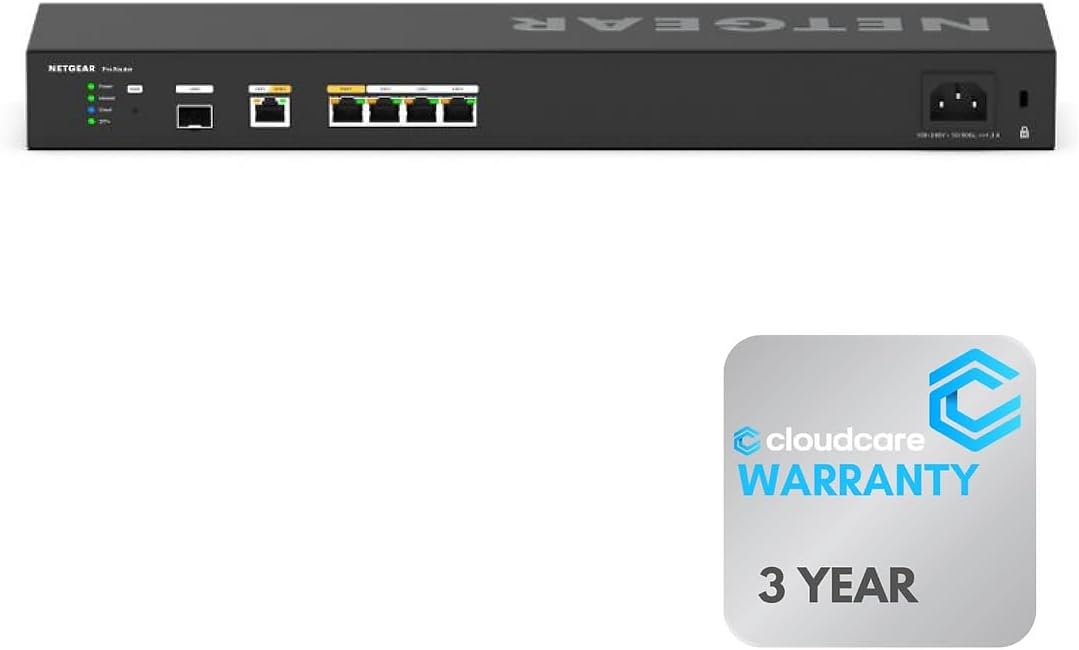
The Cloud Care NETGEAR PR60X offers six 10G/Multi-Gigabit Ethernet ports for maximum speed. Its rack-mountable design saves space and organizes equipment efficiently in professional environments. This model focuses on continuous internet access via dual WAN ports.
We may earn a commission when you buy through this link, at no additional cost to you.
Insight Cloud Management enables remote monitoring for easy setup. Cloud Care Warranty SupportPlus covers all products under a single form. This reduces administrative overhead and simplifies claims for buyers.
The price reflects enterprise-level hardware and warranties. Not every business needs six 10G ports. However, for data centers, this offers superior scalability and organization.
Buy this if you need high port density and rack integration. It simplifies network management significantly. This router is ideal for professional IT setups.
Save space and organize equipment efficiently with this rack-mountable router. Ideal for professional and enterprise environments needing neat setups.
Manage and monitor your network remotely with NETGEAR Insight. This offers cloud-based control for easy setup and maintenance.
We may earn a commission when you buy through this link, at no additional cost to you.
The Linksys LRT224 is a reliable choice for businesses needing wide range of network requirements. It supports load balancing and WAN failover for highly reliable internet connectivity. The router is affordable and feature-rich for small team deployments.
We may earn a commission when you buy through this link, at no additional cost to you.
It supports up to 50 IPsec tunnels for site-to-site and client-to-site VPN. The 900 Mbps firewall throughput handles moderate traffic effectively. OpenVPN tunnels are available for iOS and Android users.
The hardware is older, which limits raw speed compared to newer models. However, for basic needs, it remains a solid performer. The value proposition is strong for budget-conscious businesses.
Choose the LRT224 if you need simple failover on a budget. It meets wide range of business network requirements effectively. This router is a practical entry point for dual WAN.
Supports up to 50 IPsec tunnels and 5 OpenVPN tunnels. This allows flexible site-to-site and client-to-site VPN for secure access.
Supports load balancing and WAN failover for highly reliable internet connectivity. This ensures continuous uptime for small businesses.
We may earn a commission when you buy through this link, at no additional cost to you.
Selecting the right Dual Wan Router involves assessing your network requirements carefully. Consider factors like port speed, security protocols, and management tools to ensure the device meets your performance and reliability expectations.
Evaluate the number of WAN and LAN ports your router offers. Gigabit is standard, but Multi-Gigabit or 10G ports are crucial for high-speed fiber connections. Ensure you have enough physical ports to connect modems and essential wired devices.
Look for flexible port configurations where LAN ports can act as WAN. This versatility allows you to adapt to changing network needs without buying new hardware.
The primary reason for a Dual Wan Router is redundancy. Failover automatically switches to a backup ISP when the primary fails. Load balancing distributes traffic across connections to optimize bandwidth usage and reduce bottlenecks.
Check if the router supports automatic failover. Manual switching defeats the purpose of uptime, so automation is essential for business continuity.
If you need remote access, the router should support multiple VPN protocols like OpenVPN, IPSec, or WireGuard. A built-in firewall and intrusion prevention system (IPS) protect your internal network from external threats.
Verify the maximum number of supported VPN tunnels. A business needing multiple remote sites requires more tunnel capacity than a home office.
Some Dual Wan Routers include Wi-Fi, while others are wired-only. If you need wireless access, check for support of modern standards like Wi-Fi 6 or Wi-Fi 7. Dual-band or tri-band radios reduce interference and improve range.
If the router lacks Wi-Fi, plan for separate access points. This modular approach often allows for more scalable wireless deployment across larger areas.
Remote management tools like cloud dashboards or mobile apps simplify network administration. Insight and similar platforms allow you to monitor status, update firmware, and troubleshoot without physical access.
Look for intuitive interfaces. Complex setups may require IT expertise, so web GUIs or dedicated apps reduce the learning curve for smaller teams.
A solid warranty reflects manufacturer confidence in the hardware. Some brands offer lifetime warranties, which are valuable for long-term deployments. Check support hours to ensure help is available when your business operates.
Community support can also be a resource. OpenWRT-ready devices benefit from active forums, but standard consumer routers usually offer official channels.
To start using your Dual Wan Router, connect your primary and backup internet sources to the designated WAN ports. Configure the failover settings in the web interface to prioritize one ISP over the other, ensuring automatic switching if the primary link drops.
Keep your firmware updated to maintain security and performance. Regularly check for updates via the router's admin panel. This ensures you benefit from the latest patches and compatibility improvements with newer devices.
Position the router in a well-ventilated area to prevent overheating. Dust buildup can clog vents and reduce cooling efficiency, so clean the exterior periodically. Proper placement and maintenance extend the lifespan of your networking equipment.
A Dual WAN router allows you to connect two different internet service providers simultaneously. It provides redundancy by automatically switching to a backup connection if the primary one fails, ensuring uninterrupted internet access.
Technically you can, but it is better to use different providers to ensure true redundancy. If one provider experiences an outage, a second connection from a different company is more likely to remain active.
Yes, each WAN port typically requires a modem or ONT from your ISP. Ensure your router has enough physical ports to connect both modem cables securely.
It can, through load balancing, which combines bandwidth from both connections. However, this depends on the router's configuration and whether traffic can be effectively split across both links.
Failover switches to the backup only when the main connection fails. Load balancing uses both connections simultaneously to share the traffic load, potentially improving speed and reliability.
Most core Dual WAN features are included with the hardware. Some advanced cloud management tools might require a subscription, but basic failover and load balancing usually work out of the box.
Yes, many models are wired-only. They connect devices via Ethernet cables or require separate access points for wireless connectivity.
Access the router's web interface or mobile app to view connection status. Real-time indicators show which WAN link is active and signal strength for each connection.
The TP-Link ER605, Peplink B-One, and NETGEAR PR60X represent the top choices for various needs. Whether you prioritize budget, performance, or enterprise features, these models offer reliable dual WAN capabilities.
When selecting a router, focus on your specific redundancy requirements. If speed is critical, choose multi-gigabit options. For simplicity, budget-friendly wired models provide excellent value.
Prices and availability can change, so verify current details on product pages before purchasing. Investing in the right Dual Wan Router ensures your network remains resilient against internet outages.