
RedThunder One Handed Gaming Keyboard
4.4Editor score
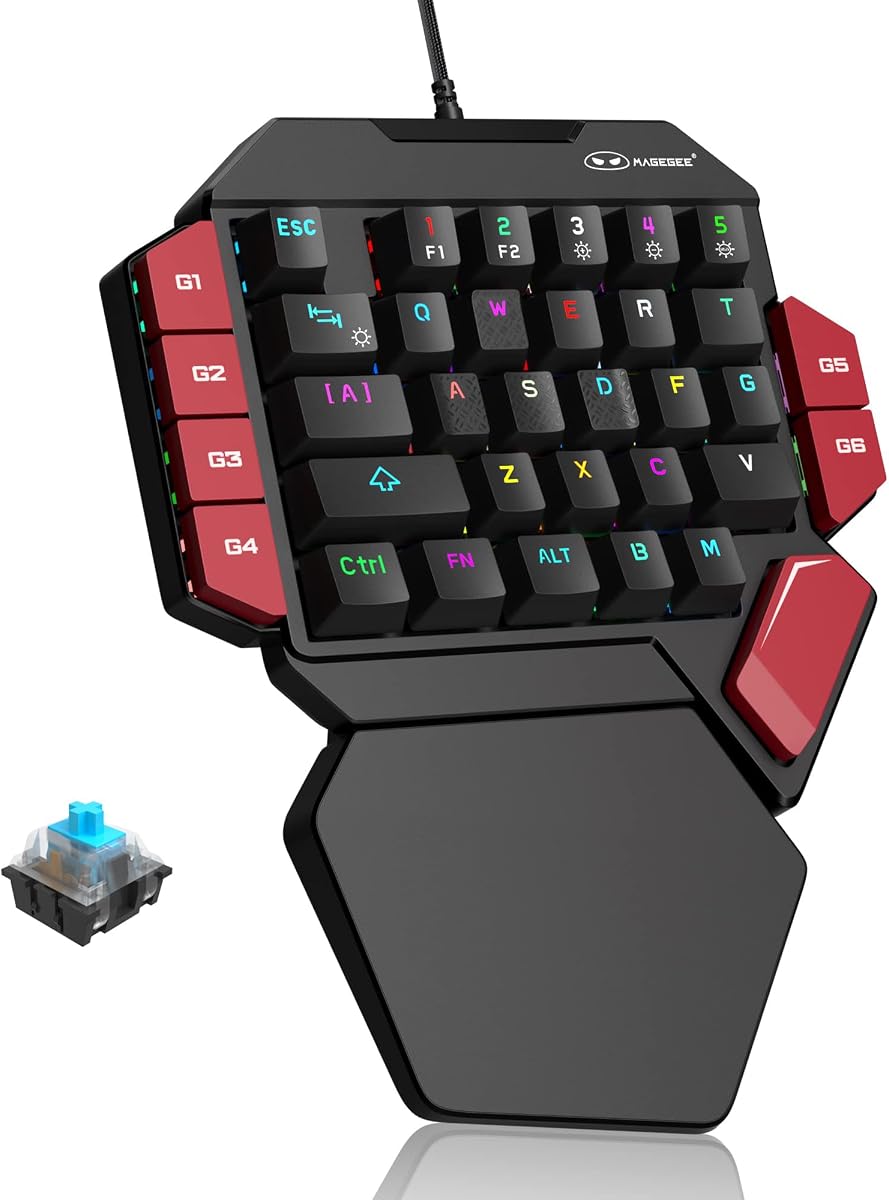
35 anti-ghosting keys
Macro recording capability
RGB backlighting modes
This comprehensive guide compares the top gaming keypads available in October 2026, evaluating features like programmable keys, ergonomic design, and connectivi
Gaming keypads offer a specialized solution for players seeking enhanced control and customization. These devices focus on essential keys to streamline actions during intense gameplay sessions.
We evaluated ten top models based on build quality, switch technology, and software capabilities. Each product was analyzed for its unique features and suitability for different gaming genres.
Each pick highlights specific strengths and potential limitations to help you decide. Please note that pricing and availability may change frequently across different retailers.
4.4Editor score

4.3Editor score

4.3Editor score
This table provides a side-by-side comparison of the ten selected models to help you identify the most suitable option for your specific gaming needs and preferences.




The Razer Tartarus V2 stands out as a top choice for gamers looking to enhance their control setup. With a rating of 4.3, it combines comfort with extensive customization options for various games.
We may earn a commission when you buy through this link, at no additional cost to you.
Its 32 programmable keys allow for complex macro commands that streamline gameplay. The included thumbpad provides intuitive movement controls, making it easier to navigate game worlds without shifting your hand.
While the mecha-membrane switches offer a unique tactile feel, some users might prefer full mechanical switches for durability. However, the comfort they provide during long sessions is a significant plus for many players.
This keypad is ideal for those who already use Razer ecosystem products due to its Chroma sync capabilities. If you want a reliable and feature-rich left-handed solution, this model is highly recommended.
The contoured design fits naturally in the hand, reducing strain during extended use.
Chroma RGB synchronization creates an immersive lighting experience across your entire setup.
We may earn a commission when you buy through this link, at no additional cost to you.
The Redragon K585 offers exceptional value for gamers seeking a customizable one-handed solution. It boasts a 4.4 rating and features a robust 42-key layout designed for tactical precision.
We may earn a commission when you buy through this link, at no additional cost to you.
Its hot-swappable switch design allows you to change the feel of the keys without soldering. This flexibility is rare at this price point and makes it a great choice for enthusiasts.
However, the software required for deep customization might feel overwhelming to casual users. Additionally, while the wrist rest is comfortable, it adds bulk that some might find cumbersome.
If you are looking for a budget-friendly option with premium features like hot-swap capability, this keypad delivers impressive performance and flexibility for the cost.
Swap out switches easily to match your preferred tactile feedback without needing soldering skills.
The USB pass-through port lets you plug devices directly into the keypad for reduced cable clutter.
We may earn a commission when you buy through this link, at no additional cost to you.
The AZERON Gaming Keypad is a high-end device designed for gamers who demand precision and comfort. With a 4.3 rating, it features a unique Hall Effect analog thumbstick that changes how movement is handled.
We may earn a commission when you buy through this link, at no additional cost to you.
The 30 programmable keys offer vast control options for complex games like MMORPGs or simulators. The 3D printed body ensures a custom fit that adapts to your hand size effectively over time.
Its price is significantly higher than standard keypads, which might deter some buyers. Additionally, setting up the specific analog movements requires patience and time to get right for your games.
For serious gamers who need an ergonomic and highly customizable setup, this keypad is a worthwhile investment. It bridges the gap between a traditional keyboard and a controller.
The thumbstick supports WASD or 360-degree movement without stick drift issues common in other devices.
Adjustable parts allow you to tailor the fit specifically to your hand size and playing style.
We may earn a commission when you buy through this link, at no additional cost to you.
The Redragon K585 PRO brings wireless freedom to the one-handed keypad market. Rated 4.2, it combines the familiar layout of the wired version with modern connectivity options.
We may earn a commission when you buy through this link, at no additional cost to you.
Its 2.4GHz and Bluetooth connections offer flexibility depending on your gaming environment. The battery life supports extended sessions, ensuring you do not run out of power during critical moments.
Wireless devices can sometimes suffer from latency which might affect competitive play. Also, using vibrant RGB lighting will significantly reduce the overall battery life on a single charge.
If you value a clean desk without cables and still want robust customization features, this model is a strong contender. It offers a balanced mix of portability and performance.
Switch seamlessly between Bluetooth and 2.4GHz depending on your stability needs.
The wireless nature makes it easy to pack for LAN parties or travel gaming sessions.
We may earn a commission when you buy through this link, at no additional cost to you.
The RedThunder One Handed Gaming Keyboard is designed for accessibility and ease of use. With a 4.4 rating, it provides essential gaming functions without unnecessary complexity or high cost.
We may earn a commission when you buy through this link, at no additional cost to you.
Its plug-and-play nature means you can start using it immediately without driver installation. The included wrist rest offers ergonomic support that helps prevent fatigue during long gaming hours.
The macro functionality is basic compared to higher-end models with advanced software. Similarly, the RGB lighting options are limited to fixed modes rather than full customization.
For casual gamers or those on a tight budget, this keypad offers a solid entry point. It delivers reliable performance for standard gameplay scenarios effectively.
No software installation is required, making it ready to use right out of the box.
The compact mini design saves desk space while keeping essential keys within reach.
We may earn a commission when you buy through this link, at no additional cost to you.
The Keychron C0 HE focuses on competitive performance with advanced Hall Effect magnetic switches. Rated 4.2, it is built to handle high-level inputs without lag or delay.
We may earn a commission when you buy through this link, at no additional cost to you.
Its 8K polling rate ensures that every keystroke is registered instantly, which is vital for fast-paced FPS games. The rapid trigger feature allows for quick resets when releasing keys.
Using a web-based configurator is convenient but may lack the depth of dedicated desktop software. Additionally, the requirement for a wired connection might not suit all desk setups.
Competitive players looking for the lowest latency and highest precision should consider this model. It brings high-end tech typically found in full keyboards to a compact form.
Magnetic switches detect inputs based on travel distance allowing for precise control.
Full compatibility with macOS and Windows makes it versatile for different systems.
We may earn a commission when you buy through this link, at no additional cost to you.
The MageGee One Handed delivers a genuine mechanical feel at a budget-friendly price. It holds a 4.3 rating and features blue switches that offer a distinct tactile click for feedback.
We may earn a commission when you buy through this link, at no additional cost to you.
Each of the 35 keys is anti-ghosting, ensuring that multiple inputs work together smoothly. The six dedicated macro keys provide quick access to complex commands without using software.
The audible click of blue switches might be disruptive in quiet environments. Since the switches are fixed, you cannot swap them out if you prefer a different feel later.
For those who prefer the tactile feedback of mechanical switches without spending a lot, this is a great option. It provides reliable performance for gaming and typing tasks.
Blue switches provide a clear click that confirms each keypress effectively.
Dedicated buttons for macros simplify recording without needing complex software.
We may earn a commission when you buy through this link, at no additional cost to you.
The AJAZZ AK029 is a highly rated compact solution with a 4.5 rating. It utilizes Hall Effect technology to minimize latency and maximize responsiveness for competitive users.
We may earn a commission when you buy through this link, at no additional cost to you.
Its small 29-key layout saves significant desk space while keeping essential functions accessible. The aluminum reinforcement adds durability and stability to the device during intense use.
Fewer keys might mean less flexibility for games requiring many macros. However, the focus is on speed and reliability for specific high-performance scenarios.
Gamers who prioritize desk space and response speed over key count will appreciate this device. It offers a clean and reliable experience for tactical gameplay.
Hall Effect switches ensure consistent performance without physical contact wear.
Internal aluminum plate provides rigidity to maintain consistent key feel.
We may earn a commission when you buy through this link, at no additional cost to you.
The alternative Razer Tartarus V2 model offers consistent performance for Razer ecosystem users. It maintains the features expected from the brand including a 4.2 rating for reliability.
We may earn a commission when you buy through this link, at no additional cost to you.
Its primary strength lies in the seamless synchronization with other Razer devices and smart lights. This creates a cohesive setup that responds to your games in real time.
The value depends on how much you value RGB integration over pure performance. It is expensive compared to other brands that do not offer this level of ecosystem support.
If you have many Razer devices already, this keypad integrates perfectly into your existing gear. It provides a unified experience that enhances immersion during gameplay.
Sync lighting effects with your monitor and other Razer gear easily.
Trusted build quality ensures long-term performance for daily gaming use.
We may earn a commission when you buy through this link, at no additional cost to you.
The Redragon RM104 offers unique control features including a smart knob for audio and lighting. With a 4.4 rating, it provides wireless versatility with a stylish aesthetic that stands out.
We may earn a commission when you buy through this link, at no additional cost to you.
Its tri-mode connectivity ensures you can connect to multiple devices easily. The large battery capacity supports long usage without frequent charging, which is ideal for travelers.
The device is larger than typical numpads and serves more as a mini keyboard. This size might take up space on smaller desks where compactness is key.
Streamers and users who need quick volume control will find this device highly useful. It adds convenience beyond just typing or gaming inputs.
The knob allows instant volume adjustment without navigating system menus.
Bluetooth and 2.4G options keep your desk cable-free and organized.
We may earn a commission when you buy through this link, at no additional cost to you.
Selecting the right gaming keypad depends on your play style and needs. Consider these factors to find a device that enhances your experience.
Switch type determines tactile feedback and durability. Mechanical switches offer distinct clicks while membrane switches are quieter and softer.
Choose switches that match your preference for sound and feel during gameplay.
Wired connections offer zero latency while wireless provides a cleaner desk. Wireless models require battery management which adds a layer of routine.
Competitive gamers should stick to wired options for consistent speed.
More programmable keys allow for complex macro commands. Software quality varies and can impact how easy it is to set up profiles.
Look for intuitive software if you plan to use macros regularly.
Comfort is crucial for long sessions. Wrist rests and contoured designs reduce strain on your hand and wrist.
A comfortable device prevents fatigue and improves focus.
Materials like aluminum add durability and stability. A sturdy keypad will not slide around during intense use.
Invest in a device that feels solid and well-made.
RGB lighting enhances immersion and helps you see keys in dark rooms. Customizable lighting adds to the visual appeal of your setup.
Choose models with modes that suit your aesthetic.
For wireless models, battery life is a key factor. Long endurance ensures you do not run out mid-session.
Consider how often you are willing to charge your device.
Ensure the keypad works with your operating system. Some software is limited to specific platforms.
Check system requirements before purchasing.
Always read the manual to understand specific key mappings. Proper setup ensures all macros function correctly.
Keep the device clean by dusting it regularly. Compressed air can help remove debris between keys.
Store wireless models in a safe place to avoid damage. Protect the battery by charging it properly when not in use.
Yes, they are excellent for MMOs as they allow many skill shortcuts. This helps you cast spells quickly without reaching for a large keyboard.
Most modern models use plug-and-play drivers. However, full customization often requires software. Always check the product specs for system requirements.
Some models support console use but many are PC focused. Always verify compatibility with your specific console model before buying.
Brown or silent mechanical switches are best for quiet environments. They provide tactile feedback without loud clicks.
Use a soft brush or compressed air to remove dust. Avoid harsh chemicals that might damage the plastic.
2.4GHz wireless offers low latency suitable for most games. Bluetooth may have slight delay but is fine for casual play.
The Razer Tartarus V2 and Redragon K585 stand out as top choices for different needs. Each offers unique features to enhance your gaming experience.
Prioritize ergonomics and programmability when selecting your next keypad. Comfort and control are key to improving your performance.
Always check current pricing and stock levels before purchasing. Deals can change quickly and availability varies by region.