
Dell Latitude 5420
3.8Editor score
Affordable Price Point
Windows 11 Pro Ready
Lightweight Business Design
Finding a reliable computer without breaking the bank is a common goal for students and professionals alike. Amazon Renewed Laptop options provide a sustainable way to access high-quality business machines. These devices undergo rigorous testing to ensure they function like new while offering significant savings compared to buying brand new models.
Our team evaluated ten top-rated refurbished laptops based on processor speed, memory capacity, and overall build quality. We focused on models that offer Windows 11 Pro, ample storage, and durable chassis designs. Each product was selected for its ability to handle multitasking, video conferencing, and daily productivity tasks efficiently.
Each pick below highlights specific strengths and potential trade-offs to help you find the right fit. We include detailed specifications and user feedback to guide your decision-making process. Please note that prices and availability can change frequently on Amazon, so check current listings before purchasing your next device.
3.8Editor score

3.7Editor score

3.9Editor score
As an Amazon Associate we earn from qualifying purchases.
This side-by-side comparison highlights the key specifications of each selected laptop to help you make an informed choice. We have organized the data to show processor generation, RAM size, storage type, and display quality across all ten models.


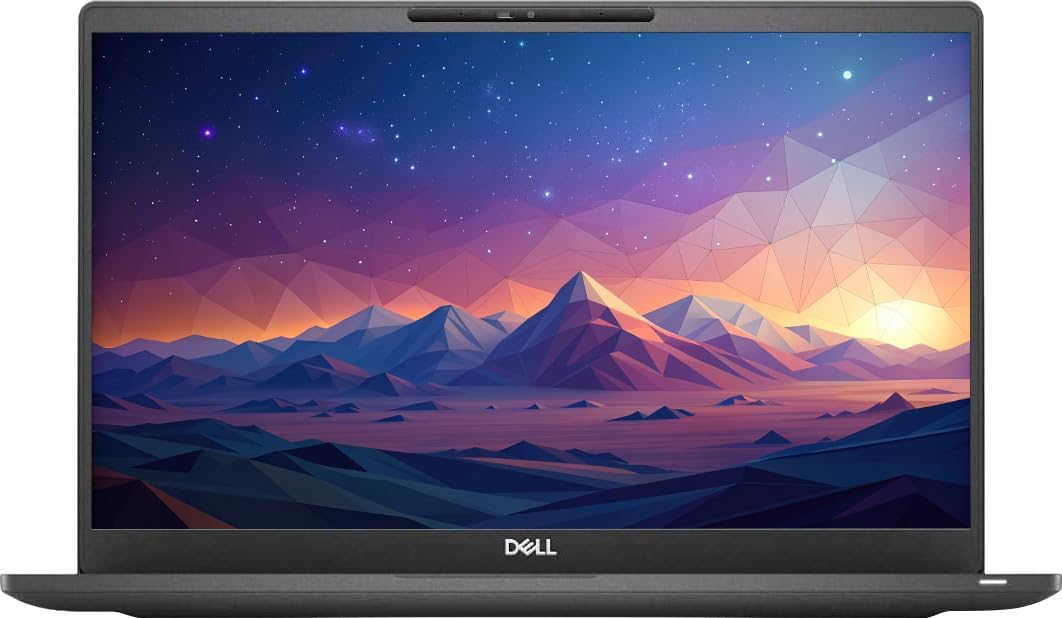


This Dell Latitude 5420 stands out as a robust option for business users needing reliable performance. It features a 11th Gen Intel Core i5 processor paired with 16GB of RAM, ensuring smooth multitasking across multiple applications. The 256GB SSD provides quick boot times and efficient file access for daily workflows.
We may earn a commission when you buy through this link, at no additional cost to you.
The inclusion of Windows 11 Pro makes this laptop ideal for enterprise environments requiring advanced security features. Users benefit from the professional grade build quality that Dell is known for in its Latitude series. The 14 inch FHD display offers clear visuals for spreadsheets and documents throughout the workday.
While the device performs well for most tasks, some users may find the battery life inconsistent depending on usage patterns. The display brightness is adequate for indoor office use but might struggle in very bright outdoor environments. These trade-offs are generally acceptable given the price point and performance capabilities.
If you need a dependable laptop for work or study without spending a fortune, this model is a strong candidate. It balances processing power with practical features like HDMI and camera support for video calls. We recommend it for anyone prioritizing speed and reliability in a refurbished package.
The combination of 16GB RAM and the i5 processor handles heavy multitasking with ease.
Windows 11 Pro ensures your business data remains secure with built-in encryption tools.
We may earn a commission when you buy through this link, at no additional cost to you.
The Dell Latitude 7420 offers premium features that justify its place as a top tier choice. Its Intel Core i7 processor delivers exceptional speed for demanding workloads and heavy multitasking. The carbon fiber chassis adds a layer of durability that protects the device during travel and daily use.
We may earn a commission when you buy through this link, at no additional cost to you.
With 512GB of PCIe storage, this laptop provides ample space for files and applications without needing external drives. The 16GB of RAM ensures that switching between tabs and programs remains fluid and responsive. This makes it suitable for professionals who need consistent performance throughout the day.
Some users might find the weight slightly higher than ultrabooks, but the durability compensates for this. The cost is also higher than other refurbished options, yet the performance per dollar remains competitive. These factors are minor considerations for those prioritizing build quality and processing power.
We recommend this model for executives or power users who need a reliable machine for critical tasks. It balances high-end specs with a rugged design that can withstand the rigors of a busy work environment. Choosing this unit ensures you get a near-new experience with premium specifications.
Carbon fiber materials make the laptop resistant to damage and lightweight for portability.
PCIe SSD technology ensures rapid file transfers and quick system boot times.
We may earn a commission when you buy through this link, at no additional cost to you.
The Lenovo ThinkPad L14 brings modern AMD performance to the refurbished market with impressive efficiency. It uses the Ryzen 5 PRO processor to deliver strong single-core and multi-core performance for various tasks. The 16GB of RAM supports smooth operation even when running multiple virtual machines or browsers.
We may earn a commission when you buy through this link, at no additional cost to you.
Connectivity is a standout feature with USB-C Gen 2 and HDMI 2.1 support for high resolution displays. The inclusion of WiFi 6E ensures fast and stable wireless connections in crowded network environments. These features make it a future-proof choice for users planning to use the device for several years.
The classic ThinkPad trackpoint might take some time to get used to if you are coming from a standard touchpad. However, the keyboard is widely regarded as one of the best available on any laptop today. The trade-off in trackpad preference is often worth the typing comfort it provides.
For users seeking a durable keyboard and reliable connectivity, this ThinkPad is an excellent selection. It offers a balanced mix of performance and practical features that suit office environments perfectly. We suggest it for typists and professionals who value input quality over graphics performance.
USB-C 2 and HDMI 2.1 allow for versatile docking and monitor setups.
The keyboard design ensures comfortable typing during long work sessions.
We may earn a commission when you buy through this link, at no additional cost to you.
This Dell Latitude 7420 variant offers a solid balance of storage and memory for everyday business use. The 512GB SSD provides plenty of room for large files while the 16GB RAM keeps apps running smoothly. Users can expect quick wake times from sleep due to the modern hardware configuration.
We may earn a commission when you buy through this link, at no additional cost to you.
The 14 inch display delivers clear visuals that are easy on the eyes during long hours of work. It supports high resolution output which helps when viewing detailed documents or design work. The webcam is functional for meetings, though it may not match dedicated external cameras in quality.
Under heavy loads, the cooling fan can become audible, which might be distracting in quiet rooms. This is a common characteristic of business laptops designed for thermal efficiency rather than silence. Most users find this acceptable given the performance benefits of the compact chassis.
We recommend this laptop for general office tasks and remote work scenarios. It offers a dependable platform for productivity with enough storage to avoid external drives. It is a safe choice for anyone needing a professional device without premium price tags.
512GB SSD means less time managing disk space and more time working.
FHD resolution ensures text and graphics look sharp and clear.
We may earn a commission when you buy through this link, at no additional cost to you.
The Dell 7400 Latitude brings older generation hardware into the present with reliable performance for basic tasks. Its 8th Gen processor is still capable of handling standard office applications and web browsing efficiently. The 16GB RAM ensures that multitasking remains smooth regardless of how many tabs you open.
We may earn a commission when you buy through this link, at no additional cost to you.
Storage speed is maintained through the M.2 NVMe SSD which offers much faster access times than traditional drives. This means booting up Windows and launching programs happens quickly even on older architecture. The inclusion of Thunderbolt provides versatile connectivity options for modern peripherals.
Users should be aware that the battery might need replacement sooner than newer models due to age. The processor generation is older, which might limit performance in very heavy software environments. These issues are manageable for budget conscious buyers who need a functional machine quickly.
We suggest this model for students or secondary office setups where cost is a primary concern. It delivers essential features and stability without the high cost of the latest hardware. It is a practical choice for those who prioritize utility over cutting edge speed.
Thunderbolt support bridges the gap between older design and modern accessories.
Ideal for getting a reliable laptop at a lower price point than newer models.
We may earn a commission when you buy through this link, at no additional cost to you.
This Dell Latitude 5400 model is praised for its reliability and ease of use in office settings. The 16GB RAM helps maintain performance levels even when working with large datasets or multiple browser windows. It is a solid choice for organizations looking to equip staff with consistent devices.
We may earn a commission when you buy through this link, at no additional cost to you.
The keyboard on this model is designed for long typing sessions and includes a numeric keypad on some layouts. This feature is highly valued by accountants and data entry professionals who need precise input. The port layout includes modern Type-C options alongside traditional HDMI for flexibility.
The screen resolution is standard HD which may appear less sharp than higher resolution displays available today. However for basic text work and spreadsheets the clarity remains sufficient for most users. Those needing high definition visuals for media consumption might find this limiting.
We recommend this laptop for users who need a sturdy machine for daily administrative tasks. It offers a great balance of features at a competitive price point for budget planning. Choosing this model ensures you get a well built device with a high satisfaction rate.
Keyboard design minimizes fatigue during long work days.
Type-C and HDMI allow connection to modern peripherals and monitors.
We may earn a commission when you buy through this link, at no additional cost to you.
This iteration of the Dell Latitude 5420 offers a lower price point for those who need a portable machine. The 11th Gen processor provides fast performance for general computing needs despite having less memory. It is well suited for tasks that do not require heavy multitasking capabilities.
We may earn a commission when you buy through this link, at no additional cost to you.
The device is lightweight and easy to carry which makes it convenient for students or sales staff. It comes with a valid Windows 11 Pro license ensuring security and compatibility with enterprise software. This reduces the need for additional software purchases after unboxing the device.
The limitation of 8GB RAM might become noticeable if you frequently run many applications at once. Users may find themselves needing to manage open tabs carefully to maintain performance. Upgrading RAM in the future could help mitigate this but depends on the specific motherboard configuration.
We suggest this laptop for basic usage scenarios like web browsing and document editing. It is an excellent entry point for refurbished hardware without sacrificing essential security features. This model fits well for casual users who want a reliable tool without spending a lot.
Enterprise OS features available at a consumer friendly price point.
Compact build makes it easy to transport between home and office.
We may earn a commission when you buy through this link, at no additional cost to you.
The Dell Latitude 5490 is a trusted model known for its durability and consistent performance in enterprise settings. It offers a 512GB SSD which is a generous amount of storage for a refurbished device at this price. The 16GB RAM ensures that daily productivity tasks run without lag or interruption.
We may earn a commission when you buy through this link, at no additional cost to you.
Users appreciate the sturdy build quality that withstands frequent handling in office environments. The cooling system keeps the device running quietly which helps maintain focus during meetings or quiet work. This makes it a dependable choice for professionals who need a machine that just works.
The physical design might feel slightly heavier compared to modern ultrabooks available on the market. This weight is due to the robust construction materials used for durability rather than lightweight aesthetics. For stationary desk use this is rarely an issue but might be noticed during travel.
We recommend this laptop for users who prioritize stability and storage capacity over portability. It is a solid investment for home offices or fixed workstations where performance is key. Choosing this unit ensures you get a reliable device with a history of high user satisfaction.
Built to withstand daily office wear and tear effectively.
512GB allows ample room for projects and media files.
We may earn a commission when you buy through this link, at no additional cost to you.
This Dell Latitude 5400 version focuses on providing essential features at a very competitive price. The 256GB SSD provides enough speed for system operations while the FHD screen offers clear visuals. It is an attractive option for those who need a capable machine without extra frills.
We may earn a commission when you buy through this link, at no additional cost to you.
The processor speed supports quick launch times for common applications like Word and Chrome. Users can expect a smooth experience for web browsing and document editing. The laptop is ready to use right out of the box with a fresh installation of Windows.
Having only 8GB RAM might limit performance if you are a power user with many background apps. Graphics performance is also modest which makes this unsuitable for gaming or heavy media editing. However for general office work these limitations are generally acceptable.
We suggest this laptop for students or home office users on a tight budget. It provides the reliability of a business laptop at a lower cost than newer models. This choice is ideal for those who value screen quality and speed in their daily tasks.
SSD and fast CPU ensure the system feels snappy during use.
Perfect balance of price and performance for general use.
We may earn a commission when you buy through this link, at no additional cost to you.
This Dell 5420 Latitude model stands out for its exceptional memory capacity which is rare for refurbished laptops. The 32GB of RAM allows you to run virtual machines or edit video without any slowdown. It is a powerhouse for users who need to push the limits of their device.
We may earn a commission when you buy through this link, at no additional cost to you.
The i7 processor combined with NVMe storage ensures that data access is incredibly fast and efficient. Thunderbolt ports enable high speed data transfer and connection to multiple high resolution displays. This makes it a strong contender for creative professionals and developers.
High performance comes with higher power consumption which may impact battery life significantly. Users should expect to carry the charger for longer sessions outside of a power outlet. The heat generated under load is managed well but fans may run more often than on lighter models.
We recommend this laptop for power users who need maximum memory for their workflows. It offers professional level performance at a refurbished price point that saves significant money. This is the ultimate choice for those who cannot compromise on multitasking capability.
32GB RAM handles heavy workloads that other laptops cannot support.
Thunderbolt connectivity ensures rapid file movement between devices.
We may earn a commission when you buy through this link, at no additional cost to you.
Selecting the right Amazon Renewed Laptop involves evaluating several key factors to ensure you get the performance and value you need. This guide breaks down the most important considerations to help you make an informed decision.
The processor is the brain of your computer and determines how fast it can handle tasks. Look for at least an 11th Gen Intel Core i5 or an AMD Ryzen 5 for modern performance. Newer generations offer better efficiency and support for the latest security features and software updates.
Prioritize a recent processor generation to ensure your laptop remains useful for several years without needing an upgrade.
RAM dictates how many applications you can run simultaneously without slowing down. For general use 8GB is the minimum but 16GB is recommended for a smoother experience. Power users might benefit from 32GB especially if they run virtual machines or heavy multitasking workflows.
Always choose 16GB or more if your budget allows to future proof your machine against software demands.
Solid State Drives are essential for quick boot times and fast file access. Look for SSDs with at least 256GB of capacity to store your files comfortably. NVMe SSDs are faster than SATA versions and are preferred for high performance needs.
Aim for 512GB SSD storage to avoid running out of space and needing external drives later.
Ensure the laptop comes with a valid license for Windows 11 Pro to access enterprise features. Many refurbished units may come with Windows 10 which can be upgraded to Windows 11 for free. Having the latest OS ensures better security and compatibility with new software.
Verify the operating system version before purchasing to ensure you do not need to reinstall software immediately.
A Full HD or 1920×1080 resolution display is standard for most modern laptops. This resolution provides clear text and sharp images for work and entertainment. Consider IPS panels for better viewing angles and color accuracy if you work with visual content.
Select a laptop with at least a Full HD screen to maintain readability and eye comfort during long sessions.
Refurbished laptops often come with a standard 90-day warranty which covers major hardware failures. Check if the seller offers an option to extend this warranty for longer protection. A clear return policy ensures you can send the unit back if it does not meet your expectations.
Always review the warranty terms carefully to understand what is covered and how to claim support if needed.
Check that the laptop has the ports you need for peripherals and monitors. Modern laptops should include USB-C for charging and data transfer. HDMI and USB-A ports are also useful for older devices and external displays.
Ensure the laptop has sufficient ports to avoid buying extra dongles or adapters for your existing devices.
Business laptops often have ruggedized designs that can withstand travel and daily use. Look for models made with durable materials like aluminum or carbon fiber. This ensures the device lasts longer even if you move it around frequently.
Prioritize build quality if you plan to use the laptop in different environments or transport it often.
When you first receive your refurbished laptop perform a full update of the operating system and drivers to ensure security. Check the battery health using built-in tools to confirm it holds a charge efficiently. This initial setup helps verify the device is functioning correctly.
Use a protective sleeve when transporting your laptop to prevent scratches and minor impacts. Avoid placing heavy objects on the closed lid as this can damage the screen. Keep the device on a hard flat surface to prevent overheating during long sessions.
Regularly clean the keyboard and screen with a microfiber cloth to maintain hygiene and visibility. Do not use harsh chemicals or spraying liquids directly onto the device. Proper care extends the life of your investment and keeps it looking professional.
Amazon Renewed products are pre-owned items that have been professionally inspected and tested to work like new. They undergo a strict refurbishment process to ensure they meet specific performance standards before being sold. This allows buyers to access high-quality electronics at a lower price point with confidence.
Yes most Amazon Renewed laptops come with a minimum 90-day warranty. This warranty covers hardware defects and issues that arise under normal use. Some sellers may offer extended warranty options which can provide additional peace of mind.
Batteries are generally tested to ensure they hold a minimum charge level but they are not always new. The refurbishment process checks battery health to confirm it meets functional standards. If you need extended battery life you may consider replacing it with a new unit later.
Most business class refurbished laptops listed come with Windows 11 Pro pre-installed. This ensures access to enterprise security features and better management tools. Always check the product description to confirm the specific operating system version included.
Many business laptops have accessible panels that allow for future RAM or storage upgrades. It is a great way to extend the lifespan of the device as needs grow. Check the specific model documentation to confirm upgradeability before purchasing.
Refurbished laptops may have minor cosmetic scratches or wear that do not affect performance. They are tested to function like new but appearance can vary based on previous use. Amazon grades products so you know what to expect regarding condition.
Choosing the right Amazon Renewed Laptop depends heavily on your specific needs and budget constraints. Whether you prioritize raw power or cost efficiency there is a model in this list that fits your workflow. The Dell Latitude 7420 and ThinkPad L14 stand out for their balance of performance and build quality.
When making your decision prioritize specifications like RAM and SSD size to ensure long-term usability. A laptop with 16GB of RAM and a 512GB SSD will serve you well for years to come. Focus on models that offer modern connectivity options to support your peripheral needs.
Always verify the current price and availability before finalizing your purchase as these details can change. Use the comparison table above to quickly identify the model that matches your requirements. Investing in a refurbished business laptop is a smart way to get reliable performance without overspending.