
VSDISPLAY H/D VGA DVI LVDs Controller Board 40Pin
4.4Editor score
40-pin LVDS connection
VGA and DVI inputs
Speaker output connector
Finding the right LCD Controller Board for Laptop Screen is essential for restoring functionality to damaged displays or building custom monitors. These boards act as the bridge between your laptop's internal panel and external video sources, ensuring crisp images and stable performance. Selecting a compatible model requires careful attention to resolution, interface type, and pin configuration to avoid display errors.
We evaluated ten leading options based on user feedback, technical specifications, and real-world compatibility with popular laptop panels. Our analysis covers boards supporting various resolutions from HD to Full HD, different interface standards like eDP and LVDS, and multiple video input options. This list helps you narrow down choices quickly without needing deep technical expertise in display hardware.
Each pick highlights specific strengths such as plug-and-play installation, robust power management, or versatile input support for gaming and media. While prices fluctuate frequently, our recommendations focus on value and reliability for DIY enthusiasts and repair technicians. Always verify your screen model number before purchasing to ensure seamless integration and optimal display performance.
4.4Editor score

4.4Editor score

4.0Editor score
As an Amazon Associate we earn from qualifying purchases.
This comparison table provides a side-by-side overview of the top 10 LCD Controller Board for Laptop Screen options, highlighting key specifications like interface type, supported resolutions, and video inputs to help you choose the right fit for your specific panel.




This H/D LCD Controller Board is designed specifically for laptop screens with 1366×768 resolution and a 30-pin eDP interface. It holds a solid 4.4-star rating based on user reviews, reflecting its reliability for DIY monitor projects and screen repairs. The board delivers a stable high-definition signal that ensures clear image quality without flickering or signal loss during normal operation.
We may earn a commission when you buy through this link, at no additional cost to you.
One of its standout qualities is the pre-connected signal cable that simplifies installation significantly. Users only need to align Pin 1 marked by a red circle on the board with the corresponding pin on the screen panel. The low standby consumption of under 0.3 watts makes it energy efficient while the solid green LED confirms proper signal detection immediately after powering on.
The main trade-off is its strict limitation to HD resolution panels. If your screen is 1920×1080 Full HD, this board will not work correctly and may cause display errors. Additionally it requires a separate 12V 2A power adapter which is not included in the package. These limitations are acceptable for users with compatible screens who value simplicity and reliable performance.
This board is ideal for hobbyists repairing laptops with 11.6 to 15.6 inch HD panels or building secondary monitors from spare displays. The technical support team is available to verify compatibility before purchase which reduces the risk of ordering the wrong part. For those needing a straightforward solution for 30-pin eDP HD screens this remains a top recommendation in 2026.
The pre-connected cable and clear pin 1 marking eliminate guesswork during assembly.
Low standby power consumption ensures eco-friendly operation and reduces electricity costs.
We may earn a commission when you buy through this link, at no additional cost to you.
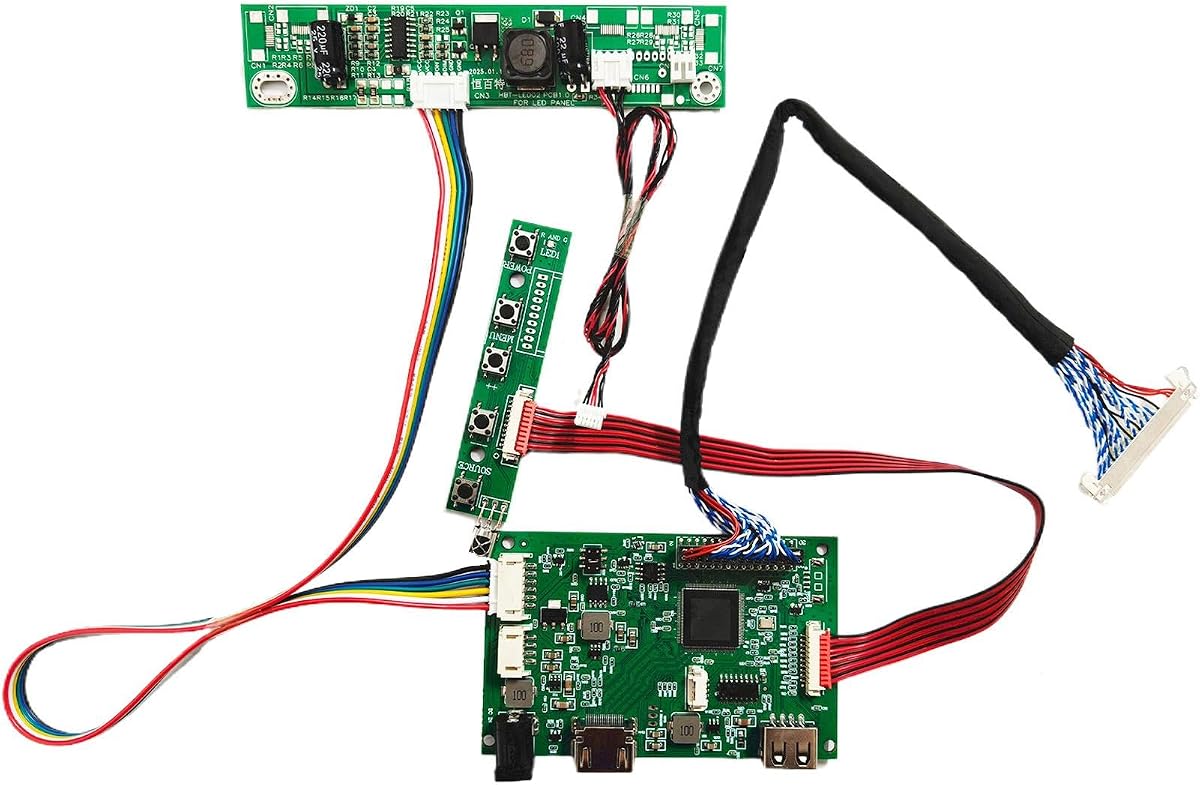
The VSDISPLAY H/D VGA DVI LVDs Controller Board offers an excellent entry point for users needing 40-pin LVDS interface support. With a 4.4-star rating it is praised for its compatibility with popular 15.6 inch panels like LP156WH2 and LP156WH3. The board supports VGA and DVI video inputs allowing connection to older computers or gaming consoles without needing adapters.
We may earn a commission when you buy through this link, at no additional cost to you.
Its budget-friendly nature does not compromise essential features like audio output through the included speaker connector. The plug-and-play design means once connected properly the screen lights up immediately when powered on. The LED status check helps troubleshoot issues quickly with green or red lights indicating normal board function before signal connection.
While cost-effective the lack of HDMI input limits modern connectivity options for newer devices. Users must also source their own 12V 2A power adapter which adds to the total setup cost. These constraints are manageable for basic desktop setups where VGA or DVI is sufficient for video transmission.
This board suits repair professionals and DIYers working with legacy laptops that use LVDS interfaces. It provides reliable performance for converting laptop screens into standalone monitors at a fraction of the cost of commercial displays. For budget-conscious buyers needing 40-pin LVDS support this remains a highly recommended choice.
Support for both VGA and DVI ensures compatibility with a wide range of older devices.
Speaker connector allows direct audio output without needing external sound systems.
We may earn a commission when you buy through this link, at no additional cost to you.
This VGA Controller Board supports 1920×1080 Full HD resolution making it ideal for high-quality display projects. It works with 30-pin eDP interface screens ranging from 11.6 inches to 17.3 inches providing flexibility for various laptop models. The 4.0-star rating indicates solid performance though users should ensure correct resolution settings to avoid white or black screen issues.
We may earn a commission when you buy through this link, at no additional cost to you.
Key strengths include direct plug-and-play functionality without requiring software drivers. The board connects directly via provided cables and supports a broad list of compatible panel models like B156HAN01.1 and LP156WF4. This ensures vibrant color reproduction and crisp image quality essential for media consumption or professional design work on converted displays.
The main limitation is reliance on VGA input which may introduce signal quality loss compared to digital connections. Users must also verify power supply current to prevent restarting issues as insufficient current can cause screen instability. These factors are acceptable trade-offs for the resolution and interface compatibility it offers.
Ideal for those upgrading to 1080P displays from older HD panels this board delivers premium image fidelity. It is perfect for converting laptop screens into high-definition secondary monitors or specialized displays. For users prioritizing resolution over input versatility this is a strong choice in the 2026 market.
Delivers crisp 1080P resolution for enhanced visual clarity and detail.
Eliminates need for software installation making setup faster and easier.
We may earn a commission when you buy through this link, at no additional cost to you.
This board is specifically optimized for 17 and 19-inch laptop panels with 1280×1024 resolution and 30-pin LVDS interfaces. Its high 4.6-star rating reflects strong user satisfaction particularly among those working with legacy hardware or gaming displays. The board supports both VGA and DVI inputs offering flexible connectivity for older desktops or gaming PCs.
We may earn a commission when you buy through this link, at no additional cost to you.
It includes an audio speaker connector enabling sound output directly from the board without extra hardware. The power requirement is 12V 3A which ensures stable operation under load and prevents flickering. Plug-and-play functionality means once cables are connected correctly the display lights up immediately without complex configuration steps.
The need for a 3A power adapter might be a hurdle if you only have a 2A supply available. Additionally it does not support modern HDMI connections which limits its use with contemporary devices. These limitations are acceptable for specific repair scenarios involving larger older laptop screens that demand robust power and stable signal handling.
This controller board is perfect for technicians repairing vintage laptops or converting large panels into specialized displays. The high rating indicates reliability and consistent performance even under demanding conditions. For users with 17 to 19-inch panels requiring stable analog video input this remains a top-tier option in 2026.
3A power handling ensures consistent performance during intensive use cases.
Designed to work with older panel sizes that are becoming rare in the market.
We may earn a commission when you buy through this link, at no additional cost to you.
This board targets larger laptop screens ranging from 21.5 to 23.8 inches with 1920×1080 Full HD resolution. It holds a 4.2-star rating indicating reliable performance for DIY large monitor projects. The package includes a USB cable specifically for touch screens which adds versatility for interactive display setups. It also comes with an inverter board simplifying installation.
We may earn a commission when you buy through this link, at no additional cost to you.
With support for both VGA and DVI inputs users can connect various devices without additional converters. The 30-pin LVDS interface matches many modern widescreen panels allowing seamless integration. Power requires a 12V 3A adapter to ensure bright and stable output across the larger display area preventing dim spots or flickering.
Notably this board does not work with all touch screen models such as LM215WF3-SLA1 which limits some upgrade paths. The absence of a power adapter in the box means additional costs for setup. These factors are manageable if you verify your exact screen model before purchase to ensure compatibility.
Ideal for creating large secondary monitors or interactive kiosks this board offers excellent resolution and size support. It suits users comfortable with basic troubleshooting and verifying touch capabilities. For those needing 21-inch plus Full HD conversion this provides a robust and feature-rich solution in 2026.
Handles 23-inch panels effectively for immersive visual experiences.
Included inverter board streamlines wiring and reduces component count.
We may earn a commission when you buy through this link, at no additional cost to you.
This board is designed specifically for 1920×1080 Full HD panels with a 30-pin eDP interface. It holds a 4.1-star rating and is field-tested for compatibility with popular models like B156HAN01.1 and LP156WF4-SP. The pre-connected signal cable simplifies setup and reduces the risk of pin damage during installation. It ensures vibrant color reproduction for high-quality viewing experiences.
We may earn a commission when you buy through this link, at no additional cost to you.
Installation is straightforward with clear Pin 1 alignment markers to guide users. The board supports VGA and DVI video inputs allowing connection to standard desktop PCs or older laptops. Power requirements are 12V 2A which is standard for most eDP screens and prevents flickering or random restarts during operation.
The main trade-off is the lack of HDMI input which limits direct connection to modern media devices. Additionally it will not work for 1366×768 panels so verification of screen resolution is critical before purchase. These limitations are acceptable for users targeting Full HD performance with existing VGA or DVI setups.
This option is best for those upgrading older laptops to Full HD or building high-definition monitors. It provides reliable performance with minimal configuration steps making it accessible for beginners. For users needing a dedicated Full HD solution with eDP interface this remains a solid choice in 2026.
Optimized for 1920×1080 resolution to deliver crisp image quality.
Red circles on board help align cable correctly without trial and error.
We may earn a commission when you buy through this link, at no additional cost to you.
This universal kit supports a wide range of screen sizes from 10 to 65 inches making it extremely versatile for large projects. It holds a 4.0-star rating reflecting its adaptability for custom DIY monitor builds. The board features HDMI DVI and VGA inputs covering almost all common video sources. OSD menu language supports multiple languages which simplifies configuration for non-English users.
We may earn a commission when you buy through this link, at no additional cost to you.
The NT68676 chipset provides robust signal processing and resolution handling for various panel types. Users may need to select the correct resolution settings during setup which adds a slight complexity step. Once configured the board delivers stable performance across different laptop and desktop panels without requiring driver installation.
Calibration can take time if the screen does not light up immediately or shows incorrect colors. This is normal for universal kits and requires checking jumper pins or cable orientation. Despite this the flexibility it offers for building custom displays far outweighs the initial setup effort for most hobbyists.
Best suited for advanced DIYers creating large touch displays or interactive kiosks this kit is highly adaptable. It provides comprehensive connectivity options for connecting modern consoles or PCs to older laptop screens. For those prioritizing versatility and wide compatibility this board stands out in the 2026 market.
Handles everything from 10-inch to 65-inch screens seamlessly.
Supports multiple languages for easier menu navigation and setup.
We may earn a commission when you buy through this link, at no additional cost to you.
This board stands out with a perfect 5.0-star rating indicating exceptional user satisfaction. It supports 21.5 to 23.8 inch Full HD screens with unique USB video playback capabilities for media files directly. Image rotation up to 180 degrees allows flexible display orientation which is ideal for digital signage. It also supports audio output through a built-in speaker connector.
We may earn a commission when you buy through this link, at no additional cost to you.
The USB functionality allows playback of videos pictures and text files directly from a drive without a PC. This feature makes it perfect for kiosks or promotional displays where constant external computing is not desired. The HDMI input ensures compatibility with modern devices while maintaining full HD resolution clarity across the screen surface.
While the price is higher than average options the unique USB playback features justify the cost. Users must still provide their own power adapter which is common for these boards. The 100% positive feedback suggests that installation is reliable and the unique features work as advertised without major bugs.
Best for digital signage or interactive media displays this board offers unique functionality unmatched by standard models. It is ideal for businesses or hobbyists needing to play media files directly on the display. For users requiring 21-inch Full HD with USB playback this is a top-rated solution in 2026.
USB video playback eliminates need for external computer connection.
180-degree rotation support for vertical and horizontal setups.
We may earn a commission when you buy through this link, at no additional cost to you.
This controller board targets 15.6 inch panels with 1366×768 resolution and 40-pin LVDS interfaces. It includes HDMI input support which is rare for budget boards in this resolution class allowing easy connection to modern media devices. The product description emphasizes optimized image quality with adjustable brightness and contrast parameters for vivid colors.
We may earn a commission when you buy through this link, at no additional cost to you.
Stable signal transmission is highlighted as a key feature reducing lag and distortion during viewing. The board monitors working status continuously adjusting voltage to prevent hardware overload. It also supports remote control commands for quick volume or channel switching enhancing the user experience for media playback applications.
With no verified ratings yet this board is a newer offering in the market. The price point is slightly higher than average which suggests premium build quality or extra features. Users should verify exact screen compatibility before purchase since specific panel models like LP156WH4 are listed in the title.
Ideal for gamers or media users needing HDMI on 15.6 inch panels this board provides a modern interface option. It suits projects requiring stable performance with minimal signal loss. For those needing HDMI on standard laptop panels this represents a promising choice to monitor closely in 2026.
Adds HDMI support to older HD panels for better device compatibility.
Adjustable parameters ensure colors remain vivid and accurate across content.
We may earn a commission when you buy through this link, at no additional cost to you.
This driver controller board is specialized for 17.3-inch Full HD panels with 40-pin LVDS interfaces like B173HW02. It holds a perfect 5.0-star rating reflecting high user satisfaction and reliability. The signal processing core effectively converts host output to screen formats ensuring accurate color adjustment. Strict adaptability ensures hardware overload or screen mismatches are avoided during operation.
We may earn a commission when you buy through this link, at no additional cost to you.
The board supports HDMI and VGA inputs making it versatile for modern gaming setups or media playback. It includes low-power mode support which extends battery life when used with laptop power systems. This feature is ideal for portable setups where energy efficiency is a priority alongside high visual quality.
Because it is specialized it does not support a wide range of models outside its listed matrix kit. Users must verify their exact panel number to avoid compatibility issues. The higher price range is justified by the specialized support and high-performance processing core that ensures stability on larger Full HD screens.
Best for converting large 17-inch gaming laptops into desktop monitors this kit offers tailored reliability. It suits users needing high-end performance on specific panel types without compromise. For those with matching 17.3-inch Full HD panels this remains a highly recommended choice in 2026.
Designed specifically for 17.3-inch panels to ensure perfect fit.
Low-power settings help maintain battery life during portable use.
We may earn a commission when you buy through this link, at no additional cost to you.
Choosing the right controller board involves checking compatibility with your screen panel to avoid return hassles and frustration.
Always verify your screen's native resolution matches the board's supported range. Using a 1080P screen with a 768 board will result in display errors or black screens. The board must explicitly state it supports your specific pixel count to ensure proper image output.
Match the board resolution to your panel's native specs exactly before purchasing.
Check whether your screen uses eDP or LVDS and how many pins it has. Common connectors are 30-pin or 40-pin eDP or LVDS. A mismatch in interface type will prevent the board from communicating with your panel entirely.
Confirm both connection type and pin count match your physical screen connector perfectly.
Select a board with the inputs you need such as HDMI VGA or DVI. Modern setups often require HDMI for gaming consoles or media devices while older PCs use VGA. Ensure the chosen board supports your primary source device without needing extra adapters.
Prioritize HDMI support if connecting modern devices or stick to VGA for older systems.
Most boards need a separate 12V adapter with specific amperage like 2A or 3A. Using a lower amperage supply can cause flickering restarting or screen instability. Always check the required wattage to ensure stable power delivery for your screen size.
Ensure your power adapter meets the board's voltage and current requirements exactly.
Look for a board that lists your exact screen model number in its compatibility section. Manufacturers like LP B156 or N156 often have specific revisions that affect compatibility. If your model is not listed verify compatibility with support before buying to avoid returns.
Cross reference your specific model number against the product's list before buying.
Some boards include a speaker connector for audio output which eliminates external speakers. This is useful if you plan to use the screen as a standalone monitor without extra hardware. Check if the board has audio pins if you need sound from the display.
Check for a speaker connector if you want direct audio output from the board.
Look for boards that come with pre-connected cables or clear alignment guides like Pin 1 markers. Simplified assembly reduces the risk of damaging delicate pins during setup. Plug-and-play boards save time and frustration during initial installation steps.
Choose options with pre-connected cables for safer and faster setup.
Reputable brands offer technical support to verify compatibility before shipping. This is crucial for avoiding incompatible boards and return delays. Look for listings that encourage Amazon message inquiries for model verification to ensure you are buying correctly.
Select sellers who offer compatibility checks to avoid ordering the wrong part.
First connect the board to your power adapter and wait for the LED to turn green indicating it is powered. Then connect the video cable to the board's video input port like HDMI or VGA. Finally connect the screen signal cable to the board ensuring Pin 1 aligns with the red circle marker.
Turn on the power adapter first then press the keyboard buttons on the board to activate the screen. Use the monitor menu to adjust brightness or contrast settings to your preference. If the screen shows No Signal check cable connections and resolution settings on your source device.
Avoid touching the board's circuits with bare hands to prevent static discharge damage. Keep the board in a well-ventilated area to prevent overheating during extended use. Regularly check cable connections to ensure they remain secure and free from dust buildup.
First identify your screen's model number and check the resolution and pin count on the connector. Compare this info with the board's compatibility list which should match these numbers exactly. If your model is not listed contact the seller to verify compatibility before purchasing to ensure a fit.
Most boards do not include a power adapter in the package. You will need to source a separate 12V adapter with the required amperage such as 2A or 3A. Always check the product details to confirm what is included before purchasing to avoid surprises.
Check if your cable connections match the screen's Pin 1 orientation and power adapter voltage. If the LED is green but the screen is black try changing the input source on the monitor menu or verify resolution settings. Ensure the power supply provides enough current to prevent flickering.
No not all boards support HDMI. Some only support VGA or DVI which are older analog video inputs. If you need HDMI for gaming or media ensure the board explicitly lists HDMI input in its features before purchasing to guarantee compatibility.
Some models include USB cables specifically for touch screens but you must verify your exact model is supported. Not all touch panels work with standard controller boards without additional calibration or hardware. Check the product list for touch compatibility before attempting installation.
A white screen usually means the cable is connected in reverse or the resolution is wrong. Try swapping the cable orientation and check the resolution setting in the monitor menu. If the screen restarts often the power supply might be too weak for your panel size.
Yes these boards work with desktops as long as the video source matches the board's inputs. You can connect a desktop GPU output via VGA DVI or HDMI to drive the converted screen panel. Just ensure the video signal format matches what the board supports.
Most of these boards do not require any driver installation to function. They are plug-and-play devices that work as soon as power and video connections are made. If issues arise try resetting the board settings via the menu or checking cable integrity first.
Choosing the right LCD Controller Board for Laptop Screen depends on matching your panel's resolution and interface type to the board's specs. Our top picks cover various needs from budget-friendly options to full HD HDMI support ensuring every user finds a suitable match.
Prioritize compatibility checks to avoid returns especially for touch panels or rare models. Ensure your power adapter meets the board's amperage requirements to maintain stable operation and prevent screen flickering during use.
Prices fluctuate regularly on platforms so verify current listings before finalizing your order. Always check for available technical support to confirm compatibility before shipping to secure a smooth repair or DIY project experience.