
Redragon K671
4.3Editor score
Hot-swappable red switches
Double-shot PBT keycaps
11 backlight modes
This guide compares the top loud mechanical keyboards for gamers and typists seeking satisfying clicky feedback and durable performance across various budgets
Finding a loud mechanical keyboard means chasing that satisfying click that announces every keystroke. These boards deliver tactile feedback and audible cues that many users prefer for typing and gaming immersion.
We analyzed ten top models focusing on switch type, build quality, and acoustic performance. Each option offers unique features like RGB lighting, hot-swap capabilities, and ergonomic designs to suit different preferences.
Every pick highlights key strengths and potential trade-offs to help you choose wisely. Prices and availability change frequently so always verify the latest details before making your final purchase decision today.
4.3Editor score

4.6Editor score

4.6Editor score
Here is a side-by-side look at all ten keyboards to help you compare features at a glance before deciding which loud mechanical board fits your setup best.




The SteelSeries Apex 5 stands out as a top contender for loud mechanical keyboard enthusiasts seeking premium build quality. Its hybrid blue switches deliver a distinct tactile click while maintaining durability for long-term use.
We may earn a commission when you buy through this link, at no additional cost to you.
The standout feature is the integrated OLED smart display which shows game info and Discord messages in real time. Combined with per-key RGB lighting and an aircraft-grade aluminum frame this board feels robust and professional on any desk.
While the tactile feedback is excellent the software dependency might be a minor hurdle for users who prefer plug-and-play simplicity. However the customization options available justify the setup effort for most gamers and power users.
This keyboard is ideal for those who value both sound and visual customization in their setup. If you want a loud click paired with advanced display features the Apex 5 is a highly recommended choice.
The aluminum alloy frame ensures this keyboard resists flex and daily wear while adding a sleek look to your workspace.
Personalize your typing experience with custom GIFs and real-time notifications without needing to switch windows constantly.
We may earn a commission when you buy through this link, at no additional cost to you.
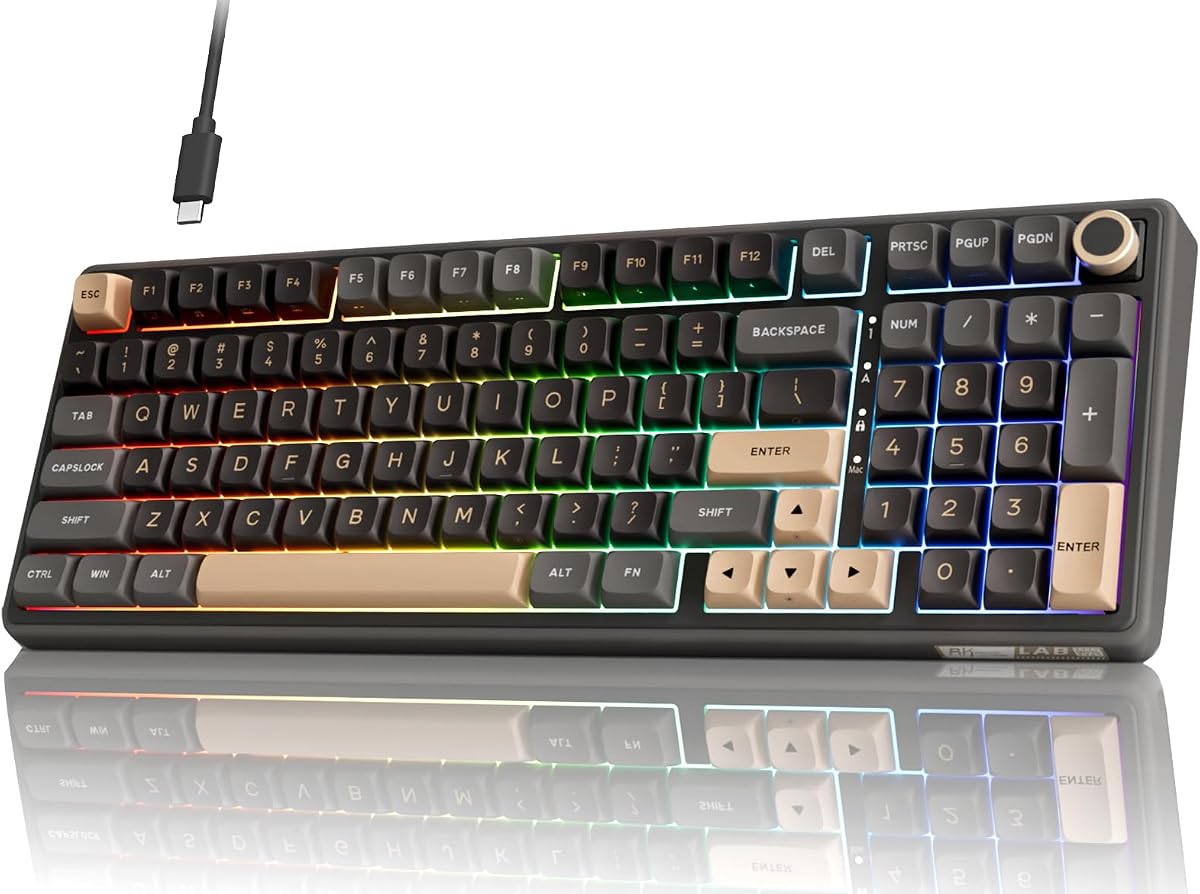
The Redragon K671 offers impressive value for anyone seeking a customizable mechanical keyboard without spending a fortune. It features hot-swappable switches allowing you to try different sounds easily.
We may earn a commission when you buy through this link, at no additional cost to you.
Its double-shot PBT keycaps ensure text remains clear even after heavy use. The 11 backlight modes add visual flair to your setup making it suitable for both gaming and casual work.
While the stock red switches are smooth and quiet you can swap them for louder options. This flexibility makes the K671 a great starting point for users interested in loud mechanical experiences.
If you want budget-friendly customization and reliable typing this keyboard is a solid pick. It balances cost and features effectively for entry-level enthusiasts.
Change switches without soldering to experiment with louder clicky options that match your sound preferences.
High-quality PBT material prevents shine and wear keeping the keyboard looking fresh over time.
We may earn a commission when you buy through this link, at no additional cost to you.
The RK ROYAL KLUDGE S108 brings a nostalgic vibe with its typewriter-style round keycaps and loud blue switches. It is designed to feel like classic vintage equipment while delivering modern performance.
We may earn a commission when you buy through this link, at no additional cost to you.
The clicky switches provide a distinct audible click that many users love for typing. A metal panel adds to the sturdiness and the detachable wrist rest ensures comfort during long sessions.
A limitation is that the switches are not hot-swappable limiting future customization. Also the software for macros only works on Windows which may inconvenience Mac users.
This keyboard is perfect for those who prioritize style and sound over modularity. If you want a loud retro aesthetic the S108 delivers on both fronts.
Round keycaps and vintage styling create a unique look that stands out in modern setups.
Blue switches offer a strong click and tactile bump for satisfying feedback on every keystroke.
We may earn a commission when you buy through this link, at no additional cost to you.
The RisoPhy Mechanical Keyboard combines a slim profile with loud clicky switches for a comfortable typing experience. Its blue switches offer a distinct sound that appeals to many users.
We may earn a commission when you buy through this link, at no additional cost to you.
The rainbow backlight enhances visibility in low light. Spill-resistant hydrophobic holes protect against accidental water spills making it practical for busy desks.
ABS keycaps may show wear sooner than PBT options. However for the price and sound performance this is a minor trade-off for casual users.
If you want a slim loud keyboard without breaking the bank this is a strong option. It balances ergonomics and acoustic feedback well.
Stair-up keycaps reduce hand fatigue while keeping the overall profile low for portability.
Hydrophobic holes allow water to drain away quickly reducing risk of damage from spills.
We may earn a commission when you buy through this link, at no additional cost to you.
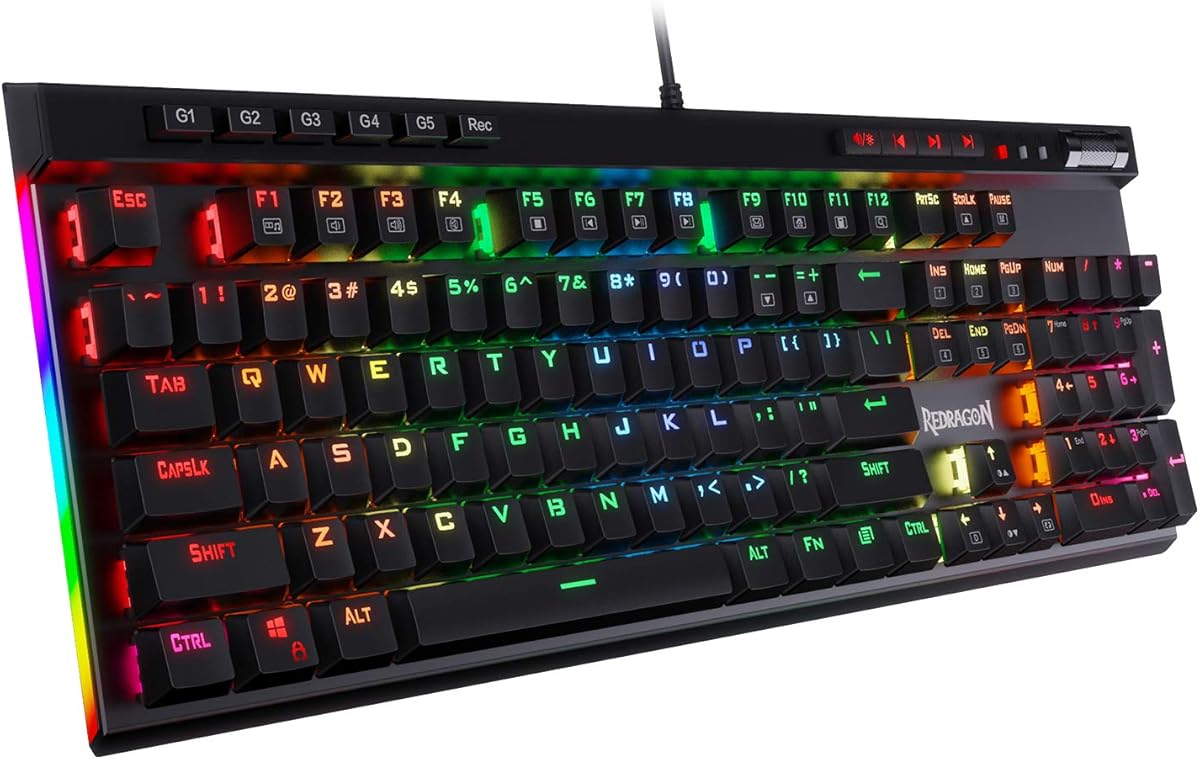
The Redragon K668 features a full-size layout with extra hotkeys and hot-swap capability for customization. It is designed for users who want flexibility and efficiency.
We may earn a commission when you buy through this link, at no additional cost to you.
The four extra hotkeys streamline access to common tasks like mute or calculator. RGB lighting modes add visual appeal and can sync with desktop audio for an immersive effect.
Stock linear switches are quiet but you can swap them for clicky options. This makes the board versatile for those who want loud feedback later.
Ideal for gamers who need extra macros and the ability to change switch sounds easily. The K668 is a practical tool for productivity and gaming.
Dedicated shortcut keys provide instant access to functions without needing complex key combinations.
Lighting effects react to your music creating a dynamic visual environment during media consumption.
We may earn a commission when you buy through this link, at no additional cost to you.
The R98 Pro offers a 96 percent layout that keeps essential keys in a smaller footprint. Its gasket mount design provides a bouncy and satisfying typing feel.
We may earn a commission when you buy through this link, at no additional cost to you.
Pre-lubed linear switches ensure smooth keystrokes right out of the box. The detachable aluminum volume knob adds premium convenience for audio control.
While the stock switches are linear the hot-swap feature allows upgrades to louder options. This makes it a great canvas for custom audio tuning.
If you want a compact board with upgrade potential the R98 Pro is excellent. It saves space without sacrificing sound customization.
The suspension system adds flex and sound dampening for a premium typing experience.
Quickly adjust audio levels with a dedicated knob that feels solid and responsive.
We may earn a commission when you buy through this link, at no additional cost to you.
The Logitech G413 SE is known for its durability and solid build quality. Tactile mechanical switches offer clear feedback that enhances typing precision.
We may earn a commission when you buy through this link, at no additional cost to you.
PBT keycaps resist wear and shine better than ABS. The aluminum top case adds structural rigidity ensuring the keyboard stays stable during intense use.
The tactile switches are loud enough for most users but customization is limited compared to enthusiasts boards. This is a reliable choice for straightforward performance.
Ideal for users who prioritize build quality over flashy features. The G413 SE provides a consistent typing experience.
High-quality PBT material ensures key legends remain visible even after years of heavy typing.
A brushed aluminum top case minimizes flex and adds a professional look to your desk.
We may earn a commission when you buy through this link, at no additional cost to you.
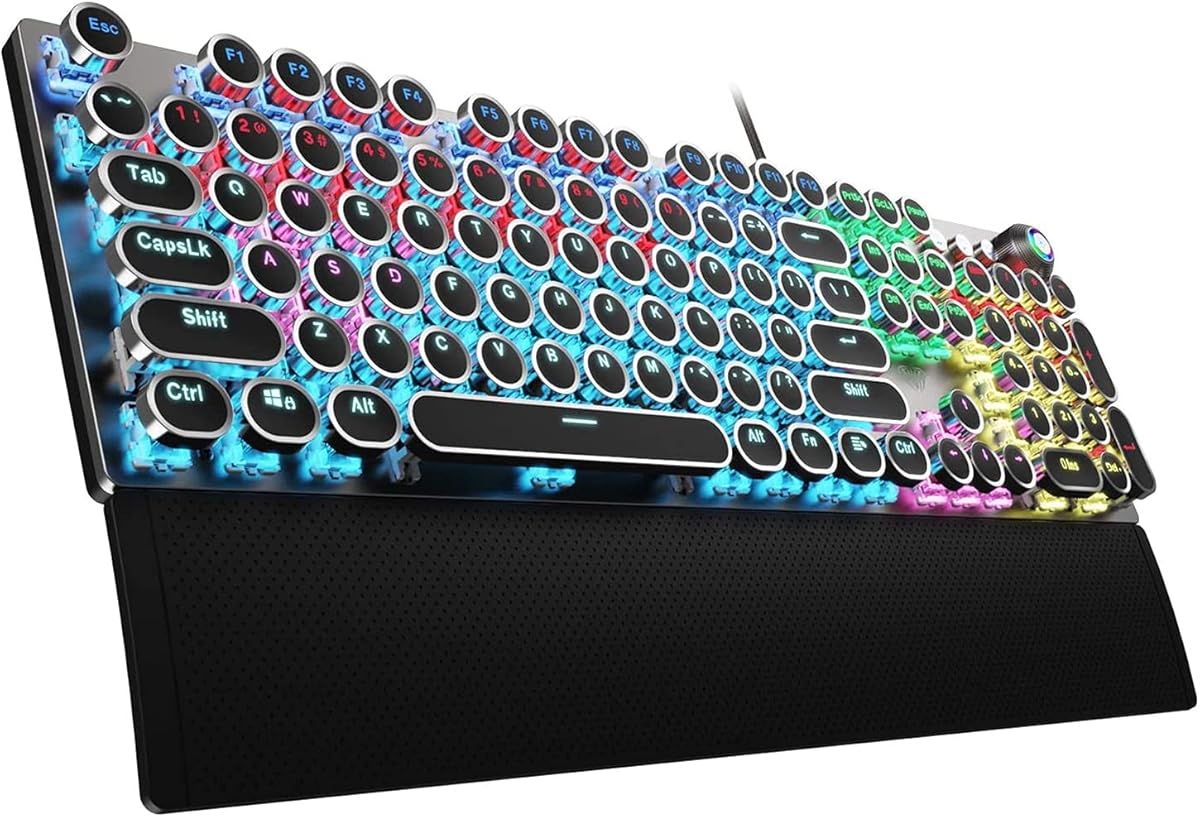
The AULA F2088 combines a retro typewriter design with loud blue switches for a distinctive experience. It brings classic charm to modern typing.
We may earn a commission when you buy through this link, at no additional cost to you.
Blue switches deliver a crisp audible click for satisfying feedback. A dedicated media control knob allows easy adjustments without leaving your app.
ABS keycaps may not be as long-lasting as PBT. However the unique design and sound make it a great choice for style-focused users.
If you want a keyboard that looks vintage and sounds clicky this is a strong option. It stands out in any setup.
Retro keycaps and floating design create a nostalgic feel that matches vintage themes.
A convenient knob controls volume and lighting effects improving user interaction during sessions.
We may earn a commission when you buy through this link, at no additional cost to you.
The AULA F99 offers wireless connectivity via Bluetooth or 2.4GHz for versatile use across devices. It supports hot-swap customization for switch changes.
We may earn a commission when you buy through this link, at no additional cost to you.
A gasket structure ensures a soft and elastic hand feel. The 8000mAh battery provides long usage between charges making it practical for travel.
Stock linear switches are smooth but can be upgraded for louder feedback. The gasket dampening creates a premium feel compared to rigid boards.
Ideal for users wanting wireless convenience with upgrade potential. The F99 is a powerful option for modern setups.
Switch between devices seamlessly using Bluetooth or 2.4GHz modes for work and play.
Internal padding reduces hollow sounds and improves overall typing feel for a softer impact.
We may earn a commission when you buy through this link, at no additional cost to you.
The Redragon K580 features dedicated macro keys allowing you to record combos without software. Blue switches provide a distinct tactile bump and audible click.
We may earn a commission when you buy through this link, at no additional cost to you.
A media wheel and dedicated controls add convenience for gaming and media. Double-shot keycaps resist fading ensuring long-term visual quality.
The ability to swap switches means you can upgrade to louder options later. This makes the board versatile for evolving preferences.
If you value macro functionality and loud feedback the K580 is a practical pick. It supports efficient workflows well.
Record complex commands directly on the keyboard without needing external software tools.
A dedicated wheel lets you adjust volume or scroll quickly during work or gaming.
We may earn a commission when you buy through this link, at no additional cost to you.
Selecting a loud mechanical keyboard involves evaluating several key factors that affect sound, durability, and user experience.
Mechanical switches are the heart of the keyboard and dictate the primary sound profile. Blue switches are famous for their loud click and tactile bump making them ideal for typists who want feedback. Green switches are even louder but may be too harsh for some environments. If you prefer a clicky feel without as much noise consider brown switches which offer tactile feedback with a quieter actuation.
Always verify switch specifications before buying to ensure the sound level matches your tolerance for noise in shared spaces.
Materials used in the case and plate determine durability and acoustic resonance. Aluminum or metal cases provide a solid frame that reduces unwanted flex and enhances the sound quality of keystrokes. Plastic cases are lighter but may feel hollow or less premium. A sturdy board minimizes rattling and ensures the click sound remains consistent over time.
Look for reinforced frames if you prioritize a solid and long-lasting typing experience.
Keycaps influence the sound and texture of each keystroke. PBT keycaps are denser and produce a deeper thocky sound compared to ABS. They also resist wear and shine over time. ABS keycaps are smoother and cheaper but may become shiny after heavy use. Choosing PBT helps maintain the original acoustic profile longer.
Prefer PBT keycaps for better durability and sound consistency.
Hot-swap sockets allow you to replace switches without soldering. This feature is essential for users who want to try different switches to adjust the sound. If a keyboard is not hot-swappable you are locked into the original switch choice. Having this flexibility makes future upgrades easier and more affordable.
Choose hot-swap boards if you want to customize your acoustic experience later.
Comfort during long typing sessions depends on ergonomic design. Look for features like wrist rests adjustable feet, and sculpted keycaps. Ergonomic layouts reduce strain on wrists and fingers ensuring you can type loudly without discomfort. Proper support also helps maintain a natural posture which is vital for health.
Prioritize keyboards with wrist support to prevent fatigue during extended use.
Wired connections offer zero latency which is crucial for gaming and fast typing. Wireless options provide flexibility and reduce cable clutter on your desk. Some keyboards support both wired and wireless modes allowing you to switch based on need. Ensure the chosen connection type fits your usage habits and device ecosystem.
Decide between wired speed and wireless convenience based on your specific needs.
Software enables customization of RGB lighting, macros, and key mapping. Some brands offer robust tools for advanced users to tune every aspect of the keyboard. Others are plug-and-play with minimal software requirements. Ensure the software is compatible with your operating system and meets your customization needs.
Check software availability and OS compatibility before finalizing your purchase.
Loud mechanical keyboards range from affordable entry-level to premium high-end models. Budget options often include ABS keycaps and simpler construction. Premium models feature better materials like aluminum and advanced features like hot-swap. Determine your spending limit and prioritize features that matter most to your sound goals.
Balance cost with essential features to find the best value for your budget.
Connect your keyboard securely to your PC via USB cable or wireless receiver. Install any necessary software to configure macros or lighting effects if required for customization.
Adjust the kickstand feet to find a comfortable typing angle that supports your wrists during long sessions. Test different keycaps or switches to optimize the sound and feel to your liking.
Regularly clean the keycaps with compressed air or a soft brush to prevent dust buildup. Avoid liquids near the electronics to maintain long-term reliability and performance.
Loud mechanical keyboards can be too noisy for quiet offices. Consider using quieter tactile switches like brown or linear switches if noise is a concern for colleagues. Some models allow switch swaps so you can adapt the sound later.
Both are clicky but green switches are typically louder and require more force to actuate. Blue switches offer a strong tactile bump with a clear click sound. Choose based on your tolerance for noise and actuation force.
Modern mechanical keyboards are designed for durability with tens of millions of keystrokes rated life. High-quality switches and sturdy frames ensure long-term reliability. Regular cleaning and gentle use further extend the lifespan.
Use dampening foam inside the case or apply O-rings under keycaps to reduce impact noise. Swapping to quieter switches like linear or tactile brown switches also lowers sound levels significantly.
If the keyboard supports hot-swap you can replace switches without soldering. Check the product specifications to confirm compatibility. For non-hot-swap boards you may need soldering equipment to change switches.
Most mechanical keyboards work with Mac systems via USB but some software may be Windows-only. Look for Mac-specific compatibility modes or alternative configuration tools. Wired models typically function plug-and-play on Mac.
The best loud mechanical keyboards offer satisfying clicky feedback combined with robust build quality. Top choices like the SteelSeries Apex 5 and RK ROYAL KLUDGE S108 deliver exceptional acoustic experiences.
Prioritize features like switch type and hot-swap support to tailor sound to your preferences. Whether you want retro aesthetics or wireless flexibility there is a model to fit your needs.
Always check current availability and specs before purchasing to ensure you get the right configuration. Your ideal loud keyboard can transform typing into a more engaging experience.