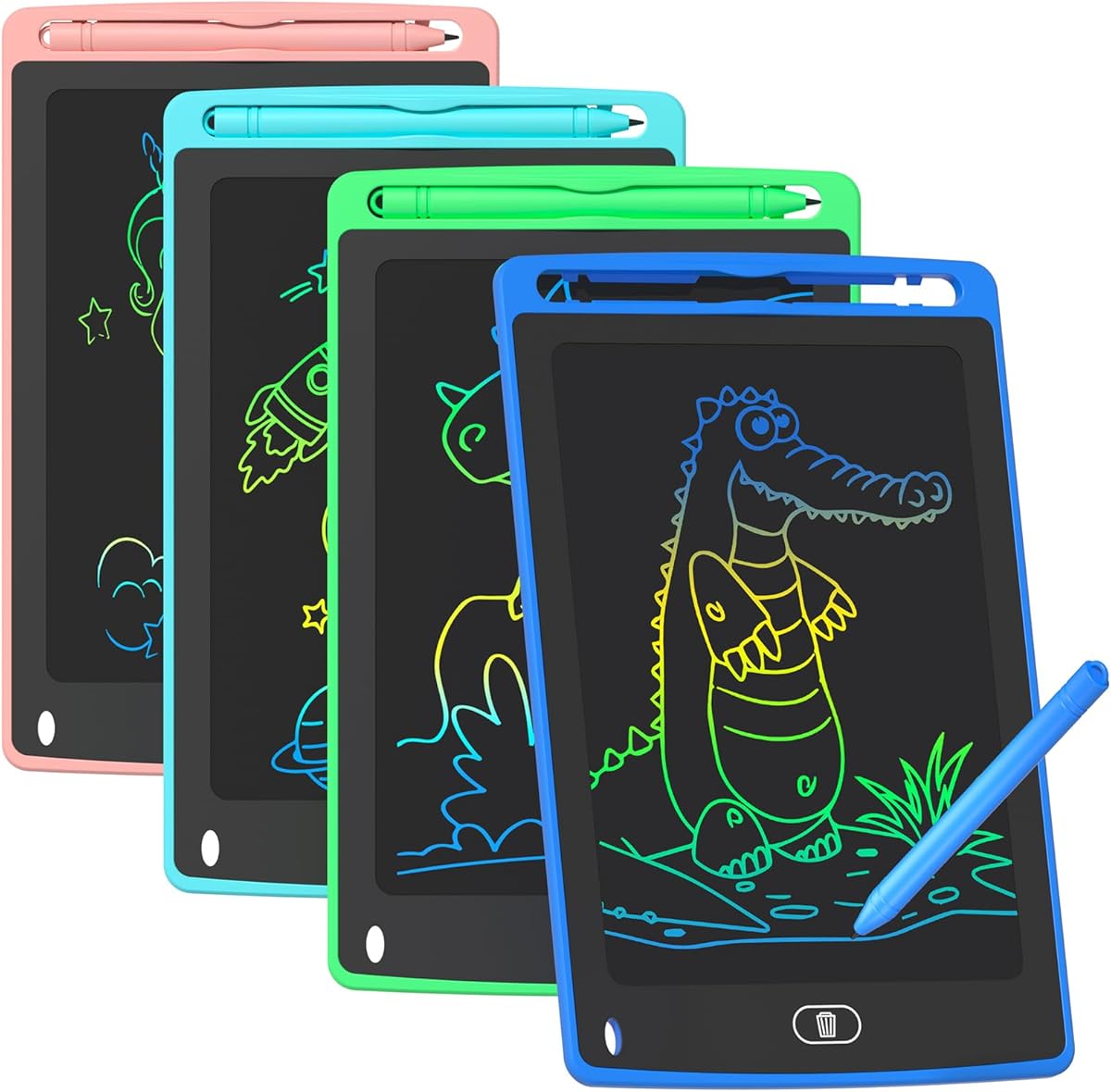
4 Pack LCD Writing Tablet for Kids
4.5Editor score
Four color variety pack
8.5 inch screen size
Lock switch included
Portable travel design
Discover the best LCD Writing Tablet for Kids Doodle Board options for 2026. We compare screen size, durability, eye protection, and features.
Finding the right creative outlet for young children can be challenging for parents who want to encourage artistic expression without the mess. LCD writing tablets offer a digital alternative that mimics paper while remaining eco-friendly and portable for travel.
We evaluated ten top-rated models based on screen size, battery life, durability, and ease of use. Our comparison focuses on educational value and child safety features that matter most to modern families seeking screen-free learning tools.
Each selection highlights unique strengths like rechargeable batteries, anti-lost styluses, or larger drawing surfaces. Please note that availability and pricing may vary by retailer and region over time for accurate purchase decisions.
4.5Editor score

4.5Editor score

4.5Editor score
Below you will find a detailed side-by-side comparison of all ten selected models including their key specifications and standout features for easy selection.


This model leads the pack with a generous 16 inch screen that gives children ample room to explore their artistic ideas without feeling confined by small borders.
We may earn a commission when you buy through this link, at no additional cost to you.
The USB charging system eliminates the need to constantly replace disposable batteries while the pressure sensitive technology allows for varying line thickness based on writing intensity.
While the size is larger than portable options it remains light enough for travel and the hidden battery design prevents accidental access by curious fingers during play.
It is the ideal choice for parents seeking a long term educational tool that encourages creativity while protecting eyes from blue light exposure.
The screen brightness is significantly higher than standard models reducing eye strain during extended drawing sessions in various lighting conditions.
Rechargeable design reduces waste and operating costs making it a sustainable choice for families focused on environmental responsibility.
We may earn a commission when you buy through this link, at no additional cost to you.
Perfect for families with multiple children or for classroom settings this set provides four distinct tablets that ensure every child has their own personal canvas.
We may earn a commission when you buy through this link, at no additional cost to you.
The flexible liquid crystal technology offers clear bright lines that are satisfying to draw on while the compact size makes it easy to store or carry.
Although the batteries are not rechargeable the cost per unit remains very low and the durability ensures they withstand regular handling by young users.
This option is recommended for budget-conscious buyers who need several units quickly for gifts or group activities without sacrificing quality or fun.
Having four units allows siblings to draw together or for teachers to distribute them easily among students for group learning activities.
The straightforward design with a front erase button and lock switch ensures even the youngest users can operate it without frustration.
We may earn a commission when you buy through this link, at no additional cost to you.
This model stands out with an impressive twenty inch screen that provides a near wall-size drawing experience suitable for larger creative projects or detailed storytelling.
We may earn a commission when you buy through this link, at no additional cost to you.
The electronic drawing pads function without ink or mess making them ideal for quiet play in restaurants or on long trips where cleanup would be difficult.
While it may not fit easily into a small backpack the value of the expanded canvas makes it worth the extra space for older toddlers and young school age kids.
Select this model if screen real estate is a priority and you want a device that supports more complex drawings without the limitations of smaller boards.
The twenty inch width allows for two-handed drawing or collaborative play between friends without crowding the workspace or limiting strokes.
Ideal for homework help or learning activities that require frequent erasing without the hassle of paper waste or pencil shavings.
We may earn a commission when you buy through this link, at no additional cost to you.
The sixteen inch display provides ample room for practicing letters or numbers while the one-click clear function allows children to start fresh instantly.
We may earn a commission when you buy through this link, at no additional cost to you.
The replaceable battery design ensures the device can be used for years without needing to buy a whole new unit when power runs low.
While the battery swap requires a tool which keeps it safe from children the overall durability and screen quality make it a robust choice for daily use.
This tablet is perfect for parents focused on reducing environmental impact by eliminating paper usage while maintaining a high quality writing experience.
The device replaces thousands of paper sheets helping families track progress on writing skills without generating physical waste.
The larger screen helps children focus on their work without feeling cramped which supports better cognitive development and attention span.
We may earn a commission when you buy through this link, at no additional cost to you.
This model offers exceptional battery longevity lasting up to nine months on a single charge which is ideal for families that forget to swap batteries often.
We may earn a commission when you buy through this link, at no additional cost to you.
The included pair of styluses allows parents and children to share the device for collaborative drawing or teaching moments without needing extra accessories.
While it lacks a physical lock switch to save artwork the durable ABS body protects the internal battery securely ensuring safety during rough handling.
Select this option if you want a low-maintenance power solution that keeps the tablet ready for use whenever inspiration strikes during the day.
The high capacity battery reduces the frequency of charging cycles making it convenient for busy households with limited downtime.
Having two pens means siblings or parents can draw together promoting social interaction and shared learning experiences.
We may earn a commission when you buy through this link, at no additional cost to you.
This device is designed with an eye protection material screen that eliminates blue light and glare ensuring safe use during long play periods.
We may earn a commission when you buy through this link, at no additional cost to you.
Weighing only two hundred grams it is incredibly easy for small hands to carry around the house or pack in a school bag for day trips.
The rounded corners provide shock resistance against accidental drops while the service policy offers peace of mind for parents investing in a gift.
It is an excellent choice for parents who prioritize eye health and lightweight portability for their young children's daily creative activities.
The lack of self-illuminating properties means the screen does not emit harmful light making it safer than tablets for sensitive eyes.
The shock resistant shell ensures that drops on hard floors do not crack the device maintaining its longevity for years of play.
We may earn a commission when you buy through this link, at no additional cost to you.
This tablet excels in portability with an ultra-thin design that slips easily into jackets or bags making it perfect for travel or restaurant visits.
We may earn a commission when you buy through this link, at no additional cost to you.
The magnetic stylus feature ensures the pen is always near the screen which reduces the risk of losing the tool during play.
While the size is smaller than premium models it offers a paper-like feel that is comfortable for writing and drawing without any mess or ink.
It is the go-to choice for families who need a lightweight reliable toy for on-the-go entertainment that protects eyes from digital glare.
Its slim profile and low weight make it easy to slip into a diaper bag or purse for quick access when needed.
The magnetic hold keeps the stylus close by preventing it from getting lost inside bags or under seats.
We may earn a commission when you buy through this link, at no additional cost to you.
Weighing only one hundred fifty grams this is one of the lightest options available which makes it easy for toddlers to hold for long periods.
We may earn a commission when you buy through this link, at no additional cost to you.
The lanyard attachment ensures the stylus stays tethered to the board so it does not get lost when the child is moving around.
The screen provides clear colorful lines that are easy to see while the battery lasts for months allowing consistent use without interruption.
This model is ideal for younger toddlers who need a lightweight toy that can withstand drops and be carried everywhere by small hands.
The lanyard system attaches the pen to the board ensuring it remains accessible during drawing sessions.
The screen provides high contrast lines that are easy to see even in bright daylight conditions.
We may earn a commission when you buy through this link, at no additional cost to you.
This model features a dedicated lanyard that attaches the stylus to the board preventing loss during active play or travel scenarios.
We may earn a commission when you buy through this link, at no additional cost to you.
The twelve inch screen strikes a balance between portability and workspace allowing for more detailed drawings than smaller units.
Waterproof corners and a durable build ensure that the device can handle accidental spills or drops without sustaining damage to the screen.
It is a smart choice for active children who need a reliable toy that keeps all parts connected and survives everyday rough use.
The built-in lanyard means the stylus stays attached to the board so it never gets separated during use.
The corners and body are designed to resist water spills protecting the internal electronics from minor accidents.
We may earn a commission when you buy through this link, at no additional cost to you.
This model offers a generous fourteen inch screen that provides ample space for creativity without being too bulky to store or carry.
We may earn a commission when you buy through this link, at no additional cost to you.
The screen lock feature is a critical tool for preventing accidental erasure which protects completed drawings from being deleted by mistake.
While it uses a non-rechargeable battery the large display and eye friendly design make it a solid option for home or car use.
It is a strong candidate for parents who want a larger canvas than standard models but do not need the extreme size of the premium options.
The fourteen inch size provides enough room for complex sketches without the bulk of the larger twenty inch models.
The lock key secures the screen content preventing accidental deletion while the child finishes their creative work.
We may earn a commission when you buy through this link, at no additional cost to you.
Selecting the right tablet involves considering size durability battery life and eye safety features to ensure the best experience for your child.
Screen size directly impacts the amount of detail a child can draw and how visible their work is to others. Larger screens like sixteen or twenty inches offer more room for complex drawings while ten inch models are better for travel.
Choose a size that fits your storage space and travel needs.
Battery type determines how often you need to power the device. Rechargeable models save money over time but require charging cables while button batteries are easy to replace but create waste.
Rechargeable units are generally more eco-friendly for long-term use.
The stylus should be comfortable for small hands and easy to keep track of. Models with lanyards or magnetic attachments prevent losing the pen which is a common frustration for parents.
Ensure the stylus is securely attached when possible.
Eye protection is vital for children's developing vision. LCD screens do not emit blue light or glare making them safer for long periods of use compared to tablets.
Always verify the device has non-illuminating tech.
Kids are often rough with their toys so the build quality must withstand drops and shocks. Look for ABS plastic shells with rounded corners for added resistance.
Durable shells extend the lifespan of the device significantly.
An erase button allows quick clearing of drawings while a lock switch preserves artwork. This combination is essential for teaching creativity and managing mess-free play.
Prioritize models with both functions clearly accessible.
Lightweight tablets are easier for small hands to hold for extended periods without fatigue. Heavier models may be better for stationary use at a desk or table.
Check the weight if portability is a primary concern.
Prices vary based on screen size and features. Bulk packs offer better value for multiple children while premium models cost more but provide larger screens and better batteries.
Balance your budget with the features your child needs.
Start by checking the battery compartment to ensure the device is powered on before handing it to your child. Most models have a simple power switch or button near the edge.
Use the included stylus to draw on the screen. Press harder for thicker lines and lighter for thinner ones to teach pressure sensitivity to your child.
Regularly clean the screen with a soft dry cloth to prevent smudges affecting visibility. Store the device flat or in its original case to avoid accidental damage.
No these tablets use liquid crystal technology that does not emit blue light or glare. This makes them safe for children's eyes during extended drawing sessions compared to standard digital screens.
Most models allow battery replacement but some require a tool to open the compartment. Rechargeable models do not need replacement but require a USB cable to charge.
Many modern tablets include a lanyard or magnetic holder to keep the stylus attached to the board. Always check if your specific model has this feature to prevent losing the pen.
Standard LCD writing tablets do not have digital storage so drawings cannot be saved or transferred. You must take a photo of the screen if you wish to keep the artwork.
These tablets are generally suitable for children aged three to eight years old. However adults and teens can also enjoy them as note taking devices or creative tools.
No they are entirely paperless and inkless. The pressure sensitive screen creates lines digitally which can be erased instantly allowing for unlimited reuse without waste.
The top picks highlighted in this guide offer a mix of affordability screen size and durability to suit different family needs and budgets effectively.
Prioritize models with lock switches and eye protection features to ensure a safe and productive learning environment for your child at home.
Remember to check current availability and pricing on retailer sites before purchasing as product details and stock levels may change over time.