
Logitech Wireless Presenter R800
4.6Editor score
Built-in LCD timer display
Green laser for bright screens
Up to one hundred feet range
This guide compares the top laser pointers for presentations including wireless clickers, green and red beams, and battery options for teachers and professional
Finding the right laser pointer for presentations can transform how you engage your audience. Whether you are teaching a class or leading a board meeting, a reliable tool ensures your message lands clearly.
We evaluated ten leading models based on visibility, range, battery life, and ease of use. Our analysis covers both classic red beams and modern green options suitable for various screen types.
Each pick highlights key strengths and trade-offs to help you decide quickly. Note that product availability and pricing may shift over time so verify details before purchasing your final choice.
4.6Editor score

4.6Editor score

4.3Editor score
This table summarizes the core specifications of all ten models so you can compare range, beam color, power source, and connectivity at a quick glance.


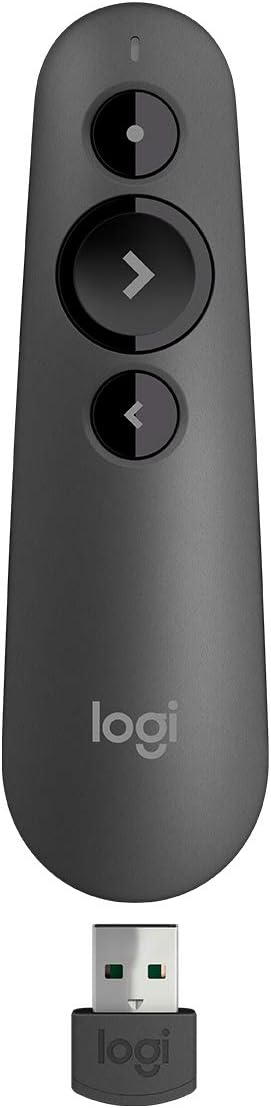


This clicker stands out for its bright green laser that cuts through ambient light where red pointers fail. It scores highly for educators who need reliable visibility across large lecture halls.
We may earn a commission when you buy through this link, at no additional cost to you.
The USB-C rechargeable design eliminates the hassle of hunting for AAA batteries before a class. A single charge lasts weeks of daily use making it cost effective and eco friendly.
While the magnetic receiver is convenient it requires careful handling so it does not snap off easily. The device also lacks a dedicated battery indicator light to show remaining power clearly.
It is ideal for teachers and professionals who value clarity and convenience over minimal weight. Choose this if you present in well lit rooms and want to reduce battery waste.
The green laser operates at 532nm which makes it significantly brighter than standard red pointers especially on whiteboards or projection screens.
Buttons for volume and hyperlinks let you manage media and navigation without switching windows or touching your computer directly during the talk.
We may earn a commission when you buy through this link, at no additional cost to you.
The R400 is a classic model known for its straightforward operation and solid build. It works well in traditional conference rooms where ambient light is controlled.
We may earn a commission when you buy through this link, at no additional cost to you.
Its fifty foot range allows you to move freely while the receiver docks neatly inside the unit to prevent loss. Touch keys make slide navigation intuitive without looking down.
The red laser may struggle on bright LCD or LED displays which limits versatility compared to green alternatives. Battery life depends heavily on usage frequency and battery brand.
Choose this for small meetings or classrooms where budget matters and screen brightness is low. It remains a dependable choice for basic presentation needs.
Intuitive touch keys allow smooth transitions between slides without needing to press hard or look away from the audience.
The built-in docking bay keeps the USB receiver secure inside the clicker so it stays handy for future presentations.
We may earn a commission when you buy through this link, at no additional cost to you.
This presenter offers a wide range of features including volume control and hyperlink navigation at a competitive price point. It suits users who need flexibility across different software platforms.
We may earn a commission when you buy through this link, at no additional cost to you.
The one hundred foot range ensures you can walk around large spaces without losing connection. Soft rubber buttons provide a comfortable grip during long sessions.
Red lasers often fade on bright screens so check your display type before buying. The lack of included batteries means you need extras before first use.
Ideal for presenters who need extra controls without breaking the bank. It is a strong contender for mixed use in meetings and classrooms.
With a range of up to one hundred feet you can interact with audience members from the back of the room seamlessly.
Dedicated volume buttons let you adjust media levels during your presentation without switching to your computer controls.
We may earn a commission when you buy through this link, at no additional cost to you.
The R800 is a top tier choice for professionals who need time management tools during talks. Its LCD timer and silent alerts keep you on track discreetly.
We may earn a commission when you buy through this link, at no additional cost to you.
The green laser shines brightly even on modern LED displays ensuring visibility for all attendees. The range supports movement across large auditoriums without signal loss.
Cost is higher than basic models and it still relies on disposable batteries which adds ongoing expense. However the convenience justifies the investment for frequent presenters.
Choose this if timing precision and screen visibility are critical. It is perfect for keynote speakers and corporate trainers.
The LCD timer with vibrating alerts helps you pace your talk without watching a clock or relying on an assistant.
Smooth contours and tactile buttons make navigation effortless so you focus on content rather than device handling.
We may earn a commission when you buy through this link, at no additional cost to you.
The R500s offers flexibility with both Bluetooth and USB options making it compatible with a wider range of devices including tablets and phones.
We may earn a commission when you buy through this link, at no additional cost to you.
Its battery life is impressive lasting up to a year on one battery. The app lets you remap buttons and set timers for personalized control.
The red laser might not be ideal for bright LCD projectors but it works for most standard setups. App features require installation on Mac or PC.
This is a great pick for mobile presenters using iPads or Android devices. Prioritize this if you need universal connectivity.
Supports Windows Mac iOS and Android with both Bluetooth and USB so it fits diverse tech setups.
Low power mode extends battery life significantly ensuring you are ready for multiple presentations without recharge.
We may earn a commission when you buy through this link, at no additional cost to you.
This clicker delivers an impressive range for its low price making it perfect for large halls where movement is required. It includes volume controls which most budget units lack.
We may earn a commission when you buy through this link, at no additional cost to you.
The lightweight design fits easily in a pocket or on a notebook clip. Plug and play setup means no software hassles for immediate use.
The red laser is less effective on bright screens and battery life depends on usage. For basic needs it offers excellent value.
Ideal for budget conscious teachers or trainers who need range and extra features without spending much.
With a range of up to three hundred twenty eight feet you can walk freely across large auditoriums without signal loss.
Dedicated volume buttons let you adjust audio during slides without touching your laptop or desktop.
We may earn a commission when you buy through this link, at no additional cost to you.
The N95 shines with its green beam and rechargeable design offering both brightness and sustainability. It supports dual USB connectivity for versatile device pairing.
We may earn a commission when you buy through this link, at no additional cost to you.
Reprogrammable buttons let you tailor navigation to your workflow via the Norwii app. The range is sufficient for auditoriums and churches.
Avoid using it on TV screens as noted in specs. The USB-C cable is not provided so you must supply your own.
Choose this for eco-friendly needs and bright room visibility. It is well suited for educators and event speakers.
Remap forward and backward buttons via app for vertical or horizontal scrolling based on presentation type.
A fully charged battery supports weeks of regular use reducing waste compared to disposable AAA cells.
We may earn a commission when you buy through this link, at no additional cost to you.
This model simplifies connectivity with a single receiver that supports both USB-A and USB-C ports. It is a practical choice for modern laptops.
We may earn a commission when you buy through this link, at no additional cost to you.
The compact size fits easily in a pocket and the rubberized body ensures a secure grip during use. Setup is quick and does not require drivers.
The range is limited to forty nine feet which may not suffice for large halls. The red laser struggles on bright displays.
Pick this for small to medium offices where dual USB ports are common. It balances convenience and functionality well.
A single receiver works with both USB-A and USB-C so you avoid carrying multiple adapters for different devices.
The compact body fits the hand naturally reducing fatigue during extended use in meetings or lectures.
We may earn a commission when you buy through this link, at no additional cost to you.
This clicker combines dual connectivity with full control features including volume adjustment. It is designed to handle various presentation scenarios without extra tools.
We may earn a commission when you buy through this link, at no additional cost to you.
The receiver stores magnetically at the base reducing the risk of loss. Low power mode extends battery life significantly during idle times.
You need two AAA batteries which increases initial cost slightly. The red beam may lack contrast on modern LED projectors.
Best for users wanting a single tool for both PC and Mac setups. It offers strong all-round performance for business use.
One receiver supports USB-A and USB-C eliminating the need for extra dongles or adapters during travel.
Auto sleep technology conserves battery energy ensuring longer standby time between presentation events.
We may earn a commission when you buy through this link, at no additional cost to you.
This presenter focuses on simplicity and portability making it easy to carry anywhere. Its compact size fits into small pockets without adding bulk.
We may earn a commission when you buy through this link, at no additional cost to you.
The receiver hides inside the battery cover keeping it secure. It uses a single AAA battery lasting months for light users.
The red laser is less visible on bright screens and it lacks advanced controls. However it covers basic slide needs well.
Choose this for students or casual speakers needing a portable tool. It is a practical pick for light daily use.
Weighing only thirty eight grams it fits easily in your pocket or small bag for travel to meeting rooms.
The USB dongle sits inside the battery compartment reducing the risk of losing it between events.
We may earn a commission when you buy through this link, at no additional cost to you.
Selecting the right pointer requires considering beam color, range, connectivity, and power options to match your presentation environment.
Green lasers are significantly brighter than red ones and work better on LCD LED or bright projection screens. If you present in well lit rooms prioritize green to ensure the audience sees your dot clearly.
Red lasers are common and cheaper but may fade on modern displays. Choose red only for dim rooms or traditional projectors where ambient light is low.
Range determines how far you can walk while maintaining control. Look for at least one hundred feet for medium rooms. For large auditoriums seek models offering up to three hundred feet or more.
Test range if possible or read reviews for real world performance. Interference from walls or other devices can reduce effective distance so buffer your choice.
Rechargeable units reduce waste and long term costs but require a charging cable. AAA batteries are universally available but must be replaced. Check estimated life per charge or battery count.
For frequent users rechargeable models are more sustainable. For occasional use AAA units may suffice if you keep spares on hand.
Most clickers use a USB receiver which plugs directly into the computer. Ensure it supports your OS including Mac Windows or Chromebook. Dual USB-A and USB-C options add flexibility for newer laptops.
Bluetooth models offer cable-free pairing but may need software setup. For simplicity stick with plug and play receivers that require no drivers.
Basic models offer forward and back controls. Advanced units include volume, hyperlink, and screen toggles. Consider if you need to manage audio or navigate links without touching your computer.
Button layout affects usability. Look for ergonomic designs with clearly labeled keys so you can operate the pointer without looking down.
Durability matters for daily use. Materials like rubberized plastic improve grip and comfort. Weight should be light enough to carry but substantial enough to feel secure in your hand.
Check for storage options for the USB receiver such as magnetic slots or internal docks. This prevents losing the receiver between events.
Some premium models include timers with silent alerts to help you pace your talk. These are useful for formal presentations where timing is strict.
If you rely on your phone or clock this feature may be unnecessary. Evaluate if the extra cost matches your need for time management.
Prices vary from under ten to nearly fifty dollars. Basic red pointers cost less while green rechargeable units cost more. Balance your budget with required features like range and beam color.
Invest in a model that matches your use case. For occasional use cheaper units suffice. For daily teaching or corporate work spend more for reliability and visibility.
Plug the USB receiver into your computer and ensure your presentation software is open. If your device has a power button press it to activate the laser and click functions.
Point the laser dot at the area you want to highlight on the slide. Use the forward or backward buttons to advance slides smoothly while maintaining eye contact with the audience.
Store the clicker in a dry place after use and replace or recharge batteries as needed. Keep the receiver in its storage dock so it is ready for your next presentation.
Yes, green laser pointers used for presentations are typically Class 2 and safe for human eyes when used responsibly. Avoid pointing them directly at anyone or into reflective surfaces.
Most modern models work with Mac via USB or Bluetooth but verify compatibility before purchase. Some may require specific drivers or settings for full functionality on macOS.
Battery life varies by model and usage. Rechargeable units last weeks per charge while AAA models may last months depending on how often you use the laser feature.
Green lasers are brighter and more visible especially on bright or LCD screens while red lasers are dimmer but often cheaper. Choose green for modern displays and red for traditional setups.
Yes, many clickers work as universal cursors for any application. They can highlight content on websites documents or videos without needing presentation software.
Some models support Bluetooth connection to Android or iOS devices enabling control from tablets or phones. Check product specs for mobile compatibility before buying.
This roundup highlights top options from budget friendly clickers to premium models with timers and green beams. The best choice depends on your screen type and environment.
Prioritize visibility and range if you present in large or bright spaces. For occasional use a simple red pointer may suffice but consider green for flexibility.
Always verify current availability and details before purchasing since features and specs may vary by region or update. Choose the tool that best supports your message delivery.