
Large Key Wired Telephone Adjustable Ringing Tone
4.2Editor score
Oversized Physical Keys
Adjustable Ring Tone
Large Warning Light
This guide compares the top 10 large button phones for seniors including features like photo speed dial, loud ringers, and simple designs for easier communicati
Finding the right communication device for elderly family members can be challenging. Large button phones offer a simple solution designed specifically for seniors who need clarity and ease of use in their daily calls.
We have carefully selected and analyzed ten leading models based on accessibility features, volume control, and user feedback. This list covers everything from basic corded units to amplified options for hearing impairments.
Each pick highlights key strengths and potential trade-offs to help you make an informed decision. Please note that availability and pricing may change over time, so verify details before purchasing.
4.2Editor score

4.1Editor score

3.4Editor score
The following table provides a side-by-side overview of all ten selected products. It highlights essential specifications to help you quickly identify the model that best fits your specific needs and preferences.




The Uvital Big Button Phone stands out as a top choice for seniors needing reliable communication. With a solid rating of 4.1 stars, users appreciate its straightforward design and loud alert features that ensure no call goes missed.
We may earn a commission when you buy through this link, at no additional cost to you.
Its standout feature is the one-touch speed dialing system. Users can customize buttons with photos of family members, making it easy for those with memory loss or poor vision to connect instantly. The 120dB ringtone is exceptionally loud, cutting through background noise effectively.
While the phone offers significant benefits like hands-free calling and adjustable volume settings, it lacks a speakerphone function which might limit some group conversations. Additionally, the absence of a display screen means caller ID information is not visible, which could be a drawback for some users.
This device is ideal for elderly individuals living alone or in care facilities who need a simple, reliable way to stay in touch. The combination of visual and auditory alerts provides peace of mind for both the user and their family members.
The bright red flashing LED indicator activates immediately upon receiving a call, ensuring users with hearing loss do not miss important connections.
Photo customization allows seniors to associate faces with numbers, reducing cognitive load and simplifying the dialing process for those with dementia.
We may earn a commission when you buy through this link, at no additional cost to you.
The SWISSVOICE Xtra TMAX10 earns a high rating of 4.5 stars for its user-friendly approach to senior communication. It focuses on simplicity, ensuring that dialing contacts is as easy as looking at a familiar face on a button.
We may earn a commission when you buy through this link, at no additional cost to you.
Its primary strength lies in the six customizable photo memory keys. These allow users to save numbers for family or caregivers, reducing the chance of dialing errors. The physical keys are oversized and clearly separated, which helps users with reduced eyesight or dexterity.
On the downside, the phone is limited to six photo keys, which might not be enough for users with larger contact lists. It also lacks a speakerphone feature, meaning the handset must be held for calls unless using the separate volume buttons for listening.
This model is best suited for seniors who prioritize ease of use and visual cues over advanced features. It is a reliable home telephone that minimizes frustration and keeps communication lines open with loved ones.
Without complicated menus or touchscreen navigation, users can pick up the handset and press a photo key to start a call immediately.
Dedicated plus and minus buttons allow for four distinct volume levels for both handset and ringer, catering to varying hearing needs.
We may earn a commission when you buy through this link, at no additional cost to you.
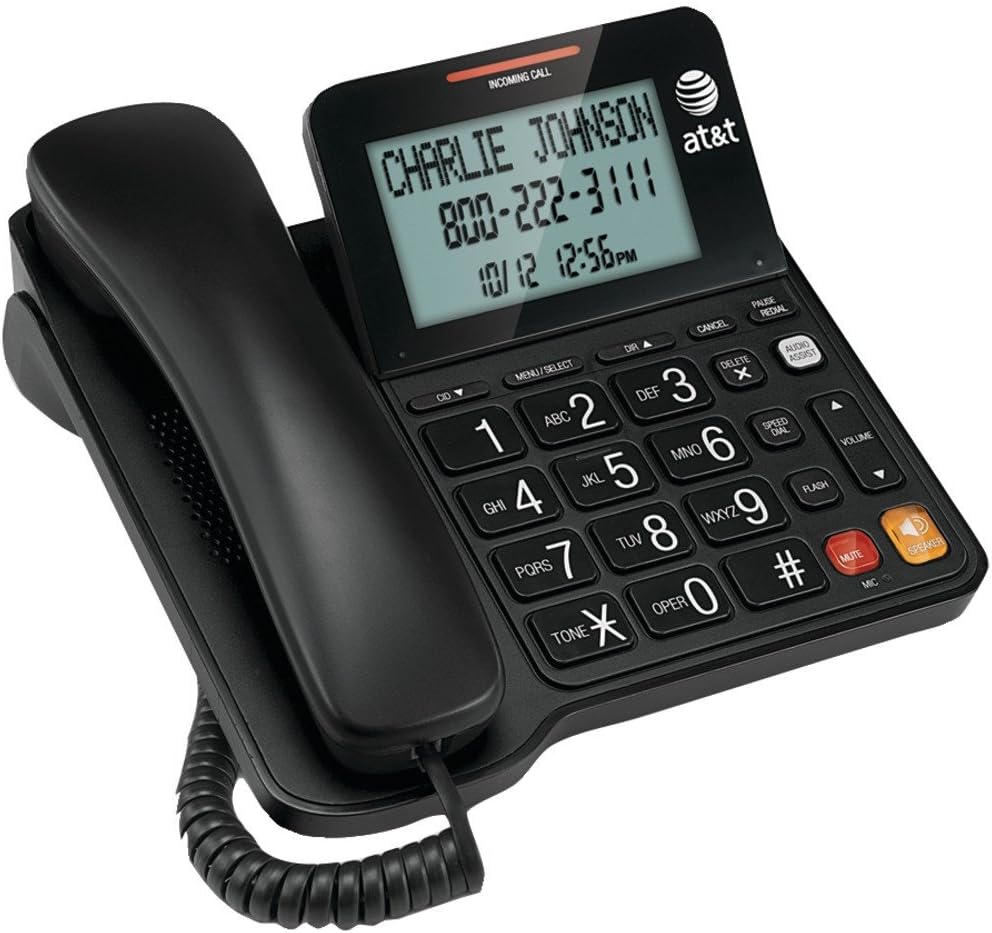
The AT&T CL2940 is a robust option that balances accessibility with modern features. With a rating of 4.2 stars, it appeals to seniors who want to see who is calling without giving up large button functionality.
We may earn a commission when you buy through this link, at no additional cost to you.
Its tiltable display is a significant advantage for those with vision challenges, allowing for a better viewing angle. The audio assist volume boost amplifies incoming sound, making conversations clearer for users with hearing difficulties. Additionally, the hands-free speakerphone facilitates multitasking or group calls.
However, the caller ID feature requires four AA batteries, which are not included. This adds a maintenance step that might be inconvenient for some. The setup is also slightly more involved than basic models due to the extra features.
This phone is recommended for seniors who value being able to screen calls using caller ID but still need large buttons and amplified sound. It offers a good blend of traditional reliability and helpful digital features.
The tiltable display ensures that numbers and names are easy to read without squinting, providing a comfortable viewing experience.
Audio assist technology boosts volume levels significantly, ensuring that softer voices are heard clearly during important conversations.
We may earn a commission when you buy through this link, at no additional cost to you.
The Large Key Wired Telephone offers exceptional value for those seeking a no-frills communication device. Its 4.2-star rating reflects satisfaction with its straightforward utility and cost-effectiveness for basic calling needs.
We may earn a commission when you buy through this link, at no additional cost to you.
This model features oversized physical keys measuring 1.0 inches in width, which are easy to press for users with limited vision. The adjustable ring tone and earpiece volume allow users to customize the sound to their comfort level, preventing it from being too loud or too soft.
Trade-offs include a lack of advanced features like photo memory or speakerphone capabilities. It is a purely functional device designed to make calls without extra complexity. Users should expect a simple experience without digital bells and whistles.
Ideal for users on a tight budget or those who only need a primary dialing tool, this phone delivers reliability and durability. It ensures that communication remains possible even during power failures due to its corded design.
The affordable price makes it accessible for care facilities or individuals needing multiple units without a significant financial investment.
Constructed with ABS material, the phone resists drops and wear, ensuring it remains functional for long-term daily use.
We may earn a commission when you buy through this link, at no additional cost to you.
The Large Button Landline Phone is designed with safety and simplicity in mind, earning a solid 4.2-star rating. It is a strong candidate for seniors living alone who need a quick way to reach emergency contacts.
We may earn a commission when you buy through this link, at no additional cost to you.
Its standout feature is the red SOS emergency button, which allows for one-touch calls to caregivers or family. The buttons are oversized at 1.06 inches with high-contrast numbers, ensuring that dialing is precise even for those with arthritis or vision loss.
However, the absence of a speakerphone function means the handset must be held during calls. It also lacks caller ID features, focusing entirely on outbound ease and emergency safety. The loud ringer ensures incoming calls are not missed in noisy environments.
This phone is highly recommended for individuals prioritizing emergency preparedness and ease of dialing. It provides peace of mind for families knowing that reaching a loved one is simple and immediate.
The red SOS key offers a vital link to help, making this phone a critical tool for seniors living independently.
High-contrast black numbers on a white background ensure that digits are visible to users with cataracts or fading vision.
We may earn a commission when you buy through this link, at no additional cost to you.
The VTech SN1117 is designed specifically for elderly users with unique audio support features. It holds a 4.0-star rating, reflecting a mix of user satisfaction regarding its accessible design and functionality.
We may earn a commission when you buy through this link, at no additional cost to you.
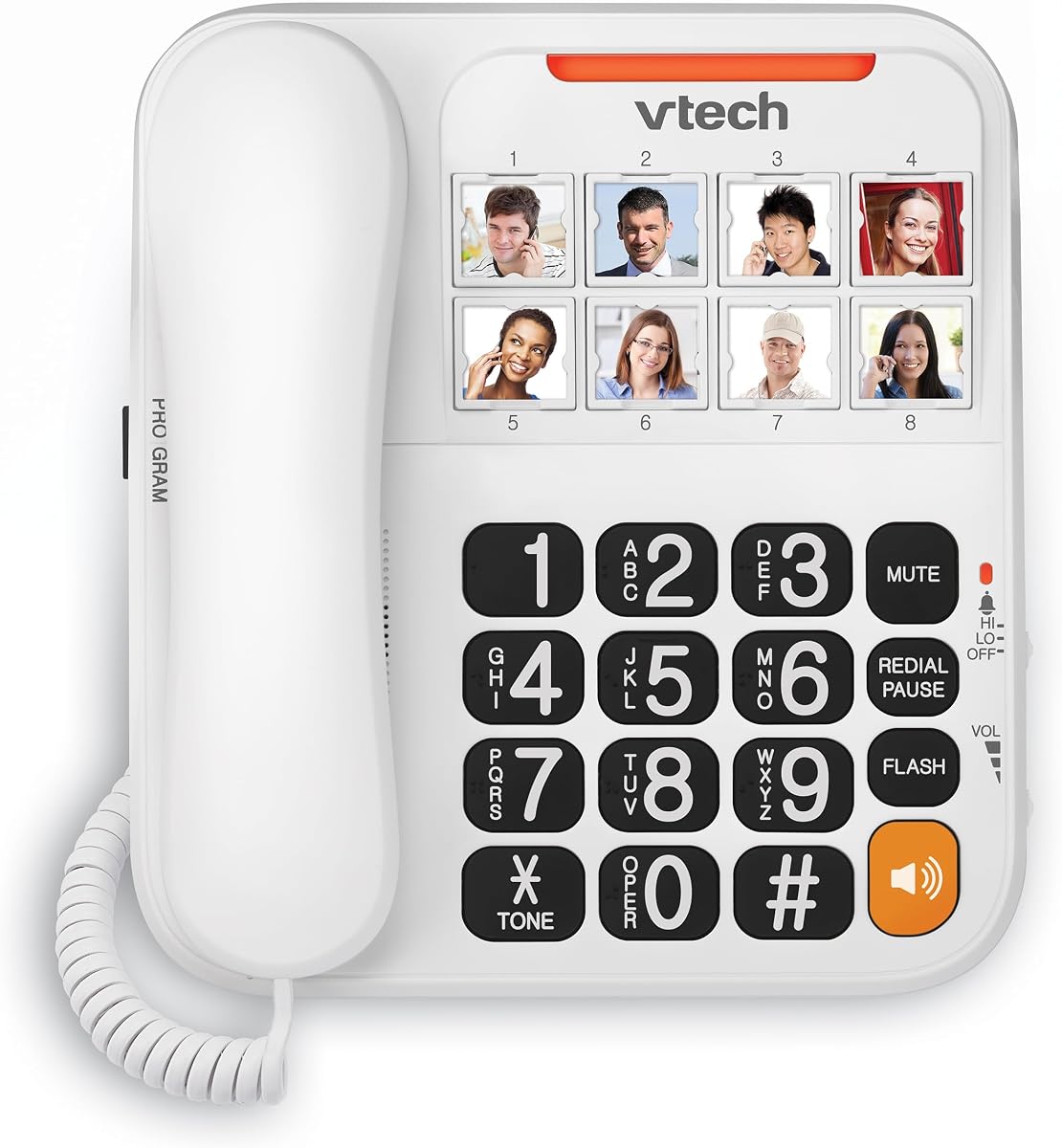
One of its most notable features is the talking digits function, which speaks the numbers as you dial. This provides immediate feedback, reducing confusion and errors during the dialing process. The eight photo speed dial keys allow for quick access to important contacts without memorizing numbers.
Users may find that the phone lacks some advanced settings available in higher-end models. While the full-duplex speakerphone is a useful addition for hands-free conversation, the overall feature set remains focused on basic accessibility rather than customization.
This model is an excellent choice for seniors with low vision or cognitive needs. The combination of auditory feedback and visual alerts creates a supportive environment for independent communication.
Spoken number announcements as you dial help ensure accuracy and prevent mistakes for users with poor vision.
The full-duplex speakerphone allows for natural conversations without holding the handset, freeing up hands for other tasks.
We may earn a commission when you buy through this link, at no additional cost to you.
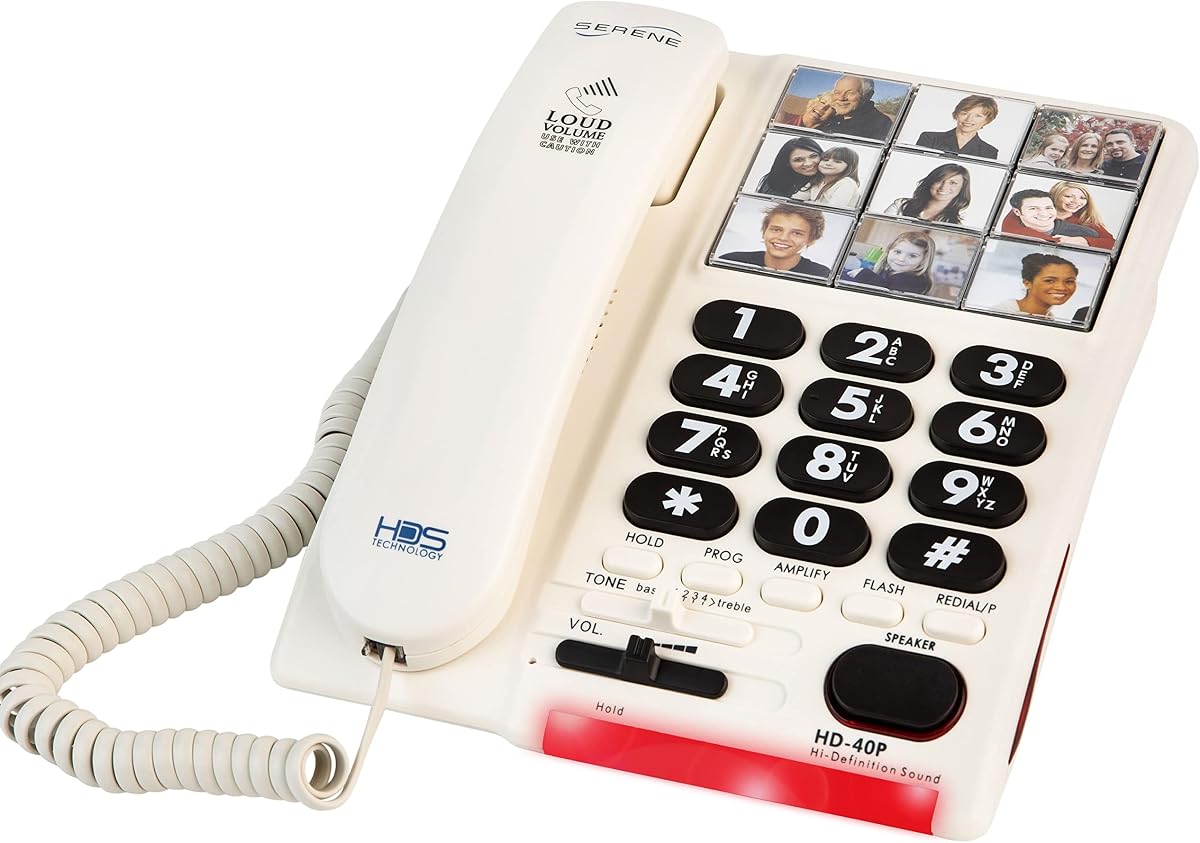
The Serene Innovations Amplified phone is a specialized device aimed at seniors with dementia or hearing impairments. With a rating of 3.9 stars, it offers robust features for those who need extra auditory and visual assistance to stay connected.
We may earn a commission when you buy through this link, at no additional cost to you.
It features a ring volume of 85dB, which is as loud as a lawn mower, ensuring it cuts through high thresholds of hearing loss. The picture phone design allows users to load portraits onto speed dial buttons, simplifying the process of reaching friends and medical professionals.
While it offers significant benefits for specific needs, the higher price point and lower rating compared to basic models suggest it is a specialized investment. Users seeking only basic functionality might find this device more expensive than necessary for their specific use case.
This phone is highly recommended for households dealing with hearing loss or cognitive challenges. It provides a sense of security through its loud alerts and intuitive visual interface.
The roaring ring volume is specifically engineered to be heard over high thresholds of hearing loss or background noise.
Persistent operation and intuitive controls make it easy to use without needing to navigate complex menus or settings.
We may earn a commission when you buy through this link, at no additional cost to you.
The Big Button Phone for Wall or Desk offers flexibility in placement with a standard 4.0-star rating. It is designed to be accessible whether mounted on a wall or placed on a desk, ensuring it is within reach for seniors with limited mobility.
We may earn a commission when you buy through this link, at no additional cost to you.
It includes ten two-touch memory options, allowing users to store family or emergency contacts easily. The hands-free speaker option helps users continue daily activities while talking, and the LED light indicator ensures they never miss an incoming call.
The phone lacks photo customization, relying on number memory rather than visual cues. While this simplifies the interface, it may be less intuitive for those with severe memory loss who benefit from seeing familiar faces.
This model is best for environments where wall mounting is preferred for accessibility, such as bedrooms or bathrooms. It provides essential communication tools without unnecessary complexity or power requirements.
The ability to mount the phone on a wall or keep it on a desk ensures it is always accessible regardless of user mobility.
The switchable Hi-Lo ringer setting allows users to adapt the volume to their environment, preventing disruption or missing calls.
We may earn a commission when you buy through this link, at no additional cost to you.
The Excelltel Big Button Phone is designed for simplicity and efficiency, earning a 4.1-star rating from satisfied users. It focuses on essential memory features that help seniors dial quickly without needing to remember numbers.
We may earn a commission when you buy through this link, at no additional cost to you.
It offers nine one-touch speed dial keys along with ten groups of two-button memories. This extensive memory capability allows for quick access to a wide range of contacts. The SOS function adds a layer of safety for emergency situations, flashing an LED light to signal incoming calls.
Despite these strengths, the phone does not include photo memory options, which might be a limitation for some users. It is a straightforward tool that prioritizes functionality over advanced customization or digital features.
This model is suitable for seniors who need a reliable landline with multiple memory options. Its battery-free operation and durable construction make it a dependable choice for long-term daily use.
With nine one-touch keys and ten memory groups, users can store all necessary contacts for quick and easy access.
The flashing LED light provides a clear visual notification for incoming calls, ensuring no important calls are missed.
We may earn a commission when you buy through this link, at no additional cost to you.
The SWISSVOICE 3355 is a premium option that bundles multiple features into one unit. With a 3.4-star rating, it offers a comprehensive package including an answering machine and extra handset, catering to seniors who need extra functionality.
We may earn a commission when you buy through this link, at no additional cost to you.
Its key strength is the inclusion of an additional cordless handset, giving users mobility within their home. The phone is hearing aid compatible and features large photo buttons for visual memory support. The call block feature provides an extra layer of security against unwanted calls.
Users may find the higher price point and lower rating compared to simpler models less appealing. The added features come with increased complexity, which might be overwhelming for those seeking a strictly basic phone.
This model is best for households needing both a fixed and cordless handset. It is a comprehensive solution for those who value advanced features like answering machines alongside accessibility.
The extra cordless handset allows for calls to be taken from different rooms, providing greater flexibility and convenience.
Hearing aid compatibility ensures that the sound is clear and free from interference, benefiting users with specific devices.
We may earn a commission when you buy through this link, at no additional cost to you.
Choosing the right phone involves considering specific needs such as hearing, vision, and mobility. This guide breaks down the key factors to look for.
Large buttons are crucial for users with arthritis or poor vision. Look for keys that are at least one inch wide and have high contrast between the numbers and the background color to make them easier to distinguish.
Adequate spacing between keys prevents accidental presses and ensures accurate dialing even with unsteady hands.
Hearing loss is a common challenge among seniors, so adjustable volume is essential. A phone with a volume boost feature allows for incoming calls to be louder than standard landlines.
Ensure both the ringer and handset volume can be adjusted independently to accommodate different hearing levels.
For those who struggle to hear phone calls, visual indicators are incredibly helpful. Look for phones with flashing LED lights that activate when a call comes in.
These alerts provide a clear signal that a call is incoming, reducing the chance of missing important messages or family contact.
Memory keys simplify the calling process by allowing users to save favorite numbers. Photo speed dial options are particularly beneficial for those with cognitive decline or memory issues.
A good model should allow for at least six to ten pre-programmed contacts for quick access without dialing.
Corded landline phones are generally more reliable during power outages than wireless models. They draw power directly from the phone line, ensuring operation without electricity.
Check if the phone requires batteries for features like caller ID and ensure you have them on hand if needed.
A speakerphone feature allows users to make calls without holding the handset, which is useful for those with limited mobility or balance issues.
This feature supports group calls and multitasking, making communication more convenient for active seniors.
Displaying who is calling helps seniors screen calls to avoid scams or unknown numbers. Look for large screens that show names and numbers clearly.
This feature can provide peace of mind by allowing users to decide whether to answer before picking up the phone.
Phones should be robust enough to handle accidental drops or frequent use. Materials like ABS plastic often offer good resistance to impact.
Consider the form factor and whether wall mounting is an option for better accessibility in specific rooms.
Start by connecting the phone to a standard RJ11 telephone wall jack. If the model requires batteries for features like caller ID, insert them before attempting to plug it in. Ensure the handset cord is securely attached to the base unit.
Program the speed dial keys according to the user manual. Take time to familiarize the senior with the layout of the buttons. Practice making test calls to ensure they are comfortable with the process before relying on it for important contacts.
Keep the phone in a dry, well-lit area to prevent dust buildup or water damage. Clean the buttons occasionally with a dry cloth to ensure they remain responsive. Avoid using harsh chemicals that might damage the labels or plastic casing.
Most corded landline phones work without electricity as they draw power directly from the phone line. However, features like caller ID may require batteries. Cordless models generally require power to operate.
It depends on the individual's hearing ability. Look for phones with adjustable volume settings ranging from quiet to very loud. Testing with the user helps find the most comfortable level without causing discomfort.
Yes, many models allow you to insert small printed photos into designated slots next to speed dial buttons. This helps users recognize contacts quickly without needing to memorize numbers.
Some phones are specifically designed to be hearing aid compatible, meaning they reduce interference for users with hearing devices. Check the product specifications for compatibility labels before purchasing.
Corded landline phones offer reliability during power outages and do not require monthly service plans. They are often simpler to operate for seniors who find smartphones too complex.
Typically you press a memory key and then dial the number followed by the save button. Consult the specific user manual as steps vary by brand. Simple models often have dedicated save or memorize buttons.
Some specialized models include a dedicated SOS emergency button that can call a predefined contact instantly. Check the features list to see if this function is included with the specific model you are considering.
Use a soft dry cloth to wipe down the buttons and screen. Avoid spraying liquids directly on the device to prevent moisture damage. Clean the handset cord periodically to remove accumulated dust or dirt.
Selecting the right communication device is vital for keeping seniors safe and connected. Our top picks like the Uvital and SWISSVOICE models offer excellent features like loud ringers and photo memory that simplify daily use.
Prioritize features that match the user's specific needs whether it is audio volume or visual alerts. A simple and intuitive interface often provides the most value for elderly users who need to avoid frustration.
Always verify current pricing and availability before purchasing to ensure you get the best deal. Remember that technology evolves quickly so checking recent reviews can help confirm the product remains a good choice.