
LeapFrog 2-in-1 LeapTop Touch
4.7Editor score
Flips to tablet mode
Role play e-mailing activities
Customizable name spelling
This expert guide compares the top rated laptops for five year old children focusing on educational value safety features and interactive learning capabilities.
Finding the right laptop for a five year old can be challenging for parents. You need a device that is safe engaging and educational while being durable enough for daily use by curious little hands.
We have carefully evaluated numerous options available on the market today. Our comparison focuses on key factors like learning modes build quality battery life and age appropriate content to help you make an informed decision.
Each pick below highlights specific strengths and target audiences. Note that availability and pricing can change frequently so check the current details before making your final purchase choice for your child.
4.7Editor score

4.5Editor score

4.2Editor score
Here is a detailed side by side comparison of all ten selected laptops. This table highlights key specifications and features to help you quickly identify the best fit for your child learning needs and budget.





The VTech Genio Bilingual JuniorBook stands out as the top choice for five year olds seeking a real computer experience. It boasts a high rating and offers over eighty activities that cover math science and language arts effectively.
We may earn a commission when you buy through this link, at no additional cost to you.
Its standout quality is the full size QWERTY keyboard which helps children transition from toy keyboards to real typing skills. The bilingual feature allows switching between English and Spanish providing immersive language learning without needing internet.
While it requires four AA batteries which can be a recurring cost the offline capability ensures kids play anywhere without wifi restrictions. The screen and keyboard are sized well for small hands making it comfortable for extended learning sessions.
This laptop is ideal for parents who want their child to learn practical computer skills alongside academic subjects. It is the best all around pick for a five year old ready to explore beyond basic toys.
The full size keyboard and cursor controller teach proper typing posture and navigation skills used in real computers.
Every activity can be played in English or Spanish allowing kids to build vocabulary and comprehension naturally.
We may earn a commission when you buy through this link, at no additional cost to you.
The LeapFrog 2-in-1 LeapTop Touch is an excellent budget friendly option that does not compromise on core learning features. With a high customer rating it delivers fun and educational value for preschoolers and early elementary students.
We may earn a commission when you buy through this link, at no additional cost to you.
Its unique design allows the screen to flip converting the laptop into a tablet mode for different types of play. The role play activities like e-mailing Scout help children understand how digital communication works in a safe way.
Parents can customize the device to include their child name which adds a personal touch to the learning experience. While it lacks advanced features like internet connectivity it covers ABCs numbers and music comprehensively.
This pick is perfect for families looking for a reliable first laptop that is easy to use and highly engaging. It offers great value for money and is suitable for ages two to five.
The ability to flip the screen allows for tablet style interaction encouraging different motor skills and play styles.
Customizable name spelling helps children recognize their own name and feel more connected to the device.
We may earn a commission when you buy through this link, at no additional cost to you.
The LEXiBOOK LAPTAB 10 inch is a premium device that bridges the gap between toy laptops and real tablets. It features a large HD touchscreen and powerful processor allowing access to thousands of games and apps safely.
We may earn a commission when you buy through this link, at no additional cost to you.
This laptop includes robust parental controls and a Qwant Junior browser ensuring a safe online experience. The customizable profiles allow different family members to have their own settings and learning paths easily.
With features like a front camera and USB-C ports it feels like a real computer which can boost tech confidence. The battery life supports hours of use making it great for travel or long quiet times.
Parents wanting a device that grows with their child should consider this high end option. It is best for older five year olds ready for more interactive and complex digital content.
Access to Google Play allows kids to try educational apps and games designed for general audiences safely.
Built in parental controls and safe browsers ensure children browse the web without exposure to inappropriate content.
We may earn a commission when you buy through this link, at no additional cost to you.
The Lexibook Unicorn Educational Laptop is designed to capture the interest of children who love magical themes. It offers a comprehensive set of learning activities including logic and math presented in a fun and colorful package.
We may earn a commission when you buy through this link, at no additional cost to you.
This laptop includes a music mode which helps kids learn notes and compose simple melodies. The realistic mouse and keyboard encourage proper usage habits that translate well to real computer use later.
The design is slim and elegant making it easy for small hands to grip and carry around. It tests knowledge through fun activities that improve memory and speed effectively.
This is a great choice for kids who need extra motivation to engage with educational content. The unicorn theme makes learning feel like play while covering essential early childhood skills.
The music mode introduces notes and composition helping children develop rhythm and sound recognition.
Different levels allow kids to test what they learned and improve at their own pace.
We may earn a commission when you buy through this link, at no additional cost to you.
This Kids Laptop with Color Screen offers a vibrant viewing experience at a very competitive price point. The TFT color screen provides clear visuals that help children focus on tasks without eye strain.
We may earn a commission when you buy through this link, at no additional cost to you.
It includes forty eight distinct learning modes covering alphabet math and general knowledge. The protective film ensures the screen remains free of scratches during transport and play.
The ergonomic design mimics real laptops making it easy for kids to hold comfortably for long periods. Games included test logic and memory ensuring that fun does not come at the expense of learning.
Ideal for parents looking for an affordable option that does not sacrifice screen quality this laptop is a solid contender. It provides hours of educational fun suitable for five year olds.
The vibrant true to life colors make activities engaging and easy to see for young learners.
Forty eight modes ensure kids can explore different subjects and keep their interest over time.
We may earn a commission when you buy through this link, at no additional cost to you.
The VTech Play Smart Preschool Laptop combines a sleek look with leveled learning activities. It has a high rating due to its engaging content that covers letters numbers and basic logic effectively.
We may earn a commission when you buy through this link, at no additional cost to you.
Children can personalize their experience with an avatar and their name making the laptop feel like their own. The introduction to Spanish words and sounds adds a valuable language layer to the curriculum.
Logic games and instrument sounds help develop reasoning and auditory skills. The device is designed to look like a grown up computer encouraging pride in learning.
This laptop is a fantastic choice for younger five year olds transitioning to digital learning. It is simple to use and packed with features that keep kids entertained and educated.
Custom avatars and names help children feel ownership of the device and increase engagement.
Learning basic Spanish words at this age can lay a strong foundation for future language studies.
We may earn a commission when you buy through this link, at no additional cost to you.
The Kids Laptop with Camera stands out for its focus on creativity and photography skills. It includes a camera with clear lenses and fun photo frames encouraging children to express themselves through images.
We may earn a commission when you buy through this link, at no additional cost to you.
Beyond the camera it offers sixty four activities covering math and animals. The ability to capture photos of family and friends adds a social element to the learning experience.
The display is vibrant and fits perfectly in small hands ensuring comfort during use. It blends education and entertainment seamlessly for hours of joyful playtime.
Parents wanting to foster creativity and memory skills will appreciate this unique feature. It is a great gift for active kids who love to explore and capture moments.
Kids can freely express their creativity with various filters and frames on their captured images.
Recording photos allows children to save memories of friends family and fun activities.
We may earn a commission when you buy through this link, at no additional cost to you.
The LeapFrog LeapPad Academy is a robust tablet designed to support learning from ages three to eight. It comes with over twenty approved learning apps that grow with the child ensuring long term value.
We may earn a commission when you buy through this link, at no additional cost to you.
Included in the box is a stylus and a kickstand making it versatile for drawing and watching videos. The rechargeable battery eliminates the need for disposable batteries which saves money over time.
Parents can set time limits and manage apps easily with built in controls. The tough bumper protects the device from drops and rough play by active kids.
While it lacks a keyboard it excels as a learning tool for creative and reading activities. It is an excellent choice for kids who prefer touch interactions over typing.
The included stylus helps develop fine motor skills and handwriting practice effectively.
Apps grow with the child providing age appropriate content as skills improve over the years.
We may earn a commission when you buy through this link, at no additional cost to you.
The Lexibook Barbie Educational Laptop features a stunning design with over one hundred twenty four activities. It covers math logic and music offering a comprehensive learning experience for curious young minds.
We may earn a commission when you buy through this link, at no additional cost to you.
The sleek and stylish design inspires authentic laptop usage encouraging kids to feel mature while playing. Each activity offers multiple levels so children can learn at their own pace.
Its compact size makes it ideal for travel and on the go learning. The realistic mouse and keyboard ensure proper ergonomic usage habits are formed early.
This laptop is a perfect blend of elegance and education. It is highly recommended for girls who enjoy themed devices without sacrificing learning content.
Over one hundred twenty four activities provide hours of learning and fun without repetition.
The stylish look encourages children to take ownership and care for their device.
We may earn a commission when you buy through this link, at no additional cost to you.
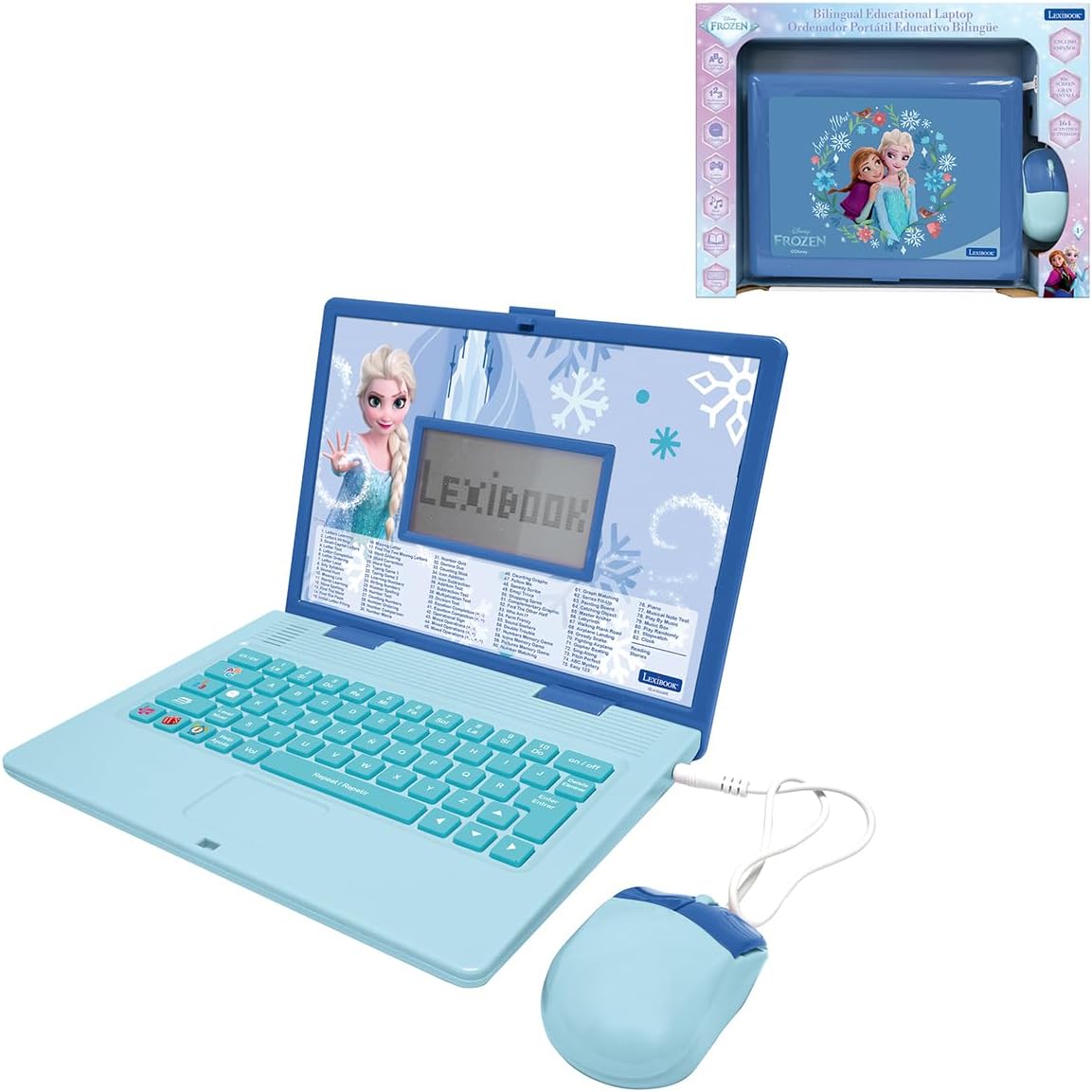
The LEXiBOOK Frozen Educational Laptop is packed with one hundred sixty four activities covering vocabulary and spelling. Its themed appeal makes it highly engaging for fans of the movie.
We may earn a commission when you buy through this link, at no additional cost to you.
Voice guidance helps children navigate activities easily without needing to read complex instructions. This is perfect for early learners who need extra help understanding tasks.
It supports bilingual learning allowing kids to switch between English and Spanish for strong language skills. The lightweight design ensures it is easy to carry around the house.
This is a great choice for five year olds who love the theme and want variety. It keeps children engaged from the first activity with fun challenges and music.
Built in voice guidance helps younger kids navigate menus without frustration or needing help.
Extensive vocabulary and spelling exercises help build strong foundational language skills.
We may earn a commission when you buy through this link, at no additional cost to you.
Choosing the right laptop for a five year old requires considering several critical factors to ensure safety and learning value.
Look for laptops with a wide range of subjects like math reading and science. The content should be interactive and engaging to maintain your child interest. High quality educational games reinforce learning better than passive watching.
Prioritize devices that offer diverse activities over simple toys to maximize value.
Five year olds are active and may drop or bump devices frequently. Choose laptops with sturdy plastic and reinforced edges. The keyboard and mouse should be resilient to withstand heavy pressing.
Durable construction ensures the laptop lasts longer and remains safe to use.
Screen size should be large enough for comfortable viewing but small enough to hold. Screens between three and ten inches are common. Clear displays reduce eye strain during extended use.
Select a screen size that balances portability with readability for your child.
Some laptops require AA batteries while others are rechargeable. Rechargeable options save money and are more eco-friendly. Battery life should be sufficient for travel or quiet times.
Decide between battery types based on your family budget and usage patterns.
If your family is interested in language learning bilingual laptops offer English and Spanish modes. This helps immersion without needing external resources. Many models allow switching between languages easily.
Consider bilingual support if you want to build early language skills.
Realistic keyboards and mice help children transition to real computers later. Full size QWERTY keyboards teach proper typing skills. Mouse controllers aid in developing fine motor skills.
Look for realistic input devices to foster long term tech skills.
Online access should be limited or nonexistent. For connected devices check parental controls and safe browsers. Ensuring content is age appropriate is critical.
Always verify that safety features are robust to protect your child.
Themes like Barbie or Frozen can motivate kids to use the device more. Design elements like colors and shapes should match your child preferences. Comfortable handgrips are essential for extended play.
Choose a design that appeals to your child to encourage regular use.
Start by reviewing the included guide to understand all available activities. Set up any customizable features like your child name to personalize the experience immediately.
Limit play sessions to appropriate amounts to protect eyesight. Place the laptop on a stable surface or on a soft mat to prevent accidental drops.
Keep the device away from water and dirt. If it uses batteries replace them regularly or use rechargeables as needed to avoid interruptions during play.
Real laptops can be overwhelming and expensive. Specialized toy laptops offer better durability and age appropriate content. They help kids learn basic skills safely without the risks of full internet access.
Pediatricians generally recommend limiting screen time. Short sessions of fifteen to twenty minutes are best. Balancing device time with outdoor play is important for healthy development.
Most toy laptops do not connect to the internet. This ensures safety and limits distractions. Some premium models offer safe browsers but require strict parental control settings.
Activities cover alphabet math logic music and sometimes Spanish. Many include games to test knowledge and memory. The variety keeps children engaged and helps reinforce different skills.
Many models feature full size QWERTY keyboards. This helps children learn proper typing skills. Some have smaller keys which are better for younger kids or basic play.
Wipe screens with a soft dry cloth to avoid scratches. Keep liquids away from the device. Regularly check battery compartments to ensure tight closures and prevent leaks.
Most devices include batteries for demo purposes only. You will need to buy new ones for regular use. Rechargeable options are available on some advanced models.
Some models have multiple difficulty levels that adapt as skills improve. Tablets with app access offer more room for growth. Check the age range to ensure long term suitability.
We recommend the VTech Genio for the best overall experience and the LeapFrog LeapTop for budget options. Premium users should consider the LEXiBOOK LAPTAB for its real computer features.
Prioritize safety educational value and durability when making your choice. The right device can help your child develop essential skills while having fun.
Prices and availability may change so review current details before purchasing. Select the device that best matches your child learning style and interests.