
BENFEI USB 3.0 Switch
4.1Editor score
2 In 4 Out Configuration
18 Month Warranty Included
Driver-Free Plug and Play
This guide compares the top 10 USB and KVM switches for sharing keyboards and mice between two computers to boost productivity and simplify dual-PC setups.
Managing two computers often means juggling multiple keyboards and mice. A reliable switch lets you share these peripherals seamlessly. This guide explores the best options available to streamline your workflow.
We evaluated products based on compatibility, speed, and ease of use. Our comparison covers USB 2.0 and 3.0 models alongside HDMI KVM switches. Each entry highlights key features to help you choose the right fit.
Every pick includes detailed specs and honest pros and cons. Prices fluctuate frequently so check current listings before buying. We aim to provide clear insights for both home offices and professional environments.
4.1Editor score

4.6Editor score

4.3Editor score
The following table provides a side-by-side comparison of all ten products. It highlights their core capabilities to help you quickly identify the model that fits your specific desktop needs.



This USB switcher allows two computers to share two USB devices simultaneously such as a keyboard mouse printer or webcam. It has a solid rating and stands out for its simple plug and play operation.
We may earn a commission when you buy through this link, at no additional cost to you.
Equipped with USB 3.0 technology it supports transfer speeds up to 5Gbps and is backward compatible with USB 2.0. The durable aluminum alloy shell ensures better heat dissipation and longevity for daily use.
While it only supports two ports it is ideal for sharing a keyboard and mouse between two computers. The one-button switch with LED indicator makes toggling between PCs intuitive and straightforward.
It is perfect for home office dual-PC setups where you need reliable access to peripherals without unplugging cables. The included USB 3.0 cables ensure you can start using it immediately.
Equipped with USB 3.0 technology this switch supports transfer speeds up to 5Gbps and is backward compatible with USB 2.0.
Features a durable aluminum alloy shell for better heat dissipation and longevity during extended use.
We may earn a commission when you buy through this link, at no additional cost to you.
The BENFEI USB switcher supports two computers sharing four USB devices like keyboards mouses printers scanners and headphones. It is a cost-effective solution for those needing more ports without breaking the bank.
We may earn a commission when you buy through this link, at no additional cost to you.
With four USB 3.0 ports it supports up to 5Gbps data transfer speed and is backward compatible with USB 2.0. An extra USB C power supply slot helps support high power consumption devices like HDDs and cameras.
Note that when connected it could work only when using the BENFEI USB A to USB A cable. The power adapter is not included but the USB A USB Charging cable is provided for power needs.
It comes with an exclusive 18-month unconditional warranty ensuring long-time satisfaction of your purchase. Friendly and easy-to-reach customer service helps solve problems timely for peace of mind.
The BENFEI USB Switch provides an extra USB C power supply slot to support high power consumption devices like HDDs and cameras.
Exclusive BENFEI Unconditional 18-month Warranty ensures long-time satisfaction of your purchase.
We may earn a commission when you buy through this link, at no additional cost to you.
This UGREEN USB Switcher allows two computers to share up to seven USB devices regardless of port type. It features ultra fast 10Gbps transfer speed and includes a Type C Converter Adapter and Power Adapter.
We may earn a commission when you buy through this link, at no additional cost to you.
It is equipped with 4 USB 3.2 Gen 2 ports and speeds up to 10Gbps which is faster than traditional 5Gbps USB Switches. You can transfer 1 GB files in 1.5 seconds to improve work efficiency without waiting.
The switch includes a power adapter and charging cable to ensure stable performance for high power devices like external hard drives and printers. There are no more disconnects or laggy transfers with this setup.
Whether you need to connect MacBooks ultrabooks desktops or older laptops to the same switch this model handles mixed setups easily. It helps keep your workspace neat without extra USB hubs or docks.
The USB-C switch is equipped with 4 USB 3.2 Gen 2 ports and speeds up to 10Gbps for faster transfers.
This switch includes a power adapter and charging cable to ensure stable performance for high-power devices.
We may earn a commission when you buy through this link, at no additional cost to you.
The UGREEN 2-in 4-Out USB switcher supports 2 computers sharing 4 USB devices like keyboards mouses printers headphones and USB cameras. It features one USB C port and 3 USB A ports to support connecting various USB devices.
We may earn a commission when you buy through this link, at no additional cost to you.
With 4 USB 3.0 ports the USB 3.0 switcher supports data transfer up to 5Gbps and is backward compatible with USB 2.0. It is plug and play for modern operating systems including Windows macOS Chrome OS and Linux computers.
The USB switch is designed with a optional power supply for high-power devices like Hard Disk Drives headsets and other USB devices. This avoids the trouble of not finding a micro cable for stable power input.
It offers two switching modes controller and button so you can switch devices freely as you like. Note that this USB Switcher is NOT a KVM switch and does not support connecting a monitor or video transmission.
The USB 3.0 switch provides 1 USB C port and 3 USB A ports to support connecting various USB devices.
The USB switcher has two switching modes—controller and button, switch devices freely as you like.
We may earn a commission when you buy through this link, at no additional cost to you.
The UGREEN 2 in 2 out USB switch supports 2 computers sharing 2 USB devices like keyboards mouses printers webcam and more. It allows you to switch freely between your work computer and personal laptop to boost your work efficiency.
We may earn a commission when you buy through this link, at no additional cost to you.
The USB 3.0 switcher supports data transfer up to 5Gbps and is backward compatible with USB 2.0. This makes it easy to transfer files from PC1 to PC2 without trouble with slow transmission speeds.
It is a driver-free USB switch selector that is plug-and-play for Windows macOS Chrome OS and Linux computers. Just plug in and enjoy efficient work without needing additional software installation or setup.
With the USB switcher button and LED indicator design you can freely switch multiple USB devices between two computers with one click. This lets you clearly know the working status at a glance.
The USB 3.0 switcher supports data transfer up to 5Gbps and is backward compatible with USB 2.0.
UGREEN USB switch selector is plug-and-play for Windows macOS Chrome OS and Linux computers.
We may earn a commission when you buy through this link, at no additional cost to you.
This HDMI KVM Switch with two HDMI ports allows control of two computers enabling them to share a single monitor along with keyboard and mouse. It is a complete USB switch and HDMI switch rolled into one.
We may earn a commission when you buy through this link, at no additional cost to you.
It features 4 USB 3.0 ports with ultra-fast data transfer speeds up to 5Gbps including 3 USB-A ports and 1 USB-C port for broader device compatibility. This allows you to seamlessly share peripherals between two computers.
The HDMI KVM Switch supports stunning 4K resolution at 60Hz ensuring crystal-clear and highly detailed visuals for your monitors. It also supports various input devices such as PCs Laptops and PS4 among others.
With Adaptive EDID and plug and play this switch requires no power supply or driver software. You just plug it in and connect all cables for seamless operation between two computers and one monitor.
HDMI KVM Switch supports stunning 4K resolution at 60Hz ensuring crystal-clear and highly detailed visuals for your monitors.
4K HDMI KVM Switch features two switching options: On-KVM Switch Button and Wired Remote Switch.
We may earn a commission when you buy through this link, at no additional cost to you.
The UGREEN 4 port USB sharing switch allows one button swapping between 2 computers to share 4 USB 2.0 peripheral devices without constantly swapping cables. It is ideal for sharing printers scanners mouse keyboards card readers and flash drives.
We may earn a commission when you buy through this link, at no additional cost to you.
It works flawlessly with Windows 10 8 8.1 7 Vista XP Mac OS X Linux and Chrome OS. The driver-free plug and play functionality makes it easy to set up without needing any complicated network sharing software.
The USB 2.0 sharing switch comes with a separate micro USB female port for option power which optimizes its compatibility with more devices. This helps support HDDs Digital Video Cameras SSDs and other peripherals stably.
With the LED light indicator you can easily switch between 2 computers with a single click on the button. This ensures you know which computer is active while keeping your desktop clean and clutter free.
You can easily switch between 2 computers with a single click on the button with LED indicating the active computer.
4 port USB switch works flawlessly with Windows 10/8/8.1/7/Vista/XP, Mac OS X, Linux, and Chrome OS.
We may earn a commission when you buy through this link, at no additional cost to you.
The UGREEN 2 in 4 out USB 3.0 switch supports 2 computers share 4 USB devices like keyboards mouses U disk printers scanners USB cameras and headphones. It is convenient to switch freely between work and personal computers.
We may earn a commission when you buy through this link, at no additional cost to you.
With the 4x USB 3.0 ports the switch supports up to 5Gbps data transfer speed and is backward compatible with USB 2.0. You can easily transfer data from U disk or mobile hard disk to computer quickly.
The USB 3.0 Switch selector is plug-and-play for Windows macOS Chrome OS and Linux computers. Just plug in and enjoy efficient work without needing additional drivers for most modern operating systems.
UGREEN USB Switch is designed with an extra USB C (5V 2A) power supply port to support high-power devices like HDDs USB cameras headphones dockingstation and microphones. This helps maintain stable performance during heavy use.
With the 4x USB 3.0 ports the UGREEN USB Switcher supports up to 5Gbps data transfer speed.
UGREEN USB Switch is designed with an extra USB C power supply port for high-power devices.
We may earn a commission when you buy through this link, at no additional cost to you.
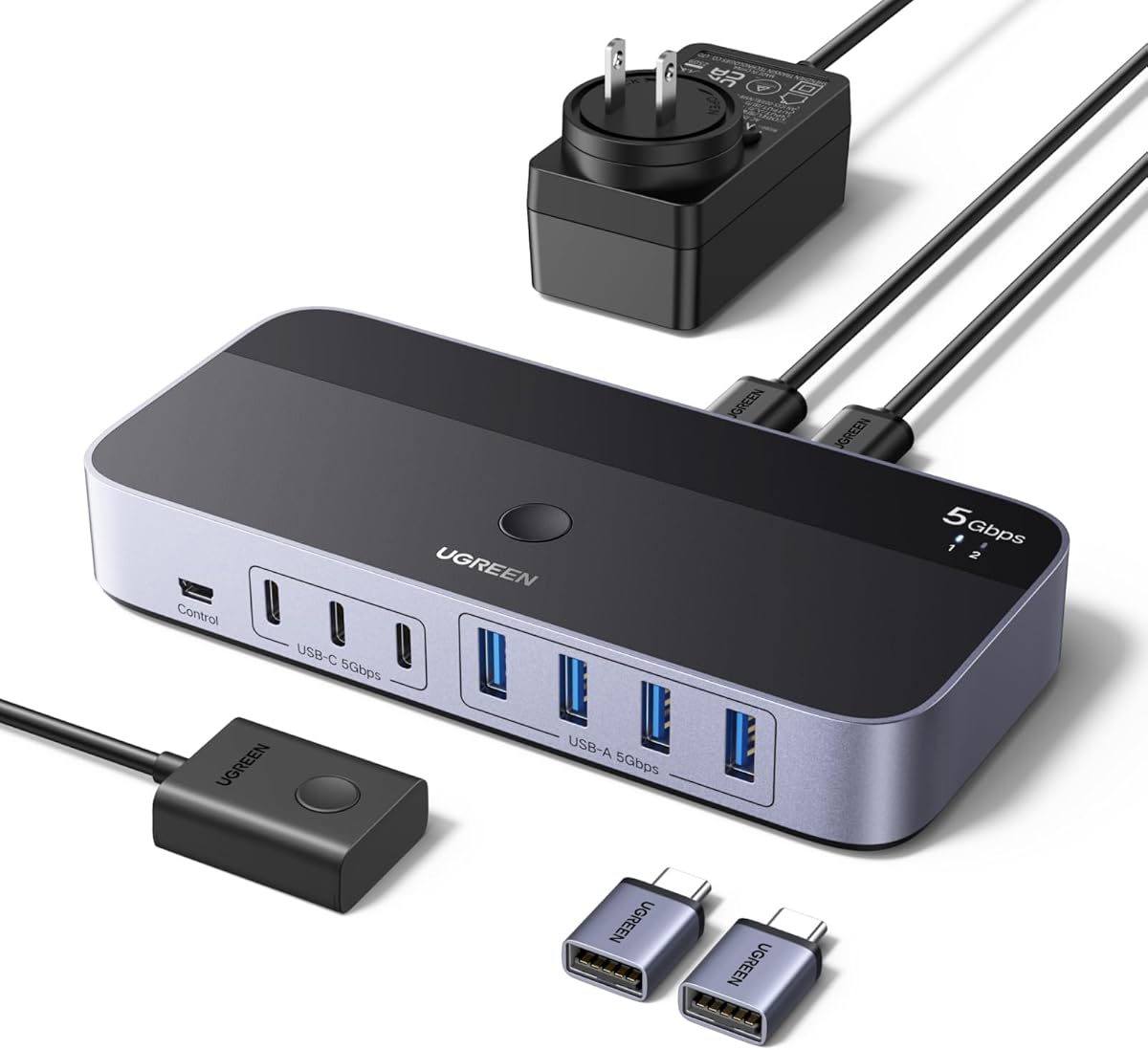
This UGREEN USB Switcher allows 2 computers to share up to 7 USB devices including 4 USB-A and 3 USB-C ports. Regardless of port type you can easily connect your existing peripherals like keyboards mice printers flash drives and more.
We may earn a commission when you buy through this link, at no additional cost to you.
With 4 USB 3.0 ports the USB 3.0 switcher supports data transfer up to 5Gbps and is backward compatible with USB 2.0. A USB-C to USB-A adapter is pre-included for easy setup with mixed device types.
This switch includes a power adapter and charging cable to ensure stable performance for high-power devices like external hard drives and printers. This means no more disconnects or laggy transfers when using demanding peripherals.
It is simple plug-and-play for any modern operating system like Windows macOS Chrome OS and Linux computers. Quickly switch between work and personal computers with button or external controller to improve workflow.
A USB-C to USB-A adapter is pre-included for easy setup and compatible with USB-C and USB-A computers.
This switch includes a power adapter and charging cable to ensure stable performance for high-power devices.
We may earn a commission when you buy through this link, at no additional cost to you.
This 2 in 2 out USB switch supports 2 computers sharing 2 USB devices like keyboards mouses printers webcam and more. It helps you switch freely between your work computer and personal laptop to boost your work efficiency.
We may earn a commission when you buy through this link, at no additional cost to you.
The 2 port USB switch works flawlessly with Windows 10 8 8.1 7 Vista XP Mac OS X Linux and Chrome OS. It is driver-free and simply plug and play for most common desktop and laptop operating systems.
Easily switch between two computers with the click of a button and the LED indicates which computer is in use. It also has an external desktop switch controller to keep your desktop neat clean and uncluttered.
The package includes 2 USB cables so you can start using the USB switcher right out of the box. It is powered directly from the computer's USB port so no AC adapter is needed for basic setups.
Easily switch between two computers with the click of a button and the LED indicates which computer is in use.
The package includes 2 USB cables so you can start using the USB switcher right out of the box.
We may earn a commission when you buy through this link, at no additional cost to you.
Selecting the right USB switch requires evaluating ports speed compatibility and power needs. This section helps you identify the most important factors for your specific setup.
Determine how many devices you need to share. Some switches offer 2 in 2 out while others provide 2 in 4 out or 2 in 7 out configurations. More ports allow greater flexibility for printers scanners and other peripherals.
Choose a model with enough ports for your current needs and some room for future expansion.
USB 3.0 models provide up to 5Gbps transfer speeds whereas USB 2.0 offers slower speeds. Faster versions are better for large file transfers and high-performance devices like external hard drives.
Prioritize USB 3.0 or newer for efficient data transfers and modern device compatibility.
High-power devices such as external hard drives or webcams may need extra power. Look for switches with USB-C power supply or external adapters to ensure stable performance.
Ensure the switch supports external power if you plan to connect demanding peripherals.
Most switches are compatible with Windows macOS Linux and Chrome OS. Check that the switch supports your specific OS versions to avoid driver issues.
Look for plug-and-play devices that require no additional software for seamless operation.
Some switches use a button on the device while others provide a remote controller. A controller keeps your desk tidy by allowing switching without touching the switch itself.
Choose a mechanism that fits your workspace layout and switching preferences.
Switches with aluminum alloy shells dissipate heat better and last longer. A sturdy build ensures reliability during daily use in home or office settings.
Prioritize models with metal bodies for better longevity and heat management.
Some products include USB cables in the package while others do not. Check what is included to avoid extra purchases and ensure you have the right connectors.
Look for packages that include necessary cables for immediate setup and use.
Most USB switches do not support video. If you need to share a monitor as well you will need a KVM switch with HDMI or VGA ports instead.
Confirm whether you need video sharing to choose between a USB switch and a full KVM switch.
Begin by connecting the USB switch to your two computers using the included USB A to A cables. Ensure the connections are secure and firmly seated in the USB ports on both machines.
Plug your keyboard mouse and other peripherals into the output ports on the switch. Turn on the switch if it has an external power adapter and wait for the LED indicator to stabilize.
Press the button on the switch or use the remote controller to toggle between computers. Verify that your peripherals respond on the active machine and repeat as needed to switch control.
A USB switch only shares USB devices like keyboards and mice between computers. A KVM switch shares keyboards mice and video monitors. Choose a KVM switch if you need to share a screen as well.
Most USB switches are plug-and-play and do not require driver installation. They work automatically with modern operating systems like Windows macOS and Linux after you connect them.
Yes but make sure the switch supports high-power devices. Some switches may need an external power supply to handle hard drives properly without disconnecting.
Some USB switches include USB-C ports or adapters. Others may require a USB-C to USB-A adapter to connect USB-C devices to the switch ports.
Check that all cables are connected securely and powered properly. Ensure your computers support the USB version used by the switch and that peripherals are functioning correctly.
Yes you can share multiple printers as long as the switch has enough USB ports. Just plug each printer into a separate output port on the switch for access by both computers.
Choose 2 in 2 out if you only need to share a keyboard and mouse. Go for 2 in 4 out if you also want to share printers or scanners without buying multiple switches.
Yes when used correctly USB switches are safe for keyboards mice and other peripherals. Look for models with surge protection or power adapters to prevent potential damage.
Our top picks offer reliable solutions for sharing keyboards and mice between two computers. The 2 in 2 Out USB 3.0 Switch stands out for its durability and speed while the BENFEI model provides great value.
When selecting a switch prioritize port count speed and power support for your specific devices. Consider whether you need USB-C compatibility or a remote controller for your workspace needs.
Prices and availability change regularly so always check current listings before purchasing. We hope this guide helps you find the right switch to streamline your multi-computer workflow.