
VOYEE PC Controller
4.3Editor score
Wide Xbox and PC compatibility
Enhanced trigger buttons
Rumble vibration feedback
This guide compares the top ten joysticks for Windows 11 to help you find the best flight simulator controller for your setup and budget.
Finding the right joystick for Windows 11 can transform your gaming experience significantly. Whether you are simulating flights or playing strategy games, a quality controller offers precision and comfort that keyboards cannot match. This guide explores the top options available to help you choose wisely.
We evaluated ten leading products based on compatibility, build quality, and features. Each item was assessed for its performance in popular simulation titles and general gaming use. Our goal is to provide a clear overview of what makes each model stand out in the current market.
Every selection includes detailed insights into design, controls, and software support. You will see how each joystick handles different tasks and where it excels. Please note that availability and pricing may vary over time, so check current listings before purchasing.
4.3Editor score

4.4Editor score

4.0Editor score
The following table provides a side by side comparison of all ten products reviewed in this guide. Each entry highlights key specifications to help you quickly identify the model that best fits your specific gaming needs and preferences.






The PXN 2113PRO PC Joystick offers an immersive flight simulation experience for Windows users. With a rating of 3.6, it provides a solid entry point for those looking to enjoy flight sims without breaking the bank. Its standout qualities include a range of programmable buttons and a comfortable design.
We may earn a commission when you buy through this link, at no additional cost to you.
This joystick features a rapid fire trigger and 4 axis controlling for precise movements. Users can enjoy 8-way hat switch functionality and 12 programmable buttons to tailor controls to their liking. The vibration function adds realism when properly configured through the driver settings.
Some users may find the vibration requires specific driver adjustments to feel effective. Additionally, it is strictly for PC use and does not support Mac or console platforms. These trade-offs are acceptable given its focus on delivering a dedicated flight stick experience for PC gamers.
This model is ideal for beginners or enthusiasts seeking a cost-effective flight controller. It works well with titles like Microsoft Flight Simulator and World of Warplanes. For those wanting a simple setup with customizable controls, this joystick presents a compelling option.
The vibration function enhances immersion when set correctly via the driver software.
Custom adjustment and keyboard mapping allow for tailored control schemes.
We may earn a commission when you buy through this link, at no additional cost to you.
The Thrustmaster T-Flight Hotas One delivers realistic flight simulator control with precision and comfort. Rated at 4.4, it is a strong choice for both beginners and seasoned enthusiasts. Its modular design and ergonomic features make it a standout in its category.
We may earn a commission when you buy through this link, at no additional cost to you.
This flight stick features adjustable resistance and responsive triggers for smooth aircraft control. The detachable throttle allows for flexible setups on a desk or lap. It supports a wide range of flight simulation types from commercial aviation to combat jets.
While the design is robust, users wanting full cockpit immersion may need to purchase rudder pedals separately. The plug and play nature simplifies setup but may still require minor adjustments for optimal performance. These limitations do not detract from its overall value and functionality.
Ideal for those seeking a versatile HOTAS system, this unit works seamlessly with Windows PC and Xbox Series X|S. It is perfect for simulating takeoffs, landings, and combat maneuvers. For a balanced mix of features and ease of use, this joystick is highly recommended.
The detachable throttle enables versatile setups for desk or lap play.
Compatible with Thrustmaster accessories for enhanced control.
We may earn a commission when you buy through this link, at no additional cost to you.
The V-one Wired USB Gaming Controller is a budget-friendly option with broad compatibility across systems. With a 4.2 rating, it serves well for casual gaming and PC flight simulations. Its multi-mode functionality allows it to work across different platforms.
We may earn a commission when you buy through this link, at no additional cost to you.
This controller supports Xinput and Dinput modes, making it flexible for various games. It also works with Android devices and PS3, offering versatility beyond just PC use. The vibration feedback and turbo function add layers of interaction for users.
It does not support Xbox One or Mac OS which limits its reach for some console gamers. The design is functional but lacks the premium feel of higher-end flight sticks. Still, it provides solid performance for its price point.
Best for those needing a simple controller for multiple platforms, this unit is easy to plug and play. It works well with Steam and many PC games. For gamers who value versatility and affordability, the V-one is a practical choice.
Supports PC, Android, and PS3 for broader gaming options.
Turbo and vibration features improve gameplay engagement.
We may earn a commission when you buy through this link, at no additional cost to you.
The Thrustmaster USB Joystick is an entry-level device designed for basic flight simulation needs. Rated at 3.9, it provides essential controls including a unique Point of View button for camera manipulation. It is suitable for users needing a straightforward setup.
We may earn a commission when you buy through this link, at no additional cost to you.
This joystick features 3 axis control and 4 buttons plus a trigger for complete game interaction. The ergonomic handle with enlarged rest ensures comfort during extended gaming sessions. It delivers basic immersion with its focus on simplicity.
The limited number of buttons may not satisfy advanced users wanting extensive programmability. It is a simpler device compared to modern HOTAS systems. However, for those needing just the basics, it performs reliably without unnecessary complexity.
Best for casual gamers or those new to flight sims, this unit offers good comfort and ease of use. It simplifies camera control with its dedicated button. For a no-fuss entry into USB joystick gaming, it is a solid option.
The Point of View button allows easy camera and immersion adjustments.
Ergonomic handle ensures comfort during long gaming periods.
We may earn a commission when you buy through this link, at no additional cost to you.
The Microsoft Sidewinder Precision 2 is a classic joystick known for its precise rudder control and programmability. With a 4.0 rating, it offers a robust set of features including 16 programmable functions. Its rotating handle and throttle add depth to its control scheme.
We may earn a commission when you buy through this link, at no additional cost to you.
Users can save and download programmed game commands into game-specific profiles for quick access. The 146 degree action throttle provides complete control from the joystick itself. The USB connection ensures plug-and-play ease for most modern systems.
Its design is somewhat older compared to newer flight sticks which may affect software support. Some features depend on driver installations that may not be updated frequently. Still, the hardware remains solid for those who appreciate its unique ergonomics.
Ideal for fans of classic flight sims, this unit provides reliable control and extensive customization. It suits users who prefer detailed mapping and tactile feedback. For a durable and feature-rich option, the Sidewinder Precision 2 is worth considering.
Programmed commands can be saved for specific game titles.
The 146 degree throttle offers precise range of motion.
We may earn a commission when you buy through this link, at no additional cost to you.
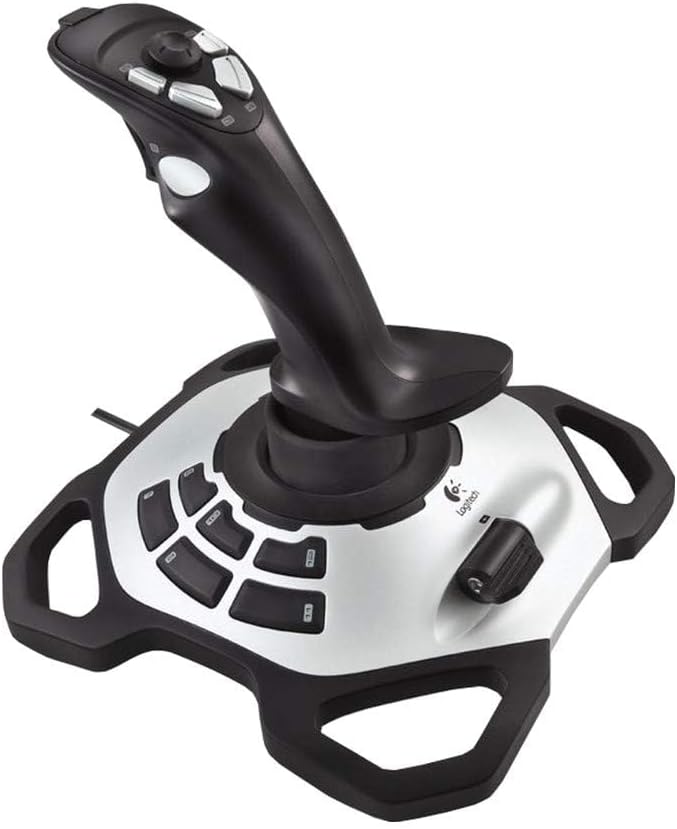
The Logitech Extreme 3D Pro is a precision flight stick designed for accurate axis control. Rated at 4.2, it offers a dedicated throttle and ergonomic design that supports long gaming sessions. It is a reliable choice for flight simulation enthusiasts.
We may earn a commission when you buy through this link, at no additional cost to you.
This device features a comfortable grip that minimizes hand strain during extended play. The throttle is well integrated to provide smooth control over speed and altitude. Its standard USB connection makes setup straightforward for most users.
While it lacks some of the advanced programmability found in premium models, it excels in basic precision and comfort. It does not come with extensive software customization options. These limitations are acceptable given its focus on straightforward performance.
Best for users seeking a reliable flight stick without unnecessary complexity, this unit offers excellent ergonomics. It is suitable for general flight games where accurate control is key. For a balanced performance and design, the Extreme 3D Pro is a strong choice.
The comfortable grip reduces strain during extended flight sessions.
Precision engineering ensures smooth and reliable movement.
We may earn a commission when you buy through this link, at no additional cost to you.
The VOYEE PC Controller offers an enhanced gaming experience with upgraded trigger buttons and sensitive joysticks. With a 4.3 rating, it is known for responsive controls and vibration feedback. Its ergonomic design ensures comfort during long gaming sessions.
We may earn a commission when you buy through this link, at no additional cost to you.
This controller supports wide compatibility with Windows and Xbox 360 systems. The rumble control adds automatic vibration feedback to enhance immersion. Its 7.2ft cord allows for flexible setup options across different desks.
It is noted as not being ideal for FPS games but works well for other genres. The basic functionality may not suit users needing advanced features or programmability. These constraints are balanced by its affordability and responsive design.
Best for casual gamers needing a reliable wired controller, this unit delivers consistent performance. It fits well for general gameplay requiring tactile feedback. For those wanting a simple plug and play option, VOYEE is a dependable choice.
Upgraded trigger buttons respond quickly to player commands.
Rumble feedback matches game events for enhanced immersion.
We may earn a commission when you buy through this link, at no additional cost to you.
The Thrustmaster SimTask FarmStick is specifically designed for Farming Simulator 25 on Xbox and PC. With a 4.3 rating, it offers precise 3-axis joystick control for operating tractors and loaders. Its Hall Effect sensors ensure long-term precision and reliability.
We may earn a commission when you buy through this link, at no additional cost to you.
This joystick features up to 33 programmable inputs to manage functions without a keyboard. The ambidextrous design allows for flexible setups with racing wheels or dual joysticks. It delivers a plug-and-play experience for serious farming simulator players.
The device is niche and designed primarily for farming and construction simulation. Users need a racing wheel to fully utilize its capabilities in certain setups. These constraints are acceptable given its specialized purpose and high-quality control.
Ideal for dedicated farming sim enthusiasts, this unit provides lifelike control over heavy machinery. It suits those looking to replicate real-world operations accurately. For specialized simulation play, the FarmStick is a highly effective tool.
Designed specifically for Farming Simulator 25 gameplay.
Hall Effect sensors prevent drift and wear over time.
We may earn a commission when you buy through this link, at no additional cost to you.
The Logitech G X56 H.O.T.A.S delivers military-grade space and flight sim precision for serious pilots. With a 4.0 rating, it offers over 189 programmable controls to customize every function. Its RGB lighting and spring system provide tactile and visual immersion.
We may earn a commission when you buy through this link, at no additional cost to you.
This controller features new mini analog stick control surfaces for precise pitch, roll, and yaw adjustments. The fully featured HOTAS includes accurate 16-bit axes and hall-effect sensors. Adjustable stick force via the 4-spring system allows for customized resistance.
The high price and large footprint may not suit casual gamers or those with limited desk space. However, its level of control and detail is unmatched in the consumer market. These trade-offs are acceptable for dedicated simulation enthusiasts.
Best for combat pilot enthusiasts and VR users, this unit offers the highest level of detail. It suits those demanding accurate control and customization. For a premium and complete flight simulator setup, the X56 is the top choice.
The 4-spring system allows users to adjust stick force.
RGB backlighting matches gaming rig aesthetics for visual consistency.
We may earn a commission when you buy through this link, at no additional cost to you.
The Thrustmaster T.16000M FCS offers a precision level that remains consistent over time thanks to H.E.A.R.T technology. Rated at 4.4, it features 16 action buttons and an ambidextrous design. Its reliable control and detailed mapping make it a top contender.
We may earn a commission when you buy through this link, at no additional cost to you.
This joystick includes 16 action buttons with braille-style physical identification for easy access. The software allows users to load specific mapping profiles for each game. Its removable components allow perfect tailoring for left or right-handed use.
The T.A.R.G.E.T software may have a learning curve for those unfamiliar with mapping tools. The design focuses on stick precision and does not include a complex throttle unit. Still, its accuracy and adaptability are highly valued in the simulation community.
Ideal for serious simulation pilots needing accurate and reliable control, this unit delivers consistent performance. It suits users willing to invest time in customizing controls. For precision and build quality, the T.16000M FCS is a recommended choice.
H.E.A.R.T technology ensures accuracy does not decrease over time.
Ambidextrous design allows customization for left or right-handed use.
We may earn a commission when you buy through this link, at no additional cost to you.
Selecting the right joystick requires understanding your specific needs and the games you play. This guide outlines key factors to consider when choosing a flight or gaming controller.
Ensure the joystick is compatible with your operating system such as Windows 11. Check if it supports other platforms like Xbox or Android if you switch between devices. Compatibility issues can lead to connectivity problems or non-functional buttons.
Always verify system requirements before purchasing to avoid frustration.
Look for joysticks made with durable materials that can withstand regular use. A solid base and robust stick mechanism prevent wear and tear over time. High-quality construction ensures the device lasts through many gaming sessions.
Choose models with sturdy grips and reinforced components for longevity.
The arrangement and number of buttons determine how intuitive the controller is. More programmable buttons allow for greater customization and control in complex games. Consider the placement to ensure you can reach all controls comfortably.
Select a layout that matches your preferred playing style and needs.
Comfort is essential for long gaming sessions to avoid hand fatigue. Ergonomic designs with proper grip angles and thumb rests support natural hand positions. Adjustable resistance and textured surfaces enhance control and comfort.
Prioritize models that offer adjustable features to fit your hand size.
Quality software allows you to map buttons and adjust sensitivity easily. Check if the manufacturer provides regular updates and profile support for different games. Good software enhances the functionality and customization of your joystick.
Ensure the software is user-friendly and supports your desired features.
Most joysticks use USB connections for simple plug-and-play functionality. Wireless options exist but may introduce latency which can affect precision in games. A stable wired connection is often preferred for serious simulation and competitive play.
Choose between wired or wireless based on your latency tolerance and setup.
Additional features like vibration feedback, RGB lighting, or throttle controls add value. Decide which features align with your gaming preferences and budget. Some models offer specialized functions for flight or driving simulations.
Focus on features that directly enhance your specific gaming experience.
Balance the cost against the features and build quality offered. Expensive models may not always provide better performance for casual gamers. Look for value that fits your budget while meeting essential functional needs.
Consider long-term value and durability when evaluating the price.
Begin by connecting the joystick to a USB port on your computer. Ensure your system recognizes the device and install any necessary drivers provided by the manufacturer. Test the controls in the game settings to confirm all inputs are registered correctly.
Calibrate the joystick through your system or game settings to ensure accurate response. Adjust sensitivity and dead zones to match your personal preference and gameplay style. Regular calibration helps maintain precision and reduces unintended inputs over time.
Keep the joystick clean by wiping it with a soft cloth after use. Store it in a dry place away from direct sunlight to prevent material degradation. Check connections periodically to ensure a stable and secure setup for consistent performance.
Most of the joysticks listed are compatible with Windows 11 as well as previous versions like Windows 10 and 7. Always check the product specifications for specific OS support before purchasing. Some models may require driver updates to ensure full functionality on newer systems.
Yes, many flight sticks can be used for general games if they support standard input modes. However, they are optimized for simulation games where precise axis control is beneficial. You may need to remap buttons for non-flight titles to get the best experience.
Some joysticks support plug-and-play operation without driver installation while others require specific software. Check the product details to determine if drivers are needed for full functionality. Using official drivers can unlock additional features like customization and calibration.
Xinput is a standard API for modern games on Windows that supports force feedback and vibration. Dinput is an older standard used for legacy games and devices. Ensuring your joystick supports the correct input mode helps with compatibility across different games.
Joystick drift can often be fixed by recalibrating the device through Windows settings. If software calibration does not help, check for physical obstructions or worn components. Some advanced models allow for hardware adjustments or replacement of internal parts.
While most flight sticks are wired to reduce latency, some wireless gaming controllers exist. Wireless options may introduce input lag which can be problematic for simulation games. For precision and reliability, wired joysticks are generally recommended for flight sims.
We have reviewed ten top joystick models that cater to various gaming needs and budgets. From affordable entry-level controllers to high-end flight sticks, there is an option for every user. Each product offers unique features that enhance control and immersion in games.
When choosing, prioritize compatibility with your system and the specific games you play. Consider ergonomic design and build quality to ensure comfort during long sessions. Balancing price with desired features will help you find the most suitable controller.
Please remember that product availability and specifications may change over time. Always check current listings and reviews before making a purchase decision. Our guide aims to provide a solid foundation for selecting the best joystick for your setup.