
ASRock B550M-ITX/AC
4.3Editor score
AM4 socket for Ryzen 5000
WiFi and Bluetooth included
Affordable compact design
Explore our expert guide comparing the top Itx Motherboards for Amd featuring AMD AM5 and AM4 platforms with DDR5 support and PCIe 5.0 connectivity.
Selecting the right motherboard is crucial for any AMD build, especially when space is limited. Mini ITX boards offer compact designs without sacrificing performance, making them ideal for small form factor rigs.
We compared ten top-rated Itx Motherboards for Amd based on power delivery, connectivity, and thermal management. Our analysis covers both AM5 and AM4 platforms to suit various processor generations and budget levels.
Each pick highlights key specifications, strengths, and ideal use cases to help you decide. Note that prices and availability fluctuate, so verify current details before purchasing your next component.
4.3Editor score
4.3Editor score

4.2Editor score
This side-by-side comparison highlights key specifications across all ten models. We evaluate socket type, power phases, storage options, and networking to help you find the perfect match for your build.


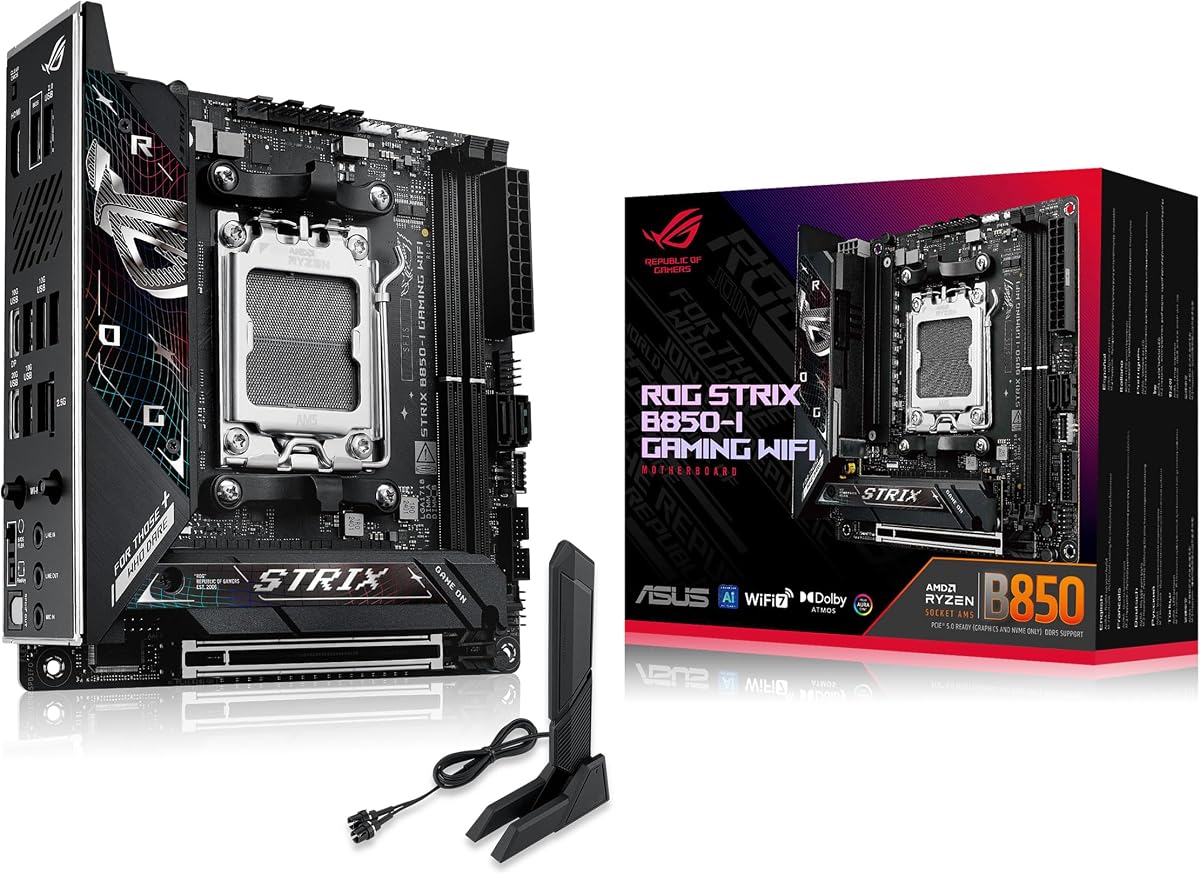
This motherboard stands out as the top choice for AMD AM5 builds in small form factors. With a 4.3 rating, it balances performance and features effectively.
We may earn a commission when you buy through this link, at no additional cost to you.
Its 10+2+1 power solution ensures stability even with Ryzen 9000 processors. AI tools like Overclocking and Networking make setup intuitive for users.
While expensive, the thermal design and connectivity justify the cost. The dual M.2 slots offer ample high-speed storage without adding bulk.
Ideal for gamers and creators wanting top-tier AMD power in a compact chassis. It delivers on promise without compromising on essential modern features.
ASUS AI Advisor and AI Overclocking simplify system tuning, ensuring optimal performance without complex manual adjustments for users.
With WiFi 7 and USB 20Gbps Type-C, this board supports the latest peripherals and network speeds for years to come.
We may earn a commission when you buy through this link, at no additional cost to you.
ASRock delivers a solid entry into the AM5 ecosystem with this Mini-ITX board. It receives a 4.1 rating from users valuing performance per dollar.
We may earn a commission when you buy through this link, at no additional cost to you.
The 8+2+1 power design handles Ryzen 9000 CPUs well, ensuring stable clocks during intensive tasks. PCIe 5.0 M.2 support is a major plus for storage.
Trade-offs include a simpler audio solution compared to premium boards. Yet, it remains one of the cheapest ways to build a high-end AM5 system.
Perfect for budget-conscious builders who refuse to compromise on CPU power. It balances cost and capability effectively for most small PC needs.
Supports DDR5 7200+ OC speeds, enabling high-bandwidth memory configurations that boost productivity and gaming performance significantly.
Premium Dr.MOS components ensure reliable power delivery, maintaining stability even under sustained workloads with high-core-count Ryzen CPUs.
We may earn a commission when you buy through this link, at no additional cost to you.
This X870 model represents the pinnacle of AMD Mini-ITX technology. With a 4.2 rating, it targets enthusiasts seeking maximum performance and connectivity.
We may earn a commission when you buy through this link, at no additional cost to you.
The 110A per stage power design handles any Ryzen CPU effortlessly. Dynamic OC Switcher allows automatic tuning based on workload for better efficiency.
USB4 support adds significant value for creators needing fast external storage. However, the high cost limits it to serious hobbyists with deep pockets.
Recommended for builders needing every possible feature in a compact form. It sets the standard for what an AMD flagship motherboard should be.
USB4 ports enable blistering data transfer rates and daisy-chaining capabilities, essential for high-end external GPUs and storage arrays.
Core Flex and Dynamic OC Switcher work together to optimize CPU performance automatically, balancing speed and temperature in real time.
We may earn a commission when you buy through this link, at no additional cost to you.
MSI offers a strong contender for AM5 users with exceptional thermal performance. Its 4.4 rating reflects robust build quality and cooling capabilities.
We may earn a commission when you buy through this link, at no additional cost to you.
The 90A SPS VRM and FROZR Guard keep temperatures low under load. DDR5 memory support extends to 8200+ MT/s, ideal for memory tuning enthusiasts.
While it lacks some rear USB convenience, the internal features compensate well. The WiFi 7 and 5G LAN ensure networking stays ahead of the curve.
Great for those prioritizing cooling and memory speed over port count. It provides a premium experience for those who push their systems to the limit.
Extended Heatsink and Combo-fan headers ensure optimal airflow, preventing thermal throttling even in tightly packed Mini-ITX cases.
DDR5 Memory Boost technology enables extreme overclocking speeds, unlocking extra bandwidth for demanding professional applications and gaming.
We may earn a commission when you buy through this link, at no additional cost to you.
This board focuses on reliability and user-friendly assembly for AM5 builders. Though rated 3.6, the 5-year warranty adds significant peace of mind.
We may earn a commission when you buy through this link, at no additional cost to you.
The 8+2+1 phase design provides steady power for most Ryzen chips. EZ-Latch mechanisms simplify installing RAM and GPU, which is helpful in tight spaces.
WiFi 7 is a nice addition for future-proofing, but the features are more basic than others. It suits those prioritizing long-term reliability over bells and whistles.
Ideal for users who want a worry-free experience with good support. The warranty coverage stands out as a major selling point in this category.
EZ-Latch clips on RAM and PCIe slots make installation and removal much easier, reducing the risk of damage during assembly.
With a 5-year warranty and robust thermal guards, this board is built to last, offering security for your investment.
We may earn a commission when you buy through this link, at no additional cost to you.
The ICE edition offers a striking white aesthetic alongside strong performance for AM5. It holds a 3.9 rating from users impressed by its design and features.
We may earn a commission when you buy through this link, at no additional cost to you.
The 110A power stage supports high-end CPUs without strain. Front and rear USB-C connectivity adds modern convenience for peripherals and mobile devices.
While rated lower than others, the EZ-Debug LEDs help pinpoint issues quickly during setup. The warranty further adds value for those seeking assurance.
Perfect for builders wanting a clean, white-themed PC without sacrificing power. It balances looks and function well for modern compact system builds.
The all-white PCB and heatsinks allow for cohesive aesthetic builds, matching cases and components for a premium visual appeal.
EZ-Debug LEDs provide clear status feedback, helping users identify boot or installation issues quickly without external tools.
We may earn a commission when you buy through this link, at no additional cost to you.
For budget builders sticking to the AM4 platform, this board is hard to beat. Its 4.3 rating shows strong satisfaction among cost-conscious users.
We may earn a commission when you buy through this link, at no additional cost to you.
The WiFi and Bluetooth integration saves extra costs on adapters. It supports Ryzen 5000 series well, offering great value for small gaming PCs.
DDR4 RAM is cheaper than DDR5, further lowering total system cost. However, you won't get PCIe 4.0 speeds for graphics cards or storage.
Ideal for entry-level builds or those upgrading existing AM4 systems. It provides essential features without extra cost for those on tight budgets.
Priced aggressively to fit low budgets, this board delivers solid performance for the cost, making AMD builds accessible to everyone.
Full support for Ryzen 5000 series ensures compatibility with powerful CPUs, extending the life of your existing AM4 investment.
We may earn a commission when you buy through this link, at no additional cost to you.
This board brings premium features to the AM4 platform with strong cooling. With a 4.3 rating, it appeals to users wanting reliability for Ryzen 5000.
We may earn a commission when you buy through this link, at no additional cost to you.
Q-Flash Plus allows BIOS updates without a CPU installed, a handy safety feature. The integrated I/O shield speeds up assembly significantly during builds.
It supports PCIe 4.0 M.2 drives, offering better storage speeds than B520 models. RGB Fusion adds customizable lighting for those who want aesthetics.
Recommended for AM4 users needing modern connectivity and better thermals. It bridges the gap between budget and high-end performance effectively.
Q-Flash Plus lets you update BIOS with just a USB drive and power, preventing issues when upgrading to newer Ryzen CPUs.
Extended VRM heatsinks and aluminum backplates dissipate heat efficiently, keeping the system stable under continuous gaming sessions.
We may earn a commission when you buy through this link, at no additional cost to you.
For the most basic build, this board covers essentials at a very low cost. Its 4.3 rating indicates users are satisfied with its simple functionality.
We may earn a commission when you buy through this link, at no additional cost to you.
It supports Ryzen 3000 and 4000 series with WiFi included. The design focuses purely on getting a system running without extra bells or whistles.
Overclocking is limited due to the A520 chipset, but stable for stock settings. It serves well for office PCs or basic home media centers.
Best for those who need a working Mini-ITX board on a strict budget. It does the job well where advanced features are not required.
This board strips away non-essentials to focus on core functions, keeping costs minimal while maintaining reliable daily performance.
Basic HDMI and DisplayPort outputs ensure monitor compatibility, while internal headers handle essential peripherals without clutter.
We may earn a commission when you buy through this link, at no additional cost to you.
This model tops the budget list with a 4.4 rating, appealing to users needing reliable basic connectivity. It is ideal for straightforward office or home builds.
We may earn a commission when you buy through this link, at no additional cost to you.
Q-Flash Plus ensures easy BIOS updates without extra steps. The 6-phase PWM provides steady power for standard Ryzen chips without thermal issues.
While speeds are capped at PCIe 3.0, it handles most common storage and display needs well. Three display outputs allow flexible monitor setups for productivity.
Best for those seeking simple Gigabyte reliability for AM4 systems. It delivers essential features with a strong reputation for consistent performance.
Direct 6 phase digital PWM with 55A DrMOS ensures stable power delivery, supporting steady performance for standard workloads.
Three video outputs provide ample screen options for multi-monitor setups, making it suitable for productivity and content consumption tasks.
We may earn a commission when you buy through this link, at no additional cost to you.
Selecting the right Mini-ITX motherboard requires balancing performance, features, and physical constraints. This guide helps you navigate key factors.
The most critical factor is ensuring the motherboard socket matches your CPU. AMD AM5 supports Ryzen 9000/8000/7000 with DDR5, while AM4 supports Ryzen 5000/3000 with DDR4. Choosing the wrong socket makes the system unusable.
Check your current CPU or future upgrade plan. If planning to future-proof with DDR5, AM5 is the mandatory choice. For existing AM4 builds, stick to compatible boards.
Mini-ITX boards have limited space for VRM cooling. Look for phase counts like 8+2+1 or higher if using Ryzen 9000 series to prevent throttling. High-end boards use premium MOSFETs for efficiency.
For high-core CPUs, a robust VRM is non-negotiable. Lower phase counts work for budget chips but struggle with sustained loads on premium Ryzen processors.
Since Mini-ITX lacks rear expansion, onboard ports matter. WiFi 7 is becoming standard for top picks, while WiFi 6E suffices for most. 2.5G LAN is preferred over 1G.
USB Type-C support, especially 20Gbps, is vital for modern peripherals. Ensure the board offers enough rear USB ports for your devices without relying on hubs.
Storage on Mini-ITX is usually limited to M.2 slots. Look for PCIe 5.0 support if you plan to use the fastest NVMe drives. Dual slots allow caching without adding drives.
PCIe 4.0 M.2 slots are still great value for most users. If you need SATA ports, verify availability, though many compact cases prefer M.2 only.
Heat is a major concern in compact cases. Heatsinks with thermal pads on VRMs and M.2 slots are crucial. Boards with I/O covers often dissipate heat better.
A well-designed thermal system ensures longevity and performance stability. Avoid models with minimal passive cooling if running high-performance CPUs.
Most boards use Realtek ALC897 or similar codecs. While adequate for gaming, audiophiles should consider external DACs as onboard audio is rarely audiophile-grade.
Standard HD audio is sufficient for casual listening and gaming. If immersive sound is critical, ensure the board supports 7.1 surround for better immersion.
BIOS Flashback allows updating without a CPU, a lifesaver for compatibility issues. AI tools like ASUS AI Overclocking simplify tuning for beginners.
User-friendly BIOS interfaces help navigate settings easily. Features like Dynamic OC Switcher provide automatic adjustments, reducing the need for manual tweaking.
Some brands offer 5-year warranties like Gigabyte, adding peace of mind. Amazon communication channels and direct support help resolve hardware issues faster.
Check manufacturer policies for warranty validity. Good support ensures that if something goes wrong, you get assistance without significant delays.
Always ground yourself before handling the motherboard to prevent static discharge. Install it gently into the case, ensuring standoffs align perfectly with screw holes.
Keep firmware updated via the manufacturer's website. Use tools like Q-Flash or ASUS EZ Flash for safe updates to ensure CPU compatibility.
Ensure case fans provide adequate airflow over VRMs. Clean dust filters regularly to maintain thermal efficiency and prevent overheating.
No, AM5 motherboards only support DDR5 memory. You must purchase new DDR5 kits when building with Ryzen 9000 or 7000 series processors.
Yes, but thermal limits are stricter. High-end boards like ROG Strix offer better cooling and AI tools for stable overclocking than budget models.
WiFi 6E offers sufficient speed and latency for gaming and streaming. Only heavy bandwidth users need the extra range of WiFi 7.
Most Mini-ITX boards offer 2 M.2 slots. Some top picks add PCIe 5.0 support for the fastest storage speeds without extra adapters.
Ryzen 7000/9000 CPUs often lack graphics. You will need a dedicated GPU unless you use specific APUs with integrated video output.
Q-Flash Plus lets you update BIOS using a USB drive and power, no CPU required. This prevents issues when upgrading to newer CPU generations.
Not all brands offer it. Gigabyte and some models provide 5 years, adding significant value compared to the standard 3-year coverage.
The ASRock B650I Lightning WiFi offers excellent value with essential AM5 features. It provides PCIe 5.0 without the premium price tag.
We highlighted ten excellent Itx Motherboards for Amd, from budget AM4 to flagship AM5. Each offers unique strengths depending on your specific build needs.
Prioritize power delivery and connectivity. If you plan to use Ryzen 9000, ensure you pick a board with strong VRM and modern networking features.
Prices change frequently, so verify current details before purchasing. Choose the board that best fits your budget and performance goals today.