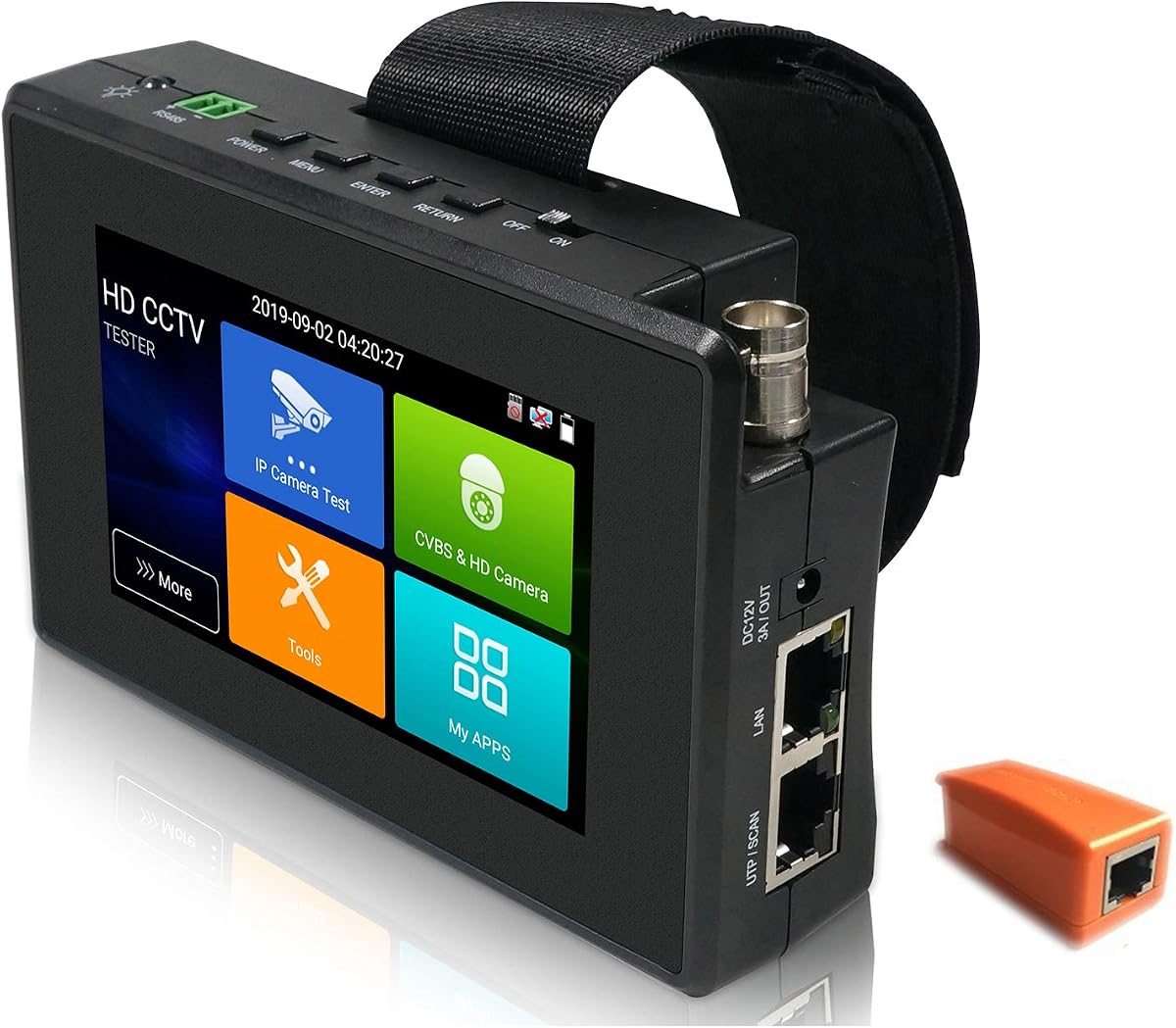
EVERSECU 5 in 1 CCTV Tester
4.4Editor score
Supports multiple camera types
4-inch touchscreen display
Integrated PoE power output
This guide compares the top IP and CCTV Camera Tester models for 2026, evaluating PoE output, screen quality, and network tools to help you choose the right
Selecting the right IP and CCTV Camera Tester is essential for security installers and network technicians. These devices streamline camera setup, network diagnostics, and power management on site. A good tester combines high-resolution display, robust PoE capabilities, and comprehensive network tools for efficiency.
We evaluated ten leading models based on screen resolution, power output, cable testing features, and overall usability. Our comparison highlights key differences in fiber support, analog compatibility, and software flexibility. This list covers options ranging from budget-friendly units to professional-grade equipment.
Each pick details specific strengths, weaknesses, and ideal use cases for different project needs. Prices and availability can change frequently, so verify current details before purchasing. We aim to provide clear insights to help you invest in the right tool for your workflow.
4.4Editor score

4.9Editor score

4.5Editor score
The following table provides a side-by-side overview of key specifications across all ten models. This helps you quickly identify differences in screen size, power output, and specific testing capabilities like fiber optics or TDR functions.


This Rsrteng model stands out with its nearly perfect rating and robust feature set for modern installations. It balances high power output with a sharp display, making it suitable for both IP and analog projects.
We may earn a commission when you buy through this link, at no additional cost to you.
The 90W PoE++ capability allows you to power demanding PTZ cameras directly from the unit. Dual gigabit ports and SFP support ensure compatibility with high-speed networks and fiber backbones.
While it carries a higher price point than entry-level tools, the included fiber module slot and Android flexibility justify the cost. The screen brightness is excellent for outdoor daylight work.
Ideal for professional installers needing one device to handle power, network diagnostics, and video verification. It simplifies workflows by reducing the need for multiple testers on site.
The 90W PoE output and SFP slot handle high-end PTZ and fiber links efficiently without extra hardware.
The 8-inch screen provides clear visibility for configuration menus and live video feeds in various lighting.
We may earn a commission when you buy through this link, at no additional cost to you.
This EVERSECU tester offers excellent entry-level functionality at a very accessible price. It covers all major camera formats including 4K IP and analog HD types for general residential work.
We may earn a commission when you buy through this link, at no additional cost to you.
The screen rotation feature is a unique ergonomic benefit for working at awkward angles without twisting your wrists. Its compact size makes it easy to carry in a tool bag.
While the PoE output is lower than premium models, it suffices for most standard cameras. The 4-inch display is clear enough for configuration but lacks the brightness of larger screens.
Best suited for beginners or residential technicians who need basic testing without paying for advanced fiber or high-wattage features. It delivers reliable performance for the cost.
Screen rotation allows comfortable viewing during cable pulls or overhead installations where device angle matters.
Supports 4K IP and major analog formats ensuring broad utility across mixed security systems.
We may earn a commission when you buy through this link, at no additional cost to you.
This NOYAFA model brings fiber optic testing capabilities directly to your handheld unit. The optical power meter and visual fault locator eliminate the need for separate tools on telecom or hybrid sites.
We may earn a commission when you buy through this link, at no additional cost to you.
The 8K support ensures future-proofing for next generation cameras. The interface handles multiple protocols seamlessly, making it versatile for enterprise deployments.
While expensive, the integration of fiber tools saves money compared to buying them separately. The weight is manageable considering the added optical modules and larger battery.
Perfect for enterprise installers dealing with fiber backbones and high-resolution cameras. It streamlines complex jobs by consolidating video, power, and fiber testing into one device.
Optical power meter and VFL allow quick diagnostics without carrying extra handheld testers to the site.
True 8K decoding ensures compatibility with emerging high-resolution camera technologies today and tomorrow.
We may earn a commission when you buy through this link, at no additional cost to you.
This Pro model runs Android 11 allowing you to install custom apps beyond the factory tools. This flexibility is ideal for specialized workflows or proprietary network diagnostics.
We may earn a commission when you buy through this link, at no additional cost to you.
It includes dual Ethernet ports and HDMI output, which helps when bridging networks or recording directly to external storage. The 90W PoE output supports high power needs.
The interface is customizable but may require some setup time. The weight is a factor if you work alone on ladders, but the connectivity options compensate.
Best for technical integrators who want a tablet-like flexibility in a hardened tester. It offers robust networking features that go beyond standard video verification tasks.
Android 11 allows installation of third-party apps for expanded network analysis and workflow automation.
Dual Ethernet and HDMI output provide versatile connection choices for complex network topologies.
We may earn a commission when you buy through this link, at no additional cost to you.
The WANLUTECH E88 delivers a balanced set of features for diverse projects. Its SFP support and TDR testing make it suitable for infrastructure work.
We may earn a commission when you buy through this link, at no additional cost to you.
The 8-inch screen offers ample space for split-view testing and configuration. HDMI and VGA inputs allow you to test other monitors or equipment beyond cameras.
While powerful, the menu system may take a moment to master. Battery life is decent but depends on how long you run the high-power PoE.
Excellent for general installers who need fiber and cable testing without buying multiple devices. It simplifies site surveys with its robust diagnostics.
HDMI and VGA inputs allow testing of other video sources beyond standard camera feeds.
TDR testing identifies cable faults and lengths quickly to save time during troubleshooting.
We may earn a commission when you buy through this link, at no additional cost to you.
This tester focuses on delivering a smooth experience for analog cameras alongside IP. The 7-inch screen with high resolution provides clear viewing for CVBS feeds.
We may earn a commission when you buy through this link, at no additional cost to you.
Built-in WiFi helps connect to wireless cameras easily without extra dongles. The zoom feature helps verify focus and framing accurately before installation.
It lacks fiber support and has limited Ethernet speeds. However, for sites relying mostly on coax or local wireless, it performs admirably.
Recommended for technicians who still manage many legacy systems. It offers a simple interface that reduces setup time for standard cameras.
Video zoom allows precise focus adjustments without walking back to the monitor.
Built-in wireless capability simplifies testing of IP wireless cameras on the same network.
We may earn a commission when you buy through this link, at no additional cost to you.
This EVERSECU model includes video recording and a video level meter, useful for documentation and signal quality checks. The battery lasts long enough for a full day shift.
We may earn a commission when you buy through this link, at no additional cost to you.
The video level meter helps verify signal strength without extra gear. It supports 8K IP which is rare in this price range.
Ethernet speeds are limited but adequate for most tasks. The recording feature alone makes it valuable for proof of work.
Ideal for field technicians needing to document installations. It saves time by capturing clips directly on the device.
Video recording allows immediate capture of footage for client proof and troubleshooting logs.
Long battery life ensures continuous operation throughout full work shifts without charging.
We may earn a commission when you buy through this link, at no additional cost to you.
This smaller unit fits easily in a pocket and weighs little. The Auto HD app recognizes camera types instantly which speeds up testing.
We may earn a commission when you buy through this link, at no additional cost to you.
PoE output is sufficient for most cameras. The compact size is a major plus for tight spaces or roof work.
The small screen might be harder to read in bright sun. It lacks advanced fiber features but handles basics well.
Best for quick on-site checks or mobile technicians. Its portability makes it easy to keep handy at all times.
Compact size makes it easy to carry and use in difficult access areas.
Automatic camera type recognition reduces manual configuration time significantly.
We may earn a commission when you buy through this link, at no additional cost to you.
The Triplett brand is known for durable test tools. This unit offers straightforward testing with minimal learning curve.
We may earn a commission when you buy through this link, at no additional cost to you.
It supports major HD analog formats and basic IP. The built-in speed test helps verify network bandwidth at the camera point.
Power output is lower than high-end models which limits PTZ use. It is a reliable tool for standard installs.
Best for users who prioritize brand trust and simplicity. It handles basic tasks efficiently without unnecessary complexity.
Built-in speed test allows quick verification of network bandwidth availability at the camera.
Simple interface ensures quick setup even for those less experienced with network tools.
We may earn a commission when you buy through this link, at no additional cost to you.
This tool focuses heavily on documentation and reporting to justify costs. It generates professional reports with screenshots automatically.
We may earn a commission when you buy through this link, at no additional cost to you.
QuickIP simplifies camera setup making it easier for novices. It covers all common systems in one device.
While powerful, the high cost and mixed reviews suggest it may be niche. It lacks some advanced fiber options of competitors.
Best for contractors needing formal documentation for billing. It streamlines the paperwork side of security jobs effectively.
Professional reports include screenshots to verify installation quality and reduce disputes.
QuickIP feature reduces configuration time by mimicking analog setup simplicity.
We may earn a commission when you buy through this link, at no additional cost to you.
Selecting the right tester requires evaluating your specific project needs and technical requirements. This guide breaks down the key factors to consider before making a purchase.
Screen quality impacts how well you can view details and manage menus. Larger screens with higher resolution make verifying image clarity easier. For professional work, an 8-inch screen is often preferred over 4-inch models.
Prioritize high resolution if you work with HD cameras frequently. Brightness is also key for outdoor use.
Power over Ethernet capabilities allow you to test cameras without external adapters. Ensure the unit supports enough watts for your cameras. PTZ cameras often need higher wattage than standard units.
Look for PoE++ support if you plan to test high-power devices regularly.
Advanced testers include tools like ping, IP scans, and cable TDR. These save time when diagnosing connectivity issues. A good toolset reduces the need for separate network devices.
Choose a model with TDR if you frequently troubleshoot cable faults in the field.
Fiber optic modules are essential for enterprise or long-distance installs. Some units include slots for SFP modules directly. This integration avoids carrying a separate fiber tester.
If you work with fiber backbones, ensure the unit has SFP ports included.
Modern testers must handle IP, AHD, TVI, and CVI formats. Auto-recognition features help identify the camera type automatically. Without this you may spend too much time switching modes.
Verify that the device supports all the analog HD types you encounter on job sites.
For field work, weight matters when climbing ladders or walking long distances. Compact units are easier to carry but may sacrifice screen size. Balance features with how much you can carry daily.
Check dimensions and weight if you work solo or for long shifts.
Battery capacity determines how long you can work without charging. Longer life means fewer interruptions during installs. Look for units with large batteries if you work all day.
Prioritize battery life if you need uninterrupted work for multiple projects per day.
Android-based units allow app updates and flexibility. This helps keep tools current as cameras evolve. Proprietary OS may be locked to specific functions.
Choose an open system if you need to install custom tools.
To begin, charge the device fully before first use. Connect your camera to the appropriate port either PoE or analog. Use the touch screen to select the correct mode.
For network testing, run a TDR test to check cable integrity. Use the ping tool to verify connectivity. Ensure your camera IP matches the tester's network segment.
Keep the screen clean with a soft cloth to avoid scratches. Store the device in a padded case when not in use. Regularly update firmware via USB or WiFi.
IP testers handle network data and PoE while analog testers focus on video signals. Modern hybrid units support both to cover all systems. Choosing a hybrid model ensures flexibility.
For standard residential work, fiber support is not usually needed. If you work on enterprise sites with fiber, an SFP slot becomes essential. Buy based on your typical site types.
Standard cameras often need 10 to 20 watts. PTZ cameras can require more to 90 watts. Choose a unit matching your highest draw device.
Yes these units function independently. WiFi helps access online tools but is not required for basic testing. All core functions work offline.
Larger screens make configuration easier and image verification clearer. Small screens can strain eyes during long tasks. A bigger display improves efficiency on site.
Yes most models are designed for professional environments. They withstand drops and dust better than consumer gear. A good case adds extra protection during transport.
The Rsrteng and NOYAFA models lead in features with fiber and high power. For budget options, the EVERSECU 5 in 1 provides great value. Choose based on your specific needs.
Prioritize screen quality and PoE power if you work with high-end equipment. Fiber support is critical for enterprise installations. Ensure the device fits your typical workflow.
Check current availability and prices before ordering. These tools are investments that can save time on every job. Select wisely to enhance your security work efficiency.