
SABRENT 74 in 1 Internal Reader
4.0Editor score
Supports 74 card types
Includes extra USB port
Affordable price point
Discover the top internal media card reader options for your PC in October 2026. We compare speed, compatibility, and build quality to help you choose the
Choosing the right internal media card reader can significantly enhance your workflow when transferring files from cameras, drones, and mobile devices. These devices slot directly into your desktop computer, offering convenience and speed that external readers often cannot match for professional users.
We evaluated ten top-rated internal card readers based on compatibility, transfer speeds, build quality, and ease of installation. Our analysis covers models ranging from budget-friendly options to professional-grade hardware designed for heavy daily use in creative studios and IT environments.
Each pick highlights specific strengths like USB 3.0 support, multi-slot access, or wide format compatibility. Prices and availability change frequently, so always verify current listings before purchasing to ensure you get the best value for your specific technical requirements.
4.0Editor score

4.5Editor score

5.0Editor score
This comparison table breaks down the key specifications of all ten internal media card readers to help you quickly identify which model fits your specific needs.


The StarTech Internal Card Reader USB 3.0 stands out as a top choice for professionals needing reliable and fast data transfer. With a strong rating of 4.5 stars, it is recognized for its robust build and wide compatibility with various memory card formats.
We may earn a commission when you buy through this link, at no additional cost to you.
This model supports simultaneous access to four different card slots, which is a rare feature that significantly speeds up workflows for photographers and videographers. The USB 3.0 connection ensures high-speed transfers, while the front-facing USB port adds extra convenience for connecting other peripherals.
While the price point is higher than basic models, the durability and TAA compliance make it worth the investment for business environments. Users should note that installation requires an internal 20-pin motherboard header, which may be challenging for those unfamiliar with PC hardware.
Overall, this reader is ideal for IT professionals and creative users who prioritize speed and reliability over budget. It offers a professional-grade solution that integrates seamlessly into desktop workstations for efficient content management.
Copying files between different cards simultaneously saves significant time during editing sessions.
High bandwidth ensures large video files transfer quickly without bottlenecks during peak usage.
We may earn a commission when you buy through this link, at no additional cost to you.
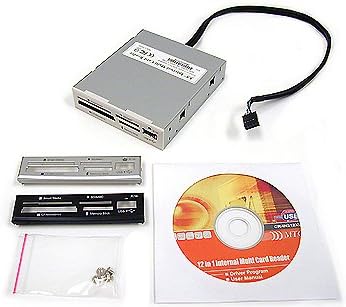
For users seeking maximum compatibility without breaking the bank, the SABRENT 74 in 1 Internal Reader is an excellent option. It supports an impressive array of memory card types, making it a universal solution for households with diverse devices.
We may earn a commission when you buy through this link, at no additional cost to you.
This reader fits into a standard 3.5-inch drive bay and includes an additional USB 2.0 port for connecting other devices. While it does not offer the high speeds of USB 3.0, it handles everyday transfers of photos and documents efficiently enough for most casual users.
The build quality is functional rather than premium, with a light plastic casing that may not withstand heavy daily use. However, at this price point, it offers tremendous value for anyone who needs to read old or rare card formats regularly.
This model is best suited for home users or small offices that need a versatile and affordable solution. It proves that you do not need to spend much to get reliable access to a wide range of memory media.
Supports formats like M2 XD and older cards that modern readers often ignore completely.
The built-in USB port adds useful flexibility for connecting flash drives without dongles.
We may earn a commission when you buy through this link, at no additional cost to you.
Achieving a perfect 5-star rating, the Vantec Link USB 3.0 Multi-LUN reader is a high-performance choice for demanding users. It supports a vast array of memory card types and capacities, ensuring compatibility with the latest and legacy storage media.
We may earn a commission when you buy through this link, at no additional cost to you.
This reader is designed for professionals who need stable and fast data transfer without interruptions. Its support for high-capacity cards up to 2TB for SDXC makes it future-proof for large video projects and extensive photo archives.
While it lacks the physical multiple slots of some competitors, its internal connection ensures a direct link to the motherboard for optimal speed. Users should ensure their system has the necessary 20-pin USB header for installation.
For those who value reliability and high-quality performance over extra bells and whistles, this reader is a top recommendation. It delivers consistent results that make it a trusted choice for serious creators and IT admins.
Handles large SDXC cards up to 2TB seamlessly for modern video recording needs.
USB 3.0 speeds ensure efficient copying of large files without frequent disconnects.
We may earn a commission when you buy through this link, at no additional cost to you.
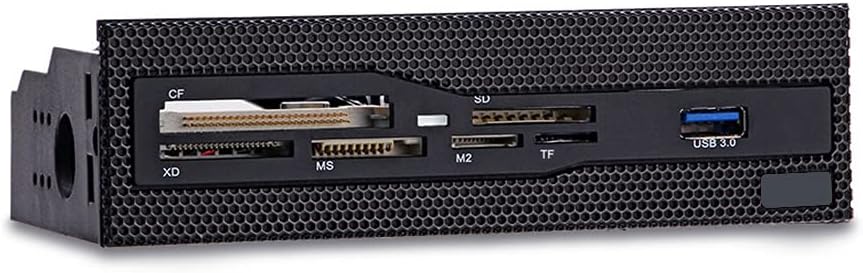
Designed for cases with 5.25-inch bays, this internal card reader offers a sleek front panel solution with USB 3.0 speeds. Its grid panel design integrates well with modern mesh cases, providing both aesthetics and functionality in a compact unit.
We may earn a commission when you buy through this link, at no additional cost to you.
With six card slots supporting popular formats like CF XD and TF, it provides easy access to various media types. The copper-plated slots are designed to ensure stable transmission, reducing the risk of connection errors during active transfers.
Installation is straightforward, and the design fits neatly into the desktop for easy access. Users with smaller cases lacking 5.25-inch bays will need to consider alternative options that fit 3.5-inch spaces instead.
This model is a great choice for PC builders who want a modern look and fast transfer speeds in one package. It balances style and performance well for users who frequently access memory cards from the front of their desktop.
Integrates seamlessly with mesh front panels for a clean and modern build appearance.
USB 3.0 interface ensures quick transfer speeds for large media files efficiently.
We may earn a commission when you buy through this link, at no additional cost to you.
This media dashboard combines a card reader with a full USB hub and audio jacks, making it a comprehensive front-panel solution. It supports high-speed USB 3.0 transfers and includes eSATA ports for users who need additional storage connectivity.
We may earn a commission when you buy through this link, at no additional cost to you.
Ideal for custom PC builds, it provides a clean interface for speakers and microphones while handling various memory cards. The all-in-one design reduces cable clutter at the back of your case by moving essential ports to the front.
While the feature set is extensive, the installation involves multiple cables and connectors which may complicate the process. Users should be comfortable with PC assembly to fully benefit from this premium front panel unit.
Tech enthusiasts looking for a complete front-panel upgrade will appreciate the versatility this dashboard offers. It is particularly useful for those building media workstations where audio and video access are frequent needs.
Front-facing speakers and mic jacks save the hassle of reaching behind the PC case.
Combines USB hubs with card reader to maximize front panel utility in one unit.
We may earn a commission when you buy through this link, at no additional cost to you.
The TCC-QL5E Dashboard offers a robust front-panel solution with six USB ports and dedicated SATA connections for advanced users. It supports five-in-one card reading, covering SD, CF, MS, TF, and M2 formats for broad compatibility.
We may earn a commission when you buy through this link, at no additional cost to you.
Front-facing audio jacks and high-speed USB 3.0 ports make it a practical addition to any desktop setup. The LED indicators provide clear status updates for power and hard disk activity, ensuring you stay informed during transfers.
While it offers many features, the installation involves multiple cables which may be daunting for beginners. Users should ensure their case has a 5.25-inch bay to accommodate this larger front panel unit.
This dashboard is a solid choice for those needing extensive connectivity options on their PC front. It balances utility and performance, making it a versatile tool for both work and entertainment setups.
Provides internal SATA ports for connecting additional storage drives directly to the front.
Six USB ports allow for connecting many peripherals without needing extra hubs.
We may earn a commission when you buy through this link, at no additional cost to you.
Sony is known for quality, and this internal card reader continues that tradition with stable performance and wide compatibility. It supports 17 different card types and comes with dual faceplates to match your PC aesthetic.
We may earn a commission when you buy through this link, at no additional cost to you.
Drive letter recognition software helps the system identify cards easily without manual configuration. This feature simplifies the process of moving files for users who are not tech-savvy.
The unit is primarily designed for older operating systems like XP and Vista, so modern users may need drivers. However, it remains a reliable choice for those maintaining legacy systems or needing a simple plug-and-play solution.
For users valuing brand reliability and ease of use, this Sony reader is a dependable option. It offers a straightforward way to access memory cards without complex setups or software issues.
Black and Ivory options allow you to match the front bezel of your desktop case.
Software helps assign drive letters automatically for smoother file access.
We may earn a commission when you buy through this link, at no additional cost to you.
This compact internal card reader is designed for users who need a simple and space-saving solution. With a 2.5-inch form factor, it fits into smaller drive bays while maintaining reliable performance for everyday file transfers.
We may earn a commission when you buy through this link, at no additional cost to you.
It comes with multiple bezel options to blend in with your desktop setup. The high-quality construction ensures durability and consistent operation, making it a practical choice for home and office use.
While it does not support an extensive list of card formats, it covers the most common ones efficiently. Installation is straightforward, requiring standard power and data connections from the motherboard.
This model is a great pick for those seeking a no-fuss, compact solution for basic needs. It offers excellent value for its price, providing reliable access to common memory cards without cluttering your workspace.
The compact 2.5-inch size allows installation in smaller drive bays without hassle.
Black silver and white bezels help it match various PC case aesthetics.
We may earn a commission when you buy through this link, at no additional cost to you.
The Akasa AK-ICR-07 is designed for simplicity with dedicated ports for common memory cards so adapters are not needed. It features LED indicators to show power and data activity, providing visual feedback during transfers.
We may earn a commission when you buy through this link, at no additional cost to you.
This model supports high-capacity SDHC cards and fits into a standard 3.5-inch bay. The six-port layout allows simultaneous use of multiple card types, making it convenient for users who juggle different devices.
The build quality is solid, and the design integrates well into most desktop cases. While it costs more than basic readers, the convenience of dedicated slots and LEDs justifies the investment for daily users.
For those who prefer convenience over cost savings, this reader offers a user-friendly experience. It reduces the need for extra adapters and provides clear status updates for efficient workflow management.
Eliminates the need for separate adapters to read microSD or M2 cards easily.
LED lights confirm power and transfer status so you know when files are moving.
We may earn a commission when you buy through this link, at no additional cost to you.
This MTG reader supports an impressive 22-in-1 format range, making it a versatile option for users with various storage needs. The metal case provides durability and fits well into standard 3.5-inch drive bays.
We may earn a commission when you buy through this link, at no additional cost to you.
Hot swappable and plug-and-play capabilities ensure easy installation without restarts. It is bus-powered, so no external power supply is needed, simplifying the setup process for beginners.
The USB 2.0 interface is a limiting factor for speed but is sufficient for small transfers. Users should note that the speed is capped at 4.5 MB per second, which may be slow for large files.
Despite the speed limit, the broad compatibility and build quality make it a practical choice for general use. It is ideal for those needing support for niche card formats without spending much.
Sturdy metal construction ensures durability and better heat dissipation during use.
Connect or disconnect without restarting the system for a smoother workflow.
We may earn a commission when you buy through this link, at no additional cost to you.
Selecting the right internal media card reader involves understanding your specific needs regarding speed, compatibility, and installation complexity.
USB 3.0 interfaces offer faster transfer speeds compared to USB 2.0, which is critical for large video files. Always check the connector type on your motherboard before purchasing to ensure compatibility.
Choose USB 3.0 for better performance if your system supports it to avoid bottlenecks during large file transfers.
Different readers support different card formats. Ensure the model you choose supports SD, CF, and other specific types your devices use.
Review the supported formats list carefully to avoid buying a reader that cannot read your specific memory card.
Internal readers typically fit 3.5-inch or 5.25-inch bays. Confirm your case has the correct slot before buying to avoid return hassles.
Measure your available drive bays and match them with the product specifications for a perfect fit.
Metal cases often provide better durability and heat dissipation than plastic ones. This is vital for frequent use in professional environments.
Prioritize metal construction if you expect heavy usage to ensure longevity and reliability.
Some models require internal headers like USB 20-pin or power connectors. Evaluate your comfort level with PC assembly before buying.
If you are not comfortable with internal wiring, consider models with simpler plug-and-play capabilities.
Warranties range from one to two years. A longer warranty often indicates better quality and manufacturer confidence.
Balance the upfront cost with warranty coverage to get the best long-term value.
First, ensure your computer is powered off and unplugged before opening the case. This prevents static damage to internal components during installation.
Next, connect the power and data headers securely to the motherboard. Double-check that the orientation matches the manufacturer instructions for safe operation.
After installation, close the case and power on the system. Insert memory cards gently into the slots and wait for the OS to recognize them before transferring files.
Most modern operating systems support card readers natively without drivers. However, older systems or specific brands may require additional software for full functionality.
Yes, if the reader includes an external USB port on the front panel. Internal slots are designed for direct insertion of memory cards.
USB 3.0 offers significantly higher transfer speeds than USB 2.0. This makes it ideal for moving large video files efficiently.
Ensure the card is properly inserted and the reader is powered on. Check your BIOS settings or restart the system to refresh the hardware detection.
Most modern internal readers are hot swappable, allowing you to connect and disconnect without restarting. Always check the product specs for confirmation.
Use a can of compressed air to gently blow out dust from the slots. Avoid using liquids or sharp objects that could damage internal contacts.
We have reviewed ten top internal media card readers, highlighting the StarTech for performance, SABRENT for budget, and Vantec for premium needs.
Prioritize interface speed and compatibility based on your workflow to ensure efficient data management and reliable performance in the long run.
Always check current prices and compatibility with your specific case before finalizing your purchase to get the best value for your system.