
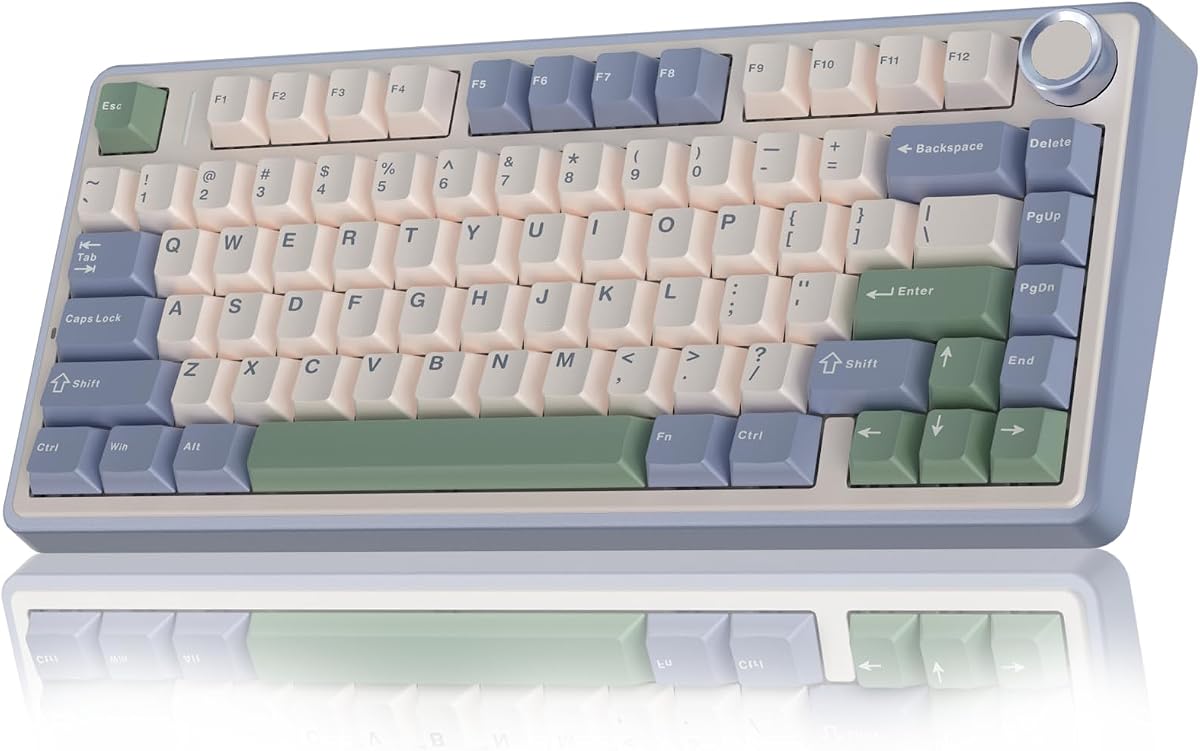
Womier DK75
4.5Editor score
Triple-mode connectivity
Quiet membrane switches
PBT keycaps durable
This guide compares the top ten green backlit gaming keyboards for performance and features to help you find the perfect match for your setup.
Finding the right green backlit gaming keyboard can transform your desktop setup into a vibrant and efficient workspace. These keyboards offer unique aesthetics combined with the functionality needed for both casual typing and intense gaming sessions.
We have carefully evaluated ten top models based on connectivity, build quality, and customization options. Our analysis ensures you receive accurate information about each keyboard's strengths and how they fit into different user scenarios.
Each pick highlights specific features like wireless connectivity, RGB lighting, and switch types. Please note that product availability and details may vary so you should verify current options before making a final decision on your new device.
4.5Editor score
4.6Editor score
4.8Editor score
This section provides a side-by-side overview of all ten keyboards. You can quickly compare key specifications and features to see which model aligns best with your specific needs and preferences.


The AULA F75 stands out as a top choice for gamers seeking a versatile mechanical experience. With a strong rating and robust features, it offers a compelling mix of performance and aesthetics.
We may earn a commission when you buy through this link, at no additional cost to you.
This keyboard supports tri-mode connectivity allowing seamless switching between Bluetooth, wireless, and wired connections. The hot-swappable design lets you customize switches easily while the RGB backlighting enhances your gaming atmosphere significantly.
While the structure is advanced with sound dampening, some users might find the driver software requires time to master. The complexity ensures deep customization but may deter casual users seeking simplicity.
Ideal for enthusiasts who want control over their setup, this keyboard delivers a premium feel. It balances functionality with style making it a reliable partner for both work and play.
Enjoy the freedom to connect up to five devices simultaneously. Switch between modes effortlessly using shortcut keys or the side button for a smooth workflow across platforms.
The hot-swap base supports both three-pin and five-pin switches. This flexibility allows you to tailor the tactile feel and sound to your personal preference without soldering.
We may earn a commission when you buy through this link, at no additional cost to you.
The Womier DK75 offers an excellent entry point into wireless gaming keyboards. It combines a sleek design with practical features that appeal to budget-conscious users without sacrificing quality.
We may earn a commission when you buy through this link, at no additional cost to you.
Triple-mode connectivity ensures you can switch between devices smoothly. The membrane switches provide a quiet experience ideal for shared spaces while the RGB effects add a vibrant touch to your desk.
Since it uses membrane switches you cannot swap them later. This limits long-term customization but keeps the cost low. The PBT keycaps ensure durability despite the budget-friendly nature of the device.
For students or casual gamers, this keyboard delivers solid performance at a great value. Its ergonomic design and screen display add functionality that is often missing in this price range.
PBT keycaps resist oil and wear better than standard ABS. This ensures your keyboard stays looking fresh and feeling comfortable even after extended daily use over time.
The small screen shows battery status and connection details clearly. This feedback keeps you informed without needing to check software or guess when a charge is needed.
We may earn a commission when you buy through this link, at no additional cost to you.
This keyboard represents the pinnacle of customization and build quality. With a near-perfect rating, it appeals to users who prioritize performance and aesthetic refinement in their gaming peripherals.
We may earn a commission when you buy through this link, at no additional cost to you.
The gasket mount structure and extensive damping materials create a rich sound profile. VIA support allows for deep programming of macros and layers which is a dream for power users and developers.
The price point is significantly higher than average models. It is a significant investment that requires you to value high-end features like hot-swap capabilities and premium build materials over basic functionality.
Enthusiasts seeking the best possible typing experience will find this keyboard rewarding. It offers a balanced layout that saves space while keeping essential keys for productivity and gaming alike.
VIA compatibility gives you full control over every key and layer. You can create complex macros or change lighting to suit any environment or task instantly.
An 8000mAh battery ensures extended usage without constant charging. This endurance supports long gaming sessions or workdays without interrupting your flow or focus.
We may earn a commission when you buy through this link, at no additional cost to you.
The AULA S99 focuses on flexibility and macro functionality. It is a strong contender for users who need to manage multiple devices and require complex key combinations for productivity.
We may earn a commission when you buy through this link, at no additional cost to you.
Its rotary knob allows quick adjustments to volume and lighting. The programmable keys are a significant advantage for gamers and professionals alike who want to automate frequent tasks efficiently.
The retro design may not fit every modern setup. Additionally the lack of hot-swap limits future upgrades. However the foldable stand helps reduce wrist strain during long sessions.
Best for users who prioritize function over form, this keyboard provides a reliable experience. It balances classic aesthetics with modern connectivity to support a versatile workflow.
Record complex sequences and assign them to single keys. This capability helps you execute fast actions in games or automate repetitive tasks in productivity software easily.
Use the knob for media control or brightness adjustment. This multi-function approach saves space and streamlines your interaction with the keyboard controls directly.
We may earn a commission when you buy through this link, at no additional cost to you.
This model brings a unique color screen to the desktop. It combines mechanical functionality with visual customization that is rarely found in standard keyboards at this price point.
We may earn a commission when you buy through this link, at no additional cost to you.
The display allows you to show GIFs and connection details. Hot-swappable sockets let you experiment with different switches to find your preferred feel without permanent modification of the device.
Mac users are limited as the software is Windows-only. This might restrict functionality for those using Apple systems. The design is also quite specific with the Frog Green theme.
Ideal for streamers or visual enthusiasts, this keyboard adds personality to your desk. It offers a balance of utility and flair that enhances both work and gaming experiences.
Upload custom GIFs to the small screen. This feature allows you to personalize your desk setup with animations that reflect your mood or brand identity.
The gasket mount reduces typing noise and increases stability. This design choice enhances the overall feel making every keystroke feel more consistent and smooth.
We may earn a commission when you buy through this link, at no additional cost to you.
The Keymatic keyboard offers a functional layout with a screen display. It is a practical choice for those who need a number pad but want to save desk space with a compact design.
We may earn a commission when you buy through this link, at no additional cost to you.
Tri-mode connectivity ensures you stay connected to various devices. The quiet typing experience makes it suitable for offices or shared spaces where noise might be disruptive.
The membrane switches may not satisfy those seeking mechanical feedback. Additionally the durability is high but the tactile response is softer than standard mechanical switches.
Best for users who value quiet operation and compactness, this keyboard meets daily needs. It combines essential keys with modern connectivity for a balanced productivity tool.
A full number pad supports efficient data entry. This ensures you can handle spreadsheets or gaming macros without sacrificing the compact layout benefits.
Advanced membrane technology reduces noise levels significantly. This allows you to work or play late at night without disturbing others around you.
We may earn a commission when you buy through this link, at no additional cost to you.
This keyboard provides a classic full size experience with green aesthetics. It focuses on reliability and comfort making it a solid choice for long typing sessions and office use.
We may earn a commission when you buy through this link, at no additional cost to you.
The linear red switches offer smooth keystrokes without much resistance. Combined with full anti-ghosting, it ensures accurate input during intense gaming or complex data entry tasks.
The lack of wireless connectivity limits placement flexibility. Additionally the fixed switch type means you cannot customize the feel later. However the build quality supports long-term use.
Ideal for users who prefer simplicity and durability, this keyboard delivers consistent performance. It combines practical features with ergonomic comfort to support a comfortable workspace.
Full anti-ghosting ensures every key press is registered. This prevents missed commands during fast-paced gaming or when using multiple keys simultaneously for macros.
XDA profile keycaps offer a uniform surface across rows. This reduces finger fatigue by providing a larger touch area for your fingers to land on.
We may earn a commission when you buy through this link, at no additional cost to you.
The Nova75 combines mechanical performance with a smart display. It is designed to be a central hub for your desk offering both gaming capabilities and daily utility.
We may earn a commission when you buy through this link, at no additional cost to you.
The screen displays custom GIFs and system status. Hot-swap capabilities allow for easy switch changes. The gasket mount adds a premium feel and acoustic quality to every keystroke.
You need to download software to access custom screen images. This extra step might be inconvenient for some users. The specific color theme may also limit its appeal to some.
Best for those who want a modern interactive experience, this keyboard stands out. It merges aesthetic customization with solid mechanical performance for a versatile tool.
The TFT display provides quick visual feedback. You can monitor battery and connections without switching windows which streamlines your workflow.
This mounting style reduces sound and increases bounce. It makes typing feel more fluid and organic which is appealing to mechanical keyboard enthusiasts.
We may earn a commission when you buy through this link, at no additional cost to you.
This variant of the F75 series excels in build quality and sound. It is a reliable companion for those who value a premium typing experience with robust features.
We may earn a commission when you buy through this link, at no additional cost to you.
The gasket structure with five layers dampens noise effectively. You can program macros to streamline your workflow. The battery life ensures long usage without frequent interruptions.
Mac users are limited to basic functionality without drivers. The pre-lubed switches are great but you might not be able to customize them fully without additional effort.
For enthusiasts seeking a premium feel, this keyboard is an excellent choice. It offers a balanced combination of performance, comfort, and modern connectivity for daily use.
Cherry-profile double-shot PBT keycaps resist wear. They maintain texture and color over time ensuring your keyboard looks new even after heavy use.
Auto-sleep activates after inactivity to save energy. This feature extends battery life while keeping the keyboard responsive for instant use when needed.
We may earn a commission when you buy through this link, at no additional cost to you.
The K742 emphasizes deep customization through software support. It is an excellent choice for power users who want full control over every aspect of their typing experience.
We may earn a commission when you buy through this link, at no additional cost to you.
Support for QMK/VIA allows unlimited remapping and macros. The gasket structure provides a high-quality feel. This keyboard is designed to adapt to your specific workflow needs.
The compact layout might take some time to adjust to. You should check the switch life expectations for your usage frequency. Overall it is a versatile tool for various needs.
Ideal for professionals and gamers who value control, this keyboard offers flexibility. It combines robust construction with advanced software features to enhance your daily tasks.
QMK/VIA allows you to define any key function. This deep customization lets you create layers and macros tailored to your specific application needs.
Connect to up to three devices seamlessly. Switch between work and gaming setups with a click which simplifies your multi-platform workflow.
We may earn a commission when you buy through this link, at no additional cost to you.
Selecting the right keyboard involves considering several key factors that align with your usage habits and setup requirements.
Modern keyboards often offer multiple connection options such as Bluetooth wireless dongles or wired USB. Having flexible connectivity ensures you can switch between devices like a PC and tablet without issues.
Look for tri-mode options if you use multiple devices daily to ensure seamless integration.
Switch types determine the feel and sound of your typing experience. Mechanical switches offer tactile feedback while membrane switches are quieter and often more budget-friendly.
Choose a switch that matches your preference for noise and tactile response.
Keyboard layouts range from full-size with a number pad to compact 60% or 75% designs. Compact layouts save space but may require learning new key combinations for missing keys.
Assess your desk space and need for a number pad before deciding on size.
Features like hot-swappable sockets allow you to change switches without soldering. RGB backlighting and macros add visual appeal and functional shortcuts to your workflow.
Prioritize hot-swap and macro support if you value long-term customization.
Materials like PBT keycaps and aluminum frames contribute to durability. Gasket-mounted designs improve typing comfort and sound quality significantly.
Invest in models with solid construction to ensure longevity and better feel.
Wireless keyboards rely on internal batteries which vary in capacity. A larger battery ensures longer usage between charges which is crucial for daily productivity.
Check battery specifications to ensure they meet your daily usage needs.
Companion software enables deep customization of lighting and macros. Some tools work on Windows while others may be limited to specific operating systems.
Ensure the software is compatible with your operating system before purchase.
When setting up your keyboard, ensure you pair it correctly via Bluetooth or plug in the dongle before powering it on. Most models allow multiple devices so save connection profiles in the software if available.
Regular cleaning helps maintain performance and aesthetics. Use compressed air to remove debris from between keys and a soft cloth to wipe the surface gently to avoid damage.
Adjust lighting and macro settings to suit your workflow. Over time, replace keycaps or switches if they wear out to keep your setup fresh and functional.
Most keyboards support both Windows and Mac via standard USB or Bluetooth connections. However advanced software features like macro programming may sometimes be limited to Windows.
Basic typing and media controls work without software. Customization like RGB colors and macros usually requires downloading the manufacturer's driver or configuration tool.
Yes most wired and wireless models allow usage during charging. Check the specific manual to ensure safe handling and cable connection practices.
Mechanical switches often last for millions of keystrokes. Membrane keys also offer good durability though they may wear faster than mechanical options over time.
Yes using RGB lighting at full brightness consumes more power. Turn off lights or use dimmer settings to extend battery life significantly during wireless usage.
Many models support key mapping via software. Some also allow physical switch replacement if they feature a hot-swap design for deeper customization.
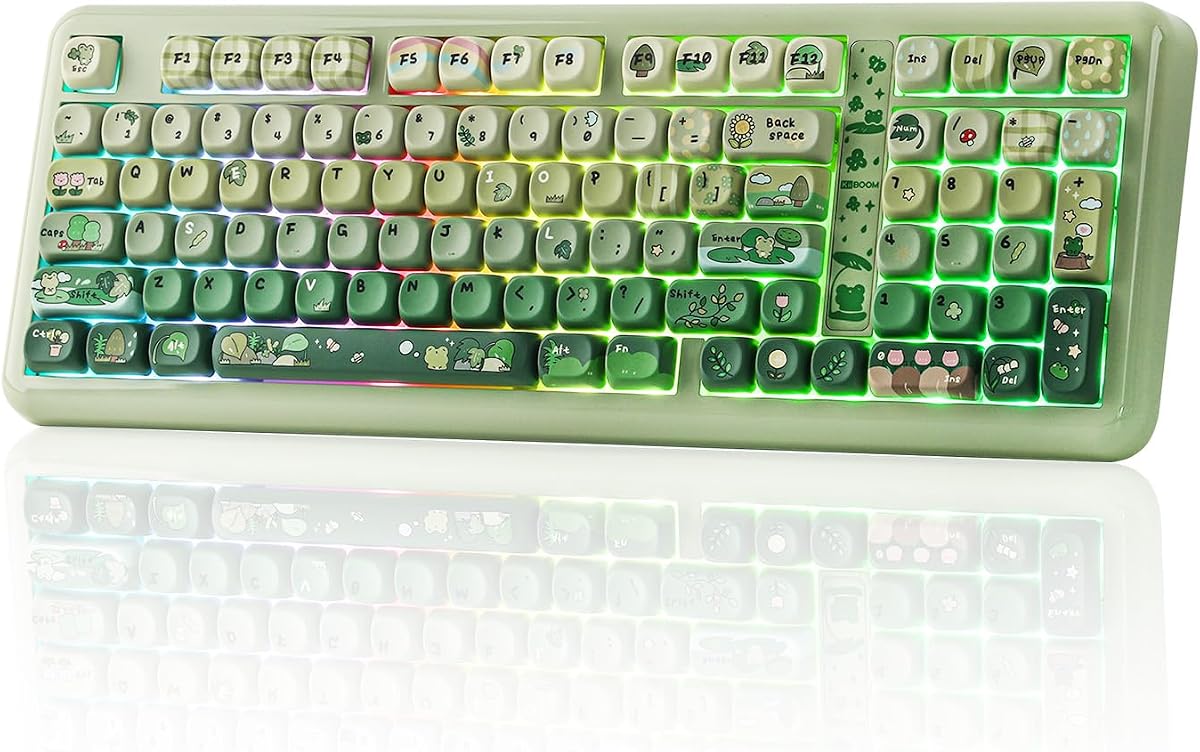
The AULA F75, Womier DK75, and KiiBoom Phantom98 Lite stand out as top choices for performance and value. Each offers unique strengths suitable for different user needs and budgets.
Focus on connectivity and build quality when making your decision. These factors ensure your keyboard remains reliable and enjoyable for daily tasks and gaming sessions alike.
Remember to verify current availability and compatibility before finalizing your purchase. Your perfect setup should match your specific needs and aesthetic preferences.