
Anker Prime Charging Station
4.6Editor score
250W total output power
Six port configuration available
Real-time LCD display feedback
This guide compares the top 10 GaN chargers with built-in displays for real-time power monitoring, covering high-wattage options for laptops and compact models
In the rapidly evolving world of power electronics, GaN chargers with displays have emerged as essential tools for tech enthusiasts and professionals. These devices combine Gallium Nitride technology for efficiency with smart screens that show real-time data, ensuring you never guess your charging status again.
To compile this list, we analyzed technical specifications, user feedback, and performance metrics across the market. We prioritized units with accurate displays, robust safety features, and versatile port configurations suitable for modern multi-device setups including laptops, smartphones, and tablets.
Each pick below showcases unique strengths from high-wattage desktop stations to pocket-sized travel adapters. Prices and availability fluctuate frequently on major retail platforms, so we recommend verifying current offers before making your final purchasing decision for your specific power needs.
4.6Editor score

4.7Editor score

4.4Editor score
The following table provides a side-by-side comparison of all ten selected GaN chargers with displays. It highlights key specifications such as total wattage, number of ports, and unique display features to help you quickly identify the model that best fits your power requirements and budget constraints.



The UGREEN Nexode Pro Charger stands out as a top performer with its 160W output and intelligent smart display. It received high marks for its ability to power multiple devices simultaneously while providing clear visual feedback on power distribution and temperature status for user confidence.
We may earn a commission when you buy through this link, at no additional cost to you.
Its standout feature is the rotatable touch control panel that shows total output wattage and per-port data instantly. The charger supports fast charging for MacBook Pro models and handles gaming laptops effectively thanks to its robust power delivery protocols and efficient GaN architecture design.
While the price is higher than standard options, the added value of the display and high power make it worthwhile. Some users noted the display dims slightly under direct sunlight, but the data remains readable and the safety features provide peace of mind.
This charger is ideal for power users who need reliable high-speed charging for workstations. If you prioritize visibility of charging metrics and want a single solution for all devices, the UGREEN Nexode Pro is a strong recommendation for your setup.
The smart display provides instant visibility into total wattage and per-port power distribution allowing you to track exactly how much energy each device is drawing during charging sessions.
The unique touch panel can be rotated to suit your viewing angle which enhances usability on crowded desks or when mounted in specific orientations for easier access.
We may earn a commission when you buy through this link, at no additional cost to you.
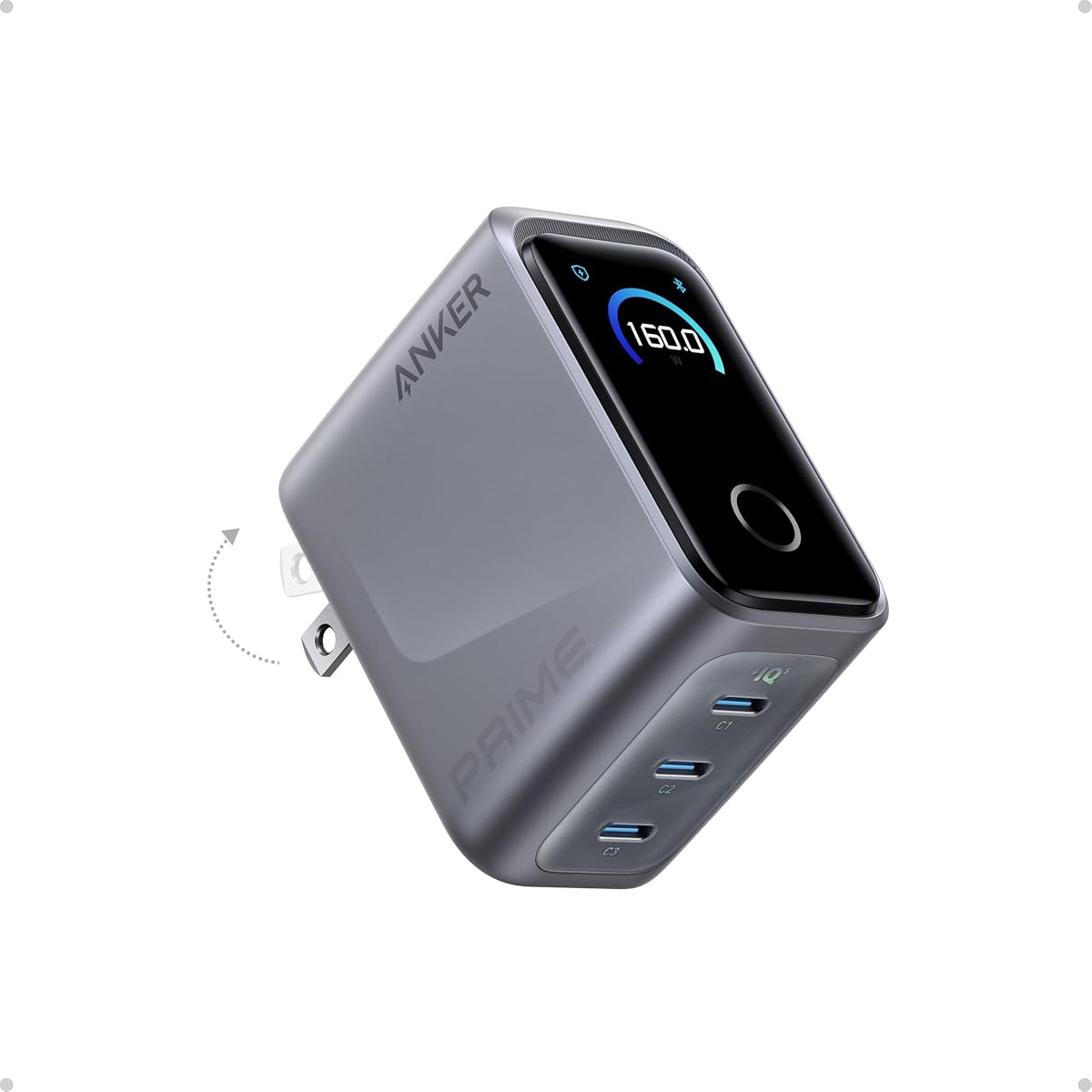
The Anker Prime Charger delivers impressive 160W power in a form factor as small as an AirPods Pro case. It earned its top premium status by combining high-density GaN technology with a smart display that monitors power usage in real time through the AnkerSense View feature.
We may earn a commission when you buy through this link, at no additional cost to you.
Its 140W single-port output ensures laptops charge at maximum speed without derating even during heavy loads. The PowerIQ 5.0 system distributes power efficiently so you can charge a laptop and phone simultaneously without sacrificing performance or efficiency significantly.
The main trade-off is the limited number of ports compared to other high-wattage units. However, for those who prioritize portability and brand reliability, the build quality and warranty support justify the higher cost for professional travel scenarios.
Choose this if you need maximum power in the smallest possible package. It is perfect for business travelers who want to carry one charger instead of multiple adapters while still monitoring their power usage remotely via Bluetooth connectivity.
Delivering 160W in such a small space showcases advanced engineering that reduces bulk significantly while maintaining the thermal performance required for sustained high-wattage output sessions.
The AnkerSense View allows users to switch modes and unlock custom settings through the app adding a layer of digital control that enhances the user experience beyond physical buttons.
We may earn a commission when you buy through this link, at no additional cost to you.
The MOKiN 70W charger offers a surprising feature set for its budget-friendly price. It features an HD interactive display that shows total wattage and temperature data making it an accessible entry point for users wanting smart monitoring without spending a premium.
We may earn a commission when you buy through this link, at no additional cost to you.
Its compact design measures only 2.15 inches wide which makes it highly portable for daily carry. The charger supports up to 70W on either USB-C port allowing most mid-range laptops and smartphones to charge at reasonable speeds while managing heat effectively.
While it lacks the raw power for high-end gaming machines, it fits most general use cases perfectly. The lack of an included cable is a minor inconvenience but the price savings usually outweigh the cost of buying a separate compatible USB-C cable.
This unit is best for students or casual users needing reliable charging with visibility. If you want a smart display charger that fits easily in a backpack without breaking the bank this MOKiN model delivers solid performance and value.
Users can tap the touch screen to switch information views or long press to rotate the display which adds a unique usability element rarely found in budget-friendly charger options.
Despite its small size the charger manages heat well using GaN technology to ensure safe operation during prolonged charging sessions for multiple devices without excessive thermal throttling.
We may earn a commission when you buy through this link, at no additional cost to you.
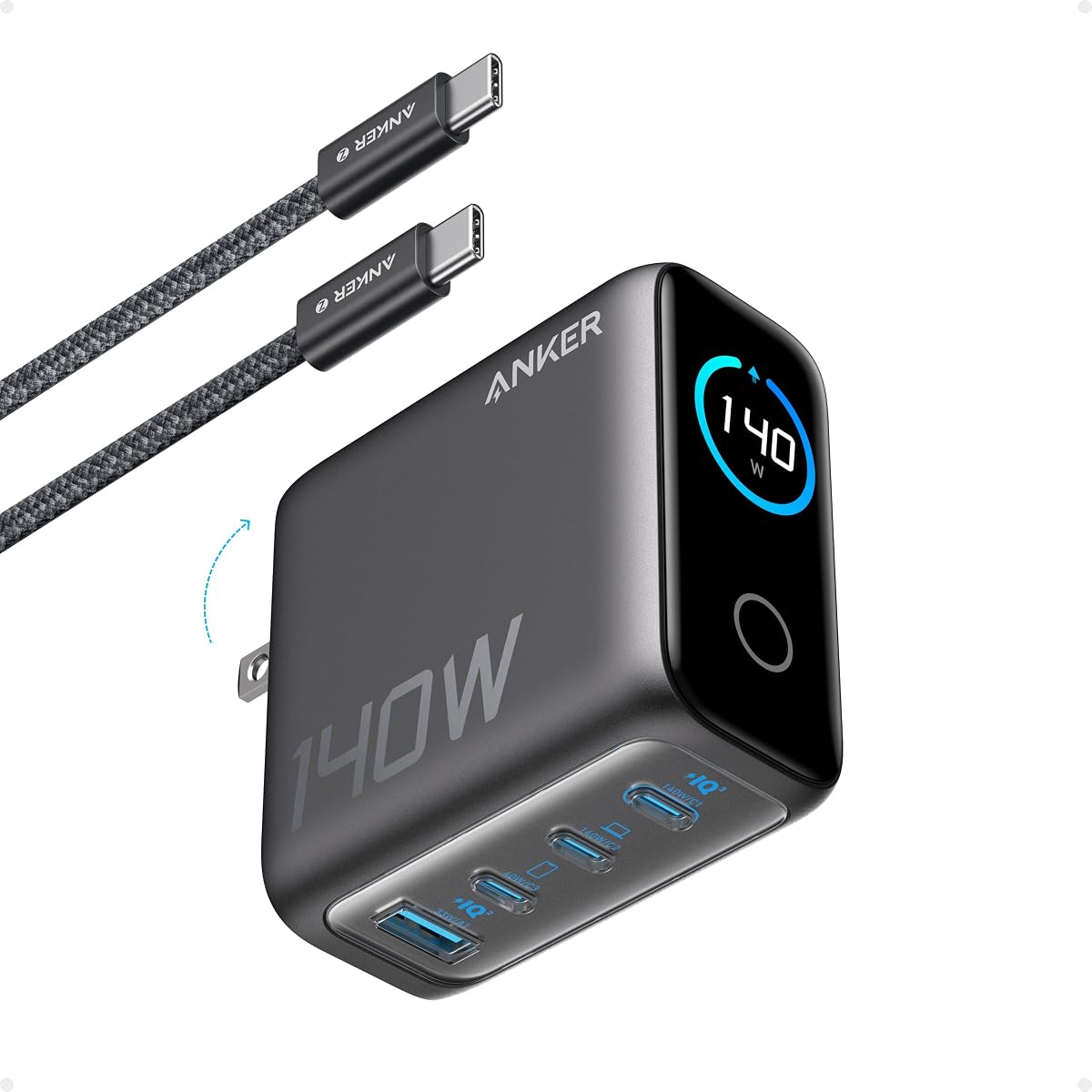
The Anker 140W Max offers a versatile four-port design ideal for desks where multiple devices need power simultaneously. The high-definition color display provides clear details on charging status and temperature which helps users manage their devices efficiently during work hours.
We may earn a commission when you buy through this link, at no additional cost to you.
Its ActiveShield 4.0 system monitors temperatures over ten million times a day to ensure safety against overheating. The unit delivers up to 140W total power and includes a 240W USB-C cable which is a valuable inclusion for high-speed charging needs.
While it is not the most portable option due to its weight the performance justifies it for home offices. The display is fixed in orientation but the clarity and detail make it easy to monitor without needing to adjust the physical unit frequently.
Choose this for a stationary setup where capacity is key. It handles four devices well and provides the safety monitoring and included cable that make it a convenient all-in-one solution for home or office environments.
ActiveShield 4.0 constantly monitors device temperatures to provide enhanced safety against overheating risks ensuring that all connected devices remain within safe thermal operating limits during use.
The inclusion of a 5ft 240W USB-C to USB-C cable means users can start charging high-power devices immediately without needing to source a separate high-wattage compatible cable first.
We may earn a commission when you buy through this link, at no additional cost to you.
The Anker 100W Max balances performance and portability with a high-definition smart display that shows real-time details on charging status and temperature. It offers steady 100W output on any USB-C port ensuring consistent performance for most modern laptops and phones.
We may earn a commission when you buy through this link, at no additional cost to you.
Its travel-sized frame is significantly smaller than traditional chargers making it easy to fit in pockets or small bags. The charger automatically switches to a low-current mode for devices like earbuds preventing damage to low-power items plugged into its ports.
While 100W is sufficient for most users it may not be enough for the latest high-performance gaming laptops. However for standard work laptops and phones it delivers reliable power without unnecessary bulk or heat generation during normal daily use.
This unit is perfect for general travelers who need reliable power monitoring. If you want a proven brand with a smart display and a compact form factor that fits anywhere this Anker model provides excellent consistency and durability.
USB-C2 or USB-A automatically switches to 5W Low-Current Mode when output remains low ensuring safe charging for small accessories like earbuds without risking overheating or overcharging.
The foldable plug and small 330% reduced frame make it significantly easier to pack and carry compared to standard adapters reducing the bulk in your travel bag.
We may earn a commission when you buy through this link, at no additional cost to you.
The Smart Charging Butler stands out for its AI-powered battery care system that monitors battery temperature and health in real time. This feature is designed to extend battery lifespan by adjusting charging speed dynamically based on the battery's needs and status.
We may earn a commission when you buy through this link, at no additional cost to you.
It supports 45W output which is ideal for iPhones and smaller devices. The display is user-friendly with simple tap controls and the included 6.6ft braided cable adds significant value by ensuring you have a reliable connection right out of the box.
The device recognition feature displays the model name on screen for supported iPhones making it easy to identify connected devices instantly. While it cannot charge high-wattage laptops the focus on battery health makes it a unique choice for phone users.
Choose this if you prioritize long-term battery health for your phone. The AI care mode and included cable make it a complete solution for those who want to protect their devices while still enjoying smart display monitoring features.
The built-in AI intelligently monitors battery temperature and health status to adjust charging speed dynamically ensuring gentle charging when full and fast charging when low.
The included 6.6ft braided cable features a durable 48-strand nylon braid and aluminum alloy shell resisting breakage and lint for reliable everyday use with your device.
We may earn a commission when you buy through this link, at no additional cost to you.
The Anker Prime Charging Station is a true desktop powerhouse with 250W total output and six ports for simultaneous device charging. Its 2.26 LCD display provides instant power feedback allowing you to monitor charging status and speed clearly on your desk.
We may earn a commission when you buy through this link, at no additional cost to you.
It features a smart control dial that allows immediate adjustments to energy output ensuring each device charges at optimal speeds. With four USB-C and two USB-A ports it can handle nearly every device in a professional ecosystem without needing multiple adapters.
While it is designed specifically for desktop use and is not recommended for travel due to its size and weight the power it delivers is unmatched for stationary setups. It supports IoT capabilities via the Anker app for further customization.
This station is best for home offices needing maximum capacity. If you have multiple high-demand devices like multiple laptops and tablets the 250W capacity ensures everything charges quickly and efficiently without power contention issues.
Experience the convenience of high-capacity charging with this 250W desktop charger capable of powering up to six devices simultaneously for comprehensive workspace needs.
Achieve perfect charging consistently with the smart control dial which allows for immediate adjustments to energy output ensuring each device charges at its optimal speed.
We may earn a commission when you buy through this link, at no additional cost to you.
The MOKiN 140W charger offers high-wattage power with a live color display that keeps you informed about charging status and temperature data. It supports 140W total output and delivers up to 140W from a single port for fast laptop charging.
We may earn a commission when you buy through this link, at no additional cost to you.
Its intelligent safety system monitors temperatures millions of times daily to protect your devices and charger unit. The live screen tells all with instant views of power output details per port making it easy to track performance while using multiple devices.
While it is larger than some travel options the power and display features are robust for home office use. The included 140W USB-C to USB-C cable ensures you can take advantage of the full power output right away.
Choose this for a high-performance charging solution at a competitive price. If you need to charge multiple high-power devices and want detailed visual feedback the MOKiN 140W provides reliable power and useful display insights.
Stay perfectly informed with the built-in high-definition color display which shows real-time charging status and power output details per port and temperature for the charger and connected devices.
Experience peace of mind with our intelligent safety system which constantly monitors temperatures millions of times daily to protect your devices and the robust 140W USB-C charger itself.
We may earn a commission when you buy through this link, at no additional cost to you.
The DJI Power 140W Charging Combo offers a unique digital display cable that shows charging status instantly with up to 7A current for fast charging visibility. It supports up to 140W charging power with dual USB-C ports and one USB-A port.
We may earn a commission when you buy through this link, at no additional cost to you.
Its dynamic power allocation prioritizes power for DJI devices and batteries ensuring stable charging for drones and other equipment. The LED status indicator confirms connection status at a glance with clear solid or blinking light patterns for immediate feedback.
The high-density braided cable is lightweight and resistant to wear making it durable for field use. While it is optimized for DJI products the high wattage and safety features make it a strong option for any user needing reliable high-power charging.
Choose this if you use DJI equipment or value cable-based displays. The digital display cable and intelligent allocation make it a standout for monitoring power flow directly from the cable connection rather than just the charger itself.
The digital display cable shows charging status instantly supporting up to 7A current for fast charging visibility directly from the cable connection.
Dual USB-C ports and one USB-A port enable fast stable charging for three devices prioritizing power allocation to DJI devices for optimal performance.
We may earn a commission when you buy through this link, at no additional cost to you.
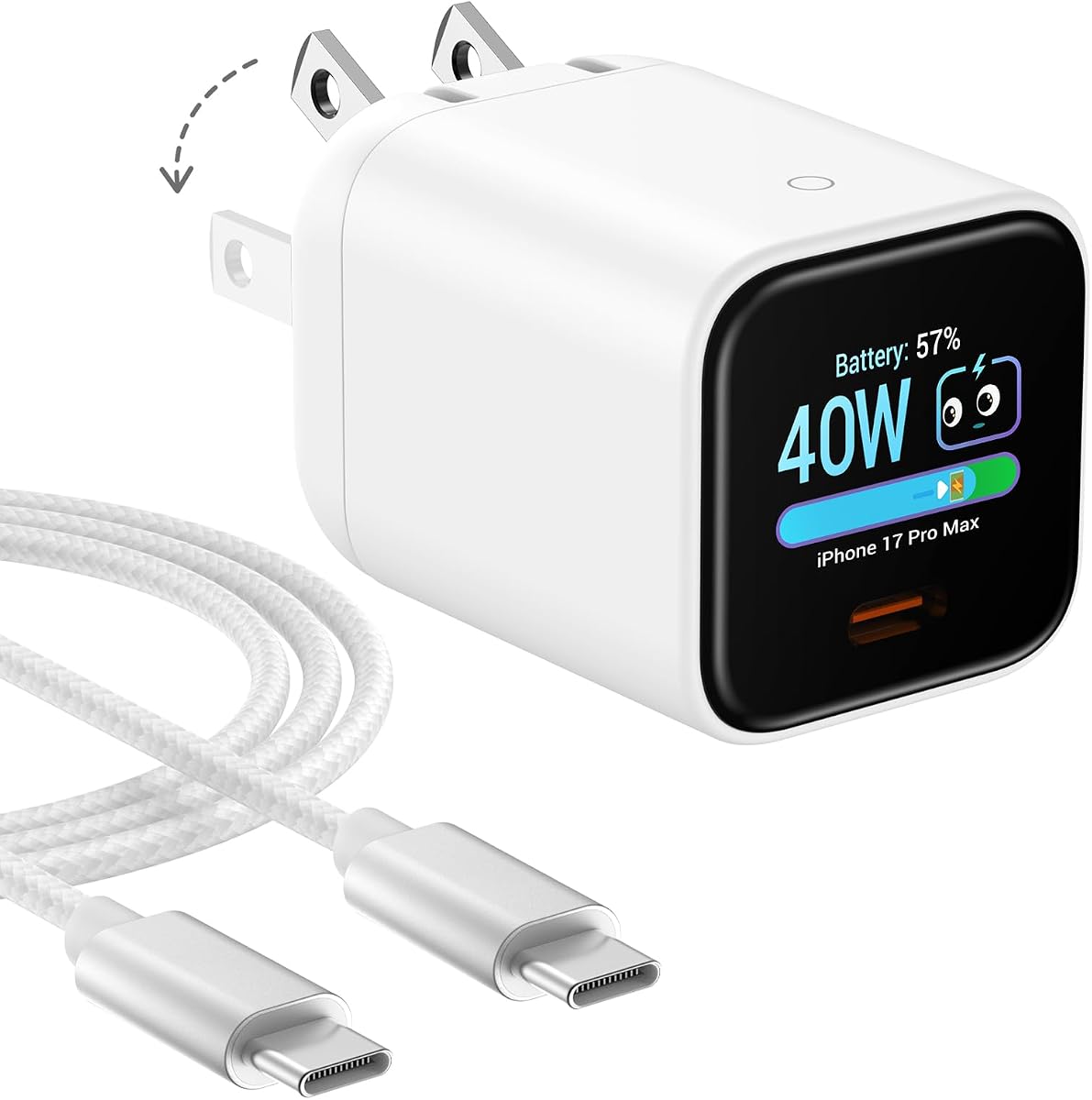
The Anker Nano Smart Display Charger is optimized for iPhone users with smart recognition that adjusts charging for safer power delivery. It delivers up to 45W of high-speed charging and extends battery life with TÜV-certified Care Mode.
We may earn a commission when you buy through this link, at no additional cost to you.
Its pocket-sized design with dual foldable prongs makes it incredibly easy to carry. The display offers simple tap and press controls to view status and rotate the screen ensuring you can monitor charging without complex gestures.
While it is a single-port device this limits multi-device use. However for a dedicated phone charger it provides high safety and efficiency. The Care Mode lowers temperature significantly which is ideal for overnight charging sessions.
This charger is best for iPhone users prioritizing battery health. If you want a compact reliable charger with display controls that protects your phone battery this Anker Nano model is an excellent specialized choice.
TÜV-certified Care Mode lowers charging temperature by up to 9 degrees Fahrenheit compared to standard chargers ideal for overnight charging to extend battery lifespan.
Automatically recognizes supported iPhone models and adjusts charging for smarter safer power delivery with compatible devices.
We may earn a commission when you buy through this link, at no additional cost to you.
Selecting the right GaN charger with a display requires balancing power needs with portability and features. The following factors help ensure you choose a unit that fits your workflow and device ecosystem perfectly.
Total wattage determines how much power the charger can provide to all connected devices simultaneously. For high-performance laptops you need at least 100W to 140W for single port use whereas smaller devices may only need 45W to 65W.
Always check the maximum single-port wattage to ensure your most demanding device charges at full speed.
More ports allow you to charge multiple devices like a laptop phone and watch at once. Look for units with at least three ports if you plan to carry several gadgets and ensure some are USB-C for modern standards.
A mix of USB-C and USB-A ports provides flexibility for older accessories.
Smart displays vary from simple LED readouts to interactive color touchscreens. A good display shows total wattage temperature and per-port power distribution so you can monitor safety and usage instantly.
Look for displays that offer clear visibility in different lighting conditions and intuitive controls.
Travelers should prioritize compact designs with foldable plugs that fit easily in bags. Desktop users can opt for larger units with higher power capacity without worrying about luggage space constraints.
Consider the weight and physical dimensions before buying to ensure it fits your intended use.
Safety features like ActiveShield or thermal monitoring protect devices from overheating and overcharging. Look for certifications from recognized bodies such as TÜV to guarantee the charger meets strict safety standards.
Prioritize chargers with multiple safety protections for peace of mind.
Prices vary significantly based on wattage and display technology. While high-wattage units cost more they often save money by replacing multiple chargers and providing longer device life through better power management.
Compare features against cost to find the best balance for your needs.
Ensure the charger supports the charging protocols your devices use such as PD 3.1 or PPS. Broad compatibility ensures you can charge phones tablets and laptops from different brands efficiently without adapters.
Check supported standards to avoid slow charging or compatibility issues.
Some units include high-wattage cables which adds value and ensures compatibility. Others may lack cables requiring you to buy them separately which increases the overall cost of the setup.
Check what is in the box to avoid missing essential accessories.
To get started plug the charger into a wall outlet and connect your devices via USB-C or USB-A cables. The display should activate immediately showing real-time power data and temperature status for all connected ports.
For best results avoid covering the charger or placing it on soft surfaces like beds where heat may accumulate. The display usually dims or turns off automatically after a period to save energy but you can reactivate it by tapping or pressing controls.
Store the charger in a dry place when not in use and fold the plug prongs carefully to avoid damage. Regularly inspect the ports for dust and clean gently to ensure long-term performance and connectivity reliability.
A GaN charger with display uses Gallium Nitride technology for efficient power delivery and includes a screen showing data like wattage and temperature. It offers better heat management and visibility compared to standard chargers.
Yes many GaN chargers support 100W to 160W output which is sufficient for most modern laptops. Check the single-port wattage to ensure your specific laptop model is fully supported.
Most reputable units include multiple safety features like overheat protection and smart power monitoring. Look for certifications like TÜV or ActiveShield to confirm rigorous safety testing has been done.
The display provides real-time feedback on how much power each device is drawing and the internal temperature. This helps you optimize charging usage and ensures devices stay within safe operating limits.
Charging speed depends on the device and the charger's wattage. High-wattage models can charge a laptop to 50% in about 25 minutes while phones charge faster with protocols like PD and PPS.
Yes most models support simultaneous charging on multiple ports. However total output is shared across all ports so high-wattage devices may slow down if other devices are plugged in.
You need a USB-C to USB-C cable rated for high power to fully utilize fast charging. Many units include a cable but check the wattage rating of the included cable before relying on it for high-power devices.
Use a soft dry cloth to wipe the display gently. Avoid harsh chemicals or liquids that could seep into the unit and damage the internal electronics of the charger.
The top picks from UGREEN and Anker demonstrate that GaN chargers with displays are now essential for modern tech setups. Whether you need high power for work or compact portability for travel there is a model here for every budget.
Prioritize total wattage and display clarity when selecting your unit to ensure you get the most utility for your money. Investing in a reliable charger protects your devices and simplifies your daily power management significantly.
Prices for these advanced chargers fluctuate often so checking current deals before buying is always recommended. With the right model you can stay powered efficiently while tracking your energy usage in real time.