
Motherboard USB 2.0 to Type C Front Panel Cable
4.8Editor score
Converts 9pin USB 2.0 header
Compact 17cm cable length
Simple plug and play setup
Finding the right front panel USB C headers can transform your desktop experience. Modern builds need fast, reversible connections for devices like phones and external drives. Quality adapters ensure stable power and data transfer without cluttering your workspace unnecessarily.
We compared ten real products based on speed, compatibility, and build quality. Each option offers unique features like Type-E headers or PCIe expansion. Our analysis focuses on reliability, ease of installation, and support for the latest USB standards across various motherboards.
Every pick shows key specs, pros, and cons to help you decide. Note that prices change frequently so check current listings before buying. We aim to provide honest insights into these essential PC components for your next upgrade project easily.
4.8Editor score

4.6Editor score

4.6Editor score
As an Amazon Associate we earn from qualifying purchases.
The following table provides a side-by-side comparison of all ten products. It highlights key specifications like speed support, header types, and included accessories to help you quickly identify the best fit for your specific motherboard and case requirements.


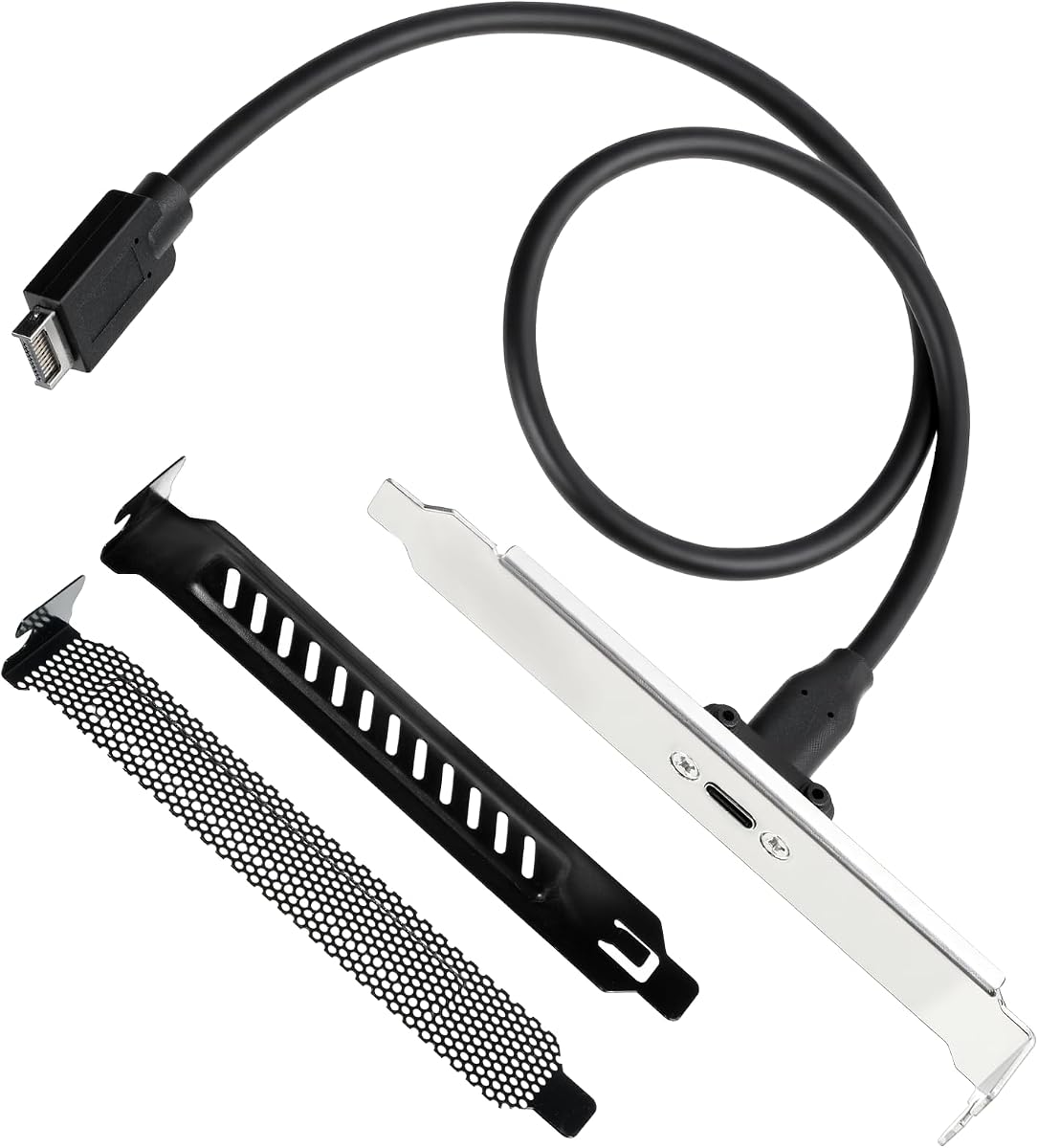


This cable offers a direct path to modern USB-C connectivity using the Type-E header. It supports speeds up to 20Gbps when your hardware allows. The metal bracket ensures a stable back-panel connection for your case.
We may earn a commission when you buy through this link, at no additional cost to you.
The double shielded wires protect data integrity during high-speed transfers. Users can connect phones, drives, or hubs easily via the front or rear panel. Installation is straightforward if your motherboard has the correct header pinout.
While it requires specific motherboard support, this adapter delivers reliable performance. The 23.6-inch length provides flexibility for routing inside larger cases. It is a solid choice for enthusiasts needing fast external access.
If you need the fastest possible front panel USB-C experience, this is a top pick. It balances speed and build quality well for daily use. Check your motherboard specs before purchasing to ensure compatibility.
Designed for Gen2x2 standards, this cable maximizes bandwidth for large files and external drives.
The included bracket secures the port firmly, reducing wear on the connector over time.
We may earn a commission when you buy through this link, at no additional cost to you.
This adapter extends the reach of your motherboard's USB-C capabilities to the front or back panel. It supports the latest Gen2x2 standards for fast file transfers. The long cable allows for neat internal organization in larger cases.
We may earn a commission when you buy through this link, at no additional cost to you.
Build quality is solid with shielded wires to prevent signal loss. The PCI bracket provides a stable mounting point for the connector. It is a convenient way to add USB-C ports without opening the case repeatedly.
Users should verify their motherboard has the correct Type-E pin layout before buying. Once installed, it works seamlessly with most modern peripherals. The plug-and-play design avoids driver hassles for most operating systems.
Ideal for power users who need quick access to fast storage or devices. This cable bridges the gap between internal headers and external needs efficiently. It stands out for its speed and reliable construction.
The 60cm length gives plenty of slack to avoid cable strain inside the case.
Shielding helps maintain data integrity even when other components generate noise.
We may earn a commission when you buy through this link, at no additional cost to you.
This adapter provides a hybrid solution by exposing both USB-C and standard USB-A ports. It connects to both Type-E and USB 3.0 headers on your motherboard. This flexibility helps you connect a wide range of legacy and modern devices.
We may earn a commission when you buy through this link, at no additional cost to you.
The setup requires two header connections but offers great versatility. Users can plug in flash drives, phones, or mouse without needing extra dongles. The PCI bracket ensures the ports stay fixed in place during use.
Check that your motherboard has both required headers before purchasing. If it does, this adapter maximizes the utility of your front panel space. It is a practical choice for mixed-device environments.
For those needing to support older USB-A peripherals alongside new USB-C gear, this works well. It balances functionality with installation requirements effectively. Review your system specs to confirm header availability first.
Combines the convenience of USB-C with the ubiquity of standard USB-A connectors.
The included bracket prevents port wobble and protects the internal connector from debris.
We may earn a commission when you buy through this link, at no additional cost to you.
This hub converts an empty floppy drive bay into a powerful multi-port front panel. It provides two USB-C ports and two USB 3.2 Gen 2 ports for various devices. The metal build ensures it withstands regular use without bending.
We may earn a commission when you buy through this link, at no additional cost to you.
Installation requires a SATA power cable in addition to the motherboard header. This extra step ensures sufficient power for high-demand peripherals like external drives. The hub includes safety features to prevent electrical issues during operation.
Users should check if their case has a 3.5 inch bay available. The design fits standard bays securely with provided screws. It is a neat way to add connectivity without using external hubs.
If you need to connect many devices at once, this hub is very practical. It keeps things organized inside the case while offering quick access. Verify your power and header availability before buying.
Transforms unused internal space into a clean and accessible port hub.
Over-current and over-voltage protection help safeguard both the hub and connected devices.
We may earn a commission when you buy through this link, at no additional cost to you.
This expansion card solves the problem of missing motherboard headers. It installs directly into a PCIe x1 slot to provide a front panel USB header. Users get both Type-C and standard USB 3.0 access without modifying the board.
We may earn a commission when you buy through this link, at no additional cost to you.
The card draws power from the slot, so no extra cables are required. Installation involves mounting the bracket to the case back and connecting internal cables. It works well for systems lacking native support.
While speeds are limited to 5Gbps, this is sufficient for most daily tasks. It is a cost-effective way to modernize older desktops with USB-C access. The card fits standard PCIe slots found on most motherboards.
Ideal for users with older hardware who want to add USB-C. It bypasses the need for expensive motherboard replacements. Just ensure you have an available PCIe slot for installation.
Perfect for older boards that lack native front panel USB-C headers.
Runs directly off PCIe slot power, avoiding clutter from extra adapters.
We may earn a commission when you buy through this link, at no additional cost to you.
This hub features a top-tier 20Gbps USB-C port alongside standard USB 3.0 ports. It fits into a 3.5 inch drive bay for a clean look. Users can connect high-speed external SSDs or charging devices directly.
We may earn a commission when you buy through this link, at no additional cost to you.
It requires headers for power and data from the motherboard. This ensures reliable performance even under heavy loads. The built-in safety features protect against electrical surges during use.
Check your motherboard for both Type-E and USB 3.0 headers before buying. Once connected, it provides a permanent solution for front panel access. The design is solid and resists damage from repeated plug-ins.
For power users needing top speeds, this hub delivers. It keeps high-speed peripherals organized and accessible. Verify your system compatibility to ensure smooth installation and operation.
Supports Gen 2×2 standards for rapid file transfers to external storage.
Includes protection circuits to prevent voltage spikes from affecting connected gear.
We may earn a commission when you buy through this link, at no additional cost to you.
This adapter is perfect for older motherboards that only have USB 2.0 headers. It allows you to use a USB-C connector without needing new headers. The cable is short enough to route neatly within the case.
We may earn a commission when you buy through this link, at no additional cost to you.
Speeds are limited to 2.0 standards but this is fine for keyboards or mice. It is an inexpensive way to bring modern form factors to older systems. Users simply connect the 9pin header to the new cable.
While not suitable for fast data transfers, it solves the connector shape problem. It is ideal for basic peripheral connectivity where speed is not the main concern. Plug and play ensures no software headaches.
If you are on a budget or have an older PC, this is a great choice. It bridges the gap between legacy boards and modern cables. Check your headers to confirm 9pin availability.
Lets you use USB-C connectors on older boards without new hardware.
Provides a low-cost entry point to USB-C front panel access.
We may earn a commission when you buy through this link, at no additional cost to you.
This adapter connects a Type-E header to a front or back panel USB-C port. It supports fast 20Gbps transfers when your system supports it. The package includes slot covers to keep the case neat.
We may earn a commission when you buy through this link, at no additional cost to you.
The cable is flexible enough for most routing needs. Installation is straightforward with clear labeling on the connectors. It provides a standard solution for adding USB-C ports via the header.
Some users report minor issues with build quality or fit. The slot covers are a nice addition for dust protection. Check reviews before buying to ensure the specific batch meets your needs.
For general front panel USB-C needs, this adapter works well. It balances speed and cost effectively. Verify your motherboard compatibility and check user feedback for latest updates.
Slot covers help maintain a clean case look and prevent debris entry.
Supports Gen2x2 standards for compatible devices and fast data moves.
We may earn a commission when you buy through this link, at no additional cost to you.
This cable uses a flat TPE design that is easy to bend and route. It supports speeds up to 10Gbps for reliable data transfer. The connector fits standard Type-E headers on modern motherboards.
We may earn a commission when you buy through this link, at no additional cost to you.
The flat profile helps with cable management inside tight spaces. Users can fold it without damaging the internal wires. Mounting screws are included to secure the panel connector firmly.
It is a solid option for those needing manageable cable routing. The speed is sufficient for most drives and peripherals. Ensure your motherboard has the correct header before installing.
For clean internal builds, the flat cable is a distinct advantage. It reduces clutter and improves airflow. Check your header type to confirm compatibility.
Flat TPE material allows flexible routing without signal degradation.
Double shielding ensures stable transmission even with frequent bending.
We may earn a commission when you buy through this link, at no additional cost to you.
This adapter connects to both Type-E and USB 3.0 headers to expose multiple ports. It provides a fast USB-C port along with two USB3.0 ports. The double shielding helps keep signals clean from noise.
We may earn a commission when you buy through this link, at no additional cost to you.
Installation requires two headers on your motherboard. Once connected, it offers versatile connectivity options for different device types. The bracket secures the panel mount firmly for daily use.
Users report high satisfaction with its speed and stability. It is great for mixed device environments needing both fast and standard speeds. The shielding adds a layer of reliability for sensitive devices.
If you need multiple ports from one header set, this is ideal. It maximizes header usage for better front panel utility. Verify your board has both headers before purchasing.
Supports both high-speed and legacy devices in one front panel unit.
Double shielding protects against EMI and EFI interference during operation.
We may earn a commission when you buy through this link, at no additional cost to you.
Choosing the right adapter depends on your motherboard headers and speed needs. This section covers key factors to consider for compatibility and performance.
First check if your motherboard has a Type-E 20-pin header. Some older boards only have USB 3.0 19-pin headers. You may need an adapter or expansion card if headers are missing.
Verify header types before buying any extension cable or hub to ensure fit.
Decide if you need USB 3.0 speeds or faster Gen2x2 performance. If you use fast external SSDs look for 20Gbps support cables. For basic peripherals standard USB 3.0 may suffice.
Speed matters for large files but not for mice or keyboards mostly.
Measure your case to determine necessary cable length. Shorter cables suit compact cases while longer ones help with larger builds. Ensure the cable can reach the header without strain.
Choose a length that allows neat routing inside the case.
Most options include a metal bracket for back or front panel mount. Look for sturdy brackets that secure the port firmly. This prevents wobble and keeps cables organized.
Secure mounting extends the life of the connector.
Decide if you need one port or multiple. Single adapters work well for limited space while hubs offer several ports. Check your total device count for future proofing.
More ports mean more flexibility for daily tasks.
Some hubs require extra power from SATA connectors. Ensure your power supply can handle this. Look for over-current protection to protect your devices.
Safety features prevent electrical issues during high-load use.
Double shielded cables prevent signal noise from affecting data. Metal construction resists wear better than plastic. Check reviews for durability feedback before buying.
Strong build quality ensures long-term reliability.
Plug and play options save time on drivers. Check if installation requires extra steps like PCIe cards. Simpler setups are better for beginners.
Easy installation reduces setup time and frustration.
Begin by powering off your system and opening the case. Locate the motherboard headers and match them to the cable connector. Push gently until secure without forcing pins.
Route cables neatly using zip ties to avoid airflow blockage. Ensure the bracket mounts firmly to the case with screws. This prevents loose connections over time.
Regularly check ports for dust or debris. Clean gently with compressed air to maintain good contact. Avoid bending cables sharply to preserve internal wires.
Most adapters work without drivers using standard USB protocols. Windows and Linux typically recognize them automatically. Some older systems may need specific updates for best compatibility.
Not all USB-C front panel ports support video. Check your cable specs for video support. Most options focus on data transfer and charging only.
You can use a USB 3.0 to Type-E adapter or PCIe card. These add the required header via available slots on your board.
Many work with Macs but you must install the right headers on the board. Check OS compatibility for drivers if using non-standard hardware.
Some high-speed cables support more power than standard ones. Look for 100W power delivery specs if charging is a priority.
It is best to connect one hub per header to avoid power limits. Daisychaining may cause instability or connection drops.
Quality cables last for years with regular use. Shielding and metal brackets help extend their life significantly.
Check your case manual for USB-C front panel ports. If it lacks ports an internal hub or adapter helps bypass that issue.
We explored ten reliable options for upgrading your PC's USB connectivity. Each model offers unique features from simple adapters to full hubs. The top picks balance speed and build quality for most users.
Prioritize motherboard compatibility and speed needs before deciding. Secure mounting and shielding help maintain long-term performance. Use the buying guide to narrow choices to your system.
Prices and availability change often so check current listings. Confirm your hardware specs before buying to avoid compatibility issues. With the right adapter your front panel becomes more powerful and versatile.