
8Bitdo M30 Wired Controller
4.2Editor score
USB-C wired connection
Six-Button Layout
Three profiles switch
This guide compares the top fightpads for PC including HORI, Akko, and 8Bitdo to help you choose the best tournament grade controller for competitive play.
Finding the right fightpad for PC is essential for competitive gamers who demand precision and speed. A quality controller offers responsive buttons, ergonomic design, and reliable connectivity to keep your focus on executing combos without interruption during intense matches.
We evaluated ten top-rated controllers based on build quality, switch type, layout customization, and platform compatibility. Each product was assessed for durability, input latency, and features that matter most to fighting game enthusiasts seeking tournament-level performance on their desktop.
Each pick below highlights key strengths, pros, and cons to guide your decision. Remember that prices and availability change frequently so check current listings before purchasing to ensure you get the best value for your specific gaming setup and budget.
4.2Editor score

4.1Editor score

4.2Editor score
The following table provides a side-by-side comparison of all ten controllers evaluated in this guide. Review the specifications and features to quickly identify which model aligns best with your preferred fighting game mechanics and hardware requirements.


The HORI Fighting Commander OCTA stands out as the top choice for PC fighters seeking a reliable and officially licensed controller. With a 4.1 rating from users, it delivers tournament-grade performance designed specifically for the precision needs of competitive games on Windows and consoles.
We may earn a commission when you buy through this link, at no additional cost to you.
Its standout features include Micro Switch buttons that provide crisp tactile feedback and rapid actuation crucial for executing complex combos. The adjustable D-Pad allows players to fine-tune sensitivity, while the short throw analog stick with an 8-way gate ensures faster execution and improved accuracy during high-stakes matches.
While the wired connection may limit mobility for some, it ensures zero latency input which is vital for competitive integrity. The companion app enables extensive customization allowing users to save profiles and adjust settings to match their unique playstyle without needing extra software.
This controller is ideal for serious players who prioritize build quality and official licensing. If you want a proven tool that balances durability with performance customization, the OCTA is a strong investment for your PC gaming setup.
Micro Switch buttons reduce input lag and provide consistent tactile feedback for faster reaction times.
Adjustable D-Pad settings let players fine-tune responsiveness to prevent accidental directional inputs during combos.
We may earn a commission when you buy through this link, at no additional cost to you.
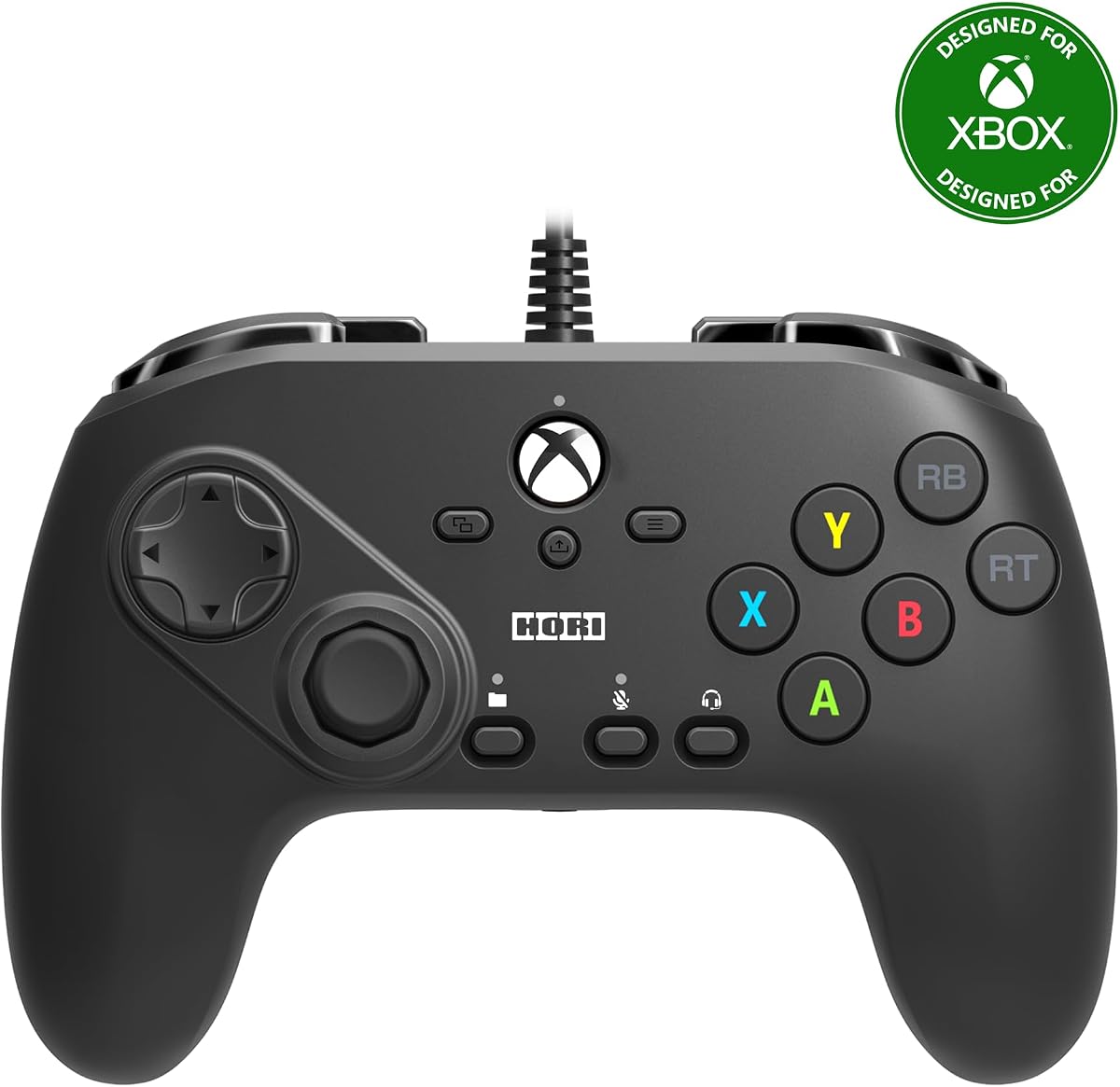
The HORI Fighting Commander Octa Xbox version offers a familiar design optimized for fighting games across Xbox and PC environments. Rated 3.5 stars, it caters to players who want official licensing and reliable features without breaking the bank.
We may earn a commission when you buy through this link, at no additional cost to you.
Key strengths include the ability to save and switch between up to four profiles using the dedicated profile button. This feature is valuable for different games or teammates sharing a setup. The Micro Switch buttons and adjustable D-Pad mirror the PlayStation version's functionality for accuracy.
Users note that while the build is sturdy, the software experience on PC can be less intuitive than the PlayStation counterpart. Additionally, compatibility is restricted to Windows 10 and specific Xbox systems which might limit versatility for some users.
This controller is best for Xbox owners who want a reliable fightpad for PC too. If you prioritize official licensing and multi-profile support over cutting-edge customization, this model delivers solid performance.
Save up to four profiles and switch on the fly with the dedicated profile button for different game modes.
Officially licensed by Microsoft ensuring compatibility and quality standards for Xbox Series X|S and One.
We may earn a commission when you buy through this link, at no additional cost to you.
The 8Bitdo M30 Wired Controller delivers exceptional value for budget-conscious PC gamers needing a compact fighting pad. With a 4.2 rating, it proves that high performance doesn't always require a premium price tag thanks to its solid construction and features.
We may earn a commission when you buy through this link, at no additional cost to you.
Its USB-C wired connection ensures a virtually lag-free experience ideal for competitive play. The controller supports 8BitDo Ultimate Software for custom profiles and includes a dedicated switch button to toggle between three profiles instantly without interruption.
While it lacks the advanced customization of higher-end models, its 6-button layout is sufficient for classic fighters. The official Xbox license guarantees plug-and-play compatibility which simplifies setup significantly for users on Windows systems.
For players starting their fighting game journey or seeking a reliable travel option, the M30 is hard to beat. It combines official licensing, modern connectivity, and an attractive price for a versatile choice.
Offers tournament-ready features like profile switching at a fraction of the cost of other licensed controllers.
USB-C wired connection provides stable, lag-free input ensuring reliable performance during intense matches.
We may earn a commission when you buy through this link, at no additional cost to you.
The DOYOKY Leverless Controller appeals to players wanting deep customization without the bulk of a full stick. Its 4.4 rating highlights its effectiveness as a hitbox-style fightpad with an OLED display for real-time feedback on settings and status.
We may earn a commission when you buy through this link, at no additional cost to you.
Hot-swappable switches allow users to change mechanical switches in seconds without soldering to tweak tactile feel. The web-based customization lets you adjust every button and macro directly via browser settings simplifying configuration without extra software.
Compatibility spans five input modes across PC, PS4, PS3, Switch, and Steam Deck making it a versatile all-in-one tool. However, the hitbox layout requires adjustment for those used to traditional analog sticks which may slow initial adoption.
Ideal for players seeking a customizable hitbox experience on a budget. If you want an OLED display and hot-swap switches to personalize your inputs, this controller offers significant value.
Swap mechanical switches quickly without soldering to fine-tune the tactile feel based on your preference.
Built-in OLED screen displays SOCD settings and input modes at a glance without needing external software.
We may earn a commission when you buy through this link, at no additional cost to you.
The Akko FUNBOX represents the future of fightpads with Hall Effect switches and Rapid Trigger technology designed for pro-level responsiveness. It holds a 4.2 rating and offers advanced features that give competitive players a decisive edge in fast-paced games.
We may earn a commission when you buy through this link, at no additional cost to you.
Hall Effect switches use magnetic contactless technology to eliminate friction and wear ensuring longevity. The Rapid Trigger feature allows adjustable actuation from 0.1mm to 2.8mm enabling feather-light taps for ultra-fast execution during combos.
A 2-inch full-color LCD provides deep customization for modes and animations through a browser-based driver. The Tournament Lock mode ensures compliance with official rules by restricting SOCD to a single direction when enabled.
This controller is perfect for serious competitors needing the fastest possible inputs. If you want future-proof magnetic switches and extensive visual customization, the FUNBOX is a top-tier investment.
Magnetic switches use a contactless design that eliminates physical friction and debris buildup for longer life.
Adjustable actuation points allow players to dial in the exact sensitivity needed for their playstyle.
We may earn a commission when you buy through this link, at no additional cost to you.
The HORI Fighting Commander OCTA TEKKEN 8 Edition is a specialized fightpad optimized for PC fans of the TEKKEN franchise. Rated 3.8 stars, it mirrors the standard OCTA's features but includes official Bandai Namco licensing and unique design elements.
We may earn a commission when you buy through this link, at no additional cost to you.
It retains the Microswitch buttons and short throw analog stick for tournament-grade accuracy. The analog slide pad helps navigate in-game menus quickly which is useful for character selection or navigating game modes efficiently.
While performance is solid, the value depends on your affinity for the TEKKEN branding. If you prefer the standard OCTA the differences are minimal making this a niche choice for collectors or devoted fans.
Best for TEKKEN 8 enthusiasts who want a dedicated setup. If you play the game heavily on PC this edition offers official licensing and the same reliable performance as the standard model.
Licensed by Bandai Namco Entertainment ensuring official support and thematic design for TEKKEN 8 players.
Analog slide pad enables smooth in-game navigation and menu access during lobby interactions.
We may earn a commission when you buy through this link, at no additional cost to you.
The HORI Wireless Fighting Commander OCTA Pro brings the reliability of the OCTA family to wireless play for PC and PS5. With a 3.6 rating, it aims to bridge the gap between console convenience and tournament-grade performance.
We may earn a commission when you buy through this link, at no additional cost to you.
Key features include programable rear buttons for custom mappings and three swappable D-pad options to suit different grip styles. The USB-C charging cable includes a lock to prevent accidental disconnects ensuring stability during matches.
Wireless technology can introduce minor latency compared to wired options. Users should download the latest firmware from HORI to ensure full compatibility and functionality on Windows 10 and 11 systems.
If you want the freedom to play from the couch without compromising on features, this is a strong candidate. Ensure you update firmware for best performance before competitive play.
Wireless connectivity allows playing from a distance without being tethered to your PC or console.
Three D-pad options let you choose the feel that suits your playstyle best.
We may earn a commission when you buy through this link, at no additional cost to you.
The HORI PS5 Fighting Commander OCTA Renewed offers a refurbished chance to own a premium fightpad. While specific ratings are unavailable, renewed products often provide a budget-friendly entry into official licensed controllers.
We may earn a commission when you buy through this link, at no additional cost to you.
It retains key features like the eight-button layout and touchpad. The programmable macros allow players to execute complex sequences with single button presses which can be a huge advantage in certain fighting scenarios.
Since it is renewed, condition may vary. Ensure the seller is reputable and offers a warranty to mitigate risks. This path is viable if you want the OCTA experience at a lower price.
Consider this if you want to try the OCTA without paying full price. Verify the return policy and warranty details before purchasing to ensure satisfaction.
Renewed units often offer significant savings while retaining the core features of the standard model.
Programmable macros let you map complex move sequences to single buttons for easier execution.
We may earn a commission when you buy through this link, at no additional cost to you.
The Logitech G F310 is a classic multi-purpose gamepad suitable for casual PC fighting games. With a 4.4 rating, it offers broad game support and a familiar layout that requires no learning curve.
We may earn a commission when you buy through this link, at no additional cost to you.
Its floating D-pad design rests on four switches for responsive directional changes. The six-foot cord lets you sit comfortably away from the monitor while the Profiler software allows mapping to keyboard and mouse commands.
While not designed specifically for high-level fighting, it works well for older titles or casual play. However, it lacks the specialized switches and precision of dedicated fightpads.
Ideal for players who need one controller for multiple genres on a tight budget. If fighting games are occasional rather than primary, this offers good value.
Same button layout as Xbox 360 controllers for instant recognition and easy setup.
Works with both classic and modern titles ensuring flexibility across your PC library.
We may earn a commission when you buy through this link, at no additional cost to you.
The HORI Fighting Stick Mini offers a compact arcade stick alternative for PC players wanting a joystick. Rated 4.2 stars, it brings the classic arcade feel to your desktop without taking up much space.
We may earn a commission when you buy through this link, at no additional cost to you.
It features a classic 8-button layout and HORI's original joystick with V-cut housing for accurate inputs. The 8ft cable allows for flexible setup while the small form factor makes it highly portable.
While it is a stick not a pad it is ideal for games where precise joystick movements are preferred. If you want the arcade experience at a smaller scale, this delivers reliability.
Best for players seeking a portable stick for travel or smaller setups. If you prefer joystick controls over pads this mini version brings authentic feel to your PC.
Small form factor design makes it easy to transport to LAN parties or tournaments.
Features HORI's original joystick with V-cut housing for consistent and durable inputs.
We may earn a commission when you buy through this link, at no additional cost to you.
Selecting the right fightpad for PC involves evaluating build quality, switch type, and customization options to match your competitive needs.
Switch type determines how the controller registers inputs. Micro switches provide a tactile click and durability common in many pro pads. Hall Effect switches use magnets for zero wear and adjustable actuation points which can give a competitive edge.
Choose Micro switches for tactile feedback or Hall Effect for maximum durability and customization.
Fightpads use a 6 or 8-button layout optimized for fighting games. This differs from standard controllers which may have shoulder buttons that interfere with combos. Ensure the layout matches your preferred control scheme.
Select a layout that places essential buttons under your fingers for quick execution.
The D-Pad is critical for directional inputs. Some pads allow adjustable sensitivity or interchangeable D-Pads. This flexibility lets you tune responsiveness to prevent accidental inputs during intense combos.
Look for adjustable or interchangeable D-Pads to find the best feel for your style.
Software allows mapping buttons and saving profiles for different games. Companion apps or browser-based tools provide deep customization. Ensure the software works seamlessly with your PC to avoid configuration issues.
Prioritize controllers with robust software support for easy profile management and adjustments.
Wired connections ensure zero latency while wireless offers convenience. For competitive play, wired is generally preferred to eliminate any signal delay. If wireless is essential check for low-latency modes and secure connections.
Choose wired for tournament integrity or reliable wireless if mobility is a priority.
Confirm the fightpad supports your PC operating system and any consoles you use. Official licenses from Sony or Microsoft often guarantee better plug-and-play compatibility. Ensure drivers are available for Windows 10 or 11.
Verify platform compatibility and official licensing to avoid connectivity or driver problems.
Build quality affects how long the fightpad lasts under heavy use. Look for reinforced ports, quality cables, and robust materials. Hot-swappable switches allow easy repairs if a switch fails later.
Invest in a durable model with features like reinforced USB-C ports for longevity.
Prices vary from affordable budget options to premium tournament models. Determine what features you truly need. Sometimes mid-range controllers offer the best balance of performance and value without unnecessary extras.
Set a realistic budget that balances essential features with your financial constraints.
Connect your fightpad using the provided USB cable and ensure it is recognized by your PC. Install any companion software or drivers to access advanced customization features like profile management and button remapping.
Customize your button layout and sensitivity settings to match your preferred playstyle. Use the companion app to save different profiles for different games and switch between them seamlessly during gameplay.
Maintain your fightpad by keeping it clean and storing it properly. Avoid excessive force on buttons and regularly inspect the cable for wear. If your controller supports it swap switches periodically to maintain optimal tactile feedback.
The HORI Fighting Commander OCTA is widely considered the best overall fightpad for PC due to its official licensing, durable Micro Switch buttons, and adjustable D-Pad. However, the Akko FUNBOX is a top choice for those seeking advanced Hall Effect switches.
Yes, fightpads offer a specialized 6 or 8-button layout optimized for fighting games. They provide better tactile feedback and input precision compared to standard controllers which have shoulder buttons that can interfere with combos.
Most modern fightpads support both Windows 10 and 11. Always check the product specifications to ensure compatibility. Officially licensed controllers often include drivers or companion apps that simplify setup.
Some advanced models require companion software to customize buttons and save profiles. Basic plug-and-play controllers work immediately. Always check if your preferred fightpad needs extra software for full functionality on PC.
The Akko FUNBOX and DOYOKY Leverless Controller offer deep customization. The Akko FUNBOX features a browser-based driver and Rapid Trigger settings. The DOYOKY includes hot-swappable switches and an OLED display for real-time status updates.
Wired fightpads generally provide lower latency and more stable input which is critical for competitive play. While wireless offers convenience, wired connections ensure consistent performance without potential interference or charging interruptions.
Yes, the HORI Fighting Commander OCTA is officially compatible with PC, PS4, and PS5. It features Micro Switch buttons and an adjustable D-Pad making it a reliable choice for PC fighters seeking official licensing.
A Hall Effect switch uses magnetic technology instead of physical metal contacts to register inputs. This design eliminates friction and wear, ensuring long-term reliability and offering adjustable actuation points for customization.
This guide covered ten top-rated fightpads for PC ranging from the versatile HORI OCTA to the specialized Akko FUNBOX. Whether you prefer traditional layouts or Hall Effect innovation there is a model to fit your needs.
Prioritize build quality, switch responsiveness, and compatibility with your specific games. Ensure the controller supports your PC version and offers features like adjustable D-Pads or hot-swap switches for future customization.
Remember that prices and stock fluctuate so check current listings before making your final decision. Investing in a quality fightpad will elevate your gaming experience and help you perform at your best.