
VisionOwl Portable Monitor 16 Inch 2.5K QHD 144Hz 16:10 Second Screen
4.8Editor score
2.5K QHD resolution
144Hz refresh rate
16:10 aspect ratio
Finding the right external monitor for MacBook Neo can transform your productivity and creative workflow. These portable displays offer extra screen space for multitasking, video editing, and coding on the go.
We evaluated ten top-rated portable monitors based on resolution, connectivity, color accuracy, and build quality. Each option supports USB-C or HDMI connections compatible with modern MacBook Neo configurations.
Each pick highlights key specs, pros, and cons to help you decide quickly. Prices and availability change frequently, so verify current details before purchasing your ideal portable display solution.
4.8Editor score
4.8Editor score

4.3Editor score
As an Amazon Associate we earn from qualifying purchases.
The following table provides a side-by-side comparison of all ten external monitors reviewed in this guide. Use these specs to quickly identify the best match for your MacBook Neo setup.


The VisionOwl Portable Monitor stands out as the top premium choice for MacBook Neo users seeking exceptional screen real estate and color fidelity. With a 4.8-star rating from verified buyers, it delivers a high-performance portable screen ideal for creators and gamers alike.
We may earn a commission when you buy through this link, at no additional cost to you.
Its 16-inch 2.5K QHD panel offers 2560×1600 resolution and a unique 16:10 aspect ratio that mirrors MacBook displays perfectly, eliminating black bars during mirroring. The 144Hz refresh rate ensures fluid motion, while 470 nits brightness makes it usable even in bright office environments.
While the price point is higher than standard portable monitors, the investment pays off in color accuracy and build quality. Some users note that optimal performance requires a robust power source, which is a reasonable trade-off for this level of visual fidelity.
This monitor is best suited for professionals who need accurate colors for design work or gamers who demand high refresh rates. Its VESA compatibility and kickstand offer flexible mounting options for any desk setup.
The 16:10 aspect ratio ensures your MacBook Neo screen extends without distortion or black bars during dual-display workflows.
With a 144Hz refresh rate, this monitor provides smoother gameplay and reduced motion blur compared to standard 60Hz displays.
We may earn a commission when you buy through this link, at no additional cost to you.
The MNN 15.6 Portable Monitor offers an excellent balance of performance and affordability for budget-conscious MacBook Neo owners. With a solid 4.3-star rating, it provides reliable second-screen functionality for work and casual gaming without breaking the bank.
We may earn a commission when you buy through this link, at no additional cost to you.
Its 1920×1080 Full HD resolution and IPS screen deliver accurate colors and wide viewing angles. The dual Type-C ports allow for single-cable power and signal transmission, simplifying setup significantly. The included smart cover doubles as a stand, adding convenience to the package.
While the glossy screen may reflect ambient light, its HDR mode enhances contrast for media consumption. Users appreciate its compact size fitting easily into backpacks, making it ideal for students and remote workers needing portable productivity.
This model is perfect for those who need a reliable secondary screen but do not require premium color accuracy. It supports various devices including Mac, consoles, and PCs, ensuring broad utility across your tech ecosystem.
Weighing under two pounds, this monitor slips easily into bags, ensuring you can extend your workspace anywhere.
Dual Type-C ports enable one-cable connection for video and power, reducing cable clutter on your desk.
We may earn a commission when you buy through this link, at no additional cost to you.
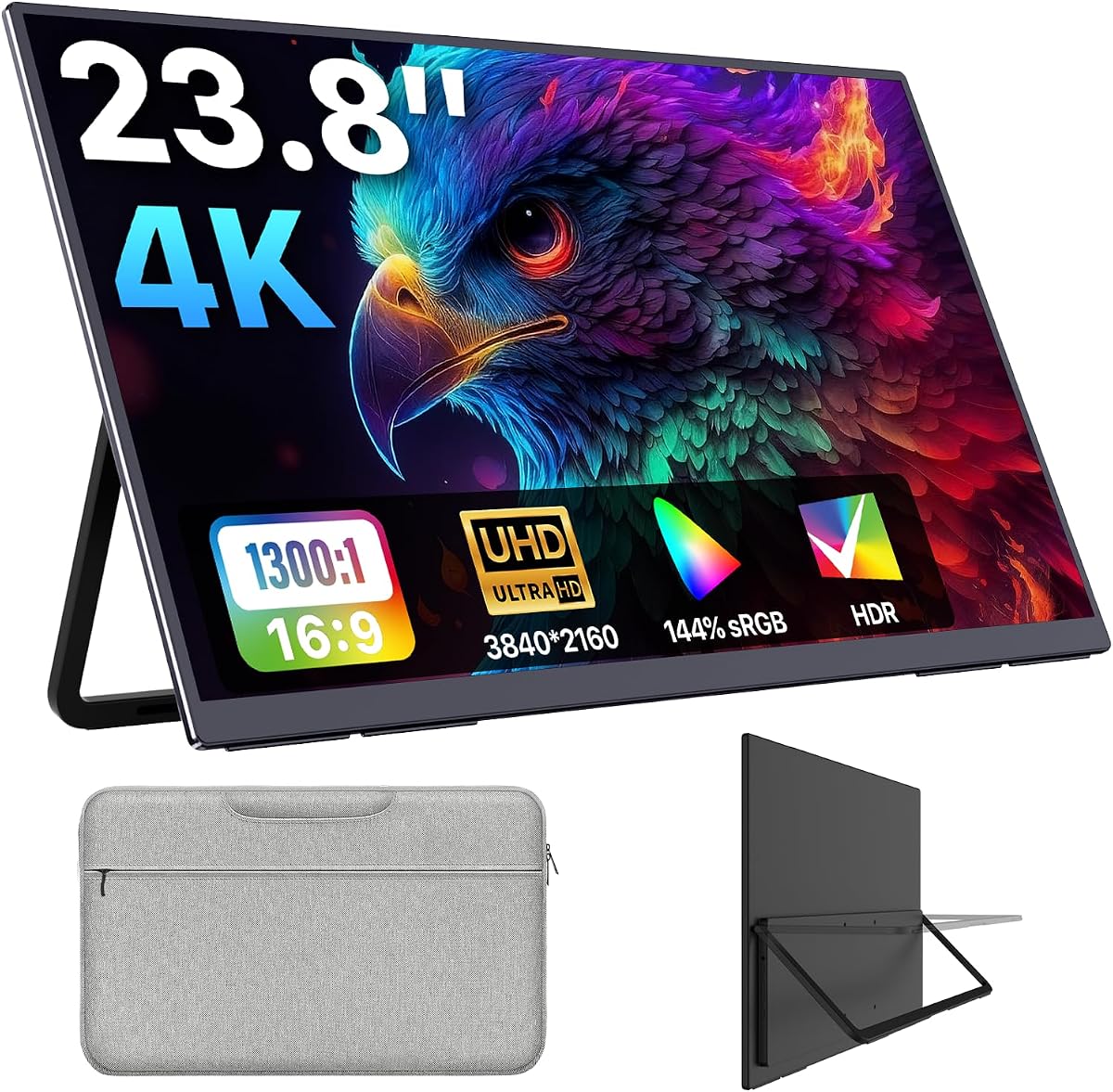
The Upperizon 23.8 inch Portable Monitor brings desktop-class screen size to a portable form factor. Rated 4.8 stars by users, it is a powerhouse for creative professionals who need detailed pixel density and wide color gamuts for design tasks.
We may earn a commission when you buy through this link, at no additional cost to you.
Its 4K UHD resolution offers sharp text and image clarity essential for coding or photo editing. The 144% sRGB color gamut ensures vibrant and accurate colors. The anti-glare coating minimizes reflections, making it easier to work in varied lighting conditions.
At 5.46 pounds, it is heavier than smaller portable monitors, but the large screen area justifies the weight. The sturdy kickstand supports angles up to 100 degrees, providing flexible positioning for comfortable viewing during long sessions.
Ideal for content creators, this monitor pairs well with MacBook Pro for high-resolution workflows. Its VESA compatibility allows for wall or arm mounting, transforming any space into a mobile workstation.
The 144% sRGB gamut ensures your designs look true to life across different output mediums.
A 23.8 inch screen provides ample room for multiple windows without overlapping, boosting productivity.
We may earn a commission when you buy through this link, at no additional cost to you.
The ASUS ZenScreen MB16ACV is a trusted choice for users prioritizing eye health during long work hours. With a 4.5-star rating, it features TÜV Rheinland-certified flicker-free and low blue light technologies to ensure comfortable viewing experiences.
We may earn a commission when you buy through this link, at no additional cost to you.
Its anti-glare surface reduces reflections effectively, while the hybrid-signal solution supports power and video transmission through USB-C. The monitor includes a kickstand allowing easy switching between portrait and landscape modes for versatile usage.
While it lacks some modern features like HDR, its reliability and eye care features make it excellent for business travel. The 3-year warranty provides peace of mind, and the ultra-slim design fits well in briefcases or backpacks.
This monitor is best for business professionals who need a simple, reliable secondary screen. It supports a wide range of devices including laptops, phones, and consoles, making it a versatile companion for various tasks.
Certified low blue light and flicker-free tech reduce eye strain during extended working sessions.
The kickstand allows quick adjustment between portrait and landscape modes to suit different tasks.
We may earn a commission when you buy through this link, at no additional cost to you.
InnoView's portable monitor offers a complete package with built-in speakers and a protective case, rated at 4.3 stars. It serves as an efficient screen extender for travelers needing audio and video capabilities in a single device.
We may earn a commission when you buy through this link, at no additional cost to you.
The 15.6-inch IPS panel delivers accurate colors and wide viewing angles. Connectivity options include two full-function Type-C ports and one HDMI port, ensuring broad compatibility with Mac, Windows, and gaming consoles.
While the speakers are functional for casual use, they may lack depth for high-quality audio. Some users report flickering if the connected device's power output is insufficient, but connecting a power adapter resolves this issue.
This monitor suits students and travelers who want an all-in-one solution without extra accessories. The protective case enhances durability during transit, making it a practical choice for daily commutes.
Includes a durable protective case and all necessary cables for immediate use upon arrival.
Multiple port options ensure seamless connection to various devices from Macs to game consoles.
We may earn a commission when you buy through this link, at no additional cost to you.
This InnoView model focuses on convenience with an included sleeve and integrated stand, earning a 4.4-star rating. Its ultra-slim profile and lightweight build make it easy to transport in backpacks for daily use.
We may earn a commission when you buy through this link, at no additional cost to you.
The 1080P IPS screen offers upgraded contrast ratios and HDR support for vivid images. Connectivity is handled via dual Type-C ports and a standard HDMI port, ensuring robust connections with laptops and mobile devices.
While the stand only adjusts within 90 degrees, it provides stable viewing for most angles. Users appreciate the quick access buttons for OSD navigation, though a separate power adapter may be needed for stable operation.
It is an excellent option for those needing a simple second screen for meetings or study. The protective sleeve adds value by safeguarding the display during travel, ensuring longevity and durability.
The built-in stand eliminates the need for external props, simplifying setup in hotel rooms or offices.
A protective sleeve comes in the box, ensuring your monitor is safe from scratches while on the go.
We may earn a commission when you buy through this link, at no additional cost to you.
The cocopar 16-inch monitor delivers exceptional color performance with 110% sRGB coverage, rated 4.8 stars by users. It is a strong contender for creatives who need vibrant colors and high resolution in a portable package.
We may earn a commission when you buy through this link, at no additional cost to you.
Its 2.5K QHD resolution and 16:10 aspect ratio match MacBook displays closely, ensuring seamless workflows. The 144Hz refresh rate supports smooth gameplay and dynamic content consumption without motion blur or tearing.
Constructed with a full metal chassis, it feels premium compared to plastic alternatives. The included fabric sleeve keeps the screen safe during transit, and the VESA mounting holes offer flexibility for custom desk setups.
This monitor is ideal for designers and streamers who prioritize visual fidelity. Its wide compatibility with USB-C devices ensures easy integration into existing tech ecosystems.
With over 100% sRGB coverage, colors appear true to life for professional graphic design work.
The 144Hz refresh rate ensures fluid motion for gaming and video content on the go.
We may earn a commission when you buy through this link, at no additional cost to you.
KEFEYA's attachable screen extender offers a unique dual-screen solution rated 4.5 stars. Designed to clip onto laptops from 13 to 17 inches, it expands workspace instantly without needing desk space or complex mounting.
We may earn a commission when you buy through this link, at no additional cost to you.
Its 14-inch Full HD IPS panel supports multiple display modes, including mirror and extension modes. The 180-degree rotation capability allows users to adjust the viewing angle to their preference for comfortable work.
While brightness is average, the convenience of attaching it directly to your laptop makes it popular among digital nomads. It supports Windows, Mac, and Android devices, ensuring broad compatibility for different user needs.
This extender is best for people who need to multitask while traveling but lack desk space. The setup is straightforward with included cables, making it accessible even for non-technical users.
Clips directly to your laptop lid to provide immediate extra screen space for multitasking.
The 180-degree rotation allows you to adjust the screen angle easily during meetings or reading.
We may earn a commission when you buy through this link, at no additional cost to you.
The kksmart 18.5-inch portable monitor strikes a balance between size and portability with a 4.8-star rating. It offers a larger viewing area than typical 15-inch monitors, making it ideal for spreadsheets and detailed work.
We may earn a commission when you buy through this link, at no additional cost to you.
Its 100Hz refresh rate ensures smoother visuals than standard 60Hz displays, while the 4-side frameless design enhances immersion. Integrated speakers provide clear audio for video calls without needing external devices.
Weighing 2.24 pounds, it is light enough for travel but sturdy enough for desk use. The VESA compatibility allows users to mount it on arms, maximizing flexibility for various desk configurations.
This monitor suits professionals who need more screen real estate for productivity without buying a full desktop monitor. It supports major devices like MacBook, Surface, and consoles, ensuring versatile use cases.
An 18.5-inch screen provides ample room for multiple windows without overlapping clutter.
The frameless design and 100Hz refresh rate create a cinematic experience for media and work.
We may earn a commission when you buy through this link, at no additional cost to you.
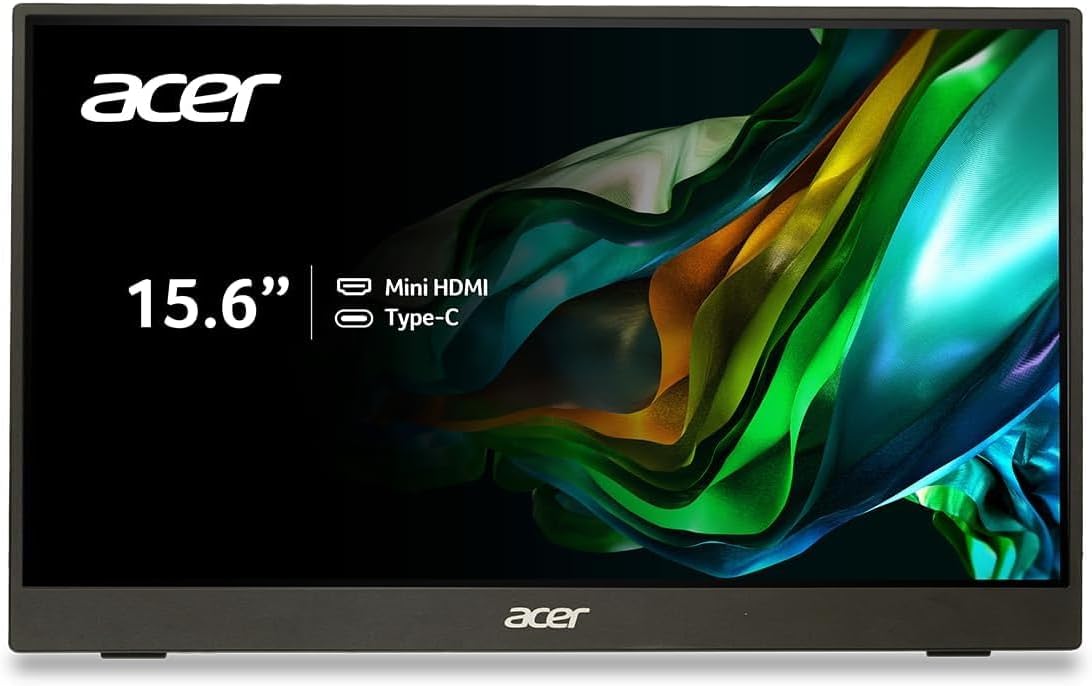
The Acer PM161Q is designed for simplicity and portability, rated at 4.3 stars. Its ultra-slim profile makes it a go-to choice for professionals who need a secondary screen for meetings and classroom use without extra bulk.
We may earn a commission when you buy through this link, at no additional cost to you.
Featuring a Full HD IPS display and AMD FreeSync technology, it ensures smooth visuals and reduced screen tearing. The 4ms response time supports decent performance for casual gaming and general productivity tasks.
While it lacks speakers, its ergonomic tilt and VESA compliance provide flexibility for setup. The lightweight design ensures it can be carried easily in a backpack for daily commuting or business travel.
This monitor is best for those who prioritize form factor and brand reliability. It supports various devices including Mac and PC, making it a versatile companion for different digital workflows.
Its thin design makes it exceptionally easy to slip into a briefcase or backpack.
Compatible with AMD graphics, this monitor reduces screen tearing for smoother video playback.
We may earn a commission when you buy through this link, at no additional cost to you.
Selecting the right external monitor for your MacBook Neo involves considering resolution, connectivity, color accuracy, and portability.
Resolution dictates the sharpness of text and images on your screen. Higher resolutions like 2.5K or 4K offer more detail but require stronger GPU performance. For standard office tasks, 1080P is sufficient, while creative work benefits from QHD or higher.
Choose 1080P for budget convenience or 2.5K/4K for professional clarity.
Modern MacBook Neo models typically feature USB-C ports that support video output. Ensure the monitor supports USB-C with DisplayPort Alt Mode for single-cable charging and display. HDMI is a reliable alternative if your device supports it.
Prioritize USB-C support for a clean, single-cable setup without extra dongles.
Color accuracy is vital for designers and video editors. Look for monitors with high sRGB percentages and IPS panels to ensure consistent and vivid colors across viewing angles. Premium models often include factory calibration for better accuracy.
Check for sRGB coverage and IPS technology if color fidelity is a priority.
If you travel frequently, weight and thickness matter. Portable monitors range from 1.5 to 5.5 pounds. Thinner models fit easier in slim bags, while heavier ones may offer larger screens or better durability.
Select a model under 2 pounds for frequent travel or heavy use.
Most portable monitors are 16:9, but some premium models offer 16:10 to match MacBook aspect ratios. A matching ratio reduces black bars during mirroring and provides more vertical space for documents.
Opt for 16:10 if you want to match your native MacBook display exactly.
Refresh rate impacts motion smoothness. Standard 60Hz is fine for office work, but gamers or video watchers may prefer 100Hz or 144Hz. Higher rates reduce blur and make scrolling smoother.
Choose 144Hz for gaming or smooth video streaming experiences.
Some monitors include basic speakers for audio during video calls. While not a replacement for quality audio, they eliminate the need for external speakers during quick meetings or travel.
Look for built-in speakers if you often use your monitor for video calls.
VESA mounting holes allow you to attach the monitor to an arm or stand. This is useful if you want to save desk space or adjust the height ergonomically. Not all portable models offer this feature.
Check for VESA holes if you plan to use a monitor arm.
Connect your monitor to your MacBook Neo using a compatible USB-C or HDMI cable. Ensure your system settings are adjusted to extend your display rather than mirror it for maximum productivity.
Clean the screen with a microfiber cloth to remove dust and fingerprints. Avoid using harsh chemicals that could damage the anti-glare coating or sensitive display panels.
When traveling, store the monitor in a protective case to prevent scratches or impact damage. Ensure the kickstand is folded securely to avoid accidental breakage during transit.
Most modern MacBook Neo models have USB-C ports that support video output directly. If the monitor also supports USB-C, you likely do not need an adapter. However, if your device uses HDMI only, you may need a USB-C to HDMI adapter for connection.
Yes, if the monitor supports USB-C power pass-through and your MacBook Neo's USB-C port supports charging via a compatible monitor. However, charging speeds vary, so use a high-wattage adapter for optimal performance.
Yes, most portable monitors work with macOS out of the box without additional drivers. The system detects the external display automatically via Plug-and-Play protocols compatible with modern Macs.
IPS panels are common in portable monitors for their color accuracy and wide viewing angles. OLED offers deeper blacks and higher contrast but is rarer and more expensive in portable form factors.
Most monitors include physical buttons or OSD menus to adjust brightness and contrast. You can also change display settings through System Settings on your MacBook to manage resolution and arrangement.
Using a portable monitor can increase battery drain on your MacBook Neo. To minimize this, ensure your monitor is powered externally via its own adapter rather than drawing solely from your laptop's battery.
We reviewed ten top options ranging from budget-friendly 1080P screens to premium 4K displays. The VisionOwl and Upperizon models offer exceptional resolution and color accuracy for professionals.
Prioritize resolution, connectivity, and aspect ratio based on your workflow needs. If you travel often, weight and portability should be your primary deciding factors for the best experience.
Prices fluctuate frequently so always verify current offers before purchasing. We hope this guide helps you find the perfect screen to elevate your MacBook Neo productivity.