
BESIGN LS03 Aluminum Laptop Stand
4.8Editor score
Premium aluminum alloy build
Six inch elevation height
Simple detachable assembly
Finding the right ergonomic laptop stand is essential for maintaining good posture and reducing strain during long work hours. A quality riser elevates your screen to eye level, preventing neck and back pain while improving overall comfort at your desk setup.
To compile this list, we analyzed dozens of models based on stability, material quality, adjustability, and user feedback. We focused on stands that offer genuine ergonomic benefits without sacrificing durability or portability for daily use across various environments.
Each pick below highlights specific strengths like cooling design, rotation features, or budget value. Remember that product availability and pricing can change frequently, so always verify current details before making your final purchase decision online today.
4.8Editor score

4.7Editor score
4.7Editor score
As an Amazon Associate we earn from qualifying purchases.
This side-by-side comparison breaks down the key specifications and unique features of each top-rated ergonomic laptop stand to help you quickly identify the model that fits your specific workspace needs and budget constraints.



This stand earns top marks for balancing stability, cooling, and ergonomic benefits in one affordable package. It holds a strong 4.7 rating from users who praise its ability to elevate laptops safely while keeping them cool during intense sessions.
We may earn a commission when you buy through this link, at no additional cost to you.
The dual-rod stability mechanism ensures your device never wobbles, even when typing vigorously. The geometric heat-vent panel actively improves airflow, preventing thermal throttling better than many solid aluminum competitors in the same price category.
While it lacks 360 rotation, the fixed angle is sufficient for most stationary desk setups. The weight limit might be restrictive for ultra-heavy gaming rigs, but it covers nearly all standard business and consumer laptops comfortably.
Ideal for professionals seeking a reliable daily driver that promotes better posture without breaking the bank. We recommend it for users who prioritize stability and cooling over advanced rotating features.
The unique heat-vent design prevents overheating during long work sessions or gaming marathons effectively.
Dual support rods distribute weight evenly, eliminating shaking and wobbling during typing or mouse use.
We may earn a commission when you buy through this link, at no additional cost to you.
LOXP stands out with its smooth 360-degree rotating base, making screen sharing effortless during meetings or collaborative sessions. Users appreciate the sturdy construction that feels more premium than typical budget aluminum stands.
We may earn a commission when you buy through this link, at no additional cost to you.
The one-piece fiber metal material enhances durability and reduces flex under load. The rotating base locks firmly in place, ensuring your screen stays put once adjusted to your preferred viewing angle.
However, the added weight of the rotating mechanism makes it less ideal for frequent travel. It is best suited for stationary desks where versatility and stability are more important than portability.
Great for teams or individuals who need to rotate their screen often. Consider this if you value flexibility and build quality over ultra-lightweight portability features.
The rotating base allows seamless screen sharing without moving the entire laptop or stand physically.
Fiber metal construction resists wear and tear better than standard aluminum alloys found in cheaper stands.
We may earn a commission when you buy through this link, at no additional cost to you.
Lamicall excels at supporting larger laptops up to 17.3 inches, a rare feature in this category. The heavy base provides exceptional stability, ensuring no sliding or tipping even with bulky devices.
We may earn a commission when you buy through this link, at no additional cost to you.
The aluminum alloy construction looks sleek and professional on any desk. Multiple ventilation holes keep the laptop cool during extended use, which is crucial for preventing overheating during rendering or gaming tasks.
While the fixed angle limits flexibility, it offers a consistent ergonomic position that many users prefer for stability. It is slightly bulkier than other models but remains portable enough for occasional travel.
Best for users with larger laptops who need maximum stability. If you prioritize capacity and cooling over rotation or fine-tuned angle adjustments, this is a top choice.
Accommodates laptops up to 17.3 inches, covering nearly all standard business and gaming models effectively.
Heavier base design ensures the stand remains stationary even when typing vigorously on the device.
We may earn a commission when you buy through this link, at no additional cost to you.
Amazon Basics delivers solid value with a stand that offers significant height adjustment up to seven inches. It is lightweight and rust-resistant, making it perfect for users who move between home and office frequently.
We may earn a commission when you buy through this link, at no additional cost to you.
The open hollow design ensures good airflow to prevent overheating. While it may not feel as premium as heavier aluminum models, it gets the job done for everyday typing and browsing tasks comfortably.
The weight limit is lower than heavy-duty options, so it is best suited for standard consumer laptops. Stability is good on flat surfaces but requires care with heavier devices to prevent tipping.
Ideal for budget-conscious buyers who want essential ergonomic features without extra bells and whistles. Choose this if portability and adjustability are your primary concerns.
Adjust up to seven inches to find the perfect eye level for your specific desk and chair setup.
Folds flat to fit easily into backpacks, making it great for daily commutes or travel setups.
We may earn a commission when you buy through this link, at no additional cost to you.
With a rare 4.8 rating, BESIGN offers premium quality at a budget-friendly price. The aluminum build feels sturdy and professional, providing a six-inch elevation that significantly improves viewing angles for most users.
We may earn a commission when you buy through this link, at no additional cost to you.
Its detachable design makes assembly incredibly simple without tools. The open structure ensures heat dissipation while the rubber grips keep the laptop secure without scratching the surface of your device.
The fixed angle means it is not suitable for users needing dynamic height changes throughout the day. However, for a stable, permanent desk setup, this simplicity is a benefit rather than a drawback.
Top pick for those seeking high reliability and ergonomics on a strict budget. If you want a no-frills solution that just works exceptionally well, this is the one to buy.
The detachable design allows for quick setup without needing any screws or assembly tools at all.
Sturdy aluminum construction holds your device firmly without wobbling even during intense typing sessions.
We may earn a commission when you buy through this link, at no additional cost to you.
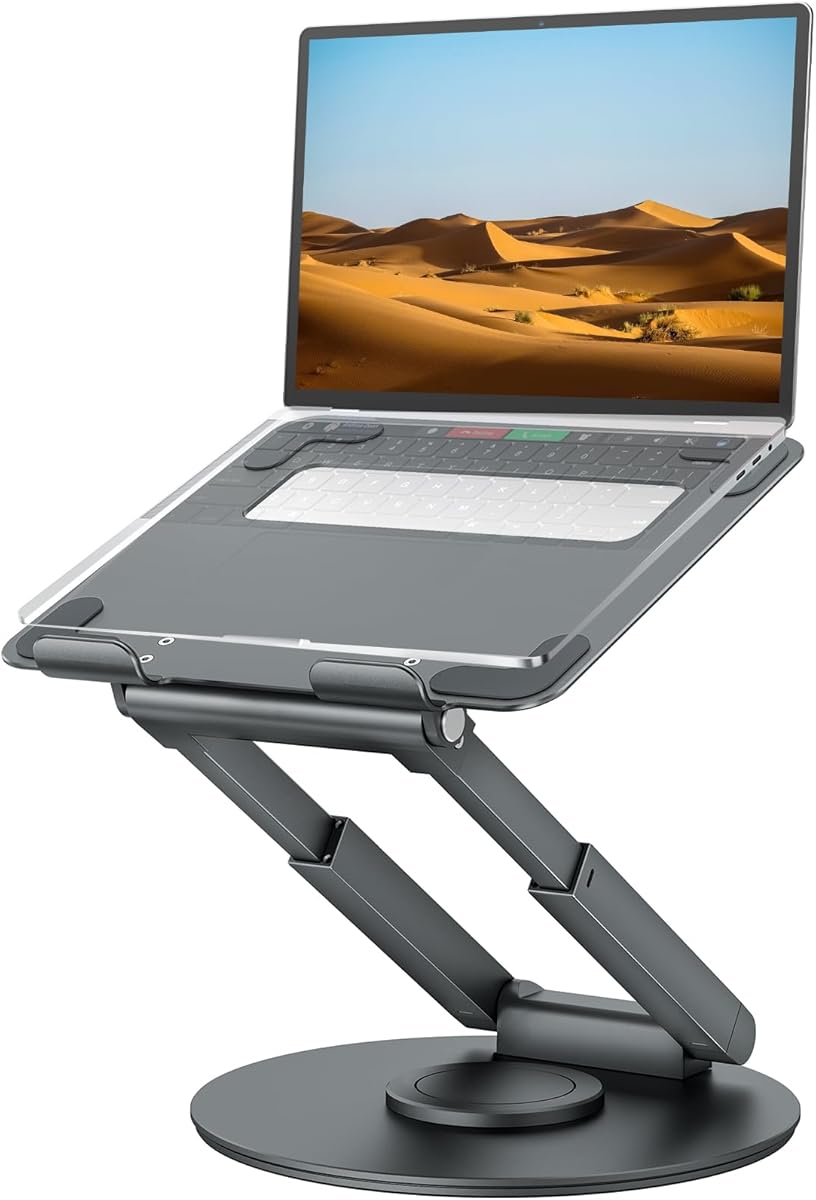
This stand combines height adjustability with a dual-axis swivel base, offering versatility rarely seen in standard risers. The rotation is smooth, allowing for easy sharing of screens during collaborative work or casual viewing.
We may earn a commission when you buy through this link, at no additional cost to you.
The base is designed to be heavier for stability, preventing tipping when the laptop is rotated. Despite the added features, it folds down to a compact size, making it surprisingly portable for a dual-functional stand.
Some users might find the rotation too sensitive for precise typing. It is best used when the laptop is stable, with typing done via external peripherals or when the stand is locked.
Perfect for professionals who need to present frequently or share screens. Choose this if you want both height adjustability and rotation in a single package.
Rotate smoothly on two axes to find the perfect angle for typing or presentation sharing easily.
Ideal for meetings where you need to show your screen to colleagues sitting at different angles.
We may earn a commission when you buy through this link, at no additional cost to you.
Nulaxy brings heavy-duty performance to rotating stands, supporting up to 22 lbs with reliable anti-drop hooks. The premium damping hinge ensures your laptop stays stable even after thousands of rotation tests.
We may earn a commission when you buy through this link, at no additional cost to you.
It is built to handle gaming laptops and heavy devices that typically exceed the weight limits of standard stands. The hooks provide extra security, ensuring the device never slides off during use or rotation.
The dual foldable design helps reduce bulk despite the heavy build, but it is still heavier than non-rotating options. It is a specialized tool for those who need robust support for heavier hardware.
Best for gaming or heavy laptop users who require rotation capabilities. If you need a stand that can handle 22 pounds securely, this is the strongest option available.
With a 22 pound capacity, it supports large gaming laptops that other stands might struggle to hold.
Reinforced hooks physically prevent your device from sliding off during typing or accidental bumps.
We may earn a commission when you buy through this link, at no additional cost to you.
This metal stand offers robust construction with a high load capacity of 17.6 lbs, making it reliable for heavier devices. It features rubber mats to secure the laptop and protect it from scratches during daily use.
We may earn a commission when you buy through this link, at no additional cost to you.
The ventilation holes are strategically placed to maximize airflow, preventing overheating during intensive workloads. The foldable design allows it to be stored easily when not in use, saving valuable desk space.
While it lacks rotation, the sturdy build provides a solid typing platform. It is suitable for users who prioritize strength and durability over advanced features like swivel capabilities or fine angle adjustments.
Ideal for heavy laptop users who need a simple, durable stand. If you want a no-nonsense metal solution that won't bend or break under weight, consider this model.
The sturdy metal construction resists bending and flexing under heavy loads of laptops up to 17.6 lbs.
Multiple holes allow hot air to escape freely, keeping your laptop cooler during long work sessions.
We may earn a commission when you buy through this link, at no additional cost to you.
This stand transforms your desk into a sit-stand workstation with a simple telescoping button. The range extends from 2.1 to 21 inches, allowing you to alternate between sitting and standing effortlessly throughout the day.
We may earn a commission when you buy through this link, at no additional cost to you.
The 360-degree base facilitates easy screen sharing without moving the unit. Built with aluminum alloy, it supports up to 22 lbs, ensuring stability even when fully extended at standing height.
While expensive, it offers active health benefits by encouraging movement during long work sessions. The bulkier design is worth it for the flexibility to change posture instantly without buying a separate desk.
Best for health-conscious professionals who want to reduce sedentary time. If you need true sit-stand capability at your current desk, this is the most effective option available.
Switch between sitting and standing easily to reduce muscle tension and stress during long workdays.
Adjust from 2.1 to 21 inches to accommodate almost any chair height or standing position comfortably.
We may earn a commission when you buy through this link, at no additional cost to you.
Nulaxy offers a powerful solution with standing height reaching 18 inches. It also allows tilt angle adjustments, giving you total control over the viewing angle for optimal posture and comfort.
We may earn a commission when you buy through this link, at no additional cost to you.
The 360-degree rotation is smooth, and the strong bearing force ensures no tipping even when fully extended. It is highly versatile, supporting not just laptops but also tablets for creative work or reading.
Typing directly on the laptop keyboard while standing may feel awkward, so an external keyboard is recommended. This is a premium feature that enhances usability for serious standing desk setups.
Ideal for users who need a high standing desk accessory. If you want maximum height adjustability combined with rotation and tilt, this model offers the most comprehensive feature set.
Rise up to 18 inches to create a functional standing desk without buying a whole new workspace.
Combine height adjustment with tilt and rotation to find the perfect ergonomic position for your eyes.
We may earn a commission when you buy through this link, at no additional cost to you.
Selecting the right ergonomic laptop stand involves considering several factors beyond just price. This guide breaks down the key features to look for to ensure you buy a product that truly improves your workspace comfort.
Stability is the most critical factor for a laptop stand. You need a model that does not wobble when typing. Look for a load capacity that exceeds your laptop's weight. Heavy-duty stands supporting 22 lbs are best for gaming laptops.
Always choose a stand with a load rating higher than your device's actual weight for safety.
Adjustability allows you to position your screen at eye level to reduce neck strain. Some stands offer fixed heights while others provide multiple settings. Sit-stand models allow dynamic changes throughout the day for better health.
Prioritize stands that let you adjust height to match your chair and monitor level.
Materials like aluminum alloy are preferred for their strength and heat dissipation properties. Fiber metal or thick steel adds to durability. Avoid cheap plastic stands that might crack under heavy loads over time.
Metal stands generally last longer and feel more premium than plastic alternatives.
Laptops generate heat during intensive tasks. A stand with ventilation holes or an open design promotes airflow to prevent thermal throttling. Some stands even have specific heat-vent designs to maximize cooling efficiency.
Ensure your chosen stand allows air to flow freely around your device bottom.
If you work from cafes or travel frequently, portability matters. Foldable designs that collapse flat are ideal for backpacks. However, folding mechanisms can sometimes reduce stability slightly compared to rigid models.
Balance stability needs with travel requirements when selecting a portable stand.
Rotation capabilities are useful for collaborative work or presentations. A 360-degree rotating base allows you to share screens easily. Ensure the base is heavy enough to prevent tipping when the laptop is rotated.
Look for smooth rotation hinges that lock securely in place during use.
Check the size compatibility to ensure the stand fits your laptop. Most covers 10 to 16 inches, but larger stands exist for 17.3-inch models. Universal compatibility ensures you can use it with future devices.
Verify the width and depth limits match your current device before buying.
Prices range from budget options under $20 to premium models over $50. Budget stands cover basic needs while premium ones offer features like sit-stand functionality. Determine which features justify the cost for your specific needs.
Invest in features that directly impact your daily workflow and comfort levels.
Place the stand on a flat, stable surface to prevent tipping. Ensure your laptop is centered and the rubber grips are touching the device to prevent sliding during use.
Clean the aluminum surface periodically with a dry cloth to remove dust and fingerprints. Avoid harsh chemicals that might damage the anti-slip pads or protective coatings on the metal.
If the stand has moving parts like hinges or rotation bases, check them occasionally for tightness. Keep them free of debris to ensure smooth operation and prevent mechanical wear over time.
Yes, elevating your laptop to eye level helps align your spine and reduces neck and back strain. Using an external keyboard while using the stand allows you to maintain this posture without compromising typing comfort.
Yes, most stands are compatible with MacBook models due to their universal design. Look for rubber grips that protect the aluminum body from scratches while securing it in place on the stand.
No, the stand does not directly impact battery life. However, better cooling can prevent overheating which indirectly helps your device perform efficiently and maintain battery health over time.
Yes, provided you choose a heavy-duty model with a high weight capacity like 22 lbs. Standard budget stands may not be strong enough to safely support the weight of high-end gaming devices.
Wipe the rubber pads with a damp cloth and mild soap to remove dust and debris. Ensure they are completely dry before placing your laptop on the stand to maintain grip effectiveness.
You can, but typing directly may cause the stand to shake. It is generally recommended to use an external keyboard and mouse for better comfort and stability when the laptop is elevated.
We found that the Nulaxy Ergonomic Adjustable Laptop Stand offers the best balance of stability and cooling for most users. Its dual-rod design ensures a wobble-free experience that many other models struggle to match.
For those seeking premium features like sit-stand functionality, the tounee Telescopic Laptop Stand provides unmatched versatility. It encourages healthy movement while offering the high load capacity needed for professional laptops.
Prices for these products can fluctuate, so check current listings before making your final purchase decision. Investing in the right stand is a small step that yields significant long-term benefits for your posture and comfort.