
ATSC Digital Converter Box with TV Tuner
3.8Editor score
Supports external hard drives up to 2TB
Clear QAM function for unscrambled cable
Front display panel shows channel and clock
This guide compares the top 10 DVR recorders for TV in October 2026, evaluating features like tuner count, storage options, and compatibility to help you
Finding the right DVR recorder for your television setup can transform how you enjoy live broadcasts and archived content. Whether you prefer over-the-air signals or analog inputs, modern devices offer versatile recording options without needing a subscription.
We evaluated ten distinct models based on tuner capacity, storage flexibility, and ease of use. Our analysis covers standalone recorders, networked solutions, and hybrid units that support various video formats and external drive connections for maximum utility.
Each selection highlights key strengths and potential limitations to guide your decision-making process. Prices and availability fluctuate regularly, so always verify current listings before purchasing to ensure you secure the best deal for your specific home entertainment needs.
3.8Editor score

3.4Editor score
4.0Editor score
The following table provides a side-by-side overview of all ten selected DVR recorders. It highlights essential specifications such as video resolution support, tuner configurations, and storage compatibility to help you quickly identify the best fit for your setup.


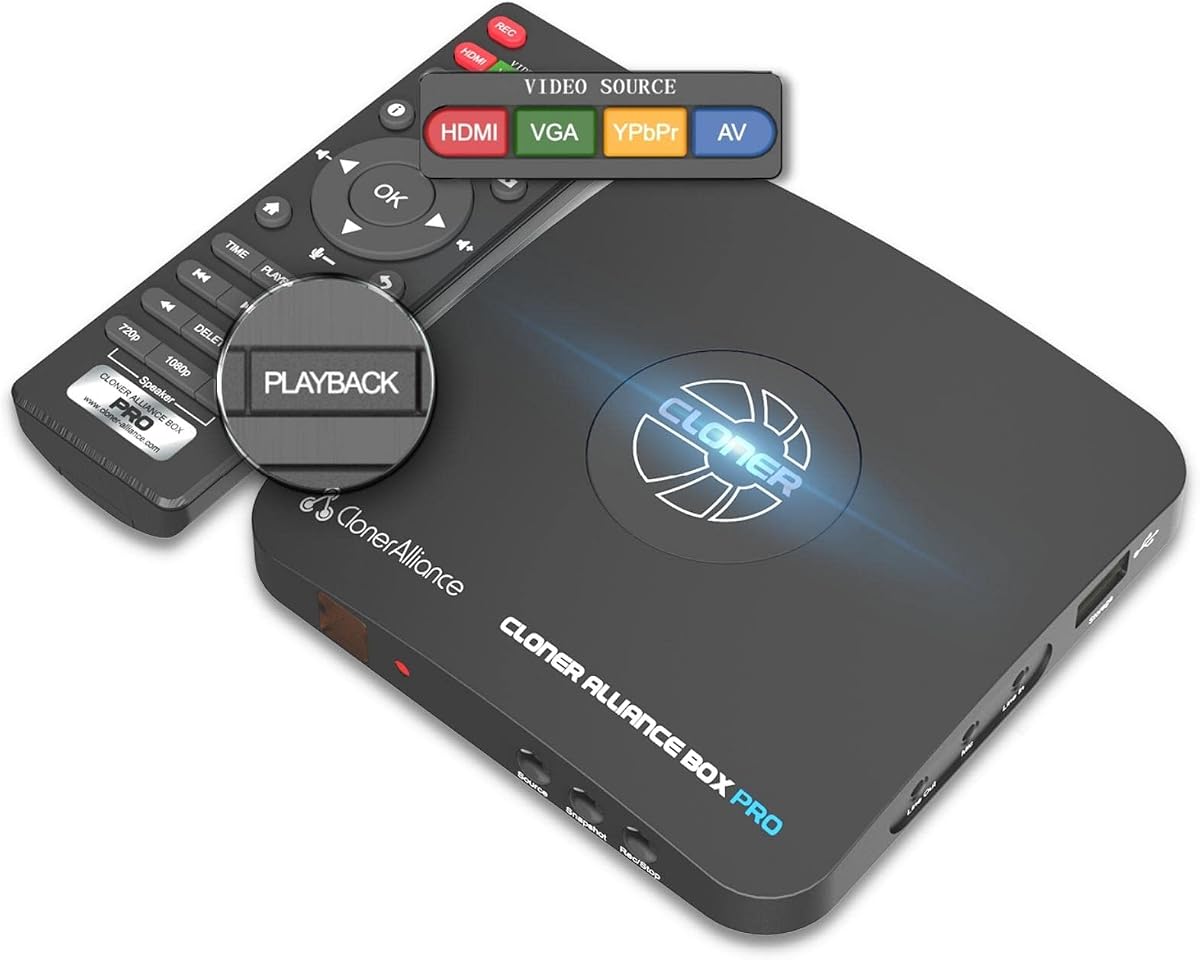
The ClonerAlliance Box Pro stands out as a powerful standalone video recorder capable of capturing 1080p at 60 frames per second. Its rating of 4.0 reflects solid performance for users needing to digitize analog content or record high-definition feeds without a computer.
We may earn a commission when you buy through this link, at no additional cost to you.
This device offers exceptional versatility with support for HDMI, RCA, component, and VGA inputs, making it ideal for connecting various sources like game consoles, set-top boxes, and older camcorders. The ultra-low latency of less than 90ms ensures that what you see is what gets recorded almost instantly.
While it is robust, the device does not support content protected by HDCP, which limits its use with some streaming sticks or cable boxes that enforce strict digital rights management. Additionally, the included video editing software is only available for Windows systems, which may inconvenience Mac users.
For home users or professionals who need to archive analog videos or capture live feeds for later editing, this recorder provides a reliable solution. Its ability to save MP4 files directly to USB storage makes it a top choice for those seeking flexibility and high-quality capture.
This device excels at converting old VHS tapes or camcorder feeds into digital MP4 files without needing a computer to process the signal.
Gamers can capture gameplay or stream live video directly to USB storage while maintaining minimal delay for a smooth viewing experience.
We may earn a commission when you buy through this link, at no additional cost to you.
The Tablo TV 4th Gen 4-Tuner delivers a robust over-the-air DVR experience with the flexibility to record up to four channels at once. With a rating of 3.2, it offers a solid option for cord-cutters who want to watch live TV across multiple screens without recurring fees.
We may earn a commission when you buy through this link, at no additional cost to you.
Its standout feature is the whole-home access capability, allowing you to stream live or recorded content to smartphones, tablets, and smart TVs throughout your house. The four tuners provide ample room for managing complex schedules while you watch something else on another channel.
While it is designed for homes with consistent high-speed internet, reliance on Wi-Fi means placement matters for optimal performance. Additionally, this device is not compatible with non-smart TVs, so you will need a smart TV or streaming device to access the full functionality of the system.
For households that want to eliminate cable bills while keeping control over their recording schedules, this Tablo model is an excellent choice. It balances storage capacity with network streaming features to provide a modern take on traditional TV recording.
You can record four different shows while watching another channel, giving you complete control over your TV schedule without missing any episodes.
The device streams live and recorded content wirelessly to compatible smart TVs and mobile devices, so your recordings are never confined to one screen.
We may earn a commission when you buy through this link, at no additional cost to you.
The 2-Tuner version of the Tablo TV 4th Gen offers a more affordable entry into over-the-air recording while maintaining the same whole-home streaming features. With a rating of 3.4, it is well-suited for users who primarily need to record one show while watching another.
We may earn a commission when you buy through this link, at no additional cost to you.
This model supports over 50 hours of onboard storage, which is plenty for most households to catch up on favorite series without needing external drives. The setup process is straightforward using the included QR code, and the device connects easily via Wi-Fi or Ethernet.
While it lacks the capacity to record three or four shows simultaneously, two tuners cover the majority of everyday viewing needs. The main limitation is the requirement for a smart TV or streaming device, as non-smart TVs cannot directly interface with the Tablo system.
For single households or couples who want to cut the cord without paying monthly fees, this DVR is a practical solution. It provides a modern interface and flexible viewing options that bridge the gap between traditional antennas and smart streaming environments.
This unit provides a cost-effective way to record live local TV without ongoing contracts, making it ideal for budget-conscious viewers.
You can get up and running quickly by scanning the QR code included in the guide, which walks you through the entire installation in minutes.
We may earn a commission when you buy through this link, at no additional cost to you.
This bundle combines the Tablo 2-Tuner DVR with a 35-mile range indoor antenna, offering a complete package for capturing local broadcasts. With a rating of 3.4, it removes the guesswork of selecting a compatible antenna for your over-the-air setup.
We may earn a commission when you buy through this link, at no additional cost to you.
The included antenna is designed to provide solid reception in many areas, making it easier to start recording immediately after unboxing. Like other Tablo models, it supports streaming to multiple devices and does not require any ongoing subscription fees for operation.
While the bundle provides convenience, the antenna performance depends on local signal strength and obstructions. Also, the device is not compatible with non-smart TVs, so you will need an existing smart TV or streaming box to view your recorded content.
For those who want an all-in-one solution to start recording local channels right away, this package is a smart investment. It simplifies the hardware choices and ensures you have everything needed to access free live TV.
The included antenna eliminates the need for separate purchases, ensuring you have both the tuner and signal capture ready out of the box.
Once you buy the device and antenna, you own your recording system outright with no monthly bills required to keep watching or recording.
We may earn a commission when you buy through this link, at no additional cost to you.
The Mediasonic HomeWorx HW250STB is a highly affordable converter box that allows you to record over-the-air broadcasts to an external USB hard drive. With a rating of 3.8, it is an excellent budget option for those who want basic DVR functionality without expensive hardware.
We may earn a commission when you buy through this link, at no additional cost to you.
It supports Clear QAM, which means it can tune into unscrambled cable channels if your provider uses an open system. The front display panel is a practical feature that shows the current channel and time even when the unit is in standby mode.
While it supports hard drives up to 2TB, it does not support ATSC 3.0 broadcasts, which may limit future compatibility as stations transition to new standards. Additionally, it is not compatible with TIVO or major cable provider boxes, so it is primarily for antenna use.
For households on a tight budget that still want to record live shows, this box provides essential features like pause and playback. It is a reliable, no-frills device that bridges the gap between old analog TVs and digital broadcasting.
You can access unencrypted cable channels directly without needing a provider decoder, expanding your channel lineup for free.
The front display shows the channel number and clock, making it easy to check status without turning on your television screen.
We may earn a commission when you buy through this link, at no additional cost to you.
The Toshiba DVR670/DVR670KU is a unique hybrid device that combines a DVD recorder, VCR, and digital tuner into one unit. With a rating of 3.9, it serves a niche market of users who still have VHS tapes to archive or need to record onto optical discs.
We may earn a commission when you buy through this link, at no additional cost to you.
It features video upconversion that can output DVD resolution up to 1080p via HDMI, which helps modern displays render older content better. The built-in ATSC tuner allows for recording live TV directly to DVD, bypassing the need for separate recording hardware.
While it offers great flexibility for legacy media, it is an older model with limited modern connectivity options compared to newer networked DVRs. It also lacks hard drive storage, meaning you must rely on physical discs and tapes for all recorded content.
For collectors or families with extensive VHS collections, this device is a practical way to manage analog media. It allows for dubbing between tapes and discs, making it a versatile tool for preserving home movies and old recordings.
This unit allows you to record directly to VHS and DVD, which is rare for modern electronics and useful for preserving analog content.
The device supports Dolby Digital and DTS formats, so you can enjoy high-quality audio when playing back recorded shows on DVD.
We may earn a commission when you buy through this link, at no additional cost to you.
This bundle pairs the 4-Tuner Tablo DVR with a 35-mile range indoor antenna to provide a complete over-the-air recording solution. With a rating of 3.3, it is an ideal choice for households that want to record four shows at once and stream them throughout the house.
We may earn a commission when you buy through this link, at no additional cost to you.
The inclusion of the antenna simplifies setup, ensuring you have both the tuner and signal capture ready immediately. The four tuners provide maximum flexibility for recording schedules, and the onboard storage supports over 50 hours of content.
While it offers great versatility, the device relies on your home network for streaming, so a strong Wi-Fi connection is essential for smooth playback. Also, it is not compatible with non-smart TVs, meaning you need a smart TV or streaming box to access the interface.
For larger families with busy schedules, this package ensures no one misses a show. It combines high capacity tuner technology with convenient streaming features to create a modern DVR experience without subscription fees.
With four tuners, you can record four separate channels simultaneously while still watching another one live on your TV.
The bundle includes a 35-mile range antenna, so you do not need to source a separate receiver to start capturing local signals.
We may earn a commission when you buy through this link, at no additional cost to you.
The ClonerAlliance UHD Pro is a high-end capture device designed to record 4K ultra-HD video directly to USB storage or TF cards. With a rating of 4.1, it is one of the top choices for content creators or users who need to archive 4K feeds from consoles or cameras.
We may earn a commission when you buy through this link, at no additional cost to you.
It supports H.265 and H.264 codecs, which allows for efficient file sizes without sacrificing quality. The device also offers 4K 60fps passthrough, meaning you can watch high-resolution content on your TV while recording simultaneously without lag.
Like the Box Pro version, this device does not support content protected by HDCP, so it is best used with sources that allow raw HDMI capture. Also, the included video editing software is limited to Windows systems, which may restrict Mac users.
For gamers or filmmakers who need reliable 4K capture without a PC, this device is a robust option. Its low latency and high-quality recording capabilities ensure that your footage is preserved exactly as it appears on screen.
You can record content at full 4K resolution, which is perfect for preserving high-definition footage from modern consoles or cameras.
The pause and resume function helps you keep all important moments in a single file without having to stop and restart manually.
We may earn a commission when you buy through this link, at no additional cost to you.
This certified renewed version of the Tablo 2-Tuner offers a more affordable entry point while keeping the core features of whole-home streaming and over-the-air recording. With a rating of 3.8, it provides a reliable alternative for those willing to try refurbished hardware.
We may earn a commission when you buy through this link, at no additional cost to you.
It comes with 128GB of onboard storage and supports two simultaneous recordings, which is sufficient for most casual viewers. The unit connects via Wi-Fi or Ethernet and allows streaming to smartphones, tablets, and smart TVs across your network.
As a renewed product, you may not receive all original accessories, but the device is tested to ensure it meets performance standards. It remains compatible with the Tablo app and does not require any monthly subscriptions to operate fully.
For budget-conscious shoppers who want the benefits of a network DVR without paying full price, this option is a solid choice. It maintains the same software and streaming capabilities as new units for a fraction of the cost.
Choosing a renewed unit allows you to access the same features as the brand-new version but at a significantly reduced price point.
Even as a refurbished unit, it still connects to your home network to stream recorded content to your mobile devices and smart TVs.
We may earn a commission when you buy through this link, at no additional cost to you.
This renewed 4-Tuner Tablo DVR offers the highest recording capacity in the lineup at a lower price point than the new version. With a rating of 3.6, it is perfect for households that need to record four shows simultaneously without paying premium prices.
We may earn a commission when you buy through this link, at no additional cost to you.
It includes 128GB of onboard storage and supports streaming across multiple devices via your home network. The four tuners allow you to manage complex recording schedules while still watching live TV on another channel.
As a refurbished unit, you should check what accessories are included since they may vary. However, the device is tested to ensure performance matches the new standard and retains all the software features of the original model.
For users needing maximum recording capacity on a budget, this is a strong contender. It delivers the same high tuner count and streaming flexibility as the new model but with cost-effective savings.
With four tuners, you can handle four separate recording tasks at once, which is ideal for busy households with many shows to track.
The device streams live and recorded content to your mobile devices and smart TVs, allowing you to watch anywhere in your home.
We may earn a commission when you buy through this link, at no additional cost to you.
Selecting the right DVR recorder for TV depends on several factors including your signal source, storage needs, and budget. This guide outlines the key aspects to consider to ensure you get a device that fits your specific entertainment setup.
Before purchasing, determine if you are recording over-the-air signals via antenna, cable inputs, or analog sources like VHS. OTA DVRs require ATSC tuners, while analog recorders need HDMI or RCA inputs to capture older formats.
Always verify that the device supports the specific input types your current equipment uses to avoid connectivity issues after installation.
Tuner count dictates how many shows you can record at once. A 2-tuner DVR is sufficient for most households, but larger families may benefit from 4-tuner models to record multiple programs simultaneously.
Higher tuner counts offer more flexibility for scheduling but often come at a higher price point, so choose based on your typical viewing habits.
Internal storage is limited on many networked DVRs, often ranging from 50 to 100 hours. Devices that support external hard drives give you much greater capacity and the ability to upgrade over time.
If you record many hours of content, prioritize models that support USB 2.0 or 3.0 external drives to ensure you never run out of space.
Modern DVRs often allow streaming to mobile devices and smart TVs, letting you watch recorded content from anywhere in your home. Some units support multiple simultaneous streams for better household flexibility.
Check that your smart TV or streaming devices are compatible with the DVR app to ensure seamless playback across your screens.
Many traditional cable DVRs require monthly fees, but standalone OTA recorders often come with no subscription costs. Always verify if the device requires ongoing payments for premium features.
Choosing a model with no hidden fees helps you save money in the long run and keeps your setup simple and affordable.
If you record from a 4K source, ensure the DVR supports 4K capture or passthrough. Many budget units only support up to 1080p recording, which may not preserve full quality from modern consoles.
For high-definition content, select a device that explicitly supports 4K recording to maintain the clarity of your source material.
Some DVRs offer multiple inputs like HDMI, RCA, component, and VGA, allowing you to connect various devices. This is crucial for digitizing old tapes or capturing from set-top boxes.
Look for units with diverse input options if you plan to archive analog media or connect multiple devices to a single recorder.
User-friendly interfaces and simple setup processes make a big difference. Features like QR code configuration, clear on-screen menus, and remote controls enhance the daily experience.
Prioritize models with intuitive design and clear documentation to avoid frustration during initial setup and ongoing use.
To start using your DVR, connect the device to your power source and your TV using the provided HDMI or RCA cables. If it is an OTA DVR, attach your TV antenna to the coaxial input and run the signal scan through the device menu to detect channels.
For recording shows, navigate to the channel guide or schedule menu and select the program you want to capture. Some devices allow you to set series recordings so you never miss an episode. For USB recorders, connect an external hard drive and select the record option when a show airs.
To care for your recorder, keep it in a well-ventilated area to prevent overheating. Regularly check for firmware updates via the device settings to ensure compatibility with new broadcasts. If you do not use it for long periods, power it down completely to save energy.
Not all DVRs require internet, but networked OTA DVRs like Tablo need Wi-Fi or Ethernet to stream recorded content to other devices. Standalone recorders that save to USB drives do not need an internet connection to function properly.
Some models like the ClonerAlliance UHD Pro support 4K recording and passthrough. However, many budget units only support up to 1080p resolution, so check the specs before buying if you need high-quality capture.
If the DVR has internal storage, you may lose recordings unless you connect a separate external drive. Always back up your files to another computer or drive to prevent losing your archived content.
Many analog capture devices can record from cable boxes via HDMI, but they cannot access encrypted signals. Ensure your cable provider uses unencrypted channels or use a converter that supports Clear QAM for cable recording.
Recording duration depends on your storage size and the resolution you select. Larger hard drives allow for hundreds of hours of content, while limited internal storage may hold only a few days of high-definition video.
Yes, devices that save to USB drives or SD cards allow you to remove the storage and plug it into your computer. Networked DVRs often let you download recorded files via their app or web interface.
HDCP errors occur when the device tries to record protected content from a source like a streaming stick. Most standalone recorders block protected signals to comply with copyright laws, so you cannot record those specific streams.
Tablo DVRs do not require monthly subscriptions to record or stream live TV. You pay once for the hardware and then enjoy free access to all local channels and recorded content without ongoing fees.
The top picks in this guide cover a range of needs from budget-friendly converter boxes to high-end 4K capture devices. Whether you need to archive VHS tapes or record live local TV for your whole home, there is a device here to fit your situation.
Prioritize your signal source and storage capacity first to ensure the device works with your current setup. If you plan to stream recordings to other screens, choose a networked option with strong Wi-Fi support for best performance.
Always verify the current price and availability before buying since these details can change frequently. Selecting the right DVR recorder today ensures you can enjoy your favorite content without missing a moment or paying monthly cable bills.