
MINISFORUM MS-S1 MAX Mini AI Workstation
4.5Editor score
128GB Unified LPDDR5x Memory
AMD Ryzen AI Max+ 395 CPU
Dual M.2 PCIe Expansion Slots
This comprehensive guide compares the top ten dual GPU AI setups for local model inference and training, highlighting performance, memory capacity, and
Finding the right dual GPU AI setup is crucial for researchers and developers needing local compute power. These systems enable running large language models without relying on cloud services, offering privacy and lower long-term costs.
We evaluated ten distinct configurations ranging from compact mini workstations to massive enterprise servers. Each entry was assessed based on GPU memory, processor core count, cooling solutions, and overall architectural design for AI workloads.
Every selection below details specific strengths and ideal use cases for different professional needs. Please note that hardware availability and pricing fluctuate frequently, so verify current stock and costs before making a final purchase decision.
4.5Editor score

4.8Editor score

4.9Editor score
The following table provides a side-by-side technical comparison of all ten selected dual GPU AI setups, highlighting key specifications to help you identify the system that best fits your computational requirements.


The WEELIAO MAXSUN Intel Arc Pro B60 represents a groundbreaking approach to dual GPU AI setups by combining two GPUs into a single physical card. This design allows users to run 70B-class models locally without needing multiple PCIe slots or complex wiring. It scores high for its ability to deliver massive VRAM capacity on consumer platforms.
We may earn a commission when you buy through this link, at no additional cost to you.
Each GPU operates at 2400 MHz with 20 Xe cores, resulting in a combined total of 394 TOPS. This architecture is specifically built for high-concurrency inference and multi-turn dialogues. The card is recognized separately by the system, offering flexible task assignment and efficient resource allocation across complex AI workloads.
A potential trade-off is the requirement for a motherboard that supports x16 lane bifurcation to achieve full bandwidth on standard platforms. While the hardware is robust, software support for open-source models like Qwen and DeepSeek is still maturing compared to NVIDIA ecosystems. However, this is acceptable for developers comfortable with open-source tuning.
This setup is ideal for researchers needing local inference capabilities without cloud dependency. If you require a powerful, space-efficient dual GPU solution that fits into standard consumer builds, this is the top recommendation for balancing performance and physical footprint.
The integrated dual-GPU design eliminates bottlenecks found in multi-card setups, allowing faster data exchange between processing units for smoother inference.
The blower fan and large vapor chamber ensure stable temperatures during uninterrupted inference tasks, mimicking data center reliability in a desktop form factor.
We may earn a commission when you buy through this link, at no additional cost to you.
The APC MES2X is a turnkey solution designed for users who want immediate performance without the hassle of assembly. Featuring dual RTX PRO 6000 Blackwell GPUs, it offers nearly 200GB of combined VRAM. This setup is exceptionally powerful for enterprise-grade AI workloads and local training tasks.
We may earn a commission when you buy through this link, at no additional cost to you.
Powered by the AMD Ryzen 9-9950X processor, the system ensures that the CPUs do not bottleneck the powerful GPUs. The 256GB of DDR5 RAM supports large data processing tasks efficiently. The 360mm liquid cooler keeps the processor temperatures in check even during sustained heavy loads.
While the system is fully tested and comes with professional cable management, the cost is significantly higher than building a similar system yourself. Additionally, the size of the chassis requires ample desk or rack space. These are acceptable trade-offs for organizations needing a guaranteed, stable infrastructure immediately.
This workstation is perfect for professional studios or research labs needing reliable power. If you prioritize performance and convenience over cost, this MES2X setup offers one of the strongest configurations available for dual GPU AI tasks today.
With 96GB per GPU, this setup allows running multiple large models simultaneously without memory swapping, maximizing throughput for complex datasets.
The pre-loaded OS and tested hardware mean you can focus on your AI models immediately upon arrival, reducing setup time to zero.
We may earn a commission when you buy through this link, at no additional cost to you.
The APC ES620 brings the latest GeForce RTX 5090 GPUs into a workstation form factor, offering cutting-edge performance for AI tasks. Each card includes 64GB of GDDR7 memory, providing ample space for training and inference. This is a premium choice for those needing the absolute latest hardware.
We may earn a commission when you buy through this link, at no additional cost to you.
The system is powered by the Ryzen 9-9950X processor, which is well-suited for heavy multitasking alongside GPU workloads. The 1600W power supply ensures stable power delivery even when both GPUs are pushed to their limits. It includes Windows 11 Pro for Workstations, optimized for high-end tasks.
The high cost is a factor to consider, as is the significant power draw of dual high-end GPUs. However, the speed and efficiency gains from the GDDR7 memory make this a worthy investment for professionals who cannot afford downtime. The warranty support adds a layer of security.
This setup is best suited for studios requiring top-tier performance for rendering and AI generation. If you need the fastest possible local AI processing capabilities and have the budget to support it, the ES620 is the leading choice in this category.
The new memory standard delivers significantly higher bandwidth than previous generations, allowing faster model loading and data transfer speeds.
Windows 11 Pro for Workstations includes features like ReFS file system support, crucial for handling large data integrity and security needs.
We may earn a commission when you buy through this link, at no additional cost to you.
The NVIDIA DGX Spark brings enterprise-grade AI performance to a desktop environment, making it unique among dual GPU setups. It leverages the GB10 Grace Blackwell chip to deliver up to one petaFLOP of AI performance. This system is ideal for those who need data center power on a desk.
We may earn a commission when you buy through this link, at no additional cost to you.
With 128GB of unified memory per unit, this system allows running massive models locally without the typical bottlenecks of discrete GPUs. It integrates seamlessly with the NVIDIA AI software stack, ensuring compatibility with industry-standard tools. This is a powerful tool for rapid testing and validation.
The cost is significant, and the system is tightly integrated with NVIDIA software, which may limit flexibility compared to generic builds. However, the efficiency and ease of use for developers already using NVIDIA tools make this a practical choice. It saves time by reducing configuration overhead.
This setup is ideal for developers and startups wanting secure, fast AI prototyping. If you need to experiment with large models locally without sending data to the cloud, the DGX Spark offers a professional, reliable solution for innovation.
Shared memory between CPU and GPU eliminates bottlenecks, allowing faster data movement for complex AI pipelines and large batch processing.
Local processing ensures sensitive data never leaves your physical premises, complying with strict regulatory requirements for privacy and security.
We may earn a commission when you buy through this link, at no additional cost to you.
The ASUS dual EPYC server is designed for enterprise-scale deployments where reliability and expansion are critical. It supports up to eight GPUs, making it a future-proof solution for growing AI workloads. This is a true server-class machine for heavy-duty training and inference.
We may earn a commission when you buy through this link, at no additional cost to you.
With two EPYC processors providing 192 cores, the CPU power is immense, ensuring that data ingestion and preprocessing never hold up the GPUs. The memory system supports ECC and high speeds, ensuring data integrity. It includes robust networking options like 200GbE NICs for cluster connectivity.
This system is too large and expensive for home use, requiring a 4U rack environment and dedicated IT support. The complexity of maintenance and power requirements is high. However, for organizations running large clusters, this level of scalability and management is essential.
This setup is perfect for data centers or large companies building AI clusters. If you need to scale AI infrastructure massively with full control over hardware and network, this server offers the necessary robustness and capacity.
Supporting up to eight GPUs allows for incremental upgrades, enabling organizations to grow compute power as training demands increase.
ECC memory and hot-swap drives ensure that critical training jobs run smoothly without data corruption or downtime due to hardware failure.
We may earn a commission when you buy through this link, at no additional cost to you.
The Cloud Ninjas Iron Bull workstation is designed to handle heavy computational tasks alongside AI inference. Featuring the Threadripper 9970X and an RTX 5090, it is a powerhouse for engineers who work with large 3D models and local AI tools. The ECC memory ensures data reliability.
We may earn a commission when you buy through this link, at no additional cost to you.
The system includes a 1600W power supply and a 360mm liquid cooler to maintain stability during long renders. Storage is handled by a fast 4TB NVMe SSD, reducing load times. It also includes dual network ports for flexible connectivity options and robust data transfer.
While powerful, the GPU memory is 32GB, which may limit very large models compared to higher-end workstation cards. Additionally, the tower design requires significant desk space. These are acceptable trade-offs for a machine optimized for multi-tasking and professional engineering software.
This setup is best for engineers needing a versatile machine for CAD and AI. If you require a system that handles complex modeling alongside local machine learning tasks efficiently, the Iron Bull offers a balanced and robust solution.
The 32-core CPU allows simultaneous processing of physics simulations and AI inference, streamlining complex engineering workflows.
Error-correcting memory prevents data corruption during long processing jobs, ensuring that complex datasets are handled with high accuracy.
We may earn a commission when you buy through this link, at no additional cost to you.
This workstation by Empowered PC is built for local training of large language models without cloud reliance. It features three RTX PRO 6000 GPUs and an AMD EPYC processor, offering raw compute power for deep learning. It is a true workstation for serious AI practitioners.
We may earn a commission when you buy through this link, at no additional cost to you.
The 768GB of DDR5 RAM eliminates bottlenecks when processing massive datasets. Paired with Gen5 NVMe SSDs, data ingestion speeds are incredibly fast. The chassis is designed to handle heavy loads, and it comes with a 3-year warranty and lifetime technical support.
The power requirements are high, needing 240V for maximum performance, which may not be standard in all homes. The cost is also significant, but it avoids monthly cloud subscription fees. For organizations focused on long-term data privacy, this investment is often justified.
This setup is ideal for enterprises training custom LLMs locally. If you need a machine that can handle massive datasets and complex neural networks without latency, this configuration offers the necessary local power and reliability.
The high core count and multi-GPU configuration drastically reduce training times compared to single GPU setups, accelerating project timelines.
With expansion slots and robust power supply, this chassis allows adding more storage or peripherals as data needs grow over time.
We may earn a commission when you buy through this link, at no additional cost to you.
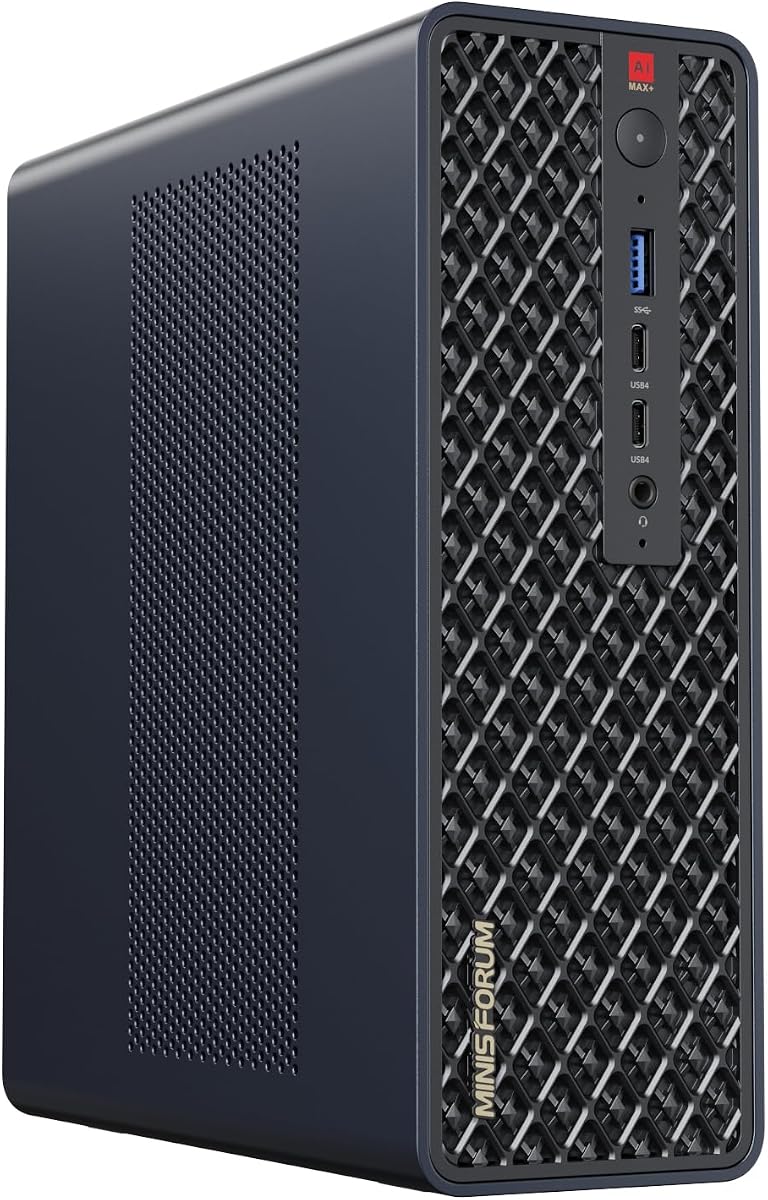
The MINISFORUM MS-S1 MAX offers a unique approach by using unified memory to run local AI models in a tiny footprint. It features an AMD Ryzen AI Max+ 395 APU with 128GB of RAM, allowing it to run LLMs efficiently. It is ideal for personal or small office use.
We may earn a commission when you buy through this link, at no additional cost to you.
With two units, you can cluster them to run larger models locally. This feature adds significant versatility without the need for a massive server. It also includes USB4 ports for fast data transfer and an internal PCIe slot for limited expansion if needed.
While it does not have the raw power of a desktop with discrete GPUs, its efficiency and portability make it attractive. The cooling is effective for its size but may require careful placement. This is a great option for those needing quiet and portable AI computing.
This setup is best for developers needing portable inference power. If you want to run AI models on a desk or in a travel bag without sacrificing too much performance, this mini workstation offers a practical and compact solution.
Connecting two units allows splitting model weights, enabling the handling of larger models than a single system could manage alone.
Shared memory pools between CPU and GPU simplify data access, reducing latency during complex computation tasks and model inference.
We may earn a commission when you buy through this link, at no additional cost to you.
The RTX PRO 6000 Max-Q is an efficient card designed for high-performance computing with lower power consumption. It packs 96GB of GDDR7 ECC memory into a compact form factor. This makes it ideal for building dual GPU workstations where power and thermal headroom are limited.
We may earn a commission when you buy through this link, at no additional cost to you.
With 3511 TOPS of AI performance, it handles deep learning tasks smoothly. The efficient design ensures that the system does not overheat during sustained workloads. It supports large open-source LLMs locally, reducing the need for cloud inference subscriptions.
Note that this is sold as a component, so it requires careful integration into a larger system build. Also, it is OEM bulk packaged, so no retail box is included. These details are minor trade-offs for the performance and efficiency this card offers in a dual GPU build.
This setup is perfect for compact high-power workstations. If you need to maximize performance per watt and fit powerful GPUs into smaller cases, this Max-Q edition provides a reliable and efficient foundation for AI tasks.
Capping power at 300W while delivering high compute allows for better thermal management and lower energy costs in small setups.
Next-gen GDDR7 memory bandwidth ensures fast data processing, essential for real-time inference and rapid model iteration.
We may earn a commission when you buy through this link, at no additional cost to you.
The MINISFORUM MS-S1 Max Mini Workstation is a versatile small form factor PC capable of running local AI workloads. With a powerful APU and 128GB RAM, it handles complex tasks like video editing and AI inference. It features five video outputs for multi-monitor productivity setups.
We may earn a commission when you buy through this link, at no additional cost to you.
The system includes dual 10GbE network ports, making it great for networking tasks or acting as a local server. The integrated NPU provides up to 50 TOPS of dedicated AI compute for specific workloads. It is a quiet and powerful machine for its size.
While it lacks discrete GPU power, the unified architecture ensures efficient performance for many modern workloads. Storage is limited to internal M.2 slots but can be expanded via USB. For mobile professionals, this balance of power and portability is very useful.
This setup is ideal for consultants or developers on the move. If you need a small computer that can serve as a powerful AI node and a general workstation, the MS-S1 Max offers a reliable and versatile solution.
Five video outputs allow for extensive multitasking, enabling simultaneous monitoring of data logs and model outputs efficiently.
Dual 10GbE ports allow for rapid data transfer, essential for syncing datasets quickly in collaborative local development environments.
We may earn a commission when you buy through this link, at no additional cost to you.
Selecting the right dual GPU AI setup requires understanding your specific workload needs and balancing performance with budget and space constraints.
Virtual RAM or VRAM is critical for running large language models locally. Dual setups usually aim to double this capacity, allowing models like 70B or larger to run smoothly without swapping data to system memory.
Look for setups offering at least 64GB per GPU to handle quantized versions of modern open-source models efficiently.
System RAM must be sufficient to handle data preprocessing and loading before it reaches the GPU. A dual GPU system should have enough capacity to avoid bottlenecks during training or inference.
Ensure your system has at least 256GB of DDR5 RAM to maintain smooth data flow between storage and GPUs.
Dual GPUs generate significant heat, which can throttle performance if not managed. Liquid cooling or specialized server-grade airflow designs are essential for sustained workloads.
Choose a system with robust cooling like 360mm liquid coolers or blower fans to ensure stability.
The CPU is responsible for feeding data to the GPUs. A high core count ensures the CPU does not slow down the AI processing tasks.
Opt for processors with at least 32 cores to ensure maximum GPU utilization during complex workloads.
Fast storage is vital for loading large datasets quickly. NVMe SSDs with Gen4 or Gen5 speeds reduce the time spent waiting for data to load.
Prioritize systems with NVMe SSDs to keep data pipelines fast and efficient.
Dual GPU setups have high power demands. A reliable PSU with enough wattage to handle peak loads is necessary to avoid crashes during heavy usage.
Ensure the system includes a power supply rated for 1600W or higher for stable operation.
Compatibility with software frameworks like PyTorch and vLLM is essential. Ensure the hardware supports the specific libraries you plan to use for your models.
Check for ISV support and compatibility with your preferred development environments.
Consider the physical size of the setup. Some workstation builds are large tower cases, while others are rackmount servers or mini PCs.
Measure your desk or rack space before selecting a chassis to ensure it fits your environment.
Ensure the system is placed in a well-ventilated area to prevent overheating. Keep dust filters clean and airflow unobstructed to maintain thermal efficiency during long inference sessions.
Install all latest drivers for the GPUs and chipset. This ensures compatibility with the latest AI frameworks and optimizes performance for your specific hardware configuration.
Monitor system temperatures regularly using tools provided by the manufacturers. If temperatures rise unexpectedly, check fan speeds and thermal paste application to prevent thermal throttling.
Yes, dual GPU setups allow you to assign different models to different GPUs. This capability enables parallel processing, increasing overall throughput and allowing simultaneous queries or training jobs.
Over time, local hardware becomes more cost-effective than paying cloud subscriptions. While the upfront cost is higher, you save on recurring fees and avoid latency issues associated with external connections.
Some setups require motherboards that support PCIe bifurcation to utilize full bandwidth for multiple GPUs. Always check motherboard specifications before assembling a custom dual GPU workstation.
Unified memory allows the CPU and GPU to access the same memory pool, reducing data transfer delays. This simplifies programming and improves efficiency for tasks requiring shared data access.
Workstation designs often allow upgrades for RAM and storage, but GPUs may be limited by power and physical space. Modular designs like tower PCs offer more flexibility than pre-built mini units.
NVIDIA currently leads in ecosystem support for AI frameworks. However, other options may offer cost or efficiency benefits depending on your specific software requirements and budget constraints.
Liquid cooling is highly recommended for high-power setups to manage heat effectively. It keeps temperatures stable under heavy loads, preventing performance throttling and extending hardware life.
Rackmount systems usually require 4U or more vertical space and a server rack. Ensure you have the proper mounting equipment and cooling infrastructure to support such configurations effectively.
Our top picks range from the compact MINISFORUM mini PCs to high-end enterprise servers. Each offers distinct advantages depending on whether you prioritize portability, raw power, or efficiency.
Consider your specific needs such as model size and physical space when making a decision. Investing in sufficient VRAM and cooling ensures your system remains capable as models grow in complexity.
Hardware prices and availability change frequently. Check current listings and verify warranty details before purchasing to ensure you get the best value for your investment.