
Brother DS-640 Compact Mobile Document Scanner, (Model: DS640)
4.3Editor score
16ppm color scanning speed
Ultra compact lightweight design
Micro USB 3.0 power
Compare the top 10 document scanners for iPhone 18 including portable, wireless, and desktop models for fast scanning and cloud integration.
Finding the right document scanner for iPhone 18 means balancing portability with speed and cloud connectivity. Modern mobile scanners offer wireless options that sync directly to your device while maintaining high resolution for crisp text and images.
We evaluated ten top-rated scanners based on scanning speed, compatibility, software features, and ease of use. Each model was chosen for its ability to integrate smoothly with iOS workflows and deliver reliable performance in professional or personal settings.
Every pick includes detailed specs, pros, cons, and real-world use cases to help you decide. Prices and availability change frequently, so check the current listings before purchasing to ensure you get the best value for your needs.
4.3Editor score
4.4Editor score

4.1Editor score
This side-by-side comparison highlights key differences between the ten leading document scanners. Consider speed, connectivity, paper handling, and software features to find the ideal match for your iPhone 18 workflow.


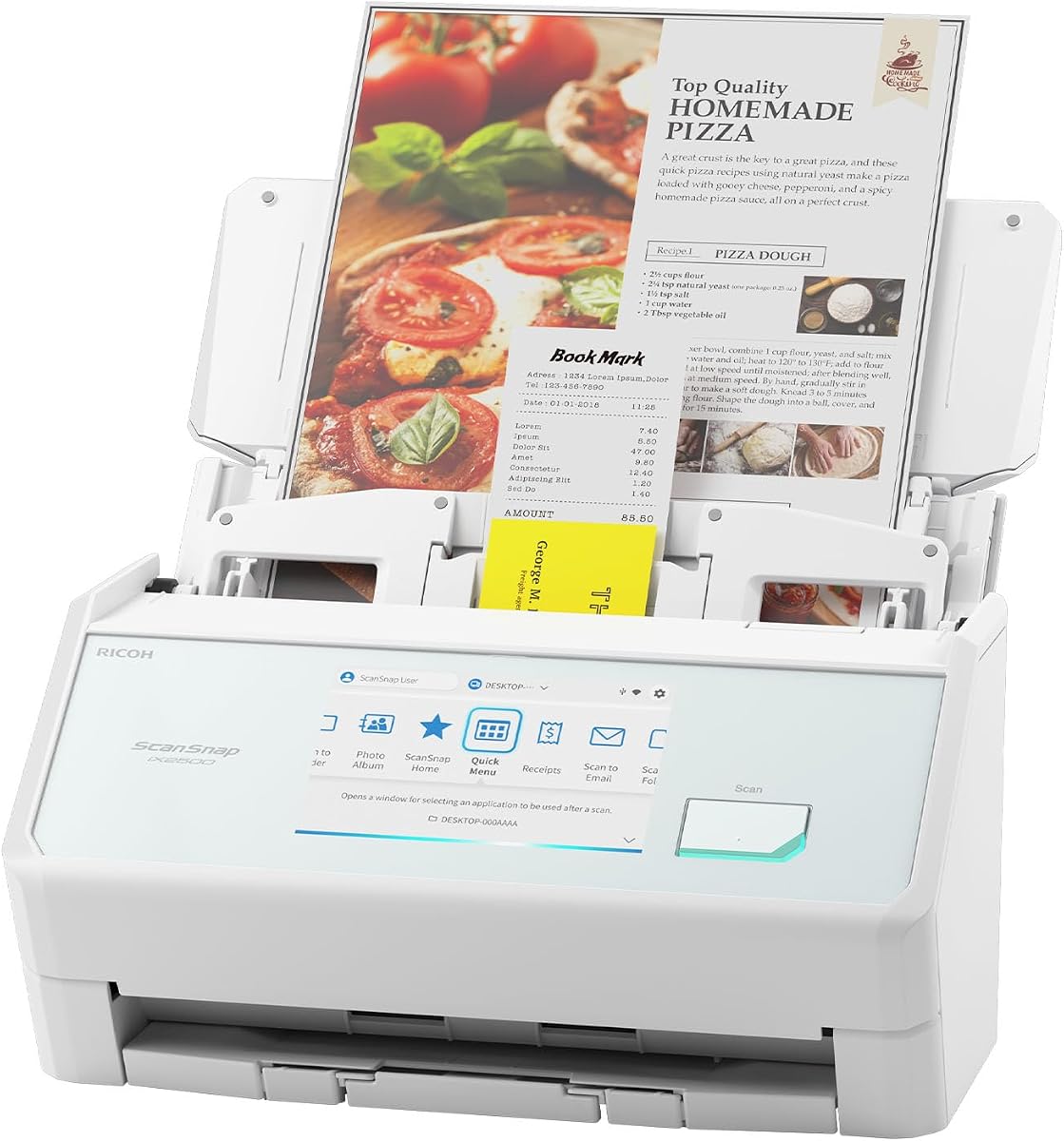
The ScanSnap iX2500 earns Editor's Choice with its 4.4-star rating and unmatched speed for mobile workflows. It delivers 45ppm double-sided scanning and integrates seamlessly via Wi-Fi 6 for direct iPhone 18 access.
We may earn a commission when you buy through this link, at no additional cost to you.
Its standout feature is the large touchscreen that lets you create personalized profiles to send scans to apps or cloud services instantly. The 100-sheet feeder handles bulk tasks effortlessly while the brake roller system prevents jams and damage to delicate pages.
While the premium price may be a trade-off, the time saved on organizing, optimizing, and sharing scans makes it worth the investment. The Wi-Fi 6 ensures stable connectivity without requiring a PC for every scan.
Ideal for professionals or teams needing high-volume scanning with minimal setup, the iX2500 is the top recommendation for iPhone 18 users who prioritize efficiency and seamless cloud integration.
The iX2500 connects directly to smart devices via Wi-Fi 6 allowing you to scan and send files to your iPhone without a computer.
Automatic optimization names and sorts files saving time on manual organization while the touchscreen enables quick drag-and-drop sharing to favorite apps.
We may earn a commission when you buy through this link, at no additional cost to you.
The Brother DS-640 offers exceptional value with a 4.3-star rating and a design that fits easily in bags or pockets. It scans color and black-and-white documents at 16ppm without slowing down performance.
We may earn a commission when you buy through this link, at no additional cost to you.
Powered via micro USB 3.0 cable it can be plugged directly into your PC or laptop making it ready anywhere there is no outlet. The Brother iPrint&Scan desktop app supports scanning to multiple destinations including email cloud services and OCR.
While it lacks a touchscreen or USB-C connection the DS-640 delivers strong image optimization with automatic color detection and text enhancement. It balances cost and functionality well for students or freelancers on a budget.
If you need a reliable portable scanner that is easy to carry and affordable the DS-640 is the best budget choice for iPhone 18 users who still want solid cloud and OCR support.
Weighing less than 1.5 pounds and under one foot in length the DS-640 fits in a pocket and runs without needing a wall outlet.
The free desktop app supports Windows Mac and Linux with TWAIN drivers and offers scan-to destinations like network cloud services and email.
We may earn a commission when you buy through this link, at no additional cost to you.
The Epson Workforce ES-60W stands out as the best premium wireless scanner with a 4.1-star rating and groundbreaking speed of scanning a single page in as fast as four seconds. It supports wireless scanning directly to iOS devices including iPhone 18.
We may earn a commission when you buy through this link, at no additional cost to you.
Its automatic connectivity switching means it seamlessly moves between USB and battery-powered wireless without user intervention. The Epson ScanSmart Software makes it easy to scan review and save files while Nuance OCR creates searchable PDFs and editable Office documents.
The LCD displays wireless and battery status so you always know when to recharge or connect via cable. It handles documents up to 8.5 by 72 inches and ID cards or receipts with versatile paper handling.
Ideal for professionals who demand speed and true wireless flexibility the ES-60W is the top premium choice for iPhone 18 users who need on-the-go scanning without tethering to a PC.
Scan critical documents wirelessly to PC Mac iOS or Android devices with automatic switching between USB and battery power for uninterrupted workflow.
Epson ScanSmart Software allows you to organize and save scans easily while Nuance OCR converts documents into searchable PDFs and editable Word or Excel files.
We may earn a commission when you buy through this link, at no additional cost to you.
The Epson Workforce ES-50 is recognized as the fastest and lightest mobile single-sheet-fed compact document scanner in its class with a 4.3-star rating. It scans a single page as quickly as 5.5 seconds and requires no external power supply.
We may earn a commission when you buy through this link, at no additional cost to you.
It connects via USB 2.0 which makes setup quick and simple for users who prefer direct computer connectivity. The Epson ScanSmart Software allows you to easily scan review and save files while keeping them organized in your workflow.
Nuance OCR creates searchable PDFs and editable Word and Excel files enhancing the value of digitized documents. It handles documents up to 8.5 by 72 inches and digitizes receipts and ID cards easily.
Perfect for users who prioritize simplicity and speed without needing wireless features the ES-50 is an excellent choice for iPhone 18 users who often scan near a PC or laptop.
The USB-powered design means you do not need batteries or an external power supply to operate making it ready whenever you connect to a computer.
Epson ScanSmart Software helps you stay organized by combining multi-page scans into one file and accepting each new sheet automatically as it is inserted.
We may earn a commission when you buy through this link, at no additional cost to you.
The Brother DS-740D offers duplex scanning in a single pass at up to 16ppm with a 4.3-star rating. It scans single and double-sided documents in one pass so color scanning does not slow you down at all.
We may earn a commission when you buy through this link, at no additional cost to you.
Its Desk Saving Design reduces the amount of space needed by saving you 11 inches of desk space. The device is powered via micro USB 3.0 cable allowing you to use it even where there is no outlet available.
Brother iPrint&Scan desktop app supports scanning to multiple destinations like PC network cloud services email and OCR. The software suite includes document management and tools like text enhancement and bleed through prevention.
For iPhone 18 users who frequently need two-sided scanning and limited desk space the DS-740D provides strong performance and compact convenience without sacrificing speed or output quality.
Scan single and double-sided documents in a single pass at up to 16ppm ensuring color does not slow down your workflow or increase scan times.
The DSD feature reduces the space needed to use the device saving you 11 inches of desk space so it fits comfortably in any workspace.
We may earn a commission when you buy through this link, at no additional cost to you.
The Canon imageFORMULA R10 is lightweight and small in size with a 4.1-star rating and easy setup that avoids technical hurdles. It scans both sides of a document at the same time at up to 12 pages-per-minute with a 20 sheet automatic feeder.
We may earn a commission when you buy through this link, at no additional cost to you.
It handles various media types like receipts business cards plastic or embossed cards and reports. The powerful scanning software is already built-in requires no installation and updates automatically for seamless integration with Windows and Mac devices.
Preview your scans to adjust and organize files as you edit straighten and trim them. It leverages Canon camera technology to ensure high-quality imaging in color black-and-white or grayscale while saving energy with ENERGY STAR certification.
For iPhone 18 users who want a convenient portable scanner that works out of the box the R10 delivers reliable performance and simple operation without complex software requirements.
Digitize receipts business cards plastic or embossed cards reports legal documents and more with a scanner that handles various media types effortlessly.
The powerful scanning software is already built-in requires no installation and updates automatically so you can start scanning right away with no setup.
We may earn a commission when you buy through this link, at no additional cost to you.
The Epson Perfection V19 II offers 4800 dpi optical resolution for amazing image clarity with a 3.9-star rating. It is ideal for photo enlargements and scanning books photo albums and documents with its high-rise removable lid.
We may earn a commission when you buy through this link, at no additional cost to you.
Epson ScanSmart software included lets you easily scan photos artwork illustrations books and documents with one-touch scanning. Easy Photo Fix technology restores color to faded photos with one click making it simple to improve old images.
The scanner is compact and lightweight at 3.1 lb with USB powered portability and a built-in kickstand for vertical placement. It generates searchable PDFs and editable Microsoft Office documents with OCR to convert your scans.
While not as fast as feed-based scanners the V19 II is perfect for iPhone 18 users who prioritize scanning photos and delicate documents with high optical quality and simple one-touch controls.
4800 dpi optical resolution delivers amazing image clarity and detail ideal for photo enlargements and preserving fine details in prints and documents.
Easy Photo Fix technology restores color to faded photos with one click making it simple to improve old images without advanced editing tools.
We may earn a commission when you buy through this link, at no additional cost to you.
The CZUR Shine Ultra works with A3 and A4 documents at ultra-fast scanning speed of about one second per page with a 4.2-star rating. It features patented flattening curved book page technology to flatten the curved surface after pixel transformation.
We may earn a commission when you buy through this link, at no additional cost to you.
It has a 13MP CMOS camera sensor and smart features like smart paging auto cropping combine sides stamp mode and multiple color modes. The neck is two-level height adjustable and the device is 90 degree foldable and lightweight at 4 lbs.
Note that it is not compatible with Android and iOS so it works better with Windows and macOS systems. It supports 180+ languages for OCR but Thai Hebrew and Arabic are not supported without contacting support.
Ideal for iPhone 18 users who also work with macOS the Shine Ultra is excellent for scanning books and flat papers but may not suit those who need iOS mobile app integration.
Patented flattening curved book page technology applies pixel transformation to flatten curved surfaces so you can scan thin books without damaging them.
A 13MP CMOS camera sensor captures high-resolution images while smart paging auto cropping and multiple color modes ensure consistent high-quality scans.
We may earn a commission when you buy through this link, at no additional cost to you.
The Portable Document Scanner handheld offers 3 resolution modes up to 900dpi and a 3.9-star rating. It works seamlessly with popular software and operating systems including Windows and stores files in seconds with plug and play setup.
We may earn a commission when you buy through this link, at no additional cost to you.
It supports a 32G Micro SD card for ultra-large storage capacity and saves all JPEG PDF formats. Simple operation means long pressing the switch to turn on selecting color mode and resolution then pressing the Scan button until the green LED lights up.
The scanner is compact and lightweight at about 0.31lb and powered by two AA batteries not included. It is perfect for busy professionals students or anyone who needs to digitize documents while traveling without needing a computer.
For iPhone 18 users looking for an ultra-affordable handheld option the Blue model provides basic functionality and storage but lacks direct iOS app integration for cloud workflow.
With 3 resolution modes up to 900dpi and support for 32G Micro SD cards you can save files in the clearest way with ultra-large storage capacity.
The handheld scanner has a compact size and lightweight design about 0.31lb powered by two AA batteries making it very easy to carry anywhere.
We may earn a commission when you buy through this link, at no additional cost to you.
The Portable Document Scanner handheld in silver offers 3 resolution modes up to 900dpi and a 3.9-star rating. It works seamlessly with popular software and operating systems including Windows and stores files in seconds with plug and play setup.
We may earn a commission when you buy through this link, at no additional cost to you.
It supports a 32G Micro SD card for ultra-large storage capacity and saves all JPEG PDF formats. Simple operation means long pressing the switch to turn on selecting color mode and resolution then pressing the Scan button until the green LED lights up.
The scanner is compact and lightweight at about 0.31lb and powered by two AA batteries not included. It is perfect for busy professionals students or anyone who needs to digitize documents while traveling without needing a computer.
For iPhone 18 users looking for an ultra-affordable handheld option the Silver model provides basic functionality and storage but lacks direct iOS app integration for cloud workflow.
With 3 resolution modes up to 900dpi and support for 32G Micro SD cards you can save files in the clearest way with ultra-large storage capacity.
The handheld scanner has a compact size and lightweight design about 0.31lb powered by two AA batteries making it very easy to carry anywhere.
We may earn a commission when you buy through this link, at no additional cost to you.
Choosing the right document scanner for iPhone 18 requires evaluating several factors to match your workflow needs and budget.
Ensure the scanner supports wireless connectivity like Wi-Fi or Bluetooth for direct iPhone 18 integration. Some models require a PC intermediary which may not suit mobile workflows. Look for compatibility with iOS apps or dedicated mobile scanning tools.
Speed matters for productivity especially if you scan many pages daily. Models like the iX2500 offer 45ppm while basic handhelds take 10 seconds per page. Consider daily volume recommendations to avoid wear on frequent users.
Automatic document feeders handle bulk scanning and save time over flatbeds. Feeder sizes range from 20 sheets to 100 sheets. For thick books or fragile papers a flatbed or specialized book scanner is better suited.
Higher DPI ensures clearer text and image quality. Look for at least 300dpi for documents and 4800dpi for photos. OCR support adds value by creating searchable and editable files from scanned images.
USB-powered scanners are convenient near computers but need a power source. Battery-powered or micro USB 3.0 models offer true mobility. Weight and size also impact how easy it is to carry in a bag or pocket.
Advanced software allows direct scanning to cloud services email or apps. Features like automatic optimization color detection and text enhancement improve output. Check if the scanner supports TWAIN or ICA drivers for your OS.
Built-in brakes and sensors prevent paper jams and damage. Compact designs save desk space while foldable features aid storage. Choose models with durable feeders if you scan mixed media frequently.
Prices vary widely from budget handhelds under $50 to premium feeders over $300. Determine how much you need wireless speed or cloud support to balance cost and functionality for your specific use case.
Begin by setting up the scanner software on your computer or mobile device as instructed. Install any required drivers and connect via USB or Wi-Fi to ensure proper communication with your iPhone 18.
Prepare your documents by removing staples and flattening folds before scanning. Place documents in the feeder or on the flatbed carefully to avoid jams and ensure high-quality output images.
Maintain your scanner by cleaning the glass and rollers regularly with a soft lint-free cloth. Store it in a dry place away from extreme temperatures to prolong its lifespan and consistent performance.
Yes many modern document scanners support wireless connectivity like Wi-Fi or Bluetooth to connect directly to iPhone 18. Models like the Epson ES-60W and ScanSnap iX2500 allow wireless scanning to iOS devices without requiring a computer.
A flatbed scanner uses a glass surface for scanning books photos or fragile pages while a document feeder uses an automatic tray for feeding sheets. Feeders are faster for bulk documents whereas flatbeds are better for multi-material items.
Many scanners offer iOS apps for mobile scanning and cloud uploads. Desktop software usually provides more advanced features like OCR but check the product details to confirm app support for iPhone 18 before purchasing.
Scanning speeds vary from 4 seconds per page on premium models to 10 seconds on handhelds. High-speed feeders can reach 45ppm while basic USB models often scan at 5.5 seconds per page depending on settings.
Yes most modern document scanners include OCR software to create searchable PDFs and editable Word or Excel files. Some require installing additional software while others have OCR built-in for immediate use after scanning.
Portable document scanners often use USB power micro USB 3.0 cables or batteries. Some models switch automatically between USB and battery power while others require a continuous connection to a computer or outlet.
The ScanSnap iX2500 Brother DS-640 and Epson ES-60W lead this list for their performance speed and mobile compatibility. Each offers distinct advantages depending on whether you prioritize budget wireless features or high volume scanning.
When choosing prioritize connectivity options power needs and document types to match your daily workflow. Consider software capabilities and cloud integration to ensure seamless file management on your iPhone 18.
Always check current prices and availability as these details change frequently. Select the scanner that best balances your performance requirements with your budget to make the most of your mobile document management.