
8mm & Super 8 Film to Digital Converter
3.7Editor score
Includes 32GB SD card
2.4 inch built-in display
No computer required
Preserving your family history is easier than ever with modern digital converters for Super 8 and 8mm film. These devices transform aging reels into clear digital files you can watch on any screen without needing old projectors.
We compared ten top-rated models based on ease of use, video quality, reel compatibility, and included accessories. Each product was evaluated for its ability to convert film quickly while maintaining image clarity and color accuracy.
Our picks show clear strengths for different needs, from budget-friendly options to high-end scanners. Prices and availability change frequently, so check the current listings before buying to ensure you get the best value today.
3.7Editor score

4.1Editor score

4.0Editor score
As an Amazon Associate we earn from qualifying purchases.
This side-by-side comparison highlights key specifications for all ten models. Use this table to quickly identify which device matches your specific film types and output needs.




The KODAK REELS Digitizer stands out with its large 5 inch touch screen and 8MP sensor, offering a premium user experience. It converts 8mm and Super 8 reels to 1080p MP4 files without needing a computer, making it ideal for quick preservation.
We may earn a commission when you buy through this link, at no additional cost to you.
Its standout feature is the intuitive interface that lets you zoom and align frames directly on the device. This level of control ensures better framing and sharpness before you save files to an SD card. The included accessory kit covers most standard reel sizes up to 9 inches.
Trade-offs include the lack of audio output, which means sound from your film reels will not be captured. Also, you must buy an SD card separately since it is not included in the box. These are minor issues for the quality and ease of use provided.
If you want a standalone device that requires no technical setup and offers excellent screen real estate for reviewing footage, this is the top recommendation. It is best suited for families who need to digitize many reels quickly and want high-definition output.
The 5 inch LCD screen is significantly larger than most competitors, allowing you to review your footage in much greater detail before saving it.
This device handles the entire process from loading film to saving files, meaning you can digitize without ever connecting to a PC or laptop.
We may earn a commission when you buy through this link, at no additional cost to you.
This converter offers excellent value by including a 32GB SD card right out of the box. It captures frame-by-frame video at 20 fps and saves MP4 files directly to the card, ready to play on any TV or computer.
We may earn a commission when you buy through this link, at no additional cost to you.
The key strength is its simplicity and all-in-one packaging. You do not need to buy extra storage or connect to a PC to start digitizing. The 2.4 inch screen lets you check your work instantly, and the RCA cable supports larger viewing.
A notable trade-off is the smaller screen and manual mounting process which can be fiddly for very old or damaged film. However, for the price, the inclusion of storage and full reel support makes it a strong contender for budget-conscious buyers.
Choose this model if you want a ready-to-use solution without extra costs. It is perfect for those who have a few reels to convert and want to save money while still getting decent 1080p digital copies.
Getting a 32GB SD card included saves you immediate cost and hassle, letting you start archiving your family movies right after unboxing.
You can operate this scanner entirely independently, which removes the learning curve associated with computer-based scanning software.
We may earn a commission when you buy through this link, at no additional cost to you.
The Magnasonic Scanner is praised for its vibrant display and straightforward controls. It automatically converts your reels into digital MP4 files with the push of a button, making it very accessible for non-technical users.
We may earn a commission when you buy through this link, at no additional cost to you.
Its strengths lie in the ability to adjust brightness and framing directly on the scanner. This ensures your videos look as good as possible before saving. The RCA cable lets you bypass the small screen and watch on a larger monitor or TV.
One limitation is the maximum reel size of 7 inches, which might require splicing larger reels before scanning. Also, no SD card is included, so you must buy one separately. These are manageable constraints for the quality provided.
Ideal for users who prioritize screen quality and ease of use, this scanner is a great mid-range choice. It fits well for those with standard-sized reels who want reliable performance without complex setups.
Adjusting brightness and sharpness on the device ensures better final video quality without needing external editing tools.
Whether you prefer the built-in screen or an external TV, the included cable gives you flexibility in how you review your scanned films.
We may earn a commission when you buy through this link, at no additional cost to you.
This model is marketed as a thoughtful gift for families looking to preserve memories. It features a 5 Megapixel sensor for clarity and a touch screen that simplifies settings like brightness and framing without software.
We may earn a commission when you buy through this link, at no additional cost to you.
Its strengths include the included 32GB SD card and comprehensive accessory set. The clear LCD screen makes it easy to check your film before converting, and the RCA cable allows for easy sharing on big screens.
The device scans video only without capturing sound, which is typical for this price point. Also, like many scanners, it may require careful handling during long sessions to avoid overheating. These are expected limitations for budget scanners.
If you want a complete package that is ready to gift, this scanner is a strong choice. It suits those who value ease of use and need a reliable way to digitize their home movies quickly.
With cables, adapters, and a memory card included, this package minimizes the need for additional purchases right after unboxing.
The full color LCD provides clear feedback during setup so you can align frames accurately before starting the conversion process.
We may earn a commission when you buy through this link, at no additional cost to you.
The MovieMaker Pro supports reels up to 9 inches, making it suitable for longer films that require less frequent interruption. It captures video in MP4 format at 1080p and saves directly to an included SD card.
We may earn a commission when you buy through this link, at no additional cost to you.
Its strengths include compatibility with large film sizes and an easy TV connection via the included cable. You can view your digitized movies on a big screen without transferring files to a computer first.
Users have reported average performance consistency compared to higher-rated models, and manual winding is needed to keep film aligned. These factors suggest it is best for users who prioritize capacity over top-tier speed.
Choose this if you have many large reels to process and want a device that handles them without splicing. It is a solid option for bulk digitization projects where capacity is more important than perfect automation.
Accommodating reels up to 9 inches means fewer stops and starts during long digitization sessions compared to models limited to smaller sizes.
Having an SD card included ensures you can begin digitizing immediately without worrying about buying extra accessories first.
We may earn a commission when you buy through this link, at no additional cost to you.
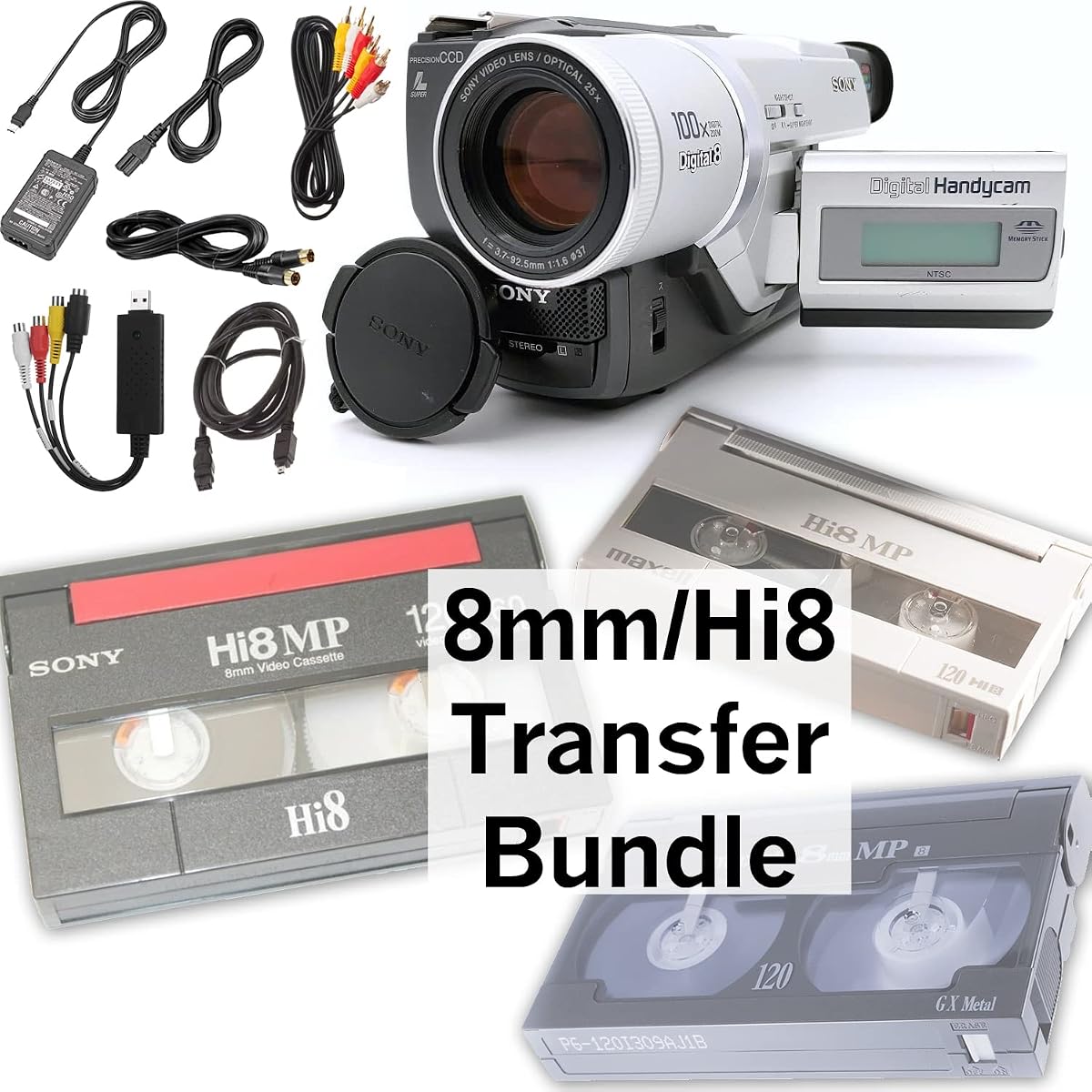
This bundle is designed for users with magnetic 8mm tapes rather than film reels. It includes a camcorder and USB adapter to transfer video to a computer or burn directly to DVD.
We may earn a commission when you buy through this link, at no additional cost to you.
Its strength is the comprehensive bundle nature, covering playback and transfer in one package. This is useful if your collection is mostly tapes and you want to get everything working without sourcing separate equipment.
It does not support physical film reels, so check your media type before buying. Also, it relies on a computer for file transfer which may not suit those seeking a standalone device.
Select this if your main challenge is digitizing tapes rather than film. It provides a ready-made solution for tape playback and capture, ensuring you can access analog content stored on magnetic media.
Unlike film scanners, this bundle focuses on magnetic tape formats like 8mm and Hi8 which require a playback device to read.
With camcorder and USB adapter included, you have everything needed to start transferring your tapes without additional purchases.
We may earn a commission when you buy through this link, at no additional cost to you.
This variant of the Tech Collector bundle also targets magnetic tape formats but includes a blank tape for testing. It provides a USB capture device to transfer footage to a computer or for burning to DVD.
We may earn a commission when you buy through this link, at no additional cost to you.
The main benefit is having a test tape included so you can verify playback before digitizing your valuable footage. The free returns policy adds security to the purchase if the device does not meet expectations.
As with other tape bundles, it is not for film reels and requires a computer. This limits its use to digital-only backup workflows rather than standalone analog playback.
If you are focused on magnetic tape recovery, this is a practical choice. It ensures you can test your setup safely and offers an affordable entry point to analog backup.
Having a blank tape included helps you confirm your transfer workflow before risking your original recordings on the process.
The free returns policy provides peace of mind in case the device fails to work correctly with your existing media.
We may earn a commission when you buy through this link, at no additional cost to you.
This scanner distinguishes itself by also handling slides and negatives in addition to film reels. It uses a touch interface to send footage to an SD card without needing a computer or drivers.
We may earn a commission when you buy through this link, at no additional cost to you.
Its strength is multi-format support, allowing you to digitize slides and negatives alongside movie films. The built-in screen and TV cable make reviewing and sharing straightforward for all media types.
The product details are less specific about film reel size limits, so verify dimensions before purchase. Also, pricing can fluctuate significantly compared to other models in this category.
Choose this if you have a mix of film reels and static media like slides. It offers versatile digitization in one device, saving you from buying separate scanners for different media types.
Unlike standard movie scanners, this device handles slides and negatives too, making it ideal for mixed media collections.
The device works without installing drivers, which simplifies setup on any computer or laptop you might use to transfer files.
We may earn a commission when you buy through this link, at no additional cost to you.
This device focuses on converting films into still JPEG images rather than continuous video. It is equipped with a display screen and works without computer drivers, offering an easy workflow for static snapshots.
We may earn a commission when you buy through this link, at no additional cost to you.
The strength is its specialization in JPEG output, which can be easier to manage for photo albums and archives. The TV cable and display screen allow you to preview images before saving them to an SD card.
It does not support video output so continuous motion capture is not possible. Also, there is limited verified user feedback on its reliability compared to more established models.
Select this if you primarily want still images from your film reels rather than full video. It is ideal for creating photo collections or scanning key frames for printing and sharing.
Converting to JPEG files is ideal for photo collections and easy sharing without dealing with video file sizes.
The touch controls simplify navigation and setting changes without needing any software installation on a computer.
We may earn a commission when you buy through this link, at no additional cost to you.
This model offers frame-by-frame conversion for both video and still images. It includes a full accessory kit and allows standalone operation without a computer, making it versatile for different digitization needs.
We may earn a commission when you buy through this link, at no additional cost to you.
Its strength is the comprehensive accessory set which includes power adapters and video cables. This ensures you can connect to a TV or monitor immediately without purchasing extra parts.
It comes at a higher price point with limited verified user data on long-term reliability. These factors suggest careful research before purchase if budget and performance certainty are priorities.
Choose this if you want a complete kit and multi-media support. It is suitable for those who need flexibility in output formats and prefer a ready-to-go package.
Having all necessary cables and adapters included ensures you can start using the scanner right away without extra shopping.
This device handles both still frames and video, giving you options for how you want to preserve your film content.
We may earn a commission when you buy through this link, at no additional cost to you.
Selecting the right converter depends on your specific needs regarding film size, output type, and budget. Below are key factors to help you decide.
Most modern converters output MP4 video files which work on most devices. Ensure the output matches your storage needs and viewing platforms.
Choose video output for motion pictures or JPEG for still frames. Always check if sound capture is available for your specific model.
Film reels come in different diameters, typically 3, 5, 7, and 9 inches. Ensure the device supports your reel size to avoid extra cutting or splicing.
Devices that accept 9 inch reels save time by reducing interruptions. Check the universal supply reel size limits before buying.
Larger screens make it easier to frame your shots and check quality during scanning. Look for at least 2.4 inches for comfortable viewing.
Touch screens simplify adjustments like brightness and framing without complex menus. This improves usability for non-technical users.
Standalone converters require no computer connection and are easier to set up. They store files directly on SD cards for immediate use.
PC-connected models may offer more editing options but add complexity. If you want simplicity, prioritize devices that work without drivers.
Check whether the device includes an SD card or if you must buy one separately. This impacts total cost and immediate usability.
A 32GB card typically stores several hours of video. Ensure the device supports the storage size you need for full conversion sessions.
1080p resolution is standard for high-quality conversion. This ensures your home movies look clear on modern televisions and monitors.
Higher resolution helps preserve detail and color. Look for models that capture 1080p to maintain quality as screens get larger.
Standard frame rates for conversion are around 20 fps which is suitable for older films. This keeps motion smooth without creating unnecessarily large files.
Avoid devices that limit frame rate too much as it can affect motion clarity. A consistent frame rate ensures steady playback.
Complete kits with cables, adapters, and power supplies save time and money. Ensure everything needed for operation is included in the box.
Check for TV cables and reel adapters. If you want a ready-to-go experience, look for bundles with all necessary tools.
Start by cleaning your film reels gently with a soft cloth to remove dust. Avoid touching the film surface directly to prevent fingerprints or scratches.
Mount the film onto the universal supply reel using the included adapters. Follow on-screen prompts to align the first frame correctly before starting conversion.
Store your device and films in a cool, dry place away from direct sunlight. This prevents overheating during use and extends the lifespan of both film and electronics.
Most standalone 8mm and Super 8 converters capture video only and do not include audio. Audio tracks on older film often require separate equipment to read. Check product details for any audio capabilities before purchasing.
A 32GB SD card is typically sufficient for several hours of video. Ensure the device supports SDHC or SDXC formats for larger capacity. Always back up files after conversion to avoid data loss.
No, most modern converters are standalone and work without a computer. You can save files directly to an SD card and transfer them later. Some models support TV output for immediate playback.
Many top converters support reels up to 9 inches, but always verify the specs. Larger reels may require specific adapters to load properly. Check compatibility to avoid needing to splice your film.
Only specific models designed for multi-media support both film reels and stills. Standard movie converters focus only on moving images. Look for explicit mentions of slide or negative support if needed.
Use the included RCA or USB cable to connect the device to a TV. Many models allow direct playback from the SD card on supported smart TVs. Check connection ports on your screen before starting.
Handle fragile film with extra care and consider professional scanning services. Home devices may jam or tear brittle film. Always inspect reels before loading them into the scanner.
No, film scanners are only for optical film reels. Magnetic tapes require separate camcorders and capture devices. Check product specifications to confirm it matches your media format.
Our top picks show clear strengths for different needs. The KODAK REELS leads in screen size and control while the budget model includes essential storage.
Prioritize standalone operation and 1080p quality for the best balance of ease and clarity. Ensure the device supports your reel sizes and offers necessary accessories.
Prices and availability change frequently so check current listings before buying to ensure you get the best value today. Always back up your digitized files securely.