
Desk Grommet Power Outlet
4.5Editor score
Affordable price point
Fast USB-C charging
Compact 2.5 inch size
Modern workspaces demand seamless power integration without cluttering surfaces. Desk grommets with USB C ports offer a sleek solution to manage cables and charge devices directly from your furniture, enhancing both aesthetics and functionality.
We evaluated ten top-rated models based on charging speed, port variety, build quality, and installation requirements. Our selection includes options for various hole sizes and power needs, ensuring you find the perfect fit for your specific setup.
Each pick highlights unique strengths, from high-wattage laptop charging to compact designs for small tables. Please note that availability and pricing can change frequently, so verify details before purchasing to ensure the best value for your needs.
4.5Editor score
4.8Editor score

4.6Editor score
As an Amazon Associate we earn from qualifying purchases.
The following comparison table breaks down the key specifications of each model to help you make an informed decision based on your specific power and installation requirements.


This model stands out with an impressive rating, reflecting high user satisfaction and reliability. It offers a clean, flush mount design that integrates seamlessly into desks without disrupting the surface workflow.
We may earn a commission when you buy through this link, at no additional cost to you.
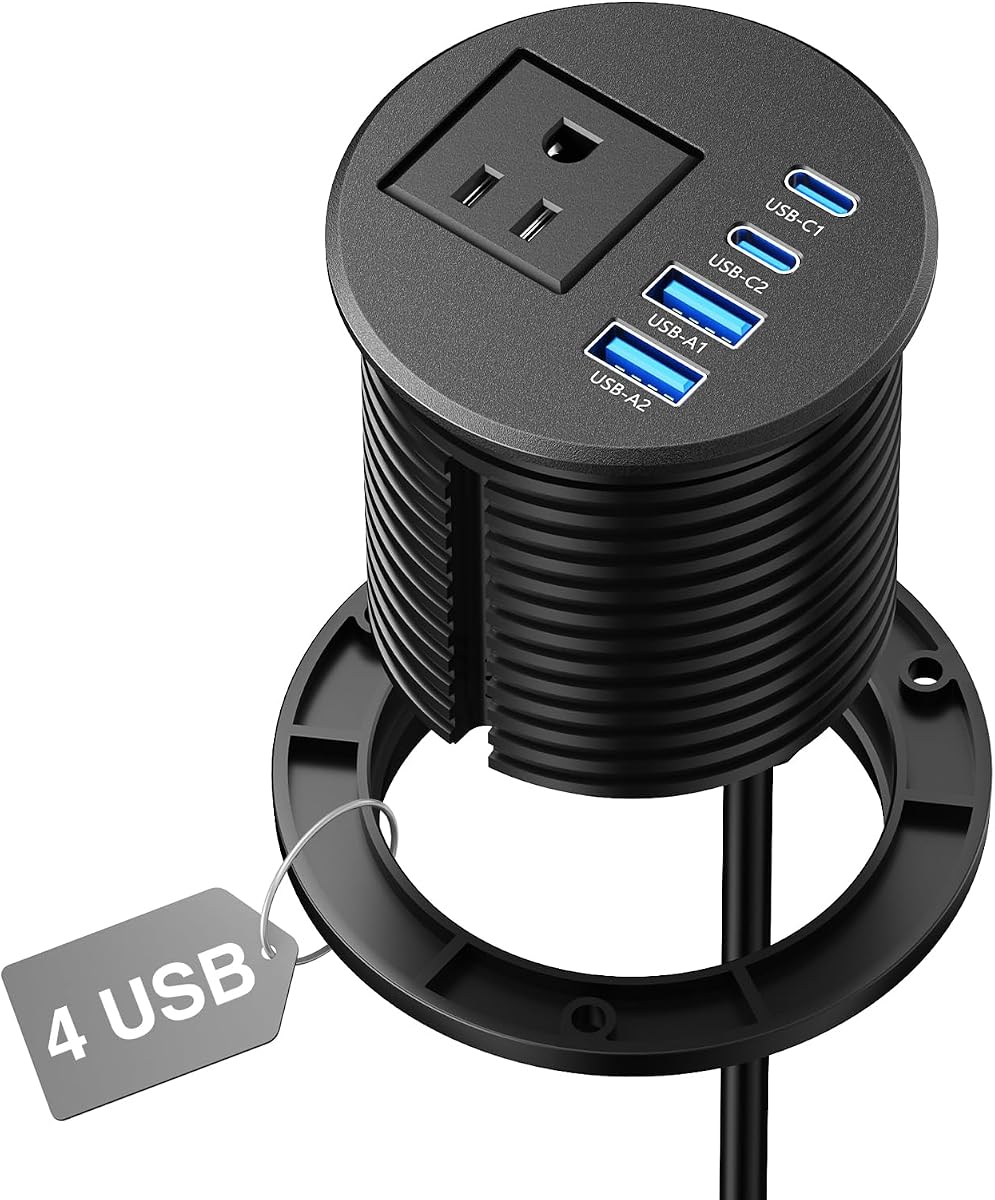
The port configuration includes two USB-C ports capable of 20W fast charging alongside two USB-A ports. This mix ensures compatibility with a wide range of devices from phones to tablets. The 6-foot cord provides flexibility for placement.
While it lacks higher wattage laptop charging, its focus on mobile device charging makes it ideal for general use. The 1500W AC rating supports most standard electronics without issue. Safety features are robust for daily use.
We recommend this for users seeking a dependable, well-rated solution for office or home desks. Its balance of features and performance makes it a top choice for most standard setups.
Users report consistent performance over time, making this a trustworthy long-term investment for your workspace.
The mix of USB-C and USB-A ports ensures you can charge multiple different device types simultaneously.
We may earn a commission when you buy through this link, at no additional cost to you.
For those prioritizing budget without sacrificing essential features, this option delivers solid value. It fits standard 2.5-inch holes and provides fast charging for mobile devices effectively.
We may earn a commission when you buy through this link, at no additional cost to you.
The unit supports PD 20W on USB-C and QC3.0 on USB-A. This allows for rapid charging of phones and tablets. The flush mount design keeps the desk surface tidy and professional.
Trade-offs include lower total wattage compared to high-end models. It is not designed for high-power laptop charging. However, for general office tasks, it suffices perfectly.
This is an excellent choice for conference rooms or guest desks where cost matters. It provides clean power management without breaking the bank.
You get essential fast charging features at a fraction of the cost of premium competitors.
The 2.5-inch size fits most standard cable cutouts found in modern furniture.
We may earn a commission when you buy through this link, at no additional cost to you.
This premium model supports up to 100W USB-C charging, making it suitable for power hungry laptops. It offers a double-sided design for convenient access from multiple angles.
We may earn a commission when you buy through this link, at no additional cost to you.
With five AC outlets and four USB ports, it replaces multiple power strips. The build quality includes fire resistant materials and robust safety mechanisms. The installation requires a 4-inch cutout.
The higher cost reflects the advanced power delivery capabilities. It is the only choice for users needing full laptop charging power directly from the desk. Setup is more involved due to hole size.
Ideal for professional workstations where power needs are high. This model ensures your laptop and peripherals run smoothly without external adapters.
The 100W output means you can charge most USB-C laptops without needing an extra wall brick.
The double-sided ports allow colleagues or users on either side of a table to connect easily.
We may earn a commission when you buy through this link, at no additional cost to you.
This unit offers a balanced 65W power output which supports many standard laptops. It features a minimalist design that looks sleek on any desktop. The recessed fit keeps it flush with the surface.
We may earn a commission when you buy through this link, at no additional cost to you.
You get two AC outlets and four USB ports for versatile charging. The 65W USB-C port is sufficient for most ultrabooks. Surge protection ensures your devices remain safe during fluctuations.
Installation requires a standard 3-inch hole which is common. The black color matches most office furniture. It sits well between budget and premium options in terms of cost and capability.
A solid choice for general office use or home offices. It provides enough power for work devices while maintaining a clean aesthetic.
The sleek black finish blends in easily with modern office and home furniture styles.
Built in surge protection adds a layer of safety against electrical surges.
We may earn a commission when you buy through this link, at no additional cost to you.
This model is designed for smaller holes with a 2-inch cutout requirement. It is available in a two pack which offers great value for multiple installations. Safety is certified by ETL.
We may earn a commission when you buy through this link, at no additional cost to you.
It provides 20W USB-C fast charging perfect for phones and small devices. The flush mount design is very slim and unobtrusive. It works well on side tables or narrow desks.
It lacks USB-A ports which may be a limitation for some. But for USB-C focused setups, it is efficient. The small size helps preserve desk integrity.
Best for compact workstations or guest furniture. The two pack allows you to outfit multiple rooms without extra cost.
The 2-inch footprint is perfect for tables where space is limited.
Getting two in one box is a smart way to equip multiple furniture pieces.
We may earn a commission when you buy through this link, at no additional cost to you.
This option combines 65W charging with a slightly longer 6.6 foot cord. It is ideal for setups where the power source is a bit farther away. The black finish is standard for office gear.
We may earn a commission when you buy through this link, at no additional cost to you.
It includes multiple USB ports for simultaneous charging. The 65W supports most laptops and tablets. It is a straightforward product with no complex features.
While the rating is lower than others, it offers solid functionality. The long cord adds convenience for under desk routing. It fits a standard 3-inch hole.
Good for users who need a bit more reach. It balances power and cable length effectively for general use.
The 6.6-foot cord gives you more flexibility in placing the grommet relative to your power source.
No unnecessary features means easy installation and reliable operation.
We may earn a commission when you buy through this link, at no additional cost to you.
This model fits into a 2-inch hole making it one of the smallest options. It has a slim 5mm raised profile that keeps the surface smooth. The rating is high indicating user satisfaction.
We may earn a commission when you buy through this link, at no additional cost to you.
It provides one AC outlet and three USB ports. The two USB-C ports support 20W PD charging. It is great for small workstations or side tables.
The single AC outlet is a trade-off for the small size. If you only need one plug for a monitor, this is perfect. The flush look is very clean.
Ideal for minimalist setups. It avoids clutter effectively while providing essential charging for mobile devices.
The 5mm raised profile is barely noticeable keeping your desk surface almost flat.
The 2-inch hole requirement means minimal drilling and less damage to furniture.
We may earn a commission when you buy through this link, at no additional cost to you.
This unit offers an impressive eight USB ports which is unique in this category. It also includes two AC outlets for flexibility. It is great for environments with many devices.
We may earn a commission when you buy through this link, at no additional cost to you.
The 3.15 inch hole requirement is larger than average. But the capacity justifies the space. It includes robust surge protection for safety. Each USB port supports 20W PD.
The lower wattage per port means not all devices can charge at max speed simultaneously. But for phones and accessories, it is excellent. It reduces the need for extra hubs.
Perfect for shared workspaces or classrooms. You can charge many devices from a single point without extra hardware.
Eight USB ports allow you to charge tablets, phones, and accessories all at once.
This unit is ideal for conference tables where many people need charging access.
We may earn a commission when you buy through this link, at no additional cost to you.
This model includes built-in retractable USB-C cables which is a unique convenience. You can pull them out to 2.2 feet and they retract instantly. It is great for occasional use.
We may earn a commission when you buy through this link, at no additional cost to you.
It provides 35W USB-C power and two AC outlets. The retractable cables eliminate the need for extra cords. This keeps the desktop tidy. It fits a 3.25 inch hole.
The retraction mechanism may wear over time compared to fixed ports. But the space saving aspect is significant. It is ideal for desks that need to be clear quickly.
Recommended for users who hate cable clutter. The built-in cables streamline your workspace effectively.
Retractable cables keep your desk free of dangling wires when not in use.
You get the flexibility of fixed ports and retractable cables in one unit.
We may earn a commission when you buy through this link, at no additional cost to you.
This is another great value option selling as a two pack. Each unit offers 20W USB-C charging and AC outlets. It fits a standard 3-inch hole which is easy to drill.
We may earn a commission when you buy through this link, at no additional cost to you.
The installation is straightforward with a locking ring. The ETL listing ensures safety standards are met. It includes two AC outlets and three USB ports per unit.
While the cord length is standard, the two pack makes up for it. You can install them in multiple places at home. It is reliable and simple to use.
Best for outfitting multiple furniture pieces. This ensures consistent charging solutions throughout your home or office.
Buying two at once saves money compared to buying single units later.
Use the same model across your home for uniform look and function.
We may earn a commission when you buy through this link, at no additional cost to you.
Selecting the right desk grommet involves considering power needs, hole sizes, and build quality. This guide outlines the key factors to ensure you get the best product for your workspace.
Power delivery (W) determines how fast and what devices you can charge. For smartphones and tablets 20W is sufficient. For laptops look for 65W to 100W. Higher wattage ensures your high performance devices run smoothly without throttling.
Always match the wattage to your largest device requirement to avoid slow charging.
The cutout size is critical because you will need to drill or fit a hole in your desk. Common sizes are 2 inch, 2.5 inch, and 3 inch. Verify your existing hole or plan to drill accordingly before purchasing.
Choose a model that matches your desk's current aperture to minimize work.
Look at the mix of USB-C and USB-A ports. A good mix allows you to connect various accessories and phones. Some models have dedicated AC outlets which is useful for monitors or lamps.
Prioritize models with enough ports to cover all your daily devices without needing extensions.
Build quality ensures longevity and safety. Look for materials that are fire resistant and include surge protection. Certifications like ETL or UL indicate the product meets safety standards for electrical use.
Never compromise on safety certifications especially when plugging into high voltage outlets.
Installation should be simple with minimal tools. Most models include locking rings and clear instructions. Consider if you have the tools to drill a new hole or if you need a plug and play solution.
Select a design that fits your skill level and furniture type to avoid damage.
The cord length dictates how far your desk can be from the wall outlet. Standard lengths are around 6 feet. If your desk is far from a wall outlet ensure the cord reaches comfortably.
Measure the distance between your desk and power source before buying to avoid extension cords.
The design and color should match your furniture. Most models come in black but some offer different finishes. A flush mount design keeps the surface clean and professional.
Choose a finish that blends well with your existing desk to maintain a cohesive look.
Budget ranges vary based on features like high wattage or extra ports. Basic models are affordable but premium ones with 100W charging cost more. Determine how much you need before spending.
Balance your budget with necessary features to get the best value for money.
To install, measure your desk and drill the specified hole size if necessary. Insert the grommet from the top and secure it with the locking ring underneath. Plug the cord into a wall outlet and test the ports.
Keep the ports clean by gently dusting them occasionally. Avoid spilling liquids on the exposed parts. If using retractable cables do not force them beyond their limit.
Check connections periodically to ensure wires are not frayed. If you notice any issues unplug immediately and inspect. With proper care, these grommets will last for many years.
Yes but it depends on the wattage. Models with 65W or 100W USB-C ports can charge most laptops. Lower wattage models are better for phones and tablets.
Hole sizes vary from 2 inches to 3.25 inches. Always check the product specs for the required cutout size before you drill your desk.
Most models include some form of surge protection to safeguard your devices. Look for specifications mentioning joules or safety certifications to confirm.
Yes but you will need to drill a hole or use an existing one. Ensure the hole matches the grommet size. If no hole exists you may need tools to install it.
Yes when certified by safety organizations like ETL. They are designed for regular use and include safety features like over current protection.
This depends on the number of ports. Some models have up to eight USB ports plus AC outlets allowing many devices to charge simultaneously.
Check the cord length in the specs. If 6 feet is not enough you may need to use an extension cord to reach your wall outlet.
We recommend the 2.5 inch Desk Power Grommet for general use and the 100W model for high power needs. The Budget option is great for conference rooms.
Prioritize power delivery that matches your largest device to ensure efficiency. Safety and hole size are also critical factors to check before buying.
Always check current availability as models may change. Find the one that fits your desk perfectly today.