
Switch Cooling Fan with Bottom Cooling
4.0Editor score
Compatible with Switch OLED
Adjustable speed USB powered
Prevents overheating issues
This guide compares the top cooling fan Nintendo Switch dock accessories to help you find the best option for keeping your console cool during intense gameplay.
Keeping your Nintendo Switch cool during long gaming sessions is essential for performance and longevity. A dedicated cooling fan for the dock helps prevent overheating and ensures smooth gameplay without unexpected pauses or lag issues.
We evaluated ten top-rated cooling solutions based on airflow efficiency, noise levels, build quality, and ease of installation. Our analysis covers both original and OLED models to help you select the perfect accessory for your setup.
Each pick highlights key features, pros, cons, and ideal use cases to guide your decision. Please note that product availability and pricing may change over time so verify details before purchasing online.
4.0Editor score

4.6Editor score

4.0Editor score
The following table provides a quick side by side overview of all ten cooling fans we reviewed to help you compare key specifications at a glance.



This cooling fan stands out for its advanced LED display that shows real-time RPM and temperature. It received an excellent rating from users who appreciate the precise control over cooling performance during intense gaming sessions.
We may earn a commission when you buy through this link, at no additional cost to you.
The adjustable fan speed ranges from 510 RPM to 6000 RPM allowing you to balance noise and cooling. When set under 2400 RPM it operates nearly silently while still providing adequate ventilation for long play hours.
One trade-off is that speeds above 2400 RPM do produce some fan sound but this is expected for high performance cooling. The Micro USB cable requires a power source but installation is simple with the included fixed pad.
Gamer who need reliable temperature monitoring and customizable cooling will find this ideal. The lifetime warranty adds significant value making it a top recommendation for anyone serious about console protection.
The digital LED display shows both current RPM and exhaust temperature in Celsius so you always know your console status.
Three physical buttons let you increase decrease or turn off the fan speed for tailored airflow based on gaming intensity.
We may earn a commission when you buy through this link, at no additional cost to you.
This compact cooling fan offers exceptional value for its price point. It features an LED display and adjustable speed settings similar to premium models but at a fraction of the cost making it accessible for budget-conscious gamers.
We may earn a commission when you buy through this link, at no additional cost to you.
It effectively lowers operating temperature and prevents unexpected lags during extended play. The included fixed stabilizer pad ensures stable placement while the Micro USB cable connects easily to the dock power port.
Build quality is solid though not as premium as higher end options. The fan operates silently at low speeds but may generate noticeable noise when pushed to maximum performance settings.
Ideal for casual gamers or those with multiple consoles needing extra cooling. The lifetime warranty and responsive customer service make this a safe budget choice for daily use.
Works seamlessly with both Switch original dock and OLED models as well as Steam Deck for versatile cooling across devices.
The anti-slip sponge pad prevents scratches and keeps the fan secure between the console and docking base during operation.
We may earn a commission when you buy through this link, at no additional cost to you.
This advanced cooling dock is designed for the upcoming Switch 2 but offers premium features for current users too. It features dual fans and a three stage adjustment system that delivers powerful heat dissipation right from startup.
We may earn a commission when you buy through this link, at no additional cost to you.
Unique perks include six game card slots and three USB expansion ports for controllers and headsets. The RGB lighting adds a stylish touch with nine vibrant modes that sync with your gaming environment.
The main limitation is its focus on Switch 2 compatibility though it supports current models effectively. The price reflects the added functionality but casual users might prefer simpler options.
Perfect for tech enthusiasts wanting a full docking station upgrade. The enhanced ventilation and extra connectivity make this a future-proof investment for serious gamers.
Dual fans promote superior heat dissipation extending your console lifespan and preventing crashes during intense gameplay sessions.
USB ports and game card slots allow seamless accessory charging and storage reducing clutter on your entertainment setup.
We may earn a commission when you buy through this link, at no additional cost to you.
Specifically designed for the 2021 OLED dock this replacement cooler offers a precise fit and effective heat dissipation. The high efficiency fan blows inward to accelerate air circulation directly onto the console base.
We may earn a commission when you buy through this link, at no additional cost to you.
A standout feature is the fourteen game card slots on top providing easy access to your library. The ABS material ensures durability while keeping the unit lightweight and compact for tidy storage.
Unlike other models this unit lacks fan speed control operating at a fixed pace. While this simplifies use it reduces flexibility for those needing quieter operation during light gaming.
Recommended for OLED owners seeking a seamless aesthetic upgrade. The blue light effect matches the OLED style well and the card slots add practical value to your setup.
Engineered to match the official 2021 OLED dock HEG-007 ensuring a perfect fit and consistent visual integration.
Fourteen game card slots on the top allow you to store frequently used titles for quick and convenient access.
We may earn a commission when you buy through this link, at no additional cost to you.
This white cooling fan is tailored for the Switch OLED model with a sleek design that complements the console. It features a single high speed fan that accelerates air circulation to dissipate heat effectively.
We may earn a commission when you buy through this link, at no additional cost to you.
Users praise its quiet performance even under load making it ideal for evening gaming. The blue LED inside syncs with the switch turning on and off when you activate the cooling system.
The lack of adjustable speeds means you cannot reduce noise during light play. However the Type C cable connects directly to the dock base adapter for convenient plug and play use.
Best for users who prioritize simplicity and noise reduction. The dedicated OLED fit and clean aesthetic make it a reliable choice for maintaining console performance quietly.
Designed to operate quietly while providing adequate cooling for the OLED base without distracting noise during play.
Blue LED lighting inside the fan syncs with the power switch to add a subtle visual enhancement to your setup.
We may earn a commission when you buy through this link, at no additional cost to you.
This white cooling attachment is designed to match the OLED dock aesthetics while improving airflow. The super turbo fan accelerates airflow instantly to cool the dock and prevent overheating during intense sessions.
We may earn a commission when you buy through this link, at no additional cost to you.
Its compact design ensures it fits neatly without cluttering your entertainment setup. The USB power supply allows easy connection directly to the dock port for immediate cooling activation upon use.
Performance is strong at full speed though there is no manual speed adjustment. The white finish and blue LED light enhance the look of your console but may not suit all interior designs.
Recommended for users prioritizing visual integration. It offers a straightforward solution for heat dissipation without compromising the clean look of your Switch OLED setup.
The white color and blue LED light are designed to match the OLED dock perfectly for a unified gaming appearance.
Compact and efficient design keeps your gaming setup tidy by saving space while delivering strong cooling performance.
We may earn a commission when you buy through this link, at no additional cost to you.
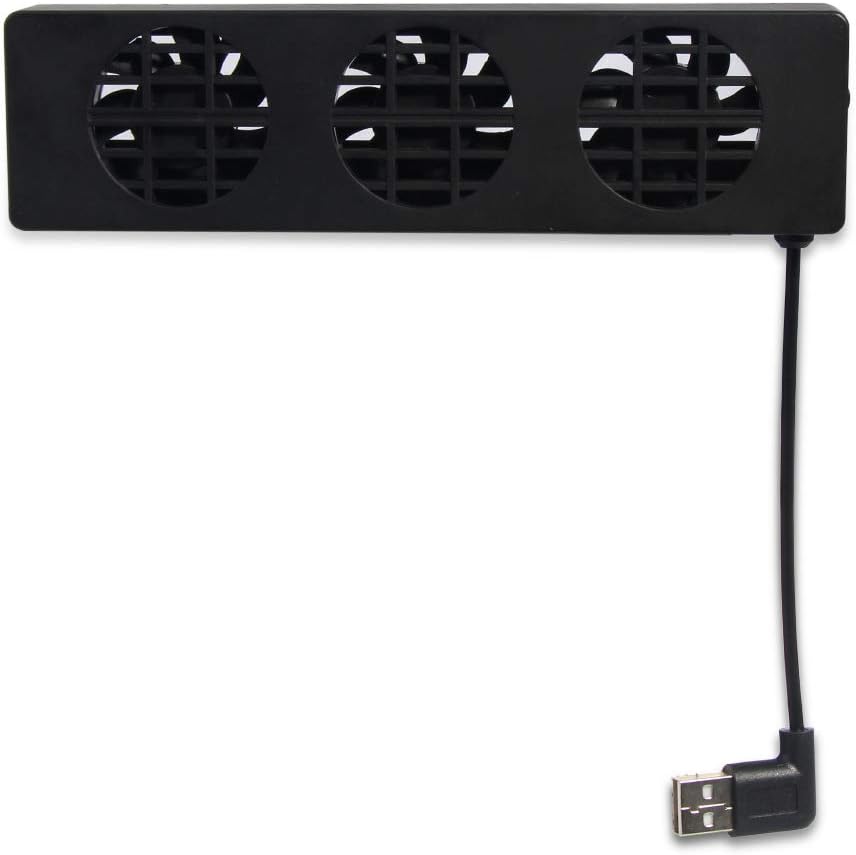
This cooler holder bracket features three cooling fans inside to effectively dissipate heat. The small and compact design makes it easy to set up and use without taking much space on your entertainment shelf.
We may earn a commission when you buy through this link, at no additional cost to you.
A side switch lets you toggle between Turbo and Normal modes for different cooling needs. The superior material construction ensures durability while maintaining a lightweight profile for portability.
While effective at reducing temperature it lacks advanced features like speed displays or precise control. The dual modes are simple but sufficient for most casual gaming scenarios.
Good for users seeking straightforward multi-fan cooling. The ease of use and durability make it a practical addition for keeping the console cool during extended play.
Three cooling fans work together to provide powerful ventilation and faster heat reduction compared to single fan units.
A side switch allows easy adjustment between Turbo and Normal speeds to suit different gaming intensities.
We may earn a commission when you buy through this link, at no additional cost to you.
This cooler increases airflow to the console speed up heat exchange effectively. It is built-in three cooling fans that provide powerful ventilation to reduce temperature quickly during heavy gaming sessions.
We may earn a commission when you buy through this link, at no additional cost to you.
The design features a simple Turbo Normal and Off switch for easy control. It inserts easily onto the back of the dock and draws power from the USB port requiring no extra cables.
While functional some users report inconsistent fan performance at lower speeds. The compact size allows easy carry and storage but build quality feels basic compared to more expensive options.
Suitable for budget shoppers needing extra airflow. Its simplicity and portability make it a decent option for occasional cooling needs without complex setup.
Simply insert onto the back of the dock and connect to a USB port for immediate cooling without tools.
Select Turbo for heavy gaming or Normal for decent performance with minimal noise using the included switch.
We may earn a commission when you buy through this link, at no additional cost to you.
This vertical stand cooler fits perfectly with Switch original dock stations and effectively lowers operating temperature. It prevents unexpected pauses caused by overheating allowing uninterrupted long-time gaming sessions.
We may earn a commission when you buy through this link, at no additional cost to you.
Equipped with an LED display it shows real-time RPM and exhaust temperature clearly. Physical buttons support power on and speed adjustment from 510 RPM to 6000 RPM for precise control.
It runs nearly silent below 2400 RPM balancing strong cooling with a low noise experience. The package includes Micro USB cable and a sponge pad for anti-slip protection.
Best for users wanting reliable and transparent cooling stats. The lifetime warranty and responsive support make this a trustworthy investment for your console care.
LED display shows real-time fan speed and exhaust temperature so you can monitor performance effectively.
Included sponge pad is anti-slip and prevents scratches to console ensuring secure placement during operation.
We may earn a commission when you buy through this link, at no additional cost to you.
This black cooling fan is designed specifically for the OLED model dock. It offers a simple solution for maintaining optimal console temperatures without compromising the sleek look of your gaming setup.
We may earn a commission when you buy through this link, at no additional cost to you.
The precise fit ensures compatibility with the OLED dock while providing efficient airflow. Its black finish helps it blend seamlessly into modern entertainment centers for a clean appearance.
While detailed specs are limited user ratings suggest reliable performance for heat management. The simplicity makes it an easy choice for those who want plug and play functionality.
Ideal for users focused on aesthetics and compatibility. This fan provides essential cooling while keeping your OLED setup looking professional and organized.
Black color design ensures the fan complements the modern look of the OLED console and docking station.
Designed specifically for the OLED model dock to ensure a perfect fit and effective cooling performance.
We may earn a commission when you buy through this link, at no additional cost to you.
Selecting the right cooling fan requires evaluating several key factors to ensure performance and compatibility with your setup.
Ensure the cooling fan matches your dock type whether original OLED or new models. Some units are specifically designed for the OLED HEG-007 or Switch 2 docks so check product descriptions carefully.
Matching your dock ensures proper fit and power connection without risking damage or instability during gaming sessions.
Look for fans with multiple blades or higher RPM ratings like 6000 RPM to ensure effective heat dissipation. Units with three fans or turbo modes offer stronger ventilation than single fan options.
Higher airflow capacity helps prevent overheating during intensive games and extends the lifespan of your console hardware.
Consider how loud the fan operates especially during quiet moments. Adjustable speed fans allow you to run at lower RPM for silence when full power isn't needed.
Balancing cooling power with noise ensures an immersive gaming experience without distracting sounds.
Most fans use USB power from the dock but check if Micro USB or Type C is supported. This affects cable compatibility and ease of connection to your console setup.
Type C connections are more modern and convenient while Micro USB may require specific adapters.
Durable ABS or high-quality plastic prevents wear and ensures safety. Lightweight materials help keep the unit portable and reduce strain on the dock.
Sturdy construction protects your console and ensures long-term reliability under continuous use.
Features like LED displays RGB lighting or game card slots add value and utility. Temperature displays help monitor overheating while storage slots keep your setup organized.
These extras enhance user experience but may increase price depending on the product tier.
Look for units offering at least a year of warranty or lifetime support. This protects your investment against manufacturing defects or premature failure.
Strong customer service ensures quick resolution if issues arise with your cooling accessory.
Choose models that offer tool-free insertion into the dock back or base. Stable mounting prevents accidental slippage and ensures consistent cooling performance.
Easy setup saves time and ensures the fan stays secure during regular use.
First connect the cooling fan to your dock using the provided USB cable. Insert the fan into the dock base or back port ensuring it fits snugly for secure placement.
Next turn on the fan using the control button or switch. Select your desired speed based on gaming intensity with Turbo for heavy sessions and Normal for casual play.
Periodically clean the fan blades and vents to prevent dust buildup. Use a soft cloth or compressed air to maintain airflow efficiency and extend the unit's lifespan.
Not all fans are universal. Many are designed specifically for the original dock or the 2021 OLED HEG-007 model. Always verify compatibility before purchasing to ensure a proper fit.
High-performance fans with adjustable speeds or multiple blades can significantly reduce console temperatures. They help prevent thermal throttling during long sessions but extreme heat may still occur in hot environments.
Noise varies by model and speed. Many modern fans operate silently below 2400 RPM while high-speed turbo modes may produce noticeable sounds. Adjustable settings help manage this balance.
Most dock cooling fans use USB power from the console dock port. Some require Micro USB while others use Type C. Check the included cable to ensure it matches your setup.
Yes most fans draw power from the dock while your console charges. This allows simultaneous cooling and power delivery without needing an extra outlet.
Some newer models are explicitly designed for the Switch 2 dock. Others might work with adapters. Review product specifications carefully to confirm support for your specific dock version.
We reviewed ten top cooling fans ranging from affordable options to premium docks with RGB features. Our top picks include the adjustable LED fan for control and the OLED-specific units for fit.
Prioritize compatibility and airflow capacity when choosing. Features like noise control and extra ports add convenience but ensure the core cooling meets your gaming needs.
Prices and availability change often so check current listings before buying. Invest in a fan that matches your console type for best protection and performance.