
UGREEN SD Card Reader USB 3.0
4.6Editor score
Supports SD Micro SD CF MS cards
USB 3.0 speeds up to 5Gbps
Reads four cards simultaneously
This guide compares the top ten compact flash card readers for photographers, highlighting speed, compatibility, and multi-card support for efficient workflows.
Finding a reliable compact flash card reader is essential for photographers and videographers who need quick access to their media files. A quality reader ensures fast transfer speeds and broad compatibility with various memory card formats used in modern and legacy cameras.
We have evaluated ten top-rated models based on their transfer speeds, build quality, and ability to handle multiple cards simultaneously. Each option offers unique features tailored to different needs, from budget-friendly solutions to professional-grade adapters for high-speed data.
Each pick below highlights key specifications and real-world performance traits to help you choose the right tool for your setup. Please note that product availability and pricing may change over time, so verify details before making your final purchase decision today.
4.6Editor score

4.7Editor score

4.3Editor score
The following table provides a side-by-side comparison of all ten compact flash card readers evaluated in this guide. It highlights key specifications such as supported card types, transfer speeds, and connectivity options to help you quickly identify the model that best fits your specific requirements.



The BENFEI 4in1 USB 3.0 and USB-C card reader is a versatile solution for accessing various memory card formats. With a high rating of 4.5 stars, it offers reliable performance for users needing quick access to SD, Micro SD, MS, and CF cards.
We may earn a commission when you buy through this link, at no additional cost to you.
Its integrated design allows connection via USB 3.0 or USB-C ports, making it compatible with a wide range of laptops and modern smartphones. The reader supports simultaneous reading and writing of four cards, which streamlines workflows for photographers managing multiple media sources.
While transfer speeds are impressive in UHS-I mode, the actual performance depends on the specific card and USB slot used. Users should note that older Memory Stick formats are not supported, which may limit compatibility for those with legacy equipment.
This reader is ideal for professionals and enthusiasts who need a universal solution for different card types. Its robust design and warranty support make it a trustworthy choice for daily use across various computing environments.
The dual USB-C and USB 3.0 design ensures compatibility with both older and newer systems without needing additional adapters.
Reading four cards simultaneously eliminates the need to constantly swap cards, saving time during data offloading sessions.
We may earn a commission when you buy through this link, at no additional cost to you.
The UGREEN SD Card Reader USB 3.0 is a cost-effective option that delivers strong performance for its price. With a rating of 4.6 stars, it supports a wide array of card types including CF, SD, and Micro SD, making it a flexible tool for various users.
We may earn a commission when you buy through this link, at no additional cost to you.
Its USB 3.0 interface provides transfer speeds up to 5Gbps, allowing for quick offloading of large files. The ability to read four cards at once enhances productivity, particularly for those who manage multiple camera cards during shoots.
While the compact design is convenient for travel, the lack of a USB-C port might limit compatibility with newer devices like modern MacBooks. Additionally, the fixed cable length could restrict usage scenarios depending on your setup and workspace needs.
This reader is an excellent choice for budget-conscious buyers seeking reliable performance. It balances cost with functionality, offering essential features that meet the needs of most everyday photography and data transfer tasks.
USB 3.0 technology ensures that large files are transferred quickly, reducing wait times during critical workflow moments.
Support for CF, CFI, TF, and SD cards means this reader adapts to many camera systems and storage formats.
We may earn a commission when you buy through this link, at no additional cost to you.
The Lexar Multi-Card 3-in-1 is a premium option designed for users who prioritize speed and reliability. Boasting a high rating of 4.7 stars, it supports SD, microSD, and CompactFlash cards with transfer speeds reaching up to 312MB/s for SD and microSD.
We may earn a commission when you buy through this link, at no additional cost to you.
Its USB 3.1 compatibility ensures backward compatibility with older ports while leveraging the latest standards for maximum performance. This makes it suitable for both new and existing setups without requiring hardware upgrades on the host device.
The main limitation is its focus on only three card types, which may not cover all legacy formats like Memory Stick. Additionally, the higher price point compared to other models might be a consideration for budget-focused buyers seeking basic functionality.
For professionals needing rapid data access and a trusted brand, this reader is an outstanding investment. Its speed and durability justify the cost, ensuring efficient workflows for high-volume photographers and videographers.
Transfer speeds of up to 312MB/s allow for near-instantaneous access to high-resolution images and video files.
Lexar's reputation for quality ensures consistent performance and long-term durability for demanding professional use.
We may earn a commission when you buy through this link, at no additional cost to you.
The 6-in-1 Compact Flash Card Reader is a robust solution for complex workflows requiring support for multiple legacy and modern card formats. With a rating of 4.3 stars, it stands out for its ability to read six different card types at once without swapping.
We may earn a commission when you buy through this link, at no additional cost to you.
Constructed from aluminum alloy, this reader efficiently dissipates heat during prolonged use, enhancing durability and performance stability. The dual USB-C and USB-A connectors provide flexibility, allowing easy connection to both modern mobile devices and traditional computers.
While the price is higher than basic models, the extensive card support and professional build quality offer significant value. Users should note that availability might vary compared to more common card readers, which could impact purchasing convenience.
This reader is perfect for professionals managing diverse camera gear and storage types. Its comprehensive compatibility and thermal design ensure reliable operation even under heavy usage conditions.
Support for CFast, CF, SD, TF, MS, and XD cards ensures compatibility with a wide range of professional and consumer cameras.
The aluminum alloy chassis prevents overheating, maintaining consistent transfer speeds during long data offloading sessions.
We may earn a commission when you buy through this link, at no additional cost to you.
The ZIYUETEK CF Card Reader offers a strong balance of features and performance for users needing specific card support like M2. With a rating of 4.5 stars, it supports five card slots and offers high-speed data transfer up to 5Gbps via USB 3.0.
We may earn a commission when you buy through this link, at no additional cost to you.
Its slim aluminum alloy cover provides durability while keeping the device compact for travel. The inclusion of intelligent protection features against over-current and short circuits adds a layer of safety for connected equipment during data transfers.
One drawback is the lack of USB-C support, which limits connectivity with newer devices that have phased out USB-A ports. Additionally, the brand is less recognized than others, though user feedback suggests reliable performance.
This reader is a solid choice for users with specific card needs like M2 support. Its protective features and speed make it a practical option for daily data management tasks.
Built-in intelligent protection safeguards your computer and card reader against electrical issues during use.
Unique support for M2 cards makes this reader ideal for users with specific legacy hardware requirements.
We may earn a commission when you buy through this link, at no additional cost to you.
The UGREEN USB C SD Card Reader is designed specifically for modern devices featuring USB-C ports. With a rating of 4.5 stars, it supports SD, Micro SD, CF, and MS cards, offering seamless connectivity for iPhones, iPads, and Android devices.
We may earn a commission when you buy through this link, at no additional cost to you.
Its USB-C interface ensures compatibility with the latest hardware, eliminating the need for adapters. Transfer speeds reach up to 5Gbps, providing fast data access for high-resolution media files efficiently without driver installations.
While it supports many card types, the restriction to four slots and USB-C only may limit utility for those with older USB-A computers. Users must ensure their devices have available USB-C ports for optimal use.
This reader is ideal for mobile creators and professionals using modern laptops and phones. Its plug-and-play design simplifies workflows for those prioritizing speed and connectivity.
Direct USB-C connectivity ensures a stable and fast link to modern computing and mobile devices.
Designed for iPhone 15 and Android devices, this reader supports seamless file sharing without extra steps.
We may earn a commission when you buy through this link, at no additional cost to you.
The SmartQ C368 USB 3.0 Card Reader is a straightforward tool for users needing reliable card access without extra features. With a rating of 4.6 stars, it supports SD, Micro SD, MS, and CF cards with fast transfer speeds up to 5Gbps.
We may earn a commission when you buy through this link, at no additional cost to you.
Its plug-and-play design ensures compatibility with Windows, Mac, and Linux systems without requiring drivers. The blue LED indicator provides clear status updates during operation, making it easy to monitor device activity.
The design is basic with no USB-C support, which may be a limitation for newer devices. However, its simplicity and affordability make it a practical choice for standard USB-A port users.
This reader is suitable for those seeking a no-frills solution for everyday tasks. Its reliability and speed ensure efficient data transfer for home and office users.
The blue LED light offers instant feedback on power status, ensuring you know when the device is active.
No driver installation is required, allowing immediate use across multiple operating systems.
We may earn a commission when you buy through this link, at no additional cost to you.
The CFast 2.0 Card Reader is designed for professionals requiring access to high-speed CFast cards alongside legacy formats. With a rating of 4.4 stars, it supports CFast, CF, SD, TF, and XD cards simultaneously without constant swapping.
We may earn a commission when you buy through this link, at no additional cost to you.
Its dedicated CFast 2.0 slot ensures blazing-fast data transfers up to 5Gbps, essential for high-resolution video workflows. The durable aluminum housing dissipates heat effectively, maintaining performance during prolonged usage sessions.
The higher price reflects its specialized capabilities, which may not be necessary for casual users. However, for professionals managing 4K/8K footage or legacy camera formats, it offers significant value and efficiency.
This reader is ideal for videographers and photographers needing robust performance and broad compatibility. Its design ensures reliable access to critical media files.
A dedicated slot for CFast 2.0 cards ensures maximum speed for professional-grade video and photo workflows.
Support for XD-Picture Cards ensures older camera formats remain accessible, preserving historical media assets.
We may earn a commission when you buy through this link, at no additional cost to you.
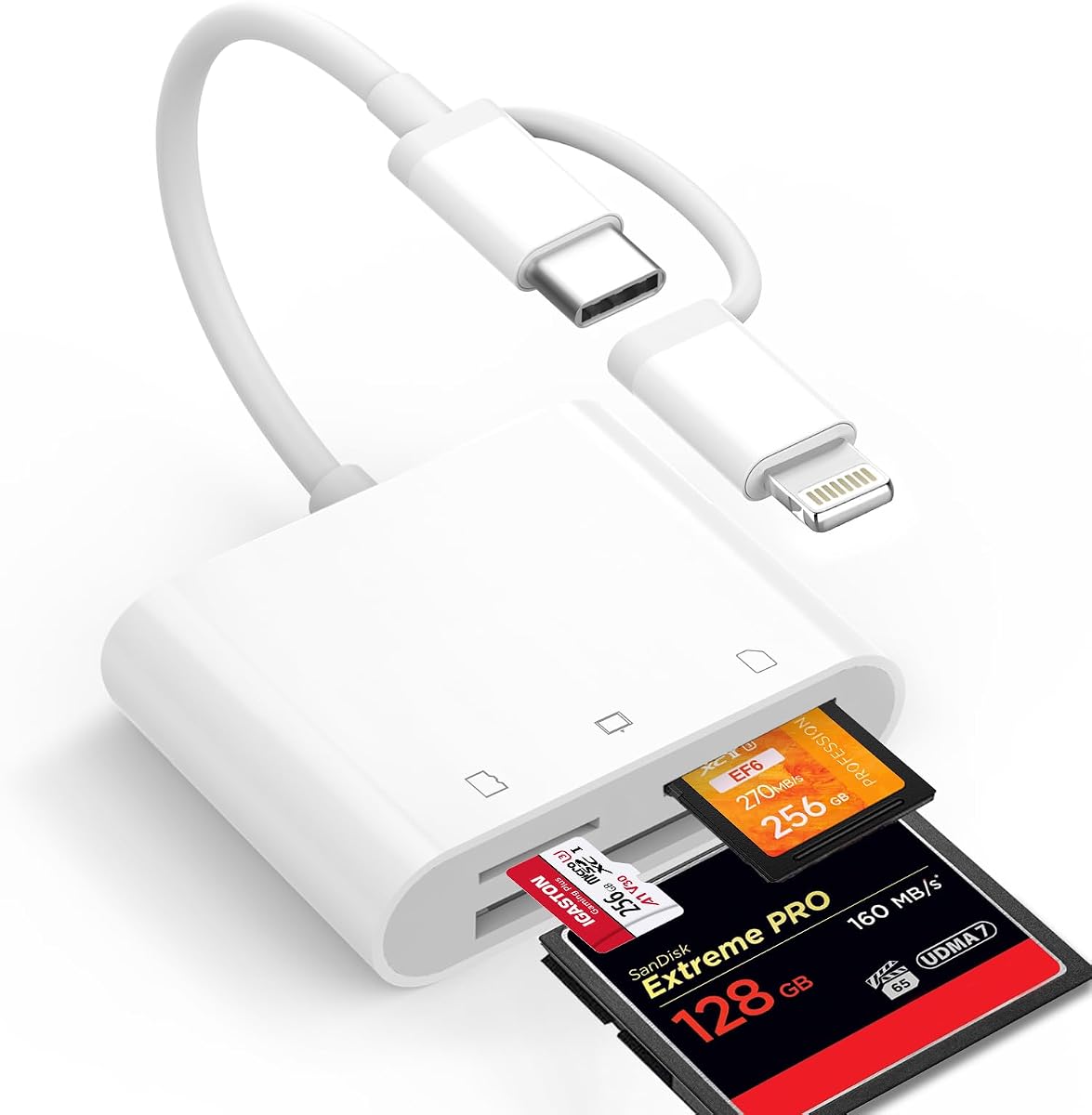
The Denlane CF SD Card Reader offers unique dual connectivity for users with both Lightning and USB-C devices. With a rating of 4.3 stars, it supports CF, SD, and Micro SD cards, making it versatile for iPhone, iPad, and Android users.
We may earn a commission when you buy through this link, at no additional cost to you.
Apple MFi certification ensures stable transmission speeds and compatibility with iOS devices. The fixed connectors prevent loss and provide a secure connection, enhancing reliability during data transfer operations.
The inability to use both connectors simultaneously limits multitasking options. Additionally, the higher price compared to single-connector readers reflects the dual interface functionality and certification benefits.
This reader is perfect for users managing media across multiple device ecosystems. Its dual support ensures accessibility regardless of the primary device being used.
Having both Lightning and USB-C connectors allows seamless transition between Apple devices and modern Android or PC setups.
MFi certification guarantees safe and efficient data transfer with iOS devices without connection issues.
We may earn a commission when you buy through this link, at no additional cost to you.
The ChiaoPio USB C SD Card Reader provides a compact solution for transferring files from camera cards to modern devices. With a rating of 4.5 stars, it supports CF, SD, and Micro SD cards via a built-in USB-C cord.
We may earn a commission when you buy through this link, at no additional cost to you.
Its design ensures the connector does not block other ports on laptops or tablets. The plug-and-play functionality simplifies use across macOS, Windows, and iPad OS without requiring additional power or drivers.
The limitation to three card types and lack of USB-A support may restrict versatility. However, for users prioritizing portability and compatibility with USB-C devices, it offers convenient and efficient performance.
This reader is ideal for travelers and users with USB-C-centric workflows. Its compact size ensures it fits easily into camera bags or pockets for on-the-go access.
The built-in cord design prevents blocking adjacent ports, ensuring uninterrupted use on laptops and tablets.
No external power source is needed, making this reader fully portable and ready for use anywhere.
We may earn a commission when you buy through this link, at no additional cost to you.
Selecting the right compact flash card reader involves evaluating several critical factors to ensure compatibility, speed, and durability for your specific needs.
Ensure the reader supports all the card formats you currently use or plan to use. Common formats include SD, Micro SD, CompactFlash (CF), and newer types like CFast or XD for specialized cameras.
Prioritize models offering multi-slot support if you frequently switch between card types to avoid buying multiple readers.
Transfer speed is critical for efficiency, especially when handling large video files or high-resolution photos. Look for USB 3.0 or USB 3.1 compatibility offering speeds up to 5Gbps for fast offloading.
Check product specifications for maximum transfer rates and ensure your device supports the same USB standard to achieve optimal performance.
Choose a reader with connectors that match your devices. Modern laptops and phones use USB-C, while older systems may require USB-A. Some readers offer dual connectors for broader compatibility.
Confirm the physical design allows comfortable access to ports without obstructing neighboring connections on your device.
Robust construction materials like aluminum alloys enhance durability and help dissipate heat during prolonged use. Plastic housings may be lighter but can be less resilient over time.
Consider readers with protective features such as over-current or short-circuit protection to safeguard your data and devices.
Readers that support reading multiple cards at once significantly improve workflow efficiency. This feature eliminates constant card swapping and is ideal for professionals managing multiple camera outputs.
Verify the number of cards supported simultaneously to match your typical workflow requirements.
Ensure the reader is plug-and-play compatible with your operating system, including Windows, macOS, and Linux. Avoid models requiring complex driver installations or software setups.
Check user feedback for any reported compatibility issues with specific OS versions or device models.
A solid warranty offers peace of mind against potential defects. Look for at least a one-year warranty from reputable brands that provide responsive customer service.
Read return policies and warranty terms carefully to understand what is covered and the claims process.
Compact and lightweight readers are essential for travelers or those working on the go. Consider the physical dimensions and cable length for ease of transport and storage.
Some readers are built-in with cords to reduce bulk, while others may use detachable cables for flexibility.
To begin using your reader, simply plug the USB connector into an available port on your computer or compatible device. Most readers are plug-and-play and will be recognized automatically by your operating system.
Insert your memory card carefully into the correct slot until it clicks or locks into place. Ensure the card orientation matches the slot design to prevent damage to the card or reader pins.
After transferring files, safely eject the card reader and memory card from your system before unplugging the device. Store the reader in a dry, clean case when not in use to protect against dust and physical damage.
Most modern card readers are plug-and-play and do not require driver installation. Your operating system will automatically recognize the device upon connection. However, some specialized readers may need specific drivers for full functionality, so check product details if unsure.
This issue can stem from a faulty USB port, incompatible card format, or physical damage to the reader. Try plugging into another port or using a different computer to isolate the problem. Ensure the memory card is inserted correctly and formatted properly.
Only readers specifically designed with USB-C connectors are compatible. Standard USB-A readers will require an adapter for use with USB-C devices. Always check the product specifications to confirm connector types before purchasing.
Transfer speed depends on the reader's maximum supported rate, the memory card's speed class, and the USB port's standard. Even a fast reader may perform slowly if the card or port is slower than its capabilities.
Yes, many compact flash readers support simultaneous reading of multiple cards through multiple slots. This feature allows efficient workflows by transferring data from several cards in one session.
Most USB 3.0 readers are backward compatible with USB 2.0 ports, though speeds will be limited to the older standard. Check product details to confirm compatibility with your specific device's USB version.
We have reviewed ten top-rated compact flash card readers suitable for a variety of user needs and budgets. From the budget-friendly UGREEN model to the professional Lexar and CFast options, each offers distinct advantages tailored to different workflows.
When selecting a reader, prioritize speed, card type compatibility, and port connectivity to ensure it meets your daily requirements. Consider build quality and warranty support for long-term reliability especially if used frequently.
Prices and availability can change frequently, so verify the latest product details before purchasing. We hope this guide simplifies your decision and helps you find the perfect tool for seamless memory card access.