
ASRock DeskMeet X300
4.8Editor score
Supports AM4 Ryzen 5000 CPUs
Includes 500W PSU included
8 Liter compact form factor
Discover the 10 best barebone PCs with AMD processors for 2026. This guide compares top mini PC kits for gaming, work, and home servers.
Barebone PCs with AMD processors offer a unique blend of flexibility and power for modern computing needs. These kits allow you to choose your own memory, storage, and operating system, ensuring a customized setup tailored to your specific requirements.
We evaluated ten top-rated mini PC kits based on performance, connectivity, thermal management, and expandability. Our analysis focuses on real-world usability for gaming, content creation, and home server applications.
Each pick highlights key strengths, potential trade-offs, and ideal use cases. Prices and availability can fluctuate, so verify the latest details before making your final purchase decision.
4.8Editor score

4.0Editor score

3.1Editor score
The following table provides a side-by-side comparison of all ten featured mini PC barebone kits, highlighting their core specifications and key differentiators.





The AOOSTAR MACO stands out as a powerful barebone mini PC featuring the AMD Ryzen 7 PRO 8845HS processor. With its integrated Radeon 780M graphics and robust connectivity options, it delivers exceptional performance for gaming and professional tasks.
We may earn a commission when you buy through this link, at no additional cost to you.
This unit excels in providing versatile connectivity, including dual USB4 ports and a dedicated OCuLink port. These features allow for high-speed data transfer and support for external GPUs, making it ideal for users needing extra graphical power without sacrificing portability.
While the system offers impressive speed and thermal management, remember that you must purchase RAM and storage separately. Additionally, if you want Windows 11 Pro, you need to contact customer service to claim the product key after purchase.
Buy this if you need a compact, high-performance desktop for content creation or gaming. Its balance of raw power, modern connectivity, and sustainable design makes it a top recommendation for 2026.
Dual USB4 ports and OCuLink enable future-proof connections for high-bandwidth devices like external GPUs and 8K displays.
Crafted with 100% recycled aluminum, the chassis reduces carbon emissions by 75% while maintaining durability and efficient heat dissipation.
We may earn a commission when you buy through this link, at no additional cost to you.
The AOOSTAR GEM12+ offers impressive power at an affordable price point. Powered by the Ryzen 7 PRO 8845HS, it handles gaming and multitasking efficiently while maintaining low power consumption.
We may earn a commission when you buy through this link, at no additional cost to you.
Its standout features include support for four 4K displays and an OCuLink port for external graphics. This makes it a strong contender for multi-monitor office setups or gaming rigs on a budget.
The system uses a dual cooling setup with a vapor chamber to manage heat effectively. However, users should note that the OCulink port requires power cycling before connecting or disconnecting external devices.
Choose this kit if you want high performance without breaking the bank. Its expandability and modern features make it a smart choice for home and business use.
Supports up to four 4K displays simultaneously, ideal for creative professionals and multi-tasking environments.
Adopts VAT architecture to save 5%-20% power compared to standard mini computers, reducing long-term energy costs.
We may earn a commission when you buy through this link, at no additional cost to you.
The AOOSTAR GEM12+ PRO adds premium security features like a built-in fingerprint reader to an already powerful barebone platform. It is designed for users who want quick, secure access to their workstation.
We may earn a commission when you buy through this link, at no additional cost to you.
This unit matches the performance of the GEM12+ with similar specs but enhances usability with a customizable display and advanced monitoring tools. It supports quad 4K outputs and high-speed data transfer.
While powerful, it demands careful DIY setup for RAM and storage. Additionally, external GPU connections via OCuLink require powering down the system before changing devices.
Invest in this if security and customization are priorities. The fingerprint unlock and display monitoring make it a standout for professional or hybrid work environments.
Built-in fingerprint recognition provides instant, password-free login, enhancing security and convenience for daily use.
A customizable built-in display allows real-time monitoring of CPU, GPU, and RAM stats, giving users direct access to system health.
We may earn a commission when you buy through this link, at no additional cost to you.
The ASRock DeskMeet X300 is a robust option for those comfortable with AM4 platform compatibility. It includes a 500W PSU, saving the hassle of sourcing power components separately.
We may earn a commission when you buy through this link, at no additional cost to you.
Its support for PCIe 3.0 x16 allows for discrete GPU upgrades, which is rare in compact barebone kits. This flexibility makes it ideal for small form factor builds that need extra graphical power.
The unit supports DDR4 memory and a variety of Ryzen processors. While it lacks the latest DDR5 speeds, the stability and wide CPU compatibility are strong selling points.
Choose this if you want a traditional PC-building experience in a mini format. Its included PSU and expansion capabilities offer great value for budget-conscious builders.
Includes a 500W 80+ Bronze power supply, reducing the need for additional purchases and simplifying the build process.
Supports Ryzen 5000, 4000, and 3000G CPUs, allowing users to upgrade with cost-effective, reliable processors.
We may earn a commission when you buy through this link, at no additional cost to you.
The MINISFORUM X1 Lite-255 is designed for efficiency and display versatility. It features advanced PCM cooling to keep memory and SSD running smoothly under load.
We may earn a commission when you buy through this link, at no additional cost to you.
With triple display outputs supporting up to 8K resolution, it is excellent for multimedia and productivity. The full USB4 port supports high-speed data and even powers the host via PD.
However, using OCulink for external GPUs requires sacrificing an M.2 slot. This trade-off might be a drawback for users needing maximum internal storage.
Buy this if you need a reliable, compact workstation with high-resolution display support. Its warranty and cooling design ensure long-term stability.
PCM phase-change material in the CPU fan ensures memory and SSD remain cool, maintaining consistent performance under load.
Supports up to three 8K@60Hz displays simultaneously, making it suitable for creative workflows and command centers.
We may earn a commission when you buy through this link, at no additional cost to you.
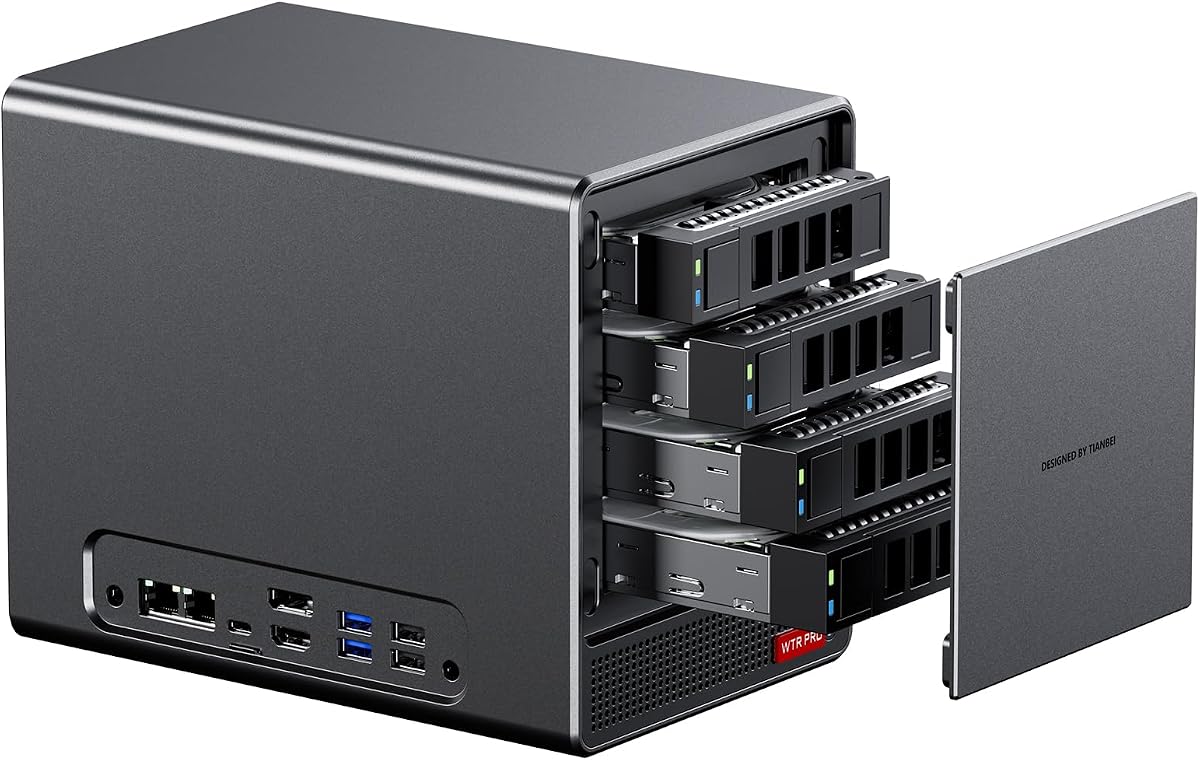
The AOOSTAR WTR PRO is a specialized mini PC for home server and NAS applications. With four SATA bays and two NVMe slots, it offers extensive storage capacity for media and backup.
We may earn a commission when you buy through this link, at no additional cost to you.
It consumes minimal power, making it suitable for 24/7 operation. The triple 4K output allows you to connect multiple monitors for easy management of storage systems.
While the architecture is not the newest, it remains efficient and reliable for server tasks. Users should be prepared to handle the initial setup and OS installation themselves.
Select this if you need a compact home server with high storage density. Its low power use and expandability make it a solid choice for home labs.
Supports up to four 22TB drives and two NVMe SSDs, providing a combined storage capacity of up to 88TB for your data.
Designed with low power consumption between 15W and 25W, ideal for always-on applications like home servers.
We may earn a commission when you buy through this link, at no additional cost to you.
The ASRock DeskMini X300 is one of the smallest options available, measuring just 1.92 liters. It supports a wide range of AM4 CPUs, allowing for flexible performance choices.
We may earn a commission when you buy through this link, at no additional cost to you.
It features high-speed networking with a 2.5G LAN port, which is rare in compact mini PCs. The system supports triple displays and RAID storage configurations for data redundancy.
Its tiny footprint makes it perfect for tight spaces, but it requires separate component purchases. You will need to install a CPU, DDR4 RAM, and storage yourself.
Opt for this if space is your primary constraint. Despite its size, it offers surprising expandability and reliable performance.
Measures only 1.92 liters in volume, making it ideal for desks with limited space or portable workstation setups.
Equipped with a 2.5G LAN port for faster file transfers and stable streaming compared to standard Gigabit connections.
We may earn a commission when you buy through this link, at no additional cost to you.
The ASUS ExpertCenter PN54 is built for the AI era with a powerful NPU capable of 50 TOPS. This hardware acceleration boosts productivity in AI-driven workloads.
We may earn a commission when you buy through this link, at no additional cost to you.
It features Wi-Fi 7 for ultra-fast wireless speeds and a toolless design that simplifies upgrades. The compact chassis supports up to four 4K displays for extensive multitasking.
While expensive, the advanced silicon and future-proofing justify the cost for professionals. It offers a rare combination of AI performance and corporate reliability.
Invest in this if you need cutting-edge AI capabilities and connectivity. Its durability and support make it ideal for business environments.
Includes a dedicated XDNA2 NPU with up to 50 TOPS for local AI tasks, improving efficiency in creative and analysis work.
Wi-Fi 7 ensures ultra-fast wireless speeds, reducing latency for cloud apps and large file transfers.
We may earn a commission when you buy through this link, at no additional cost to you.
The AOOSTAR WTR PRO 4+2 offers massive storage flexibility with four 3.5-inch bays and two M.2 slots. It is designed specifically for home labs and media servers.
We may earn a commission when you buy through this link, at no additional cost to you.
Virtualization support allows you to run multiple OS instances, making it great for soft routing. The dual 2.5G LAN ports provide redundant networking and faster data throughput.
Users running Linux may need to configure specific rules to achieve full SATA speeds on all bays. However, once set up, the system runs efficiently and quietly.
Choose this if you need a dedicated home server with maximum expandability. Its support for various operating systems provides unmatched versatility.
Four 3.5-inch SATA bays plus two M.2 NVMe slots allow flexible storage layouts for high-speed cache and bulk data.
Supports OpenWrt and OPNsense, making it a powerful hardware platform for custom networking and firewall configurations.
We may earn a commission when you buy through this link, at no additional cost to you.
The ASUS ExpertCenter PN54-S1 combines a slim chassis with business-oriented features. Its 34mm depth makes it one of the thinnest options available on the market.
We may earn a commission when you buy through this link, at no additional cost to you.
It features a toolless design, allowing quick access for upgrades. Dual 2.5G LAN ports support networking redundancy, which is essential for business environments.
While using older Ryzen 200 Series architecture, it still provides reliable performance for office tasks. The compact design is its strongest selling point for space-constrained offices.
Select this if you need a discreet, reliable office PC. Its upgrade-friendly design and warranty ensure long-term usability.
Housed in a sleek 34mm chassis, perfect for mounting behind monitors or in tight office spaces.
Tool-free design allows quick access to internal components for easy upgrades without needing specialized tools.
We may earn a commission when you buy through this link, at no additional cost to you.
Selecting the right barebone mini PC involves weighing processor performance, connectivity options, and expandability needs. This guide outlines the key factors to consider before purchasing.
Choose a processor that matches your workload. Newer Ryzen 7000/8000 series chips offer integrated Radeon 780M graphics, while AM4 Ryzen 5000 CPUs are more affordable and compatible with DDR4 memory.
Verify the CPU socket type to ensure future upgrade paths are available for your system.
Look for kits with multiple RAM slots and M.2 PCIe 4.0 slots to maximize speed and capacity. Most barebone kits support up to 64GB or 128GB of DDR5 or DDR4 memory.
Ensure the system supports the storage capacity you need, especially for home server or NAS configurations.
Check for essential ports like USB4, HDMI 2.1, and Ethernet. High-end kits offer OCuLink or Thunderbolt support for external GPUs or high-speed data.
Multi-display support is crucial for multitasking, so confirm HDMI and DisplayPort versions meet your monitor requirements.
Mini PCs must dissipate heat efficiently. Look for designs with vapor chambers, large fans, or aluminum chassis to maintain stable performance under load.
Better cooling ensures longevity and prevents throttling during intensive tasks like video editing or gaming.
Verify whether the power supply is included. Some kits like the DeskMeet come with a dedicated PSU, while others rely on external adapters.
Check wattage ratings to ensure the system can handle your chosen components without instability.
Align the kit with your primary use case. Gaming needs strong integrated or eGPU support, while NAS builds require multiple drive bays and low power consumption.
Office work focuses on connectivity and display support, so prioritize models with USB4 and dual Ethernet ports.
Since barebone kits usually exclude an OS, ensure your preferred system supports the hardware. Most AMD systems work well with Windows 11 or various Linux distributions.
Check for BIOS features like Windows TPM 2.0 support if you plan to upgrade to newer OS versions later.
Install your RAM and storage components carefully. Align notches on the memory sticks and secure M.2 drives with the provided screws to avoid damage.
Connect your peripherals to the appropriate ports and update the BIOS immediately after first boot. This ensures all hardware is recognized and optimized for performance.
Keep the vents clear of dust and place the unit in a cool, ventilated area. Regular cleaning of the fans prevents overheating and extends the system's lifespan.
A barebone mini PC is a partial computer kit that includes the motherboard, case, and power supply but excludes RAM, storage, and sometimes the CPU or OS. You must purchase and install these components yourself.
Yes, kits with Ryzen 7000/8000 series chips and Radeon 780M graphics handle eSports and light AAA gaming well. For heavier gaming, models with OCuLink ports support external GPUs effectively.
Basic technical skills are required to install RAM and M.2 drives. Most systems use simple screw-down mounts for SSDs, and the process takes only minutes for those familiar with PC parts.
Upgradeability depends on the socket type. AM4 platforms support a wide range of older CPUs, while AM5 requires DDR5 RAM. Always check the motherboard support list before upgrading.
DDR5 offers higher bandwidth and efficiency but costs more. DDR4 is still excellent for budget builds and supports many high-performance Ryzen 5000 processors.
OCuLink is a high-speed port for connecting external GPUs or storage devices. It offers near-desktop performance for expansion and is ideal for compact gaming or workstation setups.
Yes, most barebone PCs support Linux distributions like Ubuntu or OpenWrt. However, ensure driver compatibility for Wi-Fi and graphics chips before installation.
Most reputable brands offer 1 to 3-year warranties. Check the seller's policy carefully, as coverage may vary for components you install yourself.
The AOOSTAR MACO and GEM12+ stand out for their balance of modern performance and versatile connectivity. The ASRock DeskMeet offers the best budget-friendly entry for traditional AM4 builders.
Prioritize connectivity options like USB4 and OCuLink if you plan to expand your setup later. For home servers, the AOOSTAR WTR PRO series provides unmatched storage flexibility.
Verify current stock and pricing before purchasing, as availability can vary by region. Always ensure you have compatible RAM and storage before finalizing your order.