
Bluetooth 1D&2D Barcode Scanner
4.3Editor score
Supports 1D and 2D QR codes
Up to 70m wireless range
2600mAh battery with 9 hours use
This guide compares the top 10 barcode scanner for iPad options including wireless, 2D, and battery life to help you choose the right mobile scanning tool.
Finding the right barcode scanner for iPad can transform your workflow whether you manage inventory track packages or check out customers. Mobile scanning needs vary widely so selecting a device that matches your specific environment is crucial for efficiency and accuracy.
We evaluated ten highly rated models based on connectivity options scanning speed battery life and compatibility with iOS devices. Each product was assessed for its ability to handle both 1D and 2D codes across paper and digital screens to ensure reliable performance.
Each pick below highlights key strengths ideal use cases and any limitations to note before buying. Prices and availability can change frequently so please verify current details on the product pages before placing your order.
4.3Editor score
4.9Editor score

4.5Editor score
The table below provides a side-by-side overview of the top barcode scanner for iPad models highlighting their key capabilities and ideal use scenarios.


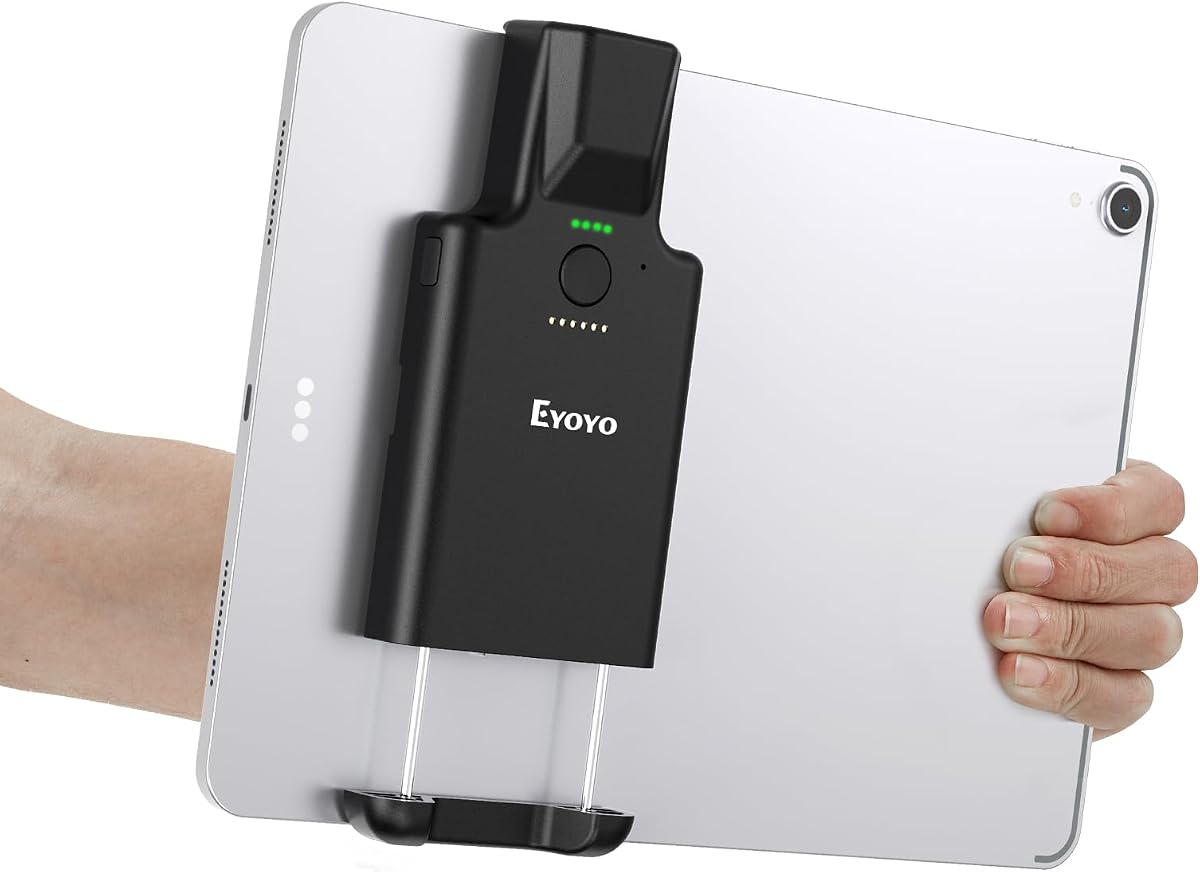
The Eyoyo 1D 2D Portable Bluetooth Scanner stands out as the top choice for iPad users due to its unique clip design and high performance. With a 4.9 rating this model combines versatility with durability making it ideal for retail and inventory tasks.
We may earn a commission when you buy through this link, at no additional cost to you.
Its 2D CMOS technology ensures accurate reading of both 1D and 2D codes whether printed on paper or displayed on screens. The 3000mAh battery provides up to 30 hours of continuous scanning which is exceptional for long workdays without interruption.
While it lacks 2.4G wireless support the Bluetooth and USB options cover most needs effectively. The clip design is excellent but users must verify their device fits the 5.7 to 7.1 inch range before purchasing.
If you need a reliable scanner that attaches securely to your iPad for hands-free workflow this model is the best investment. It balances performance features and usability better than any other option on this list.
The vertical retractable clip holds your iPad steady so you can scan items without juggling devices.
The 3000mAh battery ensures you can work all day or even weeks with light use without recharging.
We may earn a commission when you buy through this link, at no additional cost to you.
This PecuMecu scanner offers incredible value for those needing 2D capabilities without a high price tag. Its 4.3 rating reflects solid performance for basic inventory and retail tasks across iOS and Android devices.
We may earn a commission when you buy through this link, at no additional cost to you.
The 2.4G wireless range extends up to 70 meters allowing flexibility in large spaces. It supports a wide variety of 1D and 2D codes including QR and Data Matrix ensuring compatibility with modern packaging and digital coupons.
Users should note it does not work with Square POS systems which limits some retail use cases. The battery provides about 9 hours which is decent but not class leading for all day shifts.
For small businesses or individuals seeking a budget friendly 2D scanner this model delivers essential features efficiently. It is a smart pick if cost is a primary concern and Square compatibility is not required.
Get the ability to read QR and Data Matrix codes at a fraction of the cost of premium devices.
The 70 meter 2.4G range allows you to move freely without losing connection to your iPad.
We may earn a commission when you buy through this link, at no additional cost to you.
The Inateck BCST-70 is designed for professionals who need reliability over extended distances. Its 4.5 rating highlights its robust build quality and exceptional battery performance suitable for warehouse and field work.
We may earn a commission when you buy through this link, at no additional cost to you.
With a connection range of over 115 feet you can operate far from your iPad while maintaining a stable link. The 180 day standby battery means you rarely need to charge it for frequent daily scanning tasks.
The external TPU case protects against drops up to 6 feet making it ideal for tough environments. However it only supports 1D barcodes so it may not suit businesses requiring QR code scanning.
If your workflow involves large spaces and frequent device drops this scanner is the premium choice. Its durability and battery life outweigh the lack of 2D support for many industrial applications.
Move freely across large floors or outdoor areas without worrying about connection loss during critical tasks.
The thick TPU case and internal consolidation ensure the scanner survives accidental drops that would break standard units.
We may earn a commission when you buy through this link, at no additional cost to you.
The NETUM Bluetooth Scanner offers exceptional versatility with support for 2.4G Bluetooth and wired connections. Its 4.4 rating indicates strong reliability for diverse environments ranging from offices to warehouses.
We may earn a commission when you buy through this link, at no additional cost to you.
The CCD sensor provides high resolution scanning capable of reading damaged or tightly spaced codes. The offline storage mode allows you to save up to 100000 barcodes when connectivity is unavailable then upload later.
Setup involves scanning specific configuration codes from the manual which can be time consuming initially. Also it is incompatible with Square POS systems so check your software requirements before buying.
For users who need robust connectivity options and offline capabilities this scanner is a strong contender. Its programmable features allow customization to fit specific workflow needs perfectly.
Switch between wireless and wired modes easily to suit different environments without needing multiple devices.
Store thousands of scans locally when out of range and sync them once you reconnect to your device.
We may earn a commission when you buy through this link, at no additional cost to you.
The Eyoyo Mini is engineered for portability weighing just 35 grams making it easy to carry anywhere. Its 4.3 rating reflects user appreciation for its small size and effective scanning performance for 1D codes.
We may earn a commission when you buy through this link, at no additional cost to you.
You can switch between 2.4G Bluetooth and USB wired modes depending on your needs. The vibration mode is perfect for quiet environments like libraries where noise can be disruptive to patrons.
The battery lasts up to 10 days with moderate use due to its auto-off feature. However it only reads 1D barcodes so it is not suitable for QR code or modern digital payment scanning.
If you need a lightweight tool for basic inventory or book scanning this mini scanner is ideal. Its small footprint ensures you can keep it in your pocket or bag without adding bulk.
Its ultralight design makes it perfect for mobile work where carrying heavy equipment is impractical.
Silent vibration feedback allows scanning in sensitive areas without drawing attention or causing noise.
We may earn a commission when you buy through this link, at no additional cost to you.
This desktop scanner is designed for stationary checkout or inventory stations where speed is critical. Its 4.6 rating highlights its efficiency and ease of use for repetitive scanning tasks in retail or logistics.
We may earn a commission when you buy through this link, at no additional cost to you.
The omnidirectional sensor reads codes from any angle without needing precise alignment. Its auto-sensing feature activates when an item approaches making it fully handsfree for quick throughput.
It requires a USB connection so it lacks mobility but offers stability and power. The IP54 rating protects against dust which is useful in warehouse environments where debris is common.
If you need a reliable countertop scanner for checkout or receiving this model is the best choice. It simplifies workflow by allowing staff to scan items quickly without lifting a device.
Capture codes from any angle without aiming the scanner saving time during busy checkout periods.
The anti-slip base and shock resistance ensure the unit stays stable and safe even in busy retail areas.
We may earn a commission when you buy through this link, at no additional cost to you.
This NetumScan model includes a charging dock that serves as both a power source and data receiver. Its 4.1 rating suggests reliable functionality particularly for those wanting organized storage and power management.
We may earn a commission when you buy through this link, at no additional cost to you.
The 1200mAh battery charges fully in four hours ensuring you can quickly reset between shifts. The dock keeps the device stable and reduces cable clutter on your desk or workstation.
It supports vibration mode which helps in quiet environments like offices or libraries. However users should be aware it does not integrate with Square POS systems limiting some business use cases.
If you value a clean workspace and easy charging this docked scanner is worth considering. It offers a balanced set of features for general retail and inventory management.
The dock simplifies your setup by charging the unit while acting as the wireless receiver for data.
Fast charging ensures minimal downtime so your team can return to work quickly after a battery top up.
We may earn a commission when you buy through this link, at no additional cost to you.
This NetumScan variant focuses on user control with a dual button design to prevent accidental shutdowns. With a 4.9 rating it is highly trusted for consistent performance and durability in active environments.
We may earn a commission when you buy through this link, at no additional cost to you.
The middle button acts solely as a scan trigger while the side button manages power and modes. This separation reduces errors during busy scanning sessions and improves overall workflow efficiency.
The included dock functions as a data receiver and charger keeping your workspace organized. Its drop protection rating of two meters ensures it can withstand tough conditions without damage.
If you need a reliable tool that minimizes user error and lasts long this model is excellent. Its high rating confirms satisfaction among users who prioritize stability and control.
Separate scan and power buttons prevent accidental shutdowns during intense scanning periods.
The tough construction ensures the scanner survives accidental drops better than standard lightweight models.
We may earn a commission when you buy through this link, at no additional cost to you.
This handheld scanner excels in data storage with a large 16MB memory holding up to 50000 codes. Its 3.8 rating suggests it works well but may require more user attention during setup compared to competitors.
We may earn a commission when you buy through this link, at no additional cost to you.
The auto reconnect feature ensures seamless return to connection after short disconnections. It supports a wide range of 1D and 2D codes making it versatile for varied inventory needs.
A side switch must be manually engaged before scanning which adds a small step to the process. The ergonomic design ensures comfort during extended use despite the added step.
If you need substantial offline storage and 2D support this model offers good value. It is suitable for businesses that prioritize data retention over immediate connectivity.
Store thousands of scans locally so you can scan in areas without network access.
Re-establish connection quickly when returning to range without needing to re-pair manually.
We may earn a commission when you buy through this link, at no additional cost to you.
The KUIIYER scanner offers robust protection with an IP54 rating for dust and water resistance. Its 4.3 rating reflects satisfaction among users who work in outdoor or potentially messy environments.
We may earn a commission when you buy through this link, at no additional cost to you.
The CMOS sensor with 800 by 600 pixels ensures clear image capture for accurate reading of various codes. The 2000mAh battery provides ample power for daily scanning cycles without frequent charging.
It supports three scanning modes including manual auto-sensing and continuous to suit different tasks. The multi-language support makes it accessible for international teams or diverse user bases.
If you need a rugged scanner that can handle moisture and dust this model is a great fit. Its protective features and sensor quality make it suitable for demanding logistics or field tasks.
The IP54 rating safeguards the device against dust and water spills extending its operational lifespan.
The CMOS sensor delivers high quality images ensuring accurate reading of even complex barcodes.
We may earn a commission when you buy through this link, at no additional cost to you.
Selecting the right barcode scanner for iPad requires understanding your specific workflow needs and technical requirements.
Ensure the scanner supports iOS and Bluetooth to connect seamlessly with your iPad. Many scanners also offer 2.4G wireless or wired options for flexibility across different devices and environments.
Look for devices that explicitly mention iPad or iOS support to avoid pairing issues with your mobile setup.
Most traditional scanners read only 1D barcodes which are lines. If you need to scan QR codes or digital coupons you must choose a model with 2D CMOS imaging technology.
Verify that the scanner handles both types if your business requires reading modern digital barcodes in addition to standard product labels.
Battery capacity varies significantly across models with standby times ranging from hours to days. For all day shifts look for a scanner with at least 2000mAh capacity and quick charge features.
Consider if the scanner comes with a charging dock which simplifies daily power management and reduces cable clutter on your desk.
If you need to move around frequently choose a lightweight and compact scanner that fits easily in your pocket. Ergonomic grips reduce hand fatigue during long scanning sessions.
Some models include built-in clips for tablets which secure your iPad allowing for more convenient scanning workflows without juggling devices.
For environments with weak connectivity look for scanners with built-in memory to store scans offline. This feature allows you to upload data once you reconnect to your main device.
Check the storage capacity to ensure it meets your daily volume requirements without needing frequent data syncing.
Warehouses and field work require scanners with drop protection and dust resistance ratings. Models with IP54 ratings and rubberized cases survive accidental drops and harsh conditions better.
Investing in a durable scanner saves replacement costs and ensures consistent performance in challenging physical environments.
Many standard scanners are not compatible with specific POS systems like Square or Clover. Always confirm compatibility with your software provider before purchasing to avoid connectivity issues.
Some models explicitly note POS compatibility so check the product description to ensure it works with your retail system.
Prices vary based on features like 2D scanning range and build quality. Determine which features are essential for your workflow to avoid paying for unnecessary capabilities.
Compare models that meet your core needs while offering the best value for your specific use case and budget.
To begin pairing your scanner connect Bluetooth on your iPad and turn on the scanner to discover it in settings. Follow any manual steps to scan configuration codes if required for your specific model.
Keep the scanner clean by wiping the lens regularly with a soft cloth to ensure accurate reading. Avoid exposing it to extreme heat or moisture unless it has an IP rating.
Charge the battery regularly even if not in use to maintain its health and longevity. Store the device in a cool dry place when not needed for extended periods.
Yes but only if it supports Bluetooth or USB OTG connectivity. Ensure the product explicitly states compatibility with iOS or iPad to avoid pairing issues with your device.
Only 2D CMOS scanners can read digital screens and QR codes. Traditional 1D scanners will not be able to read digital barcodes displayed on other devices.
Battery life varies from 8 hours to several weeks depending on usage and capacity. Models with 2000mAh or more can last multiple days with moderate daily scanning.
Most standard scanners are not compatible with Square POS systems due to specific protocol requirements. Check the product description for explicit Square compatibility before purchasing.
Yes many scanners have storage modes that save scans locally. You can upload the data to your iPad once you are back in range of the connection.
While not strictly necessary a docking station keeps the device organized and ensures it is always charged. It is useful for high volume environments where quick battery replacement is needed.
Usually no as most Bluetooth scanners function as keyboard input devices. They will type the barcode data directly into any field on your iPad without special apps.
Bluetooth scanners generally offer up to 30 meters of range. Some models with 2.4G wireless extend this range significantly to over 70 meters for larger spaces.
We highlighted ten reliable models ranging from portable units to rugged desktop options to suit different business needs. The Eyoyo Portable Bluetooth stands out for its unique clip design and long battery life making it a top choice for mobile workers.
When deciding prioritize connectivity options that match your environment and ensure 2D support if you need QR codes. Durability and offline storage are also key considerations for field and warehouse operations.
Prices and stock fluctuate frequently so check current details on the Amazon links before purchasing. Choose the model that best fits your workflow to maximize efficiency and return on investment.