
TONGVEO 3-in-1 4K Webcam
4.0Editor score
Built in dual mics
Voice tracking function
Compact all-in-one design
Discover the top 10 Auto Tracking Conference Camera models for 2026. Our expert guide compares features, performance, and value to help you choose the best
Choosing the right video conferencing equipment is crucial for modern businesses. An Auto Tracking Conference Camera ensures every participant stays in focus without manual adjustments, making meetings more professional and efficient for remote teams.
We have evaluated ten top-rated systems based on video quality, tracking accuracy, audio performance, and ease of use. Our analysis covers a range of options from compact USB webcams to professional PTZ setups suitable for various room sizes.
Each selection highlights key strengths and potential trade-offs to help you find the perfect fit for your office or worship space. Please note that product availability and pricing may change, so verify details before purchasing.
4.0Editor score

4.8Editor score

4.6Editor score
The following table provides a side-by-side comparison of all ten models to help you quickly identify which system meets your specific technical requirements and budget constraints for your next purchase.




This TONGVEO system stands out as the top choice for most users seeking a reliable all-in-one solution. It holds an impressive 4.8 rating and combines a 4K PTZ camera with a wireless Bluetooth speakerphone for a seamless meeting experience.
We may earn a commission when you buy through this link, at no additional cost to you.
The standout quality is its smart AI auto-tracking which uses precise face recognition to keep the speaker centered. The camera supports 4K video at 30fps via HDMI and 1080P via USB ensuring high fidelity for any platform including Zoom and Teams.
While the tracking is excellent some users might find the speakerphone battery requires regular charging for long sessions. The camera itself is wired so you need to manage cables but the plug-and-play nature makes initial setup very straightforward.
It is ideal for small to medium conference rooms or worship spaces where professional video is needed without complex IT support. If you want a complete kit that delivers high quality video and audio immediately this system is our strongest recommendation.
The 4K sensor provides sharp detail that makes remote participants feel present in the room during important meetings.
The included speakerphone eliminates the need for extra microphones ensuring clear sound pickup across the meeting space.
We may earn a commission when you buy through this link, at no additional cost to you.
This model is designed specifically for small meeting spaces where simplicity and certification matter. It has a 4.1 rating and offers a unique selling point as a Zoom Certified device ensuring full compatibility with Zoom Rooms environments.
We may earn a commission when you buy through this link, at no additional cost to you.
The AI auto framing feature automatically detects and frames all attendees so you do not need to adjust the camera manually. The 120 degree wide angle ensures no one is left out of the frame even in tight spaces and it includes a physical lens cover for privacy.
However the lower rating compared to others suggests it may have occasional connectivity or audio issues in varied setups. It lacks significant optical zoom which might be a limitation for larger rooms but it is a strong pick for small dedicated Zoom rooms.
We recommend this for teams that prioritize Zoom integration above all else. It is a simple plug-and-play device that gets you started quickly without needing extensive configuration or IT intervention for basic video calls.
Being Zoom certified guarantees that the device meets strict performance standards for Zoom specific features like virtual backgrounds.
The included physical lens cover provides a simple mechanical way to block video when the camera is not in use.
We may earn a commission when you buy through this link, at no additional cost to you.
This system prioritizes motion smoothness with 1080p at 60fps which makes video feel much more fluid than standard 30fps. It has a solid 4.4 rating and is a reliable alternative for those who do not strictly need 4K resolution.
We may earn a commission when you buy through this link, at no additional cost to you.
The 3X optical zoom allows you to get closer to the subject without losing image quality and the tracking algorithm is highly effective for locking onto speakers. The speakerphone offers a long battery life making it portable for different meeting rooms within a facility.
The trade-off is that it does not offer the crispness of 4K video which might be noticeable on larger displays. Additionally the speakerphone is wireless which is convenient but means you have to charge it separately from the wired camera unit.
It is a great choice for general business meetings where fluid motion is more important than maximum resolution. If you have a room where you need to zoom in on documents or whiteboards this optical zoom capability will serve you well.
The 60fps output reduces motion blur during active presentations making gestures and movements appear natural.
The built-in battery allows you to move the audio unit easily between different meeting spaces without extra cables.
We may earn a commission when you buy through this link, at no additional cost to you.
This model introduces a unique control method with hand gestures allowing you to turn tracking on or zoom without touching a remote. It has a 4.3 rating and is great for users who want a more interactive and hands-free way to manage their video feed.
We may earn a commission when you buy through this link, at no additional cost to you.
The 4K video quality ensures sharp details and the digital zoom helps frame specific subjects when needed. The remote control also allows for preset positions which is handy for recurring meeting layouts where you always want to capture the same view.
However digital zoom is not as crisp as optical zoom so you might see pixelation if you zoom in too much. Also some users may find the gesture controls take a bit of practice to master correctly in a professional setting.
We suggest this for teams that want a tech-forward meeting room experience. If you are often standing and presenting these gestures can save time and add a cool element to your setup without needing complex automation.
Using hand signals to control camera settings adds a layer of convenience for presenters moving around the room.
The remote allows you to save specific angles so you can recall them instantly for consistent framing.
We may earn a commission when you buy through this link, at no additional cost to you.
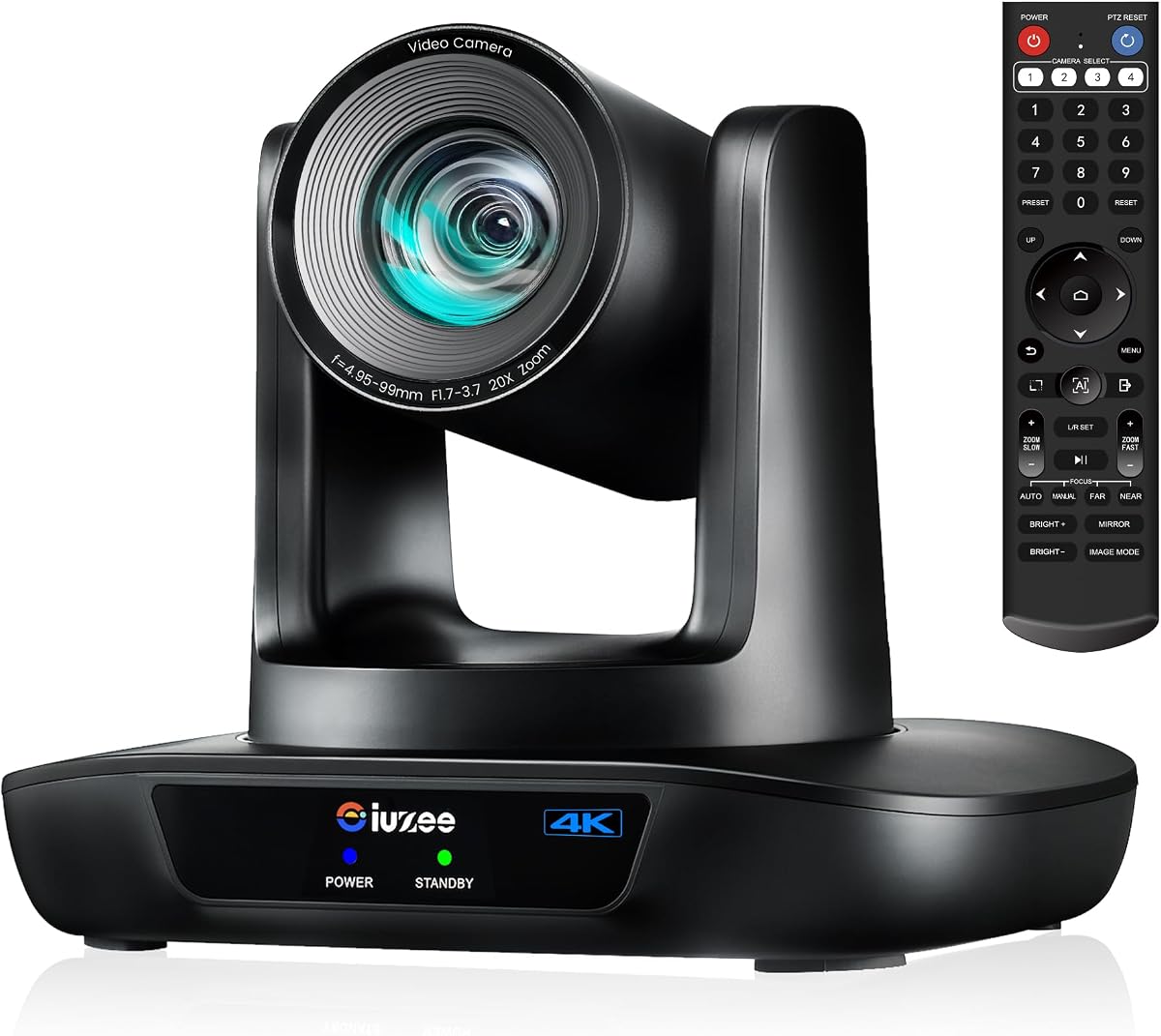
This system is designed for larger venues like churches or auditoriums where the camera needs to reach from the back of the room. It has a 4.4 rating and features a powerful 20X optical zoom to capture details clearly even from a distance.
We may earn a commission when you buy through this link, at no additional cost to you.
It offers professional connectivity options like LAN and PoE which allow power and data to travel over a single cable. This reduces clutter and simplifies installation in fixed environments. The audio component is a Bluetooth speakerphone that delivers consistent voice pickup for meetings.
The setup is more complex than basic USB webcams and might require some network configuration for PoE. It is also a higher price point which may not be necessary for smaller offices that do not need such a long reach.
It is highly recommended for places of worship or large conference halls. If you need to capture a speaker on a stage or far away from the camera this optical zoom will ensure the image remains sharp and usable.
The 20X optical zoom allows you to maintain high detail even when the subject is far away from the lens.
PoE support means you can run a single network cable for both power and data simplifying wiring.
We may earn a commission when you buy through this link, at no additional cost to you.
This camera focuses on professional live streaming and broadcasting needs with a high 4.6 rating. It offers 20X optical zoom and supports IP streaming protocols like RTMP and RTSP which are essential for direct streaming to platforms like YouTube.
We may earn a commission when you buy through this link, at no additional cost to you.
It provides multiple outputs including USB HDMI and LAN giving you flexibility in how you connect to your system. The web browser control interface makes it easy to adjust settings without needing dedicated control hardware for basic operations.
Note that this unit does not include a built-in microphone so you will need to source audio separately. This is common for professional broadcast cameras but means you must budget for a mic setup if you want a complete system.
We recommend this for broadcast setups where you want to stream directly from the camera or use advanced switchers. It is a robust option for educational or church environments where streaming quality is a top priority.
Support for RTMP and RTSP allows direct connection to streaming software without needing a separate capture card.
You can access the camera menu via a browser which simplifies management for remote users.
We may earn a commission when you buy through this link, at no additional cost to you.
This is the premier option for professional broadcast workflows with official NDI integration which allows for high quality video transmission over standard networks. It holds a 4.6 rating and is the only model in our list that includes a full NDI license.
We may earn a commission when you buy through this link, at no additional cost to you.
It combines 4K video over HDMI and USB with SDI output for reliable long cable runs. The advanced AI tracking offers modes like Presenter Tracking and Auto-Framing to ensure your subject is always perfectly framed during dynamic events.
The high cost reflects its professional capabilities and may be overkill for simple business meetings. It also requires a good network setup to take full advantage of the NDI features which can be complex for smaller IT teams.
We recommend this for professional production teams or high-end studios where video quality and flexibility are paramount. If you use tools like vMix or OBS for live streaming this camera will integrate seamlessly into your workflow.
Official NDI support means you can use the camera as a source in software without additional capture hardware.
SDI output provides a robust locking connection that prevents accidental disconnects during critical events.
We may earn a commission when you buy through this link, at no additional cost to you.
This model brings together strong performance and flexibility with a 4.2 rating. It offers 20X optical zoom and supports multiple connection options including HDMI USB and LAN for versatile installation in different types of rooms.
We may earn a commission when you buy through this link, at no additional cost to you.
The smooth PTZ performance ensures that when you move the camera it does not jerk or stutter which keeps the view pleasant for viewers. It also allows control via remote software or optional joystick giving you many ways to manage the feed.
One note is that the default HDMI output is 4K at 30Hz which may require manual adjustment if your monitor only supports lower refresh rates. This is a minor step but requires access to the remote menu to resolve initially.
It is a strong choice for education or churches where reliability is key. The ability to use PoE simplifies cabling and the 20X zoom ensures you can capture details from the back of a large classroom or hall.
Multiple control methods allow you to choose the interface that fits your workflow whether it is software or hardware.
Support for both USB and PoE lets you choose between simple direct connection or professional network power.
We may earn a commission when you buy through this link, at no additional cost to you.
This system is an all-in-one device that simplifies setup by combining camera microphones and speakers in one unit. It has a high 4.6 rating and is designed for medium to large conference rooms that need a clean look without lots of hardware.
We may earn a commission when you buy through this link, at no additional cost to you.
The 4-mic array with noise reduction ensures voices are captured clearly across the entire room. It also features AI auto framing to detect participants and adjust the frame in real time which is great for collaborative discussions where people move around.
The main limitation is that it is a fixed unit so you cannot zoom optically to focus on specific details like documents. It is also limited by the speaker range which may not fill very large spaces without external amplification.
We recommend this for medium rooms that want a simple plug-and-play experience. If you dislike managing multiple devices this camera offers a clean integrated solution that works well for standard business meetings.
By combining audio and video into one unit you save desk space and reduce cable clutter in your room.
The 4-mic array reduces background noise ensuring that remote participants hear only the speakers clearly.
We may earn a commission when you buy through this link, at no additional cost to you.
This is the most budget-friendly option in our list with a 4.0 rating and it offers significant value by including audio in a single webcam unit. It is perfect for individuals or small offices that need a 4K upgrade without a large investment.
We may earn a commission when you buy through this link, at no additional cost to you.
It features a voice tracking function that locates and follows the active speaker within three seconds adding a smart touch to a simple setup. The remote control allows you to adjust volume and zoom without reaching for your keyboard.
The 5X digital zoom works well but is not as sharp as optical zoom on higher-end models. Also the speaker is small and may not be loud enough for rooms with background noise so you might need headphones for critical listening.
We recommend this for home offices or individual contributors who want a high-quality experience on a budget. It is a great entry point into 4K conferencing with useful smart features that enhance usability.
Getting a 4K sensor with built-in audio at this price point makes it a strong option for solo users.
The included remote lets you manage settings like zoom and volume easily during your video calls.
We may earn a commission when you buy through this link, at no additional cost to you.
Selecting the right camera involves balancing video quality with connectivity and audio needs.
Video resolution determines how clear your image will be on large screens. 4K provides sharp details but requires more bandwidth than 1080p. Optical zoom is superior to digital zoom for maintaining quality when you need to get closer to a subject.
Prioritize 4K for large rooms and optical zoom for capturing distant speakers.
Auto tracking uses AI to follow speakers or frame groups. Look for systems that support both individual tracking and framing to avoid manual adjustments. Some systems allow you to turn tracking on or off as needed for different types of meetings.
Ensure the system supports tracking mode that fits your meeting style.
Audio is just as important as video for clear meetings. Some systems include a full conference speakerphone while others have no mic at all. Consider the room size and whether you need separate microphones for better sound capture.
Choose a system with a speakerphone or budget for separate audio devices.
Most cameras connect via USB for plug-and-play use but professional models offer HDMI LAN or SDI. HDMI allows connection to TVs while LAN supports PoE for simpler installation. Decide based on your room's cabling capabilities.
Check that your connection type matches your existing room infrastructure.
Not all cameras work seamlessly with every platform. While most support Zoom Teams and Google Meet some have specific certifications. Ensure the driver support matches your operating system to avoid issues.
Verify compatibility with your primary video conferencing platform.
Different rooms require different mounting options. Some cameras come with wall mounts or tripod adapters while others are designed for desktop use. Consider whether you need to mount the camera high up or place it on a table.
Select a model with mounting options that fit your room layout.
Prices vary widely from simple webcams to professional NDI systems. A higher price often brings better build quality and advanced features. Decide on your minimum requirements to avoid overspending on unused capabilities.
Balance your budget with the features you truly need.
Long-term reliability depends on the manufacturer's support. Look for products with clear warranties and responsive customer service. This ensures you get help if issues arise after installation.
Confirm warranty terms and support availability before purchasing.
Start by mounting the camera securely to a stable surface like a monitor or wall. Ensure the lens is clean and free of dust to maintain image clarity.
Connect the camera to your computer or network using the appropriate cable. USB for simple use or LAN for advanced streaming. Allow the software to recognize the device.
Adjust the tracking settings in the software or via the remote control. Test a short meeting to ensure the speaker is framed correctly and audio levels are appropriate.
Most modern cameras are compatible with Zoom because they use standard UVC drivers. However some models like the one in rank 2 have official Zoom certification for guaranteed performance in Zoom Rooms.
Optical zoom uses lens movement to magnify the image without losing quality. Digital zoom crops and enlarges the image which can make it look pixelated when you zoom in too far.
Many of the PTZ models support live streaming protocols like RTMP. This allows you to stream directly to platforms like YouTube or Facebook without needing extra capture cards.
Most plug-and-play cameras do not need drivers on Windows or Mac. However some advanced models might require specific software for full feature access.
PoE is mostly beneficial for professional setups where running network cables is preferred. For small rooms USB power is often simpler and more cost-effective.
Many models come with an IR remote or allow control via a web browser. Professional cameras may also support joystick controllers for precise movement during broadcasts.
Ensure the lighting in the room is even and not too dim. You may also need to update the camera firmware or check the settings to confirm tracking is enabled.
Yes especially the compact USB models which are easy to set up on a desk. They provide professional quality video for home use without complex installation.
We highlighted ten top picks ranging from all-in-one kits to professional NDI systems. Each model offers a unique balance of video clarity audio quality and smart features.
Prioritize optical zoom and reliable audio if you host large meetings. For smaller rooms a compact webcam with a speakerphone may be sufficient and more affordable.
Please check current pricing and availability on our links as they can change frequently. Choose the model that best fits your room size and specific needs.