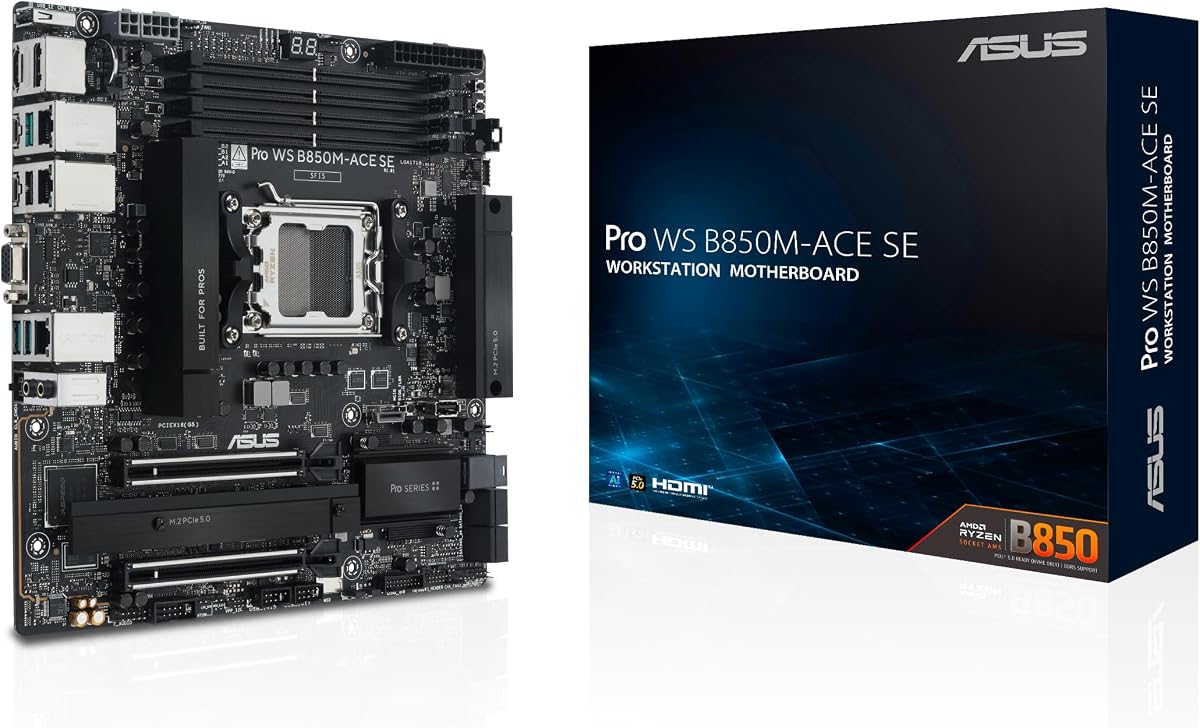
ASUS Pro WS B850M-ACE SE
4.3Editor score
Compatible with AMD Ryzen 9000
10G and 2.5G LAN ports
Compact MicroATX form factor
This guide compares the top ASUS server motherboards for workstations and enterprise use, focusing on performance, connectivity, and reliability for 2026.
Selecting the right server motherboard is critical for building reliable systems that handle demanding workloads without failure. ASUS offers a wide range of options designed for stability, high-speed connectivity, and robust power delivery across various use cases.
We evaluated ten ASUS server and workstation motherboards based on their chipset support, expansion capabilities, memory handling, and remote management features. Each model was chosen for its ability to support modern processors and deliver consistent performance under heavy usage conditions.
Each pick highlights key strengths and target environments to help you match hardware to your specific needs. Prices and availability fluctuate frequently, so always verify current listings before making a final purchase decision for your infrastructure.
4.3Editor score

3.7Editor score

The following comparison highlights the key specifications and features of each ASUS server motherboard to help you identify the best fit for your specific workstation or server requirements.


The ASUS Pro WS WRX90E-SAGE SE stands out as a powerhouse for professionals requiring maximum CPU cores and expandability. With support for AMD Ryzen Threadripper PRO 7000 WX-Series processors, this board delivers unmatched performance for rendering and simulation tasks.
We may earn a commission when you buy through this link, at no additional cost to you.
Its seven PCIe 5.0 x16 slots enable extensive multi-GPU setups or high-speed storage configurations without bandwidth bottlenecks. The robust 32-power stage design ensures stable power delivery even under sustained multi-core loads.
While the cost is significant, the inclusion of enterprise-grade features like IPMI remote management and ECC memory support justifies the investment for critical workstations. Users should ensure their chassis supports the EEB form factor before purchasing.
This board is ideal for video editors, 3D artists, and data scientists who need every ounce of performance from their hardware. It is a top-tier choice for builds where reliability and expandability are paramount.
Seven PCIe 5.0 x16 slots allow for multiple GPUs, capture cards, and NVMe RAID arrays simultaneously.
Dedicated IPMI with BMC control enables remote monitoring and rebooting even when the system is offline.
We may earn a commission when you buy through this link, at no additional cost to you.
The Pro WS W890E-SAGE SE brings Intel Xeon power to the workstation with exceptional stability and speed. It supports the latest Intel Xeon 600 processors and includes NitroPath DRAM technology for optimized memory performance.
We may earn a commission when you buy through this link, at no additional cost to you.
Connectivity is a standout feature with seven PCIe 5.0 x16 slots and dual 10Gb LAN ports, ideal for data-intensive workflows. The robust power design with active cooling ensures components stay within safe temperatures during heavy usage.
Although it shares some form factor constraints with AMD counterparts, its specific support for Intel Xeon makes it a unique choice for mixed-platform environments. It offers excellent remote management capabilities for IT administrators.
Professionals building high-end Intel workstations will find this motherboard delivers reliable performance. It is especially useful for those who require consistent uptime and remote administration tools.
NitroPath DRAM technology reduces latency and improves data throughput for faster computing tasks.
Dual 10Gb LAN ports ensure rapid data transfer essential for large file hosting and cloud sync.
We may earn a commission when you buy through this link, at no additional cost to you.
This model offers a CEB form factor which fits more chassis options than EEB boards. It supports Intel Xeon 600 processors and provides a flexible environment for adding an IPMI expansion card when remote management is needed.
We may earn a commission when you buy through this link, at no additional cost to you.
The board delivers seven PCIe 5.0 x16 slots for extensive expansion capabilities similar to higher-tier models. USB4 support ensures future-proofing for high-speed peripherals and storage devices.
Users should note the lack of onboard IPMI means additional purchases may be required for full server management features. However, the robust power design and thermal solutions remain consistent with ASUS standards.
It is a practical choice for users who need Intel performance but prefer a slightly different form factor. The board balances professional features with accessibility for workstation builds.
CEB size provides more case compatibility options compared to EEB workstation motherboards.
Support for IPMI expansion cards allows customizable remote control features based on budget needs.
We may earn a commission when you buy through this link, at no additional cost to you.
The Pro WS B850M-ACE SE brings enterprise features to a budget-friendly MicroATX board. Compatible with AMD Ryzen 9000 and 7000 series, it offers robust performance for small business servers or entry workstations.
We may earn a commission when you buy through this link, at no additional cost to you.
It includes onboard BMC support and ASUS Control Center Express for essential remote management without extra hardware. Dual 10G and 2.5G LAN ports provide versatile networking options for various environments.
While expansion is limited compared to EEB boards, the inclusion of PCIe 5.0 M.2 slots ensures fast storage performance. This makes it a versatile choice for cost-conscious users needing reliability.
Ideal for small offices or home labs requiring server-grade stability on a budget. It balances price with critical features like IPMI and fast networking.
MicroATX design fits into standard cases, making it easy to integrate into existing infrastructure.
Built-in BMC and Control Center Express simplify remote monitoring without add-on cards.
We may earn a commission when you buy through this link, at no additional cost to you.
This motherboard introduces WiFi 7 capability to high-performance workstations, allowing flexible deployment locations. It supports AMD Ryzen Threadripper PRO 7000 processors with robust 36 power stage delivery for sustained loads.
We may earn a commission when you buy through this link, at no additional cost to you.
With three PCIe 5.0 x16 slots, it accommodates powerful GPU configurations. The inclusion of ECC memory support ensures data integrity for professional rendering and scientific workloads.
While wireless is convenient, users in strict server rooms might prefer cabled solutions. The robust thermal design helps maintain performance during long compute sessions without throttling.
Best for creative professionals needing flexibility in placement alongside extreme CPU performance. It bridges the gap between desktop convenience and workstation power.
WiFi 7 offers lower latency and higher throughput for wireless data transfers in mobile workflows.
36 power stages provide consistent voltage regulation for complex computational tasks.
We may earn a commission when you buy through this link, at no additional cost to you.
This variant balances power delivery and connectivity with 20 power stages and USB4 ports for ultra-fast peripherals. It supports AMD Ryzen Threadripper processors and provides ample space for high-end GPU configurations.
We may earn a commission when you buy through this link, at no additional cost to you.
The inclusion of SlimSAS NVMe support enables high-speed storage arrays directly on the board. USB4 ports allow for daisy-chaining high-resolution displays or external storage enclosures.
It offers a robust platform for users who need substantial expansion without reaching for the most expensive models. The power design ensures stable performance across varied workloads.
Recommended for professionals needing fast I/O and flexible storage options. It supports demanding workflows efficiently.
USB4 provides 40Gbps speeds for rapid data transfer and external display connectivity.
SlimSAS NVMe support allows for enterprise-grade storage speeds essential for large datasets.
We may earn a commission when you buy through this link, at no additional cost to you.
Designed for Intel users, this ATX board includes an IPMI expansion card in the box, offering immediate remote management capabilities. It supports 13th Gen Core processors and provides robust connectivity for mixed-use environments.
We may earn a commission when you buy through this link, at no additional cost to you.
The inclusion of Thunderbolt 4 headers allows for high-speed external device connectivity. Dual 2.5Gb LAN ports ensure reliable networking without needing additional cards.
It fits into standard ATX cases, making it easier to build compared to workstation-specific EEB boards. The bundled IPMI card adds significant value for budget-conscious server setups.
Ideal for small businesses needing server features in a standard chassis. It offers practical management and connectivity for professional use.
Included IPMI card provides out-of-box remote administration capabilities without extra costs.
Thunderbolt 4 headers enable connection to ultra-fast external storage and high-res displays.
We may earn a commission when you buy through this link, at no additional cost to you.
This board is designed for stability with the Intel C252 chipset and support for Xeon E-2300 series processors. It fits Micro-ATX cases and is built for reliable server tasks without requiring massive case footprints.
We may earn a commission when you buy through this link, at no additional cost to you.
The chipset ensures stability for 24/7 operation. While the platform is older, it remains viable for basic file servers or network appliances where cost efficiency is key.
It offers solid performance for general business tasks but lacks the high-speed PCIe 5.0 features of newer boards. It is a reliable entry point for small server deployments.
Best for legacy system upgrades or cost-sensitive small business servers. It provides stability where high-end features are not required.
Intel C252 chipset ensures consistent performance for always-on server applications.
Support for ECC memory helps prevent data corruption in critical file operations.
We may earn a commission when you buy through this link, at no additional cost to you.
The Z13PE-D16 is designed for heavy workloads with dual Intel Xeon support and up to 4TB of DDR5 memory. It is ideal for virtualization, databases, and high-performance computing where single CPU limits are restrictive.
We may earn a commission when you buy through this link, at no additional cost to you.
Dual Intel 10Gbps LAN ports provide high-speed networking essential for data centers. The board supports massive memory capacity and high TDP CPUs for sustained computational tasks.
Its physical size requires a large E-ATX chassis and careful planning for airflow. However, for users needing raw power, it is one of the few options available for dual-socket workstation builds.
Best for data center engineers and researchers needing maximum memory and core counts. It delivers enterprise-class performance in a workstation format.
Support for dual Xeon processors allows for extreme core counts and parallel processing capabilities.
Up to 4TB RAM supports massive virtual machines and complex dataset processing.
We may earn a commission when you buy through this link, at no additional cost to you.
This board provides a balanced feature set with three M.2 slots and SlimSAS support for flexible storage configurations. It supports Intel 13th Gen processors and includes a BMC IPMI chip for essential management.
We may earn a commission when you buy through this link, at no additional cost to you.
Rear I/O includes HDMI, DisplayPort, and VGA, allowing connection to legacy monitors. It supports DDR5 and provides stable power for modern consumer-grade workstation builds.
While not as fast as PCIe 5.0 boards, its storage flexibility and IPMI support make it viable for general purpose servers. It balances cost with modern connectivity.
Recommended for users needing storage flexibility and remote management. It is a solid option for mixed-use setups.
Three M.2 slots plus SlimSAS allow multiple high-speed drives without RAID cards.
VGA and HDMI ports ensure compatibility with older displays and specialized hardware.
We may earn a commission when you buy through this link, at no additional cost to you.
Selecting the right ASUS server motherboard involves evaluating CPU compatibility, memory capacity, expansion slots, and management features. Here are the key factors to consider before you buy.
Ensure the motherboard supports your chosen processor architecture, such as AMD TR5 or Intel LGA 4710. Mismatched sockets render the board unusable with your CPU.
Check the supported CPU generation to guarantee compatibility with your current and future upgrade plans.
Workstation boards often support ECC R-DIMM memory which provides error correction essential for stability. Ensure the board supports the capacity required for your applications.
Consider DDR5 support for higher bandwidth and verify the maximum RAM capacity supported by the chipset.
Evaluate the number of PCIe slots available for GPUs, network cards, and storage. Workstation boards typically offer more lanes than standard consumer boards.
Ensure the slot generation like PCIe 5.0 meets your speed requirements for data transfer and rendering.
Look for IPMI or BMC support to enable remote administration and monitoring. This is critical for maintaining servers that are not physically accessible.
ASUS Control Center Express provides additional software tools for managing hardware and health status remotely.
Server and workstation boards like EEB and CEB may require larger cases than standard ATX. Verify your chassis supports the physical dimensions before purchasing.
Ensure adequate space for cooling and cable management as these boards often have bulky heatsinks.
High-speed LAN options like 10Gb or 2.5Gb are vital for transferring large files efficiently. Dual ports offer redundancy or link aggregation for stability.
Check for onboard controllers versus expansion needs to avoid extra costs or compatibility issues.
Robust power stages ensure stable voltage under load which is critical for multi-core CPUs. High-quality VRMs prevent throttling during long tasks.
Look for active cooling solutions for VRMs and M.2 slots to maintain performance under sustained loads.
M.2 slots and SlimSAS ports allow for high-speed storage configurations. Multiple slots provide flexibility for boot and data drives.
Confirm NVMe support and bandwidth availability to avoid bottlenecks in data-intensive workflows.
Install the motherboard into a compatible chassis ensuring all standoffs align correctly with the PCB holes to prevent short circuits. Connect the power cables securely and verify all expansion cards are seated firmly.
Configure BIOS settings to enable remote management features and adjust fan profiles for optimal cooling. Update the BIOS to the latest version to ensure compatibility with newer CPU generations.
Regularly clean dust from heatsinks and fans to prevent overheating. Monitor system temperatures and logs to identify potential hardware issues before they impact performance.
Workstation boards are designed for performance and compatibility with high-end consumer CPUs. Server boards focus on reliability, ECC memory, and remote management for 24/7 operation.
Most server boards require specific workstation or Xeon processors. Always verify the QVL list to confirm supported CPUs before purchasing to ensure compatibility.
EB and CEB boards are larger than ATX and require compatible cases with proper standoffs. Check your chassis specs to ensure it fits the motherboard dimensions.
IPMI allows remote management of the server including power control and monitoring. It is essential for administrators who manage hardware remotely without physical access.
Yes most support standard PCIe GPUs used in gaming and rendering. Check for multi-GPU support and slot configuration if you plan to run multiple graphics cards.
ECC memory corrects errors which is vital for critical applications and data integrity. While not mandatory for home use it is recommended for professional workloads.
Choosing the best ASUS server motherboard depends heavily on your specific workload and processor preference. Options like the Pro WS WRX90E-SAGE SE offer exceptional performance for professionals.
Prioritize features such as memory capacity, remote management, and expansion slots to match your operational needs. Balancing these factors ensures you get the most reliable hardware for your investment.
Always check current prices and availability before purchasing. Inventory fluctuates quickly so verifying listings ensures you secure the best deal for your build.