
ASUS Prime AP201 Micro-ATX PC Case
4.7Editor score
Quasi-Filter Mesh Panels
Optimized for Cooling
Industry-Leading Spatial Efficiency
This guide compares the top 10 ASUS PC Case options for gaming and workstations, evaluating cooling, design, and build quality to help you choose the right
Choosing the right chassis is crucial for any build. A good ASUS PC Case offers excellent airflow, durability, and style to protect your components.
We compared ten top models based on cooling performance, expansion options, and ease of use. Each product brings unique features for different user needs.
Every pick highlights key specs and real-world usability. Note that prices change frequently, so check current listings before making your final purchase decision.
4.7Editor score

4.8Editor score

4.6Editor score
Explore the side-by-side comparison of all ten models to see how they stack up in size, cooling, and features at a glance.


This model is highly rated for its robust build and cooling capabilities. It supports E-ATX motherboards and includes multiple fans for immediate performance.
We may earn a commission when you buy through this link, at no additional cost to you.
The custom TUF gaming spatter pattern adds style while the 4mm smoked glass showcases internals. Its ergonomic handles make moving the heavy chassis manageable.
While heavy, the durability justifies the weight. The liquid cooling support is a key benefit for overclockers seeking top performance in a clean layout.
Buyers wanting a reliable full tower will find this an ideal choice. It balances premium features with practical design for serious gaming setups today.
The included fans and mounting points ensure consistent cooling even during intense workloads and extended gaming sessions.
Metal panels and thick glass provide protection and a sleek look that resists wear and damage over years of use.
We may earn a commission when you buy through this link, at no additional cost to you.
This Micro-ATX case delivers great value with its quasi-filter mesh panels designed to boost airflow significantly without extra cost.
We may earn a commission when you buy through this link, at no additional cost to you.
Despite its compact size, it supports ATX PSUs and large GPUs. Tool-free panels simplify access for upgrades and regular cleaning needs.
The main trade-off is the lack of pre-installed fans which you must buy separately to maximize the cooling potential offered.
Ideal for budget builds needing strong thermal performance in a small area. It offers the best balance of price and functionality for entry users.
Over 57000 precision holes in the mesh ensure air moves freely across components to keep temperatures low.
A 32mm gap behind the motherboard tray allows cables to tuck away neatly for a clean internal appearance.
We may earn a commission when you buy through this link, at no additional cost to you.
This model stands out with its sturdy diecast aluminum frame that feels solid and luxurious in any gaming room environment.
We may earn a commission when you buy through this link, at no additional cost to you.
It supports massive radiators and custom cooling loops while including a built-in drawer for small tools. The Type-C ports add modern connectivity options.
The premium price tag reflects the build quality and features like the graphics card holder that prevents sag during operation.
Enthusiasts seeking the best materials and flexibility will love this case. It is a top choice for those who prioritize aesthetics and cooling.
The aluminum alloy frame ensures stability and support for heavy components including large GPUs and custom loops.
A hinged side panel and storage drawer streamline assembly and maintenance for a smooth building experience.
We may earn a commission when you buy through this link, at no additional cost to you.
The dual-chamber chassis creates independent zones for CPU and GPU cooling which helps manage heat distribution more efficiently than standard designs.
We may earn a commission when you buy through this link, at no additional cost to you.
Front and side glass provide a fully unobstructed view of your build while the high-speed USB Type-C port offers modern connectivity.
Most panels are detachable for easier installation but this modular design adds complexity to the initial setup process for users.
Builders wanting a clean and efficient airflow layout will appreciate this design. It offers a distinct approach to managing thermal zones.
Separate zones keep heat from mixing allowing each component to operate at optimal temperatures consistently.
Tinted glass on both sides highlights your hardware with an immersive and modern visual presentation for your room.
We may earn a commission when you buy through this link, at no additional cost to you.
This case is built specifically for motherboards with hidden connectors to optimize cable management and ensure a clutter-free internal setup for all.
We may earn a commission when you buy through this link, at no additional cost to you.
It includes four ARGB fans for immediate lighting and cooling while the 8 degree angled base enhances airflow and viewing angle slightly.
The main advantage is the ability to hide cables completely which is rare at this price point but may limit motherboard compatibility.
Ideal for users prioritizing aesthetics and clean builds with compatible boards. It offers great value for those wanting pre-installed lighting fans.
Designed for hidden connectors to keep cables out of sight for a pristine internal appearance.
The angled base improves intake efficiency and widens the viewing angle for a better immersive experience.
We may earn a commission when you buy through this link, at no additional cost to you.
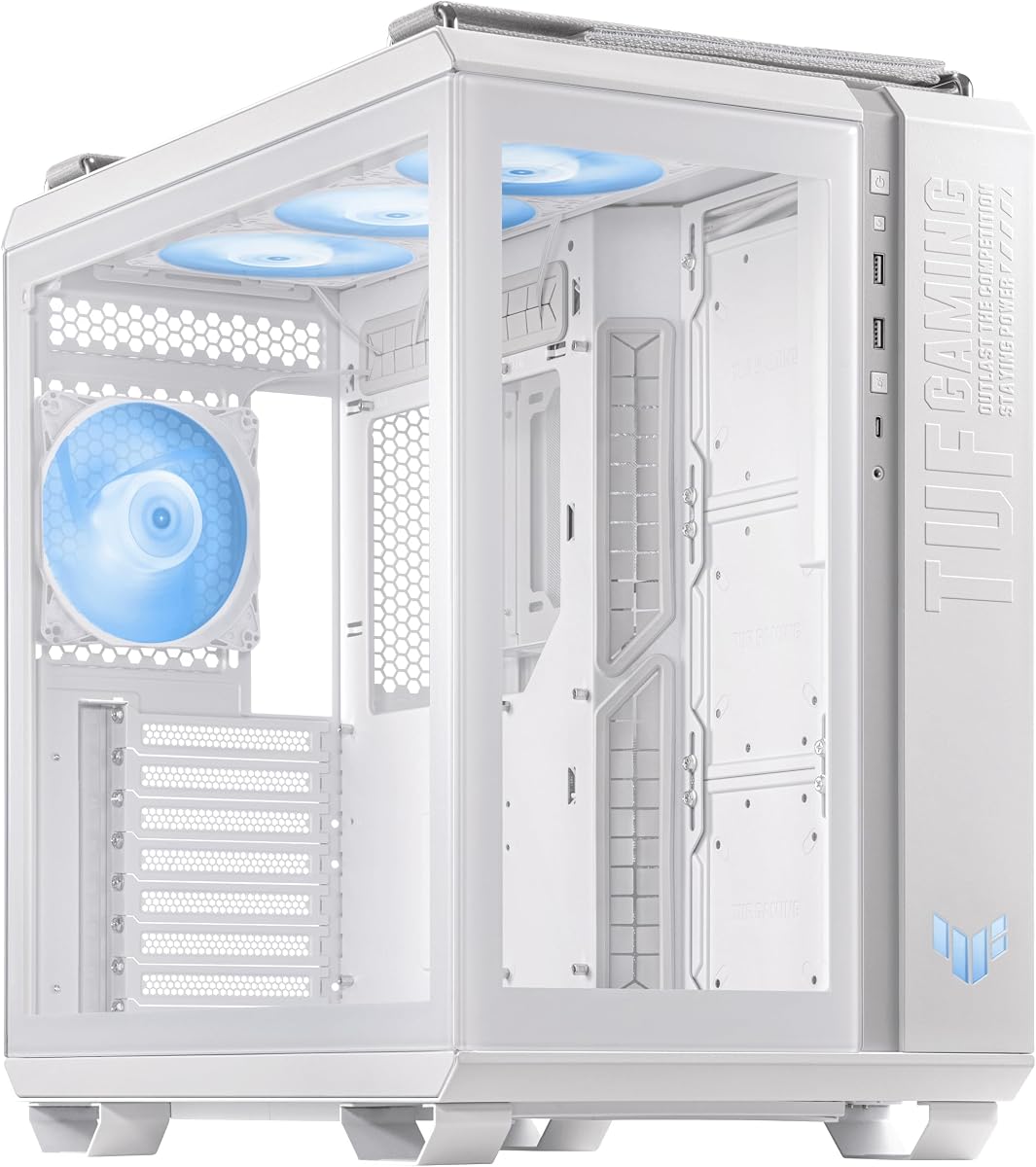
This white edition matches the robust design of the GT501 with a custom spatter pattern that stands out in any white-themed gaming setup.
We may earn a commission when you buy through this link, at no additional cost to you.
It includes the same high-performance fans and liquid cooling support making it just as capable as the black version for gaming.
The white finish might show dust more easily over time but the durability and airflow performance remain consistent and strong.
Perfect for builders wanting a cohesive white PC build without sacrificing performance. It retains all the premium features of the original.
Designed to match TUF Gaming motherboards and components for a unified visual aesthetic in your system.
Retains the same fan layout and mounting points as the standard version for reliable thermal control.
We may earn a commission when you buy through this link, at no additional cost to you.
The perforated honeycomb front panel aids airflow significantly while keeping the case compact enough for smaller desks and gaming areas.
We may earn a commission when you buy through this link, at no additional cost to you.
It includes an integrated RGB controller hub allowing you to manage lighting without extra software or hardware adapters.
The compact size means less room for extra storage but is perfect for users who prioritize cooling in a smaller footprint.
Great for gamers who need efficient cooling in a mid tower. The included headphone hanger adds practical convenience for daily use.
Built-in 6 port hub and control button simplify lighting management for your fans and components.
A compact case that saves space while maintaining high cooling capacity for performance components.
We may earn a commission when you buy through this link, at no additional cost to you.
This white dual chamber case combines the efficiency of independent cooling zones with the convenience of four pre-installed ARGB fans.
We may earn a commission when you buy through this link, at no additional cost to you.
The 20Gbps Type-C port on the front panel ensures fast data transfer while the tinted glass offers a completely unobstructed view.
Modular panels simplify hardware installation but the design is more complex than standard single chamber cases for assembly.
Ideal for those seeking white aesthetics with advanced thermal management. It offers a balance of convenience and performance for builds.
Four ARGB fans are included to save time and ensure balanced cooling performance right out of the box.
The USB 20Gbps Type-C port allows for fast connections to modern storage and peripherals without extra cables.
We may earn a commission when you buy through this link, at no additional cost to you.
This variant is built for motherboards with concealed connectors to optimize cable management for a clutter-free setup in any build.
We may earn a commission when you buy through this link, at no additional cost to you.
It supports up to 360mm radiators and long GPUs while the panoramic glass ensures an unobstructed view of your components inside.
The high user rating suggests it meets expectations for those seeking a clean look without compromising on hardware support options.
Perfect for builders wanting a tidy aesthetic with specific motherboard types. It delivers strong compatibility and visual appeal for gaming.
Optimized for hidden ports to eliminate cable clutter and create a sleek and professional looking system.
The 8 degree angled base improves airflow efficiency for better thermal performance during intensive tasks.
We may earn a commission when you buy through this link, at no additional cost to you.
This model offers independent cooling zones for CPU and GPU to help manage heat without mixing hot air from different components.
We may earn a commission when you buy through this link, at no additional cost to you.
The USB 3.2 Gen 2 Type-C port provides fast transfer speeds while four ARGB fans ensure balanced cooling performance out of the box.
Most panels are removable to ease hardware installation and maintenance for users who prefer a modular approach to building.
Great for mid tower builds needing efficient cooling and modern connectivity. It offers a practical design for those seeking airflow.
Dual chamber design allows separate zones for the CPU and GPU to keep temperatures low during heavy use.
The front panel includes high-speed USB 3.2 Gen 2 Type-C for fast data and charging of devices.
We may earn a commission when you buy through this link, at no additional cost to you.
Selecting the right ASUS PC Case requires looking at several key factors to ensure your build runs smoothly and fits your needs.
Always check that the case supports your motherboard form factor such as ATX or E-ATX to avoid fitting issues. Larger boards need more space to install without problems.
Match the board size to the case specifications before buying to ensure a secure and proper fit.
Look for cases with mesh panels or pre-installed fans to maintain good airflow. Good cooling prevents overheating and keeps components stable.
Prioritize cases with multiple fan mounts and radiator support for better thermal control.
Ensure the case can hold your graphics card length including any custom cooling. Long GPUs may not fit in smaller cases.
Check the internal dimensions to confirm your GPU will fit comfortably inside.
Good cases have gaps and hooks to hide cables. This improves airflow and makes the inside look cleaner.
Look for wide spaces behind the motherboard tray for cable routing.
Metal panels are more durable than plastic and protect components better. Heavy-duty cases last longer under stress.
Choose steel or aluminum builds for better longevity and protection.
Modern cases often include USB Type-C ports for fast data transfer. This adds convenience for connecting devices.
Check if the case supports USB 3.2 Gen 2 Type-C for speed.
Tool-free panels make assembly easier for beginners. This feature saves time and reduces stress during installation.
Pick a case with clip-on or button-release panels if you value convenience.
Glass panels allow you to show off your build but may need more cleaning. Choose a style that matches your room.
Consider tempered glass for a clear look that suits modern gaming setups.
Install your motherboard and components carefully to avoid static damage. Use a clean workspace and keep screws organized for reassembly.
Clean the dust filters regularly to maintain airflow. Use compressed air to remove buildup from fans and vents.
Ensure all panels are securely closed to protect internal parts from accidental contact or damage.
Most cases support ATX and micro-ATX boards while some like the GT501 support E-ATX. Always check the compatibility list before purchasing to ensure a match.
Some models like the GT501 and A31 PLUS come with pre-installed fans while others like the AP201 do not. Verify the product details before buying.
Many models feature tool-free panels with clips or buttons for easy access. This simplifies upgrades and cleaning without needing extra tools.
The GT502 Horizon supports USB 10 Gbps or 20Gbps Type-C while others use standard USB 3.2 Gen 2. Check specs for exact transfer speeds.
Yes, many cases support 360mm radiators for liquid cooling. Ensure there is enough space at the front or top for the radiator.
ASUS cases often feature TUF durability and ROG style with quality materials. They are designed to work well with ASUS motherboards and components.
The GT501 and AP201 lead the list for performance and value respectively. Each offers unique strengths for different build goals.
Prioritize cooling and motherboard compatibility first to ensure your system runs well. Features like Type-C ports are a bonus.
Prices change often so verify current listings before buying. Choose a case that fits your budget and needs today.