
ASRock 970A-G/3.1
4.2Editor score
Supports AM3 plus CPUs
Includes M.2 slot
Offers USB 3.1 ports
This guide compares the top Asrock AM3 Motherboard models for performance compatibility and value to help you choose the right AMD platform for your next PC
Choosing the right foundation for your computer is essential for stability and performance. Asrock AM3 Motherboard options offer reliable support for legacy AMD processors while providing modern connectivity features for today's users.
We have analyzed ten distinct models based on chipset capabilities expansion slot options and overall user satisfaction ratings. Our comparison highlights key differences in power delivery storage interfaces and form factors to simplify your decision process.
Each pick below shows specific strengths like budget friendly pricing or advanced overclocking support for enthusiasts. Please note that pricing and availability can change rapidly so verify current details before completing your purchase online.
4.2Editor score

5.0Editor score

3.8Editor score
The following table provides a side-by-side look at the core specifications for each model to help you quickly identify the board that matches your specific build requirements.



This top rated board stands out with a perfect five star rating from verified buyers who value stability and feature sets. It offers the powerful 890FX chipset which was designed for high performance multi GPU configurations and robust CPU support.
We may earn a commission when you buy through this link, at no additional cost to you.
The inclusion of six SATA3 ports ensures you have ample high speed storage connectivity without needing add on cards. Additionally four USB 3.0 ports provide fast data transfer capabilities for external drives and peripherals which is rare for this older socket generation.
While it is limited to the AM3 socket which means newer Ryzen processors will not work it remains an excellent choice for upgrading existing systems. The trade off is clear but acceptable if you are committed to the Phenom II or Athlon II ecosystem.
Enthusiasts looking for the last word in AMD legacy performance should prioritize this model. It balances connectivity expansion and reliability better than any other option on our list for serious multi GPU or high capacity storage builds.
With six native SATA3 ports users can connect multiple SSDs or HDDs at full speeds without bottlenecks.
Support for Quad CrossFireX allows for serious gaming performance scaling using multiple AMD graphics cards.
We may earn a commission when you buy through this link, at no additional cost to you.
This model is a favorite for budget builders who need modern connectivity without breaking the bank. It brings the 970 chipset to the table which supports the latest AM3+ processors while adding surprising modern touches like an M.2 slot.
We may earn a commission when you buy through this link, at no additional cost to you.
The presence of USB 3.1 Type-C and Type-A ports is a major advantage for connecting modern external devices. The board also supports Quad CrossFireX which gives you room to grow your graphics performance later if you have multiple AMD cards.
You might notice the audio is less premium compared to higher end models but for general use and gaming this is rarely a bottleneck. The lack of fancy RGB lighting or extreme overclocking features keeps the cost down where it matters most.
If you need an affordable AM3+ solution that does not sacrifice storage modernity this is the smart choice. It bridges the gap between older legacy hardware and contemporary accessory needs effectively for most standard PC applications.
USB 3.1 and M.2 support bring current day speeds to legacy platforms.
Multiple PCI Express slots allow for future upgrades or additional hardware cards.
We may earn a commission when you buy through this link, at no additional cost to you.
This board represents the pinnacle of AM3+ engineering with the 990FX chipset designed for maximum performance headroom. It supports CPUs up to 140 Watts which is crucial for high end Phenom II X6 processors running at stock or overclocked speeds.
We may earn a commission when you buy through this link, at no additional cost to you.
The ability to run Quad SLI alongside Quad CrossFireX makes it a versatile choice for multi GPU setups. The audio system includes THX TruStudio Pro which is a significant upgrade for users who value high fidelity sound for media or gaming.
Power management is a consideration here as this board draws more energy than cheaper options. However for those building a legacy beast PC the reliability and feature set justify the complexity and power requirements involved.
Buyers seeking the absolute best legacy platform performance should look here first. It offers the most complete package for enthusiasts who want every possible feature available on the AM3+ architecture.
Designed to handle 140W processors ensuring stable operation for top end chips.
THX TruStudio Pro enhances audio output for a more immersive experience.
We may earn a commission when you buy through this link, at no additional cost to you.
This board is ideal for smaller cases that still need powerful performance from legacy AMD hardware. Its MicroATX form factor saves space while supporting processors up to 125 Watts which is plenty for most gaming scenarios.
We may earn a commission when you buy through this link, at no additional cost to you.
The support for 8-core CPUs means you can run multi-threaded applications efficiently. AMD Overdrive with ACC feature gives you extra tuning capabilities to squeeze out performance without complex external tools.
The limitation to USB 2.0 and SATA2 might be a drawback for modern peripherals or fast SSDs. However if your budget is tight and you use standard external drives these speeds are still acceptable for daily tasks.
Small form factor builders or those needing a simple home server will appreciate this unit. It keeps costs low while maintaining the power necessary to run demanding applications on older hardware platforms.
MicroATX layout allows use in compact cases without sacrificing CPU compatibility.
Advanced Clock Calibration allows safe and easy performance tuning for enthusiasts.
We may earn a commission when you buy through this link, at no additional cost to you.
This model provides a robust platform for users needing standard ATX size and reliable performance. The 970 chipset is a workhorse that supports modern CPU features and gives you five SATA3 ports for storage expansion.
We may earn a commission when you buy through this link, at no additional cost to you.
Having ten USB 2.0 ports is useful for many peripherals even if USB 3.0 is not present. The eSATA3 port adds convenience for external hard drive connections which is great for backups and media libraries.
Power delivery is designed to handle high TDP processors ensuring stability under load. However older USB standards mean you will rely on adapters or hubs for high speed external drives which might inconvenience some users.
Users who need a balanced all rounder for general computing or light gaming will find this reliable. It offers a solid middle ground between feature count and cost without sacrificing core stability.
Multiple SATA3 ports support connecting several fast drives for better performance.
Ten USB ports allow extensive connection of mice keyboards and other accessories.
We may earn a commission when you buy through this link, at no additional cost to you.
This board brings solid value to small PC builds with features like solid capacitors for longevity. The inclusion of XBoost technologies helps optimize network and storage performance without manual intervention.
We may earn a commission when you buy through this link, at no additional cost to you.
Support for 8-core CPUs and 1866 MHz DDR3 gives you enough headroom for modern multitasking. App Charger support means faster charging for mobile devices which is a handy extra feature for daily users.
While the overall rating is lower than other top picks it remains a functional choice for specific small case needs. The limitations on advanced features like USB 3.0 make it less versatile for tech heavy workflows.
If you need a compact motherboard for a media center or light office PC this is a viable option. It provides essential modern connectivity in a small package without unnecessary expensive bells and whistles.
Solid capacitors help ensure stable performance and longer board lifespan.
XFast 555 technology improves network stability and throughput for better performance.
We may earn a commission when you buy through this link, at no additional cost to you.
This board is a great option for users who do not want a discrete graphics card immediately. The integrated Radeon HD4250 supports Full HD playback which is perfect for HTPC or media center setups.
We may earn a commission when you buy through this link, at no additional cost to you.
Having a native USB 3.0 port is rare for this generation and helps with fast file transfers. It also supports Hybrid CrossFireX which allows adding a matching AMD card for a small performance boost later.
The lower rating suggests it is best suited for basic tasks rather than heavy gaming or workstation loads. If you plan to use a dedicated GPU later you might want to consider a board with more power phases.
For silent office PCs or basic media boxes this model delivers exactly what is needed. It keeps costs minimal while providing modern connectivity and decent media playback capabilities out of the box.
Integrated graphics support Full HD video playback with HDMI and DVI.
USB 3.0 ports allow fast data transfer for external drives and peripherals.
We may earn a commission when you buy through this link, at no additional cost to you.
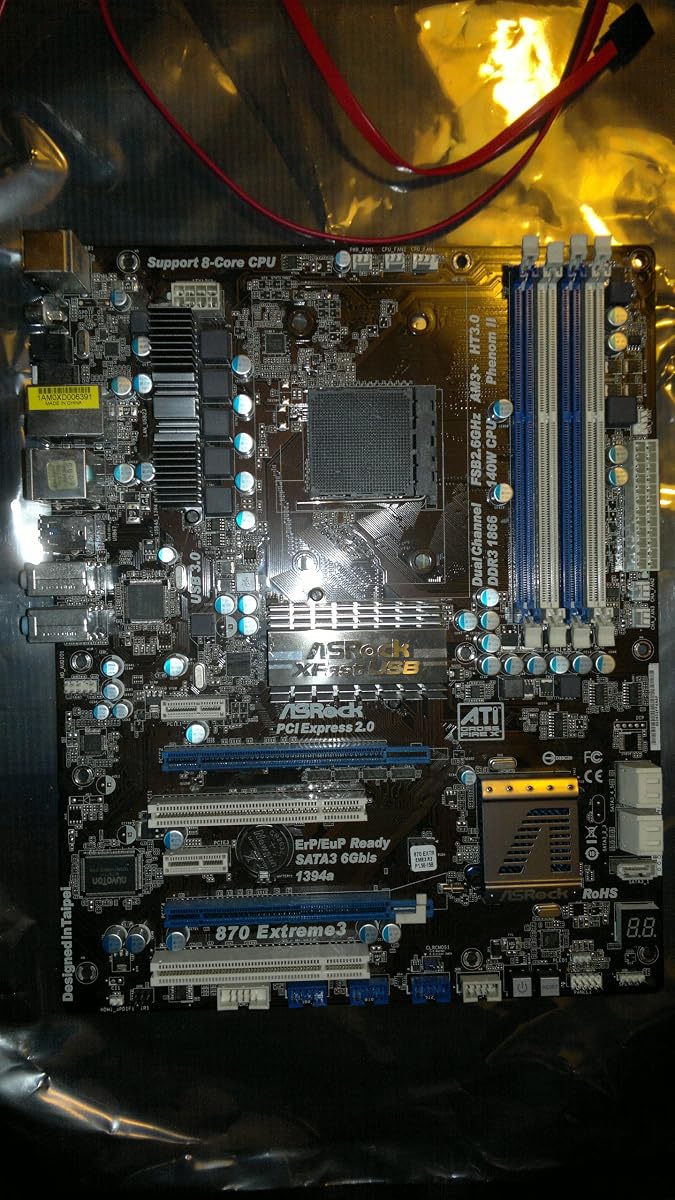
This revision offers a reliable platform for users wanting a solid balance of features. The 870 chipset provides good performance and supports Quad CrossFireX which is helpful for multi GPU setups on a budget.
We may earn a commission when you buy through this link, at no additional cost to you.
The inclusion of IEEE 1394 FireWire ports is unique and benefits users with legacy devices like camcorders. High definition audio and multiple SATA3 ports ensure quality sound and storage speed for daily tasks.
You may find USB 3.1 Type-C missing which could be a drawback for modern peripherals. But the two USB 3.0 ports and 12 USB 2.0 ports still offer plenty of connectivity for most users.
Those needing a dependable workstation or gaming board without extreme features will find this a good fit. It is a stable choice for builders who value specific legacy ports and balanced performance.
FireWire ports make this ideal for legacy video or audio production needs.
Quad CrossFireX allows scaling performance with multiple graphics cards.
We may earn a commission when you buy through this link, at no additional cost to you.
This board brings some modern features to the AM3+ socket at a reasonable cost. The PCIe 3.0 x16 slot is beneficial for newer graphics cards that take advantage of the extra bandwidth available.
We may earn a commission when you buy through this link, at no additional cost to you.
USB 3.0 support ensures your external drives can run at fast speeds. It also includes SATA3 ports which are essential for SSDs and mechanical hard drives needing high throughput.
The 770 chipset is older and lacks the power and features of the 990FX or 970 options. However for standard office or home use it provides everything necessary to run systems smoothly without issues.
Budget conscious buyers needing a PCIe 3.0 connection will appreciate this option. It bridges the gap between cost and capability effectively for users who do not need top tier overclocking.
PCIe 3.0 slot allows better bandwidth for compatible modern graphics cards.
SATA3 ports support SSDs for faster boot and application loading times.
We may earn a commission when you buy through this link, at no additional cost to you.
This MicroATX board packs powerful features into a small case friendly design. The 970 chipset gives you access to high performance CPUs and multi GPU support which is impressive for its size.
We may earn a commission when you buy through this link, at no additional cost to you.
USB 3.0 support allows for fast external data transfers. The Compact CrossFireX capability means you can scale graphics performance later if your budget allows for a second card.
Limited expansion slots can be a constraint if you need multiple add on cards like sound or capture cards. But for most standard builds the layout is efficient and functional enough.
Gamers or builders needing a small PC with high performance potential should consider this model. It combines modern connectivity with powerful chipset features in a compact package.
MicroATX layout saves space without sacrificing chipset power.
USB 3.0 and Quad CrossFireX support ensure longevity.
We may earn a commission when you buy through this link, at no additional cost to you.
Selecting the right motherboard depends on your CPU plans and specific connectivity requirements. Here are the critical factors to consider before making your purchase.
Ensure the motherboard explicitly supports AM3 or AM3+ sockets. AM3+ boards generally work with AM3 CPUs but not vice versa which limits your future upgrade path.
Check that your chosen processor model is listed in the CPU support list to avoid BIOS issues.
Higher end chipsets like the 990FX and 970 provide better overclocking support and more PCIe lanes for graphics cards.
Budget chipsets like 760G or 770 are sufficient for daily tasks but may lack expansion features.
ATX boards offer more expansion slots and ports while MicroATX saves space in smaller cases.
Match your board size with your computer case to ensure physical compatibility before buying.
Most boards support DDR3 memory up to 1866MHz or 2400MHz depending on the model.
Verify the maximum RAM capacity to ensure it meets your application requirements for multitasking.
Look for USB 3.0 or 3.1 ports if you plan to use external drives at high speeds.
Some budget models only offer USB 2.0 which limits data transfer speeds significantly.
SATA3 ports are essential for running modern SSDs at full speed.
M.2 support is rare on older boards but available on some models like the 970A-G/3.1.
If you need multiple graphics cards check for CrossFireX or SLI support and available PCI Express slots.
Ensure you have enough space for sound cards or other add-on hardware if needed.
Higher end models often include premium audio codecs and surround sound support.
If you use external audio gear the onboard audio may matter less than other factors.
Install the motherboard into your case carefully aligning the standoffs and securing the I/O shield properly to prevent short circuits.
Update the BIOS to the latest version using the built-in flash tool to ensure CPU compatibility and stability.
Avoid exposure to moisture and dust to maintain long term reliability and keep vents clear of obstruction.
Yes most AM3+ motherboards support both AM3 and AM3+ processors. However AM3+ CPUs will not work on older AM3 boards. Always verify the specific CPU support list on the product page before purchasing.
Official support for Windows 11 is rare on these legacy platforms due to TPM requirements. You may run it unofficially but compatibility and stability are not guaranteed by the manufacturer.
Most models support up to 64GB of DDR3 RAM though some limit to 16GB or 32GB depending on the chipset and BIOS revision. Check the memory specs for your specific board.
Yes SATA3 ports on these boards support modern SATA SSDs. M.2 NVMe SSDs are only supported on models with a specific M.2 slot like the 970A-G/3.1.
The 990FX and 970 chipsets provide the best performance and features. They support higher TDP CPUs and have more PCIe lanes for multi GPU setups.
If you need better overclocking or more USB 3.0 ports upgrading to a 970 chipset board is worthwhile. The 760G is sufficient for basic use but lacks modern connectivity options.
Only select newer models like the 970A-G/3.1 include USB 3.1 Type-C and Type-A ports. Most others are limited to USB 3.0 or 2.0 standards.
Many models support Quad CrossFireX for AMD cards. SLI support is limited to specific high end boards like the 990FX EXTREME3 which lists Quad SLI support explicitly.
We have reviewed ten top options for Asrock AM3 Motherboard builds ranging from budget MicroATX models to high end ATX boards. Each provides unique strengths for legacy AMD system upgrades.
Prioritize connectivity like USB 3.1 and M.2 if you need modern performance alongside your legacy CPU. The ASRock 970A-G/3.1 offers the best balance for most users today.
Remember to check current pricing and stock availability before purchasing. These legacy models may sell out or vary in price frequently on the market.