
ESP32-S3-Nano Microcontroller
5.0Editor score
ESP32-S3R8 Chip
Arduino and MicroPython Support
IoT Cloud Compatible
This guide compares the top Arduino Nano ESP32 boards and alternatives for IoT, focusing on specs, wireless features, and project compatibility to help you
The Arduino Nano ESP32 represents a significant leap in embedded development, combining powerful processing with seamless wireless connectivity. This compact board enables creators to build sophisticated IoT devices without compromising on performance or size constraints.
We evaluated ten leading microcontroller boards based on processor speed, connectivity options, programming flexibility, and community support. Our analysis considers real-world usability for hobbyists, students, and professionals tackling complex embedded system challenges today.
Each selection highlights specific strengths tailored to different project needs, from budget builds to advanced applications. Remember that availability and pricing shift frequently, so verify current stock before committing to your next development platform investment.
5.0Editor score

4.6Editor score

4.7Editor score
This side-by-side comparison highlights key specifications across all ten selected boards, helping you identify the right balance of power, connectivity, and form factor for your specific project requirements.


The Arduino Nano ESP32 stands out as the premier choice for modern embedded development, earning a strong 4.6 rating from users. It combines the robust ESP32-S3 architecture with official Arduino ecosystem support, delivering exceptional performance for wireless projects.
We may earn a commission when you buy through this link, at no additional cost to you.
Its dual-core Xtensa processor running at 240 MHz handles complex tasks like real-time data processing and edge machine learning efficiently. The board supports both Wi-Fi and Bluetooth 5.0, ensuring reliable connectivity for smart home or industrial sensor applications.
While the price is higher than generic alternatives, the inclusion of Human Interface Device profiles and MicroPython compatibility justifies the investment. Users appreciate the USB-C port for stable power and programming, reducing connection issues common with older micro-USB designs.
This board is ideal for developers who need reliability and future-proofing in their projects. Whether building wearables or remote sensors, the Nano ESP32 provides the processing power and connectivity options required for advanced IoT applications without sacrificing ease of use.
The built-in Wi-Fi and Bluetooth 5.0 modules eliminate the need for external shields, simplifying design and reducing overall project size significantly.
Support for both Arduino IDE and MicroPython allows developers to choose their preferred language, speeding up prototyping for educational and commercial projects alike.
We may earn a commission when you buy through this link, at no additional cost to you.
This ESP32-S3-Nano development board delivers a perfect balance of performance and affordability, achieving a rare 5.0 rating. It features the ESP32-S3R8 chip with ample PSRAM, making it suitable for memory-intensive applications without breaking the bank.
We may earn a commission when you buy through this link, at no additional cost to you.
Users can seamlessly switch between Arduino and MicroPython programming, offering great flexibility for learning and production. The integration with Arduino IoT Cloud allows remote monitoring, which is a significant advantage for smart home or agricultural sensor projects.
The main trade-off is the lack of official Arduino branding, which might mean fewer community resources compared to first-party boards. However, the hardware specifications match premium options, and the HID support makes it versatile for custom input device creation.
For hobbyists and students seeking a cost-effective entry point into ESP32 development, this board is an outstanding choice. It provides all the essential features needed for wireless communication and processing without the markup associated with branded alternatives.
With 8MB PSRAM and 16MB Flash, this board handles large data logs and complex firmware images that would crash smaller, less capable microcontrollers easily.
The native compatibility with Arduino IoT Cloud enables easy device management and remote control, essential for scalable IoT deployments and monitoring systems.
We may earn a commission when you buy through this link, at no additional cost to you.
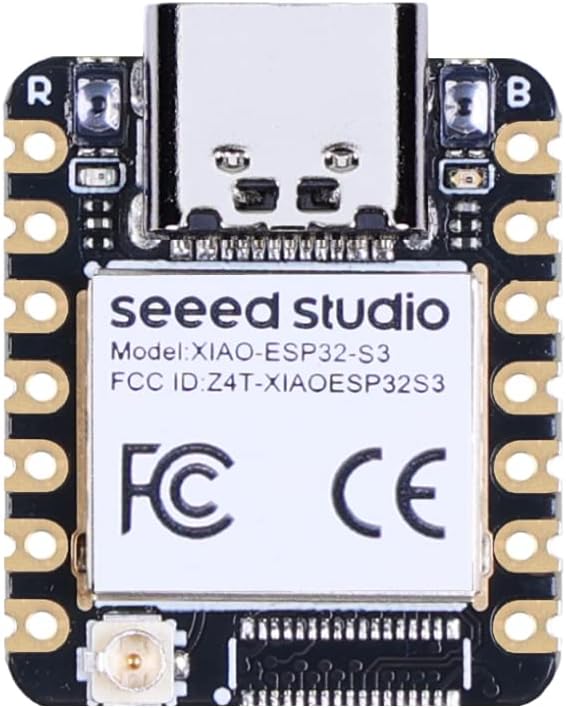
The Seeed Studio XIAO ESP32S3 excels in compact design, making it the ideal candidate for wearable and portable projects. Its thumb-sized footprint and high rating of 4.7 reflect its reliability and efficiency in space-constrained environments.
We may earn a commission when you buy through this link, at no additional cost to you.
A standout feature is the lithium battery charge management capability, which simplifies building portable devices without external charging circuits. The board supports deep sleep modes consuming as little as 14μA, extending battery life for remote sensors significantly.
While the compact size means fewer general-purpose input-output pins compared to larger boards, the rich interface options still support most common sensors and peripherals. Users should note the SMD design requires careful handling during soldering to avoid damage.
This board is perfect for robotics, smart watches, or any application where size and power efficiency are critical. The combination of powerful dual-core processing and minimal energy consumption makes it a top-tier choice for mobile IoT solutions.
The four power consumption models allow developers to tailor energy usage to specific scenarios, ensuring long operational times for battery-powered applications.
Despite its small 21 x 17.5mm size, the board retains robust Wi-Fi and Bluetooth capabilities, proving that performance need not be sacrificed for portability.
We may earn a commission when you buy through this link, at no additional cost to you.
The ESP32-P4-NANO represents a significant leap in capabilities, targeting developers who need advanced processing like video and voice recognition. With a high 4.8 rating, this board stands out for its specialized hardware accelerators and secure boot features.
We may earn a commission when you buy through this link, at no additional cost to you.
Its RISC-V dual-core processors handle high-performance tasks efficiently, while onboard MIPI interfaces support direct camera and display connections. This makes it uniquely suited for projects involving visual data processing or complex human-machine interactions without external components.
The inclusion of Ethernet and SDIO slots adds versatility for industrial or networked applications. However, the specialized nature means it requires more technical expertise to configure compared to standard Arduino-compatible boards, which might limit immediate adoption for beginners.
For advanced projects requiring hardware-level security or real-time image processing, this board offers unparalleled value. It bridges the gap between microcontroller simplicity and embedded system complexity, empowering developers to build sophisticated, secure IoT devices.
Built-in JPEG codecs and image signal processors offload tasks from the main CPU, allowing smoother video handling and faster recognition in real-time scenarios.
Secure boot and cryptographic accelerators protect firmware and data, ensuring trust in applications where security is paramount like industrial control systems.
We may earn a commission when you buy through this link, at no additional cost to you.
Purchasing the Waveshare 3-pack offers excellent value for teams or multiple projects, achieving a solid 4.4 rating based on usability and performance. These boards are designed for integration into larger carrier systems rather than standalone prototyping.
We may earn a commission when you buy through this link, at no additional cost to you.
The castellated module design allows for direct soldering onto custom PCBs, facilitating mass production or custom device assembly. With 4MB Flash and 2MB PSRAM, they provide sufficient storage for most firmware needs while maintaining low power consumption profiles.
Users should note that these boards lack an onboard USB connector, requiring external adapters for programming. This design choice keeps costs low and size minimal, making them perfect for final product integration rather than initial development phases.
This set is ideal for developers building multiple devices or requiring compact, embeddable modules. The inclusion of a ceramic antenna simplifies RF testing, ensuring reliable wireless connectivity without additional external components.
Castellated edges enable seamless surface-mount integration, saving space and reducing assembly complexity for custom hardware designs.
Independent module power supply settings allow precise energy management, ensuring devices operate efficiently across varying operational scenarios.
We may earn a commission when you buy through this link, at no additional cost to you.
This comprehensive kit simplifies the learning curve with over 35 modules and detailed tutorials, earning a 4.3 rating for educational effectiveness. It provides everything needed to explore IoT projects without sourcing individual components separately.
We may earn a commission when you buy through this link, at no additional cost to you.
The included step-by-step guide covers 30+ projects, from basic circuits to advanced smart home applications. This hands-on approach helps users understand electronics and coding fundamentals while leveraging the ESP-32's Wi-Fi and Bluetooth capabilities.
While the board is an earlier ESP-32 generation rather than the newer S3, it remains capable for most introductory tasks. Beginners might eventually outgrow its features, but the learning value provided by the structured curriculum is substantial.
For students or hobbyists starting their electronics journey, this kit offers the best starting point. The combination of hardware and educational resources ensures a smooth transition from concept to functional prototype in any home lab.
With motors, displays, sensors, and input devices, this kit enables a wide range of project types without additional purchases.
Clear circuit diagrams and code examples guide learners through progressively challenging tasks, building confidence and skill effectively.
We may earn a commission when you buy through this link, at no additional cost to you.
The Nano 33 IoT offers a balance of security and ease of use, maintaining a 4.5 rating among established Arduino users. It features a Secure Element for hardware-level encryption, making it ideal for sensitive IoT applications.
We may earn a commission when you buy through this link, at no additional cost to you.
With built-in WiFi and Bluetooth Low Energy, it connects seamlessly to cloud services and mobile apps. The inclusion of a gyroscope and accelerometer simplifies sensor-based projects without needing extra breakout boards.
Compared to newer ESP32-S3 boards, its processor is less powerful, limiting complex processing tasks. However, for standard connectivity and secure communication tasks, it remains a reliable choice with extensive community support and documentation.
This board is recommended for developers prioritizing security features in their designs. Its robust security architecture ensures data privacy, making it suitable for financial or personal data IoT projects.
The integrated secure element provides robust encryption, protecting sensitive user data from interception during wireless transmission.
Built-in motion sensors reduce wiring needs, accelerating development for projects requiring orientation or movement detection capabilities.
We may earn a commission when you buy through this link, at no additional cost to you.
The ESP-WROOM-32 remains a staple in the developer community due to its proven reliability and extensive library support, reflected in a 4.4 rating. It supports both Wi-Fi and Bluetooth Classic, making it versatile for legacy or simple IoT systems.
We may earn a commission when you buy through this link, at no additional cost to you.
Its ultra-low power consumption modes make it suitable for battery-powered devices. The AP STA mode allows the board to function as both an access point and a client, offering flexible network configurations for custom solutions.
While newer chips offer faster speeds and better Bluetooth standards, this board is sufficient for basic projects. The three-pack option provides great value for prototyping multiple devices simultaneously without significant investment.
This board is a smart choice for developers needing a stable platform for general-purpose applications. Its compatibility with Arduino IDE ensures easy integration into existing workflows for both hobbyists and professionals.
Dynamic clock scaling and low-power modes extend battery life for remote sensors operating on limited energy sources.
Support for multiple connection modes allows versatile deployment scenarios, from direct connections to standalone access points.
We may earn a commission when you buy through this link, at no additional cost to you.
Offering three fully featured development boards, this kit provides exceptional value for testing and deployment, achieving a 4.7 rating for satisfaction. The inclusion of USB-C simplifies connections, and over-the-air update support streamlines firmware maintenance.
We may earn a commission when you buy through this link, at no additional cost to you.
The boards support dynamic clock scaling, which helps reduce energy usage during long deployments. With 240 MHz dual-core performance, they handle multitasking and sensor processing efficiently for most common IoT applications.
While Bluetooth 4.2 is outdated compared to newer standards, it remains functional for many use cases. The three-pack format is ideal for teams needing multiple units for testing different configurations simultaneously.
This product is best suited for developers needing reliable, accessible hardware for production prototyping. The combination of modern connectivity like USB-C and legacy support makes it versatile for varied project requirements.
Firmware updates can be pushed wirelessly, eliminating the need for physical connections to fix bugs or add features after deployment.
USB-C interfaces allow faster data transfer and better power delivery compared to older micro-USB standards used in similar boards.
We may earn a commission when you buy through this link, at no additional cost to you.
The UNO R4 WiFi sets a new standard for development boards, earning a 4.7 rating for its advanced features. It combines a Renesas RA4M1 microcontroller with an ESP32-S3, offering dual processing power for complex tasks.
We may earn a commission when you buy through this link, at no additional cost to you.
Features like a 12-bit DAC and integrated OP-AMP provide high-precision analog output, essential for audio or signal generation. The CAN bus support expands connectivity options for automotive or industrial networks.
The built-in 12×8 LED matrix allows immediate visual feedback without external screens, which is incredibly useful for debugging or interactive projects. The Qwiic connector simplifies sensor integration, reducing wiring complexity significantly.
For professionals requiring top-tier performance and versatile I/O, this board justifies its premium price. It bridges the gap between simple microcontrollers and full embedded systems, making it ideal for advanced prototypes.
The 12-bit DAC enables detailed signal generation, suitable for audio synthesis and precise control in robotics applications.
CAN bus support allows the board to interface with automotive and industrial systems, expanding its use cases beyond hobbyist electronics.
We may earn a commission when you buy through this link, at no additional cost to you.
Selecting the right microcontroller depends on your specific project requirements, including processing power, connectivity needs, and available development tools. This guide outlines the critical factors to evaluate.
The core of any embedded board is its processor. Look for dual-core options like the ESP32-S3 that run at 240 MHz for smooth multitasking. Higher clock speeds improve performance for complex tasks like audio processing or real-time data analysis.
Prioritize boards with modern architectures like RISC-V or Xtensa to ensure future compatibility with new libraries and tools.
Wi-Fi and Bluetooth are essential for IoT applications. Ensure the board supports both 2.4GHz Wi-Fi and Bluetooth 5.0 for faster speeds and better battery life. Some boards include additional modules like Zigbee or LoRa for specialized use cases.
Check for antenna quality and signal strength to maintain reliable connections over longer distances.
Sufficient flash memory and RAM are crucial for storing firmware and handling data. Aim for at least 4MB flash and 2MB PSRAM for most advanced projects. Boards with larger memory can handle more complex code and larger datasets.
Verify that memory allocation supports your intended applications, such as large image buffers or extensive logging.
Battery life is a key concern for portable projects. Look for boards with deep sleep modes and low power consumption profiles. Features like dynamic voltage scaling can extend battery life significantly.
For remote sensors, prioritize options with battery charging management to simplify design.
The ability to program in Arduino IDE or MicroPython depends on your expertise. Boards supporting both languages offer flexibility for rapid prototyping. Ensure the chosen platform has robust community support.
Check if OTA updates are supported to simplify future maintenance.
Evaluate the number of GPIO pins available. Some applications may need analog inputs, PWM, or specific communication protocols like I2C and SPI. Additional connectors like Qwiic simplify wiring.
Ensure the board has enough pins for all sensors and actuators in your design.
Compact boards are essential for wearable or portable projects. Measure the dimensions against your available space. Smaller form factors may limit the number of available pins or add-ons.
Select a size that balances space constraints with functionality.
Prices vary significantly between generic and branded boards. While branded options offer reliability and support, generic boards provide similar specs at a lower cost. Determine your budget relative to project longevity.
Compare the total cost including accessories needed for a complete solution.
Start by installing the necessary drivers for the USB-C port on your computer. Ensure the latest Arduino IDE or compatible editor is configured to recognize the ESP32 board. This step guarantees a stable connection for uploading code.
When prototyping, use a breadboard to test connections before soldering components. Avoid exceeding the voltage limits on GPIO pins to prevent permanent damage. Always disconnect power when making hardware changes.
Keep the board in a dry, cool environment when not in use. Static electricity can damage sensitive electronics, so use a grounded mat during assembly. Regular firmware updates help maintain performance and security.
Yes, the Arduino Nano ESP32 supports MicroPython, allowing you to write and run Python scripts directly on the board. This feature simplifies development for those familiar with Python syntax, making prototyping faster and more intuitive than traditional C++ coding.
The ESP32-S3 focuses on general-purpose IoT tasks with robust Wi-Fi and Bluetooth capabilities. In contrast, the ESP32-P4 is optimized for high-performance tasks like image processing and AI, featuring RISC-V cores and specialized accelerators for video data.
Most modern boards include onboard ceramic or PCB antennas for reliable wireless connectivity. External antennas are only necessary if your project requires extended range beyond standard indoor environments, or if the board specifically lacks an internal antenna.
Yes, it is fully compatible with the Arduino IDE, allowing seamless integration with existing Arduino projects. You can use the standard Arduino libraries and tools while leveraging the advanced features of the ESP32 architecture.
Most boards support standard lithium-ion or lithium-polymer batteries. Ensure your board has a charge management system to safely charge the battery. Many models support 3.7V cells, which are common in portable electronics.
Yes, these boards are suitable for prototyping commercial products, but you may need to modify designs for mass production. Ensure compliance with local regulations for wireless devices and consider using custom PCBs for final versions.
Press the reset button located on the board to reboot the microcontroller. If that fails, disconnect the USB power briefly and reconnect it. Check your code for infinite loops that might require a permanent fix.
The Arduino Nano ESP32 and its alternatives offer powerful options for modern embedded development. The top picks balance performance, connectivity, and ease of use to meet diverse project needs.
Prioritize processor speed and power efficiency based on your specific application. Whether you need compact size or advanced interfaces, there is a board designed for your requirements.
Always check current availability and pricing before purchasing. Technology moves quickly, so verifying the latest specs ensures you get the best tool for your next project.