
8Bitdo Ultimate 2C Wireless
4.4Editor score
1000Hz Polling Rate
Hall Effect Sensors
Remappable Bumpers
This guide compares the top Android Joystick Controller models for 2026, analyzing features, compatibility, and performance to help you choose the perfect
Mobile gaming has evolved significantly, transforming smartphones into powerful handheld consoles. To truly enjoy this experience, a high quality Android Joystick Controller is essential for precision and comfort during extended play sessions.
We have evaluated the latest market options focusing on connectivity, build quality, and compatibility with popular games and services. This list covers wired and wireless models designed specifically for Android devices and cloud gaming platforms.
Each pick highlights unique strengths like Hall Effect sensors or ergonomic grips to suit different player needs. Please note that product availability and specific features may vary over time so verify current details before purchasing.
4.4Editor score

4.4Editor score

4.3Editor score
The following table provides a side by side comparison of all ten selected Android Joystick Controller models to help you quickly identify which device offers the best balance of features and performance for your needs.
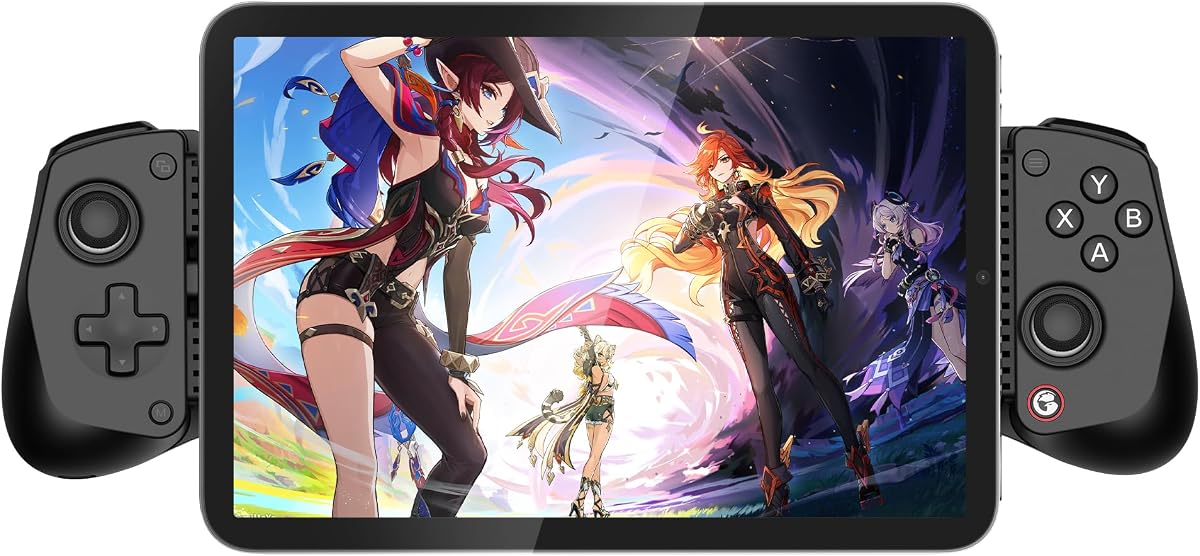


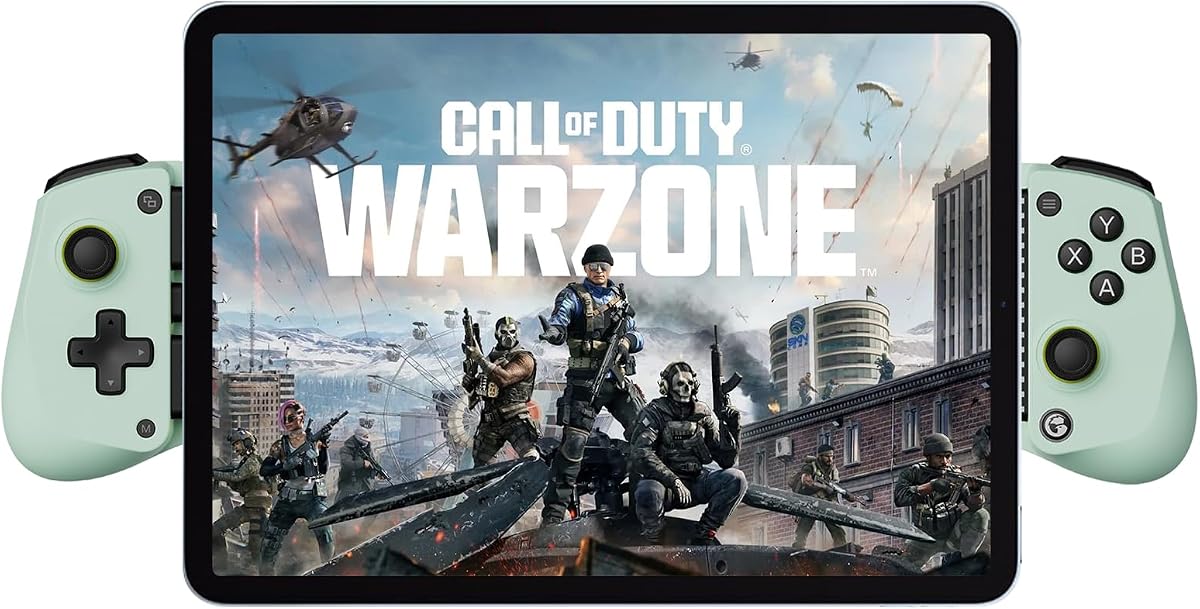

The Mocagen MC1 Phone Controller stands out as a top choice for Android gamers seeking precision and durability. With a rating of 4.4 stars it offers reliable performance across various mobile titles and cloud gaming services.
We may earn a commission when you buy through this link, at no additional cost to you.
Its Hall Effect Joysticks ensure zero drift and a lifespan five times longer than standard carbon film sticks. The ergonomic grip reduces fatigue during long sessions and the battery supports up to six hours of continuous play.
While the RGB lighting is vibrant it lacks color customization for the ABXY buttons. The controller works best with games that support native Xbox input which excludes PlayStation Remote Play users.
Buyers looking for a balanced mobile gaming experience will appreciate its blend of build quality and practical features. It is an excellent choice for travelers who need a robust and comfortable controller on the go.
The Hall effect technology ensures precise character control and significantly extends the lifespan of the device for intense gaming use.
Laser engraved textured grips provide an anti-slip hold that keeps your hands comfortable even during extended marathon gaming sessions.
We may earn a commission when you buy through this link, at no additional cost to you.
This wireless controller delivers high performance at an affordable price point making it ideal for budget conscious Android gamers. It supports a 1000Hz polling rate for responsive inputs and includes Hall Effect sensors for accurate aiming.
We may earn a commission when you buy through this link, at no additional cost to you.
The inclusion of remappable L4 and R4 bumpers adds a layer of customization often found in more expensive models. Wear resistant metal joystick rings ensure the device stays in good condition even with heavy use.
While it excels on PC and Android it lacks a built in phone clamp for mobile play which may require an accessory. The focus is on wired or wireless connectivity rather than a handheld phone controller form factor.
Players who prioritize performance and button layout over portability will find this unit highly capable. It is a smart purchase for those seeking console like precision without spending a premium amount.
The 1000Hz polling rate ensures that your commands are registered almost instantly reducing lag during competitive gaming matches.
Remappable bumpers allow you to assign complex commands to extra buttons for easier access during fast paced gameplay.
We may earn a commission when you buy through this link, at no additional cost to you.
The GameSir G8 Plus offers a console like experience for mobile gaming with premium features that justify its higher cost. Its Hall Effect joysticks and triggers provide smooth and durable control perfect for competitive titles.
We may earn a commission when you buy through this link, at no additional cost to you.
Interchangeable magnetic components let you personalize the look and feel of the controller to match your style. The ergonomic design with console sized sticks ensures comfort during long sessions and precise movement in games like Genshin Impact.
While it supports Bluetooth for mobile devices PC users are limited to a wired connection which might reduce portability in some setups. The 500mAh battery capacity is decent but may require frequent charging for heavy users.
Gamers seeking the highest quality mobile controller should consider this model for its advanced features and build. It represents a top tier option for those willing to invest in a superior gaming experience.
The 6-axis gyroscope enhances gameplay with precise motion control which is ideal for Switch games and compatible mobile titles.
Enjoy console sized sticks and buttons for exceptional control and comfort during long gaming sessions on your mobile device.
We may earn a commission when you buy through this link, at no additional cost to you.
This mobile gaming controller is designed for those who prioritize stable connectivity over wireless freedom. The Type-C connection ensures a responsive input stream which is crucial for competitive gaming and cloud play.
We may earn a commission when you buy through this link, at no additional cost to you.
Its lightweight design at 135.4g makes it comfortable to hold during extended sessions without causing strain. The pass through charging feature allows you to play while your device charges ensuring you never lose power mid game.
The software customization available on Android lets you adjust settings to your preferences though it is not available for iOS users. This flexibility helps tailor the controller to specific game mechanics and personal play styles.
Players who play primarily with Android devices will appreciate the stable connection and charging convenience. It is a solid choice for those who want a reliable and lightweight solution for mobile gaming.
Pass through charging keeps your connected mobile device powered so you can enjoy longer sessions without interruption.
Hall Effect sensing sticks deliver smooth 360 degree control for accurate aiming and movement adjustments.
We may earn a commission when you buy through this link, at no additional cost to you.
Officially licensed by Xbox this controller offers seamless integration with Xbox Cloud Gaming and other mobile platforms. Its stretchable design fits most phones and ensures a stable connection for various device sizes.
We may earn a commission when you buy through this link, at no additional cost to you.
Upgraded Hall Effect joysticks and triggers provide robust and long lasting performance with higher precision than standard models. The inclusion of 2 Pro back buttons and metal joystick rings adds to its durable and premium feel.
Support for the 8BitDo Ultimate Software V2 on mobile allows for deeper customization of your gaming setup. However the primary focus is on cloud and mobile gaming which may limit its utility for PC specific setups.
Android users looking for an officially licensed controller will find this model highly compatible and reliable. It is an excellent option for those who frequently play Xbox Cloud games on their mobile devices.
Designed for Xbox Cloud Gaming this controller ensures that your mobile play experience matches the quality of console gaming.
Wear resistant metal joystick rings and upgraded Hall Effect sensors ensure the controller lasts longer under intense gaming conditions.
We may earn a commission when you buy through this link, at no additional cost to you.
This travel companion for car and leisure use offers low latency performance and a case friendly design that saves you the hassle of removing your phone case. Its 5M cycle lifespan ensures durability even with frequent travel use.
We may earn a commission when you buy through this link, at no additional cost to you.
The 3-level turbo function is particularly useful for games requiring repeated inputs like shooting games. Dual vibration motors enhance immersion and can be adjusted via the KeyLinker app for a personalized experience.
Quick reconnect features make it easy to resume play after a break without going through full pairing steps. This convenience is ideal for commuters or travelers who need to pick up and start playing quickly.
Travelers and mobile gamers who need a reliable controller on the go will appreciate its thoughtful design. It balances performance with practical features that make it easy to use in various environments.
Simply press the home button once after the initial pairing to reconnect quickly without going through the full pairing process again.
Dual motor vibration technology enhances immersion with adjustable intensity settings that you can customize through the companion app.
We may earn a commission when you buy through this link, at no additional cost to you.
As a true pocket controller this mini device is incredibly compact and easy to store making it ideal for on the go gaming. It fits effortlessly in your pocket or bag so you can take your favorite games anywhere.
We may earn a commission when you buy through this link, at no additional cost to you.
Despite its small size it supports dual connection via Bluetooth 5.0 and wired USB-C ensuring reliable performance across Switch PC iOS and Android. The built-in turbo button helps reduce hand fatigue during intense action games.
Equipped with a 6-axis gyroscope and dual rumble motors it offers precise aiming and realistic feedback for every action. The ergonomic design ensures comfort during long sessions even with its compact footprint.
Users who prioritize portability above all else will find this controller a convenient travel companion. It is a practical choice for casual gamers who want to play anywhere without carrying a bulky device.
Fits effortlessly in your pocket or bag making it the ultimate portable controller for on-the-go gaming with multiple platforms.
The 6-axis gyroscope allows for fast target locking ensuring accurate control even during rapid gameplay sequences.
We may earn a commission when you buy through this link, at no additional cost to you.
This controller offers effortless compatibility with a wide range of devices including the latest iPhone and iPad models. The plug and play feature ensures you can start gaming immediately without complex setup steps.
We may earn a commission when you buy through this link, at no additional cost to you.
Hall Effect sticks provide the precision and durability that mobile gamers demand allowing for seamless pinpoint control. The turbo function lets you customize settings for various buttons to enable faster and more efficient gaming.
Pass through charging ensures your gameplay remains uninterrupted by allowing you to charge your device while playing. The lightweight design and textured grips provide a secure and comfortable hold during long gaming sessions.
Gamers looking for a simple and reliable wired solution will appreciate its ease of use and performance. It is a solid choice for those who want a high quality controller without worrying about wireless latency or pairing issues.
Plug and play functionality ensures you can start gaming immediately without complex setup steps or software downloads.
Pass through charging allows gamers to continue playing while charging your device ensuring your gameplay is uninterrupted.
We may earn a commission when you buy through this link, at no additional cost to you.
Designed for an unstoppable gaming experience this controller works for both iPhone and Android supporting nearly all cloud gaming services. It features a hall effect joystick that provides ultra precise control without drift or dead zones.
We may earn a commission when you buy through this link, at no additional cost to you.
The adjustable turbo function allows for customizable firing speeds which is beneficial for action games. A built-in rechargeable battery offers over eight hours of play time so you can enjoy long sessions without frequent recharging.
Setup involves connecting via Bluetooth and the device is recognized as an Xbox Wireless Controller ensuring native compatibility with thousands of games. However cloud gaming performance depends heavily on a stable high speed network connection.
Players looking for a versatile controller that works across different platforms will find this option highly capable. It is a reliable choice for those who value compatibility and battery life in their mobile gaming setup.
Uses Xbox Controller Input Protocol on mobile devices ensuring seamless native compatibility with thousands of games and apps.
Built-in rechargeable high capacity battery provides over eight hours of game playing ensuring long uninterrupted gaming sessions.
We may earn a commission when you buy through this link, at no additional cost to you.
This controller features upgraded TMR sensors that deliver ten times more precision than standard Hall Effect sensors with zero physical contact. The zero drift design ensures ultra smooth aiming and significantly extends battery life due to lower power consumption.
We may earn a commission when you buy through this link, at no additional cost to you.
It includes programmable back paddles and macro recording for complex combos which enhances the competitive edge of gameplay. Dynamic RGB lighting on joysticks and buttons allows you to personalize your setup for late night sessions.
The 1000mAh battery supports up to fifteen hours of gaming which is days of casual play or all day tournaments. However bulky cases may need to be removed for optimal fit with the telescopic clamp.
Gaming enthusiasts seeking high precision and battery longevity will find this model exceptionally capable. It offers a blend of advanced sensor technology and practical features that cater to serious mobile gamers.
Upgraded TMR sensors deliver ultra smooth aiming with 3000 point resolution and consume minimal power for extended battery life.
The built-in 1000mAh battery pushes playtime to a full fifteen hours allowing days of casual gaming without reaching for a charger.
We may earn a commission when you buy through this link, at no additional cost to you.
Selecting the right controller for your Android device involves evaluating several key factors to ensure a seamless and enjoyable gaming experience.
Connectivity is one of the most important aspects to consider when choosing a controller. Bluetooth models offer wireless freedom and are ideal for mobile gaming where mobility is key. Wired Type-C controllers provide a stable connection with minimal latency which is beneficial for competitive play.
Decide if you prioritize wireless convenience or wired stability based on how and where you play most often.
Modern controllers often use Hall Effect or TMR sensors in their joysticks to prevent drift and ensure precise movement. Hall Effect sensors use magnetic fields to detect movement which means there is no physical contact to wear out. TMR sensors take this further by offering higher resolution and lower power consumption.
Look for controllers with Hall Effect or TMR technology to ensure your device stays responsive and accurate over time.
If you opt for a wireless controller battery life is crucial for uninterrupted gaming sessions. Models range from six hours to fifteen hours on a single charge so consider your typical play duration. Some controllers also support pass through charging which allows you to use the device while it is plugged in.
Choose a battery capacity that matches your daily gaming habits to avoid interruptions during important matches.
Ensure the controller is compatible with your specific Android phone or tablet model. Some controllers have stretchable clamps that fit a wide range of phone sizes while others may have limits. Check if the controller supports the specific games or services you plan to use such as Xbox Game Pass or Steam Link.
Verify compatibility with your device size and preferred gaming platforms before making a purchase.
A comfortable grip is essential for long gaming sessions to prevent fatigue and discomfort. Look for controllers with ergonomic shapes and textured grips that provide a secure hold. The build quality also matters as a durable controller will withstand the wear and tear of regular use.
Prioritize controllers with ergonomic designs and durable materials to ensure comfort and longevity.
Advanced controllers offer customization options such as remappable buttons turbo functions and macro recording. These features allow you to tailor the controller to your specific play style and game requirements. Some models even include software apps that let you adjust settings on the fly.
If you need specific controls for complex games look for models that offer extensive customization options.
For gamers who travel frequently a portable design can be a significant advantage. Mini controllers that fit in a pocket are convenient for on the go gaming but may lack some ergonomic features of larger models. Consider whether you need a compact device or a full size controller for your needs.
Balance portability with performance based on whether you play mostly at home or on the move.
Controllers range from budget friendly options to premium models with advanced features. Determine how much you are willing to spend and what features are essential for your experience. Often a mid range controller offers the best balance of price and performance for most users.
Set a budget and compare features to find the best value for your specific gaming requirements.
Start by pairing your controller with your Android device through Bluetooth settings or a wired connection. Ensure your phone is in pairing mode and select the controller from the list of available devices to establish a stable link.
Once connected open your game and navigate to the settings menu to confirm controller input is enabled. Some games may require you to map keys manually or use a companion app to configure buttons to your preference.
To maintain the longevity of your controller keep it in a protective case when not in use and avoid exposing it to extreme temperatures. Clean the buttons and joysticks regularly with a soft cloth to remove dust and ensure smooth operation.
Most modern Android phones support external controllers but compatibility depends on the device and game. Ensure your phone has Bluetooth or USB-C capabilities. Most games that support controller input work seamlessly without extra software.
Hall Effect technology uses magnetic sensors to detect joystick movement. This eliminates physical contact which prevents drift and extends the lifespan of the controller. It ensures precise and consistent control over time.
Some controllers are compatible with consoles like Nintendo Switch or Xbox in addition to Android. Always check the product description for specific console support. Not all mobile controllers work with console systems.
Most modern controllers update firmware through a companion app available on the Play Store. Download the app connect your controller and follow the on-screen instructions to check for updates. Keeping firmware current ensures optimal performance.
Bluetooth latency can cause delays if the connection is unstable. Try reducing interference from other wireless devices or use a wired connection. Some games may also introduce input lag depending on their settings.
Many controllers are designed to work with phone cases up to a certain thickness. Check the product details for specific compatibility limits. Some models have adjustable clamps to accommodate different case sizes.
Choosing the right Android Joystick Controller can significantly enhance your mobile gaming experience by offering precision and comfort. Our top picks cover a range of needs from budget friendly options to premium models with advanced sensors.
Prioritize features like Hall Effect technology battery life and ergonomics to find a controller that suits your play style. Ensure the model you choose is compatible with your device and the games you enjoy most.
Remember that product specifications and availability can change so always check the latest details before buying. With the right controller you can enjoy console quality gaming right on your Android device.