
Mechanic Master C34
4.6Editor score
Compact ATX form factor
Built-in carry handle
USB Type-C front I/O
This guide compares the top ten aluminum PC cases for durability thermal performance and modern design ensuring you find the right chassis for your next build.
Aluminum PC cases offer exceptional durability and sleek aesthetics for modern builds. They provide superior heat dissipation compared to standard steel alternatives. These chassis protect your expensive hardware while maintaining a premium look on your desk.
We evaluated ten top-rated models based on airflow build quality and component compatibility. Our analysis focuses on real-world performance and user feedback to ensure reliability. Each case was assessed for its ability to handle high-performance components efficiently.
Every pick highlights unique features like modularity portability and cooling potential. Prices fluctuate so check current listings before purchasing. These options cater to diverse needs from compact setups to expansive workstation towers.
4.6Editor score
4.4Editor score

4.6Editor score
The following table provides a quick side-by-side comparison of all ten models. Use this to identify key specifications and features at a glance before diving into detailed reviews.




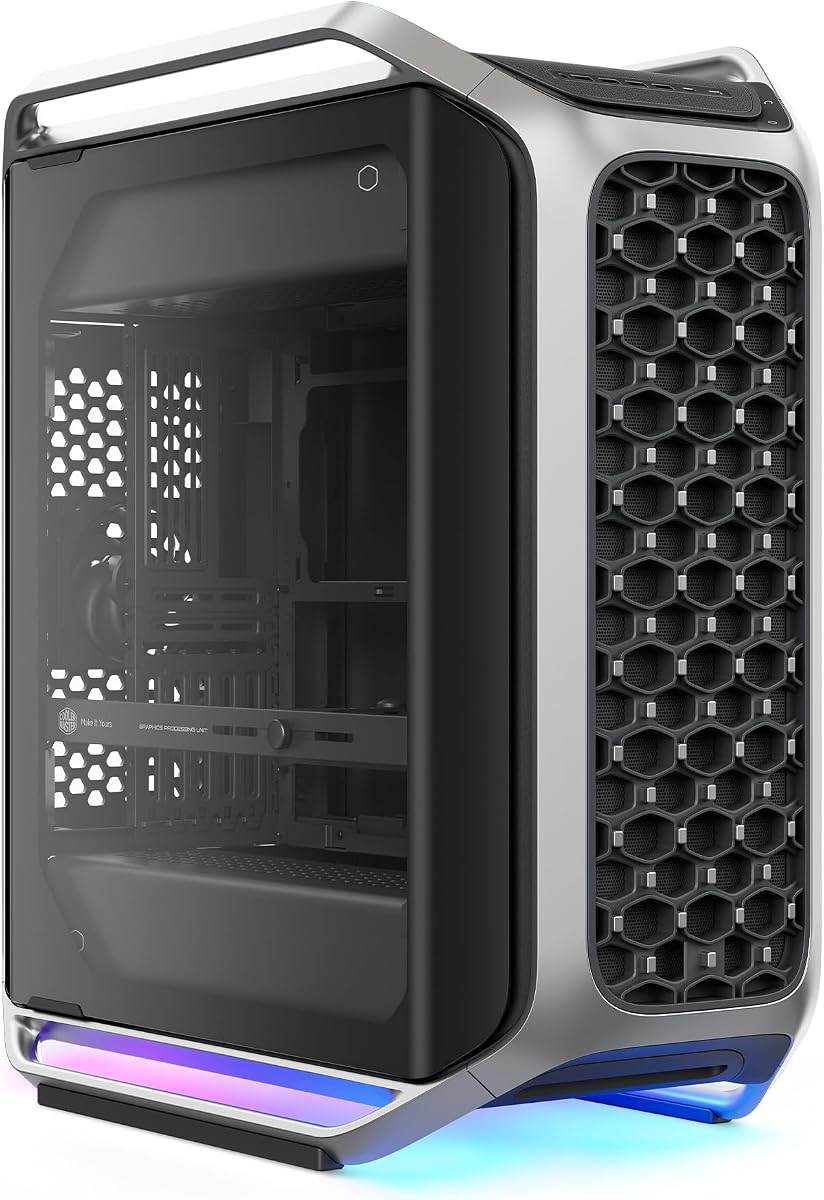
The Cooler Master Cosmos Alpha stands out as a flagship aluminum PC case blending iconic aesthetics with modern functionality. It features a premium curved aluminum frame paired with full tempered glass panels. This design preserves the classic COSMOS look while elevating your build with integrated ARGB underglow.
We may earn a commission when you buy through this link, at no additional cost to you.
Its extreme hardware compatibility supports E-ATX and EEB motherboards along with GPUs up to 400mm. The FreeForm 2.0 rotatable layout allows you to rotate internal components left or right. This flexibility optimizes airflow desk placement and visual presentation for any workspace.
The modular sliding motherboard tray lets you easily switch between air and liquid cooling layouts. Next-gen front I/O includes four USB-A ports and two USB-C ports for ultra-fast data transfer. While the case is large it offers unmatched customization for high-end builds.
This case is ideal for enthusiasts seeking a true showcase for their hardware. It delivers a premium build quality that justifies its investment. Consider this if you value unique design and maximum component flexibility.
The curved aluminum frame creates a sleek look that enhances any desk setup.
Rotatable internals allow for unique orientations tailored to specific cooling needs.
We may earn a commission when you buy through this link, at no additional cost to you.
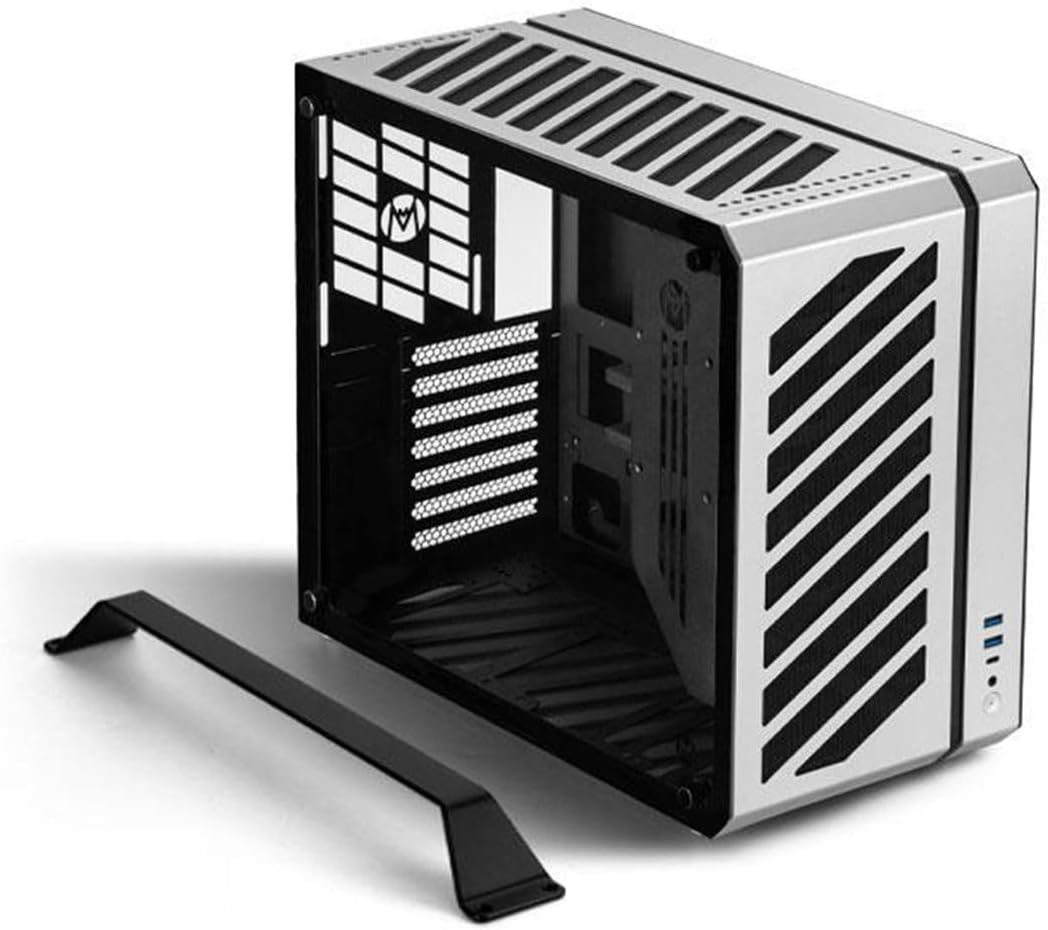
The MATX Case B2Pro delivers a robust full aluminum construction at an attractive price point. It features a silver anodized surface treatment with a chassis frame thickness of 3.0mm. This build ensures durability and effective heat dissipation for compact systems.
We may earn a commission when you buy through this link, at no additional cost to you.
Unique exterior design includes side panels with a mesh pattern for optimal airflow. The case fits MATX and ITX motherboards supporting ATX or SFX power supplies easily. A high tower CPU cooler limit of 135mm ensures compatibility with standard air coolers.
Exquisite foot stands and a handle design make it convenient to move on your desktop. The case supports a 240mm integrated water cooling system for enhanced thermal performance. It is an excellent choice for small form factor builds on a budget.
This case suits users needing a reliable portable aluminum chassis without breaking the bank. It balances build quality and functionality perfectly for entry-level to mid-range systems. Prioritize this if you need a durable compact aluminum solution.
Mesh side panels ensure efficient airflow to keep components cool under load.
Integrated handle and stands make it easy to reposition the case anytime.
We may earn a commission when you buy through this link, at no additional cost to you.
The Open Air Frame PC Test Bench is made from aerospace magnesium aluminum alloy with an 8mm thickness. This material choice reduces corrosion and improves service life significantly. It supports standard MATX motherboards and standard ATX power supplies seamlessly.
We may earn a commission when you buy through this link, at no additional cost to you.
It accommodates installation of four hard drives and supports various water-cooling drainage options. Design metal support rods and anti-slip pads on the bottom bracket ensure stability. The product is shipped not finished requiring the buyer to install it per instructions.
Ideal for long-term high-intensity disassembly and testing this case offers unparalleled access. It fits radiators ranging from 120mm to 360mm for versatile cooling setups. The open design allows for easy cable management and component changes without tools.
This case is perfect for enthusiasts who prioritize cooling and accessibility over enclosed aesthetics. It provides a sturdy platform for testing water loops and overclocking. Choose this if you need a rugged open-frame aluminum test bench.
Open frame design allows for unrestricted hardware installation and testing.
Magnesium aluminum alloy ensures the chassis withstands rigorous daily use.
We may earn a commission when you buy through this link, at no additional cost to you.
The Mechanic Master C34 is an ultra-compact ATX case with a built-in carry handle. Its small form factor saves space without sacrificing performance for standard ATX boards. It supports graphics cards up to 335mm and full-size ATX power supplies.
We may earn a commission when you buy through this link, at no additional cost to you.
Integrated handle makes it easy to transport your PC to LAN events or between workstations. Flexible cooling support allows a 240mm liquid cooling radiator or tall air coolers up to 162mm. The internal layout simplifies installation for clean cable management.
Attention to detail is evident in the metal front I/O panel with USB 3.0 and USB Type-C. Using an SFX/L power supply is recommended for the cleanest build experience. This case combines functionality with a premium feel for mobile setups.
This case suits users needing portability without losing standard ATX component compatibility. It offers a balanced mix of performance and convenience. Prioritize this if you need a compact aluminum chassis that travels well.
Built-in handle allows for easy transport between different locations effortlessly.
Front USB-C port ensures fast data transfer for modern peripherals.
We may earn a commission when you buy through this link, at no additional cost to you.
The Cooler Master MasterFrame 500 features a FreeForm 2.0 aluminum exo-structure for flexible configurations. Its open-frame design enables various installation scenarios and easy modding. It supports motherboard sizes from Mini-ITX up to E-ATX effortlessly.
We may earn a commission when you buy through this link, at no additional cost to you.
Pre-installed dual 200mm fans provide powerful airflow out-of-box without extra cost. Interchangeable panels allow for personalized builds and customization. Extensive cooling support accommodates up to seven fans and 360mm radiators for thermal reliability.
The design offers great flexibility for users wanting to tweak their case layout often. It is ideal for those who prioritize cooling performance and open aesthetics. The aluminum exo-structure ensures the frame remains durable despite the open design.
This case is a top choice for enthusiasts wanting maximum airflow and modularity. It supports a wide range of hardware configurations. Choose this if you value open-frame flexibility and powerful cooling.
Dual 200mm fans ensure high static pressure and efficient airflow out-of-box.
Interchangeable panels let users adapt the case to unique setups.
We may earn a commission when you buy through this link, at no additional cost to you.
The Mechanic Master C34Pro supports ATX and E-ATX motherboards with modular flexibility. It fits 360mm radiators 420mm GPUs and 220mm ATX PSUs for flagship components. Multi-zone fan mounts ensure stable cooling under heavy loads.
We may earn a commission when you buy through this link, at no additional cost to you.
A 2mm aluminum shell plus 1mm steel frame provides a robust build. It offers multiple power supply mounting positions for layout versatility. The case measures 30.6L capacity with a portable carry handle for convenient transportation.
Dust filters and optimized airflow are integrated to maintain system stability. The interior includes 18mm cable management space for cleaner builds. A magnetic screwdriver kit is included for easy assembly and maintenance.
This case is designed for users needing a portable aluminum chassis for high-end hardware. It offers a balance of robustness and compactness. Consider this if you prioritize E-ATX support in a portable frame.
Fits large GPUs and radiators without compromising portability.
Multi-zone fan mounts maintain optimal temperatures under load.
We may earn a commission when you buy through this link, at no additional cost to you.
The Fractal Design Define 7 XL features a refined front door with brushed aluminum. It accommodates large motherboards up to E-ATX and SSI-EEB effortlessly. Install up to eighteen HDDs alongside five SSD mounts in the default storage layout.
We may earn a commission when you buy through this link, at no additional cost to you.
Convert to an open layout for custom water loops with radiators up to 480mm. Reversible dual-handed hinges and magnetic latching provide a premium feel. Multi-brackets convert unused fan positions to HDD SSD or pump mounts seamlessly.
The silent modular design ensures quiet operation while offering immense storage options. It is ideal for workstations needing massive data storage without noise. The aluminum encases a durable aesthetic that remains timeless.
This case suits professionals needing a silent powerful workstation solution. It delivers superior build quality and storage flexibility. Choose this if you value premium materials and massive capacity.
Supports up to 18 HDDs for ultimate data storage capacity.
Silent design ensures minimal noise even under heavy storage loads.
We may earn a commission when you buy through this link, at no additional cost to you.
The Lian Li V100 comes with four pre-installed PWM-controlled 120mm ARGB fans. It supports ATX Micro-ATX Mini-ITX and back-connect motherboards for cleaner routing. Each side panel features a tool-less mounting mechanism for easy access.
We may earn a commission when you buy through this link, at no additional cost to you.
Integrated 26-LED ARGB strip offers full spectrum color control with motherboard sync. It fits GPUs up to 420mm and CPU coolers up to 178mm easily. The fan noise level stays low at 26.5 to 30.8 dBA.
Tool-less mounting streamlines your build process significantly saving time and effort. The RGB options enhance visibility and aesthetics for a vibrant setup. High-end hardware compatibility ensures future-proofing for upgrades.
This case suits users prioritizing aesthetics and ease of build. It delivers excellent value with pre-installed lighting. Choose this if you want a polished aluminum look with easy installation.
26-LED strip provides full color control for a vibrant aesthetic.
Tool-less panels allow quick and easy access to internal components.
We may earn a commission when you buy through this link, at no additional cost to you.
The LIAN LI O11D EVO RGB allows a completely uninterrupted view by removing the front support pillar. The main compartment facilitates large graphics cards with 455.7mm clearance. It features two 1.5mm L-shaped RGB strips at the top and bottom.
We may earn a commission when you buy through this link, at no additional cost to you.
The internal layout can be adjusted with two height options for motherboard installation. This means you can set up fans and CPU coolers differently for varied performance. Comes with Velcro straps and dual-layered clips for tidy cable bundles.
The PSU mounting bracket protrudes 15mm out from the case for additional cable space. This design is easy for builders to manage and customize. The seamless view enhances the aesthetics of custom loops and high-end builds.
This case suits enthusiasts wanting a pristine view of their build. It offers a flexible layout for various cooling options. Choose this if you prioritize aesthetics and visibility above all.
Removable pillar allows a completely clear view of internal components.
Dual-layered clips and straps keep cables hidden and organized.
We may earn a commission when you buy through this link, at no additional cost to you.
The JOYJOM Mini ITX Case has only 4.3L capacity with a compact 7.3×4.1×8.8 inch size. It includes a 18.5cm PCIe 3.0 Riser cable for GPU installation. The body is made of 2.0mm Aluminum Alloy for good heatsink performance.
We may earn a commission when you buy through this link, at no additional cost to you.
It supports standard ITX motherboards FLEX-Small 1U Power Supply and small graphics cards. Hard disk support is limited to 2×2.5 inch SSDs with thickness less than 9mm. CPU cooler height must be less than 36mm for proper fit.
This case is perfect for users needing the smallest possible aluminum footprint. The included riser simplifies the build process for SFF enthusiasts. It maintains a beautiful appearance despite its tiny dimensions.
This case suits users needing a travel-ready mini PC solution. It offers a solid aluminum build in an ultra-small package. Choose this if you prioritize extreme portability over raw performance.
4.3L capacity ensures maximum portability for small setups.
Includes PCIe 3.0 riser for easier GPU installation.
We may earn a commission when you buy through this link, at no additional cost to you.
Choosing the right aluminum PC case requires evaluating several technical and aesthetic factors. This guide breaks down the key elements to ensure your selection matches your needs.
Look for cases made from high-grade aluminum alloys with thickness ranging from 1.5mm to 3.0mm. Thicker frames provide better structural integrity and thermal conductivity for your components. Aluminum naturally dissipates heat better than steel keeping internal temperatures lower.
Prioritize cases with thick aluminum panels for maximum durability and thermal performance.
Ensure the case supports your desired cooling solution whether air or liquid. Check maximum radiator size and fan mount locations for airflow efficiency. Aluminum cases often excel in passive cooling due to conductive properties.
Verify radiator and fan support to ensure optimal thermal management.
Confirm compatibility with your motherboard form factor like ATX or E-ATX. Measure your graphics card length to ensure it fits within the case dimensions. Some aluminum cases have unique layouts affecting clearance.
Always check component clearance specs before buying to avoid fit issues.
Assess if the case offers modular features for customization like movable trays. Check front I/O ports for modern connectivity such as USB-C. Modular designs help future-proof your build for upgrades.
Look for modular options and modern ports for long-term usability.
Consider how easy the case is to assemble with tool-less or magnetic features. Quality assembly ensures secure components and reduced cable strain. Some aluminum cases require specific assembly techniques.
Prioritize designs with easy assembly features for smoother setup.
Aluminum finishes like brushed or anodized impact the visual appeal of your desk. Choose a finish that matches your setup style whether silver black or white. Glass panels often complement aluminum frames nicely.
Select a finish that aligns with your personal style preferences.
If you plan to move your PC often look for integrated handles and lightweight builds. Aluminum provides a balance of strength and lower weight compared to steel. Consider the overall weight relative to your transport needs.
Check for carry handles if you need to move the case frequently.
Balance the cost of the aluminum case with the features it provides. Higher prices usually mean better finishes and additional modularity. Find a model that fits your budget without sacrificing core needs.
Compare prices to find the best value for your specific requirements.
When installing components follow the included manual to ensure proper mounting. Use anti-static precautions to protect sensitive hardware during assembly. Aluminum cases often require specific screw lengths for secure mounting.
Clean the exterior regularly using a soft dry cloth to maintain the finish. Avoid chemical cleaners that might damage the anodized surface. Dust filters should be removed and washed periodically to ensure airflow.
Store the case in a dry environment to prevent corrosion over time. Check screws and mounting brackets annually to ensure they remain tight. Proper care extends the lifespan of your aluminum chassis significantly.
Yes aluminum conducts heat more efficiently than steel helping to dissipate thermal energy from internal components. This natural conductivity aids in maintaining lower internal temperatures without extra fans. It makes aluminum an excellent choice for high-performance systems.
Most aluminum cases require standard screwdrivers for assembly. However some high-end models offer tool-less features for side panels and trays. Check the product description to confirm what tools are needed for your specific build.
Yes aluminum cases support water cooling with proper radiator clearance. Ensure the case supports your desired radiator size like 360mm or 480mm. Many models include mounts for radiators and pumps to facilitate liquid loops.
Aluminum cases are often quieter due to better sound dampening properties. However noise also depends on fan selection and internal layout. Models designed for silence like the Define 7 XL offer extra sound insulation.
Use a microfiber cloth for cleaning and avoid abrasive materials. Some cases come with protective films that should remain until installation. Handle panels gently to preserve the anodized or brushed finish over time.
Aluminum cases typically weigh between 10 to 20 pounds depending on size. This is generally lighter than steel alternatives of similar dimensions. Lightweight designs make transportation easier without sacrificing durability.
Some aluminum cases come with pre-installed fans while others do not. Models like the MasterFrame 500 include large intake fans out of the box. Always check the specs to see if fans are part of the package.
Not all aluminum cases support E-ATX so check compatibility before buying. Full towers like the Define 7 XL definitely accommodate larger boards. Compact cases may only support ATX or Micro-ATX sizes.
We have reviewed ten top aluminum PC cases ranging from compact mini ITX to massive full towers. Each offers unique advantages in thermal performance design and modularity. The Cooler Master Cosmos Alpha leads with its premium features.
Prioritize your needs such as portability cooling or aesthetics when making your final decision. Ensure the case supports your current hardware and potential future upgrades. A solid aluminum case protects your investment for years to come.
Always check current prices and availability before purchasing to get the best deal. Deals change frequently so monitor listings for discounts on these premium models. This guide helps you choose with confidence and clarity.