
YOOPAI 3D Printer Enclosure
4.4Editor score
Built-in LED light strip
Temperature humidity monitoring
Fire resistant materials
This guide compares ten top 3D printer enclosures for ABS printing, evaluating ventilation, temperature control, safety, and compatibility to help you choose
Printing with ABS requires a stable environment to prevent warping and ensure high-quality results. A dedicated enclosure helps maintain consistent temperatures and reduces exposure to harmful fumes during operation.
We evaluated ten leading enclosures based on ventilation efficiency, thermal insulation, safety features, and compatibility with popular 3D printer models. Each option offers unique benefits for different user needs and workspace constraints.
Each selection highlights key specifications, pros, cons, and real-world performance insights. Keep in mind that prices and availability may change over time, so verify current details before purchasing your enclosure.
4.4Editor score

4.8Editor score
4.5Editor score
The following comparison table outlines key specifications for all ten selected enclosures to help you quickly identify the best fit for your specific printing needs and printer model.


This large enclosure stands out for its versatility and robust design, making it ideal for users with multiple printers or large-format machines. Its 4.8 rating reflects strong satisfaction regarding stability and odor control during ABS printing sessions.
We may earn a commission when you buy through this link, at no additional cost to you.
The dual-side opening allows flexible printer placement, while the waterproof fabric and sealing zippers ensure harmful fumes stay contained. The dark-transparent window blocks UV rays, preventing premature resin curing if you also print with SLA or DLP machines.
While it does not include the ventilation kit, the dedicated exhaust ports allow you to customize airflow based on your specific needs. Assembly takes about 20 minutes and may require two people due to the size, but the effort pays off in performance.
If you need a single solution for both FDM and resin printing or have a large office setup, this enclosure offers the space and features necessary for safe and consistent results.
The dual-side opening design lets you position printers front or side access, optimizing workspace flow and exhaust direction.
Fire-resistant materials and airtight zippers protect against accidental touches and prevent fumes from escaping into your living space.
We may earn a commission when you buy through this link, at no additional cost to you.
The YOOPAI enclosure delivers exceptional value for Ender 3 users looking to improve ABS print quality without a heavy investment. With a 4.4 rating, it balances cost with essential features like built-in LED lights and temperature monitoring.
We may earn a commission when you buy through this link, at no additional cost to you.
Its ability to maintain a consistent internal temperature helps reduce warping, while the monitoring system alerts you to environmental changes that could affect print quality. The enclosure also effectively dampens noise, making it suitable for quiet home offices.
However, the filter system is basic and may need more frequent replacement compared to premium models. Ensure your printer dimensions fit within the specified limits before purchasing to avoid compatibility issues.
For those starting out with ABS or upgrading an existing Ender 3, this enclosure provides a reliable and affordable entry point into enclosed printing.
Real-time temperature and humidity sensors help you optimize conditions without needing external hardware.
The fully enclosed design blocks noise transmission, creating a calmer environment during long prints.
We may earn a commission when you buy through this link, at no additional cost to you.
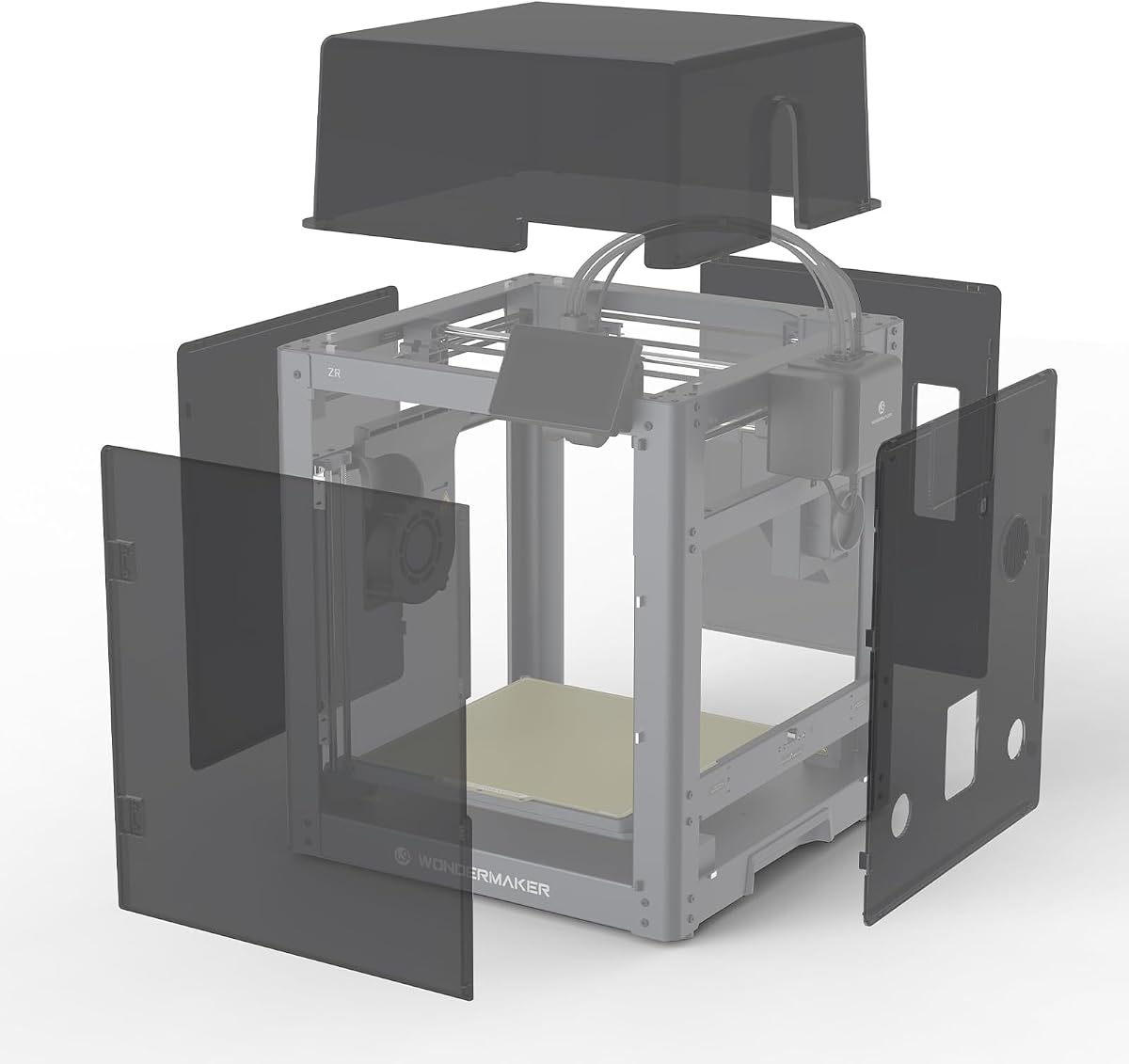
Designed specifically for the ZR printer, this enclosure offers premium features that prioritize safety and air quality. Its 4.5 rating highlights user satisfaction with its active filtration and noise reduction capabilities during high-temp printing.
We may earn a commission when you buy through this link, at no additional cost to you.
The built-in filtration fan actively removes fine particles and odors, keeping your workspace cleaner. In silent mode, noise drops to 46 dB, making it one of the quietest options available for home environments.
While excellent for the ZR model, its custom fit means it won't work with other printers. The magnetic cover provides convenient access, but the higher price point might be a consideration for budget-conscious buyers.
If you own a ZR printer and value air quality and silence, this enclosure provides a top-tier solution that matches the printer's performance capabilities.
High-efficiency fans and replaceable filters actively remove odors and fine particles from the enclosed air.
The sealed design maintains consistent heat, reducing warping and cracking for ABS and ASA filaments.
We may earn a commission when you buy through this link, at no additional cost to you.
This enclosure excels for smaller LCD resin printers and compact FDM units, offering specific features like a UV block window to protect photosensitive resins. Its 4.5 rating reflects strong performance in safety and odor control.
We may earn a commission when you buy through this link, at no additional cost to you.
The 12V fan system allows you to adjust airflow speed, and the three-layer filter captures particles effectively. The stainless steel frame provides durability and stability without adding excessive weight.
Keep in mind that you may need to print a specific adaptor to mount the fan properly, which adds a minor step to setup. Also, verify your printer size as it is designed for smaller models.
Ideal for resin printers or small desktop setups where space and specific UV protection are priorities over large print volumes.
The UV-blocking window prevents premature curing, ensuring resin prints remain stable during exposure.
Speed control lets you tailor ventilation based on printing materials and environmental conditions.
We may earn a commission when you buy through this link, at no additional cost to you.
Designed specifically for the Bambu Lab A1, this enclosure ensures a perfect fit while maintaining safe operating temperatures. Its 4.4 rating comes from users who value reliability and specific compatibility with their printer model.
We may earn a commission when you buy through this link, at no additional cost to you.
The design ensures the internal temperature does not exceed 40C, protecting the motherboard during operation. A large transparent window and integrated LED strip make monitoring prints easy without opening the cover.
Without active ventilation, it relies on natural airflow, so it may not be ideal for high-fume materials without external modifications. The 5-minute installation and fireproof features add to its appeal for daily use.
If you own an A1 and want a custom-fit solution that prioritizes safety and stability, this enclosure delivers focused performance.
Engineered to keep internal temperatures within safe limits, protecting sensitive electronics during long prints.
Integrated LED lights and a large window provide clear viewing in any lighting condition.
We may earn a commission when you buy through this link, at no additional cost to you.
This enclosure stands out for including everything you need right out of the box, making it a convenient choice for beginners. Its 4.4 rating highlights user appreciation for the complete kit and reliable thermal performance.
We may earn a commission when you buy through this link, at no additional cost to you.
The 180 CFM fan refreshes air ten times per minute, reducing fumes effectively. Users report successful passive drying for ABS filament, lowering humidity without extra equipment. Dual exhaust ports allow flexible setup for different room layouts.
The dark TPU window blocks UV light, protecting resin if you switch printers, but verify Y-axis height limits before buying. Assembly is straightforward, similar to setting up a camping tent.
For those who want a hassle-free solution with all components included, this enclosure offers strong value and flexibility.
Includes enclosure, fan, ducting, and lighting, requiring no extra purchases to get started.
Natural airflow helps lower internal humidity, keeping filament dry without separate dryers.
We may earn a commission when you buy through this link, at no additional cost to you.
This enclosure offers a unique approach with DIY customization, allowing you to tailor the look to your space. Its 4.3 rating reflects satisfaction with its thermal stability and odor containment for ABS and ASA printing.
We may earn a commission when you buy through this link, at no additional cost to you.
The enclosure maintains a consistent temperature to improve print quality and supports high-temperature filaments. It also effectively blocks noise and dust, ensuring a clean workspace and protecting your printer from pets and children.
Because it is specific to the AD5M, it is not versatile for other printers. Ventilation is passive, which may require additional fans for high-fume materials.
If you want a stylish and functional cover for your AD5M that supports advanced filaments, this option provides solid protection and customization.
Choose unique colors and materials to match your personal style or office decor.
Maintains heat well enough to unlock ABS and ASA printing without complex setups.
We may earn a commission when you buy through this link, at no additional cost to you.
Similar to the AD5M option, this kit allows DIY customization to match your office or home setup. Its 4.2 rating highlights improvements in noise reduction and safety for Adventurer 5M users.
We may earn a commission when you buy through this link, at no additional cost to you.
The enclosure reduces noise from 65 dB to 55 dB and maintains stable temperatures for PC and ASA. It also protects hot components from accidental contact, increasing safety in shared environments.
Ventilation is minimal, so consider adding external fans for strong odors. Verify your printer fits within the kit's dimensions before purchasing.
For Adventurer 5M owners seeking a customizable and safer environment, this kit provides essential upgrades for quality and safety.
Lower noise levels by 10 dB, making printing less intrusive in open spaces.
Keeps internal components clean and free from dust that can affect mechanical accuracy.
We may earn a commission when you buy through this link, at no additional cost to you.
This enclosure is specifically designed for the Bambu Lab A1 Combo, ensuring space for the AMS Lite unit. Its 4.4 rating reflects strong performance in ventilation and thermal management during daily operation.
We may earn a commission when you buy through this link, at no additional cost to you.
The included 8025 fan effectively removes smoke and dust, while built-in LED lighting ensures clear visibility. The fire-resistant construction protects your printer and workspace from potential accidents.
Be aware that this will not fit the A1 without the AMS unit due to height constraints. Always verify your specific configuration before purchasing.
For A1 Combo users, this enclosure provides a tailored solution that balances ventilation, light, and protection efficiently.
Specifically designed to accommodate the AMS Lite, ensuring extra spools fit without issues.
The included fan actively extracts fumes, maintaining a cleaner printing environment.
We may earn a commission when you buy through this link, at no additional cost to you.
This open enclosure uses metal and tempered glass to offer durability and visibility for the SV08 printer. Its 4.1 rating highlights its role in noise reduction and stable temperatures for materials like ABS and PETG.
We may earn a commission when you buy through this link, at no additional cost to you.
The exhaust fan and dust screen help remove odors and keep the environment clean. It protects ongoing prints from interference and improves heat stability, reducing issues like warping.
To increase Z-axis printing size, you may need to download and install an extension kit, adding a step to setup. Ensure your workspace can accommodate the glass structure.
If you prefer a solid, durable enclosure for your SV08 that maintains transparency, this option offers a sturdy and reliable solution.
Glass panels provide excellent visibility to monitor prints without opening the enclosure.
The enclosed design stabilizes ambient temperature to reduce thermal issues with sensitive materials.
We may earn a commission when you buy through this link, at no additional cost to you.
Selecting the right enclosure involves balancing size, ventilation, and safety features to match your printer and workspace.
Always verify that the enclosure dimensions match your printer's footprint and height, especially for models with AMS units or tall spool holders. Measuring before purchasing avoids the frustration of returns.
Check the product description for specific supported models to ensure a secure fit.
For ABS printing, effective ventilation is crucial to manage fumes and maintain air quality. Look for enclosures with multiple exhaust ports or included fans that offer sufficient airflow.
A good ventilation system should be adjustable to suit different filament types and printing conditions.
A stable internal temperature prevents warping and improves layer adhesion for ABS. Look for enclosures with thermal lining or sealed designs that trap heat effectively.
Consistent warmth reduces the risk of print failures and clogs, especially in cooler environments.
Fire-resistant and dustproof materials protect your printer and workspace from potential hazards. Also, consider enclosures that prevent accidental contact from children or pets.
Safety measures like fireproof fabrics and sturdy frames add confidence during unsupervised printing.
An enclosed design naturally dampens sound, but some models offer better isolation. If you work in shared spaces, look for claims regarding decibel reduction.
Quieter operation makes the environment more comfortable and reduces disturbances to others.
If you plan to print with resin, ensure the viewing window blocks UV light to prevent premature curing. A dark-transparent window is ideal for hybrid setups.
This feature ensures versatility if you switch between FDM and resin printing occasionally.
Look for setups that require minimal tools and time, ideally under 30 minutes. Simple assembly means you can start printing sooner without frustration.
Quick setup designs often include modular components that simplify future adjustments.
Clear windows and built-in LED lights allow you to monitor prints without opening the enclosure. Good visibility helps catch issues early and ensures print quality.
Integrated lighting is especially useful for night printing or dimly lit workspaces.
Assemble the enclosure according to the manufacturer's instructions, ensuring all zippers and seals are properly aligned to maintain air tightness. Verify that the ventilation fans are connected securely.
Regularly check and replace air filters to maintain efficient fume extraction and air quality. Clean the interior surfaces with a soft cloth to prevent dust buildup.
Monitor internal temperature and humidity using the sensors if available, and adjust ventilation settings based on your specific filament needs.
Yes, an enclosure is highly recommended for ABS to maintain stable temperatures and prevent warping. It also contains harmful fumes effectively.
Use an exhaust fan connected to one of the ports to pull fumes outside. Ensure fresh air intake remains unobstructed.
Yes, PLA can be printed inside an enclosure, though it is less critical than for ABS. Ensure temperatures stay moderate to avoid warping.
Look for fire-resistant materials and sturdy frames. Also ensure the design prevents accidental contact with hot parts.
Most enclosures can be assembled in under 30 minutes with basic tools. Some premium models include pre-built frames for quick setup.
Yes, enclosures typically reduce noise by 10 to 20 decibels. This makes the printing environment quieter overall.
Yes, but ensure the window blocks UV light to prevent premature resin curing. Ventilation must be sufficient for resin fumes.
Use a soft, slightly damp cloth to wipe the fabric surfaces. Vacuum the filters regularly to maintain performance.
The top picks offer excellent options for different needs, from large multi-printer setups to compact desktop solutions for specific models.
Prioritize ventilation and thermal stability to get the most reliable results with ABS filaments and ensure your workspace remains safe.
Remember to check current prices and compatibility details before purchasing, as availability may vary over time.