
Logitech Brio 101 Full HD
4.4Editor score
Auto-Light Balance technology
Integrated privacy slide cover
Plug-and-Play setup
This guide compares the best 1080p webcams for streaming, meetings, and content creation based on video quality, microphone performance, and ease of use.
In a world where remote work and online streaming dominate our daily lives, having a reliable camera is essential. A good 1080p webcam ensures you look clear and professional on every call without needing expensive equipment.
We evaluated ten top models based on video resolution, autofocus capabilities, microphone quality, and compatibility with popular platforms like Zoom and Teams. Our analysis focuses on real-world performance and user reliability.
Each pick highlights specific strengths whether for budget needs or premium features. Keep in mind that availability and specific model details may change over time so always verify current specs before purchasing.
4.4Editor score

4.6Editor score

4.4Editor score
The following table offers a side-by-side look at the key specifications and features of the ten leading 1080p webcams available today.




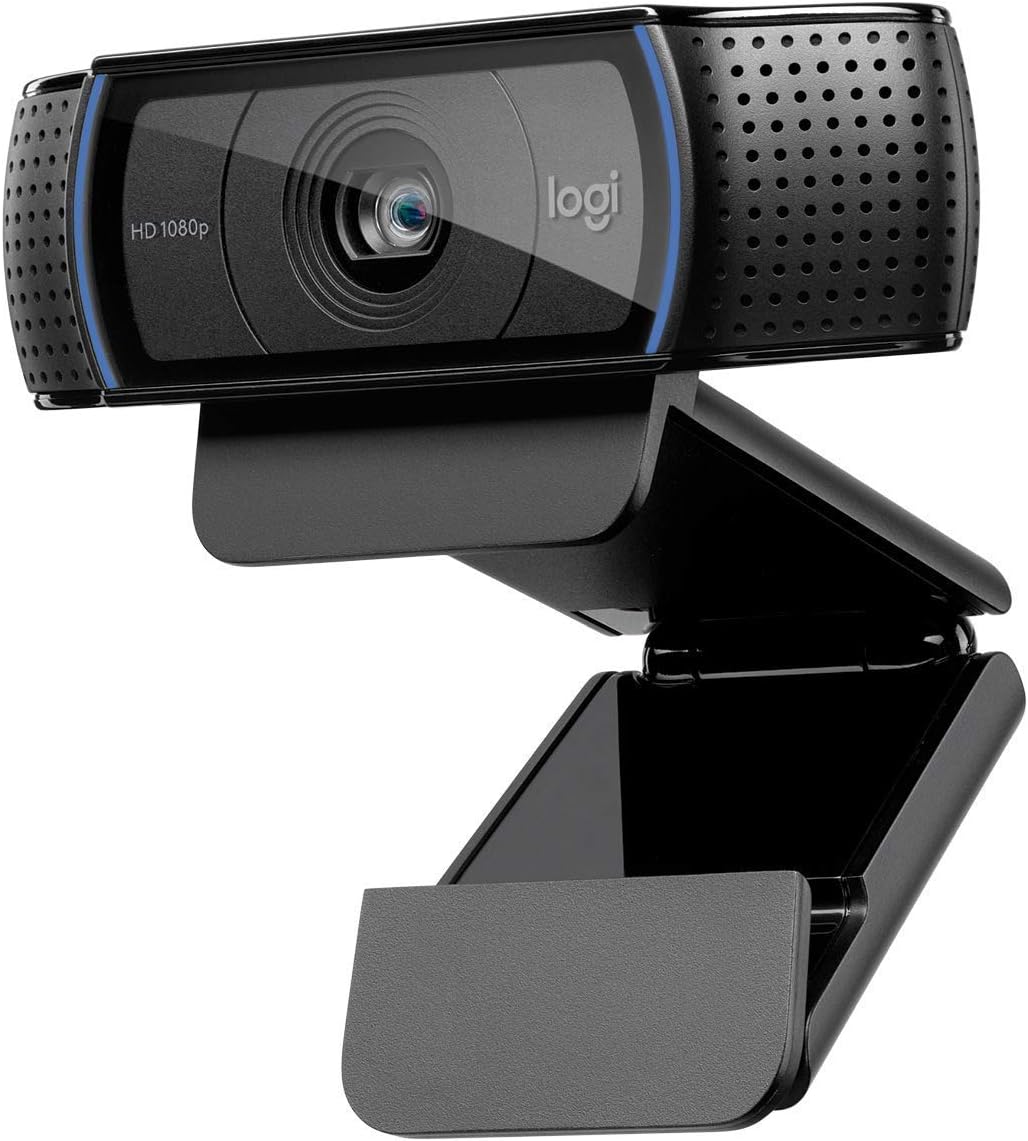


The Logitech C920x HD Pro stands out as a top performer for those seeking a balance of quality and reliability. It delivers sharp Full HD video with clear audio from its dual mics.
We may earn a commission when you buy through this link, at no additional cost to you.
This webcam uses advanced autofocus and light adjustment to ensure you look your best even in varying lighting conditions. The stereo sound captures natural voice tones effectively.
While it lacks a physical privacy shutter, its overall performance makes it a favorite for daily meetings. Some users might find the cable length limiting for larger desks.
If you need a dependable camera for work or streaming without breaking the bank, this model is a solid choice that rarely disappoints in real-world scenarios.
HD lighting adjustment fine-tunes brightness automatically so your face remains visible even in dim rooms.
Dual microphones capture sound clearly without needing an external mic for most standard call scenarios.
We may earn a commission when you buy through this link, at no additional cost to you.
The Logitech Brio 101 proves that you do not need to spend a fortune for a clear video call experience. It offers solid 1080p video with smart light balancing features.
We may earn a commission when you buy through this link, at no additional cost to you.
Its integrated privacy slide gives peace of mind when not in use. The RightLight tech boosts brightness to reduce shadows on your face during meetings.
Because it uses a fixed USB cable, placement might be slightly restricted compared to detachable models. Also zooming requires using the Logi Options app rather than hardware controls.
This webcam is ideal for students or home office workers who want a reliable device without complex setups or high costs.
It is made with a minimum of 77 percent post-consumer plastic which helps reduce environmental waste.
Auto-Light Balance reduces shadows by up to fifty percent so you look brighter and more professional.
We may earn a commission when you buy through this link, at no additional cost to you.
For those who demand top-tier image quality, the EMEET S600 brings advanced technology to the desktop. It features a Sony sensor capable of delivering crisp detail even in lower light.
We may earn a commission when you buy through this link, at no additional cost to you.
The PDAF autofocus offers faster and more precise focusing than standard webcams. You can also adjust the field of view to focus on yourself or include more of your room.
While it offers 4K resolution, users often rely on the 1080p mode for better frame rates during streaming. The price reflects its premium build and specialized features.
Streamers and content creators who need superior image fidelity will appreciate the versatility and robust build quality this webcam provides.
Phase Detection Autofocus locks onto your face quickly and maintains sharp focus during movement.
Proprietary audio algorithms filter background noise so your voice stays clear for listeners.
We may earn a commission when you buy through this link, at no additional cost to you.
The C920S adds a vital privacy layer to the classic C920 design making it perfect for security-conscious users. It delivers the same premium Full HD video with a convenient sliding cover.
We may earn a commission when you buy through this link, at no additional cost to you.
Its autofocus and light correction ensure that your video remains sharp and bright. The stereo mics capture audio well without needing extra hardware.
Some users note the shutter feels a bit small but it effectively covers the lens. Unlike the X version it does not include a virtual background software license.
If you prioritize privacy alongside high-quality video this model offers a practical solution for home or office environments.
The snug privacy cover blocks the lens completely giving you control over when you are visible.
A glass lens ensures crisp video that looks professional on screen during recorded sessions.
We may earn a commission when you buy through this link, at no additional cost to you.
Designed for corporate environments, the C920e offers certified compatibility with major platforms like Teams and Zoom. It ensures smooth integration into professional workflows.
We may earn a commission when you buy through this link, at no additional cost to you.
The fixed field of view is balanced to show individuals while allowing room to share physical items. An attachable privacy screen adds physical security when needed.
The webcam includes tripod threads for flexible mounting options. However the autofocus is optimized for distance rather than rapid movement.
For office teams needing a reliable certified device this webcam provides seamless connectivity and professional performance.
Certified for Microsoft Teams and Zoom to reduce setup issues and ensure compatibility.
Includes standard 1/4 inch threads for tripod use beyond laptop or monitor clips.
We may earn a commission when you buy through this link, at no additional cost to you.
The EMEET C960 offers a wide 90 degree view which is great for showing your workspace during calls. It features auto exposure to adjust brightness automatically.
We may earn a commission when you buy through this link, at no additional cost to you.
Users appreciate the dual USB Type-A and Type-C adapters for flexibility with different computers. The built-in cover helps maintain privacy when the camera is idle.
While the focus is fixed it still delivers clear images within its optimal range. It is not designed for gaming consoles or complex setups.
This webcam is a strong contender for anyone needing a wide-angle affordable camera for home office use.
The 90 degree FOV captures more participants or room details without frequent repositioning.
Includes both Type-A and Type-C connections so it works with most modern ports easily.
We may earn a commission when you buy through this link, at no additional cost to you.
The NexiGo N60 is a compact choice that fits well on laptops and small desks. It delivers clear Full HD video with a noise-canceling microphone for better sound.
We may earn a commission when you buy through this link, at no additional cost to you.
It comes with a privacy cover to block the lens when not in use. The software control allows some customization of basic settings.
Some users have reported audio delay which can be resolved via firmware updates. It supports a wide range of operating systems for broad compatibility.
For travelers or users with limited space this webcam offers a lightweight solution that still performs well.
Built-in microphone reduces ambient noise to make your voice sound clearer on calls.
Works with Windows Mac Linux and Chrome OS for easy setup on most devices.
We may earn a commission when you buy through this link, at no additional cost to you.
The Logitech C920 remains a classic in the webcam market due to its consistent quality and reliability. It offers sharp Full HD video for both calls and recording.
We may earn a commission when you buy through this link, at no additional cost to you.
Its autofocus and light correction work well in various environments. The stereo microphones provide clear audio capture without extra gear.
While the design is older it continues to be a trusted choice. It lacks modern privacy features like a built-in shutter.
This model is perfect for those who want a proven workhorse that works with everything.
A trusted model that has been a standard for high quality video calls for years.
Delivers vibrant colors and sharp details suitable for professional presentations.
We may earn a commission when you buy through this link, at no additional cost to you.
The Brio 105 is designed specifically for business use offering a balance of value and essential features. It provides clear video with auto-light balancing technology.
We may earn a commission when you buy through this link, at no additional cost to you.
It includes an integrated privacy cover and is certified for Google Meet. This ensures smooth operation on common business platforms.
While it lacks advanced software features it is easy to deploy and manage for teams. The design is practical and fits most setups.
For businesses needing reliable hardware without high costs this webcam is a solid choice.
Supported by Logitech Sync for remote deployment and management across multiple devices.
RightLight 2 technology automatically adjusts image quality in suboptimal conditions.
We may earn a commission when you buy through this link, at no additional cost to you.
The renewed Brio 100 offers an affordable entry point for a reliable 1080p camera. It delivers smooth video at 30fps for clear calls and recordings.
We may earn a commission when you buy through this link, at no additional cost to you.
It features a plug and play connection and a built-in microphone. The narrower field of view is great for focusing on just your face.
As a renewed product the condition may vary so checking seller ratings is recommended. It still provides the same core functionality as new models.
This webcam is ideal for budget-conscious buyers who still want brand quality performance.
A renewed option that offers full HD video at a lower price point than new units.
USB connection works seamlessly with popular video conferencing applications without drivers.
We may earn a commission when you buy through this link, at no additional cost to you.
Selecting the right webcam involves evaluating several key factors to ensure it meets your specific needs and setup.
Resolution determines the clarity of your video. While 1080p is the standard, ensure the model can maintain that at smooth frame rates for real-time calls.
Prioritize models that maintain 1080p at 30fps for natural motion during meetings.
Autofocus allows the camera to adjust as you move closer or further away. This is vital for keeping your image sharp without manual tweaks.
Look for Phase Detection or Fast Autofocus tech for better reliability.
A good webcam should have a built-in microphone that captures your voice clearly. Stereo mics often provide better depth and noise handling than mono.
Check for noise cancellation features to improve audio in noisy environments.
Privacy covers or shutters are essential for security-conscious users. They physically block the lens when not in use to prevent accidental recording.
Always look for a physical slide or shutter option for peace of mind.
Most webcams use USB-A, but modern laptops might need USB-C. Ensure the camera supports your available ports or comes with adapters.
Choose a model with both USB-A and USB-C support for broader compatibility.
The Field of View (FOV) determines how much of the room you see. A wider FOV is great for groups, while a narrower one keeps focus on you.
Select a 78 to 90 degree FOV depending on your room size and needs.
Some webcams are certified for platforms like Teams or Zoom. This ensures they integrate smoothly with software settings and reduce compatibility issues.
Check for certifications if you use specific business software regularly.
Some webcams come with a flexible clip for monitors, while others support tripod mounts. Consider how you plan to position the camera on your desk.
Tripod mounts offer the most versatility for different desk setups.
When setting up your webcam, ensure it is placed at eye level to create a natural viewing angle. Use a stable surface or secure mount to prevent shaking during calls.
Keep the lens clean by wiping it gently with a microfiber cloth. Dust or smudges can reduce video clarity significantly over time.
Adjust your lighting to face the camera rather than facing a window behind you. This helps the sensor produce a bright and balanced image.
Most modern webcams are plug-and-play and do not require additional software. However using manufacturer software can enable extra features like background replacement or specific zoom controls.
Yes, a dedicated 1080p webcam usually offers higher resolution and better light adjustment than built-in laptop cameras. This results in clearer video and a more professional appearance.
You can use it for streaming on platforms like Twitch or YouTube. Just ensure your PC has enough power to handle the game and the video feed simultaneously.
Use a dry microfiber cloth to gently wipe the lens. Avoid liquid cleaners as they can damage the lens coating or internal components.
Check that your lens is clean and the autofocus is functioning properly. If the issue persists, try adjusting the lighting or updating your camera drivers.
Most modern webcams are compatible with both Windows and Mac systems. Just connect via USB and ensure your operating system recognizes the device.
We hope this guide has helped you narrow down the best options for your needs. The Logitech C920x HD Pro stands out for overall reliability while the EMEET S600 leads in premium features.
Consider what matters most to you such as privacy, audio, or resolution. Choosing the right fit will ensure better communication for work or streaming.
Remember that prices and availability can change over time so verify the current details before making a purchase.