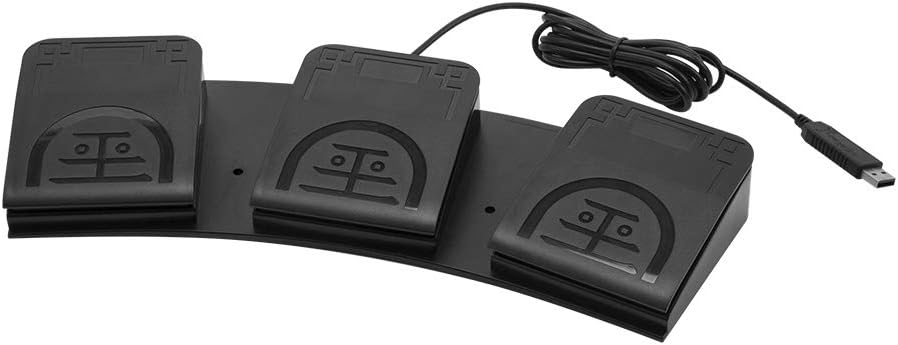
iKKEGOL Upgraded USB Triple Foot Pedal Switch Control 3 Three Key Footswitch Program Customized Computer Keyboard Mouse Game Action HID
4.4Editor score
Optical quiet switches
Programmable HID device
Wide ergonomic design
Compare the top foot pedals for transcriptionists including Infinity, Philips, and Express Scribe models to find the best ergonomic control for your workflow.
Choosing the right foot pedal can transform your transcription workflow by keeping your hands on the keyboard while controlling audio playback effortlessly.
We evaluated ten leading models based on durability, ergonomic design, software compatibility, and switch responsiveness to identify the most reliable options.
Each pick highlights specific strengths and ideal use cases while noting that product availability and pricing may change without prior notice or warning.
4.4Editor score

4.5Editor score

4.1Editor score
This side-by-side comparison highlights the key specifications and unique features of each model to help you decide which pedal fits your needs.


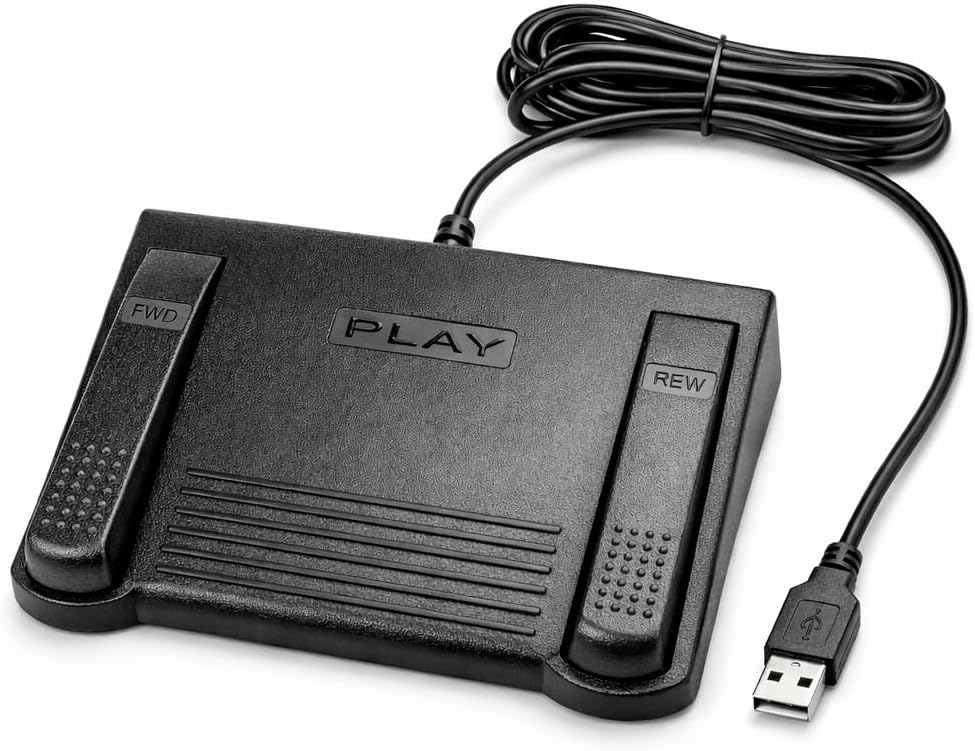


The Infinity 3 USB Foot Pedal stands out as a highly rated device with a 4.5-star rating for its rugged construction and ease of use.
We may earn a commission when you buy through this link, at no additional cost to you.
Its wide central sloping play pedal allows you to move your foot easily between play, fast forward, and rewind without losing your place.
While it lacks wireless capability, the sturdy design and ultra-heavy-duty micro switches ensure countless hours of trouble-free performance.
This pedal is ideal for transcriptionists seeking a reliable plug-and-play solution that minimizes fatigue during long daily sessions.
The wide and sloping play pedal is designed to support natural foot positioning and reduce strain during extended use.
Ultra-heavy-duty micro switches are built to withstand millions of presses ensuring consistent performance over time.
We may earn a commission when you buy through this link, at no additional cost to you.
The VEC in-USB-2 Infinity Digital Foot Control combines precision engineering with a rechargeable battery for long-lasting professional use.
We may earn a commission when you buy through this link, at no additional cost to you.
Precision switches and a mechanical stop prevent accidental triggering while stepping on side pedals maintaining control during active dictation.
Although you will need to charge the battery occasionally its 1000-hour recording time offers extended uninterrupted usage periods.
This model suits professionals who need robust durability and seamless compatibility across various PC and laptop systems.
Powered by a rechargeable battery this pedal provides up to 1000 hours of digital recording time for extended use.
A mechanical stop prevents accidental triggering of the center pedal while stepping on side pedals during use.
We may earn a commission when you buy through this link, at no additional cost to you.
The Philips ACC2330 4-Pedal Foot Control offers a premium experience with its unique toe touch control and ergonomic swing design.
We may earn a commission when you buy through this link, at no additional cost to you.
You can swing your foot using the heel for easy relax during pause time which helps reduce fatigue throughout the work day.
The increased width of the center pedal helps avoid unintended presses of other pedals improving accuracy and control.
This model is best for professionals willing to invest in a high-end device that prioritizes ergonomic comfort and precision.
Swing the foot using the heel to allow easy foot relax during pause time and reduce muscle strain.
Increased width of the center pedal avoids unintended presses of other pedals for better accuracy.
We may earn a commission when you buy through this link, at no additional cost to you.
The DAC 3 Function Foot Pedal holds a perfect 5.0 rating and features large clearly labeled buttons for straightforward operation.
We may earn a commission when you buy through this link, at no additional cost to you.
Its buttons include specific labels like Next Job Rew/Play and Record which cater to specialized transcription workflows.
While compatible with certain computer software it may require setup wizard ensure it works with your specific system.
This pedal is an excellent choice for users who need simple labeled controls and are working within supported software environments.
Buttons are clearly labeled as Next Job Rew/Play and Record for quick identification during use.
We may earn a commission when you buy through this link, at no additional cost to you.
The Infinity USB Digital Foot Control with Computer Plug features a low profile design that saves space under your desk.
We may earn a commission when you buy through this link, at no additional cost to you.
Its greater non slip surface area ensures the pedal stays in place during active use preventing slips or unwanted movement.
With a 4.5-star rating this device is trusted for its reliable performance and ergonomic layout for daily transcription.
This model is recommended for users with limited workspace who need a compact yet fully functional foot control solution.
A low profile design allows the pedal to fit easily under desks without occupying excessive space.
We may earn a commission when you buy through this link, at no additional cost to you.
The Express Scribe Transcription Foot Pedal ECS-FPAE is designed exclusively for Express Scribe software on Windows and Mac.
We may earn a commission when you buy through this link, at no additional cost to you.
Its oversized pedal layout allows easy movement between play fast-forward and rewind functions supporting comfortable low-fatigue operation.
You get a 1-year Mail-In Parts/Labor Warranty ensuring professional-grade reliability for consistent performance in transcription.
Choose this pedal if you rely on Express Scribe and want a custom hardware solution that works out of the box.
Designed only for use with Express Scribe transcription software ensuring seamless and reliable playback control.
We may earn a commission when you buy through this link, at no additional cost to you.
The ECS-IN-USB-1 Foot Pedal delivers reliable hands-free audio playback control allowing professionals to work without interrupting typing.
We may earn a commission when you buy through this link, at no additional cost to you.
It is engineered for comfort during extended use with a contoured layout that supports natural foot positioning to minimize strain.
Backed by a 1-year Mail-In Parts/Labor Warranty this pedal is ideal for medical legal and public safety applications.
While it has a lower rating it offers broad compatibility and a focus on reducing fatigue during long transcription sessions.
The thoughtfully contoured layout supports natural foot positioning to help minimize strain and fatigue.
We may earn a commission when you buy through this link, at no additional cost to you.
The iKKEGOL Upgraded USB Triple Foot Pedal is an affordable yet highly programmable option with quiet optical switches.
We may earn a commission when you buy through this link, at no additional cost to you.
It works as a standard HID device allowing you to trigger keyboard and mouse actions with your foot easily.
The ergonomic design supports lasting comfort and the pedal can bear weights over 100kg for durability.
This pedal is great for users who need a versatile and budget-friendly solution that supports customization and transcription.
Optical switches provide quiet and sensitive operation with minimal resistance for a smooth user experience.
We may earn a commission when you buy through this link, at no additional cost to you.
The Philips LFH-2330 features a 4-pedal design that can be completely configured using a user-friendly wizard.
We may earn a commission when you buy through this link, at no additional cost to you.
Its slim ergonomic design minimizes foot movement during transcription helping to reduce physical strain significantly.
The anti-slip bottom surface keeps the pedal in the right place ensuring stability while you work on long projects.
This model is perfect for professionals who need a fully customizable pedal to match their specific workflow requirements.
The 4-pedal design can be completely configured to suit you using a user-friendly wizard for customization.
We may earn a commission when you buy through this link, at no additional cost to you.
The iKKEGOL Upgraded USB Triple Foot Pedal uses mechanical switches to execute complex macros and key combos with your feet.
We may earn a commission when you buy through this link, at no additional cost to you.
You can program this pedal using the powerful ElfKey software to speed up workflows in transcription coding and creative suites.
Even without software it works as a plug-and-play device once configured making it versatile for multiple systems.
This model is recommended for power users who need precise control over macros and customizable keyboard functions.
This USB foot switch is a mechanical standard HID device that physically closes an electrical circuit to send the signal.
We may earn a commission when you buy through this link, at no additional cost to you.
Selecting the right foot pedal involves considering factors like switch type ergonomic design and software compatibility.
The type of switch in a foot pedal determines its lifespan and tactile feel. Mechanical switches like those in the iKKEGOL models are known for their robustness while optical switches offer quiet operation. Heavy-duty micro switches such as those in the Infinity 3 model ensure consistent performance over millions of presses.
Look for pedals with durable switches designed to withstand frequent use without failure.
Ergonomics are critical for transcriptionists who work for hours. Pedals with wide central slopes or low profiles reduce strain on your feet and ankles. Features like swing foot motion or heel support can further minimize fatigue during long sessions.
Choose a pedal that supports natural foot positioning to avoid discomfort.
Ensure the pedal works seamlessly with your transcription software. While most models support broad platforms like Express Scribe and Dragon others like the ECS-FPAE are exclusive to specific programs. Check if your software requires specific configuration or if plug-and-play is available.
Verify compatibility before purchasing to avoid workflow interruptions.
USB connection is the standard for most foot pedals ensuring stable and reliable data transfer to your computer. Some models offer rechargeable batteries for wireless flexibility but USB remains the most common and dependable option for desktop setups.
Prioritize USB compatibility for reliable connection across systems.
The layout of the pedals affects your workflow speed. Wide pedals prevent accidental presses while customizable models allow you to map specific functions to each pedal. Some models include specific labels like Next Job for specialized tasks.
Select a layout that fits your hand size and workflow preferences.
Professional-grade pedals should be built with sturdy materials to withstand daily use. A solid warranty like the 1-year mail-in parts and labor coverage offered by some brands provides peace of mind against defects or failures.
Look for durable construction and reliable warranty support for long-term use.
Foot pedals must remain stable during operation to prevent accidents. Models with anti-slip bottoms or TPU rubber pads stay in place on hard floors ensuring your foot movement is precise and controlled without the device sliding around.
Ensure the pedal has a secure grip to maintain stability during use.
While budget models exist it is important to balance cost with longevity. Investing in a higher-quality pedal with better switches and ergonomics often saves money in the long run by reducing wear and replacement needs.
Consider value over just low price when choosing a professional tool.
Connect the pedal via USB to your computer and install any required software to map the foot functions to your transcription application controls.
Adjust your foot placement so the central pedal rests comfortably under your toes while ensuring your heel remains stable for pivoting or relaxing.
Clean the pedal surface periodically to prevent dust buildup and store it in a dry place to maintain the switch mechanisms and anti-slip features.
Foot pedals are not strictly necessary but they greatly improve efficiency by allowing you to control audio playback without removing your hands from the keyboard. This reduces typing interruptions and helps maintain a smoother workflow during long sessions.
No most pedals support popular platforms but some are designed exclusively for specific software like Express Scribe. Always check the product specifications to ensure it is compatible with your transcription program before purchasing.
Mechanical switches use physical metal contacts to register a press while optical switches use light beams. Optical switches tend to be quieter and have longer lifespans but mechanical switches are often more affordable and still durable.
Many pedals come with dedicated configuration software like ElfKey for assigning keyboard shortcuts or macros. Follow the setup wizard included with the product to map specific functions to each pedal button.
Most USB foot pedals are cross-compatible with both Mac and Windows systems. However some software configurations may vary so it is best to verify the compatibility list in the product description for your specific OS.
Yes most reputable models include a warranty ranging from one year to lifetime coverage on mechanical parts. Check the product details for specifics on warranty terms and whether they cover mail-in repairs.
The Infinity 3 USB Foot Pedal and VEC in-USB-2 stand out for their balance of durability and ergonomic design for professional users.
Prioritize features like switch quality and software compatibility to ensure the pedal supports your specific transcription workflow needs.
Always verify current product availability and features since models and offers can change over time.