
NIMO 15.6 AI Ready Laptop
4.8Editor score
Intel N150 Processor
8GB RAM Flexible Expansion
Standard US Backlit Keyboard
2-Year Warranty Included
Choosing the right laptop for karaoke gear is essential for hosts, performers, and enthusiasts who demand reliable audio and video processing. Modern karaoke setups require machines that can handle multiple streams, run specialized software, and connect to various audio interfaces without lag.
This guide compares ten diverse laptop models ranging from powerful business workstations to budget-friendly options. We evaluated processors, memory capacity, display clarity, and port selection to ensure each pick meets the unique demands of karaoke environments.
Each pick highlights specific strengths like battery life or screen size, helping you find the ideal match for your setup. Prices and availability change frequently so verify current details on the product pages before making your final decision today.
4.8Editor score

4.5Editor score

4.5Editor score
As an Amazon Associate we earn from qualifying purchases.
The following table provides a side-by-side comparison of all ten selected laptops focusing on key specifications relevant to karaoke performance and connectivity needs.






The HP 17 inch Business Laptop Computer stands out as the best overall choice for karaoke applications due to its robust processing power and expansive screen real estate.
We may earn a commission when you buy through this link, at no additional cost to you.
Equipped with an AMD Ryzen 5 CPU and 16GB of RAM, this machine handles complex audio mixing software and video rendering with ease without stuttering or lag.
While the chassis is somewhat heavier than standard ultrabooks, the trade-off provides a larger screen which is crucial for viewing lyrics and managing multiple windows simultaneously.
This laptop is ideal for professional hosts who need reliability and performance for demanding setups involving external displays and high quality audio interfaces.
The 17.3 inch FHD anti-glare display offers sharp details and vivid colors making it perfect for viewing lyrics on large screens.
With 16GB of RAM you can run karaoke software, web browsers, and background apps simultaneously without performance degradation.
We may earn a commission when you buy through this link, at no additional cost to you.
The Dell Pro 15.6 Laptop offers premium features suitable for modern karaoke environments including DDR5 memory and a high refresh rate display.
We may earn a commission when you buy through this link, at no additional cost to you.
Its Intel Core 3 100U processor paired with 16GB DDR5 RAM ensures fluid performance when switching between karaoke apps and media players.
The 120Hz refresh rate provides smoother visuals which is beneficial for video karaoke tracks while the SD card slot aids in media management.
Business users and mobile hosts will appreciate the durable design and wide range of connectivity options including USB-C and HDMI.
The 120Hz refresh rate delivers smoother scrolling and more fluid visuals which enhances the viewing experience during karaoke sessions.
Multiple ports including USB-C and HDMI allow you to connect to projectors and audio mixers without needing extra adapters.
We may earn a commission when you buy through this link, at no additional cost to you.
The HP OmniBook 3 17.3 combines a large screen with long battery life making it an attractive option for portable karaoke setups.
We may earn a commission when you buy through this link, at no additional cost to you.
Its AMD Ryzen 3 30 processor provides adequate performance for streaming and light mixing tasks while the 17.3 inch display offers ample space.
With up to 14 hours of battery life and fast charge capabilities this laptop ensures you stay powered throughout long events or parties.
While it has less RAM than some peers the storage capacity and screen quality make it a strong contender for budget conscious buyers.
Enjoy up to 14 hours of battery life on a single charge which is ideal for all day events without constant outlet access.
The 17.3 inch Full HD display provides vibrant colors and wide viewing angles enhancing the visual aspect of karaoke entertainment.
We may earn a commission when you buy through this link, at no additional cost to you.
The NIMO 15.6 AI Ready Laptop is the best budget choice offering solid performance and essential features for basic karaoke use.
We may earn a commission when you buy through this link, at no additional cost to you.
It features a silent Intel N150 processor which is excellent for quiet environments and includes a backlit keyboard for use in dimly lit rooms.
The 8GB RAM is sufficient for running standard karaoke applications while the 2 year warranty provides peace of mind for buyers.
Despite its low cost this laptop does not compromise on build quality and offers reliable connectivity for small home setups.
The N150 processor operates silently making it perfect for library style karaoke sessions or quiet hotel room entertainment.
With a backlit keyboard and physical webcam shutter this laptop offers convenience and privacy features often found on more expensive models.
We may earn a commission when you buy through this link, at no additional cost to you.
The HP Ultrabook 14 Laptop is ideal for users who need a compact yet powerful machine for both work and occasional karaoke duties.
We may earn a commission when you buy through this link, at no additional cost to you.
Its 16GB RAM and Windows 11 Pro operating system ensure professional performance while the bundle includes lifetime Office access for document management.
The 14 inch screen is more portable than larger models but still provides clear visuals for managing playlist files and media libraries.
With external storage options and robust security features this laptop serves well for business environments requiring flexibility.
Inclusion of lifetime Microsoft Office 2024 adds significant value making it suitable for creating custom song sheets or flyers.
Windows 11 Pro offers advanced security features like encryption and hardware isolation keeping your data safe in public spaces.
We may earn a commission when you buy through this link, at no additional cost to you.
The HP 255 G10 Laptop offers a balanced mix of modern processing power and memory suitable for various karaoke software applications.
We may earn a commission when you buy through this link, at no additional cost to you.
Its AMD Ryzen 3 7330U processor supports efficient multitasking while the 16GB RAM allows you to keep multiple tabs and audio tools open.
The lightweight design makes it easy to transport to events and the Full HD display ensures text and images remain crisp and legible.
This model represents a strong mid-range option for those seeking recent hardware features without the cost of premium business class devices.
The Ryzen 3 7330U processor delivers strong performance for everyday tasks and multimedia handling without excessive heat generation.
The Full HD LED backlit display provides crisp visuals that are essential for reading lyrics quickly in varying lighting conditions.
We may earn a commission when you buy through this link, at no additional cost to you.
The HP OmniBook 3 16 inch stands out with its stunning 2K touchscreen and advanced AI features making it a top premium selection.
We may earn a commission when you buy through this link, at no additional cost to you.
Touchscreen capability allows for intuitive navigation through song lists and the 2K resolution ensures images are incredibly detailed and clear.
Advanced AI noise reduction improves conference call quality which is useful if you use the laptop for managing audio feedback during events.
With strong battery life and a sleek design this laptop combines aesthetics with functionality for modern mobile users.
The 2K IPS touchscreen delivers incredible detail and lifelike color reproduction enhancing the visual quality of any digital content.
AI noise reduction technology filters out background noise automatically ensuring clearer audio performance in conference or streaming scenarios.
We may earn a commission when you buy through this link, at no additional cost to you.
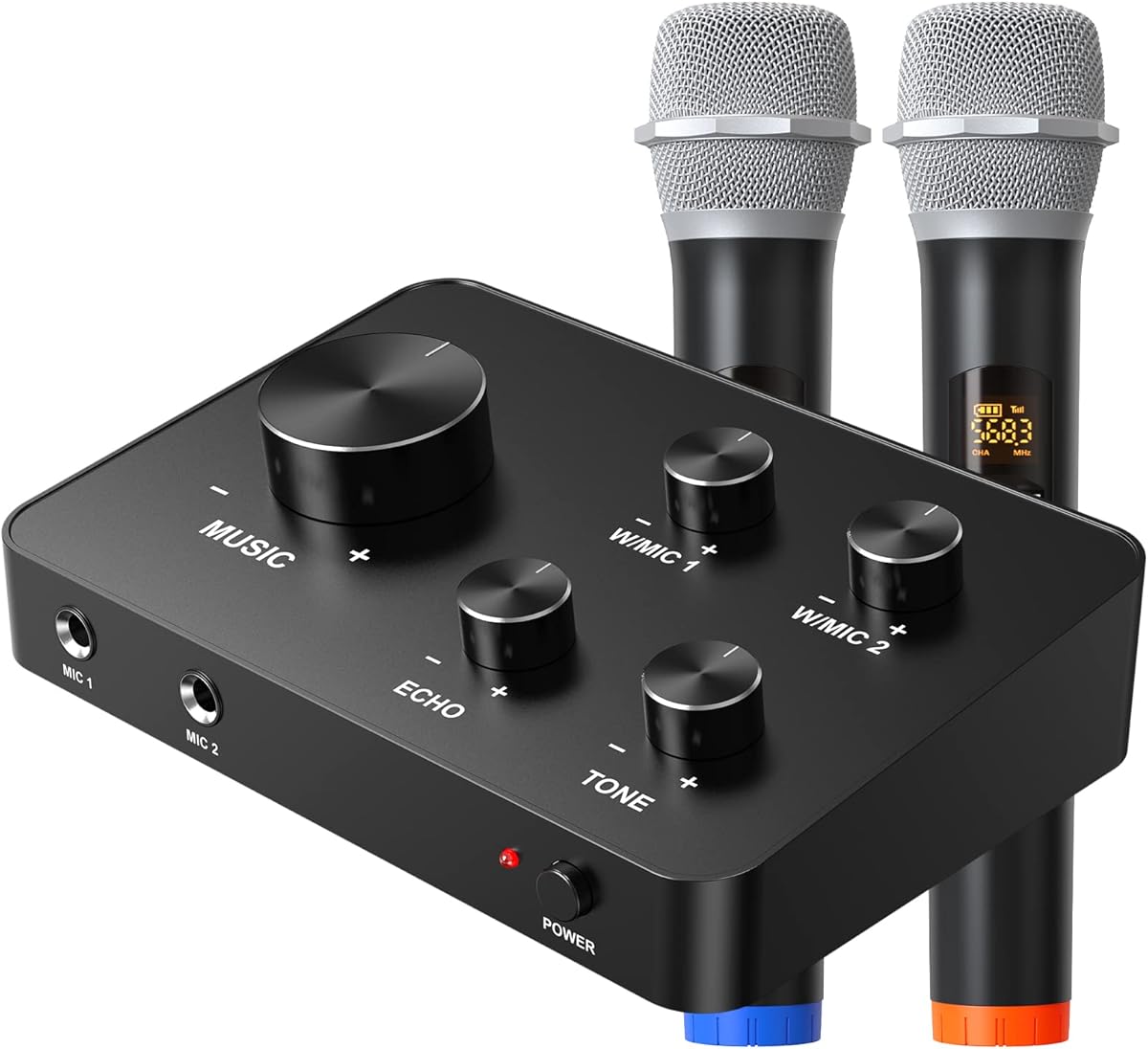
The Rybozen Wireless Microphone Karaoke Mixer System is a compact accessory that enhances your karaoke setup with wireless freedom and simple controls.
We may earn a commission when you buy through this link, at no additional cost to you.
It includes two handheld wireless microphones with a 100 foot range allowing performers to move freely without worrying about cable limitations.
With separate volume controls for each mic and echo settings you can customize the audio output to match your specific room acoustics.
This mixer is perfect for integrating with smart TVs or existing audio systems to create a complete karaoke environment quickly.
A wireless operating range of up to 100 feet allows performers to engage with the audience while moving around the stage.
Plug and play compatibility with various devices ensures you can start singing immediately without complex configuration or technical knowledge.
We may earn a commission when you buy through this link, at no additional cost to you.
The Sound Town 16 Channels Wireless Microphone Karaoke Mixer System offers extensive connectivity and control for more advanced karaoke configurations.
We may earn a commission when you buy through this link, at no additional cost to you.
It supports HD ARC and Optical Toslink inputs which allows you to extract audio directly from modern smart TVs seamlessly without extra dongles.
With 16 frequency selections and independent volume controls this mixer provides flexibility for managing multiple audio sources simultaneously.
Ideal for larger events or professional setups this system ensures you have the tools to manage sound quality precisely and effectively.
HD Audio Return Channel support lets you extract audio from your smart TV easily blending music and vocals for output.
Effect mode selection and level adjustments allow you to fine tune reverb and echo for professional sounding vocal performances.
We may earn a commission when you buy through this link, at no additional cost to you.
The Wireless Bluetooth Karaoke Microphone is a fun portable device ideal for quick sessions and parties without the need for complex laptop setups.
We may earn a commission when you buy through this link, at no additional cost to you.
It features six voice effects and dynamic lights which add an entertaining layer to performances especially for kids and family gatherings.
With a 10 hour battery life and universal smartphone connectivity it is always ready for use anywhere without needing cables or power.
This mic is perfect as a gift or supplementary tool for casual singers who want professional sounding audio in a simple package.
Sync two microphones via Bluetooth for instant duets at parties making it a fun way to perform with a friend quickly.
Compact design fits easily into travel bags ensuring you can bring entertainment to any location without hassle or setup time.
We may earn a commission when you buy through this link, at no additional cost to you.
Selecting the right laptop requires evaluating several key factors to ensure smooth performance during karaoke sessions and events.
The processor is the engine of your laptop and it should be capable of handling audio mixing software without lag. For karaoke applications look for modern CPUs like AMD Ryzen 5 or Intel Core i5 that offer multi core performance to manage background tasks smoothly.
Prioritize processors that support fast multitasking to prevent audio dropouts during performances.
Random Access Memory allows your laptop to run multiple programs at once which is common in karaoke setups where you might have a player open alongside a browser. Aim for at least 8GB of RAM but 16GB is highly recommended for future proofing.
Higher RAM ensures smooth transitions between songs and applications without freezing.
A larger screen helps when you need to view lyrics and control software simultaneously. Laptops with 15.6 inch or larger displays provide a better workspace for managing playlists and adjusting audio settings effectively.
Choose a display with anti glare features to reduce eye strain in bright environments.
Ensure your laptop has the necessary ports to connect to audio mixers or external speakers. Look for HDMI or USB-C ports that support high resolution video output to send audio to external displays easily.
A variety of ports reduces the need for dongles during events.
Battery life is critical if you plan to host events away from power outlets. Laptops with long battery endurance allow you to focus on the performance rather than constantly searching for an outlet to plug into.
Select models offering at least 10 hours of usage for uninterrupted sessions.
While external speakers are often used the internal audio quality of a laptop still matters for initial checks and monitoring. Laptops with dedicated audio drivers or high quality speakers provide a better starting point for your setup.
Check for features like noise reduction or clear audio processing in the specs.
Karaoke setups often involve travel and frequent transport so durability is a significant consideration. Laptops with sturdy chassis and reliable hinge designs are better equipped to withstand the rigors of regular use.
Invest in a model with a proven track record of build quality.
Fast storage ensures that software and song files load quickly which is important for seamless transitions between songs. Solid State Drives are far superior to traditional hard drives in terms of boot speed and data access.
Opt for a model with a 512GB SSD to balance speed and file capacity.
Start by installing all necessary audio drivers and karaoke software before your event to ensure compatibility. Connect your external speakers or mixers via HDMI or USB ports and verify the audio output levels are balanced.
Keep your laptop on a stable surface away from potential spills and avoid blocking the ventilation vents during use. Regularly update your operating system and software to benefit from the latest security patches and performance improvements.
Store your laptop in a protective case when transporting it to prevent physical damage. Clean the screen and keyboard regularly with appropriate microfiber cloths to maintain optimal functionality and appearance.
The most important specifications include a fast processor for multitasking, at least 8GB of RAM to handle multiple apps, and a large display for easy navigation. Additionally ensure your laptop has HDMI ports for external audio connections.
Yes you can use a basic laptop for karaoke as long as it meets minimum requirements for RAM and storage. However for professional events with complex audio setups a more powerful machine with dedicated graphics is recommended.
A touchscreen is not strictly necessary but it can make navigating song lists easier during performances. It adds convenience but a standard trackpad or mouse works just as well for most software interfaces.
You should aim for at least 256GB of SSD storage to keep your music library and software installed without clutter. For large collections of high quality audio files consider models with 512GB or more capacity.
Wireless microphones offer greater freedom of movement which is ideal for energetic performances but they require battery charging. Wired microphones provide uninterrupted use without battery concerns so choose based on your specific event needs.
Yes most modern laptops have HDMI ports that allow you to connect directly to a TV for audio and video output. If your laptop lacks HDMI you can use a USB-C to HDMI adapter for similar functionality.
We have explored ten top laptops ranging from the HP 17 inch Business Laptop to portable mixers ensuring you find the perfect gear for your needs.
Prioritize processing power and display size to guarantee smooth playback and easy management of lyrics during your events.
Check current prices and availability on the product pages to confirm the best deal before making your purchase today.