
AULA F75 HE
4.5Editor score
Magnetic switches
8000Hz polling
Rapid trigger mode
This guide compares the top keyboards for Valorant including magnetic switches and rapid trigger tech to help you find the best gaming keyboard for competitive
Finding the right keyboard for Valorant can significantly improve your aim and reaction time during intense matches. Competitive players need responsive keys that register inputs instantly without delay. A good gaming keyboard offers features like rapid trigger and adjustable actuation to give you an edge over opponents.
We compared ten leading keyboards based on performance features durability and value for money. Our analysis focused on switch technology polling rates and build quality to ensure you get reliable hardware. Each product was evaluated for its ability to handle fast-paced gameplay and counter-strafing mechanics.
Every pick in this list highlights unique strengths suited for different play styles and budgets. You will see detailed reviews and specs to help you make an informed decision. Please note that prices and availability may change over time so check current listings before purchasing.
4.5Editor score
5.0Editor score

4.6Editor score
This side-by-side comparison highlights the key specifications and features of each keyboard to help you decide quickly.







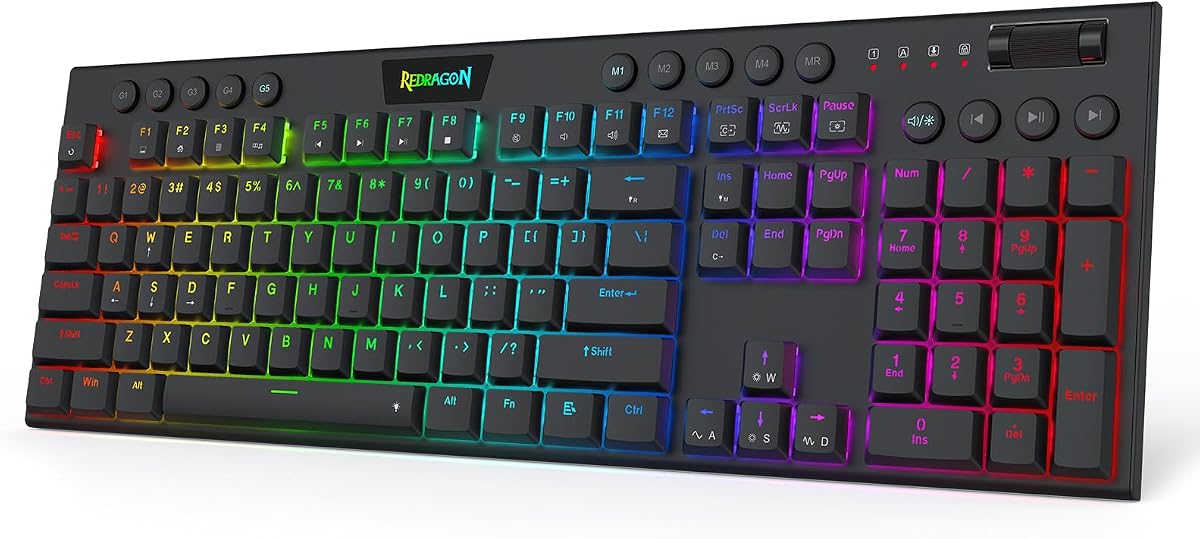
The Redragon K673 HE is a top contender for Valorant players seeking speed and precision. Its Hall-Effect switches provide rapid trigger capabilities that allow for instant key resets during movement. This model earned high marks for its ability to handle fast-paced gameplay without lag or ghosting.
We may earn a commission when you buy through this link, at no additional cost to you.
Key strengths include the UltraMag POM magnetic switches that sense keypresses without physical contact. This reduces wear and tear while ensuring consistent actuation every time. The dual-module floating structure minimizes noise and provides a soft tactile bounce that is easy on the wrists during long sessions.
However, you may need to spend time calibrating the actuation points through the desktop driver. Some users might find the learning curve steep if they are new to magnetic keyboards. These trade-offs are acceptable given the performance gains in competitive scenarios like counter-strafing.
Gamers who prioritize input speed and customization should consider this keyboard. It is an excellent choice for those willing to tweak settings for optimal play. The reliable wired connection ensures you never miss a shot due to connectivity issues.
Dynamic key activation cuts redundant keystrokes during quick direction changes for sharper aim.
A single control knob adjusts backlight brightness and media playback without extra key combos.
We may earn a commission when you buy through this link, at no additional cost to you.
The Redragon K686 HE offers similar performance to its sibling with a focus on refined user experience. It features the same Next-gen UltraMag POM switches for seamless key registration. Players report high satisfaction with the timing of peek-and-fire actions in tactical shooters.
We may earn a commission when you buy through this link, at no additional cost to you.
This keyboard stands out due to its noise dampening layers which reduce harsh clacking sounds. The anti-wobble independent switch-plate design ensures every keystroke feels stable and intentional. It is well-suited for shared spaces where audio feedback from mechanical keyboards can be distracting.
On the downside, the software-powered precision tuning requires a wired connection to adjust settings fully. This might inconvenience users who prefer on-the-fly adjustments without a PC. Yet the consistency across games makes the setup time worthwhile for serious competitors.
Ideal for players who want a silent yet responsive keyboard for extended gaming marathons. The media controls add convenience for managing streams or music during play. It balances performance and comfort effectively for most desktop setups.
Dampening layers give a soft bounce instead of a harsh rigid clack for quieter sessions.
Adjust backlight brightness and media playback with a single control knob effortlessly.
We may earn a commission when you buy through this link, at no additional cost to you.
The Redragon K618 HE delivers exceptional value with its low-profile magnetic switches. It registers keystrokes faster than standard switches making it perfect for counter-strafing in Valorant. Users praise its 5.0 rating for reliability and speed in competitive matches.
We may earn a commission when you buy through this link, at no additional cost to you.
A dedicated 4×5 macro zone allows you to record combos without installing software first. The low-profile design shortens travel distance which lightens the load on your wrists. This makes it a comfortable choice for long practice sessions or ranked games.
Some may find the low profile requires an adjustment period if used to tall keys. The software tuning is powerful but limited to specific drivers. Despite this the speed and comfort it offers justify the minor adaptation needed.
Perfect for budget-conscious gamers who do not want to sacrifice speed. The macro keys provide extra utility for executing complex move quickly. It is a robust option for those seeking efficiency without breaking the bank.
Shortest travel low-profile magnetic switches register keystrokes quicker for faster reactions.
20 on-the-fly macro keys let you record combos or adjust volume instantly.
We may earn a commission when you buy through this link, at no additional cost to you.
The Corsair Clipper PRO MINI 60 is designed specifically for competitive FPS gamers. Its MGX hyperdrive core hall effect switches offer zero drift and high durability. The compact layout maximizes mouse space which is crucial for low-sensitivity aiming in Valorant.
We may earn a commission when you buy through this link, at no additional cost to you.
Advanced Hall Effect control enables instant reset for rapid taps and faster reactions. FlashTap SOCD ensures cleaner directional inputs and sharper counter-strafing. IP57 rating adds peace of mind against spills and dust during intense play.
The lack of arrow keys may be a hurdle for users who rely on them. The price is higher than average entry-level boards but reflects premium build quality. It is ideal for those who already have a mouse pad setup optimized for movement.
This keyboard suits serious competitors who need every millimeter of desk space. The sound dampening keeps it distraction-free. If you value precision and layout efficiency this is a strong contender.
FlashTap SOCD enables cleaner directional inputs and sharper counter-strafing.
Maximize mouse space for low-sensitivity aiming with a space-saving layout.
We may earn a commission when you buy through this link, at no additional cost to you.
The Razer Huntsman Mini 60% uses optical beam-based actuation for speed of light registration. This results in 15-30% shorter actuation distance than other linear switches. The aluminum construction ensures structural integrity during aggressive gaming sessions.
We may earn a commission when you buy through this link, at no additional cost to you.
Chroma RGB lighting fully syncs with popular games and partners for immersion. Snap Tap allows prioritizing the latest input between a pair of assigned keys for smoother movement. PBT keycaps resist grime buildup over time ensuring long-lasting texture.
Dependency on Razer Synapse software for macros might be a concern for some. The compact layout lacks dedicated function keys which could impact productivity tasks. However for pure gaming performance the optical switches deliver tangible benefits.
Fans of the Razer ecosystem will appreciate the customization options. The matte frame looks sleek and professional. If you want fast optical switches and rich lighting this is a great pick.
Razer Linear Optical switch technology registers key presses at the speed of light.
Enjoy truly responsive in-game movement via prioritizing latest input between keys.
We may earn a commission when you buy through this link, at no additional cost to you.
The AULA WIN60 HE brings advanced magnetic technology to a budget-friendly price. It features advanced self-developed magnetic switches that eliminate wear and tear from physical contact. The lightweight driver ensures non-memory-intensive operation which keeps system resources free.
We may earn a commission when you buy through this link, at no additional cost to you.
Optimized for FPS games the magnetic switches enable faster peeking and quick-stop shooting. The rapid trigger gaming keyboard ensures lightning-fast response times with a low RT step distance. Dynamic RGB lighting illuminates PBT keycaps for stunning visual effects.
Some users may prefer a downloadable app over a web-based driver for offline access. The build quality is functional but not premium compared to higher-end boards. Still it offers competitive features that usually cost more elsewhere.
Perfect for students or casual gamers needing top-tier specs without high costs. The compact design saves desk space efficiently. It is a smart choice for value-driven buyers.
Effortlessly remap keys and create advanced macros via web-based driver.
Delivers polling rates up to 8000Hz for ultra-fast response times.
We may earn a commission when you buy through this link, at no additional cost to you.
The AULA WIN68 HE offers an industry-leading 8000Hz polling rate for instant command execution. Combined with ultra-low latency it gives you an edge in the game. Hall effect magnetic switches allow personalized actuation points for precise keying experiences.
We may earn a commission when you buy through this link, at no additional cost to you.
Customizable web driver enables mapping key RT/SOCD functions without bulky downloads. 16.8 Million RGB backlit keyboard features south-facing LEDs for better visual experience. The compact wired keyboard saves desktop space while retaining arrow keys via FN combos.
Driver compatibility is limited to Windows systems which restricts Mac users. The compact size might lack function keys for non-gaming tasks. However for gamers the speed and customization are significant advantages.
This board is great for coders and gamers who need a portable solution. The detachable cable enhances connectivity stability. It balances functionality with portability well.
Offers industry-leading 8000Hz polling rate and 8x faster response than standard.
Each key can be personalized to smallest unit of 0.1 mm.
We may earn a commission when you buy through this link, at no additional cost to you.
The AULA F75 Pro supports Bluetooth 5.0 2.4GHz wireless and USB wired connections. This tri-mode connection keyboard works with five devices at the same time for versatility. Hot-swap base allows replacement of 3-pin or 5-pin switches easily.
We may earn a commission when you buy through this link, at no additional cost to you.
Pre-lubricated stabilizers and LEOBOG reaper switches bring smooth typing and fast response. Advanced structure with PCB single key slotting optimizes resilience and stability. Professional gaming keyboard saves desktop space with 75% layout retaining arrow keys.
Wireless modes may introduce slight latency compared to wired options in competitive play. The price point is higher due to wireless features and build quality. However the convenience of connectivity and battery life justifies the cost.
Ideal for multi-device users who need a versatile keyboard for work and play. The side-printed keycaps add a unique aesthetic. It is a premium choice for those valuing freedom of movement.
Work with Bluetooth 5.0 2.4GHz wireless and USB wired connection simultaneously.
Hot-swap base supports 3-pin or 5-pin switches replacement easily.
We may earn a commission when you buy through this link, at no additional cost to you.
The ATTACK SHARK X68 HE RT features adjustable hall effect magnetic switches for dynamic keystroke control. It binds four functions according to four different pressing degrees to one key for flexibility. Top mount structure and HiFi typing sound provide stable operation.
We may earn a commission when you buy through this link, at no additional cost to you.
Programmable NKRO ANSI keyboard lets you remap key function via web driver easily. Light up keyboard with PBT keycaps ensures durability and attractive look. Ergonomic design with curved wrist rest supports stable usage during extended play.
The web driver requires internet access for customization which may limit offline tweaks. The compact layout may feel cramped for users who need extra keys. But for FPS games the RT function is highly effective.
Perfect for rhythm game and FPS players needing precise key control. The detachable streamer cable is a nice touch. It balances performance with user-friendly features.
True 8000Hz polling rates reduce latency to impressive theoretical value.
Scientific structure with compact 66 key and curved wrist rest for stability.
We may earn a commission when you buy through this link, at no additional cost to you.
The ASUS ROG Strix Scope II 96 offers full-size functionality in a compact 96% design. Tri-mode connectivity includes Bluetooth and low-latency 2.4GHz wireless for seamless connection. Hot-swappable pre-lubed ROG NX Snow linear switches provide smooth keystrokes.
We may earn a commission when you buy through this link, at no additional cost to you.
Enhanced acoustics integrated sound-dampening foam absorb pinging noises and echoes. Versatile tri-mode connectivity supports up to 3 devices with exceptional battery life. Optimized for gaming streaming and daily work with pre-programmed hotkeys.
The premium price reflects high build quality and wireless convenience. The larger footprint might not suit small desks. However for users needing a numpad and wireless freedom this is ideal.
Best for streamers and professionals who need a full keyboard without cables. The multi-function wheel allows intuitive media adjustments. It is a top-tier choice for quality.
Experience compact design retaining keys and number pad from 96 percent.
Integrated sound-dampening foam absorb pinging noises and echoes effectively.
We may earn a commission when you buy through this link, at no additional cost to you.
Choosing the right keyboard requires understanding key features that impact gameplay and comfort.
Magnetic and optical switches are preferred for Valorant due to rapid trigger capabilities. They allow instant key resets which help with counter-strafing and fast movements. Traditional mechanical switches may not offer the same level of precision for competitive play.
Higher polling rates like 8000Hz ensure inputs are registered faster by your computer. This reduces input lag and makes your character move more responsively. Look for keyboards with high polling rates if you play at a competitive level.
Compact layouts such as 60% or 75% save desk space for mouse movement. This is beneficial for low-sensitivity aiming which is common in Valorant. However consider if you need arrow keys or a numpad for productivity tasks.
Sturdy materials like aluminum frames prevent flex during intense typing sessions. Durable keycaps resist wear from frequent use. A solid build ensures longevity and stability during gameplay.
Wired connections provide the most stable link without latency risks. Wireless options offer freedom but check for low-latency modes. Ensure compatibility with your devices whether PC or Mac.
Software that allows actuation point adjustments lets you fine-tune sensitivity. Macro support can help with complex moves without extra key presses. Choose a keyboard with intuitive software for easier setup.
Prices vary widely so decide how much you are willing to spend. High-end features may not be necessary for casual play. Balance cost with the features that truly matter for your playstyle.
Comfort is vital during long gaming sessions. Look for keyboards that reduce wrist strain through low profiles or wrist rests. A comfortable setup prevents fatigue and maintains performance over time.
Connect your keyboard using the recommended cable or wireless mode for best performance. Adjust actuation points in the driver to match your finger pressure and movement style. Test settings in a practice range to ensure responsiveness before ranked matches.
Keep your keyboard clean by gently wiping keys with a soft cloth regularly. Avoid eating or drinking near it to prevent spills that damage electronics. Use compressed air to remove dust between keycaps if needed.
Store your keyboard properly when not in use to avoid physical damage. If traveling use a padded case to protect it from bumps. Regular updates to drivers ensure you benefit from the latest features and improvements.
Rapid Trigger allows keys to reset instantly when lifted rather than fully releasing. This helps in games like Valorant where quick movement changes are needed. It reduces delay in registering directional inputs.
Magnetic switches are often preferred because they offer adjustable actuation and faster response times. They reduce physical contact which decreases wear. This consistency is key for precise aim and movement.
Higher polling rates like 8000Hz send data to your PC more frequently. This minimizes input lag and makes reactions feel smoother. While noticeable at high skill levels it enhances overall responsiveness.
Compact layouts like 60% or 75% free up space for mouse movement. This is crucial for low-sensitivity players who need room to swing. Consider your space and workflow when choosing a layout.
Modern wireless keyboards with 2.4GHz modes offer low latency comparable to wired ones. Check reviews for latency performance before buying. Wired is still safest for minimal lag but wireless is improving.
Most magnetic keyboards provide software to change actuation depth per key. Lower points register with lighter taps while higher points require more force. Experiment to find the setting that feels most natural to you.
We reviewed ten top keyboards that offer speed precision and durability for Valorant. From budget-friendly magnetic options to premium wireless boards there is something for every player. Each pick provides distinct advantages tailored to competitive needs.
Prioritize switch technology and polling rate when making your choice. These factors directly influence your ability to react quickly to in-game events. Comfort and build quality also matter for long-term use.
Check current prices and availability before purchasing to ensure you get the best deal. Features and offers change often so staying updated helps. Select the model that fits your budget and playstyle for peak performance.