
Logitech G203 Wired Gaming Mouse
4.6Editor score
8000 DPI optical sensor
Six programmable buttons
RGB lighting customization
This guide compares the top 10 analog gaming mice for precision, comfort, and customization to help gamers choose the perfect wired mouse for their setup.
Finding the right analog gaming mouse is essential for competitive play and immersive experiences. These devices offer precise tracking, customizable buttons, and ergonomic designs tailored to different hand sizes and grip styles.
We evaluated ten top-rated wired mice based on sensor accuracy, build quality, programmable features, and user feedback. Our analysis focuses on performance metrics that matter most to serious gamers and daily users alike.
Each product entry highlights key specifications, pros, cons, and ideal use cases. Please note that availability and pricing may vary over time, so check current listings before making your final purchase decision.
4.6Editor score

4.6Editor score
4.5Editor score
The following table provides a side-by-side comparison of all ten analog gaming mice featured in this guide. Review the specifications to identify which model best matches your gaming needs and budget.



The Logitech G502 Hero stands out as a top choice for gamers seeking versatility and precision. With a rating of 4.6, it delivers next-generation tracking and extensive customization for various play styles.
We may earn a commission when you buy through this link, at no additional cost to you.
Its HERO sensor provides up to 25600 DPI with zero smoothing, ensuring pinpoint accuracy. The 11 programmable buttons allow for complex macros, while the dual-mode scroll wheel offers both precision and speed.
While the adjustable weights are great for tailoring balance, some users may find the mouse slightly heavy compared to modern ultralight options. The mechanical switches also require a bit of force for actuation.
This mouse is ideal for MMO and MOBA players who need extra buttons and comfort during long sessions. Its blend of performance and ergonomics makes it a reliable investment for serious gamers.
The HERO sensor ensures sub-micron level accuracy, allowing for consistent tracking across different surfaces without acceleration issues.
Users can adjust weight and button mapping via software, enabling personalized configurations that adapt to specific game requirements.
We may earn a commission when you buy through this link, at no additional cost to you.
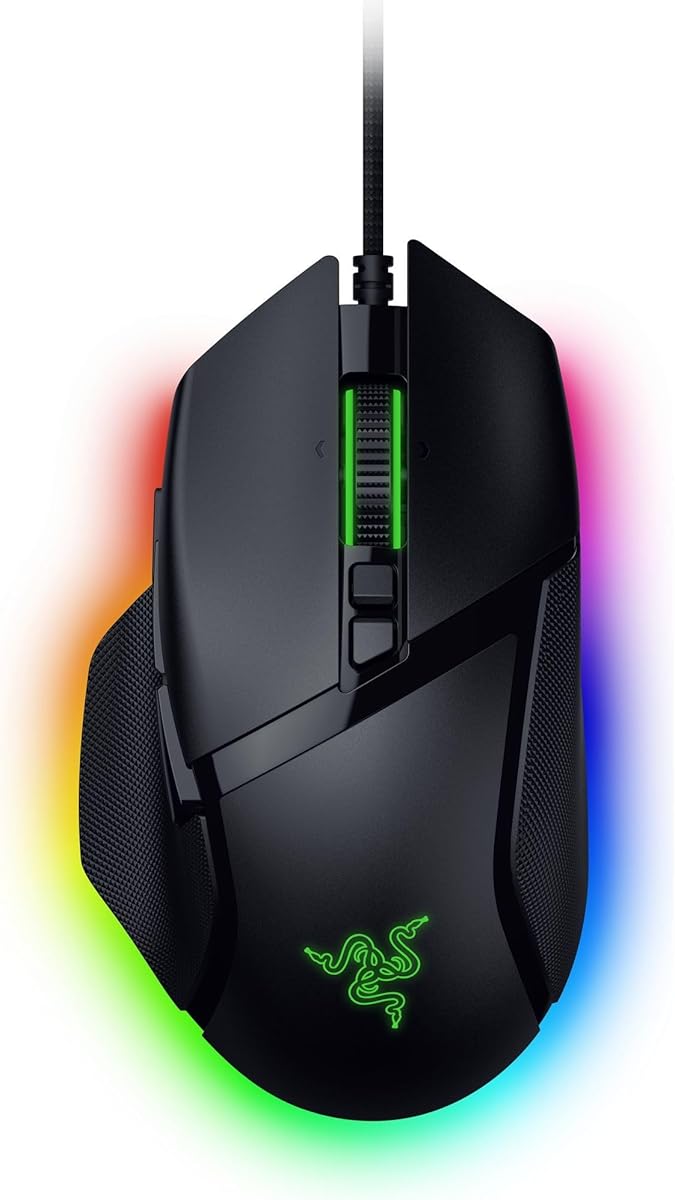
The Razer Basilisk V3 offers a compelling mix of performance and comfort at an accessible price point. Its 4.6 rating reflects strong user satisfaction with its button layout and scroll wheel functionality.
We may earn a commission when you buy through this link, at no additional cost to you.
With 11 programmable buttons including a unique multi-function trigger, this mouse supports complex gaming setups. The HyperScroll tilt wheel allows switching between tactile and free-spin modes instantly.
The ergonomic design includes a thumb rest that supports extended use, though larger hands may benefit more. Optical switches provide fast actuation, but users should note the reliance on proprietary software for full features.
This model is excellent for players who value customization and comfort without breaking the bank. It serves well for FPS and general gaming tasks where quick access to macros is beneficial.
The HyperScroll wheel enhances productivity by allowing effortless scrolling through long documents or rapid weapon switching in games.
RGB lighting zones can sync with game events, adding an immersive layer to the visual experience while highlighting key button presses.
We may earn a commission when you buy through this link, at no additional cost to you.
The Logitech G403 Hero combines lightweight design with high-end sensor technology. Rated 4.4, it appeals to gamers who prefer a lighter mouse without sacrificing performance or build quality.
We may earn a commission when you buy through this link, at no additional cost to you.
Its Hero 16K sensor tracks up to 16000 DPI with 1:1 accuracy, ensuring responsiveness during fast-paced movements. The rubber grips and contoured shape provide a secure hold for various hand sizes.
While it lacks the extensive button count of its siblings, the 6 programmable buttons cover most needs efficiently. The removable weight allows minor adjustments, though balance changes are limited compared to other models.
This mouse is best suited for FPS players who prioritize agility and comfort. Its durable construction and intuitive layout make it a solid daily driver for competitive and casual gaming alike.
The optical sensor eliminates smoothing and filtering, delivering raw input that translates directly to on-screen movement for precise aiming.
On-board memory saves settings directly to the device, allowing users to transfer profiles to different PCs without reinstalling software.
We may earn a commission when you buy through this link, at no additional cost to you.
The Logitech G203 is an accessible option for gamers entering the competitive space. With a 4.6 rating, it delivers reliable performance and features typically found in more expensive models.
We may earn a commission when you buy through this link, at no additional cost to you.
Its 8000 DPI sensor provides smooth tracking without filtering, suitable for most game genres. The mechanical switches ensure crisp clicks, while the LIGHTSYNC RGB adds visual flair to any desk setup.
Though it lacks advanced adjustments like weight systems, its standard form factor fits many hands comfortably. The six buttons offer essential customization, though it may feel limited for complex MMO needs.
This mouse is perfect for students or casual gamers seeking value. It proves that high-quality gaming peripherals do not require a premium budget when choosing wisely.
The optical sensor delivers zero smoothing, ensuring your movements are translated accurately to the screen without software interference.
RGB lighting can sync with screen colors or audio, enhancing the immersive atmosphere of your gaming environment with customizable effects.
We may earn a commission when you buy through this link, at no additional cost to you.
The Logitech G MX518 brings back a classic gaming mouse with modern internal components. Rated 4.5, it blends nostalgic comfort with high-precision sensor technology for a balanced experience.
We may earn a commission when you buy through this link, at no additional cost to you.
Equipped with the HERO 25K sensor, it tracks movements with extreme accuracy across various surfaces. The 8 programmable buttons allow for substantial customization without needing additional software every session.
Its weight and shape are reminiscent of older models, which some may find less agile than today's lightweight standards. However, the sturdy build ensures longevity and a secure grip during intense gaming.
This mouse suits users who prefer a traditional shape with modern reliability. It is an excellent choice for those transitioning from legacy systems or valuing robust construction over ultra-lightweight trends.
The HERO sensor captures over 17,000 frames per second, providing unparalleled precision that outperforms older legacy sensor technologies.
On-board memory allows you to save five profiles directly to the mouse, ensuring your settings travel with you to any computer.
We may earn a commission when you buy through this link, at no additional cost to you.
The Corsair Scimitar RGB Elite is built specifically for MMO and MOBA gamers needing extensive button access. Its 4.1 rating highlights its specialized utility for complex gameplay requiring rapid macro execution.
We may earn a commission when you buy through this link, at no additional cost to you.
It features 17 fully programmable buttons, including 12 side buttons that slide via a patented system to fit your hand size. This ergonomic adjustment ensures comfort even during long raid sessions.
The sensor offers 18,000 DPI tracking with 1 DPI steps for fine-tuned sensitivity. While the design is bulkier and may not suit FPS purists, it is unmatched for ability-heavy games.
This mouse is essential for players managing dozens of abilities simultaneously. Its robust build and unique button layout make it a standout choice for serious MMO enthusiasts.
The side button slider allows you to move the key cluster forward or backward, ensuring your thumb rests naturally on the buttons.
The optical sensor provides high accuracy for targeting enemies, while the high click rating ensures durability through repeated usage.
We may earn a commission when you buy through this link, at no additional cost to you.
The Razer Basilisk V3 35K pushes the boundaries of wired gaming mice with cutting-edge sensor technology. Rated 4.5, it offers granular control and advanced customization for discerning gamers.
We may earn a commission when you buy through this link, at no additional cost to you.
Its Focus Pro 35K sensor tracks on glass surfaces, supported by intelligent functions for better accuracy. The HyperScroll tilt wheel now features Smart-Reel mode, automating scroll mode based on speed.
Optical switches Gen-3 provide a 90-million click lifecycle with zero debounce delay, ensuring speed and reliability. The full underglow lighting adds depth, though it requires Synapse for full RGB control.
This model is ideal for competitive gamers who demand top-tier performance and customization. Its premium features justify the cost for those looking to maximize control and visual immersion.
The sensor supports 1-DPI steps and tracking on reflective surfaces, offering unmatched precision for pixel-perfect aiming in any environment.
Smart-Reel mode detects scrolling speed to auto-switch between tactile and free-spin modes, adapting instantly to your immediate needs.
We may earn a commission when you buy through this link, at no additional cost to you.
The Corsair NIGHTSWORD RGB introduces a unique smart weight system that adapts to your grip preferences. Rated 4.5, it focuses on balancing comfort and stability for various play styles.
We may earn a commission when you buy through this link, at no additional cost to you.
Its tuning system automatically detects the center of gravity, allowing weight adjustments between 119g and 141g. This precision tuning helps achieve the perfect balance for your specific hand movements.
The 18,000 DPI sensor ensures accurate tracking, while rubber grips inspired by pro sports equipment enhance control. While the base weight is high, it suits gamers who prefer a solid mouse feel.
This mouse is great for players who want a tailored weight setup without complex manual tweaking. Its focus on ergonomic stability makes it a strong candidate for strategic gameplay.
The software-driven tuning allows for real-time adjustments, ensuring the mouse feels balanced regardless of how you hold it.
Rubber grips provide a non-slip surface that improves accuracy during quick flicks and precise positioning in high-pressure moments.
We may earn a commission when you buy through this link, at no additional cost to you.
The Corsair M65 RGB Ultra is designed for FPS players requiring extreme responsiveness. Rated 4.2, it boasts a massive polling rate and durable build to withstand rigorous use.
We may earn a commission when you buy through this link, at no additional cost to you.
Its MARKSMAN sensor reaches 26,000 DPI, paired with AXON Hyper-Processing for faster response times. Optical switches ensure hyper-fast clicks without the mechanical lag found in traditional mice.
The aluminum frame offers longevity but adds weight, which may not suit everyone. The Sensor Fusion control combines gyro and accelerometer data for smoother tracking during repositioning.
This mouse is best for competitive FPS gamers who prioritize speed and durability. Its advanced processing capabilities provide a noticeable edge in rapid movement scenarios.
With an 8000Hz polling rate, the mouse registers inputs eight times faster than standard gaming mice for immediate feedback.
Sensor Fusion technology uses gyroscopic data to maintain accuracy even when the mouse is lifted and repositioned quickly.
We may earn a commission when you buy through this link, at no additional cost to you.
The Razer Basilisk V3 Customizable combines performance and value in a single package. Rated 4.6, it offers a balanced feature set for gamers seeking high specs without premium pricing.
We may earn a commission when you buy through this link, at no additional cost to you.
Its Focus Plus 26K sensor tracks movements with pixel-precise accuracy, while the optical switches provide fast actuation. The ergonomic design supports long sessions with a dedicated thumb rest.
The HyperScroll tilt wheel allows free-spinning or tactile control depending on the task. RGB lighting offers 11 zones for personalization, though it lacks the 35K sensor of the more expensive model.
This model is perfect for most users needing a reliable, feature-rich mouse. It serves as an excellent primary mouse for both gaming and productivity tasks.
The 26K DPI sensor ensures high precision for competitive gaming while maintaining smooth tracking for general office work.
The thumb rest and contoured shape reduce strain during extended use, making it suitable for long gaming marathons.
We may earn a commission when you buy through this link, at no additional cost to you.
Choosing the right analog gaming mouse involves evaluating several technical and ergonomic factors that impact gameplay experience.
The sensor determines how accurately the mouse tracks your movements. Higher DPI allows for greater sensitivity, but look for sensors with zero smoothing and filtering to ensure raw input.
Focus on optical sensors like HERO or PixArt for reliability. A high DPI is useful, but consistent tracking across different surfaces is more critical for performance.
Program buttons vary from six to over a dozen. Consider your game genre; FPS players often need fewer buttons, while MMO players benefit from side panels.
Software customization allows you to map macros and commands. Ensure the software is intuitive and supports on-board memory for portability.
The shape must match your hand size and grip style. Ergonomic mice reduce strain during long sessions, whereas ambidextrous designs suit varied users.
Look for textured grips and thumb rests. Comfort should take priority over aesthetics to prevent fatigue and improve consistency.
Weight affects control and speed. Some users prefer lightweight mice for quick movements, while others need a heavier mouse for stability.
Adjustable weight systems offer flexibility. High-quality materials like aluminum and braided cables ensure durability and resistance to wear.
Mechanical switches are standard, but optical switches offer faster actuation and longevity. Aim for switches rated for millions of clicks.
Double-click issues can ruin a mouse's utility. Check reviews for switch reliability before purchasing to ensure long-term satisfaction.
A higher polling rate means the mouse reports position more frequently, reducing input lag. Standard rates are 1000Hz, but some offer up to 8000Hz.
For competitive gaming, faster polling rates provide a tangible advantage. Ensure your PC can handle the increased data load without bottlenecks.
RGB lighting adds visual flair and can sync with games or music. While not essential for performance, it enhances the gaming environment.
Consider power consumption and software support. Customizable lighting can be disabled if you prefer a minimalist look.
Wired mice offer zero latency but have fixed cables. Look for paracord-style or Speedflex cables that reduce drag.
If wireless is an option, check for battery life and charging features. Wired options remain popular for competitive play due to reliability.
Always install the manufacturer's software to unlock full features. Configure your DPI settings and button mappings to match your preferred gaming style.
Clean the mouse regularly using a microfiber cloth. Dust and debris can accumulate under the feet, causing friction and affecting glide.
Store the mouse in a dry environment when not in use. Protect the cable from bending sharply to maintain the integrity of the internal wiring.
Optical switches use light beams to register clicks, offering faster actuation and longer lifespans compared to mechanical contacts. They reduce the risk of double-click issues common in traditional mechanical switches.
Many modern mice come with a weight system located in the base. Remove the cover and arrange the included weights to achieve your desired balance and feel for better control.
Yes, these mice are versatile and work well for daily computing. The high DPI and programmable buttons can improve productivity in office applications too.
Over time, surface wear or residue can reduce grip. Cleaning the mouse surface with alcohol wipes can restore texture and improve friction for better control.
Most gamers find a DPI between 400 and 1600 optimal for precision. Adjust based on screen resolution and personal preference for cursor movement speed.
Basic functionality works without software, but customization like RGB and macros require it. Most brands offer free apps to manage profiles and settings easily.
We reviewed ten top-performing mice including the Logitech G502 Hero, Razer Basilisk V3, and Corsair options. Each offers unique strengths for different gaming styles and budgets.
Prioritize ergonomics and sensor accuracy when choosing. A comfortable mouse with reliable tracking ensures consistent performance over long periods.
Check current availability and prices before buying to ensure you get the best value. Specifications and deals change frequently, so stay updated for the latest offers.