
Behringer X AIR XR18
4.6Editor score
Tablet controlled interface
16 Midas preamps
Built-in Wi-Fi router
This guide compares the top 10 digital mixing consoles for 2026. We evaluate features, audio quality, and connectivity to help you find the best mixer for your
Digital mixing consoles have revolutionized audio production by offering unprecedented control over sound shaping and routing. Whether you are managing a live band or recording a podcast, the right console ensures clarity and professionalism.
We have compared ten leading models based on their channel counts, preamp quality, and digital processing capabilities. Each product was evaluated for its suitability in various environments ranging from portable gigs to fixed installations.
Every pick highlights key strengths and potential limitations to guide your decision-making process. Please note that pricing and availability can fluctuate, so verify current details before purchasing your next audio solution.
4.6Editor score

4.7Editor score

4.5Editor score
The following table provides a side-by-side comparison of all ten models featured in this guide. It outlines their core specifications to help you quickly identify the model that aligns with your technical requirements.




The Behringer X32 stands out as a top contender in the digital mixing console market with its impressive channel count and flexible routing. It has earned a high rating from users who appreciate its professional-grade sound quality and extensive feature set.
We may earn a commission when you buy through this link, at no additional cost to you.
Its core strength lies in the 32 MIDAS-designed mic preamps which deliver clean and transparent audio capture. The 25 fully automated motorized faders provide instant visual feedback allowing for efficient scene management during complex live performances.
While the console offers incredible power it does require significant time to master due to its deep menu structure and vast array of options. This complexity might overwhelm beginners but is acceptable given the level of control it provides for professionals.
This console is ideal for touring bands churches and recording studios needing reliable high-performance mixing. We recommend it for users willing to invest time in learning its capabilities for superior audio results.
The MIDAS-designed preamps ensure low noise and high headroom for pristine audio capture across all input channels.
Users can save and recall complex setups instantly thanks to the 100 total recall scenes and automated fader movements.
We may earn a commission when you buy through this link, at no additional cost to you.
The Yamaha DM3 Standard brings renowned sound quality to a smaller form factor making it suitable for venues with limited space. Its 4.4 rating reflects user satisfaction with its portability and the high fidelity of its audio processing.
We may earn a commission when you buy through this link, at no additional cost to you.
This unit shines with its 96kHz sample rate which ensures detailed audio reproduction for critical listening applications. The 9 inch best screen simplifies navigation allowing users to access parameters quickly without digging through submenus.
However the 22 channel limit may restrict growth for larger productions requiring extensive inputs. Additionally the smaller size means fewer physical controls compared to larger consoles which can slow down adjustments during fast-paced events.
It is a great choice for small bands churches or mobile DJs needing quality sound in a portable package. Consider this model if you prioritize size and ease of use over maximum channel capacity.
The 96kHz sample rate delivers crystal clear sound that meets professional standards for recording and live reinforcement.
The large touchscreen allows for quick adjustments and intuitive control over EQ and dynamics settings.
We may earn a commission when you buy through this link, at no additional cost to you.
The Behringer WING is designed for large scale productions where extensive mixing capabilities are essential. With a rating of 4.2 it offers a powerful solution for professional audio engineers needing to manage complex sound systems.
We may earn a commission when you buy through this link, at no additional cost to you.
Its standout feature is the 48 channel configuration supported by MIDAS PRO preamps and outputs which deliver exceptional clarity and dynamic range. The Klark Teknik SuperMAC technology ensures ultra-low jitter and latency over long cable runs.
Despite its power the WING is quite bulky and expensive which might not suit smaller operations. The size requires significant stage or rack space and the cost is higher than mid-range options available today.
This console is perfect for large tours festivals and professional studios requiring maximum routing flexibility. It is recommended for users who need top-tier performance and have the budget and space to accommodate it.
AES50 ports allow up to 144 input and output signals over long distances with minimal signal degradation.
24 motorized faders are split into configurable sections allowing users to tailor the console to their specific needs.
We may earn a commission when you buy through this link, at no additional cost to you.
The Yamaha MGX12 offers a compelling value proposition with a perfect 5.0 rating from users. It combines modern connectivity with essential digital features making it an excellent entry point into digital mixing.
We may earn a commission when you buy through this link, at no additional cost to you.
Its dual USB-C interface supports 4K video capture and audio streaming which is ideal for content creators and hybrid events. The included software bundle provides immediate recording and editing capabilities out of the box.
While it handles basic mixing tasks well it lacks the deep EQ and dynamics processing found in higher-end models. This limitation may be acceptable for simple setups but restricts flexibility for complex audio production needs.
Ideal for small businesses podcasters and YouTubers needing a versatile all-in-one solution. This console is highly recommended for those who prioritize ease of use and modern connectivity features.
Users receive Cubase Al and other tools to start recording and producing immediately without additional purchases.
USB-C interfaces provide fast data transfer and power for connecting to laptops and mobile devices easily.
We may earn a commission when you buy through this link, at no additional cost to you.
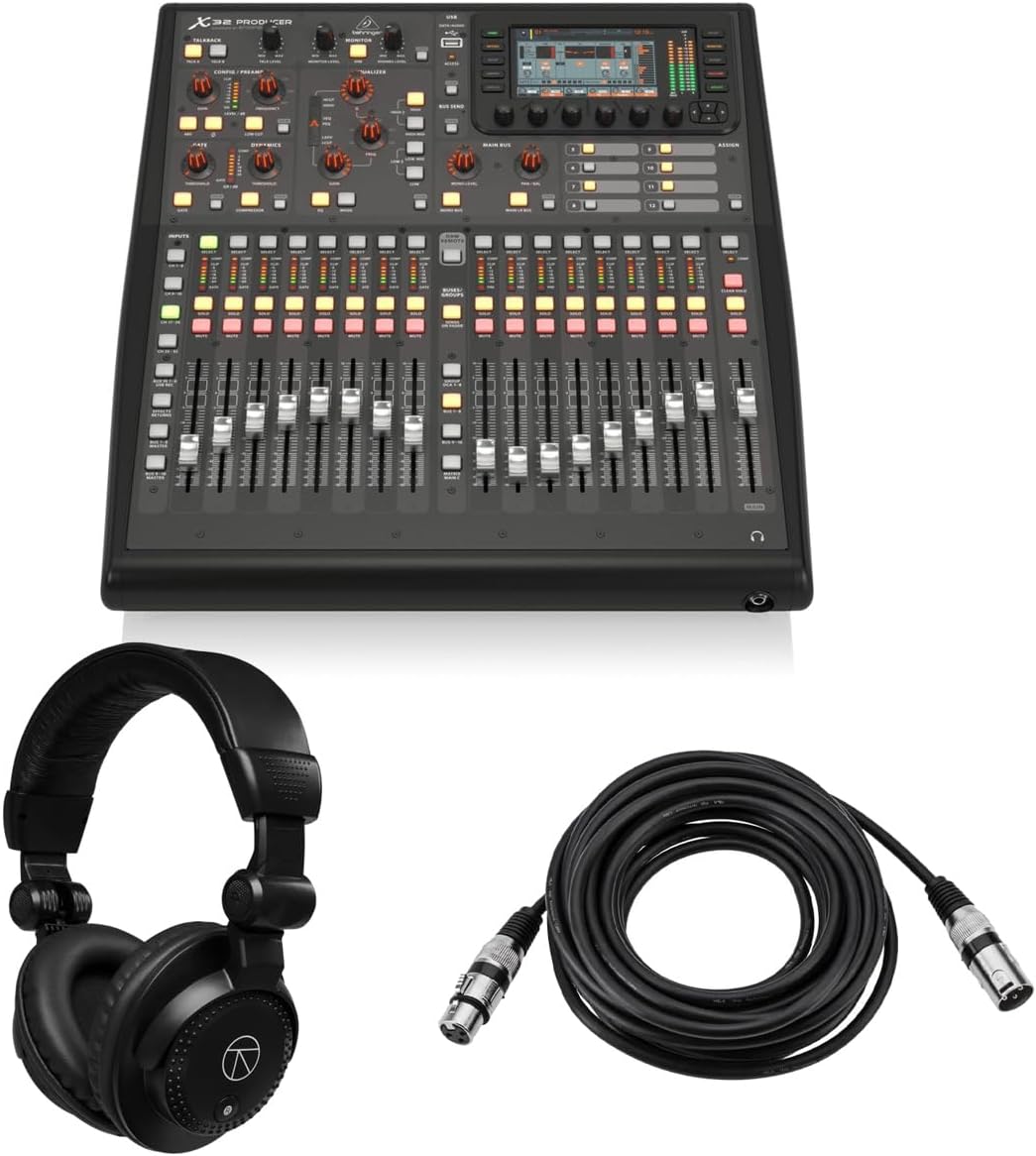
The Behringer X32 PRODUCER has achieved a perfect 5.0 rating reflecting its reliability and performance in professional environments. It is a rack-mountable version of the popular X32 designed for installation in tight spaces.
We may earn a commission when you buy through this link, at no additional cost to you.
It features 16 MIDAS preamps and a 5 inch display allowing for high-quality sound processing in a compact chassis. The inclusion of headphones and cables in the bundle adds significant value for users starting fresh.
The smaller display may limit visibility compared to larger units and require closer attention during operation. Some users might prefer a larger screen for complex tasks but the robust functionality compensates for this trade-off.
This model is perfect for permanent installations in venues or studios where space is at a premium. We highly recommend it for professionals needing a reliable high-performance console with practical value-added accessories.
Rack-mountable construction saves floor space while maintaining full access to essential mixing features.
Included accessories like headphones and cables provide a complete setup right out of the box for immediate use.
We may earn a commission when you buy through this link, at no additional cost to you.
The BEHRINGER X32 COMPACT maintains a high 4.7 rating by compressing the power of the full X32 into a portable frame. It is a favorite among mobile engineers needing professional tools without heavy baggage.
We may earn a commission when you buy through this link, at no additional cost to you.
It offers 40 input channels and MIDAS preamps in a smaller package making it versatile for various gigs. The 17 motorized faders provide essential control while saving physical space compared to standard consoles.
The compact layout can feel dense and may slow down adjustments during high-pressure situations. While functional it requires familiarity to navigate efficiently and some users prefer larger displays for visual clarity.
Best for touring musicians and DJs who need robust audio control in a transportable unit. Choose this if you prioritize performance and features over physical size and ease of use.
Engineers can take high-end routing and sound quality on the road with this durable portable unit.
Despite its size it retains critical faders and buttons needed for quick scene changes and adjustments.
We may earn a commission when you buy through this link, at no additional cost to you.
The PreSonus StudioLive offers solid integration with digital audio workstations making it suitable for hybrid recording and live setups. Its 3.9 rating suggests it performs well for specific users but lacks the polish of newer models.
We may earn a commission when you buy through this link, at no additional cost to you.
Key features include XMAX preamps and Fat Channel processing which provide clear sound and dynamic control. The 18-in/16-out USB interface allows for multi-track recording directly into a computer without extra hardware.
Some users may find the interface dated compared to modern touch screens or newer operating systems. The lower rating reflects a need for better software support or more intuitive control methods in some scenarios.
This console is recommended for home studios and small venues using PreSonus software ecosystems. It works best for those who need basic multi-track recording and simple mixing capabilities.
The USB interface enables direct recording of multiple channels for later editing and post-production.
Each channel features dedicated EQ and dynamics controls for precise sound shaping without external plugins.
We may earn a commission when you buy through this link, at no additional cost to you.
The Behringer X AIR XR18 delivers high-quality audio at a budget price point earning a strong 4.6 rating. It relies on wireless control via tablets making it incredibly portable and space-saving for various applications.
We may earn a commission when you buy through this link, at no additional cost to you.
It features 16 Midas preamps ensuring high-quality sound capture and a built-in Wi-Fi router for direct connection. This eliminates the need for external networking equipment reducing cost and complexity for users.
The lack of physical faders can be a disadvantage for users preferring tactile feedback during live mixing. Reliance on tablets also means you must keep your device powered and connected to maintain full control.
Perfect for mobile DJs small bands and home studios needing affordable high-quality mixing. It is a top pick for those who value wireless flexibility and preamp quality over physical knobs.
Integrated Wi-Fi allows control from anywhere in the venue without needing external network infrastructure.
Users get professional preamps and routing capabilities at a fraction of the cost of larger consoles.
We may earn a commission when you buy through this link, at no additional cost to you.
The Allen & Heath Qu-5 offers exceptional audio quality through 96kHz FPGA processing and earns a solid rating from professionals. It is designed for demanding environments where precision and low latency are critical for success.
We may earn a commission when you buy through this link, at no additional cost to you.
Its flexible mixing architecture supports up to 38 inputs and includes robust connectivity options like AES3 and SLink. The motorized faders and 7-inch capacitive touchscreen provide a modern and efficient control experience.
Despite its strengths the high price point and complex setup can be barriers for casual users. The specialized nature of its expansion ports may require additional hardware investments for full utilization.
Ideal for professional live sound and high-end studio applications requiring top-tier audio performance. We recommend it for serious engineers who need advanced processing power and reliable connectivity.
XCVI FPGA technology ensures ultra-low latency and high fidelity for professional live sound applications.
SLink expansion ports allow for easy expansion of inputs and outputs without compromising signal quality.
We may earn a commission when you buy through this link, at no additional cost to you.
The QSC TouchMix-16 simplifies digital mixing with an intuitive interface designed for quick setup and operation. It holds a 4.4 rating for users who appreciate its straightforward approach to managing audio without complex programming.
We may earn a commission when you buy through this link, at no additional cost to you.
It supports 20 full function inputs and includes gate and compressor on every channel which helps control dynamics easily. The TRS aux outs are capable of driving wired In Ear Monitors directly which adds significant convenience.
Some users might find the limited customization compared to other units restrictive for complex routing needs. While it handles standard tasks well it may not offer the deep control required for advanced sound engineering.
Best for churches small events and users needing a reliable simple solution. We recommend it for those who value quick setup and robust performance over deep feature customization.
TRS aux outputs drive In Ear Monitors directly reducing the need for extra distribution equipment.
Built-in gate and compressor on all channels ensures consistent sound quality with minimal manual adjustment.
We may earn a commission when you buy through this link, at no additional cost to you.
Selecting the right digital mixing console requires understanding your specific needs regarding channel count and processing capabilities. This guide outlines the critical factors to consider before making a purchase.
Determine the number of inputs you need based on your typical lineup. A larger stage requires more mic preamps while a smaller band might only need a few. Also check the outputs for connecting monitors and recorders.
Choose a console that offers enough headroom for future growth without overspending on unused capacity.
Microphone preamps are the first point of contact for your audio so quality matters greatly. Look for models with high-quality discrete designs known for low noise and transparency. This ensures clean capture even at high gain settings.
Prioritize preamps that offer sufficient gain range to handle dynamic microphones without distortion.
Digital consoles use processing to shape sound through EQ compression and effects. Look for systems that offer sufficient DSP resources to run all needed plugins simultaneously without latency. This affects the overall responsiveness of the mix.
Ensure the console can handle your full workflow without crashing or lagging during critical moments.
The interface controls how quickly you can adjust settings during a live performance. Touchscreens can be intuitive but physical faders offer better tactile feedback. Consider how often you need to make rapid changes during shows.
A workflow that matches your habits will reduce fatigue and increase consistency over long sessions.
Modern consoles rely heavily on networking for remote control and recording. Look for robust USB interfaces and Ethernet or SLink expansion options. This allows you to integrate with laptops and other digital gear seamlessly.
Verify that the protocols support your recording setup and remote control needs effectively.
Professional consoles often endure travel and varying environmental conditions. Look for sturdy chassis construction and reliable components that withstand daily use. Durability ensures consistent performance over years of service.
Select a unit built to withstand the rigors of your specific operating environment.
Digital consoles rely on firmware updates to improve functionality and fix bugs. Check if the manufacturer provides regular updates and support. A good software ecosystem adds value and longevity to your investment.
Ensure the console supports current operating systems and offers useful editing tools.
Price often correlates with features but evaluate what you actually need versus what is included. Balance cost against essential features like preamp quality and processing power. Value is determined by how well it meets your requirements.
Invest in a console that offers the best balance of performance and cost for your specific application.
Start by connecting all input sources and verifying signal flow before powering on the main system. Ensure all cables are secure to prevent noise interference during operation. Proper grounding helps avoid hum and buzz issues.
Regularly update the firmware to the latest version to access new features and security patches. Backup your settings to a computer or cloud storage to prevent loss during unexpected power failures. This saves time during critical shows.
Clean the console regularly with a dry cloth to remove dust and oils from controls. Avoid using harsh chemicals on touchscreens as they can degrade the protective coatings. Proper storage in a controlled environment extends the lifespan significantly.
Analog consoles use physical knobs and cables to route sound whereas digital consoles use software processing for routing and effects. Digital consoles offer more memory for saving scenes and allow for more complex signal processing.
Yes most digital consoles feature a built-in USB audio interface that connects to your computer. This allows you to record multiple tracks simultaneously directly from the mixer to your digital audio workstation.
For a small venue a mixer with 16 to 24 channels is usually sufficient. This allows you to mix a standard band setup with vocals and basic instruments without overcomplicating your signal chain.
Digital consoles can have a steeper learning curve than analog units due to their complex menu structures. However mastering them allows for greater efficiency and creativity once you become familiar with the layout and features.
Yes digital mixers support wireless microphone inputs just like analog ones. You simply connect the receiver outputs to the line or mic inputs on the console and adjust gain settings appropriately.
MIDI inputs allow you to control external devices like lighting or sound effects from the mixing console. They can also be used to automate certain parameters or recall scenes during a performance automatically.
Choosing the right digital mixing console depends heavily on your specific needs and budget constraints. The models highlighted in this guide offer a wide range of capabilities to suit various professional and hobbyist applications.
Prioritize preamp quality and channel count to ensure your console can grow with your ambitions. A reliable console will serve as the foundation for all your audio production efforts for years to come.
Remember to check current prices and availability as they fluctuate frequently. Take the time to test units personally if possible to confirm they meet your ergonomic and functional requirements.