
Digital Calendar 10.1" Touchscreen
4.4Editor score
No subscription fees
Weekly meal manager
Gift for moms
Digital touchscreen organizers transform chaotic households into streamlined command centers. These smart devices replace paper planners with vibrant displays that sync schedules, track chores, and display cherished photos all in one sleek interface.
We evaluated ten leading models based on screen quality, sync capabilities, and ease of use. Each product was compared against real family needs to ensure they deliver on promises of better organization and reduced household stress.
Each pick highlights specific strengths like no subscription fees or advanced chore tracking. Prices and availability change frequently so check the latest deals before purchasing to ensure you get the best value for your needs.
4.4Editor score

4.4Editor score

4.6Editor score
As an Amazon Associate we earn from qualifying purchases.
This side-by-side comparison highlights key specifications across all ten models so you can quickly identify which device matches your family size and smart home setup needs.


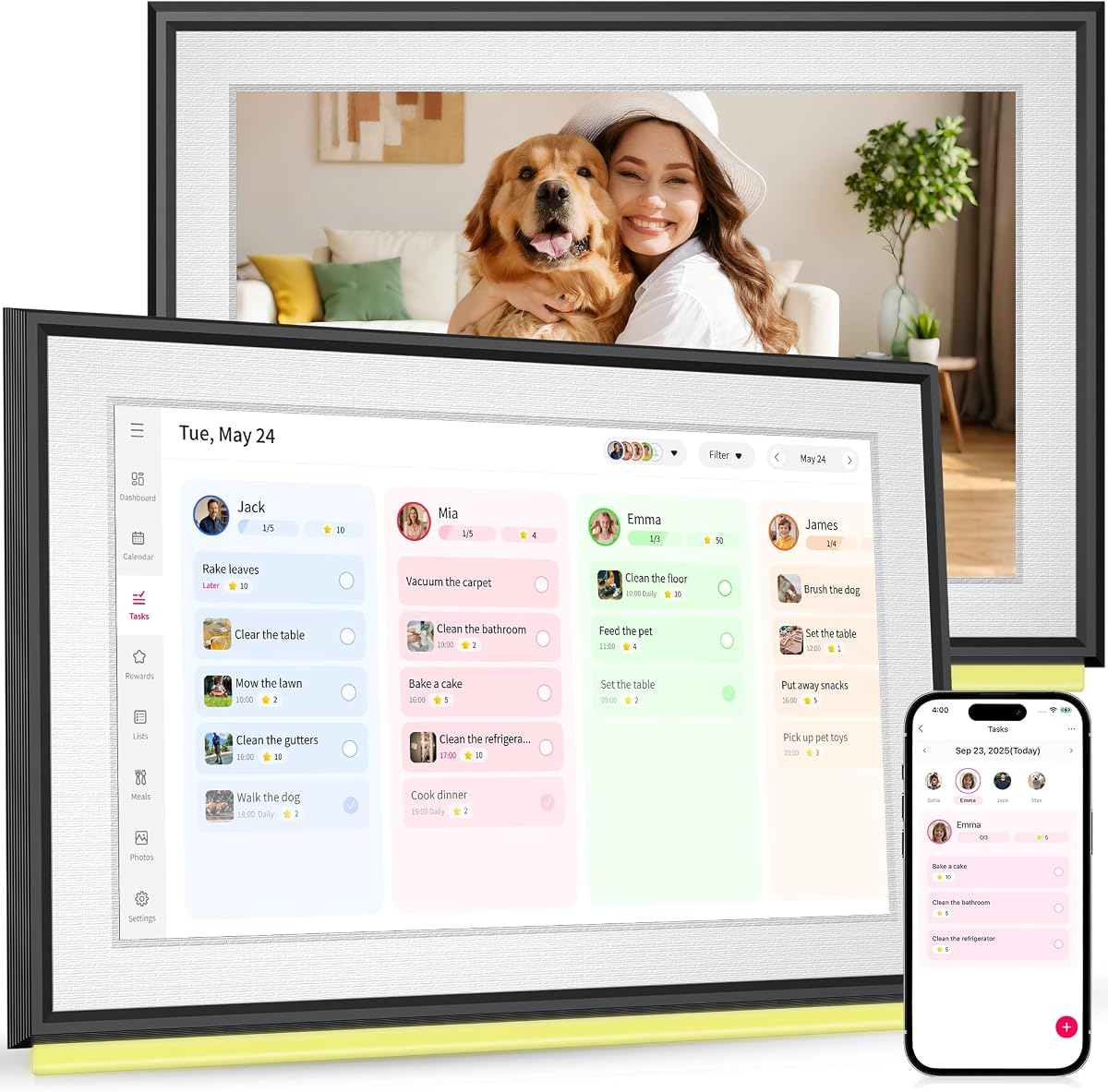

This 15.6-inch digital calendar stands out as the top choice for families seeking a central command hub. Its high rating reflects reliable performance in syncing schedules and engaging children with interactive chores.
We may earn a commission when you buy through this link, at no additional cost to you.
The real-time sync with major platforms like Google and Outlook ensures every family member sees updates instantly. The built-in chore chart gamifies household tasks making kids eager to earn points and build responsibility.
While the device requires batteries for some features the trade-off is a subscription-free experience that keeps costs down. The AI photo enhancement adds warmth by automatically improving family memories displayed on the idle screen.
It is ideal for busy households needing a reliable way to track events and meals. Families who value clear visuals and minimal monthly fees will find this organizer delivers lasting value.
The integrated meal planning and chore tracking create a unified space that reduces daily coordination stress and helps everyone stay on the same page.
The glare-free HD touchscreen ensures visibility from multiple angles in bright kitchens while the sleek design fits seamlessly into modern home decor.
We may earn a commission when you buy through this link, at no additional cost to you.
The Skylight Calendar offers a premium experience with a focus on ease of use and visual appeal. Its white finish and smart display make it a standout fixture on any kitchen wall.
We may earn a commission when you buy through this link, at no additional cost to you.
Features like Disney Mode bring a playful element that encourages family engagement through animated screensavers. The ability to access the calendar via app means updates can be made on the go.
Premium features like Magic Import require a Plus Plan which adds ongoing cost. However the core scheduling and photo frame functions work without extra fees for basic household organization.
Families who want a polished look and are willing to pay for a smooth user experience will appreciate this device. It is particularly suitable for homes with young children who enjoy themed interactions.
Iconic characters and animations transform routine checks into fun moments helping kids connect with the calendar and remember their daily tasks easily.
Weekly meal displays reduce decision fatigue for dinner by providing visual cues that keep everyone informed and engaged in the weekly menu plan.
We may earn a commission when you buy through this link, at no additional cost to you.
This 10.1-inch organizer delivers incredible value by unlocking all major features without subscription fees. It is an ideal entry point for families new to digital planning tools.
We may earn a commission when you buy through this link, at no additional cost to you.
The meal manager with automatic grocery list generation saves significant time on weekly planning. Kids enjoy the star reward system which builds discipline through positive reinforcement during daily tasks.
The smaller screen size means less visual impact on larger walls but it remains readable for close viewing. Users should ensure their space accommodates the dimensions before purchase.
Budget-conscious shoppers looking for a reliable hub will find this model meets their needs effectively. It serves as a thoughtful gift for parents seeking organization without financial strain.
Recipes upload to the device and automatically convert ingredients into a shopping list making store trips faster and reducing forgotten items.
Sleep modes conserve power while ensuring the calendar wakes to show weather and reminders exactly when the family needs them most.
We may earn a commission when you buy through this link, at no additional cost to you.
This model focuses heavily on task management and family synchronization. It provides a clear 1080P display that makes reading lists and calendars easy for all ages.
We may earn a commission when you buy through this link, at no additional cost to you.
The AI-powered import feature helps users quickly populate schedules from other sources saving time during setup. With 32GB storage the photo frame mode can hold thousands of memories for daily rotation.
Chore tracking is present but less gamified than top competitors. Users who prioritize robust to-do lists over interactive games may prefer this straightforward approach to organization.
Best for households that need a reliable task tracker alongside calendar events. Its dual mounting options allow it to fit on desks or walls depending on room layout.
Ample space allows for high-resolution family photos to be stored directly on the device without needing cloud compression or external drives.
Whether mounted on a wall or sitting on a desk the unit fits easily into various home setups without requiring complex hardware installation.
We may earn a commission when you buy through this link, at no additional cost to you.
Rated highly by users this 15.6-inch planner offers a straightforward intuitive interface that works well for all family members. Its perfect score reflects strong reliability and user satisfaction.
We may earn a commission when you buy through this link, at no additional cost to you.
Color coding helps distinguish tasks quickly making the calendar easy to read at a glance. The included sleep wake mode ensures the device stays fresh without wasting energy overnight.
Users should note that it uses a standard US plug which limits international compatibility without adapters. Despite this the lack of monthly fees keeps it accessible for long-term family planning.
Ideal for those seeking a simple yet effective organizational tool. Its bright display and custom list options make it versatile for different household routines and event tracking.
Assigning colors to different family members provides visual separation that reduces confusion and helps everyone find their own responsibilities instantly.
Beyond daily chores users can create lists for travel holidays and shopping ensuring no detail is overlooked during busy periods.
We may earn a commission when you buy through this link, at no additional cost to you.
This 10.1-inch planner combines kitchen utility with family organization. It stands out for its recipe storage which simplifies meal prep by keeping favorite cuisines right at hand.
We may earn a commission when you buy through this link, at no additional cost to you.
Remote photo sharing allows distant relatives to upload memories directly reducing the need for manual transfers. The responsive touch screen ensures smooth operation even when hands are busy cooking.
The warranty is limited to one year compared to longer terms on other models. Users should consider this when weighing long-term reliability against the initial lower cost.
Perfect for kitchens where recipe management is a priority. The minimalist design blends into decor while providing essential scheduling tools for busy households.
Grandparents can share photos of grandchildren instantly which bridges distance and creates a cozy atmosphere with shared memories on display.
Support for both horizontal and vertical mounting gives flexibility to fit narrow hallways or wide kitchen counters.
We may earn a commission when you buy through this link, at no additional cost to you.
This massive 21.5-inch screen turns the wall into a full smart dashboard offering more than just calendar functions. It appeals to tech-forward families wanting deeper home integration.
We may earn a commission when you buy through this link, at no additional cost to you.
The Android Mode allows installing third party apps turning the calendar into a true command center. Built-in voice control lets users check schedules or lights hands-free during busy mornings.
The high price reflects its advanced capabilities. It is not the best choice for simple scheduling but excels where full home control and extensive customization are needed.
Best for large rooms where the display can be appreciated. Families wanting a future-proof hub that grows with their smart home needs will find this model compelling.
Widgets for lights cameras and doorbells centralize controls so parents can monitor security and adjust settings without leaving the kitchen.
Access to Play Store apps means the device can run music or news apps creating a truly connected media experience for the whole family.
We may earn a commission when you buy through this link, at no additional cost to you.
The 15.6-inch version balances size and features by including a sturdy stand for table use. This flexibility makes it suitable for both wall mounting and countertop placement.
We may earn a commission when you buy through this link, at no additional cost to you.
Voice commands streamline daily interactions allowing hands-free updates or checks. The white finish matches modern decor making it a stylish addition to any home office or kitchen.
The dual mode system can be complex for non-technical users initially. However once configured the widgets and app downloads provide a highly personalized user experience.
Ideal for tech enthusiasts who want a smart hub with calendar functions. The included stand adds versatility for users who do not want to drill holes in walls.
The durable stand allows desk placement perfect for home offices where users need quick access to schedules and lists without wall mounting.
Voice integration helps busy parents set reminders or check weather without touching the screen keeping the device hygienic and accessible.
We may earn a commission when you buy through this link, at no additional cost to you.
This model is known for continuous improvement through software updates that unlock new features like rewards and meals. The R-1.5.0 version brings enhanced capabilities to the table.
We may earn a commission when you buy through this link, at no additional cost to you.
Syncing with major platforms ensures compatibility with existing calendars. The free app allows remote management making it easy to update schedules from work or the shop.
Users must avoid rapid operations after startup to prevent lag. Also the lack of wall mounting hardware limits its placement to flat surfaces which may not suit all spaces.
Great for budget buyers who want a basic digital hub without complex installation. The dynamic photo screensaver adds charm to any room where it is placed.
Regular updates add new tasks and features over time keeping the device fresh and improving functionality without needing a new purchase.
Color-coding tasks by family member helps everyone instantly recognize their own responsibilities making collaboration smoother in busy households.
We may earn a commission when you buy through this link, at no additional cost to you.
A large format option designed for visibility across a room. The 1920x1080P IPS screen offers wide viewing angles making it easy to read from anywhere.
We may earn a commission when you buy through this link, at no additional cost to you.
Themes like Minimalist or Family help personalize the look to match the home. The grandparent-friendly interface ensures older users can navigate menus without confusion.
Premium customization features require a subscription but core syncing is free. Users should verify which features they need before purchasing to avoid unexpected costs.
Best for spacious kitchens or offices needing a big view. The included stand allows for easy table use without complex installation steps.
The wide IPS panel ensures clear text from far away so family members can read events while cooking or walking through the kitchen.
Adjustable themes allow users to match the device aesthetics with their home style making technology blend better into living spaces.
We may earn a commission when you buy through this link, at no additional cost to you.
Selecting the right organizer depends on your family size and technical needs. This guide breaks down the key factors to consider for a smart choice.
Screen size affects readability and placement options. Larger screens like 21.5 inches offer better visibility but require significant wall space whereas smaller 10-inch models fit easily on counters.
Look for HD or IPS displays with anti-glare coatings to ensure clarity in bright kitchens.
Many models offer full features without monthly fees while others lock advanced tools behind subscriptions. Checking what is included upfront helps avoid ongoing costs.
Prefer devices that sync calendars and manage chores for free if long-term budget is a priority.
Interactive features like star rewards or points systems motivate children to complete tasks. This gamification turns household chores into fun activities.
Ensure the device has clear task assignment options and visual progress tracking for kids.
Compatibility with Google Outlook and iCloud ensures everyone sees updates instantly. Real-time sync prevents missed appointments and duplicate entries.
Choose a model that supports your existing calendar apps to save setup time.
When not in use these devices display photos which adds warmth to the home. Remote sharing capabilities allow relatives to upload memories directly.
Check storage limits and compatibility with cloud services like Google Photos for seamless memory management.
Some devices support wall mounting while others rely on stands. Consider your layout to decide between a permanent wall fixture or a flexible desk unit.
Ensure the package includes necessary hardware to avoid extra purchases.
Premium models often include voice control for checking schedules or managing smart home devices. This convenience allows hands-free operation during busy times.
Check for compatibility with Google Gemini or other assistants if voice commands are important.
A simple interface ensures all family members from kids to grandparents can use the device effectively. Look for intuitive menus and touch responsiveness.
Test the app and on-device controls if possible to verify ease of use.
Begin by connecting the device to your Wi-Fi network through the on-screen setup menu. Download the companion app on your phone to enable remote syncing and photo uploads.
Invite family members to access the calendar via email invites or app links. Encourage kids to use their assigned color codes for tasks to build responsibility early.
Clean the screen gently with a soft dry cloth to avoid scratches. Use the sleep settings to conserve energy at night while keeping morning reminders active.
Many models offer full features without any monthly fees allowing basic syncing and planning. Some premium options charge for extras like animated themes or advanced imports. Check the product details to confirm which features are included in the base price.
Yes most digital organizers support real-time sync with Google Calendar. iCloud and Outlook. Connect your account during setup to ensure all events load automatically. Updates made on your phone will appear instantly on the device screen.
Interactive chore charts and reward systems make these devices ideal for kids. They can track tasks and earn stars which builds habits positively. The large touchscreens are easy to use for children.
Simple menus and voice controls help non-technical users navigate easily. Look for devices with clear icons and large text. Many models also offer setup guides to help everyone get started quickly.
Yes all models function as digital photo frames when not in use. You can upload photos manually or via the companion app. Some devices even support remote sharing for distant family members to send pictures.
Use a soft dry cloth to gently wipe the screen. Avoid harsh chemicals or wet wipes that may damage the coating. The anti-glare surfaces are durable but should be treated with care to maintain clarity.
We found that the 15.6-inch Digital Calendar Wall Touch Screen offers the best balance of features and ease of use. It supports seamless syncing and interactive chore tracking for all ages.
Budget buyers should consider the 10.1-inch Touchscreen for its full feature set without subscriptions. For those wanting advanced smart home control the Apolosign 21.5-inch model provides deep customization.
Check current prices and availability before purchasing as deals change often. Select the device that fits your layout to keep your family organized efficiently.