
Zobirez 420W 10-Port Fast USB Charging Station for Multiple Devices, Black
4.5Editor score
Fast GaN charging technology
Includes ten short cables
Compact desktop footprint
This guide compares ten top-rated charging stations for Chromebooks, evaluating capacity, safety, cable management, and build quality to help you choose the
Finding the right charging station for Chromebooks can transform how you manage devices in classrooms or offices. A good unit keeps cords organized and ensures every device powers up safely without cluttering your workspace with messy cables.
We analyzed ten highly-rated products based on capacity, durability, and ease of use. Our list covers fixed racks, mobile carts, and compact desktop units designed specifically for schools and professional environments needing reliable power.
Each pick highlights key features like port counts, safety certifications, and storage options. Note that availability and pricing can change, so always verify current details before purchasing to ensure you get the best value for your needs.
4.5Editor score

4.7Editor score
4.8Editor score
The following table provides a side-by-side look at every model we reviewed. It highlights key specifications like slot counts, power sources, and design features to help you quickly identify the unit that fits your specific environment.


The POCHAR 8-Device Universal AC Laptop Charging Station stands out as a top choice for managing multiple Chromebooks in busy environments. Rated highly for its build quality and convenience, this unit offers immediate usability without the need for tools or complex setup steps.
We may earn a commission when you buy through this link, at no additional cost to you.
Its wide-angle slots are specifically designed to accommodate Chromebooks up to 14 inches and 1.4 inches thick, a feature often missing in cheaper units. The included surge-protected power strip ensures that your devices are safe from voltage spikes while charging, adding a layer of reliability essential for school or office settings.
While the unit is robust, its compact design means it takes up some desk space. However, this trade-off is acceptable given the stability and durability it provides for daily high-use scenarios. It effectively keeps cords organized and prevents the mess often associated with multiple individual chargers.
This station is best suited for classrooms, offices, or shared workspaces where reliability and ease of access are priorities. If you need a stationary solution that can handle daily wear and tear while keeping your Chromebooks organized, this POCHAR model is a strong recommendation.
The slots are engineered to fit larger laptops securely, ensuring that even thicker Chromebooks fit snugly without falling over.
Integrated surge protection safeguards your expensive devices from electrical surges, providing peace of mind during storms or grid fluctuations.
We may earn a commission when you buy through this link, at no additional cost to you.
This 10-Device Laptop & Tablet Charging Station offers a versatile hybrid approach by combining AC outlets with USB ports. It is designed for environments where users need to charge both laptops and smaller accessories simultaneously, making it a practical choice for offices or libraries.
We may earn a commission when you buy through this link, at no additional cost to you.
The built-in cable management system is a standout feature that reduces clutter significantly. By routing cords through the vertical slots, it keeps the workspace tidy and minimizes the risk of tripping or tangled wires. The surge-protected power strip ensures safety for all connected devices.
One minor limitation is that the vertical slots might not fit extremely thick laptop cases as easily as wider designs. Additionally, assembly is required, which adds a small step to the setup process. Despite this, the space-saving design makes it a valuable asset for crowded desks.
This station is ideal for mixed-device environments like teacher workstations or reception areas. If you need a tidy solution that handles laptops and phones alike without taking up excessive floor space, this model provides excellent organization and safety.
With six AC outlets and four USB ports, you can charge a variety of devices without needing extra adapters for every single unit.
The open layout allows for quick insertion and removal of devices, which is perfect for settings where students or staff frequently swap units.
We may earn a commission when you buy through this link, at no additional cost to you.
For those needing to store a large number of devices in a small footprint, the 14-Slot Open Charging and Storage Rack is an excellent choice. It features fourteen independent slots that allow for simultaneous power delivery and storage, meeting high-density charging demands efficiently.
We may earn a commission when you buy through this link, at no additional cost to you.
The open-frame design is crucial for effective heat dissipation, preventing overheating during long charging sessions. This is vital for maintaining device health in classrooms where computers might charge overnight or over long breaks. The adjustable leveling feet ensure stability even on uneven floors.
A significant consideration is that this unit does not include a power strip, so users must provide their own power source. While this offers flexibility, it requires planning for outlet access. The open design also means devices are visible, which might be a concern for some security-conscious environments.
This rack is perfect for libraries, conference rooms, or offices where organization and cooling are more important than enclosure. If you want a sturdy, safe solution that prioritizes airflow and storage density, this steel rack is a top contender.
The open frame allows natural ventilation around devices, ensuring they stay cool and safe during extended periods of charging.
Adjustable leveling feet allow the rack to remain stable on uneven surfaces, preventing wobbling that could lead to device tipping.
We may earn a commission when you buy through this link, at no additional cost to you.
The Workington 8-Device Open Desktop School Charging Cart is designed with device protection in mind. Its padded shelves prevent accidental scratches and damage to Chromebooks or tablets, making it a thoughtful choice for educational environments where devices are handled frequently by students.
We may earn a commission when you buy through this link, at no additional cost to you.
The included power strip adds convenience, allowing users to plug in devices directly without hunting for extra adapters. Removable plastic dividers offer flexibility to accommodate different device sizes, while cord clips help keep the charging area organized. This unit is built for easy access in student-heavy areas.
One drawback is that the plastic dividers may not be as durable as steel alternatives over long-term heavy use. Assembly is also required, which takes time and effort. However, the protective features make it a strong candidate for places where physical safety of devices is a top priority.
This cart is ideal for classrooms, computer labs, or student resource centers. If you need a reliable station that prioritizes device protection alongside easy access and organization, the Workington model offers a balanced set of features for school settings.
Soft pads on the shelves provide a cushioned surface that protects device bottoms from scratches during charging or storage.
Plastic clips at the back help manage device cords neatly, keeping the workspace tidy and reducing tangling risks.
We may earn a commission when you buy through this link, at no additional cost to you.
The 20-Port 600W Moezuti Charging Station stands out as a top budget option without compromising on power. It features a mix of USB-A and USB-C ports, ensuring compatibility with almost any device, and comes with ten short cables to save you the hassle of buying them separately.
We may earn a commission when you buy through this link, at no additional cost to you.
With two high-speed 65W USB-C ports, it can even power many modern laptops efficiently. The GaN technology ensures safe, cool operation even under heavy load, which is crucial for reliability. The one-piece slots made of flame-retardant ABS add to the durability and safety of the unit.
While it offers incredible value, the compact size means it cannot hold devices upright without the cables plugged in tightly. It is more of a charging hub than a storage rack. However, for the price and included accessories, it remains the best budget pick for versatile charging needs.
This station is perfect for home offices, nightstands, or small workspaces where you need to charge multiple devices quickly. If you want a high-performance hub that saves time and money with included cables, the Moezuti 20-Port station is an unbeatable choice.
Ten short mixed cables are included, allowing you to connect a variety of devices instantly without searching for extra cords.
Two USB-C ports deliver 65W of power, sufficient for charging many laptops quickly alongside phones and tablets.
We may earn a commission when you buy through this link, at no additional cost to you.
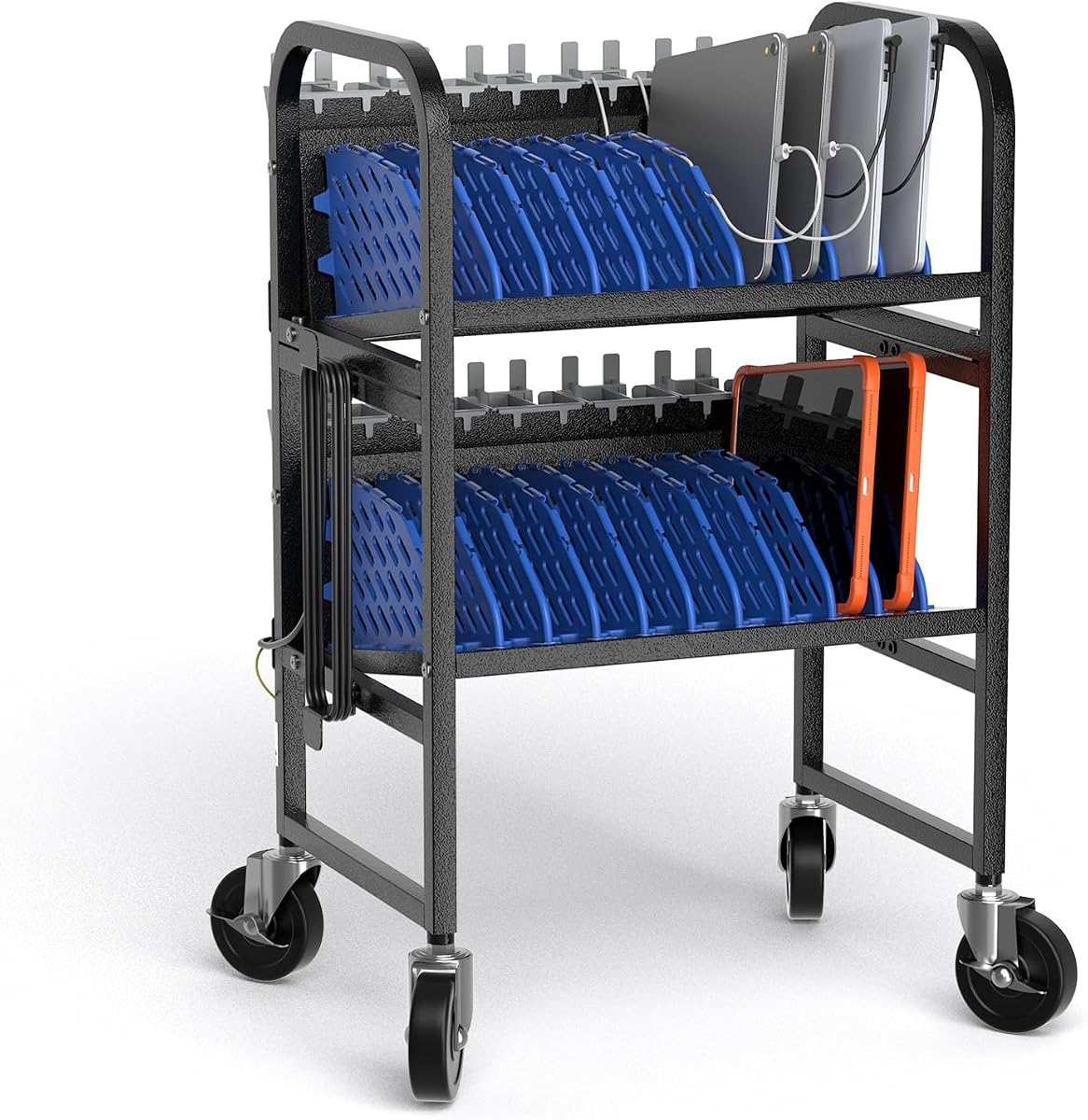
The POCHAR 20-Device Laptop Charging Cart is a premium mobile solution designed for environments that need to move devices between rooms. Its heavy-duty construction ensures longevity, while the open ventilated design keeps Chromebooks cool during charging sessions in active spaces.
We may earn a commission when you buy through this link, at no additional cost to you.
With twenty slots and adjustable dividers, it accommodates devices ranging from tablets to 15.6-inch laptops. The built-in 20-outlet power strip provides safe and organized charging. Locking casters ensure stability when parked, making it safe for high-traffic areas like school hallways.
While the price is higher than desktop units, the mobility and capacity justify the investment for institutional use. Assembly is required, which may take time, but the result is a robust piece of equipment. It simplifies logistics by allowing teachers to roll a full cart to their classroom.
This cart is best for schools, training centers, or conference rooms requiring flexible device management. If you need a portable, secure, and high-capacity solution for Chromebooks, this POCHAR cart is the top premium choice on the market.
Four durable swivel casters allow effortless movement between spaces, while locking wheels keep the cart stable when stationary.
Twenty individual slots plus a built-in power strip ensure every device charges safely and securely without clutter.
We may earn a commission when you buy through this link, at no additional cost to you.
The POCHAR 10-Device Open Charging Station offers a compact yet sturdy solution for organizing Chromebooks on desks. Its steel frame body ensures stability, while the built-in cable clips help eliminate the tangled cords that often ruin workspaces. The open structure promotes airflow to prevent overheating.
We may earn a commission when you buy through this link, at no additional cost to you.
One standout feature is the additional storage tray below the main slots, which holds chargers or accessories. This extra storage makes it a complete hub for your devices. It fits up to 14-inch screens, making it versatile for various Chromebook models and tablets used in offices.
The lack of a built-in power strip means you will need to plug your own power source into the unit or use extension cords. However, its sturdy design and space-saving profile make it a solid option for smaller teams or individual workstations needing order.
This station is ideal for office desks, libraries, or conference rooms with limited space. If you want a durable, tidy setup that keeps ten devices organized and cool without consuming too much room, this POCHAR model is a reliable choice.
Built-in clips on the back organize cords neatly, reducing visual clutter and preventing tangles around the workspace.
A lower tray provides extra space for chargers and accessories, keeping everything in one convenient and accessible location.
We may earn a commission when you buy through this link, at no additional cost to you.
Belkin is a well-known name in power protection, and this 10-Device Charging Station reflects that reputation. It offers automatic surge protection to shield your Chromebooks from voltage spikes, which is vital for expensive electronic equipment. The design fits standard AV carts for seamless transport.
We may earn a commission when you buy through this link, at no additional cost to you.
The unit is mountable, offering flexibility to attach it to desks or carts to save floor space. Wide-angle slots accommodate most cases and devices up to 1.18 inches thick, ensuring versatility. It is designed specifically for well-connected classrooms where organization is key to efficiency.
While it is a premium product, the lack of extra storage trays might be a limitation for some users. The price is also higher than generic brands. However, for users prioritizing brand trust and safety features, this station delivers proven quality and peace of mind.
This station is best for schools and offices relying on trusted equipment. If you value brand reputation and safety features like surge protection over extra storage, the Belkin station is a dependable choice for managing ten devices securely.
Mounting hardware allows the unit to be securely attached to tables or carts, freeing up valuable surface space.
Automatic surge protection protects connected devices from voltage spikes, ensuring safety during storms or power fluctuations.
We may earn a commission when you buy through this link, at no additional cost to you.
The Zobirez 420W 10-Port Fast USB Charging Station is a powerhouse for quick charging needs. It features dual 65W GaN ports capable of charging laptops quickly, alongside other ports for phones and tablets. This makes it ideal for users who need to power up devices rapidly before meetings.
We may earn a commission when you buy through this link, at no additional cost to you.
Ten short mixed cables are included, so you do not need to buy separate ones for each device. The one-piece slots made of flame-retardant ABS ensure safety and durability. Non-slip pads keep the unit stable on any surface, preventing accidental slips during use.
While it offers great charging speed, it is designed more as a hub than a storage rack. The short cables can limit reach if devices are far from the unit. However, for fast, safe, and organized charging on a desk, this unit delivers high performance.
This station is perfect for professionals, nightstands, or desks needing quick power. If you prioritize fast charging technology and safety features for multiple devices, the Zobirez station is a practical and powerful addition to your workspace.
GaN technology enables faster charging with less heat, ensuring efficient and safe power delivery for all connected devices.
Includes ten short mixed cables so you can connect all your devices immediately without searching for additional accessories.
We may earn a commission when you buy through this link, at no additional cost to you.
This 10-Device Mobile Charging Station is designed for ease of use and mobility. Its standout feature is tool-free assembly, meaning you can set it up quickly without tools. The cart rolls smoothly on casters and includes locking wheels to keep it stationary when needed.
We may earn a commission when you buy through this link, at no additional cost to you.
The unit features a bottom shelf for extra storage of adapters and accessories, maximizing utility. Rounded edges ensure safe handling in busy classrooms, reducing the risk of injury. The surfaces are easy to wipe clean, which is essential for shared environments.
While it is not as heavy as industrial steel carts, its light build makes it easier to move. It requires an external power source, but the convenience of mobility outweighs this minor detail. It is a practical, user-friendly option for schools and offices.
This cart is ideal for classrooms needing quick setup and daily transport. If you value easy assembly, safety features like rounded edges, and mobility for your Chromebooks, this 10-Device charging cart is a fantastic and efficient choice.
Get set up quickly without any tools thanks to a straightforward design that prioritizes speed and convenience.
Rounded edges prevent injuries in busy classrooms, ensuring a safer environment for students and staff handling the cart.
We may earn a commission when you buy through this link, at no additional cost to you.
Selecting the right charging station requires considering several factors such as capacity, power sources, and build quality. This guide breaks down the key elements to look for to ensure you make an informed decision.
Determine how many Chromebooks you need to charge simultaneously. Some models hold eight to ten devices, while others support twenty or more. Ensure the station has enough slots to meet your daily needs without overcrowding.
Choose a unit with a slot count that matches or slightly exceeds your number of devices to allow for growth and flexibility.
Decide between units with built-in power strips and those that require external power. Built-in strips simplify setup but may limit outlet options. External power units offer flexibility but need careful cord management.
Units with integrated power strips are generally easier to use and reduce the need for extra wall outlets in your workspace.
Look for materials like steel or heavy-duty plastics that can withstand daily use in busy environments. Industrial-grade materials ensure longevity and reduce the risk of the unit failing during critical times.
Prioritize sturdy steel frames or robust plastics that promise long-term reliability in high-traffic areas like schools.
A good station should include clips, channels, or trays to organize cords. Poor cable management leads to tangling and tripping hazards, which can be dangerous in classrooms.
Opt for designs that integrate cable clips or routing systems to keep the workspace clean and safe.
Overheating can damage batteries over time. Open-frame designs or slots with adequate spacing help air circulate around devices, keeping them cool during long charging sessions.
Choose an open design that promotes airflow to ensure devices stay safe and healthy during extended charging periods.
If you need to move the station between rooms, look for units with wheels and handles. Mobile carts offer flexibility for dynamic environments but may cost more and require assembly.
Select a mobile cart if you need to transport devices regularly, ensuring it has locking wheels for stability when parked.
Surge protection is vital to prevent damage from voltage spikes. Some units also offer enclosed designs to secure devices when not in use, adding an extra layer of protection.
Always choose a model with surge protection to safeguard your valuable Chromebooks from electrical damage.
Begin by unpacking the station and placing it on a stable, flat surface. If your unit requires assembly, follow the provided instructions carefully to ensure all parts are securely fastened before plugging in any devices.
Plug the charging station into a grounded outlet and distribute the charging cables neatly. Use any included cable clips to route cords so they do not tangle or create trip hazards for students or staff.
Regularly wipe down the station with a damp cloth to remove dust and debris. Check cables and power strips periodically for signs of wear and replace any damaged components to maintain safety and efficiency.
Yes, most modern charging stations have universal AC outlets that work with any device using a standard power brick. Just ensure the slots are wide enough to fit the thickness of your specific Chromebooks.
Some models come with cables, while others require you to use your own adapters. Check the product details to see if cables are included before purchasing to avoid additional costs.
Yes, most stations include surge protection and smart chips that stop charging once the battery is full. This safety feature prevents overheating and makes overnight charging safe for devices.
A cart is mobile with wheels and is designed to move between rooms. A desktop station stays in one place and is smaller, ideal for fixed workstations or small spaces.
Use the built-in cable clips and trays to route wires neatly. Labeling cables or using color-coded cords can also help keep everything tidy and easy to manage.
Many stations have wide-angle slots designed to accommodate devices with cases. Check the maximum thickness specs to ensure your specific cases will fit securely.
We reviewed ten top-rated options ranging from compact desktop units to large mobile carts. The POCHAR 8-Device Universal Station and the 20-Port Moezuti stand out for their balance of safety and capacity.
When choosing, prioritize capacity and build quality to ensure your investment lasts. Also consider whether you need mobility or a fixed solution to fit your workspace needs perfectly.
Prices and availability can change, so always check current listings before buying. This guide helps you find the perfect fit for your Chromebooks while keeping your space safe and organized.