
ASUS ROG Strix H270-F Gaming
4.2Editor score
AURA Sync RGB lighting
SupremeFX S1220A audio
Safe Slot PCIe reinforcement
This guide compares the top ten H270 motherboards for reliability, features, and performance to help you choose the right platform for your Intel build today.
Selecting the right H270 motherboard is essential for building a stable and capable PC system. These boards support sixth and seventh generation Intel processors with plenty of options for storage and expansion needs.
We have analyzed ten distinct models ranging from established brands to alternative options. Our comparison focuses on socket support, expansion slots, connectivity, and overall build quality to help you decide.
Each pick highlights specific strengths and trade-offs relevant to different user requirements. Please note that availability and specific terms may change over time as market conditions evolve.
4.2Editor score

4.4Editor score

4.0Editor score
The following table provides a side-by-side overview of the ten selected H270 motherboards to highlight their core specifications and intended use cases at a glance.




The ASUS Prime H270-PLUS stands out as a reliable and well-rounded option for users seeking a solid foundation. It offers a high user rating of 4.4 which reflects consistent performance across various builds and usage scenarios.
We may earn a commission when you buy through this link, at no additional cost to you.
Key strengths include the integration of Dual M.2 slots which provide exceptional speed and convenience for modern storage solutions. The board also supports Intel Optane Memory to accelerate system responsiveness without replacing primary storage drives.
Honest trade-offs involve the limited RGB lighting options which might not appeal to builders focused on aesthetic customization. Additionally the audio codec is standard rather than premium but remains functional for most general multimedia tasks.
This board is ideal for users who value stability connectivity and ease of use over flashy gaming aesthetics. We recommend it for office workstations home servers or balanced gaming rigs where reliability is paramount.
Dual M.2 slots allow for high-speed NVMe drives alongside traditional SATA storage for a versatile setup.
5X Protection III hardware safeguards ensure longevity and reliability against electrical faults and physical stress.
We may earn a commission when you buy through this link, at no additional cost to you.
The ASUS ROG Strix H270-F Gaming targets enthusiasts who want superior audio and visual customization. With a 4.2 rating it delivers on its promises of enhanced multimedia experiences and sturdy hardware design for heavy components.
We may earn a commission when you buy through this link, at no additional cost to you.
Its standout features include the ROG exclusive SupremeFX S1220A audio driven by Japanese capacitors for crystal clear sound. The board also integrates AURA Sync RGB lighting allowing seamless synchronization across compatible peripherals for a unified look.
Trade-offs include the higher cost which may be unnecessary for basic users and the need to navigate software for full lighting customization. The Safe Slot PCIe is robust but the added metal framing slightly reduces available clearance in tight cases.
We recommend this board for gamers and creators who prioritize audio fidelity and system aesthetics. It is a strong choice for those building a dedicated gaming rig where every component contributes to the overall experience.
The SupremeFX S1220A codec with Japanese capacitors provides high fidelity audio for gaming and media.
Safe Slot PCIe features injection molded metal framing to protect against damage from heavy graphics cards.
We may earn a commission when you buy through this link, at no additional cost to you.
The MSI H270 Gaming PRO Carbon offers a compelling balance of features and affordability for entry-level gamers. Its 4.0 rating suggests dependable performance for standard tasks without breaking the bank on extra luxury features.
We may earn a commission when you buy through this link, at no additional cost to you.
Key strengths include Gaming LAN with LAN protect which helps maintain stable network connections during online sessions. The Mystic Light sync feature allows users to customize RGB lighting across their system with ease and flexibility.
Honest trade-offs involve the simpler power delivery which may not support heavy overclocking and the limited number of expansion slots for future upgrades. The audio is boosted but lacks the refinement of premium dedicated audio sections.
We recommend this board for users seeking a budget-friendly gaming build with decent network and audio features. It is an excellent starting point for those who want a branded gaming aesthetic without the premium price tag.
Gaming LAN with LAN protect ensures reliable connectivity for online gaming and streaming needs.
Mystic Light sync provides an easy way to match RGB colors across compatible components and devices.
We may earn a commission when you buy through this link, at no additional cost to you.
The ASRock H270 PRO4 delivers a straightforward and functional platform for users who prioritize storage and connectivity. With a 4.2 rating it is known for offering a practical layout that supports a wide range of components without complications.
We may earn a commission when you buy through this link, at no additional cost to you.
Key strengths include the provision of six SATA3 ports which is useful for users needing multiple hard drives or SSDs. The board also features an Ultra M.2 slot for high-speed storage integration ensuring flexibility for modern storage configurations.
Trade-offs involve the absence of RGB lighting which might be a downside for those seeking visual customization. The audio implementation is basic and suitable for standard use but lacks the enhancements found on higher-end gaming boards.
We recommend this board for builders focused on utility and storage capacity over aesthetics. It is a practical choice for home servers multimedia centers or workstations where functionality and reliability are the primary concerns.
Six SATA3 ports provide ample connectivity for multiple storage devices in a single system.
The Ultra M.2 slot supports Gen3 x4 speeds for fast NVMe drive integration.
We may earn a commission when you buy through this link, at no additional cost to you.
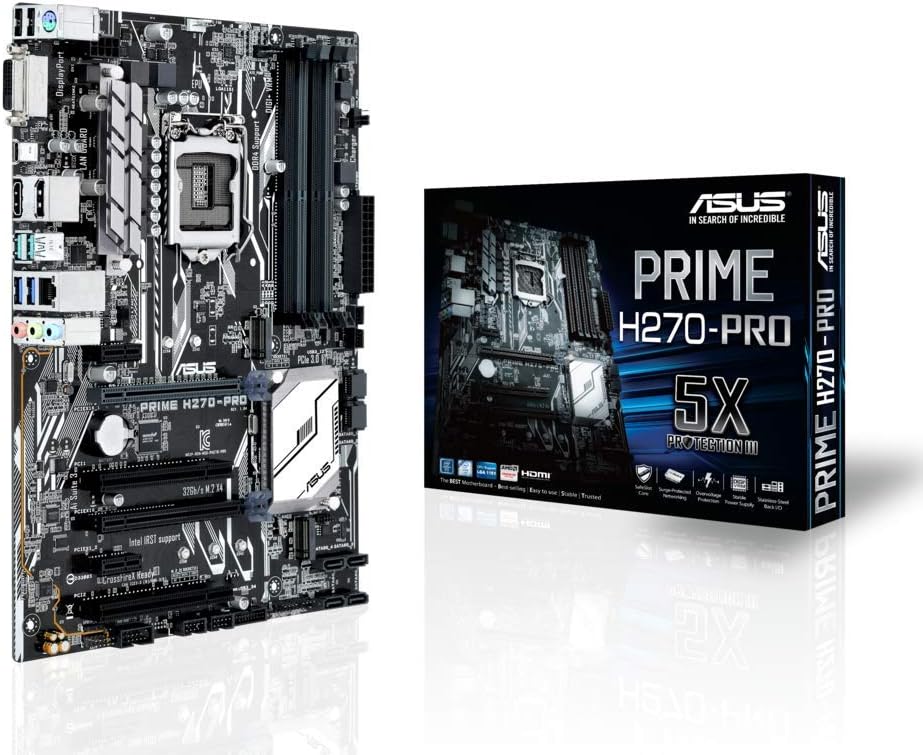
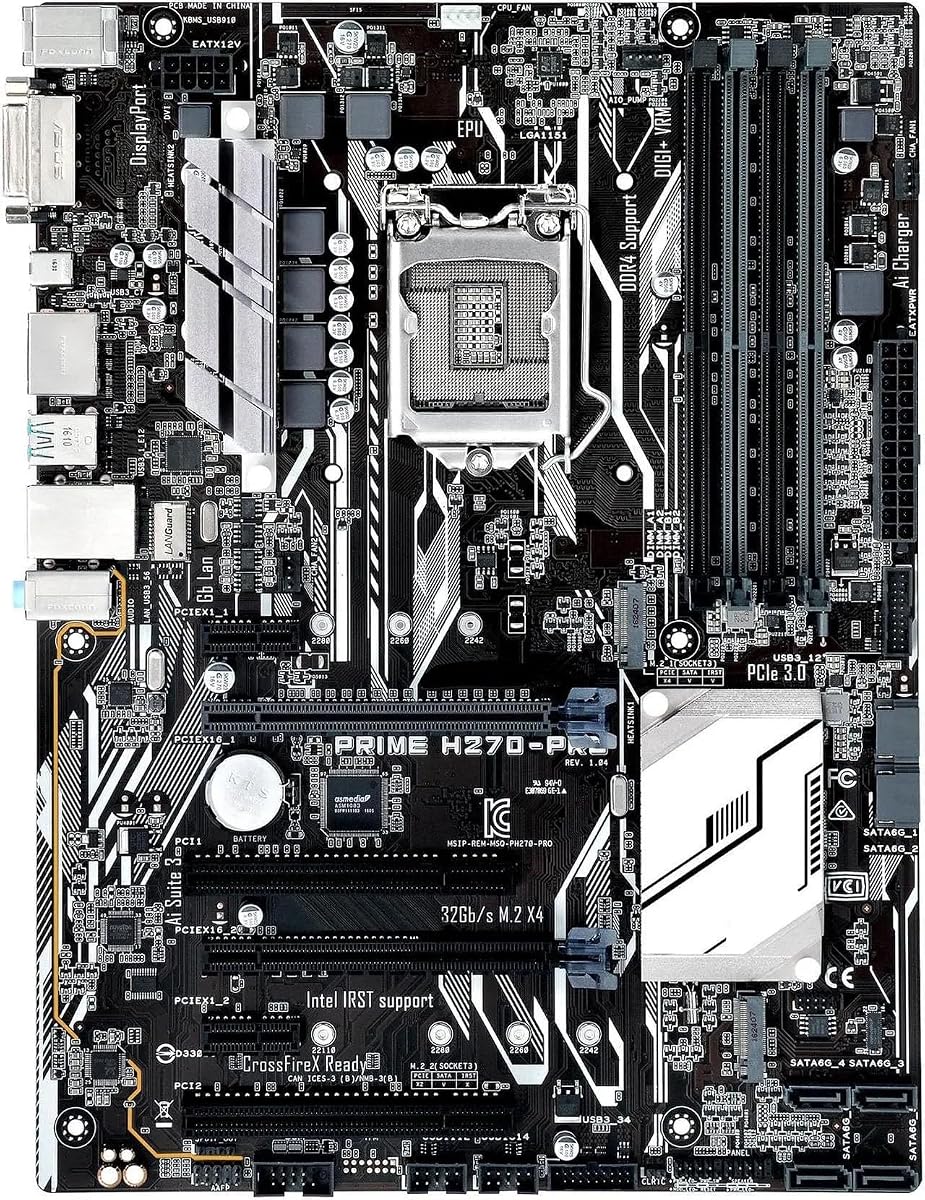
The Asus Prime H270-PRO is a robust board designed for users who need reliable connectivity and durability. A 4.3 rating indicates satisfaction with its performance and build quality across various application scenarios and workloads.
We may earn a commission when you buy through this link, at no additional cost to you.
Its key strengths include the inclusion of a USB 3.1 Type C port which offers modern connectivity options for peripherals. The board also supports up to 64GB of DDR4 memory making it suitable for multitasking and professional applications.
Honest trade-offs involve the lack of internal M.2 slots which requires external solutions for NVMe storage. The internal expansion slots are standard and may not be enough for users planning complex multi-GPU setups.
We recommend this board for users needing high memory capacity and modern USB connectivity. It is well-suited for office environments and productivity workstations where stable operation and robust connectivity are essential.
The USB 3.1 Type C port allows for fast data transfer and compatibility with newer devices.
5X Protection III provides hardware safeguards against electrical issues and physical damage.
We may earn a commission when you buy through this link, at no additional cost to you.
The GIGABYTE GA-H270-Gaming 3 focuses on providing strong networking capabilities for online gaming and streaming. With a 4.3 rating users appreciate the reliable performance of the integrated Killer E2500 network controller and fast I/O options.
We may earn a commission when you buy through this link, at no additional cost to you.
Key strengths include the Killer E2500 Gaming Network which helps prioritize game traffic and reduce latency during critical moments. The board also features USB3.1 Type-C for rapid data transfer and modern peripheral compatibility.
Trade-offs involve the lack of premium audio features which might be a drawback for audiophiles and the mid-range power design which limits extreme overclocking potential. The Crossfire support is useful for multi-GPU setups but may not be needed for casual gamers.
We recommend this board for users who prioritize network performance and connectivity. It is a great fit for competitive gamers and streamers who need a stable and responsive internet connection alongside a reliable system base.
Killer E2500 networking helps ensure smooth online play by prioritizing game data traffic.
USB3.1 Type-C connectivity supports modern devices and fast data transfer speeds.
We may earn a commission when you buy through this link, at no additional cost to you.
This motherboard is designed specifically for users needing a replacement for an existing damaged unit. It focuses on resolving contact issues and restoring system stability with optimized power and advanced heatsink designs to ensure reliable performance.
We may earn a commission when you buy through this link, at no additional cost to you.
Key strengths include its ability to replace chips damaged by poor contact or short circuits restoring full functionality to the system. The advanced heatsink design increases heat dissipation area ensuring effective thermal management under heavy loads.
Honest trade-offs involve its specific purpose which means it may not be ideal for general upgrades. The documentation may be limited and troubleshooting tips are necessary for successful installation and initial boot testing.
We recommend this board for users looking to restore an old system rather than build a new one. It is a practical solution for extending the life of a PC by addressing common hardware failures and stability issues.
Designed to resolve contact issues and replace damaged chips to restore system operation.
Advanced heatsink design improves heat dissipation for stable performance under load.
We may earn a commission when you buy through this link, at no additional cost to you.
The H270 Performance Motherboard 1151 offers a standard platform for users seeking basic connectivity and CPU support. It supports common sixth and seventh generation Intel processors and provides essential features like M.2 storage and DDR4 memory.
We may earn a commission when you buy through this link, at no additional cost to you.
Key strengths include support for a wide range of CPUs such as i5 and i3 models making it versatile for various builds. The board also supports up to 64GB of DDR4 memory which is helpful for multitasking and memory-intensive applications.
Honest trade-offs involve limited documentation which may require careful setup and testing for compatibility. The component selection is basic and may not include advanced features like RGB lighting or premium audio codecs found on branded boards.
We recommend this board for users needing a simple and functional platform for general computing tasks. It is a practical option for basic home PCs or budget builds where core functionality is more important than extra features.
Supports common Intel i5 and i3 processors for flexible system configurations.
Up to 64GB DDR4 support ensures readiness for demanding memory applications.
We may earn a commission when you buy through this link, at no additional cost to you.
The H270 Motherboard 64GB LGA 1151 is a basic option designed for users seeking a straightforward entry into Intel platforms. It provides essential support for DDR4 memory and standard LGA 1151 processors without complex additional features.
We may earn a commission when you buy through this link, at no additional cost to you.
Key strengths include support for up to 64GB of DDR4 memory making it suitable for users who need high capacity for workloads. The standard LGA 1151 socket ensures compatibility with a wide range of Intel Core processors.
Honest trade-offs involve the lack of modern connectivity features such as USB 3.1 or advanced audio options. The design is functional but lacks the customization and aesthetic elements that many users expect from newer motherboards.
We recommend this board for basic builds where core functionality is the only priority. It is a simple choice for users who need a platform to run standard applications without requiring advanced performance or connectivity.
A straightforward design makes installation and configuration easier for basic users.
Support for high memory capacity allows for future-proofing in memory-intensive tasks.
We may earn a commission when you buy through this link, at no additional cost to you.
The H270-PLUS Motherboard LGA 1151 is a flexible option that supports a wide range of processors for diverse building needs. It offers essential features like M.2 storage support and high DDR4 memory capacity for standard computing tasks.
We may earn a commission when you buy through this link, at no additional cost to you.
Key strengths include compatibility with various Intel i3 i5 and i7 models allowing users to choose their preferred processor. The M.2 ATX layout provides a balance of modern storage speed and traditional expansion slots for versatility.
Honest trade-offs involve the lack of detailed documentation which may require technical knowledge for troubleshooting. The feature set is basic and may not include advanced audio or networking features found on branded gaming boards.
We recommend this board for users seeking a flexible platform with high memory support. It is a practical option for custom builds where CPU choice is critical and basic modern connectivity is sufficient for daily tasks.
Compatible with a wide range of i3 i5 and i7 processors for flexible system building.
M.2 ATX layout ensures support for fast NVMe drives alongside traditional storage.
We may earn a commission when you buy through this link, at no additional cost to you.
Selecting the right H270 motherboard requires understanding key factors such as chipset capabilities, expansion options, and build quality to ensure compatibility with your intended use case.
Ensure the motherboard supports the specific Intel Core generation you plan to use as most H270 boards target sixth and seventh generation processors with LGA 1151 sockets. Check the manufacturer's CPU support list to confirm compatibility before purchase to avoid boot issues or performance limitations.
Always verify the CPU socket type and generation support to guarantee your processor will function correctly on the selected motherboard platform.
Look for DDR4 support and check the maximum memory capacity to ensure you can run your applications smoothly. Some boards support up to 64GB of DDR4 which is beneficial for multitasking and professional workloads requiring large amounts of RAM.
Choose a board that supports your required memory speed and capacity to prevent bottlenecks during intensive computing tasks.
Consider the number of M.2 slots available for NVMe SSDs to take advantage of faster boot and load times. Boards with multiple M.2 slots offer more flexibility for high-speed storage solutions without sacrificing SATA capacity.
Prioritize models with dedicated M.2 slots for modern storage performance and ensure they do not conflict with other expansion slots.
Evaluate the rear I/O panel for USB versions such as USB 3.0 and USB 3.1 Type C to ensure compatibility with your peripherals. Modern connectivity options like HDMI and DisplayPort are important if you plan to use integrated graphics or multiple monitors.
Select a board with sufficient USB and video ports to match your peripheral setup without needing additional adapters or hubs.
Gaming boards often include dedicated audio codecs like SupremeFX or Audio Boost to provide better sound quality for headphones and speakers. Look for Ethernet controllers with gaming features to ensure stable and low latency connections during online sessions.
Prioritize boards with robust audio and networking components if multimedia or online gaming is a primary use case for your system.
Features like Safe Slot Core or 5X Protection III ensure that your components are safeguarded against physical and electrical damage. These hardware-level safeguards contribute to the longevity of your build and help prevent common failures over time.
Choose boards with reinforced slots and protection technologies to maintain system reliability and extend the lifespan of your components.
Ensure the board matches your case size such as ATX or MicroATX to allow for proper installation and airflow management. Standard ATX boards offer more expansion slots but require larger cases while smaller options save space in compact builds.
Confirm your case supports the motherboard form factor to avoid clearance issues during assembly and ensure proper cooling airflow.
Compare the features against the price to determine the value proposition especially when weighing gaming features against basic utility. Entry-level boards may save money but lack premium audio or RGB features that could be important for your aesthetic preferences.
Balance your budget with the features you need most to get the best value without overspending on unnecessary extras.
Install the motherboard on a non-conductive surface or the case standoffs before attaching any components to prevent short circuits. Ensure the power supply is disconnected and the CMOS battery is removed before handling sensitive parts to avoid accidental electrical discharge.
Connect the CPU cooler and power cables carefully ensuring all connections are secure and aligned with the board's labels. Use high-quality thermal paste on the CPU and mount the cooler properly to maintain safe operating temperatures under load.
Update the BIOS to the latest version to ensure compatibility with your processor and enable all hardware features. Regularly clean dust from the heatsinks and fans using compressed air to prevent overheating and maintain stable system performance.
For a home office build the ASUS Prime H270-PLUS is an excellent choice due to its reliable protection features and ample storage connectivity. It provides stable performance and essential ports for multitasking and document management without unnecessary gaming features.
Yes most H270 motherboards support both 6th and 7th generation Intel Core processors as long as they use the LGA 1151 socket. Check the manufacturer's CPU support list to confirm specific compatibility before making a purchase.
Not all H270 motherboards include M.2 slots so you must verify the specifications before buying. Higher-end models usually provide one or two M.2 slots for NVMe storage while basic models may rely solely on SATA connections.
The H270 chipset lacks CPU overclocking support which is available on Z270 boards. However H270 still offers PCIe lane splitting and storage expansion making it suitable for users who do not need to overclock their processors.
Yes H270 motherboards are suitable for gaming and offer stable performance for most modern titles. Gaming-specific models include features like enhanced audio and RGB lighting to improve the overall experience without requiring overclocking.
Most manufacturers provide a utility to update the BIOS via a USB drive from the BIOS setup menu. Download the latest firmware from the manufacturer's website and follow the specific instructions for your board model to avoid errors.
Some H270 boards support AMD CrossFire for two graphics cards but they do not support NVIDIA SLI. Check the specific manual to confirm the number of PCIe slots and supported multi-GPU technologies before building.
H270 chipsets typically support DDR4 memory up to 2400 MHz when paired with 7th generation processors and 2133 MHz with 6th generation processors. Faster memory may work at lower speeds unless the board has specific overclocking features.
Choosing the right H270 motherboard depends on your specific needs whether it is reliable office performance or high-end gaming features. The ASUS Prime H270-PLUS leads as an all-around pick while the ROG Strix H270-F Gaming offers premium customization for enthusiasts.
Prioritize connectivity options and build quality to ensure your system remains stable and upgradeable for the years to come. A board with robust protection and modern I/O ports will serve you better than one focused solely on aesthetics.
Always check current availability and specific terms before making a purchase as market conditions change frequently. We hope this guide helps you find a platform that fits your budget and performance requirements.