
SUNLU Filament Dryer Box 2026 New Upgrade S1 Plus, Black
4.3Editor score
Fast drying with fan
Visual LCD display
Personalized settings
This guide compares the top filament dryer box models for 2026 to help you choose the right moisture control storage solution for your 3D printing needs.
Filament dryer boxes are essential tools for anyone serious about 3D printing quality. They protect your materials from humidity which causes print failures and poor surface finishes. Choosing the right one ensures your spools stay dry and ready for use whenever you need them.
We evaluated ten leading filament dryer box options based on capacity, heating technology, and user features. Each model was assessed for its ability to remove moisture efficiently while maintaining safe temperatures. This list covers budget-friendly picks to high-end multi-spool solutions.
Each pick highlights key strengths and ideal use cases for different printing environments. Note that prices and availability can change frequently on online retailers. Always check current listings before making your final purchase decision for the best value.
4.3Editor score

4.6Editor score
4.4Editor score
This side-by-side comparison outlines the core specifications and capabilities of each top-rated filament dryer box model available today.


The SUNLU S1 Plus offers a straightforward solution for drying filament with a focus on value. Its 4.3 rating reflects consistent performance for users needing to dry basic materials quickly without breaking the bank.
We may earn a commission when you buy through this link, at no additional cost to you.
It features an upgraded fan design that accelerates moisture removal compared to passive boxes. The visual LCD screen shows temperature time and humidity clearly while you work.
The trade-off is a smaller capacity that handles one spool at a time. This limits volume but keeps the device compact for tight workspace.
This unit is ideal for hobbyists or those starting with filament drying. It delivers reliable drying results for standard materials like PLA and PETG at a low cost.
The built-in fan actively circulates air to push moisture out faster than natural convection allows.
The two-inch LCD provides real-time tracking of temperature and humidity to ensure your settings are correct.
We may earn a commission when you buy through this link, at no additional cost to you.
The Creality Space Pi X4 stands out as a top performer with its ability to dry and store multiple spools efficiently. Its 4.6 rating confirms its reliability for users needing serious drying capacity.
We may earn a commission when you buy through this link, at no additional cost to you.
It uses dual independent heating chambers to manage different filaments simultaneously. The high 85°C maximum enables engineering materials like ABS and PC to be dried effectively.
While the cost is higher than basic models the capacity justifies the investment. The sealed enclosure also functions as long-term storage to prevent moisture reabsorption.
High-volume makers or shops will benefit most from this versatile unit. It combines speed capacity and precise control to keep printing pipelines running smoothly without wet filament.
Two separate zones allow you to run different temperature settings for different filaments at the same time.
The silicone-sealed enclosure keeps spools dry even when the heater is off acting as a passive storage box.
We may earn a commission when you buy through this link, at no additional cost to you.
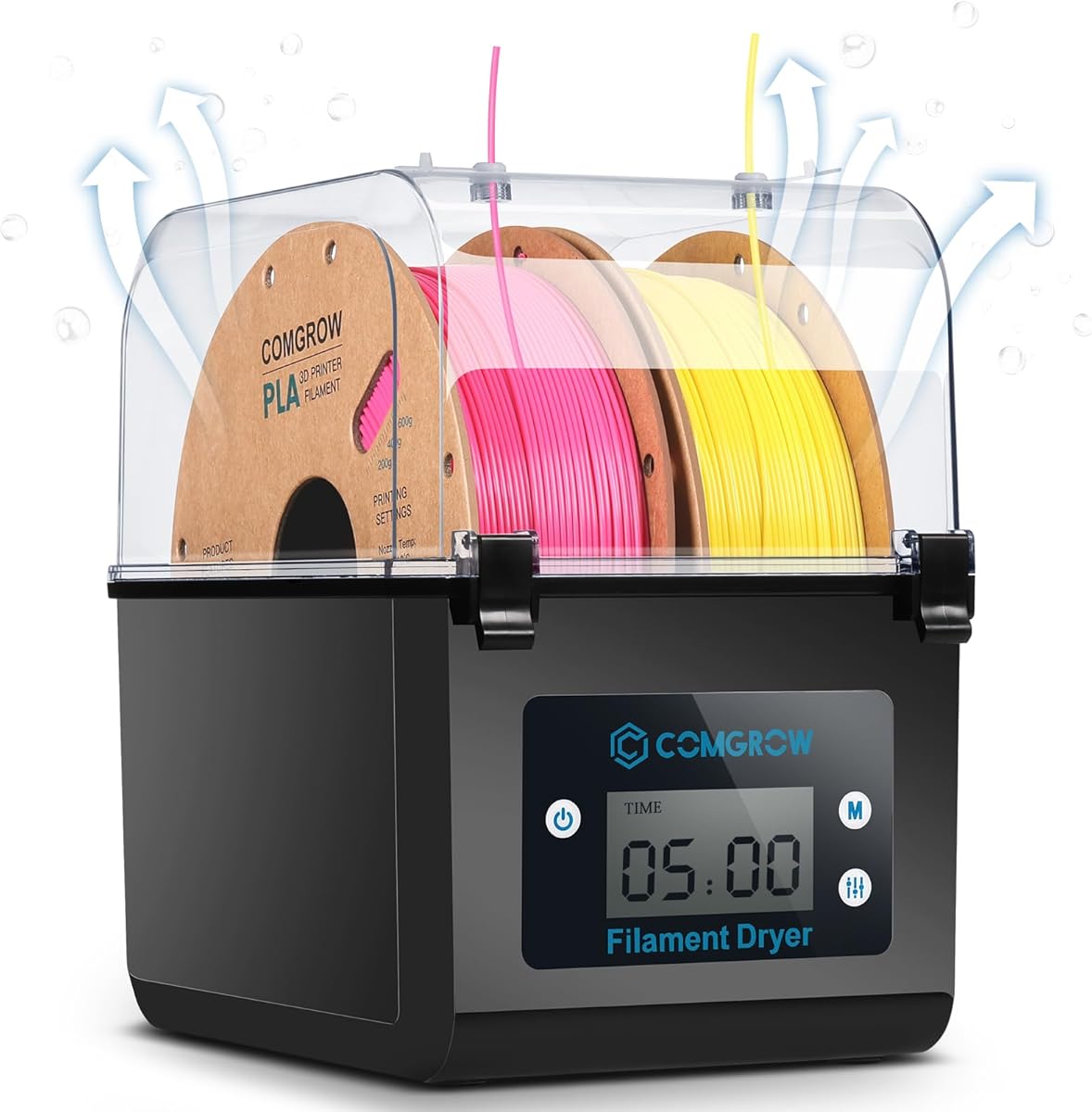
The Comgrow SH01 provides a robust option for users who need reliable drying for two spools at once. Its 4.4 rating reflects a balance of performance and ease of use.
We may earn a commission when you buy through this link, at no additional cost to you.
It features a large internal volume and a well-sealed design to keep moisture out during operation. The LCD screen allows for real-time tracking of conditions.
Users should note the lower maximum temperature compared to some advanced units. This makes it best for common filaments rather than high-temperature engineering materials.
This unit suits those who print regularly but do not need extreme temperature capabilities. The reliable sealing ensures your filament remains dry between jobs.
A snap button cover and silicone cable sheath maintain a tight seal to prevent humidity entry.
The clear display and touch buttons make it simple to adjust settings while monitoring progress.
We may earn a commission when you buy through this link, at no additional cost to you.
The Polymaker Polydryer takes a different approach by focusing on sealed storage rather than active heating. It is ideal for those who want to keep dry filament dry over time.
We may earn a commission when you buy through this link, at no additional cost to you.
It uses an airtight design and desiccant support to lock out moisture. The built-in hygrometer lets you track humidity levels without guesswork.
The lack of active heating means it does not actively dry wet filament quickly. It serves best as a protection box for already dry materials.
Choose this if you want a simple non-electric solution to prevent moisture absorption between prints. It is a great companion for a printing workflow.
The sealed enclosure ensures that ambient humidity does not reach your sensitive filament spools.
An integrated hygrometer provides visible feedback on internal conditions so you know when to replace desiccants.
We may earn a commission when you buy through this link, at no additional cost to you.
The SUNLU S2 is designed to enhance printing results by ensuring filament stays dry during use. Its 4.3 rating indicates solid performance for a broad range of users.
We may earn a commission when you buy through this link, at no additional cost to you.
It heats up quickly and uses a spindle to ensure the filament spins for even exposure. The translucent lid allows visual checks without opening the unit.
While it does not have the capacity of multi-spool units it excels in drying efficiency for one spool. The touch screen makes setting parameters simple.
This unit is a good choice for standard users who want a reliable dryer with modern features. It helps maintain print quality by removing moisture consistently.
See the filament drying inside without breaking the seal or letting moisture in.
The built-in spindle ensures continuous rotation for uniform drying across the entire spool.
We may earn a commission when you buy through this link, at no additional cost to you.
The Comgrow SH02 brings advanced PTC technology to a two-spools drying solution. Its 4.4 rating reflects user satisfaction with its heating performance and safety features.
We may earn a commission when you buy through this link, at no additional cost to you.
It uses a 150W PTC heater to heat up quickly and evenly. The one-key preset option supports nine different filament types to simplify settings.
The dual spool holes allow for flexible use with different printers. Sealing rings around openings ensure moisture stays out during operation.
This dryer is suitable for users needing speed and capacity without stepping up to a large unit. It balances efficiency with safety features for regular use.
The 360-degree PTC heater provides rapid and uniform heating for effective moisture removal.
Select from nine preset types to avoid guessing temperatures and save setup time.
We may earn a commission when you buy through this link, at no additional cost to you.
The Creality Space PI offers a versatile feature set with its upgraded PTC heater and large preset library. A 4.4 rating shows it meets the needs of many common users.
We may earn a commission when you buy through this link, at no additional cost to you.
Its 360-degree hot-air circulation ensures even drying while the touch screen simplifies controls. The power-off memory remembers your settings after an outage.
While it handles only one spool the high maximum temperature supports demanding materials. The presets cover common and composite types to streamline workflow.
This unit is a strong option for those seeking modern features in a compact design. It handles diverse filament needs with ease.
Built-in fan circulates hot air to reach all parts of the spool for consistent drying.
After a power loss the dryer restarts with previous settings so you do not need to reset.
We may earn a commission when you buy through this link, at no additional cost to you.
The Creality Space PI Plus upgrades the base model by adding a second spool slot. Its 4.4 rating indicates that users appreciate the added capacity and monitoring.
We may earn a commission when you buy through this link, at no additional cost to you.
It retains the 360-degree hot-air system and adds real-time humidity tracking. The dual design supports two spools or one large spool for flexibility.
The extended timer allows for long drying cycles if needed for tough materials. The controls remain simple with presets for common filament types.
Choose this if you need more capacity than a single spool unit offers. It delivers efficient drying with modern monitoring for better results.
Dry two spools at once to keep multiple printers ready without waiting for batches.
Real-time humidity data helps you confirm that conditions are optimal inside the unit.
We may earn a commission when you buy through this link, at no additional cost to you.
The Creality Space Pi X4L supports high-volume needs with four spool slots and dual heating chambers. Its 4.5 rating reflects strong performance for users managing multiple projects.
We may earn a commission when you buy through this link, at no additional cost to you.
It uses fans to circulate air and heat efficiently to dry spools quickly. The sealed enclosure maintains humidity control during printing pauses.
The larger footprint and price make it best for established users. However the capacity allows for simultaneous drying and storage to save time.
This unit is an excellent choice for workshops or serious makers who print often. It keeps materials dry and ready for any task.
The integrated fan helps move heat around the chambers to dry spools faster.
Four spool slots let you manage larger inventories without buying multiple smaller units.
We may earn a commission when you buy through this link, at no additional cost to you.
The Official Creality Space Pi X4 delivers premium capacity and efficiency for serious users. Its 4.6 rating highlights its appeal for high-volume printing needs.
We may earn a commission when you buy through this link, at no additional cost to you.
Independent chambers allow flexible temperature management while the 85C max handles engineering materials. The power saving mode reduces consumption when operating single chamber.
The size and cost require dedicated space but offer maximum utility. You can dry multiple spools at once to keep printing uninterrupted.
Choose this if you need top-tier performance and capacity. It is a reliable long-term investment for consistent filament quality.
Independent heating allows different settings for different materials without cross contamination.
Operating one chamber uses less power which is useful for extended maintenance runs.
We may earn a commission when you buy through this link, at no additional cost to you.
Selecting the right filament dryer box requires evaluating several factors to match your printing workflow and needs.
Capacity is a primary consideration because it dictates how many spools you can dry simultaneously. Single spool units are compact and affordable but may require batch processing for multiple materials. Multi-spools options let you dry several spools at once which is useful for workshops or users printing frequently.
Choose a capacity that aligns with how often you switch materials or run long print sessions.
Heating technology impacts drying speed and evenness. PTC heaters are generally more efficient and faster than basic resistive coils. The maximum temperature should suit your filament types; standard materials like PLA need lower temperatures while engineering filaments require higher heat.
Ensure the unit reaches at least 60°C to handle common plastics and up to 85°C for tougher materials.
A tight seal is essential to prevent moisture from re-entering during or after drying. Look for silicone gaskets or airtight designs that include cable outlets with seals. Some models also include hygrometers to monitor internal humidity levels.
Good sealing protects filament between prints and reduces the need for frequent drying cycles.
An intuitive interface saves time and reduces errors. Touch screens or simple buttons with presets allow quick setup. Display screens that show real-time temperature and humidity are helpful for verifying conditions.
Prioritize units with clear feedback and easy controls to streamline your workflow.
Safety mechanisms like overheating protection and automatic shutdown add peace of mind. Some units include fan failure alarms or thermal cutoffs to prevent damage. These features are important for unattended drying sessions.
Always verify that the dryer has reliable safety systems before leaving it on overnight.
Physical size matters if your workspace is limited. Larger units may offer more capacity but can be bulky. Consider where you will place the dryer relative to your printer to minimize filament length.
Balance size with capacity to ensure the unit fits comfortably on your desk.
Versatility determines how many filament types you can use with one dryer. Units with wide temperature ranges and multiple presets accommodate PLA PETG ABS and PA more effectively. Some models include special settings for composite or high-performance materials.
Check compatibility lists to confirm the dryer works with your preferred materials.
Price often reflects features and capacity. Budget options suit casual users while premium models offer advanced heating and storage. Consider long-term value and how often you will use it to justify the cost.
Invest in a unit that meets your current needs without overspending on unnecessary features.
Set the temperature according to your filament type before placing spools inside. Most units recommend starting with 50°C to 60°C for common plastics. Use presets if available to avoid incorrect settings that could damage materials.
Close the unit securely to maintain the seal and check that cable outlets are plugged when not in use. Run the drying cycle for several hours depending on moisture levels. Verify that the display shows stable temperature readings.
After use clean the interior occasionally to prevent dust buildup and wipe the exterior. If the unit has a fan ensure it is free of debris. Store dry spools in the sealed box to maintain moisture control between jobs.
Drying time varies based on humidity and filament type but typically ranges from 4 to 12 hours. Most units include presets that recommend specific times for different materials. For very moist filament extend the time to ensure all moisture is removed.
Yes most models are designed to feed filament directly to your printer while drying. Keep the cable outlet sealed around the filament to prevent moisture entering the box. This helps maintain dry conditions during long prints.
PLA should be dried at a moderate temperature usually between 45°C and 60°C to avoid warping. Use the lowest effective temperature and a lower to prevent damage. Always check the manufacturer guidelines for specific PLA types.
Yes desiccants saturate over time and lose effectiveness. Replace them regularly based on indicator changes or every few months for active boxes. For non-heated boxes this is the main way to keep humidity low.
If heating stops check the power connection and any safety shutdowns. Some units have alarms for fan or heater faults. Restart the cycle once the issue is resolved to ensure filament dries fully.
After drying place the filament back into a sealed container or the dryer box with the lid closed. Use desiccants in storage containers to keep humidity low long-term. Monitor humidity levels periodically to ensure dryness.
This guide highlights ten top filament dryer boxes ranging from affordable to premium models. The Creality Space Pi X4 offers the best balance of capacity and features for serious users. Budget options like the SUNLU S1 Plus work well for those just starting.
Prioritize capacity and temperature range based on the materials you use most. Ensure the unit has reliable sealing and controls for consistent performance. The right dryer protects your filament investment and improves print quality.
Always check current prices and availability before buying since these can change. Read recent customer reviews to verify performance with your specific printers. Choose a model that fits your workspace and printing volume for long-term satisfaction.