
Biometric Time Clock + Online Reports
4.1Editor score
Face palm recognition
Web based reporting
Mobile app support
This guide compares the top ten biometric fingerprint scanner time clock systems for accuracy, security, and ease of use in small business environments.
Finding the right time tracking solution is crucial for modern business efficiency. A biometric fingerprint scanner time clock ensures accuracy while preventing buddy punching and unauthorized access effectively.
We evaluated leading models based on security features, ease of setup, and data management capabilities. Our team analyzed technical specifications and user feedback to identify the most reliable options available today.
Each selection highlights unique strengths tailored to different operational needs and budget constraints. Please note that product availability and pricing may change, so verify details before making your final purchase decision.
4.1Editor score

4.3Editor score

4.7Editor score
The following table provides a side-by-side comparison of all ten selected models to help you quickly identify the best fit for your specific workforce requirements.

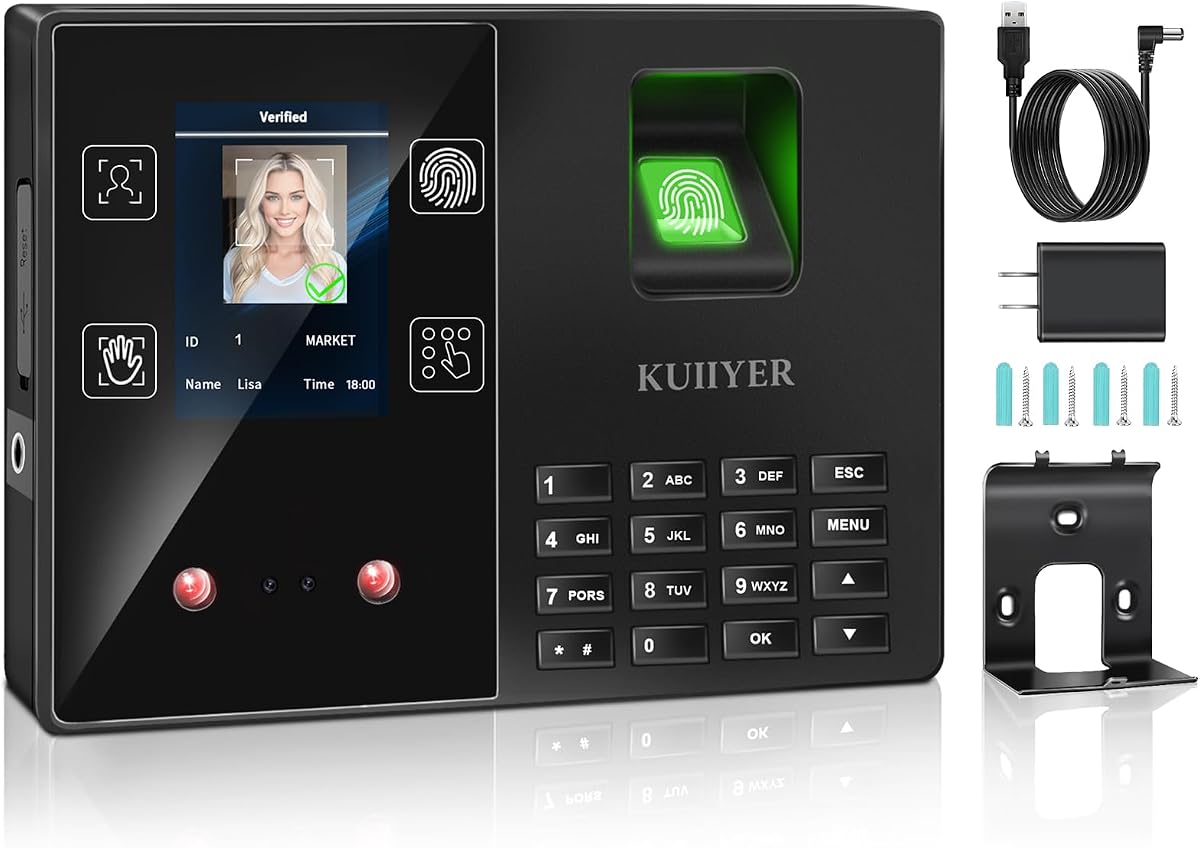


This comprehensive time tracking system stands out by offering multiple authentication methods including face, palm, and fingerprint scanning. Its robust feature set is designed to prevent time theft while streamlining administrative tasks for business owners.
We may earn a commission when you buy through this link, at no additional cost to you.
The integration of cloud based reporting allows managers to monitor attendance in real time from any location. Automated alerts for overtime and early punches help maintain compliance with labor regulations efficiently and accurately.
While the initial setup may require more time than standalone units, the long term benefits of automation are significant. The subscription model ensures continuous updates and support which adds value over time for growing teams.
Ideal for small businesses seeking a professional solution that scales with their needs, this device offers peace of mind through advanced security features and reliable data management capabilities.
The combination of biometric scans and PIN codes ensures that only authorized personnel can clock in reducing the risk of fraudulent activity.
Managers can access reports and adjust schedules via a mobile app which enhances flexibility for remote or multi location operations.
We may earn a commission when you buy through this link, at no additional cost to you.
Designed for businesses that prioritize privacy and simplicity, this standalone unit requires no network connectivity to function. It offers a straightforward solution for tracking employee hours without the complexity of cloud services.
We may earn a commission when you buy through this link, at no additional cost to you.
The ability to store up to 500 user profiles makes it suitable for expanding teams. Data export via USB provides a quick way to integrate attendance records into existing payroll systems.
Although it lacks remote monitoring features, the internal backup system ensures that no data is lost during power outages. This reliability is crucial for maintaining accurate records in environments with unstable power.
Best suited for offices or warehouses where on site management is preferred, this clock delivers consistent performance with minimal maintenance requirements for daily operations.
Eliminating the need for software installation or network setup allows teams to start tracking time immediately after unboxing.
Built in backup mechanisms protect against sudden power failures ensuring that every punch is recorded and retrievable.
We may earn a commission when you buy through this link, at no additional cost to you.
This model combines biometric tracking with cloud based administrative tools to create a seamless workflow for business owners. It aims to reduce the burden of manual payroll processing through automated data handling.
We may earn a commission when you buy through this link, at no additional cost to you.
The interface is designed to be user friendly for both managers and employees. Real-time data access allows for immediate adjustments to attendance records which helps resolve discrepancies quickly.
While some users may find the system requires a learning curve, the depth of reporting capabilities offers valuable insights into labor costs and productivity trends over time.
Suitable for businesses that need detailed analytics and payroll integration, this system provides a central hub for managing attendance and compensation data efficiently.
Direct integration with payroll tasks reduces errors and saves time during the end of month processing cycle.
The cloud infrastructure supports growth allowing teams to add more users without significant hardware upgrades.
We may earn a commission when you buy through this link, at no additional cost to you.
Known for its rapid sensor technology, this clock minimizes wait times for employees entering or leaving the building. The high satisfaction rating reflects its reliability and ease of use across various shifts.
We may earn a commission when you buy through this link, at no additional cost to you.
Management tasks are streamlined through a dedicated mobile app that allows for quick edits and schedule adjustments. This connectivity ensures that attendance records are always up to date and accurate.
The device handles unexpected power outages gracefully thanks to its built-in data protection. This feature prevents data loss which is critical for maintaining trust with employees regarding their hours.
Ideal for businesses that value speed and flexibility, this model balances hardware performance with software convenience to simplify daily time tracking tasks.
Advanced sensors ensure reliable identification even with wet or dry fingers which reduces errors and frustration at the start of shifts.
Export timesheets via email or USB allows alignment with any payroll cycle without requiring complex manual calculations.
We may earn a commission when you buy through this link, at no additional cost to you.
This device offers a wide array of authentication options including face and palm recognition in addition to standard fingerprint scanning. It is designed to accommodate a large workforce with significant data storage capacity.
We may earn a commission when you buy through this link, at no additional cost to you.
The absence of monthly fees makes it an attractive option for businesses looking to reduce ongoing costs. A colorful display and voice announcements enhance the user experience by providing clear feedback.
However the variety of features can make the initial setup more involved compared to simpler models. Users should invest time in configuring settings to ensure optimal performance.
Best for medium sized businesses that need high capacity and multiple access methods, this unit provides robust functionality without recurring financial commitments.
Supporting up to 1000 users ensures that growing teams do not need to upgrade hardware frequently as the business expands.
Intelligent voice announcements confirm identities and times reducing confusion and ensuring employees know when their punch is recorded.
We may earn a commission when you buy through this link, at no additional cost to you.
This device functions primarily as an input accessory for existing software rather than a standalone terminal. Its compact form factor makes it suitable for desktop environments where space is limited.
We may earn a commission when you buy through this link, at no additional cost to you.
The USB interface ensures compatibility with most modern computers allowing for quick installation without additional drivers. It provides a secure way to verify identity for logging into systems or applications.
While it lacks the standalone reporting features of larger units it serves well for access control or secure login tasks. It depends on host software for full attendance management functionality.
Ideal for small offices using specific attendance software, this scanner adds a layer of biometric security to existing workflows efficiently and economically.
Its lightweight design allows it to be moved between different workstations easily which is useful for shared office environments.
Compatibility with various access control software means you can choose the management tool that best fits your specific needs.
We may earn a commission when you buy through this link, at no additional cost to you.
This model focuses on essential time tracking features without extra costs or connectivity requirements. It is built for businesses that want a simple solution that works immediately out of the box.
We may earn a commission when you buy through this link, at no additional cost to you.
Automatic calculation of working hours removes the need for manual math which reduces administrative workload. The inclusion of RFID cards adds flexibility for employees who may not prefer biometric scans.
Since all data remains local, privacy is maintained without the need for cloud services. Exporting via USB keeps records accessible without relying on internet connectivity which may be unstable.
Best for budget conscious businesses, this device offers reliability and basic functionality at a competitive price point to meet essential tracking needs.
Eliminating monthly fees ensures that the initial investment covers all ongoing needs without hidden charges over time.
A step-by-step tutorial and simple interface allow teams to start tracking time within minutes of unboxing.
We may earn a commission when you buy through this link, at no additional cost to you.
This model integrates with AWS servers to provide secure cloud storage for attendance data. It aims to offer flexibility for businesses that need to manage teams across different locations.
We may earn a commission when you buy through this link, at no additional cost to you.
The free management app allows basic oversight without immediate costs. Advanced features like GPS check-ins are available through a separate subscription providing options for scaling up capabilities.
Offline functionality ensures that punches are recorded even if the internet connection is interrupted. This reliability is critical for maintaining accurate hours in environments with fluctuating network stability.
Ideal for businesses prioritizing data security and remote access, this system balances free core features with optional paid upgrades for more complex needs.
End-to-end encryption and US server storage protect sensitive employee data against unauthorized access and breaches.
Customizable shift rules help manage complex schedules and overtime automatically ensuring accurate payroll calculation.
We may earn a commission when you buy through this link, at no additional cost to you.
Designed for straightforward operations this unit focuses on reliability and ease of use. It removes the complexity of network setups to offer a secure and independent tracking solution.
We may earn a commission when you buy through this link, at no additional cost to you.
Automatic hour calculation reduces the administrative burden on managers. The device supports multiple languages making it accessible for diverse teams in various locations.
While it lacks advanced remote features the data privacy provided by local storage is a significant benefit. Users maintain full control over their attendance records without external dependencies.
Best for small teams needing basic tracking without subscription costs this model offers a practical entry point into digital time management.
Keeping data local means you decide who accesses attendance records without relying on third party cloud providers.
A one-time purchase model ensures that budget constraints do not prevent you from implementing a modern time tracking system.
We may earn a commission when you buy through this link, at no additional cost to you.
This model enhances connectivity with dual-band WiFi support ensuring stable connections for consistent data sync. It is designed for businesses that need real-time visibility into employee attendance from any location.
We may earn a commission when you buy through this link, at no additional cost to you.
The intuitive mobile app and web portal allow managers to monitor clock-ins on the go. Flexible overtime configuration helps automate complex payroll scenarios reducing manual errors and saving time.
A built-in backup battery ensures continuous tracking even during power outages. This reliability is essential for maintaining trust with employees regarding their recorded work hours.
Ideal for modern businesses requiring remote management and secure data storage this system provides a comprehensive solution for efficient workforce administration.
Dual-band WiFi support ensures that the device connects reliably even in busy office environments with high network traffic.
Auto reports streamline payroll preparation by organizing hours and overtime data into readable formats for easy review.
We may earn a commission when you buy through this link, at no additional cost to you.
Selecting the right system requires evaluating several key factors that impact both daily operations and long term costs.
Look for devices that offer multiple verification options like fingerprints, faces, or cards. This ensures accuracy and reduces rejection rates for employees with difficult scans.
Choose a system that balances security with speed to keep entry lines moving efficiently.
Decide between cloud based and standalone storage. Cloud systems offer remote access but rely on internet connectivity and subscriptions.
Standalone units provide privacy and lower costs but require manual data exports via USB.
Check the user and record capacity to ensure it supports your current and future workforce size. Growing businesses should plan for higher limits to avoid hardware changes.
Select a model with ample storage to accommodate expansion without performance loss.
Ensure the device can export data in formats compatible with your payroll software. Seamless integration saves time and reduces manual entry errors.
Look for USB export or direct API connections to simplify the payroll process.
A built-in battery or internal backup prevents data loss during unexpected power outages. This feature is essential for maintaining accurate records in any environment.
Verify that the device has a backup mechanism to protect against disruptions.
Customer support availability and warranty terms can vary significantly between brands. Check for local support and clear policies before purchasing.
Choose a provider that offers reliable service to minimize downtime if issues arise.
Begin by registering each employee using the enrollment process on the device screen. Ensure fingers are clean and dry for the most accurate scans.
Place the unit in a high-traffic area where employees can easily access it. Use the mounting hardware provided to secure it firmly on a wall or stand.
Clean the sensor regularly with a soft cloth to remove dust or oils that may hinder scanning. Schedule monthly data backups to prevent any loss of critical attendance information.
The main advantage is preventing buddy punching by ensuring only the authorized employee can clock in. This accuracy helps maintain compliance and saves money on incorrect payments.
It depends on the model. Standalone units work locally via USB while cloud based systems need WiFi or LAN for remote access and syncing capabilities.
Many models allow you to set permissions for different areas. You can restrict access to specific zones by linking punch-in status to door lock systems.
Most modern devices have internal backup batteries or memory to protect data during outages. Always check for this feature to ensure records are not lost.
You typically export via USB or cloud portal into CSV or Excel files. These formats are widely accepted by payroll software for processing wages.
Some cloud systems charge monthly fees for advanced reporting or storage. Always verify the subscription terms before buying to avoid unexpected expenses later.
The top picks cover a range of needs from standalone simplicity to cloud-based advanced reporting. Each model offers unique strengths in security and efficiency for different business sizes.
Prioritize features like backup power and data capacity to ensure your system remains reliable over time. Consider your budget and need for remote access when making a final decision.
We recommend checking current availability and verifying specifications before purchasing. This ensures you select the best device for your workforce's current and future needs.