
Qanba N3 Drone 2
4.5Editor score
Affordable licensed option
Qanba 30mm buttons
Microphone input included
Discover the top 10 Arcade Stick for PS5 options compared by experts to help you find the perfect fightstick for competitive gaming and customization.
Finding the right Arcade Stick for PS5 is crucial for serious fighting game enthusiasts. A quality stick offers precision control and durability needed for competitive play. This guide reviews the top models available to help you choose wisely.
We compared ten highly rated products based on build quality, component performance, and compatibility. Each entry features detailed analysis of buttons, joysticks, and software support. Our goal is to provide clear insights for every budget and play style.
Each pick highlights key strengths and potential weaknesses to inform your decision. Product names and specifications are based on manufacturer data and user feedback. Remember that prices and availability can change frequently across online retailers.
4.5Editor score

4.6Editor score
4.5Editor score
This side-by-side comparison covers all ten models selected for their performance and value. Each entry lists key specifications to help you visualize differences at a glance. Use this table to quickly identify which stick matches your specific gaming requirements.


The HORI PlayStation 5 Fighting Stick Alpha stands out as a top-tier option for serious competitors. With a strong user rating of 4.6 stars, it is widely praised for its tournament grade reliability. This stick is officially licensed by Sony, ensuring seamless integration with the console.
We may earn a commission when you buy through this link, at no additional cost to you.
Its standout quality lies in the use of proprietary Hayabusa components which are renowned for speed and durability. The open top panel design allows players to swap artwork or repair parts without needing special tools. This level of maintainability is rare at this price tier.
One trade-off is the weight, which provides stability but makes portability slightly harder compared to lighter boards. The price is also higher than generic alternatives, though the official licensing and build quality justify the investment for long-term use.
This stick is ideal for players who prioritize precision and official support over budget savings. It works great for Street Fighter and Tekken matches where consistent input registration is vital for winning close rounds.
The Hayabusa joystick and buttons reduce input latency significantly during rapid combos.
Open access panels let you replace worn parts easily without voiding warranties.
We may earn a commission when you buy through this link, at no additional cost to you.
The Nacon Daija Arcade Fight Stick is designed with input gamers in mind, featuring a robust set of customization tools. It carries a rating of 4.2 stars from users who appreciate its professional feel and sturdy construction. It is officially licensed for PlayStation systems.
We may earn a commission when you buy through this link, at no additional cost to you.
Its key strength is the button mapping software which allows deep configuration on PC and Mac. This lets players create specific game profiles for different titles easily. The Sanwa joystick ensures high precision which is critical for competitive play.
However the software interface might take some time to learn for casual users who just want plug and play. The weight of the unit is also substantial which may require a dedicated desk space to prevent sliding.
Buyers looking for extensive software control should consider this model highly. It offers a premium experience that competes well with other top tier sticks on the market today.
Create unique profiles for different games using the intuitive mapping tools.
Textured palm rests ensure comfort during long gaming sessions without strain.
We may earn a commission when you buy through this link, at no additional cost to you.
The MAYFLASH Arcade Stick F700 offers incredible versatility by supporting a wide range of platforms including PS5 and Switch. It has earned a solid 4.5 star rating for its flexibility and ease of connection via Bluetooth or wired options. This model is designed specifically for fighting games.
We may earn a commission when you buy through this link, at no additional cost to you.
Its standout feature is the three-way connectivity which includes Bluetooth 2.4G and USB. The hidden compartment for the receiver is a clever design touch that keeps your setup organized. It also supports turbo functions which help with rapid fire inputs.
The limitation is that it does not work for non fighting games which restricts its utility for general gaming. Additionally it lacks wireless support for Xbox consoles so you must use wired connections there if applicable.
This stick is perfect for players who own multiple consoles and want one solution for all of them. Its ability to switch modes quickly makes it a favorite among versatile gamers.
Switch seamlessly between wired and wireless modes to suit any gaming scenario.
Keep the USB receiver safe in the built-in slot when not in use.
We may earn a commission when you buy through this link, at no additional cost to you.
The Qanba N3 Drone 2 is an excellent entry point for new players seeking an official licensed stick. With a 4.5 star rating it delivers reliable performance without breaking the bank. It is fully compatible with PS5 and PC systems.
We may earn a commission when you buy through this link, at no additional cost to you.
Its main strength is the inclusion of Qanba 30mm buttons which offer a tactile feel similar to arcade cabinets. The touch pad adds a unique control option not found on many competitors. A microphone input with mute button is also included for chat.
On the downside it lacks wireless connectivity which means you are tethered to the console. It also does not have advanced customization options like hot swapping which limits its long-term modifiability.
This stick is highly recommended for those who want official quality at a budget friendly price. It covers the essentials well for casual and competitive play alike.
Experience official licensing and durability without the premium price tag.
The integrated touch pad provides additional control options for specific games.
We may earn a commission when you buy through this link, at no additional cost to you.
The MAYFLASH F700 Elite builds on the standard model with enhanced components for better performance. It holds a 4.6 star rating from users who value its robust build and responsiveness. This version focuses heavily on competitive readiness.
We may earn a commission when you buy through this link, at no additional cost to you.
Its standout quality is the use of premium Sanwa buttons and joystick which are industry standards for tournament play. The full size anti slip rubber mat ensures the stick stays put during intense combos. Wireless support via Bluetooth and 2.4G is also present.
The downside is similar to the standard model as it does not support Xbox wirelessly. Also it restricts functionality to fighting games so you cannot use it for general navigation menus.
Players who want an enhanced version of the F700 will find this upgrade worth the investment. It offers top tier reliability for those who spend hours practicing daily.
Sanwa components ensure your stick meets the standards of professional tournaments.
The included rubber mat prevents sliding on any desk surface.
We may earn a commission when you buy through this link, at no additional cost to you.
The MAYFLASH F500 Bundle comes with Magic Boots to enable PS5 compatibility without a controller. It has a 4.0 star rating which reflects mixed user experiences with setup but strong performance once working. It supports Xbox Series X and S consoles natively.
We may earn a commission when you buy through this link, at no additional cost to you.
Its key strength is the broad compatibility which covers Xbox Series Xbox One and Switch alongside PlayStation. The inclusion of Magic Boots simplifies the connection process on PS5 systems significantly. You can also output headset audio through the stick.
The main con is the setup process which can be frustrating for non technical users initially. Some users report connection issues that require troubleshooting which affects the overall satisfaction score.
This bundle is best for players with a multi console setup who need one stick for everything. It offers great value if you are willing to spend time configuring it correctly.
Magic Boots allow direct connection to PS5 without needing a controller.
Cover Xbox and PC alongside PS5 with a single hardware unit.
We may earn a commission when you buy through this link, at no additional cost to you.
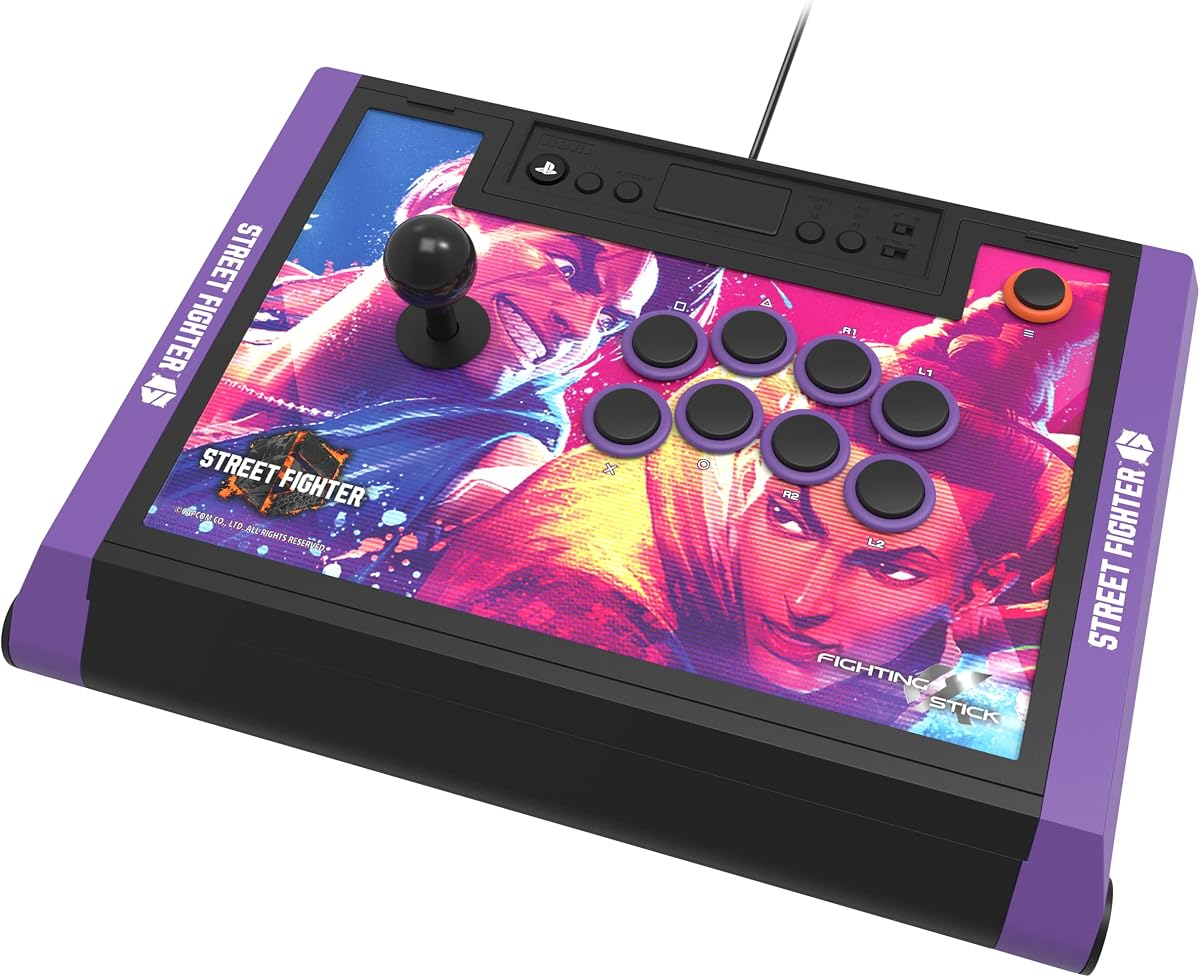
The HORI Street Fighter 6 Edition is a visually stunning stick designed for fans of the latest fighting title. It holds a 4.5 star rating for its quality and thematic depth. It is officially licensed by both Sony and Capcom.
We may earn a commission when you buy through this link, at no additional cost to you.
Its standout feature is the downloadable hi-res character art that allows you to customize the top panel. The build quality matches the standard Alpha with Hayabusa buttons and joystick ensuring top performance. It is tournament ready straight out of the box.
The high price point and specific SF6 theme might limit appeal to general players who prefer neutral designs. You may need to print or download custom art which adds a small setup step.
Collectors and SF6 enthusiasts will love the thematic elements paired with tournament grade performance. It is a premium choice that justifies its cost through quality and exclusivity.
Download official character art to customize your stick's look instantly.
Engineered for competitive environments with high end internal components.
We may earn a commission when you buy through this link, at no additional cost to you.
The Qanba Q7 Obsidian 2 is known for its modular design which lets you change joystick tops easily. It has a 4.3 star rating from users who appreciate the flexibility and robust build quality. It is officially licensed for PlayStation systems.
We may earn a commission when you buy through this link, at no additional cost to you.
Its key strength is the swappable Sanwa JLF joystick tops which let you adjust for different play styles. The full control panel and touch pad add to its functional versatility. Audio input is also available for headset chat.
One downside is the lack of wireless capabilities which limits portability for some users. Additionally it does not include software mapping tools for PC which some competitive players prefer.
This stick is a strong choice for those who want to adapt their stick to specific games. The modular design makes it a practical option for varied fighting game libraries.
Swap joystick tops to change the feel based on game genre.
Full panel access ensures you have all the tools you need.
We may earn a commission when you buy through this link, at no additional cost to you.
The HORI Tekken 8 Edition is a specialized fightstick designed for fans of the latest Tekken installment. With a 4.6 star rating it combines thematic appeal with high performance standards. It is officially licensed by Sony and Bandai Namco.
We may earn a commission when you buy through this link, at no additional cost to you.
Its standout quality is the top panel artwork which matches Tekken 8 aesthetics perfectly. The build quality mirrors the standard Alpha with Hayabusa buttons ensuring precise control. Alternate downloadable artwork allows for some customization.
The higher price and specific theme may be less appealing for players who do not play Tekken frequently. It is a premium item that serves a specific audience well though.
If you are a Tekken fan this stick is a perfect addition to your setup. It brings the game's visual identity to your physical controller.
Showcase your favorite Tekken characters with official licensed artwork.
Tournament grade build ensures you play without hardware limitations.
We may earn a commission when you buy through this link, at no additional cost to you.
The GuileKeys GK-18 Leverless takes a unique approach by replacing the joystick with 18 keys. It has a 4.3 star rating from users who enjoy its modern feel and high customizability. It supports PC natively but needs a converter for PS5.
We may earn a commission when you buy through this link, at no additional cost to you.
Its key strength is the ultra low latency which is less than one millisecond in all modes. The RGB lighting and OLED screen provide a highly personalized user interface. Hot swap capability means you can change switches without soldering.
The learning curve for leverless controls is steep for those used to traditional sticks. You also need to buy an extra converter to use it with PS5 which adds cost and complexity.
This stick is ideal for innovators who want a non traditional controller layout. It offers cutting edge features for those willing to adapt their technique.
Use the web configurator to tweak macros and button mappings deeply.
RGB and OLED display make this stick visually unique.
We may earn a commission when you buy through this link, at no additional cost to you.
Selecting the right fightstick involves understanding your needs and the features offered by each model. This guide breaks down the key factors to consider.
Ensure the stick explicitly supports PS5 for full functionality. Some models require specific firmware or converters for newer consoles. Check if it works wirelessly or only via USB cable.
High quality buttons and joysticks like Sanwa or Hayabusa improve response time. These components often feel more tactile and last longer. Look for sticks that use industry standard parts.
Consider how easy it is to swap parts or change artwork. Some boards open up for repairs while others are sealed. Hot swappable switches allow easy upgrades without tools.
Wired connections offer the lowest latency but wireless adds convenience. Check if the stick supports Bluetooth for modern consoles. Latency matters most in competitive games.
Palm rests and weight distribution affect comfort over long sessions. A lighter board is portable while a heavier one stays put. Test the weight if possible before buying.
PC mapping software allows deep customization for different games. Some sticks offer profile saving for different titles. Look for user friendly tools if you play multiple genres.
Balance the cost against the features provided. Entry sticks are cheaper but may lack durability. High end sticks often justify their cost with better parts and licensing.
Some sticks are limited to fighting games while others support more. Ensure the stick works for the specific titles you play. Check for official game licensing if needed.
Connect the stick via USB cable to the front or back port on your PS5. Ensure the console is on to recognize the device. Check if firmware updates are available for best performance.
Calibrate your controls through the console settings if needed. Map buttons to your preferences using any provided PC software. Test inputs before playing to confirm everything works correctly.
Store the stick in a dry place to prevent moisture damage. Clean the buttons with a soft cloth regularly. Cover it when not in use to avoid dust accumulation on the surface.
Not all sticks support wireless connections. Many high end models offer Bluetooth but wired is common for lower latency. Check the product specifications for wireless modes before purchasing to ensure you get what you want.
Most tournament grade sticks allow you to change the top panel artwork. Some come with templates while others need printing. Look for models with open designs for easier customization without tools.
Some sticks require specific firmware updates or converters to work on PS5. Ensure you have the latest version installed. Check if it is officially licensed for the console to avoid compatibility issues.
Sanwa buttons are considered the standard for fighting games due to responsiveness. They offer better tactile feedback and durability over time. Most pros prefer them for their consistent performance in matches.
Look for models that include rubber mats or non slip feet. You can also add extra pads underneath the base. A heavier stick naturally stays more stable during intense gameplay sessions.
Many modern sticks support both PC and PS5 via USB. Check if the specific model lists both platforms. Some require a specific mode switch to change between systems.
We reviewed ten top options ranging from budget to premium models. The HORI Alpha offers overall excellence while Qanba provides budget reliability. MAYFLASH leads in multi platform versatility.
Prioritize component quality and official licensing for long term durability. Ensure the stick matches your primary console setup for best results. Consider customization needs based on your play style.
Always check current prices and availability as they vary across retailers. Our guide aims to help you make an informed decision quickly. Enjoy competitive play with the right hardware.